steering KIA RIO HATCHBACK 2018 User Guide
[x] Cancel search | Manufacturer: KIA, Model Year: 2018, Model line: RIO HATCHBACK, Model: KIA RIO HATCHBACK 2018Pages: 492, PDF Size: 10.36 MB
Page 74 of 492
. . . . . . . . . . . . . . . . . . . . . . . . . 4-45
Steering wheel . . . . . . . . . . . . . . . . . . . . . . . . . . . . . 4-46
. . . . . . . . . . . . . . . . . . 4-46
. . . . . . . . . . . . . . . . . . . . . 4-47
. . . . . . . . . . . . . . . . . . . . . . . . . . . . . . . . . . . . \
. . . 4-47
. . . . . . . . . . . . . . . . . . . . . . . . . 4-48
Mirrors . . . . . . . . . . . . . . . . . . . . . . . . . . . . . . . . . . 4-49\
. . . . . . . . . . . . . . . . . . . . . . . . 4-49
. . . . . . . . . . . . . . . . . . . . . . . 4-49
Instrument cluster . . . . . . . . . . . . . . . . . . . . . . . . . 4-52
. . . . . . . . . . . . . . . . . . . . . 4-53
. . . . . . . . . . . . . . . . . . . . . . . . . . 4-53
. . . . . . . . . . . . . . . . . . . . . . . . . . . . . . . . . . . . \
. 4-54
. . . . . . . . . . . . . . . . . . . . . . . 4-57
LCD windows . . . . . . . . . . . . . . . . . . . . . . . . . . . . . 4-59
. . . . . . . . . . . . . . . . . . . . . . . . . . . . . . . . . . . 4-\
59
. . . . . . . . . . . . . . . . 4-64
. . . . . . . . . . . . . . . . . . . . . . . . . . . . . . . . 4-65
. . . . . . . . . . 4-65
Warning and indicator lights . . . . . . . . . . . . . . . . 4-74
. . . . . . . . . . . . . . . . . . . . . . . . . . . . . . . 4-74
Rearview camera . . . . . . . . . . . . . . . . . . . . . . . . . . 4-86
Lighting . . . . . . . . . . . . . . . . . . . . . . . . . . . . . . . . . . 4-87\
. . . . . . . . . . . . . . . . . . . . . . 4-87
. . . . . . . . . . . . . . . . . . . . 4-87
. . . . . . . . . . . . . . . . . . . . . . . . . . . . . . 4-88
. . . . . . . . . . . . 4-91
. . . . . . . . . . . . . . . . . . . . . . . . . . . . . . . 4-92
Wipers and washers . . . . . . . . . . . . . . . . . . . . . . . . 4-93
. . . . . . . . . . . . . . . . . . . . . . . . . . . . 4-94
. . . . . . . . . . . . . . . . . . . . 4-95
. . . 4-96
Interior light . . . . . . . . . . . . . . . . . . . . . . . . . . . . . . 4-98
. . . . . . . . . . . . . . . . . . . . 4-98
. . . . . . . . . . . . . . . . . . . . . . . . . . . . . . . . . . . 4-\
98
. . . . . . . . . . . . . . . . . . . . . . . . . . . . . . . . . . 4-99\
. . . . . . . . . . . . . . . . . . . . . . . . . 4-101
. . . . . . . . . . . . . . . . . . . . . . . . . . . . . 4-101
. . . . . . . . . . . . . . . . . . . . . . . . . . 4-102
Defroster . . . . . . . . . . . . . . . . . . . . . . . . . . . . . . . . 4-103
. . . . . . . . . . . . . . . . . . . . . . . 4-103
4
Page 118 of 492
Features of your vehicle
46
4
Electric power steering (EPS)
Power steering uses the motor to
assist you in steering the vehicle. If
the engine is off or if the power steer-
ing system becomes inoperative, the
vehicle may still be steered, but it will
require increased steering effort.
The electric power steering is con-
trolled by the power steering control
unit which senses the steering wheel
torque and vehicle speed to com-
mand the motor.
The steering wheel becomes heavier
as the vehicle’s speed increases and
becomes lighter as the vehicle’s
speed decreases for better control of
the steering wheel.
Should you notice any change in the
effort required to steer during normal
vehicle operation, have the power
steering checked by an authorized
Kia dealer.
✽ ✽
NOTICE
The following symptoms may occur
during normal vehicle operation:
• The steering effort is increased
immediately after turning the igni-
tion switch on. This happens as the
system performs the EPS system
diagnostics. When the diagnostics
are completed, the steering wheel
will return to its normal condition
• A click noise may be heard from the EPS relay after the ignition
switch is turned to the ON or
LOCK position.
• Motor noise may be heard when the vehicle is at a stop or at a low
driving speed.
• The steering effort increases if the steering wheel is rotated continu-
ously when the vehicle is not in
motion. However, after a few min-
utes, it will return to its normal
condition.
• When you operate the steering wheel in low temperature, noise
may occur. If the temperature
rises, the noise will likely disap-
pear. This is a normal condition. (Continued)(Continued)
• When the charging system warn-
ing light comes on or the battery
voltage is low (when the alternator
or battery does not operate nor-
mally), the steering wheel may get
heavy and become difficult to con-
trol operate abnormally.
If the Electric Power Steering System
does not operate normally, the warn-
ing light will illuminate on the instru-
ment cluster. The steering wheel may
require increased steering effort.
Take your vehicle to an authorized
Kia dealer and have the vehicle
checked as soon as possible.
STEERING WHEEL
Page 119 of 492
447
Features of your vehicle
Tilt and telescopic steering
(if equipped)
Tilt steering allows you to adjust the
steering wheel before you drive. You
can also raise it to give your legs
more room when you exit and enter
the vehicle.
The steering wheel should be posi-
tioned so that it is comfortable for
you to drive, while permitting you to
see the instrument panel warning
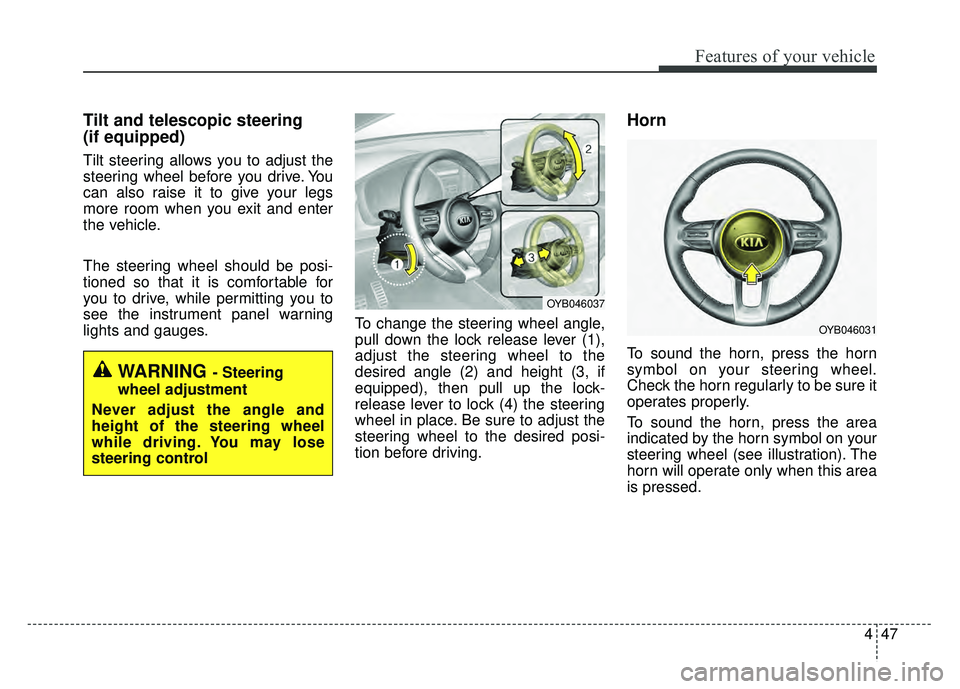
lights and gauges.To change the steering wheel angle,
pull down the lock release lever (1),
adjust the steering wheel to the
desired angle (2) and height (3, if
equipped), then pull up the lock-
release lever to lock (4) the steering
wheel in place. Be sure to adjust the
steering wheel to the desired posi-
tion before driving.
Horn
To sound the horn, press the horn
symbol on your steering wheel.
Check the horn regularly to be sure it
operates properly.
To sound the horn, press the area
indicated by the horn symbol on your
steering wheel (see illustration). The
horn will operate only when this area
is pressed.
WARNING - Steering
wheel adjustment
Never adjust the angle and
height of the steering wheel
while driving. You may lose
steering control
OYB046037
OYB046031
Page 120 of 492
Features of your vehicle
48
4
Heated steering wheel
(if equipped)
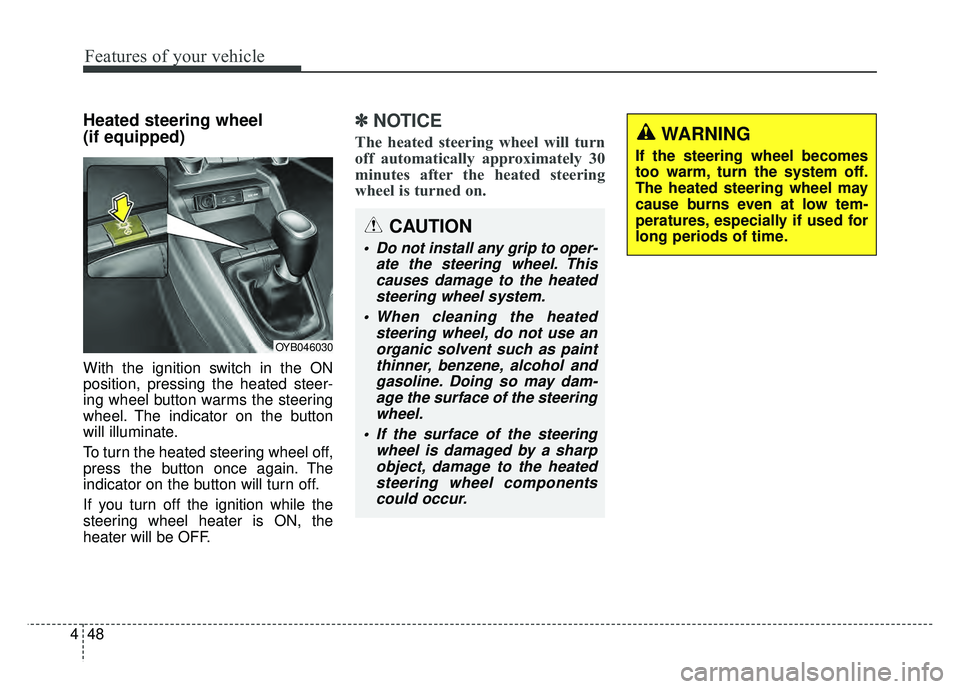
With the ignition switch in the ON
position, pressing the heated steer-
ing wheel button warms the steering
wheel. The indicator on the button
will illuminate.
To turn the heated steering wheel off,
press the button once again. The
indicator on the button will turn off.
If you turn off the ignition while the
steering wheel heater is ON, the
heater will be OFF.
✽ ✽
NOTICE
The heated steering wheel will turn
off automatically approximately 30
minutes after the heated steering
wheel is turned on.
CAUTION
Do not install any grip to oper-
ate the steering wheel. Thiscauses damage to the heatedsteering wheel system.
When cleaning the heated steering wheel, do not use anorganic solvent such as paintthinner, benzene, alcohol andgasoline. Doing so may dam-age the surface of the steeringwheel.
If the surface of the steering wheel is damaged by a sharpobject, damage to the heatedsteering wheel componentscould occur.
OYB046030
WARNING
If the steering wheel becomes
too warm, turn the system off.
The heated steering wheel may
cause burns even at low tem-
peratures, especially if used for
long periods of time.
Page 125 of 492
453
Features of your vehicle
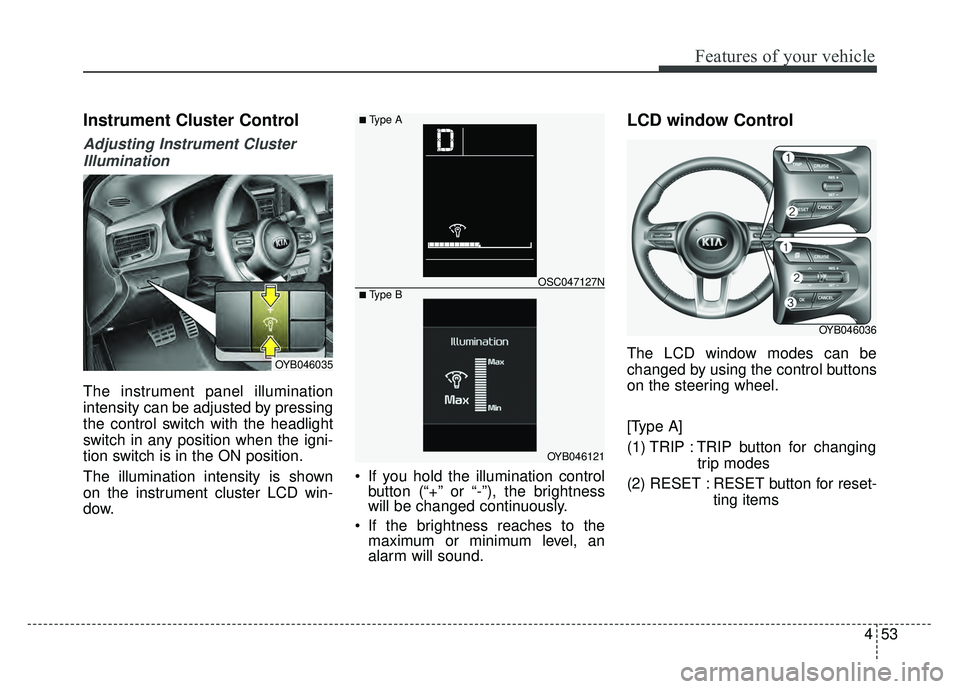
Instrument Cluster Control
Adjusting Instrument ClusterIllumination
The instrument panel illumination
intensity can be adjusted by pressing
the control switch with the headlight
switch in any position when the igni-
tion switch is in the ON position.
The illumination intensity is shown
on the instrument cluster LCD win-
dow. If you hold the illumination control
button (“+” or “-”), the brightness
will be changed continuously.
If the brightness reaches to the maximum or minimum level, an
alarm will sound.
LCD window Control
The LCD window modes can be
changed by using the control buttons
on the steering wheel.
[Type A]
(1) TRIP : TRIP button for changing
trip modes
(2) RESET : RESET button for reset- ting itemsOYB046035
OYB046121
OSC047127N
■ Type A
■ Type B
OYB046036
Page 133 of 492
461
Features of your vehicle
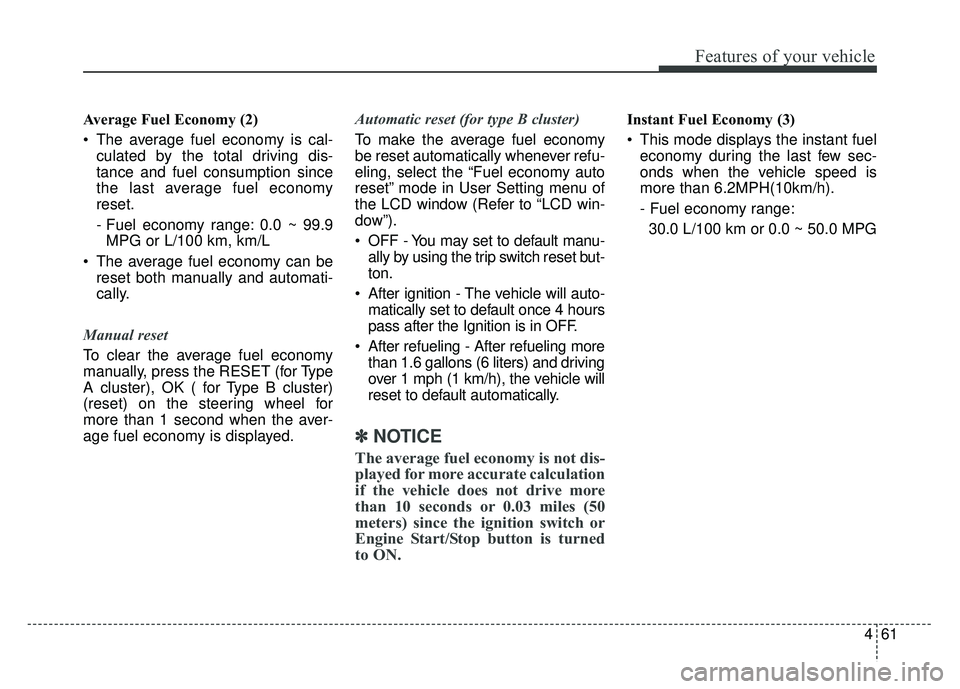
Average Fuel Economy (2)
The average fuel economy is cal-culated by the total driving dis-
tance and fuel consumption since
the last average fuel economy
reset.
- Fuel economy range: 0.0 ~ 99.9MPG or L/100 km, km/L
The average fuel economy can be reset both manually and automati-
cally.
Manual reset
To clear the average fuel economy
manually, press the RESET (for Type
A cluster), OK ( for Type B cluster)
(reset) on the steering wheel for
more than 1 second when the aver-
age fuel economy is displayed. Automatic reset (for type B cluster)
To make the average fuel economy
be reset automatically whenever refu-
eling, select the “Fuel economy auto
reset” mode in User Setting menu of
the LCD window (Refer to “LCD win-
dow”).
OFF - You may set to default manu-
ally by using the trip switch reset but-
ton.
After ignition - The vehicle will auto- matically set to default once 4 hours
pass after the Ignition is in OFF.
After refueling - After refueling more than 1.6 gallons (6 liters) and driving
over 1 mph (1 km/h), the vehicle will
reset to default automatically.
✽ ✽ NOTICE
The average fuel economy is not dis-
played for more accurate calculation
if the vehicle does not drive more
than 10 seconds or 0.03 miles (50
meters) since the ignition switch or
Engine Start/Stop button is turned
to ON.
Instant Fuel Economy (3)
This mode displays the instant fuel
economy during the last few sec-
onds when the vehicle speed is
more than 6.2MPH(10km/h).
- Fuel economy range:
30.0 L/100 km or 0.0 ~ 50.0 MPG
Page 134 of 492
Features of your vehicle
62
4
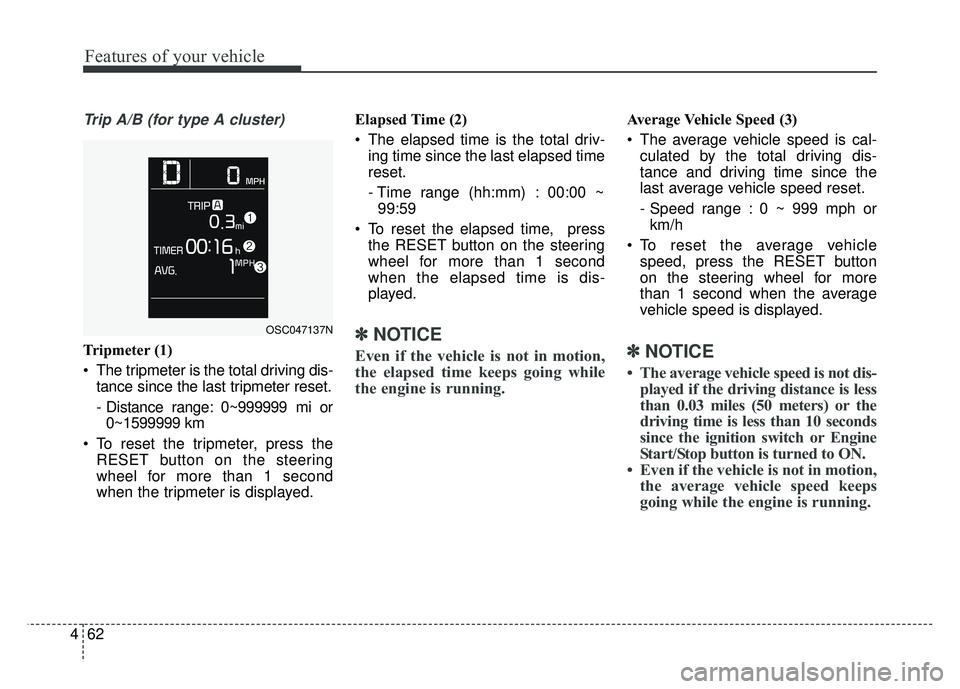
Trip A/B (for type A cluster)
Tripmeter (1)
The tripmeter is the total driving dis-
tance since the last tripmeter reset.
- Distance range: 0~999999 mi or0~1599999 km
To reset the tripmeter, press the RESET button on the steering
wheel for more than 1 second
when the tripmeter is displayed. Elapsed Time (2)
The elapsed time is the total driv-
ing time since the last elapsed time
reset.
- Time range (hh:mm) : 00:00 ~99:59
To reset the elapsed time, press the RESET button on the steering
wheel for more than 1 second
when the elapsed time is dis-
played.✽ ✽ NOTICE
Even if the vehicle is not in motion,
the elapsed time keeps going while
the engine is running.
Average Vehicle Speed (3)
The average vehicle speed is cal-
culated by the total driving dis-
tance and driving time since the
last average vehicle speed reset.
- Speed range : 0 ~ 999 mph orkm/h
To reset the average vehicle speed, press the RESET button
on the steering wheel for more
than 1 second when the average
vehicle speed is displayed.
✽ ✽ NOTICE
• The average vehicle speed is not dis-
played if the driving distance is less
than 0.03 miles (50 meters) or the
driving time is less than 10 seconds
since the ignition switch or Engine
Start/Stop button is turned to ON.
• Even if the vehicle is not in motion, the average vehicle speed keeps
going while the engine is running.
OSC047137N
Page 137 of 492
465
Features of your vehicle
Service Mode
Service in
It calculates and displays when you
need a scheduled maintenance
service (mileage or days).
If the remaining mileage or time
reaches 900 mi. (1,500 km) or 30
days, “Service in” message is dis-
played for several seconds each time
you set the ignition switch or Engine
Start/Stop Button to the ON position.
Service required
If you do not have your vehicle serv-
iced according to the already inputted
service interval, “Service required”
message is displayed for several sec-
onds each time you set the ignition
switch or Engine Start/Stop Button to
the ON position.
To reset the service interval to the
mileage and days you inputted before:
Press the RESET button for morethan 1 second. (for Type A cluster)
Press the OK button (Reset) for more than 1 second. (for Type B
cluster)
✽ ✽ NOTICE
If any of the following conditions
occurs, the mileage and days may be
incorrect.
- The battery cable is disconnected.
- The fuse switch is turned off.
- The battery is discharged.
User Settings Mode
(for type B cluster)
On this mode, you can change set-
ting of the doors, lamps, and so on.
WARNING
Do not adjust the User Setting
while driving. You may lose your
steering control and cause
severe personal injury or acci-
dents.
Page 142 of 492
Features of your vehicle
70
4
Engine has overheated
This warning message illuminates
when the engine coolant tempera-
ture is above 248°F (120°C). This
means that the engine is overheated
and may be damaged.
❈ If your vehicle is overheated, refer
to “Overheating” in chapter 7.
Shift to P (for smart key system and
automatic transaxle)
This warning message illuminates if you try to turn off the engine without
the shift lever in P (Park) position.
At this time, the Engine Start/Stop Button turns to the ACC position (If
you press the Engine Start/Stop
Button once more, it will turn to the
ON position). Low Key Battery
(for smart key system)
This warning message illuminates
if the battery of the smart key is
discharged when the Engine
Start/Stop Button changes to the
OFF position.
Press START button while turn steer-
ing (for smart key system)
This warning message illuminates if the steering wheel does not
unlock normally when the Engine
Start/Stop Button is pressed.
It means that you should press the Engine Start/Stop Button while
turning the steering wheel right
and left. Steering wheel unlocked
(for smart key system)
This warning message illuminates
if the steering wheel does not lock
when the Engine Start/Stop Button
changes to the OFF position.
Check Steering Wheel Lock System
(for smart key system)
This warning message illuminates if the steering wheel does not lock
normally when the Engine
Start/Stop Button changes to the
OFF position.
Page 149 of 492

477
Features of your vehicle
✽
✽NOTICE- Electronic Brake
force Distribution (EBD)
System Warning Light
When the ABS Warning Light is on
or both ABS and Parking Brake &
Brake Fluid Warning Lights are on,
the speedometer, odometer, or trip-
meter may not work. Also, the EPS
Warning Light may illuminate and
the steering effort may increase or
decrease.
In this case, have your vehicle inspect-
ed by an authorized Kia dealer as
soon as possible.
Electronic Power Steering (EPS) WarningLight (if equipped)
This warning light illuminates:
Once you set the ignition switch or Engine Start/Stop Button to the ON
position.
- It remains on until the engine isstarted.
When there is a malfunction with the EPS.
In this case, have your vehicle
inspected by an authorized Kia
dealer.
WARNING - ABS/Brake
Light
When both ABS and Parking
Brake & Brake Fluid Warning
Lights are on, the brake system
will not work normally and you
may experience an unexpected
and dangerous situation during
sudden braking thereby increas-
ing the risk of a crash or injury.
In this case, avoid high speed
driving and abrupt braking.
Have your vehicle inspected by
an authorized Kia dealer as
soon as possible.