ignition KIA Rondo 2015 3.G Workshop Manual
[x] Cancel search | Manufacturer: KIA, Model Year: 2015, Model line: Rondo, Model: KIA Rondo 2015 3.GPages: 564, PDF Size: 19.11 MB
Page 180 of 564
Features of your vehicle
92
4
Operation of the parking
assist system
Operating condition
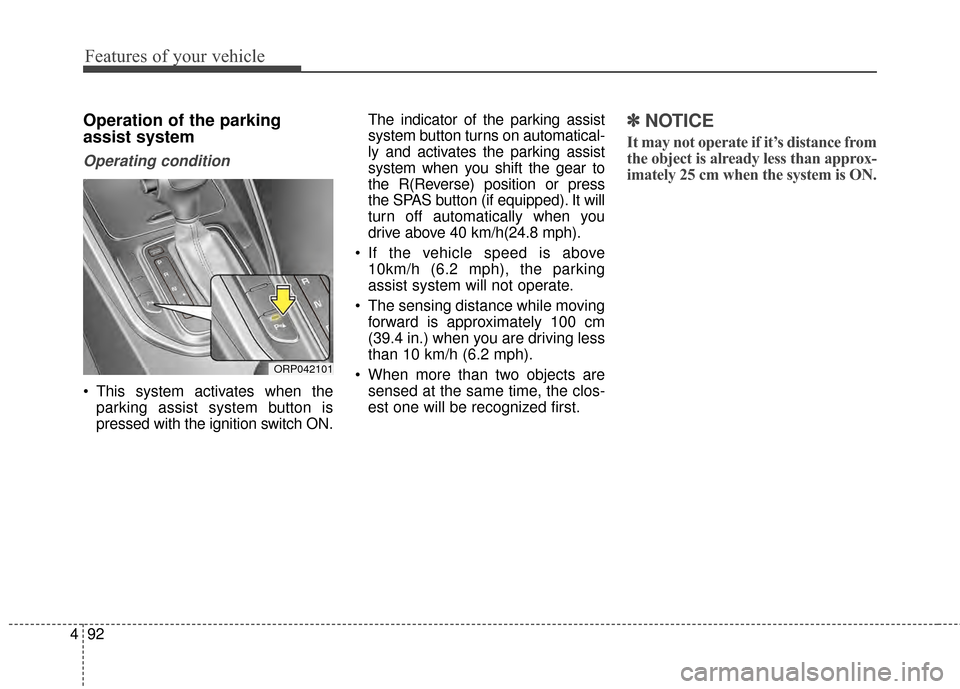
This system activates when the
parking assist system button is
pressed with the ignition switch ON. The indicator of the parking assist
system button turns on automatical-
ly and activates the parking assist
system when you shift the gear to
the R(Reverse) position or press
the SPAS button (if equipped). It will
turn off automatically when you
drive above 40 km/h(24.8 mph).
If the vehicle speed is above 10km/h (6.2 mph), the parking
assist system will not operate.
The sensing distance while moving forward is approximately 100 cm
(39.4 in.) when you are driving less
than 10 km/h (6.2 mph).
When more than two objects are sensed at the same time, the clos-
est one will be recognized first.
✽ ✽ NOTICE
It may not operate if it’s distance from
the object is already less than approx-
imately 25 cm when the system is ON.
ORP042101
Page 185 of 564
497
Features of your vehicle
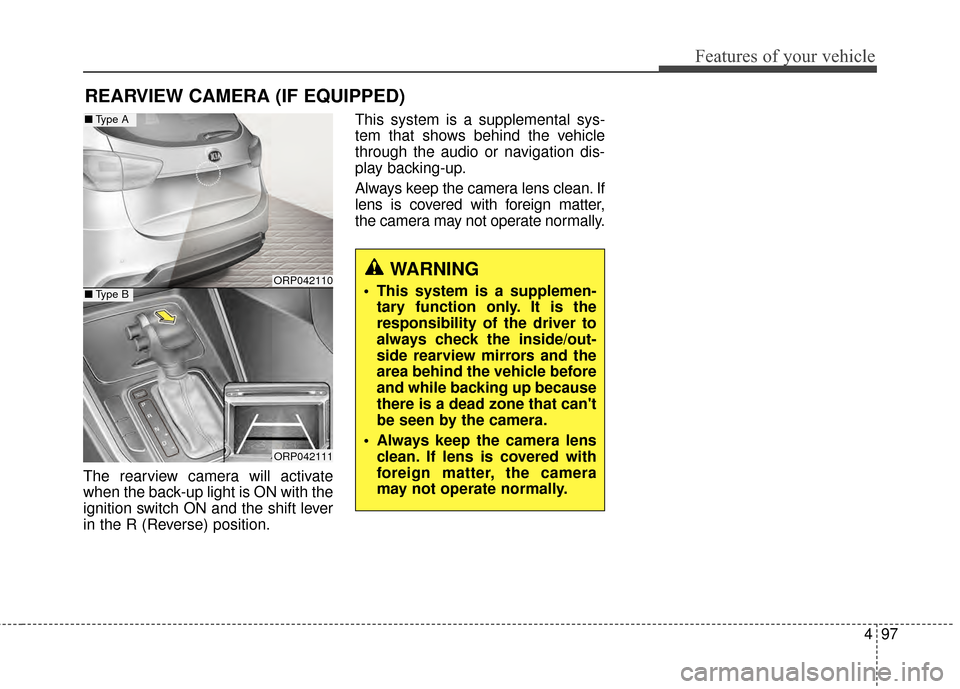
The rearview camera will activate
when the back-up light is ON with the
ignition switch ON and the shift lever
in the R (Reverse) position.This system is a supplemental sys-
tem that shows behind the vehicle
through the audio or navigation dis-
play backing-up.
Always keep the camera lens clean. If
lens is covered with foreign matter,
the camera may not operate normally.
REARVIEW CAMERA (IF EQUIPPED)
ORP042110
ORP042111
■
Type A
■Type B
WARNING
This system is a supplemen-
tary function only. It is the
responsibility of the driver to
always check the inside/out-
side rearview mirrors and the
area behind the vehicle before
and while backing up because
there is a dead zone that can't
be seen by the camera.
Always keep the camera lens clean. If lens is covered with
foreign matter, the camera
may not operate normally.
Page 187 of 564
499
Features of your vehicle
Battery saver function
The purpose of this feature is toprevent the battery from being dis-
charged. The system automatically
turns off the parking lights when
the driver removes the ignition key
and opens the driver- side door.
With this feature, the parking lights will turn off automatically if the driver
parks on the side of the road at night.
If necessary, to keep the lights on
when the ignition key is removed,
perform the following :
1) Open the driver-side door.
2) Turn the parking lights OFF and ON again using the light switch
on the steering column.
Headlamp delay function
(if equipped)
The headlamps (and/or taillights)
remain on for same minutes (5 min-
utes) after the ignition key is removed
or turned to the ACC or LOCK posi-
tion. However, if the driver’s door is
opened and closed, the headlights
are turned off after 15 seconds.
The headlights can be turned off by
pressing the lock button on the trans-
mitter or smart key twice or turning
off the light switch from the headlight
or Auto light position.
You can activate or deactivate the
headlamp delay function. Refer to
“User setting” in this chapter.
LIGHTING
CAUTION
If the driver gets out of the vehi-cle through other doors (exceptdriver’s door), the battery saverfunction does not operate andthe headlamp delay functiondoes not turn off automatically.Therefore, it causes the batteryto be discharged. In this case,make sure to turn off the lampbefore getting out of the vehicle.
Page 189 of 564
4101
Features of your vehicle
Parking light position ( )
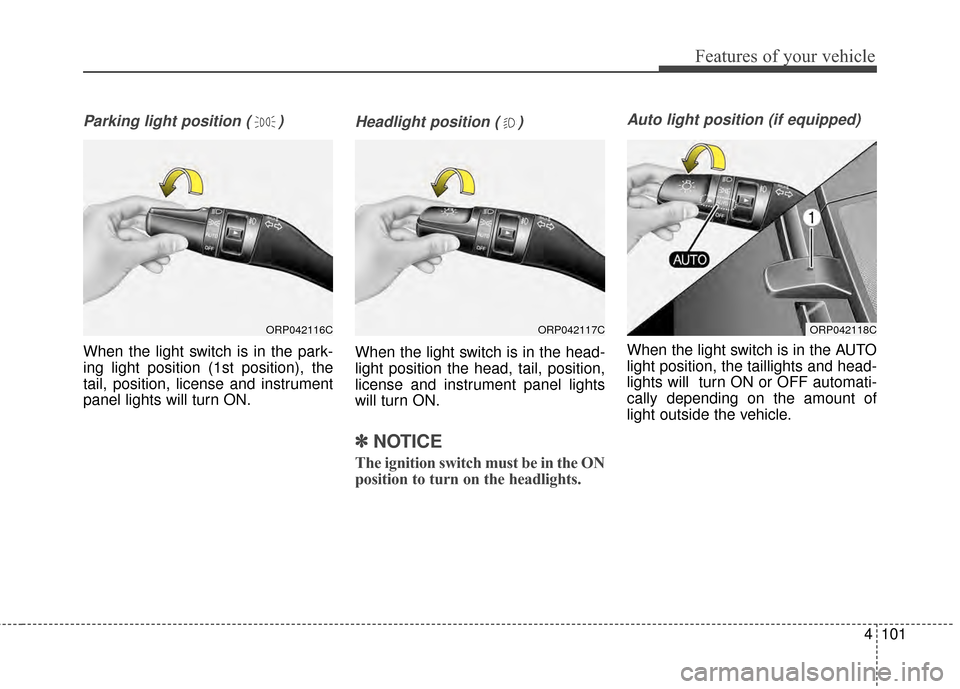
When the light switch is in the park-
ing light position (1st position), the
tail, position, license and instrument
panel lights will turn ON.
Headlight position ( )
When the light switch is in the head-
light position the head, tail, position,
license and instrument panel lights
will turn ON.
✽ ✽NOTICE
The ignition switch must be in the ON
position to turn on the headlights.
Auto light position (if equipped)
When the light switch is in the AUTO
light position, the taillights and head-
lights will turn ON or OFF automati-
cally depending on the amount of
light outside the vehicle.
ORP042116CORP042117CORP042118C
Page 191 of 564
4103
Features of your vehicle
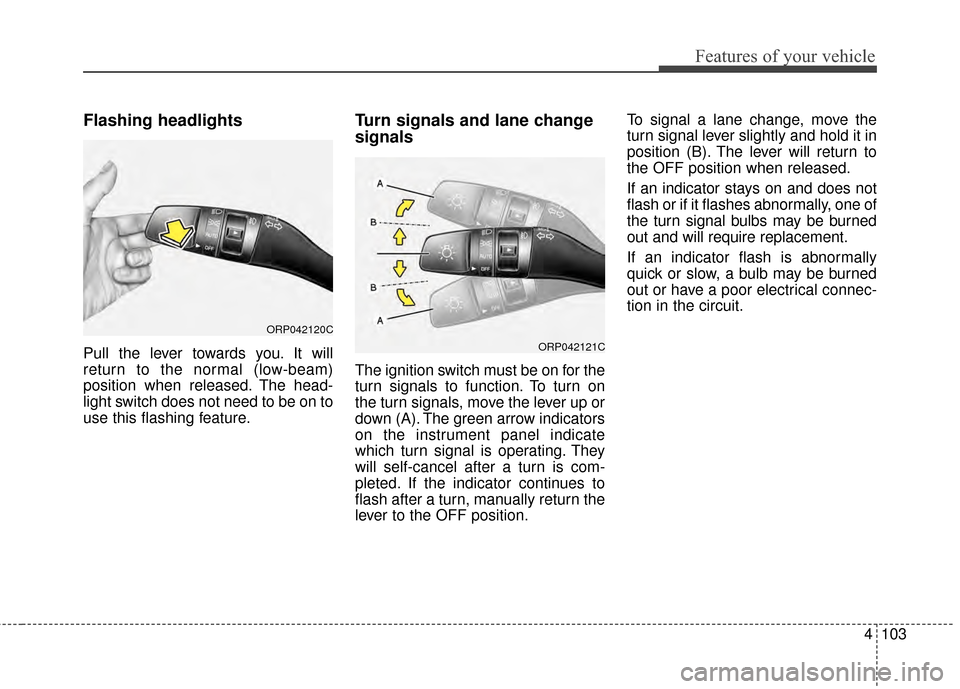
Flashing headlights
Pull the lever towards you. It will
return to the normal (low-beam)
position when released. The head-
light switch does not need to be on to
use this flashing feature.
Turn signals and lane change
signals
The ignition switch must be on for the
turn signals to function. To turn on
the turn signals, move the lever up or
down (A). The green arrow indicators
on the instrument panel indicate
which turn signal is operating. They
will self-cancel after a turn is com-
pleted. If the indicator continues to
flash after a turn, manually return the
lever to the OFF position.To signal a lane change, move the
turn signal lever slightly and hold it in
position (B). The lever will return to
the OFF position when released.
If an indicator stays on and does not
flash or if it flashes abnormally, one of
the turn signal bulbs may be burned
out and will require replacement.
If an indicator flash is abnormally
quick or slow, a bulb may be burned
out or have a poor electrical connec-
tion in the circuit.
ORP042120C
ORP042121C
Page 194 of 564

Features of your vehicle
106
4
AUTO (Automatic) control
(if equipped)
The rain sensor located on the upper
end of the windshield glass senses
the amount of rainfall and controls
the wiping cycle for the proper inter-
val. The more it rains, the faster the
wiper operates. When the rain stops,
the wiper stops.
To vary the speed setting, turn the
speed control knob (1). If the wiper switch is set in AUTO
mode when the ignition switch is ON,
the wiper will operate once to per-
form a self-check of the system. Set
the wiper to off position when the
wiper is not in use.
Always remove all snow and ice and
defrost the windshield properly prior
to operating the windshield wipers.
.
ORP042127N
CAUTION
When washing the vehicle, set
the wiper switch in the OFF (O)position to stop the auto wiperoperation.
The wiper may operate and bedamaged if the switch is set inthe AUTO mode while washingthe vehicle.
Do not remove the sensor coverlocated on the upper end of thepassenger side windshieldglass. Damage to system partscould occur and may not be cov-ered by your vehicle warranty.
When starting the vehicle inwinter, set the wiper switch inthe OFF (O) position. Otherwise,wipers may operate and ice maydamage the windshield wiperblades. Always remove all snowand ice and defrost the wind-shield properly prior to operat-ing the windshield wipers.
CAUTION
When the ignition switch is ONand the windshield wiper switchis placed in the AUTO mode, usecaution in the following situa-tions to avoid any injury to thehands or other parts of the body:
Do not touch the upper end of the windshield glass facingthe rain sensor.
Do not wipe the upper end of the windshield glass with adamp or wet cloth.
Do not put pressure on the windshield glass.
Page 195 of 564
4107
Features of your vehicle
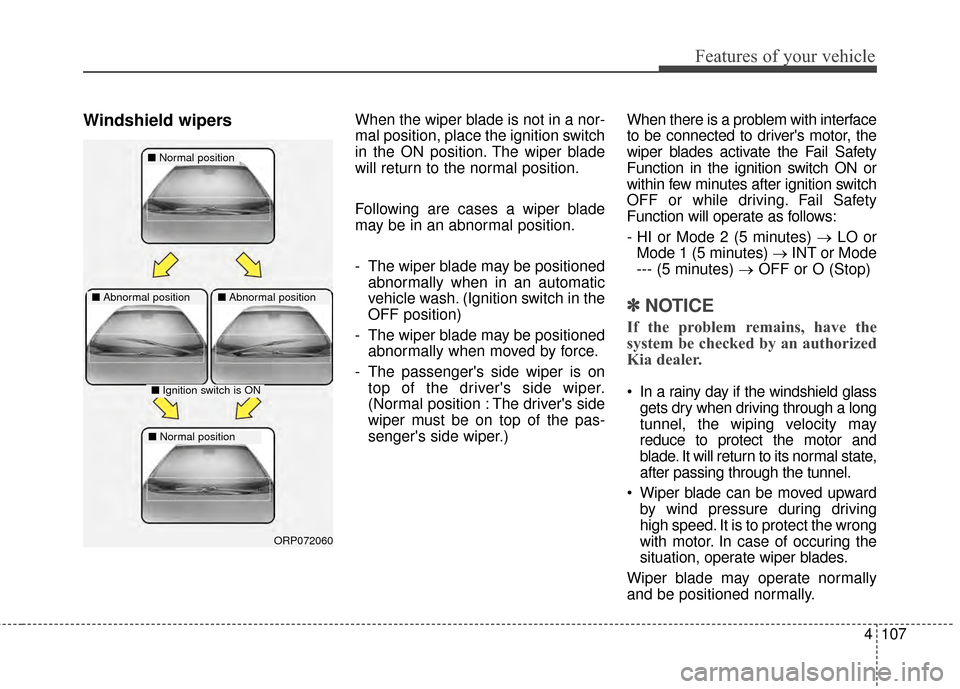
Windshield wipersWhen the wiper blade is not in a nor-
mal position, place the ignition switch
in the ON position. The wiper blade
will return to the normal position.
Following are cases a wiper blade
may be in an abnormal position.
- The wiper blade may be positionedabnormally when in an automatic
vehicle wash. (Ignition switch in the
OFF position)
- The wiper blade may be positioned abnormally when moved by force.
- The passenger's side wiper is on top of the driver's side wiper.
(Normal position : The driver's side
wiper must be on top of the pas-
senger's side wiper.) When there is a problem with interface
to be connected to driver's motor, the
wiper blades activate the Fail Safety
Function in the ignition switch ON or
within few minutes after ignition switch
OFF or while driving. Fail Safety
Function will operate as follows:
- HI or Mode 2 (5 minutes) →
LO or
Mode 1 (5 minutes) →INT or Mode
--- (5 minutes) → OFF or O (Stop)
✽ ✽
NOTICE
If the problem remains, have the
system be checked by an authorized
Kia dealer.
In a rainy day if the windshield glass
gets dry when driving through a long
tunnel, the wiping velocity may
reduce to protect the motor and
blade. It will return to its normal state,
after passing through the tunnel.
Wiper blade can be moved upward by wind pressure during driving
high speed. It is to protect the wrong
with motor. In case of occuring the
situation, operate wiper blades.
Wiper blade may operate normally
and be positioned normally.
■ Normal position
■Abnormal position■Abnormal position
■Ignition switch is ON
■Normal position
ORP072060
Page 200 of 564
Features of your vehicle
112
4
(3) :
- The map lamp comes on when adoor is opened. If you close the
door, the lamps go out after
approximately 30 seconds.
- The map lamp comes on for approximately 30 seconds when
doors are unlocked with a trans-
mitter or smart key as long as the
doors are not opened.
- The map lamp will stay on for approximately 20 minutes if a door
is opened with the ignition switch
in the ACC or LOCK/OFF position.
- The map lamp will stay on contin- uously if the door is opened with
the ignition switch in the ON posi-
tion.
- The map lamp will go out imme- diately if the ignition switch is
changed to the ON position or all
doors are locked.
(4) : The map lamp stays on at all times.✽ ✽NOTICE
When the lamp is turned on by
pressing the lens (1), the lamp does
not turn off even if the switch is in
the OFF position (2).
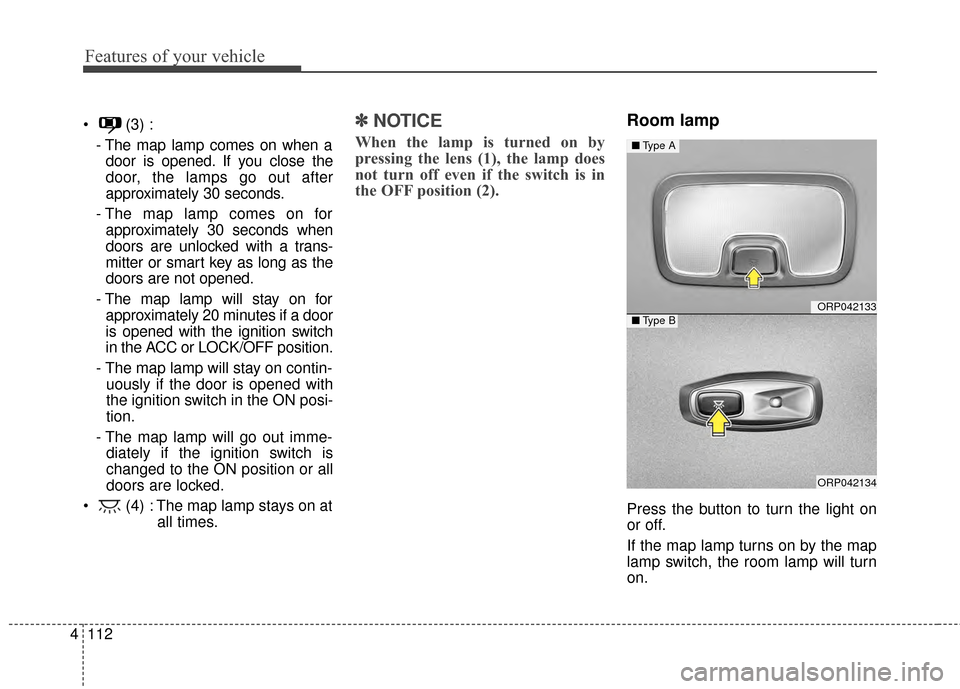
Room lamp
Press the button to turn the light on
or off.
If the map lamp turns on by the map
lamp switch, the room lamp will turn
on.
ORP042133
ORP042134
■ Type A
■Type B
Page 203 of 564
4115
Features of your vehicle
DEFROSTER
✽
✽ NOTICE
If you want to defrost and defog the
front windshield, refer to “Windshield
Defrosting and Defogging” in this
chapter.
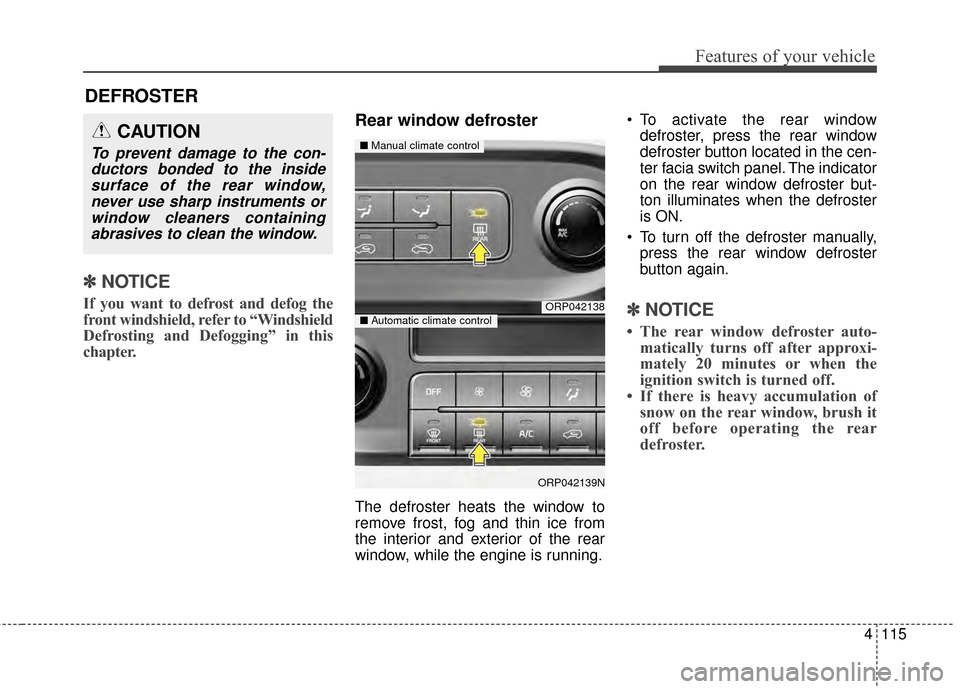
Rear window defroster
The defroster heats the window to
remove frost, fog and thin ice from
the interior and exterior of the rear
window, while the engine is running. To activate the rear window
defroster, press the rear window
defroster button located in the cen-
ter facia switch panel. The indicator
on the rear window defroster but-
ton illuminates when the defroster
is ON.
To turn off the defroster manually, press the rear window defroster
button again.
✽ ✽ NOTICE
• The rear window defroster auto-
matically turns off after approxi-
mately 20 minutes or when the
ignition switch is turned off.
• If there is heavy accumulation of snow on the rear window, brush it
off before operating the rear
defroster.
ORP042138
ORP042139N
■ Manual climate control
■Automatic climate control
CAUTION
To prevent damage to the con-
ductors bonded to the insidesurface of the rear window,never use sharp instruments orwindow cleaners containingabrasives to clean the window.
Page 210 of 564
Features of your vehicle
122
4
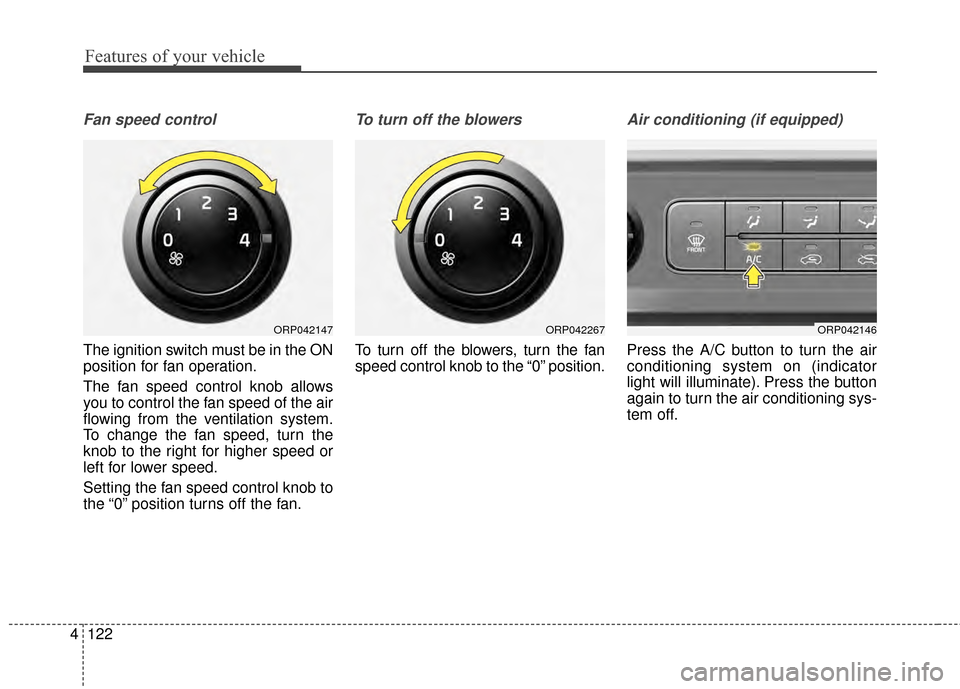
Fan speed control
The ignition switch must be in the ON
position for fan operation.
The fan speed control knob allows
you to control the fan speed of the air
flowing from the ventilation system.
To change the fan speed, turn the
knob to the right for higher speed or
left for lower speed.
Setting the fan speed control knob to
the “0” position turns off the fan.
To turn off the blowers
To turn off the blowers, turn the fan
speed control knob to the “0” position.
Air conditioning (if equipped)
Press the A/C button to turn the air
conditioning system on (indicator
light will illuminate). Press the button
again to turn the air conditioning sys-
tem off.
ORP042146ORP042147ORP042267