change time KIA Rondo 2017 3.G User Guide
[x] Cancel search | Manufacturer: KIA, Model Year: 2017, Model line: Rondo, Model: KIA Rondo 2017 3.GPages: 625, PDF Size: 19.69 MB
Page 166 of 625
469
Features of your vehicle
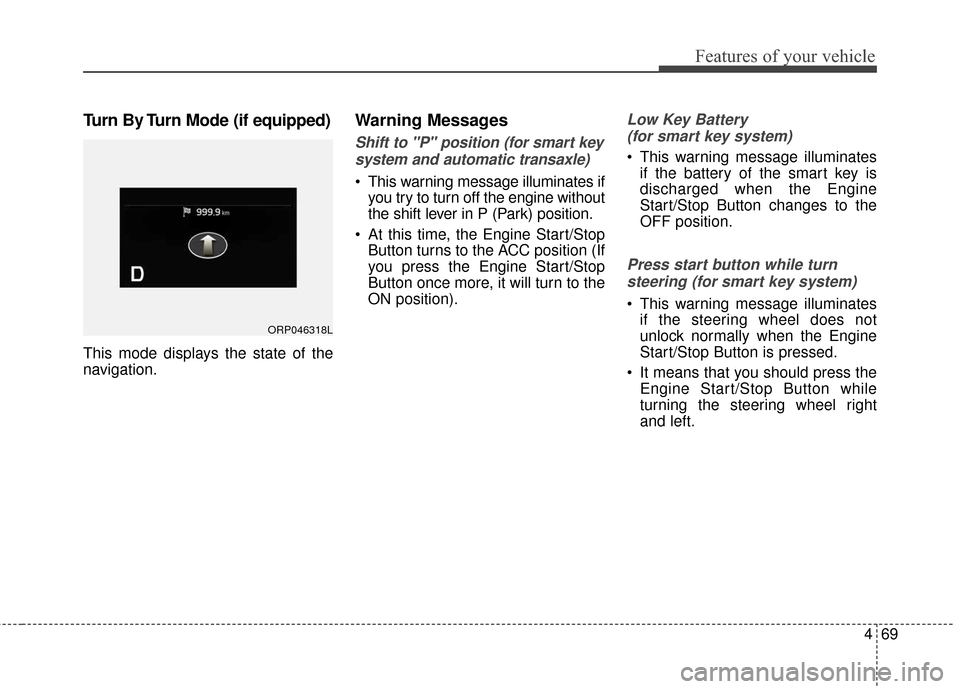
Turn By Turn Mode (if equipped)
This mode displays the state of the
navigation.
Warning Messages
Shift to "P" position (for smart keysystem and automatic transaxle)
This warning message illuminates if you try to turn off the engine without
the shift lever in P (Park) position.
At this time, the Engine Start/Stop Button turns to the ACC position (If
you press the Engine Start/Stop
Button once more, it will turn to the
ON position).
Low Key Battery
(for smart key system)
This warning message illuminates if the battery of the smart key is
discharged when the Engine
Start/Stop Button changes to the
OFF position.
Press start button while turn
steering (for smart key system)
This warning message illuminates if the steering wheel does not
unlock normally when the Engine
Start/Stop Button is pressed.
It means that you should press the Engine Start/Stop Button while
turning the steering wheel right
and left.
ORP046318L
Page 171 of 625
Features of your vehicle
74
4
Overview
Description
The trip computer is a microcomput-
er-controlled driver information sys-
tem that displays information related
to driving.
✽ ✽
NOTICE
Some driving information stored in
the trip computer (for example
Average Vehicle Speed) resets if the
battery is disconnected.
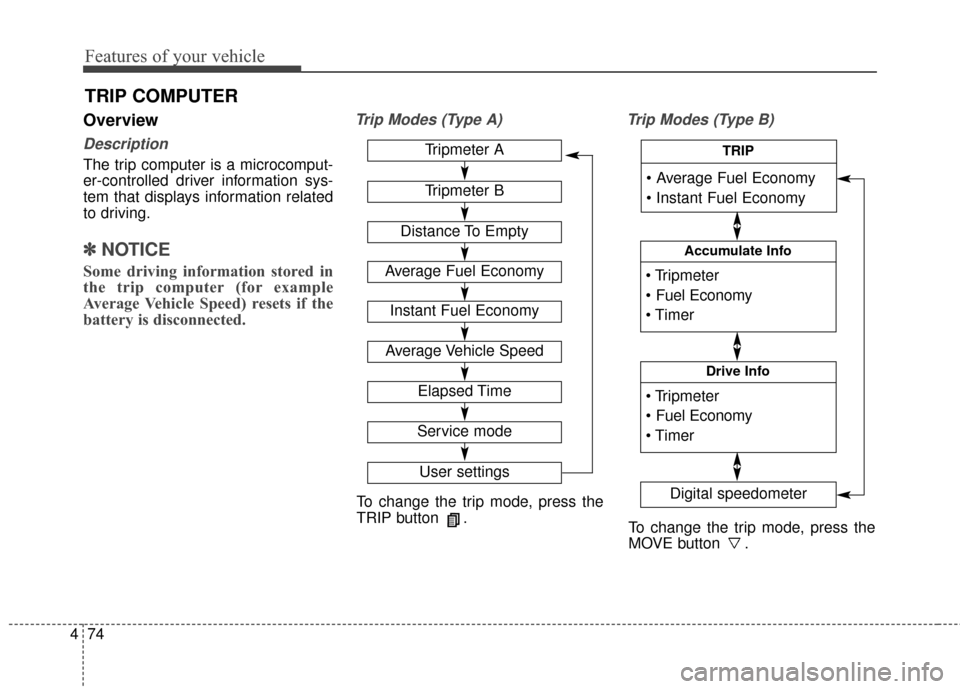
Trip Modes (Type A) Trip Modes (Type B)
TRIP COMPUTER
To change the trip mode, press the
TRIP button .
To change the trip mode, press the
MOVE button .
Tripmeter A
Tripmeter B
Distance To Empty
Average Fuel Economy
Instant Fuel Economy
Average Vehicle Speed
Elapsed Time
Service mode
User settings
Accumulate Info
Digital speedometer
Drive Info
TRIP
Page 205 of 625
Features of your vehicle
108
4
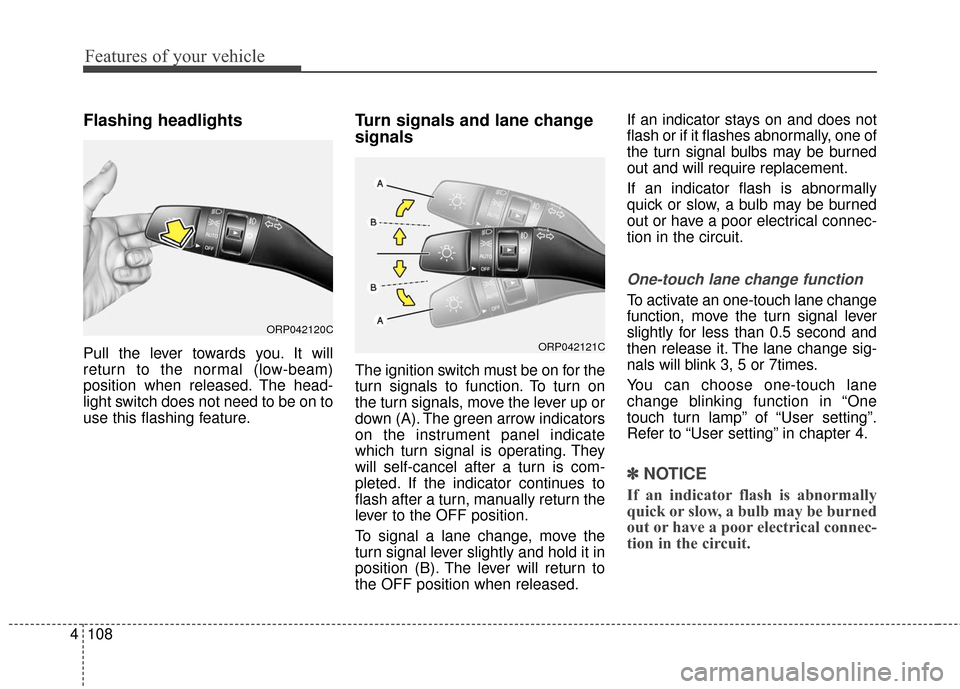
Flashing headlights
Pull the lever towards you. It will
return to the normal (low-beam)
position when released. The head-
light switch does not need to be on to
use this flashing feature.
Turn signals and lane change
signals
The ignition switch must be on for the
turn signals to function. To turn on
the turn signals, move the lever up or
down (A). The green arrow indicators
on the instrument panel indicate
which turn signal is operating. They
will self-cancel after a turn is com-
pleted. If the indicator continues to
flash after a turn, manually return the
lever to the OFF position.
To signal a lane change, move the
turn signal lever slightly and hold it in
position (B). The lever will return to
the OFF position when released. If an indicator stays on and does not
flash or if it flashes abnormally, one of
the turn signal bulbs may be burned
out and will require replacement.
If an indicator flash is abnormally
quick or slow, a bulb may be burned
out or have a poor electrical connec-
tion in the circuit.
One-touch lane change function
To activate an one-touch lane change
function, move the turn signal lever
slightly for less than 0.5 second and
then release it. The lane change sig-
nals will blink 3, 5 or 7times.
You can choose one-touch lane
change blinking function in “One
touch turn lamp” of “User setting”.
Refer to “User setting” in chapter 4.
✽ ✽
NOTICE
If an indicator flash is abnormally
quick or slow, a bulb may be burned
out or have a poor electrical connec-
tion in the circuit.
ORP042120C
ORP042121C
Page 216 of 625
4119
Features of your vehicle
(3) :- The map lamp comes on when adoor is opened. If you close the
door, the lamps go out after
approximately 30 seconds.
- The map lamp comes on for approximately 30 seconds when
doors are unlocked with a trans-
mitter or smart key as long as the
doors are not opened.
- The map lamp will stay on for approximately 20 minutes if a door
is opened with the ignition switch
in the ACC or LOCK/OFF position.
- The map lamp will stay on contin- uously if the door is opened with
the ignition switch in the ON posi-
tion.
- The map lamp will go out imme- diately if the ignition switch is
changed to the ON position or all
doors are locked.
(4) : The map lamp stays on at all times.✽ ✽NOTICE
When the lamp is turned on by
pressing the lens (1), the lamp does
not turn off even if the switch is in
the OFF position (2).
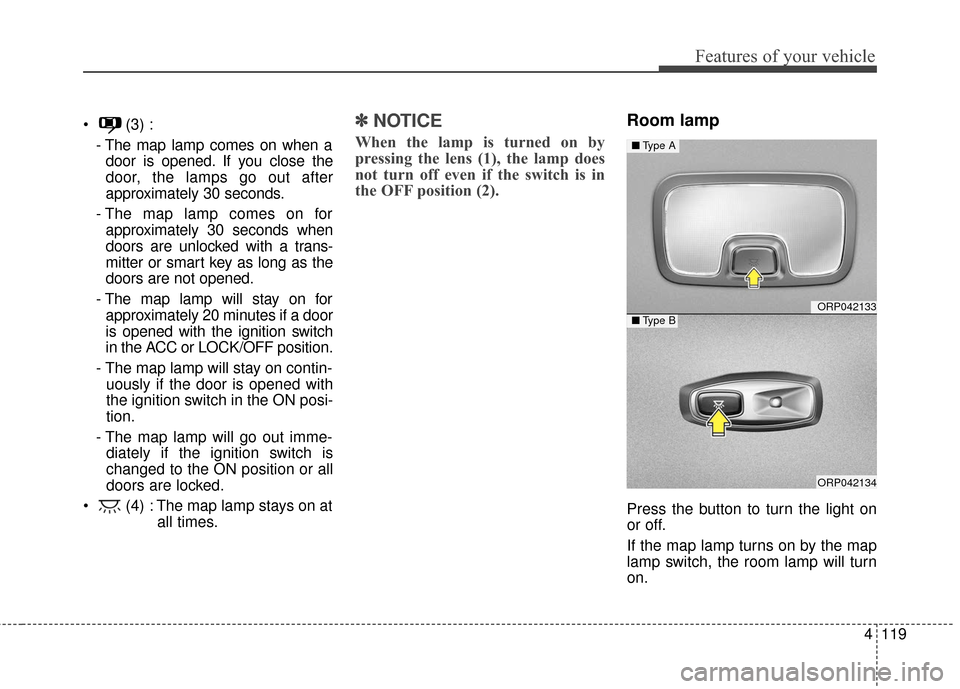
Room lamp
Press the button to turn the light on
or off.
If the map lamp turns on by the map
lamp switch, the room lamp will turn
on.
ORP042133
ORP042134
■ Type A
■Type B
Page 228 of 625
4131
Features of your vehicle
✽ ✽NOTICE
• When using the air conditioning
system, monitor the temperature
gauge closely while driving up
hills or in heavy traffic when out-
side temperatures are high. Air
conditioning system operation
may cause engine overheating.
Continue to use the blower fan but
turn the air conditioning system
off if the temperature gauge indi-
cates engine overheating.
• When opening the windows in humid weather air conditioning
may create water droplets inside
the vehicle. Since excessive water
droplets may cause damage to
electrical equipment, air condi-
tioning should only be used with
the windows closed.
Air conditioning system operation tips
If the vehicle has been parked in
direct sunlight during hot weather,
open the windows for a short time
to let the hot air inside the vehicle
escape.
To help reduce moisture inside of the windows on rainy or humid
days, decrease the humidity inside
the vehicle by operating the air
conditioning system.
During air conditioning system operation, you may occasionally
notice a slight change in engine
speed as the air conditioning com-
pressor cycles. This is a normal
system operation characteristic.
Use the air conditioning system every month only for a few minutes
to ensure maximum system per-
formance.CAUTION
The refrigerant system should only be serviced by trained andcertified technicians to insureproper and safe operation.
The refrigerant system should be serviced in a well-ventilat-ed place.
The air conditioning evaporator (cooling coil) shall never berepaired or replaced with oneremoved from a used or sal-vaged vehicle and new replace-ment MAC evaporators shall becertified (and labeled) as meet-ing SAE Standard J2842.
Page 229 of 625
Features of your vehicle
132
4
When using the air conditioning
system, you may notice clear water
dripping (or even puddling) on the
ground under the passenger side
of the vehicle. This is a normal sys-
tem operation characteristic.
Operating the air conditioning sys- tem in the recirculated air position
provides maximum cooling, how-
ever, continual operation in this
mode may cause the air inside the
vehicle to become stale.
During cooling operation, you may occasionally notice a misty air flow
because of rapid cooling and
humid air intake. This is a normal
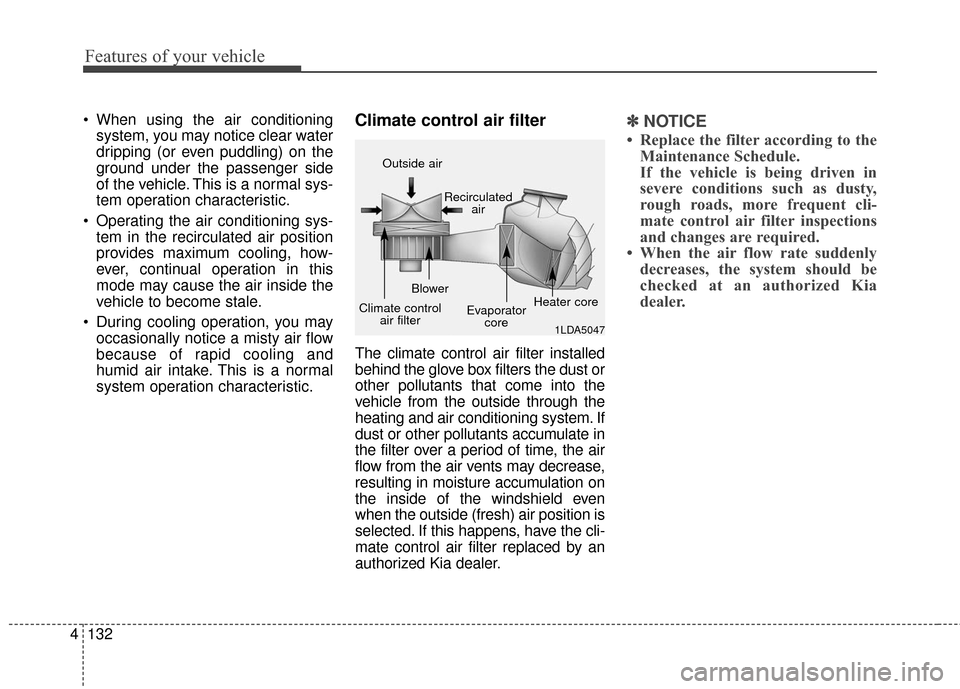
system operation characteristic.Climate control air filter
The climate control air filter installed
behind the glove box filters the dust or
other pollutants that come into the
vehicle from the outside through the
heating and air conditioning system. If
dust or other pollutants accumulate in
the filter over a period of time, the air
flow from the air vents may decrease,
resulting in moisture accumulation on
the inside of the windshield even
when the outside (fresh) air position is
selected. If this happens, have the cli-
mate control air filter replaced by an
authorized Kia dealer.
✽ ✽ NOTICE
• Replace the filter according to the
Maintenance Schedule.
If the vehicle is being driven in
severe conditions such as dusty,
rough roads, more frequent cli-
mate control air filter inspections
and changes are required.
• When the air flow rate suddenly decreases, the system should be
checked at an authorized Kia
dealer.
1LDA5047
Outside air
Recirculatedair
Climate control air filter Blower
Evaporatorcore Heater core
Page 242 of 625
4145
Features of your vehicle
Air conditioning system operation tips
If the vehicle has been parked indirect sunlight during hot weather,
open the windows for a short time
to let the hot air inside the vehicle
escape.
To help reduce moisture inside of the windows on rainy or humid
days, decrease the humidity inside
the vehicle by operating the air
conditioning system.
During air conditioning system operation, you may occasionally
notice a slight change in engine
speed as the air conditioning com-
pressor cycles. This is a normal
system operation characteristic.
Use the air conditioning system every month only for a few minutes
to ensure maximum system per-
formance. When using the air conditioning
system, you may notice clear water
dripping (or even puddling) on the
ground under the passenger side
of the vehicle. This is a normal sys-
tem operation characteristic.
Operating the air conditioning sys- tem in the recirculated air position
provides maximum cooling, how-
ever, continual operation in this
mode may cause the air inside the
vehicle to become stale.
During cooling operation, you may occasionally notice a misty air flow
because of rapid cooling and
humid air intake. This is a normal
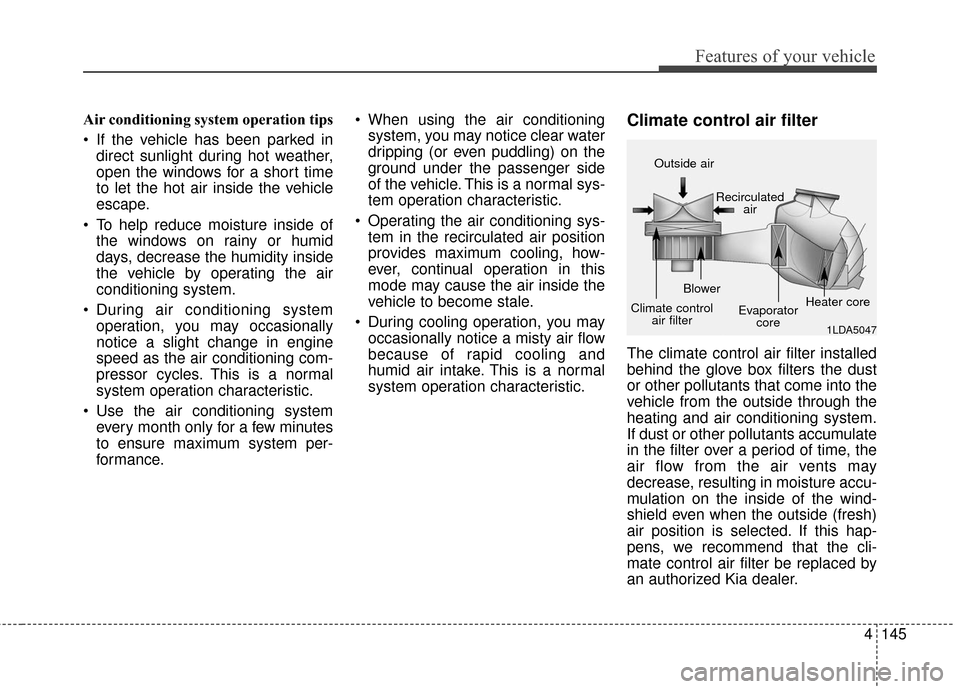
system operation characteristic.Climate control air filter
The climate control air filter installed
behind the glove box filters the dust
or other pollutants that come into the
vehicle from the outside through the
heating and air conditioning system.
If dust or other pollutants accumulate
in the filter over a period of time, the
air flow from the air vents may
decrease, resulting in moisture accu-
mulation on the inside of the wind-
shield even when the outside (fresh)
air position is selected. If this hap-
pens, we recommend that the cli-
mate control air filter be replaced by
an authorized Kia dealer.
1LDA5047
Outside air
Recirculatedair
Climate control air filter Blower
Evaporatorcore Heater core
Page 250 of 625
4153
Features of your vehicle
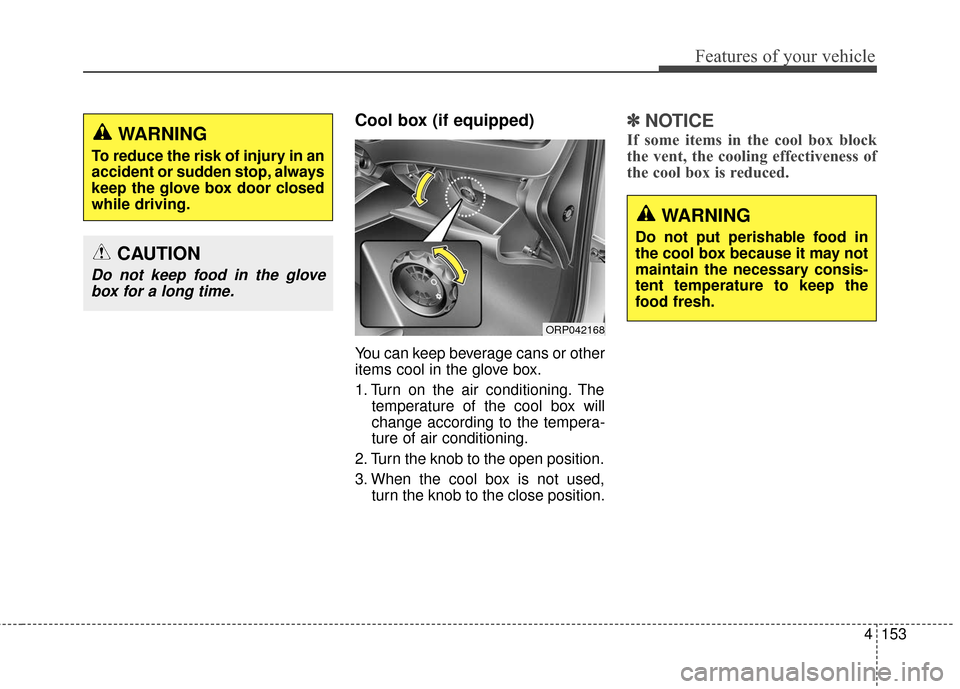
Cool box (if equipped)
You can keep beverage cans or other
items cool in the glove box.
1. Turn on the air conditioning. Thetemperature of the cool box will
change according to the tempera-
ture of air conditioning.
2. Turn the knob to the open position.
3. When the cool box is not used, turn the knob to the close position.
✽ ✽NOTICE
If some items in the cool box block
the vent, the cooling effectiveness of
the cool box is reduced.WARNING
To reduce the risk of injury in an
accident or sudden stop, always
keep the glove box door closed
while driving.
ORP042168
WARNING
Do not put perishable food in
the cool box because it may not
maintain the necessary consis-
tent temperature to keep the
food fresh.
CAUTION
Do not keep food in the glove
box for a long time.
Page 256 of 625
4159
Features of your vehicle
Seat warmer (if equipped)
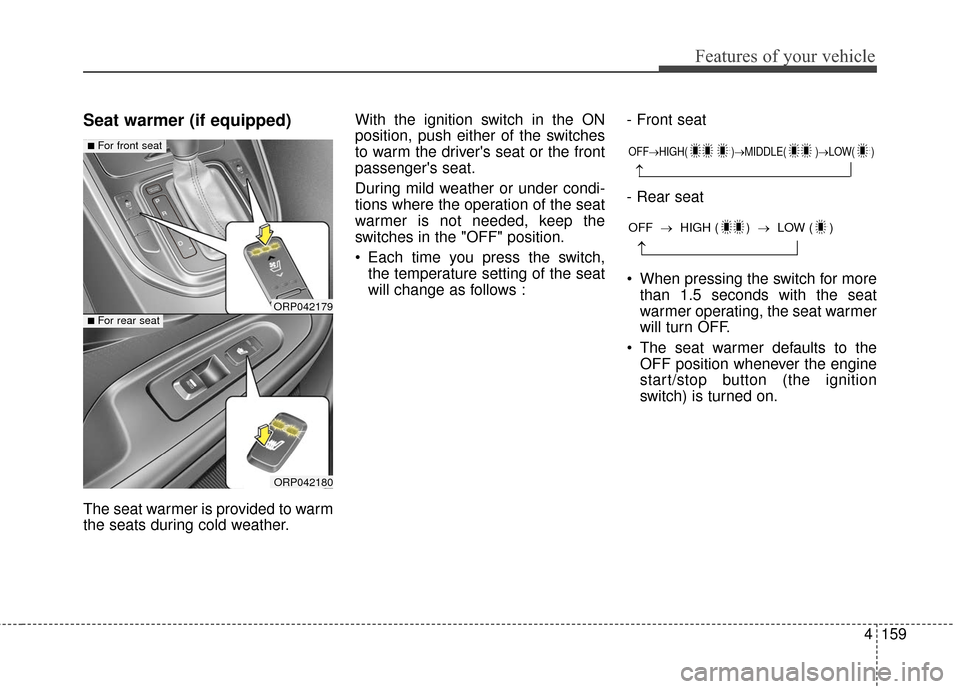
The seat warmer is provided to warm
the seats during cold weather.With the ignition switch in the ON
position, push either of the switches
to warm the driver's seat or the front
passenger's seat.
During mild weather or under condi-
tions where the operation of the seat
warmer is not needed, keep the
switches in the "OFF" position.
Each time you press the switch,
the temperature setting of the seat
will change as follows : - Front seat
- Rear seat
When pressing the switch for more
than 1.5 seconds with the seat
warmer operating, the seat warmer
will turn OFF.
The seat warmer defaults to the OFF position whenever the engine
start/stop button (the ignition
switch) is turned on.
ORP042179
ORP042180
■For front seat
■For rear seat
OFF→ HIGH( )→ MIDDLE( )→LOW( )
→
→
OFF →HIGH ( ) → LOW ( )
Page 258 of 625
4161
Features of your vehicle
Air ventilation seat (if equipped)
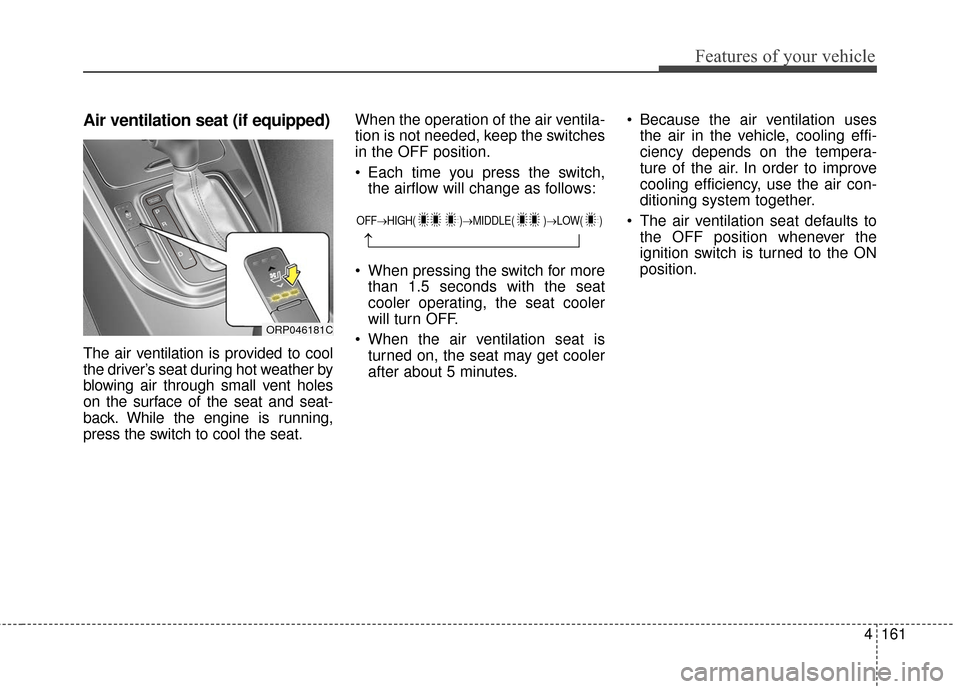
The air ventilation is provided to cool
the driver’s seat during hot weather by
blowing air through small vent holes
on the surface of the seat and seat-
back. While the engine is running,
press the switch to cool the seat.When the operation of the air ventila-
tion is not needed, keep the switches
in the OFF position.
Each time you press the switch,
the airflow will change as follows:
When pressing the switch for more than 1.5 seconds with the seat
cooler operating, the seat cooler
will turn OFF.
When the air ventilation seat is turned on, the seat may get cooler
after about 5 minutes. Because the air ventilation uses
the air in the vehicle, cooling effi-
ciency depends on the tempera-
ture of the air. In order to improve
cooling efficiency, use the air con-
ditioning system together.
The air ventilation seat defaults to the OFF position whenever the
ignition switch is turned to the ON
position.
ORP046181C
OFF→ HIGH( )→ MIDDLE( )→LOW( )
→