height KIA Sedona 2012 2.G Owner's Manual
[x] Cancel search | Manufacturer: KIA, Model Year: 2012, Model line: Sedona, Model: KIA Sedona 2012 2.GPages: 370, PDF Size: 6.75 MB
Page 54 of 370
337
Features of your vehicle
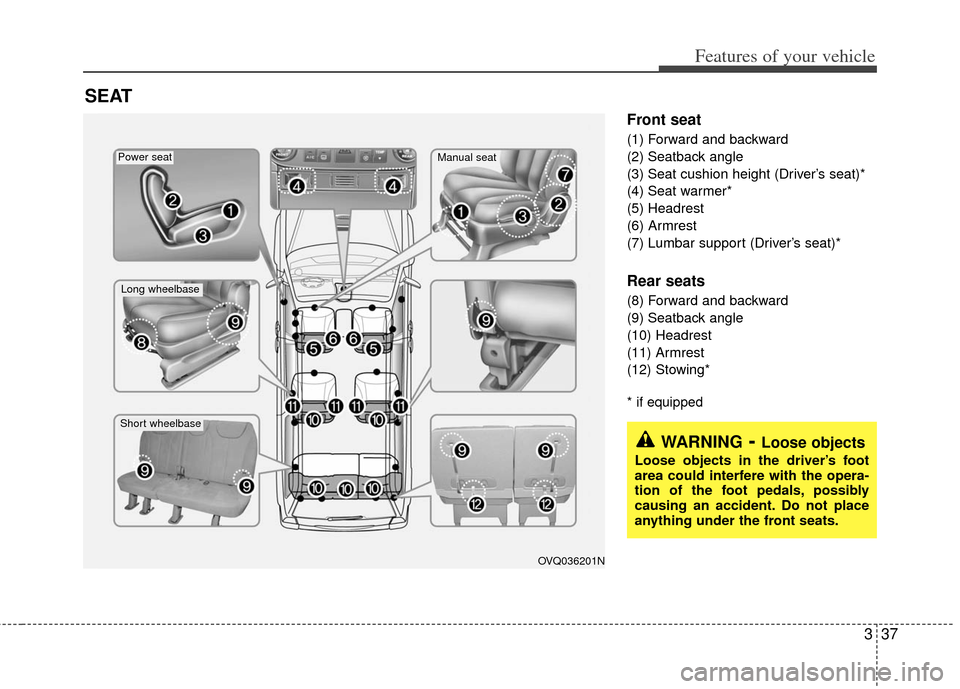
Front seat
(1) Forward and backward
(2) Seatback angle
(3) Seat cushion height (Driver’s seat)*
(4) Seat warmer*
(5) Headrest
(6) Armrest
(7) Lumbar support (Driver’s seat)*
Rear seats
(8) Forward and backward
(9) Seatback angle
(10) Headrest
(11) Armrest
(12) Stowing*
* if equipped
SEAT
OVQ036201N
Long wheelbase
Short wheelbase
Power seatManual seat
WARNING- Loose objects
Loose objects in the driver’s foot
area could interfere with the opera-
tion of the foot pedals, possibly
causing an accident. Do not place
anything under the front seats.
Page 57 of 370
Features of your vehicle
40
3
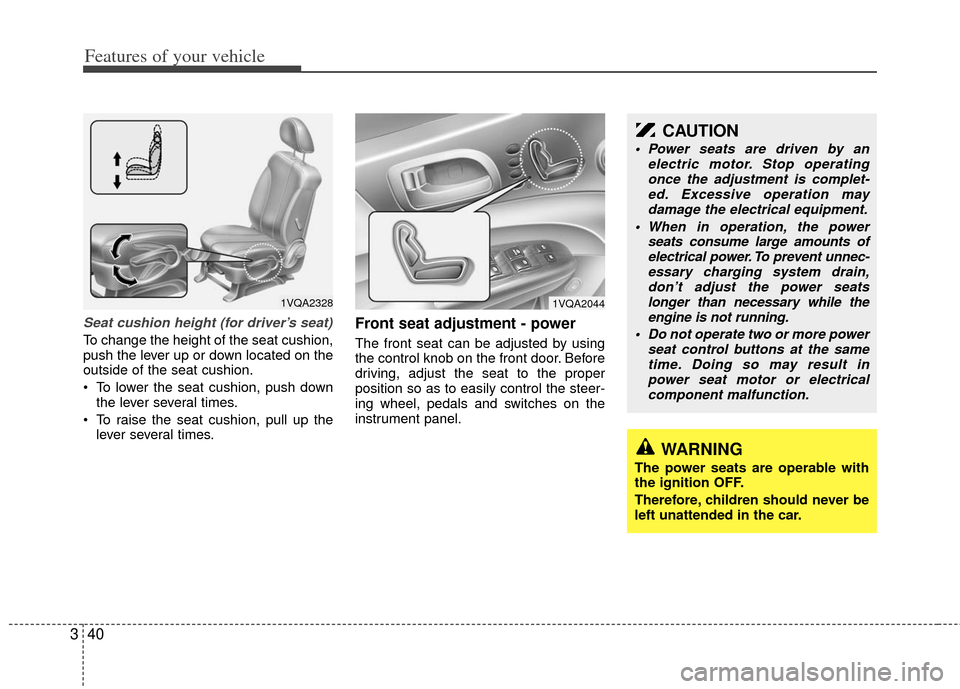
Seat cushion height (for driver’s seat)
To change the height of the seat cushion,
push the lever up or down located on the
outside of the seat cushion.
To lower the seat cushion, push down
the lever several times.
To raise the seat cushion, pull up the lever several times.
Front seat adjustment - power
The front seat can be adjusted by using
the control knob on the front door. Before
driving, adjust the seat to the proper
position so as to easily control the steer-
ing wheel, pedals and switches on the
instrument panel.
1VQA2328
WARNING
The power seats are operable with
the ignition OFF.
Therefore, children should never be
left unattended in the car.
CAUTION
Power seats are driven by an electric motor. Stop operatingonce the adjustment is complet- ed. Excessive operation maydamage the electrical equipment.
When in operation, the power seats consume large amounts ofelectrical power. To prevent unnec- essary charging system drain,don’t adjust the power seatslonger than necessary while the engine is not running.
Do not operate two or more power seat control buttons at the sametime. Doing so may result inpower seat motor or electrical component malfunction.
1VQA2044
Page 59 of 370
Features of your vehicle
42
3
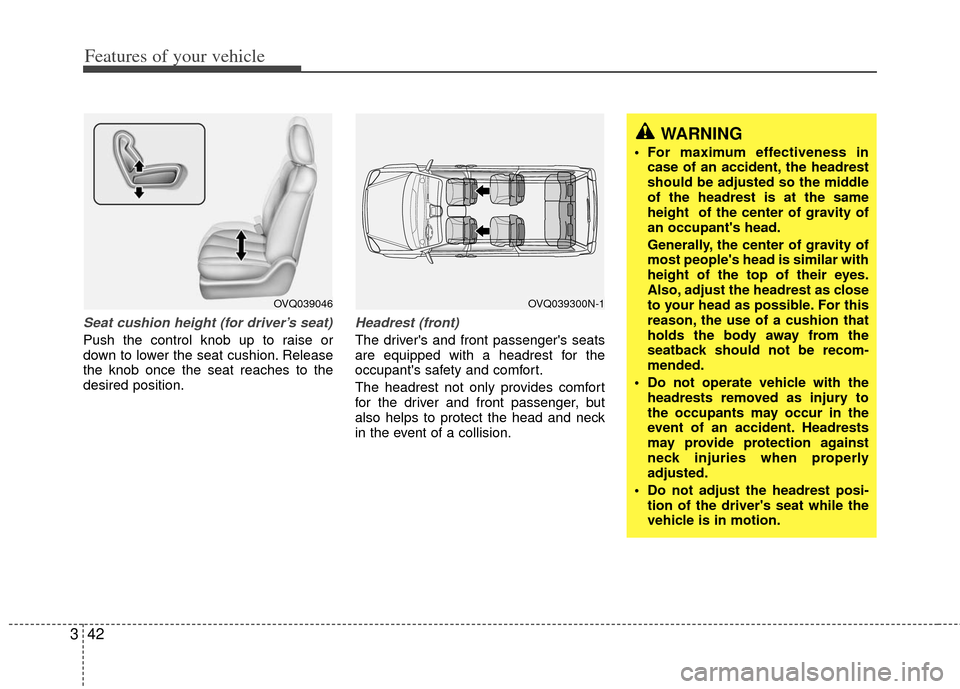
Seat cushion height (for driver’s seat)
Push the control knob up to raise or
down to lower the seat cushion. Release
the knob once the seat reaches to the
desired position.
Headrest (front)
The driver's and front passenger's seats
are equipped with a headrest for the
occupant's safety and comfort.
The headrest not only provides comfort
for the driver and front passenger, but
also helps to protect the head and neck
in the event of a collision.
OVQ039046OVQ039300N-1
WARNING
For maximum effectiveness in
case of an accident, the headrest
should be adjusted so the middle
of the headrest is at the same
height of the center of gravity of
an occupant's head.
Generally, the center of gravity of
most people's head is similar with
height of the top of their eyes.
Also, adjust the headrest as close
to your head as possible. For this
reason, the use of a cushion that
holds the body away from the
seatback should not be recom-
mended.
Do not operate vehicle with the headrests removed as injury to
the occupants may occur in the
event of an accident. Headrests
may provide protection against
neck injuries when properly
adjusted.
Do not adjust the headrest posi- tion of the driver's seat while the
vehicle is in motion.
Page 60 of 370
343
Features of your vehicle
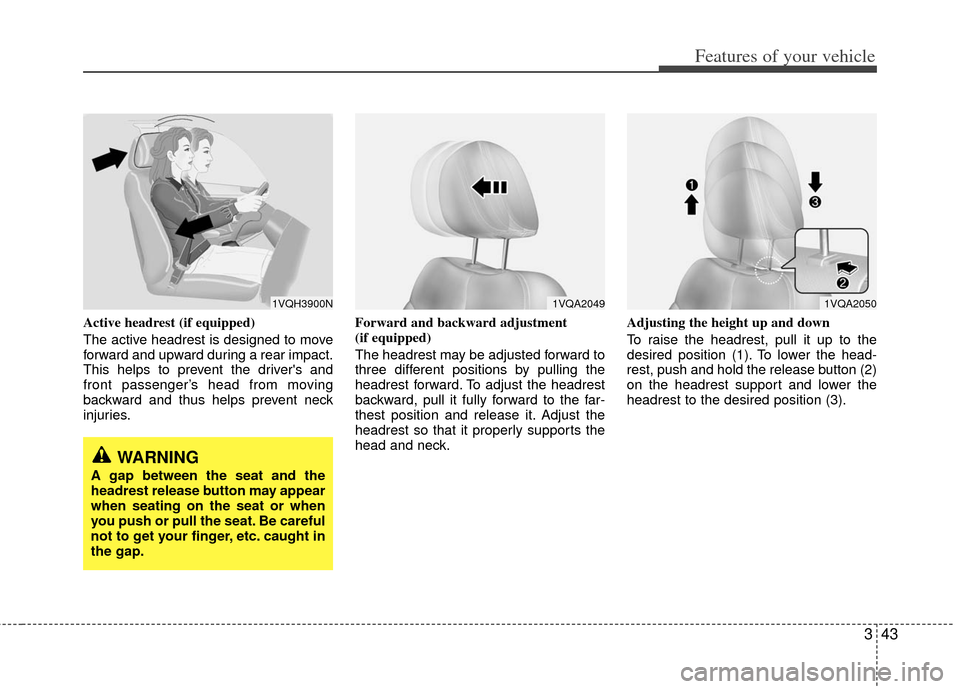
Active headrest (if equipped)
The active headrest is designed to move
forward and upward during a rear impact.
This helps to prevent the driver's and
front passenger’s head from moving
backward and thus helps prevent neck
injuries.Forward and backward adjustment
(if equipped)
The headrest may be adjusted forward to
three different positions by pulling the
headrest forward. To adjust the headrest
backward, pull it fully forward to the far-
thest position and release it. Adjust the
headrest so that it properly supports the
head and neck.Adjusting the height up and down
To raise the headrest, pull it up to the
desired position (1). To lower the head-
rest, push and hold the release button (2)
on the headrest support and lower the
headrest to the desired position (3).
1VQH3900N1VQA20491VQA2050
WARNING
A gap between the seat and the
headrest release button may appear
when seating on the seat or when
you push or pull the seat. Be careful
not to get your finger, etc. caught in
the gap.
Page 61 of 370
Features of your vehicle
44
3
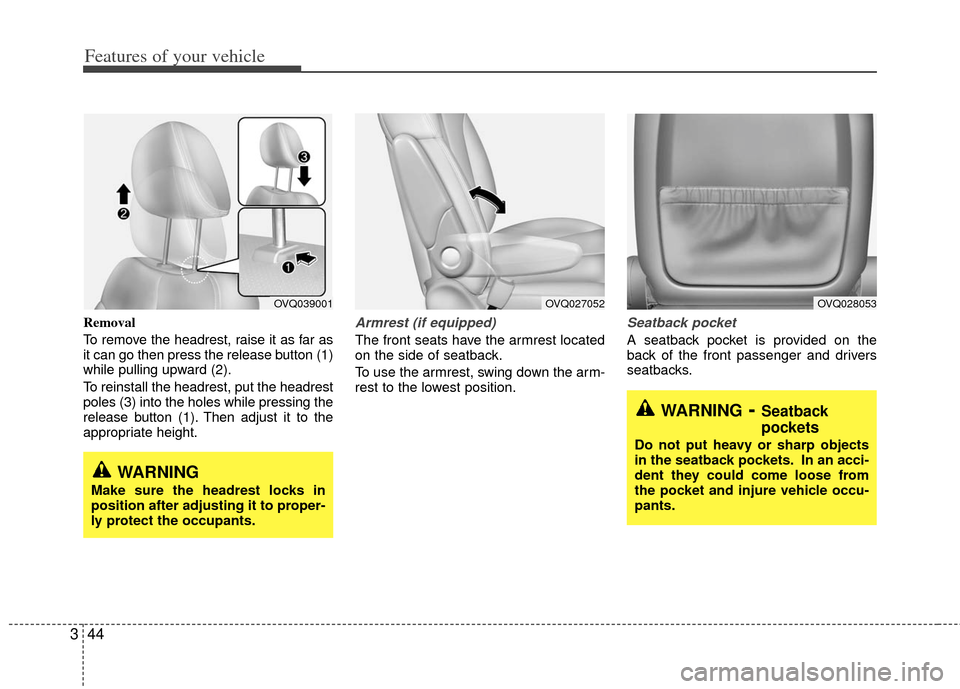
Removal
To remove the headrest, raise it as far as
it can go then press the release button (1)
while pulling upward (2).
To reinstall the headrest, put the headrest
poles (3) into the holes while pressing the
release button (1). Then adjust it to the
appropriate height.Armrest (if equipped)
The front seats have the armrest located
on the side of seatback.
To use the armrest, swing down the arm-
rest to the lowest position.
Seatback pocket
A seatback pocket is provided on the
back of the front passenger and drivers
seatbacks.
WARNING
Make sure the headrest locks in
position after adjusting it to proper-
ly protect the occupants.
OVQ039001OVQ027052
WARNING- Seatback
pockets
Do not put heavy or sharp objects
in the seatback pockets. In an acci-
dent they could come loose from
the pocket and injure vehicle occu-
pants.
OVQ028053
Page 65 of 370
Features of your vehicle
48
3
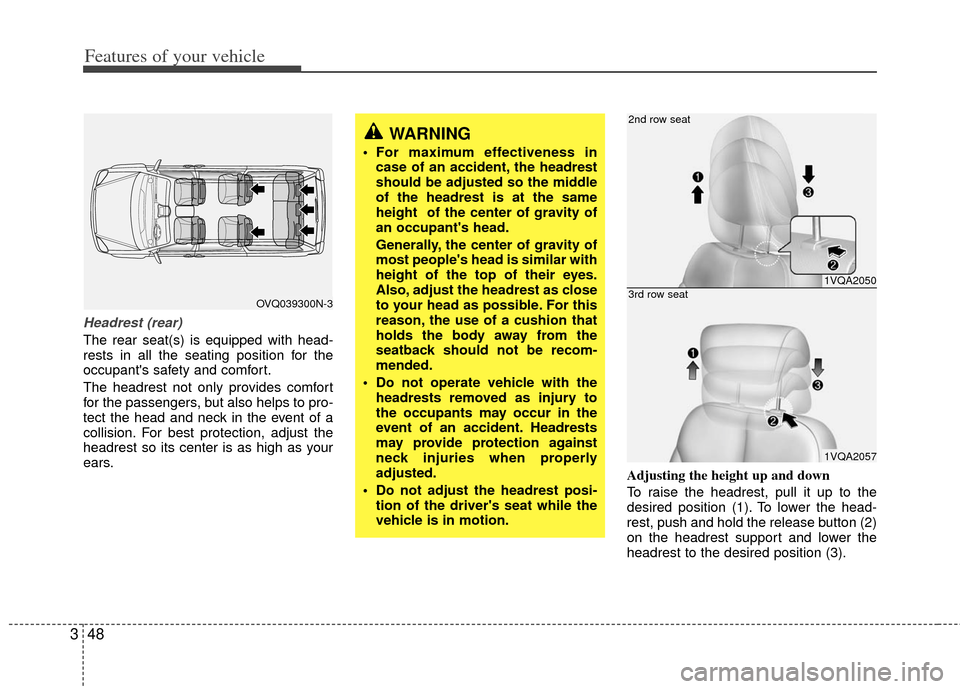
Headrest (rear)
The rear seat(s) is equipped with head-
rests in all the seating position for the
occupant's safety and comfort.
The headrest not only provides comfort
for the passengers, but also helps to pro-
tect the head and neck in the event of a
collision. For best protection, adjust the
headrest so its center is as high as your
ears.
Adjusting the height up and down
To raise the headrest, pull it up to the
desired position (1). To lower the head-
rest, push and hold the release button (2)
on the headrest support and lower the
headrest to the desired position (3).
WARNING
For maximum effectiveness in
case of an accident, the headrest
should be adjusted so the middle
of the headrest is at the same
height of the center of gravity of
an occupant's head.
Generally, the center of gravity of
most people's head is similar with
height of the top of their eyes.
Also, adjust the headrest as close
to your head as possible. For this
reason, the use of a cushion that
holds the body away from the
seatback should not be recom-
mended.
Do not operate vehicle with the headrests removed as injury to
the occupants may occur in the
event of an accident. Headrests
may provide protection against
neck injuries when properly
adjusted.
Do not adjust the headrest posi- tion of the driver's seat while the
vehicle is in motion.
OVQ039300N-3
1VQA2050
1VQA2057
2nd row seat
3rd row seat
Page 66 of 370
349
Features of your vehicle
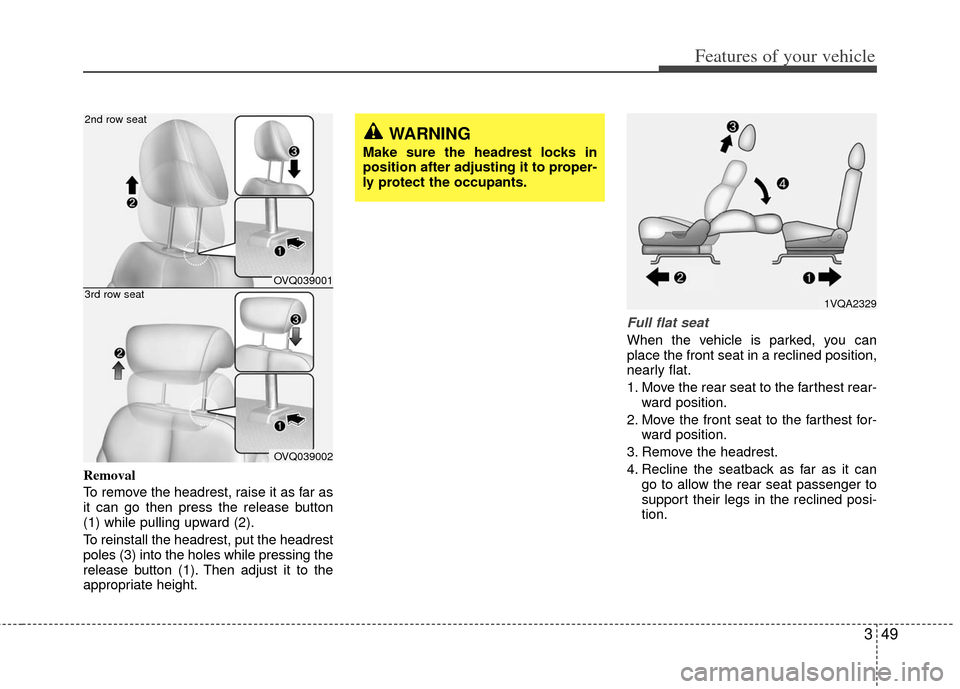
Removal
To remove the headrest, raise it as far as
it can go then press the release button
(1) while pulling upward (2).
To reinstall the headrest, put the headrest
poles (3) into the holes while pressing the
release button (1). Then adjust it to the
appropriate height.
Full flat seat
When the vehicle is parked, you can
place the front seat in a reclined position,
nearly flat.
1. Move the rear seat to the farthest rear-ward position.
2. Move the front seat to the farthest for- ward position.
3. Remove the headrest.
4. Recline the seatback as far as it can go to allow the rear seat passenger to
support their legs in the reclined posi-
tion.
WARNING
Make sure the headrest locks in
position after adjusting it to proper-
ly protect the occupants.
1VQA2329
OVQ039001
OVQ039002
2nd row seat
3rd row seat
Page 83 of 370
Features of your vehicle
66
3
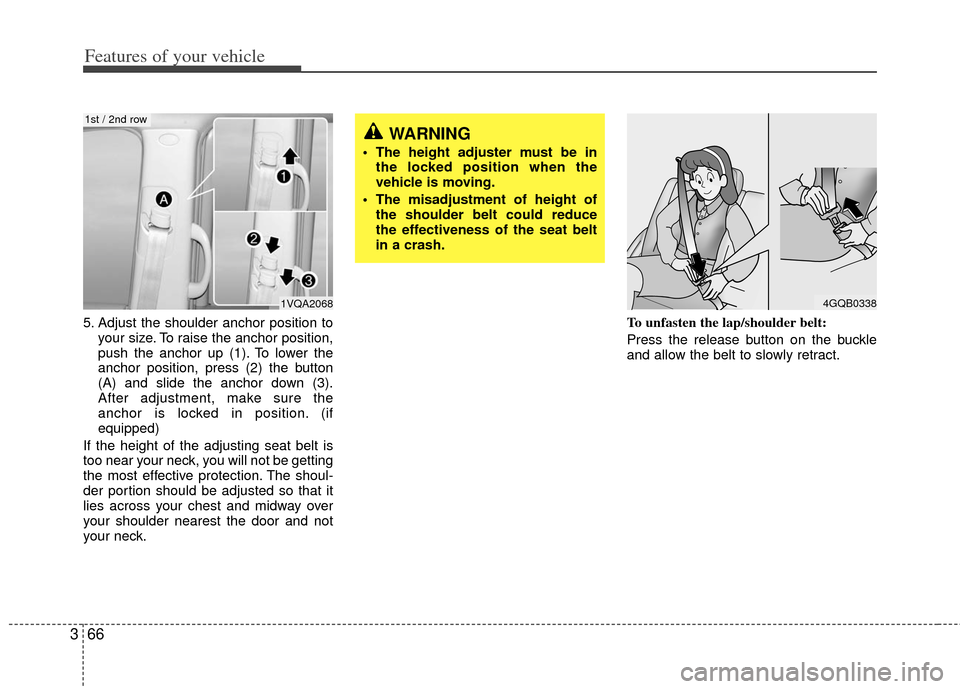
5. Adjust the shoulder anchor position to
your size. To raise the anchor position,
push the anchor up (1). To lower the
anchor position, press (2) the button
(A) and slide the anchor down (3).
After adjustment, make sure the
anchor is locked in position. (if
equipped)
If the height of the adjusting seat belt is
too near your neck, you will not be getting
the most effective protection. The shoul-
der portion should be adjusted so that it
lies across your chest and midway over
your shoulder nearest the door and not
your neck. To unfasten the lap/shoulder belt:
Press the release button on the buckle
and allow the belt to slowly retract.
4GQB0338
WARNING
The height adjuster must be in
the locked position when the
vehicle is moving.
The misadjustment of height of the shoulder belt could reduce
the effectiveness of the seat belt
in a crash.
1VQA2068
1st / 2nd row
Page 208 of 370
3191
Features of your vehicle
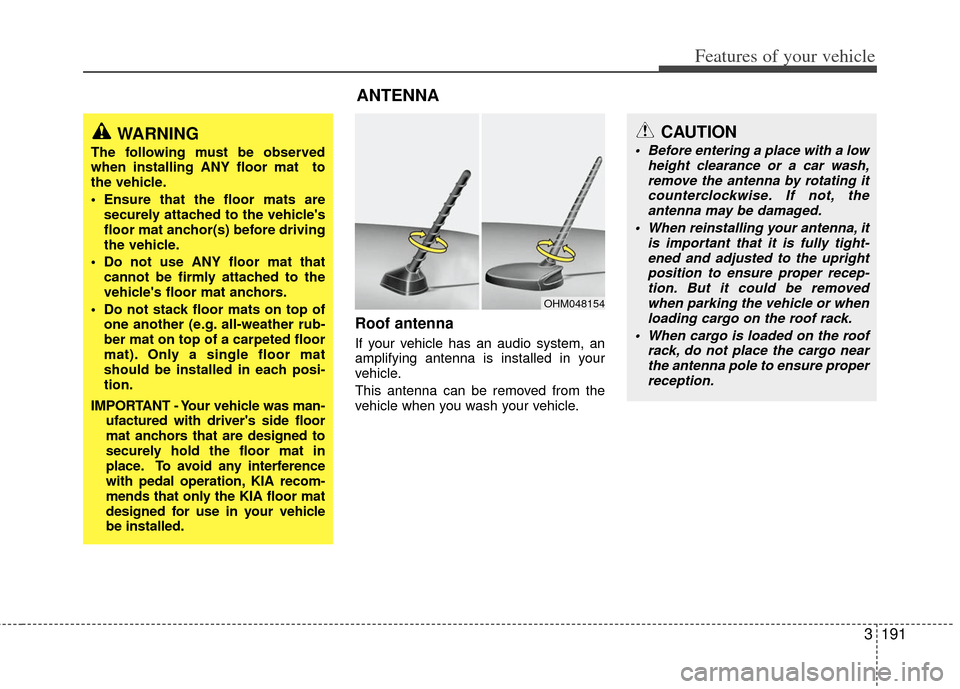
Roof antenna
If your vehicle has an audio system, an
amplifying antenna is installed in your
vehicle.
This antenna can be removed from the
vehicle when you wash your vehicle.
ANTENNA
OHM048154
WARNING
The following must be observed
when installing ANY floor mat to
the vehicle.
Ensure that the floor mats aresecurely attached to the vehicle's
floor mat anchor(s) before driving
the vehicle.
Do not use ANY floor mat that cannot be firmly attached to the
vehicle's floor mat anchors.
Do not stack floor mats on top of one another (e.g. all-weather rub-
ber mat on top of a carpeted floor
mat). Only a single floor mat
should be installed in each posi-
tion.
IMPORTANT - Your vehicle was man- ufactured with driver's side floor
mat anchors that are designed to
securely hold the floor mat in
place. To avoid any interference
with pedal operation, KIA recom-
mends that only the KIA floor mat
designed for use in your vehicle
be installed.
CAUTION
Before entering a place with a low height clearance or a car wash,remove the antenna by rotating it counterclockwise. If not, theantenna may be damaged.
When reinstalling your antenna, it is important that it is fully tight-ened and adjusted to the uprightposition to ensure proper recep- tion. But it could be removedwhen parking the vehicle or when loading cargo on the roof rack.
When cargo is loaded on the roof rack, do not place the cargo nearthe antenna pole to ensure properreception.
Page 250 of 370
3233
Features of your vehicle
✽
✽NOTICE
The RSE will enter standby mode when
the vehicle ignition is turned off and
back on. Press the SRC or
PLAY/PAUSE( ) button to “wake
up” the unit and resume disc play.
1. Stop/Eject
While the disc is playing, press the
STOP/EJECT ( ) button to stop disc
play. When the disc has stopped, press
the button again to eject the disc.
✽ ✽NOTICE
The player has an Auto-Reload Disc
Protection feature to protect discs from
accidental damage. If an ejected disc is
not removed within 25 seconds after
being ejected, it will be pulled back into
the player. This is to protect the disc
from accidental damage.
2. Speaker Volume Control
You can adjust the volume one of two
ways. First, if you are adjusting the vol-
ume for audio through the vehicle speak-
ers, you can use the VOLUME button on
the control panel or the remote control.
This button is reserved for sending a sig-
nal to the vehicle speakers only, and will
not adjust the headphone volume. Press
“+” to increase the volume and “-” to
decrease the volume.
Second, the volume on the wireless
headphones can be adjusted by turning
the VOL knob located on the left side of
the headphones.
3. Play/Pause
You do not need to press the play button
after first loading a DVD or VCD; it will
start automatically by playing the first
track or bringing up the disc menu.
If the disc does not automatically load,
press PLAY/PAUSE( ) to play the DVD.
While playing a DVD, press PLAY
/PAUSE( ) to pause the DVD. Press
the button again to resume play.
4. Display
When the player is in DVD mode, press the
DISP button to view the DVD title, chapter
number and elapsed time and other infor-
mation about the DVD currently playing.
It will also display brightness. There are
“Day Time” brightness with brightest level
and “Night Time” brightness which has 70%
level of “Day Time” brightness. Adjust the
level of brightness by pressing the
REV(dimmer) or FWD(brighter) buttons.
The next time the player is turned on, it will
return to the brightness level it was adjusted
to when last used.
The RSE unit has two presets of display
brightness. When the headlamp is turned
on, the display brightness level will be
dimmed as the preset. However, when the
headlamp is turned off, the display bright-
ness will return to the daytime brightness.
Press DISP to adjust the image format. The
image format, also known as the aspect
ratio, is a ratio of the height to width of the
image on the screen. For example, a 4:3
ratio would mean an image that is 4 units by
3 units.