instrument cluster KIA Sedona 2016 3.G User Guide
[x] Cancel search | Manufacturer: KIA, Model Year: 2016, Model line: Sedona, Model: KIA Sedona 2016 3.GPages: 644, PDF Size: 19.23 MB
Page 472 of 644
Driving your vehicle
60
5
RCTA (Rear Cross Traffic Alert)
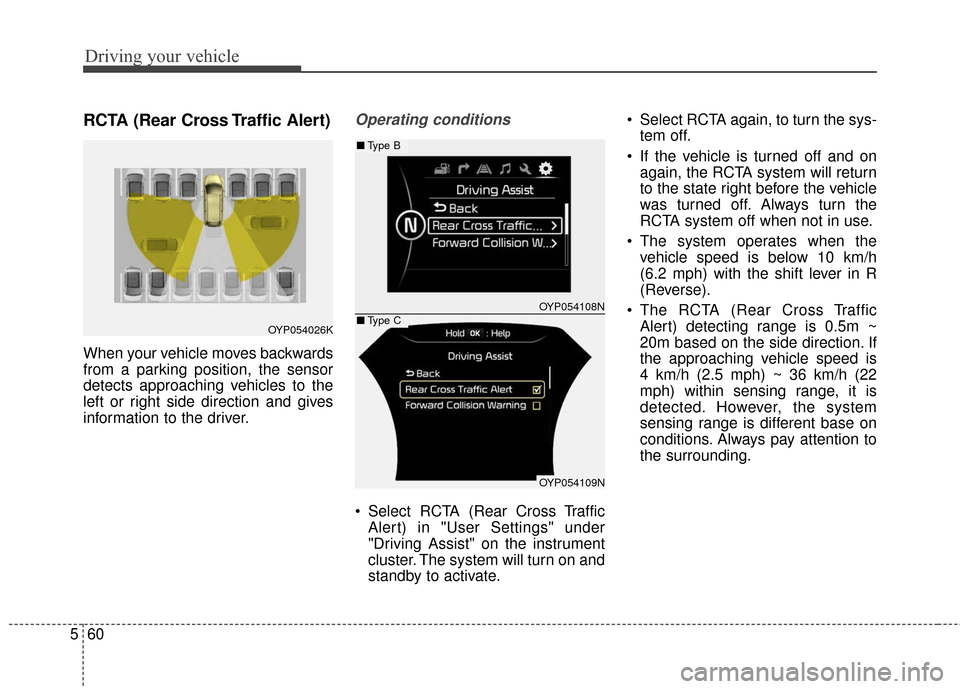
When your vehicle moves backwards
from a parking position, the sensor
detects approaching vehicles to the
left or right side direction and gives
information to the driver.
Operating conditions
Select RCTA (Rear Cross Traffic
Alert) in "User Settings" under
"Driving Assist" on the instrument
cluster. The system will turn on and
standby to activate. Select RCTA again, to turn the sys-
tem off.
If the vehicle is turned off and on again, the RCTA system will return
to the state right before the vehicle
was turned off. Always turn the
RCTA system off when not in use.
The system operates when the vehicle speed is below 10 km/h
(6.2 mph) with the shift lever in R
(Reverse).
The RCTA (Rear Cross Traffic Alert) detecting range is 0.5m ~
20m based on the side direction. If
the approaching vehicle speed is
4 km/h (2.5 mph) ~ 36 km/h (22
mph) within sensing range, it is
detected. However, the system
sensing range is different base on
conditions. Always pay attention to
the surrounding.
OYP054026K
OYP054108N
OYP054109N
■ Type B
■Type C
Page 594 of 644

Maintenance
66
7
If you do not have a spare, use a
fuse of the same rating from a circuityou may not need for operating thevehicle, such as the power outletfuse.
If the headlights or other electrical
components do not work and the
fuses are OK, check the fuse panel
in the engine compartment. If a fuse
is blown, it must be replaced.
Fuse switch
Always, put the fuse switch at the ON
position.
If you move the switch to the OFF
position, some items such as audio
and digital clock must be reset and
transmitter (or smart key) may not
work properly. When the switch is
Off, the caution will be displayed on
the instrument cluster.
Always place the fuse switch in the
ON position while driving the vehicle.
Engine compartment fuse
replacement
1. Turn the ignition switch and all other switches off.
2. Remove the fuse panel cover by pressing the tab and pulling the
cover up.
When the blade type fuse is dis- connected, remove it by using the
clip designed for changing fuses
located in the engine room fuse
box. Upon removal, securely
insert reserve fuse of equal quan-
tity.
OYP074011K
OYP074012N
Page 597 of 644
769
Maintenance
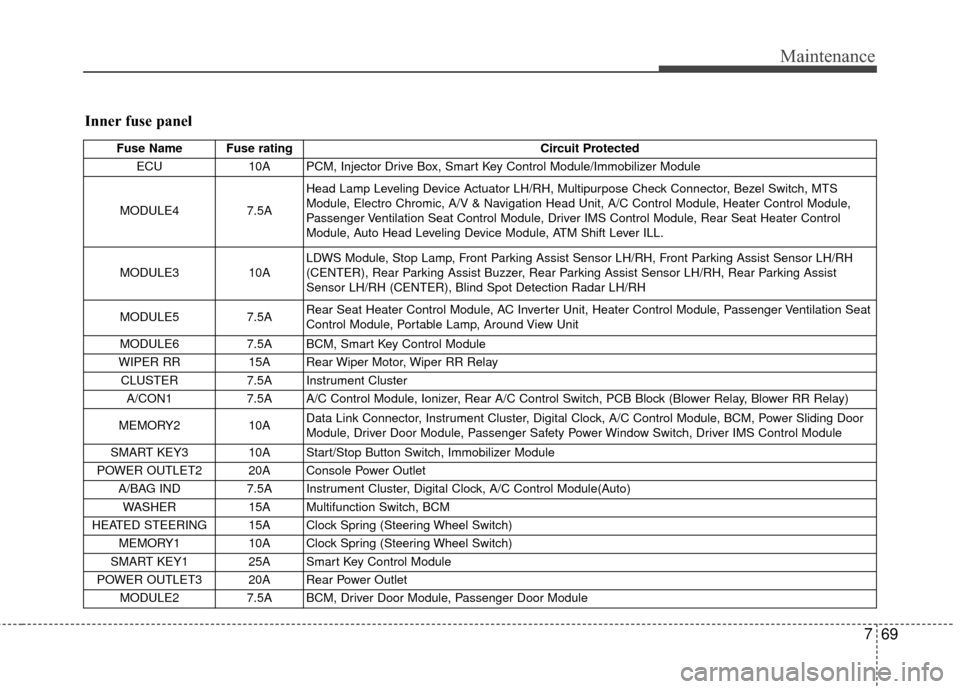
Inner fuse panel
Fuse Name Fuse ratingCircuit Protected
ECU 10A PCM, Injector Drive Box, Smart Key Control Module/Immobilizer Module
MODULE4 7.5AHead Lamp Leveling Device Actuator LH/RH, Multipurpose Check Connector, Bezel Switch, MTS
Module, Electro Chromic, A/V & Navigation Head Unit, A/C Control Module, Heater Control Module,
Passenger Ventilation Seat Control Module, Driver IMS Control Module, Rear Seat Heater Control
Module, Auto Head Leveling Device Module, ATM Shift Lever ILL.
MODULE3 10A LDWS Module, Stop Lamp, Front Parking Assist Sensor LH/RH, Front Parking Assist Sensor LH/RH
(CENTER), Rear Parking Assist Buzzer, Rear Parking Assist Sensor LH/RH, Rear Parking Assist
Sensor LH/RH (CENTER), Blind Spot Detection Radar LH/RH
MODULE5 7.5A Rear Seat Heater Control Module, AC Inverter Unit, Heater Control Module, Passenger Ventilation Seat
Control Module, Portable Lamp, Around View Unit
MODULE6 7.5A BCM, Smart Key Control Module
WIPER RR 15A Rear Wiper Motor, Wiper RR Relay
CLUSTER 7.5A Instrument Cluster
A/CON1 7.5A A/C Control Module, Ionizer, Rear A/C Control Switch, PCB Block (Blower Relay, Blower RR Relay)
MEMORY2 10A Data Link Connector, Instrument Cluster, Digital Clock, A/C Control Module, BCM, Power Sliding Door
Module, Driver Door Module, Passenger Safety Power Window Switch, Driver IMS Control Module
SMART KEY3 10A Start/Stop Button Switch, Immobilizer Module
POWER OUTLET2 20A Console Power Outlet A/BAG IND 7.5A Instrument Cluster, Digital Clock, A/C Control Module(Auto)
WASHER 15A Multifunction Switch, BCM
HEATED STEERING 15A Clock Spring (Steering Wheel Switch) MEMORY1 10A Clock Spring (Steering Wheel Switch)
SMART KEY1 25A Smart Key Control Module
POWER OUTLET3 20A Rear Power Outlet MODULE2 7.5A BCM, Driver Door Module, Passenger Door Module
Page 639 of 644

I5
Index
Gross vehicle weight. . . . . . . . . . . . . . . . . . . . . . . . . . . . 8-5
Hood . . . . . . . . . . . . . . . . . . . . . . . . . . . . . . . . . . . . \
. . . 4-56Closing the hood . . . . . . . . . . . . . . . . . . . . . . . . . . . 4-57
Opening the hood . . . . . . . . . . . . . . . . . . . . . . . . . . 4-56
How to use this manual . . . . . . . . . . . . . . . . . . . . . . . . . 1-2
If the engine does not start . . . . . . . . . . . . . . . . . . . . . . . 6-4 If engine doesn’t turn over or turns over slowly . . . . 6-4
If engine turns over normally but does not start . . . . 6-4
If the engine overheats . . . . . . . . . . . . . . . . . . . . . . . . . . 6-7
If you have a flat tire . . . . . . . . . . . . . . . . . . . . . . . . . . . 6-8 Changing tires . . . . . . . . . . . . . . . . . . . . . . . . . . . . . 6-11
Jack and tools . . . . . . . . . . . . . . . . . . . . . . . . . . . . . . . 6-8
Removing the spare tire . . . . . . . . . . . . . . . . . . . . . . . 6-9
Storing the spare tire . . . . . . . . . . . . . . . . . . . . . . . . 6-10
Use of temporary compact spare tire . . . . . . . . . . . . 6-15
In case of an emergency while driving . . . . . . . . . . . . . . 6-3 If engine stalls while driving . . . . . . . . . . . . . . . . . . . 6-3
If the engine stalls at a crossroad or crossing . . . . . . 6-3
If you have a flat tire while driving . . . . . . . . . . . . . . 6-3 Instrument cluster . . . . . . . . . . . . . . . . . . . . . . . . . . . . . 4-82
Gauges . . . . . . . . . . . . . . . . . . . . . . . . . . . . . . . . . . . 4-\
84
Instrument cluster control . . . . . . . . . . . . . . . . . . . . 4-83
LCD display control . . . . . . . . . . . . . . . . . . . . . . . . . 4-83
Transaxle shift indicator . . . . . . . . . . . . . . . . . . . . . . 4-88
Instrument panel overview . . . . . . . . . . . . . . . . . . . . . . . 2-5
Interior features . . . . . . . . . . . . . . . . . . . . . . . . . . . . . 4-189 AC inverter . . . . . . . . . . . . . . . . . . . . . . . . . . . . . . . 4-193
Bottle holder . . . . . . . . . . . . . . . . . . . . . . . . . . . . . . 4-190
Clock . . . . . . . . . . . . . . . . . . . . . . . . . . . . . . . . . . . 4-\
196
Clothes hanger . . . . . . . . . . . . . . . . . . . . . . . . . . . . 4-196
Cup holder . . . . . . . . . . . . . . . . . . . . . . . . . . . . . . . 4-189
Floor mat anchor (s) . . . . . . . . . . . . . . . . . . . . . . . . 4-197
Power outlet . . . . . . . . . . . . . . . . . . . . . . . . . . . . . . 4-192
Seat cooler (air ventilation seat) . . . . . . . . . . . . . . 4-191
Seat warmer . . . . . . . . . . . . . . . . . . . . . . . . . . . . . . 4-190
Side curtain. . . . . . . . . . . . . . . . . . . . . . . . . . . . . . . 4-197
Sunvisor . . . . . . . . . . . . . . . . . . . . . . . . . . . . . . . . . 4-192
USB charger . . . . . . . . . . . . . . . . . . . . . . . . . . . . . . 4-195
Interior lights . . . . . . . . . . . . . . . . . . . . . . . . . . . . . . . 4-141 Automatic turn off function . . . . . . . . . . . . . . . . . . 4-141
Battery replacement . . . . . . . . . . . . . . . . . . . . . . . . 4-144
Luggage lamp . . . . . . . . . . . . . . . . . . . . . . . . . . . . . 4-143
Map lamp . . . . . . . . . . . . . . . . . . . . . . . . . . . . . . . 4-142
Portable lamp usage . . . . . . . . . . . . . . . . . . . . . . . . 4-143
Room lamp . . . . . . . . . . . . . . . . . . . . . . . . . . . . . . . 4-141
Vanity mirror lamp . . . . . . . . . . . . . . . . . . . . . . . . . 4-143
Interior overview. . . . . . . . . . . . . . . . . . . . . . . . . . . . . . . 2-4
G
H
I