tow KIA Sedona 2016 3.G User Guide
[x] Cancel search | Manufacturer: KIA, Model Year: 2016, Model line: Sedona, Model: KIA Sedona 2016 3.GPages: 644, PDF Size: 19.23 MB
Page 86 of 644
Safety features of your vehicle
70
3
1KMN3663
1KMN3664
1KMN3665
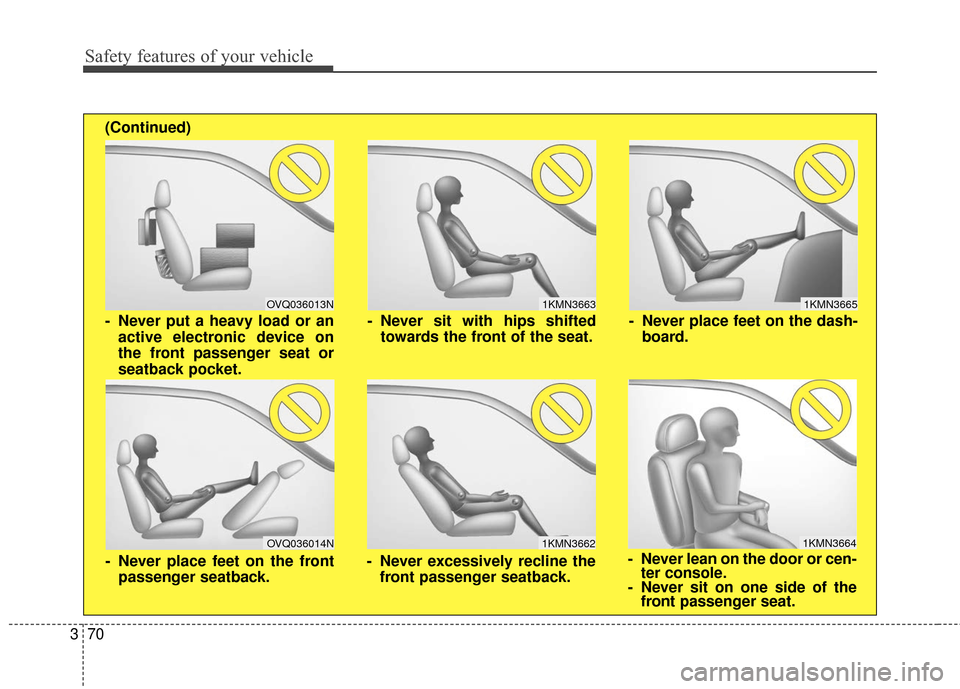
- Never sit with hips shifted
towards the front of the seat.
- Never lean on the door or cen-ter console.
- Never sit on one side of the front passenger seat.
- Never place feet on the dash-
board.
OVQ036013N
1KMN3662
- Never put a heavy load or anactive electronic device on
the front passenger seat or
seatback pocket.
- Never excessively recline thefront passenger seatback.
OVQ036014N
- Never place feet on the frontpassenger seatback.
(Continued)
Page 98 of 644
Safety features of your vehicle
82
3
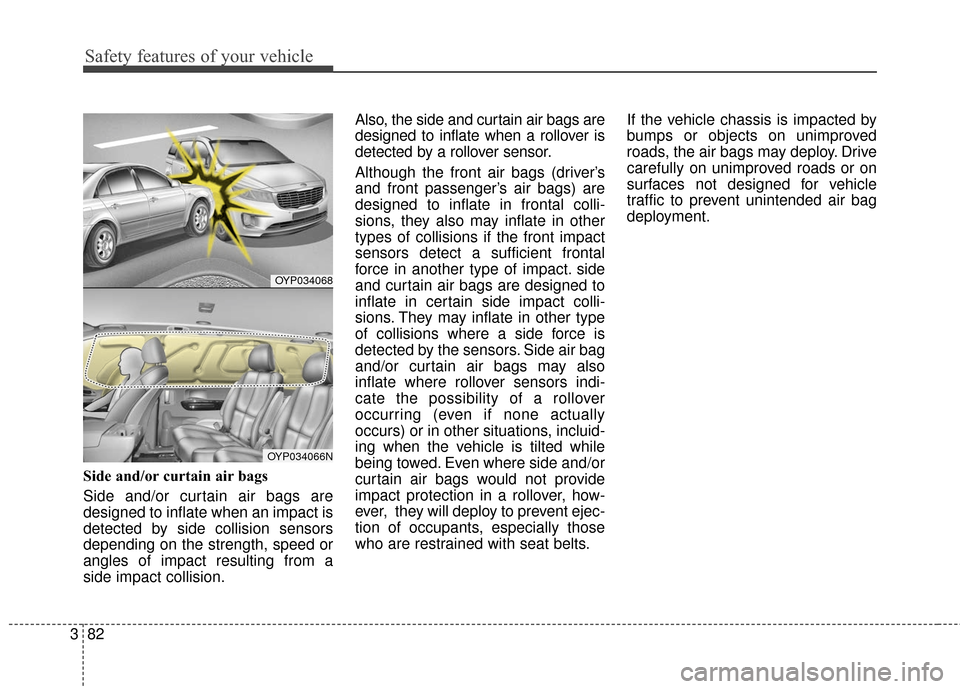
Side and/or curtain air bags
Side and/or curtain air bags are
designed to inflate when an impact is
detected by side collision sensors
depending on the strength, speed or
angles of impact resulting from a
side impact collision. Also, the side and curtain air bags are
designed to inflate when a rollover is
detected by a rollover sensor.
Although the front air bags (driver’s
and front passenger’s air bags) are
designed to inflate in frontal colli-
sions, they also may inflate in other
types of collisions if the front impact
sensors detect a sufficient frontal
force in another type of impact. side
and curtain air bags are designed to
inflate in certain side impact colli-
sions. They may inflate in other type
of collisions where a side force is
detected by the sensors. Side air bag
and/or curtain air bags may also
inflate where rollover sensors indi-
cate the possibility of a rollover
occurring (even if none actually
occurs) or in other situations, incluid-
ing when the vehicle is tilted while
being towed. Even where side and/or
curtain air bags would not provide
impact protection in a rollover, how-
ever, they will deploy to prevent ejec-
tion of occupants, especially those
who are restrained with seat belts.
If the vehicle chassis is impacted by
bumps or objects on unimproved
roads, the air bags may deploy. Drive
carefully on unimproved roads or on
surfaces not designed for vehicle
traffic to prevent unintended air bag
deployment.
OYP034068
OYP034066N
Page 102 of 644
Adding equipment to or modi-
fying your air bag-equipped
vehicle
If you modify your vehicle by chang-
ing your vehicle's frame, bumper sys-
tem, front end or side sheet metal or
ride height, this may affect the opera-
tion of your vehicle's air bag system.
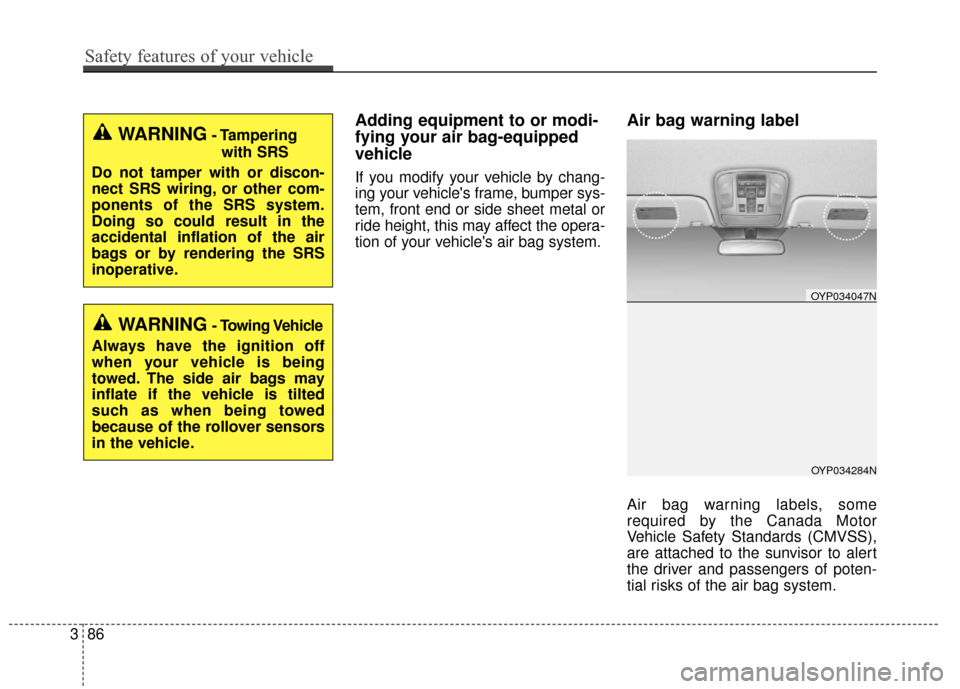
Air bag warning label
Air bag warning labels, some
required by the Canada Motor
Vehicle Safety Standards (CMVSS),
are attached to the sunvisor to alert
the driver and passengers of poten-
tial risks of the air bag system.
WARNING- Tamperingwith SRS
Do not tamper with or discon-
nect SRS wiring, or other com-
ponents of the SRS system.
Doing so could result in the
accidental inflation of the air
bags or by rendering the SRS
inoperative.
WARNING- Towing Vehicle
Always have the ignition off
when your vehicle is being
towed. The side air bags may
inflate if the vehicle is tilted
such as when being towed
because of the rollover sensors
in the vehicle.
OYP034284N
OYP034047N
386
Safety features of your vehicle
Page 120 of 644
Features of your vehicle
18
4
Using the button on the smart key
1. Press the tailgate unlock button
(5) for more than 1 second.
2. When all doors are locked, the hazard warning lights will blink two
times.
For Power Tailgate Only :
The Power Tailgate will open if the
button is pressed for more than 1
second. Also, once the tailgate is
opened and then closed, the tailgate
will be locked again automatically.
If the power tailgate is switched ‘Off’
using the button in the overhead con-
sole, the tailgate unlock button will
operate to unlock the tailgate as
described above.
For detailed information refer to the
“Power sliding door and power tail-
gate“ in this chapter.Panic
1. Press the panic button (6) for more than 1 second.
2. The horn sounds and hazard warning light flash for about 27
seconds.
✽ ✽NOTICE
To stop the horn and lights, press
any button on the smart key.
Start-up
You can start the engine without
inserting the key. For detailed infor-
mation refer to the “Engine start/stop
button” in chapter 5.
Loss of the smart key
A maximum of 2 smart keys can be
registered to a single vehicle.
If you happen to lose your smart key,
you will not be able to start the
engine. You should immediately take
the vehicle and remaining key to your
authorized Kia dealer(tow the vehi-
cle, if necessary) to protect it from
potential theft.
Page 128 of 644
Features of your vehicle
26
4
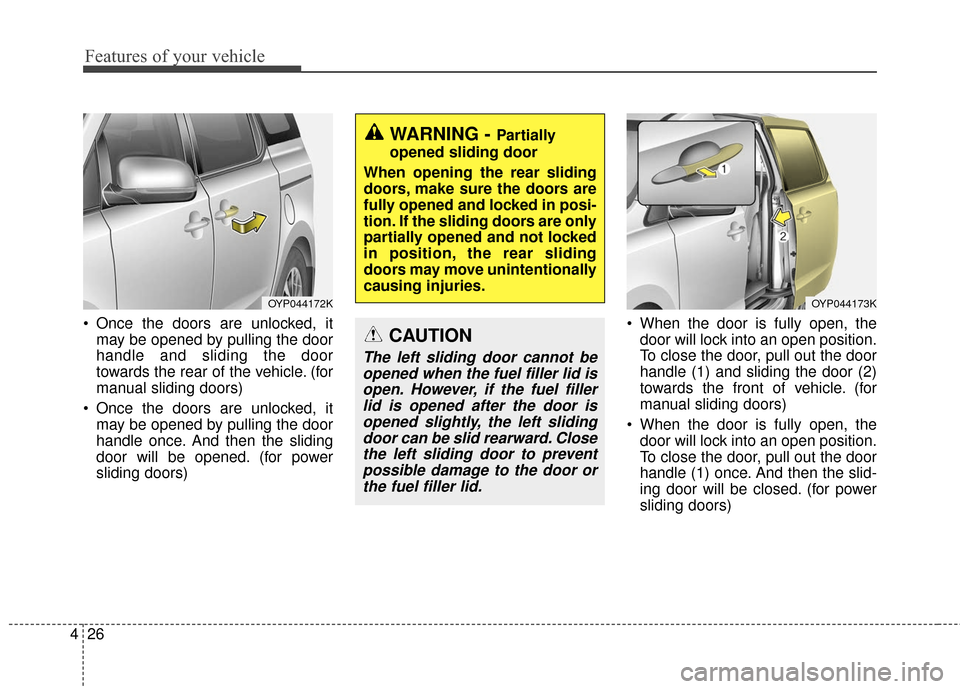
Once the doors are unlocked, it
may be opened by pulling the door
handle and sliding the door
towards the rear of the vehicle. (for
manual sliding doors)
Once the doors are unlocked, it may be opened by pulling the door
handle once. And then the sliding
door will be opened. (for power
sliding doors) When the door is fully open, the
door will lock into an open position.
To close the door, pull out the door
handle (1) and sliding the door (2)
towards the front of vehicle. (for
manual sliding doors)
When the door is fully open, the door will lock into an open position.
To close the door, pull out the door
handle (1) once. And then the slid-
ing door will be closed. (for power
sliding doors)
OYP044172K
WARNING - Partially
opened sliding door
When opening the rear sliding
doors, make sure the doors are
fully opened and locked in posi-
tion. If the sliding doors are only
partially opened and not locked
in position, the rear sliding
doors may move unintentionally
causing injuries.
CAUTION
The left sliding door cannot be opened when the fuel filler lid isopen. However, if the fuel fillerlid is opened after the door isopened slightly, the left slidingdoor can be slid rearward. Closethe left sliding door to preventpossible damage to the door orthe fuel filler lid.
OYP044173K
Page 173 of 644

471
Features of your vehicle
MIRRORS
Inside rearview mirror
Adjust the rearview mirror so that the
center view through the rear window
is seen. Make this adjustment before
you start driving.
Do not place objects in the rear seat
or cargo area which would interfere
with your vision through the rear win-
dow.
Day/night rearview mirror (if equipped)
Make this adjustment before you
start driving and while the day/night
lever is in the day position.
Pull the day/night lever toward you to
reduce the glare from the headlights
of the vehicles behind you during
night driving.
Remember that you lose somerearview clarity in the night position. Electrochromic mirror with
HomeLink system (if equipped)
To operate the electric rearview mirror
Press the I button (1) to turn the
automatic- dimming function on. The
mirror indicator light will illuminate.
Press the O button (2) to turn the
automatic- dimming function off. The
mirror indicator light will turn off.
WARNING- Mirror adjustment
Do not adjust the rearview mir-
ror while the vehicle is moving.
This could result in loss of con-
trol.
WARNING
Do not modify the inside mirror
and don’t install a wide mirror. It
could result in injury, during an
accident or deployment of the
air bag.
OAM049023
Day
Night
OHD046025N
Page 182 of 644
Features of your vehicle
80
4
Center (AUTO, 3) :
The mirror will fold or unfold auto-
matically as follows :
The mirror will fold or unfold when the door is locked or unlocked by
the folding key or smart key.
The mirror will fold or unfold when the door is locked or unlocked by the
button on the outside door handle.
The mirror will unfold when you approach the vehicle (all doors
closed and locked) with a smart
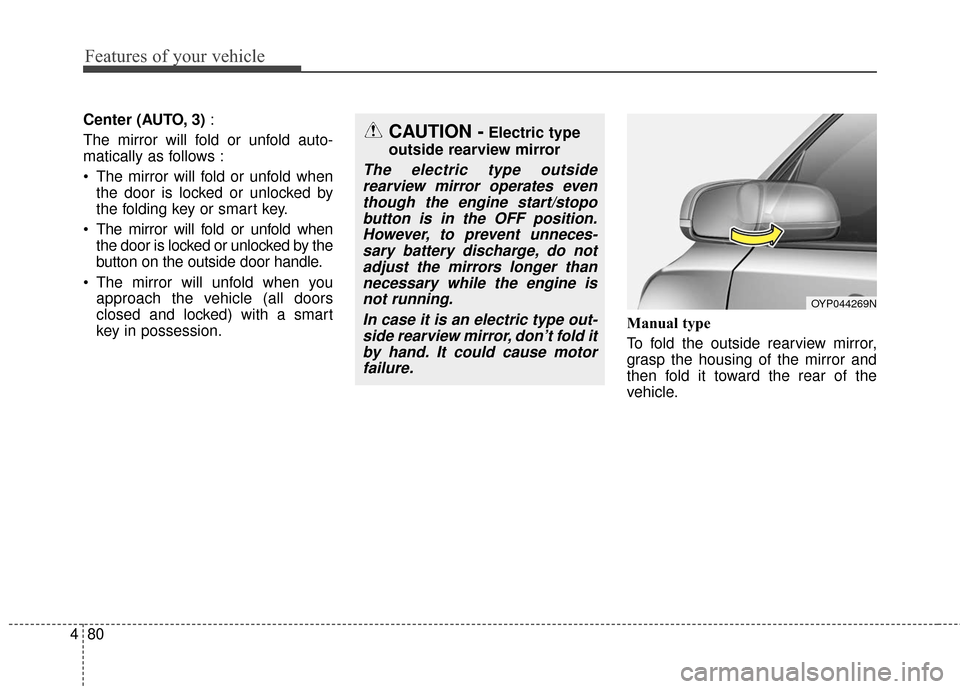
key in possession. Manual type
To fold the outside rearview mirror,
grasp the housing of the mirror and
then fold it toward the rear of the
vehicle.
OYP044269N
CAUTION -Electric type
outside rearview mirror
The electric type outside rearview mirror operates eventhough the engine start/stopobutton is in the OFF position.However, to prevent unneces-sary battery discharge, do notadjust the mirrors longer thannecessary while the engine isnot running.
In case it is an electric type out-side rearview mirror, don’t fold itby hand. It could cause motorfailure.
Page 187 of 644
485
Features of your vehicle
Engine Coolant TemperatureGauge
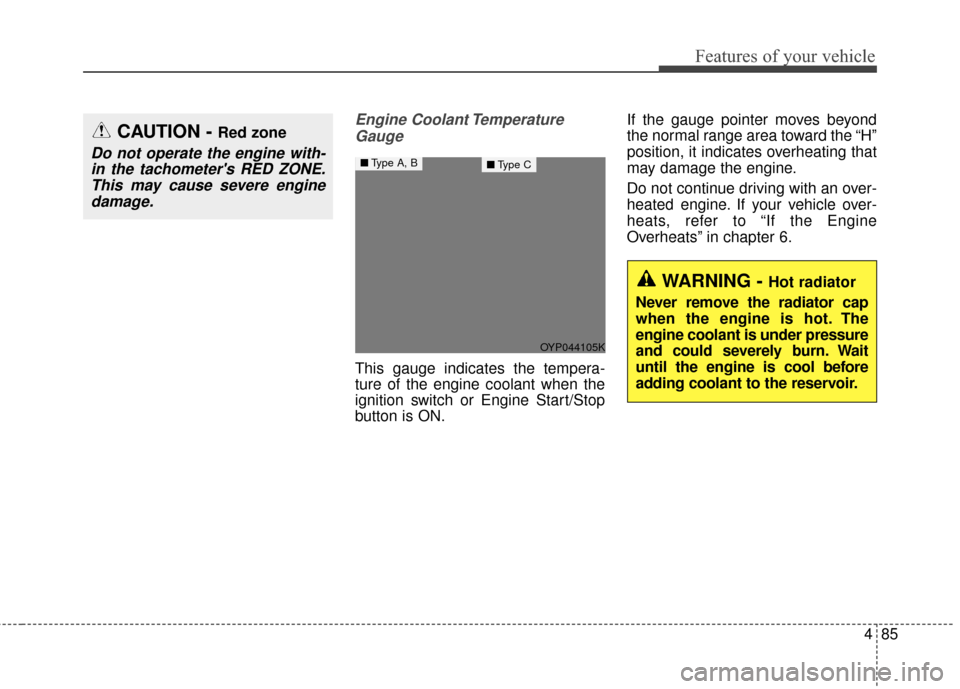
This gauge indicates the tempera-
ture of the engine coolant when the
ignition switch or Engine Start/Stop
button is ON. If the gauge pointer moves beyond
the normal range area toward the “H”
position, it indicates overheating that
may damage the engine.
Do not continue driving with an over-
heated engine. If your vehicle over-
heats, refer to “If the Engine
Overheats” in chapter 6.
CAUTION - Red zone
Do not operate the engine with-
in the tachometer's RED ZONE.This may cause severe enginedamage.
WARNING - Hot radiator
Never remove the radiator cap
when the engine is hot. The
engine coolant is under pressure
and could severely burn. Wait
until the engine is cool before
adding coolant to the reservoir.
OYP044105K
■ Type A, B■Type C
Page 211 of 644
4109
Features of your vehicle
Parking Brake & BrakeFluid Warning Light
This warning light illuminates :
Once you set the ignition switch or Engine Start/Stop Button to the ON
position.
- It illuminates for approximately 3seconds.
- It remains on if the parking brake is applied.
When the parking brake is applied.
When the brake fluid level in the reservoir is low.
- If the warning light illuminateswith the parking brake released, it
indicates the brake fluid level in
reservoir is low. If the brake fluid level in the reservoir
is low:
1. Drive carefully to the nearest safe
location and stop your vehicle.
2. With the engine stopped, check the brake fluid level immediately and add
fluid as required (For more details,
refer to “Brake Fluid” in chapter 7).
Then check all brake components
for fluid leaks. If any leaks in the
brake system is still found, the
warning light remains on, or the
brakes do not operate properly, do
not drive the vehicle.
In this case, have your vehicle
towed to an authorized Kia dealer
and inspected. Dual-diagonal braking system
Your vehicle is equipped with dual-
diagonal braking systems. This
means you still have braking on two
wheels even if one of the dual sys-
tems should fail.
With only one of the dual systems
working, more than normal pedal
travel and greater pedal pressure are
required to stop the vehicle.
Also, the vehicle will not stop in as
short a distance with only a portion
of the brake system working.
If the brakes fail while you are driv-
ing, shift to a lower gear for addition-
al engine braking and stop the vehi-
cle as soon as it is safe to do so.
Page 224 of 644
Features of your vehicle
122
4
This system will activate when
backing up with the ignition switch
ON.
If the vehicle is moving at a speed
over 5 km/h (3 mph), the system
may not be activated correctly.
The sensing distance while the back-up warning system is in oper-
ation is approximately 120 cm (47
in.) at the rear bumper center area,
60 cm (23.5 in.) at the rear bumper
both side area.
When more than two objects are sensed at the same time, the clos-
est one will be recognized first.Types of warning sound
When an object is 120 cm to 61 cm(47 in. to 24 in.) from the rear
bumper : Buzzer beeps intermit-
tently.
When an object is 60 cm to 31 cm (24 in. to 12 in.) from the rear
bumper : Buzzer beeps more fre-
quently.
When an object is within 30 cm (12 in.) of the rear bumper :
Buzzer sounds continuously.
Non-operational conditions of
rear parking assist system
The rear parking assist system
may not operate properly when :
1. Moisture is frozen to the sensor. (It will operate normally when the
moisture has been cleared.)
2. The sensor is covered with foreign matter, such as snow or water, or
the sensor cover is blocked. (It will
operate normally when the materi-
al is removed or the sensor is no
longer blocked.)
3. Driving on uneven road surfaces (unpaved roads, gravel, bumps,
gradient).
4. Objects generating excessive noise (vehicle horns, loud motor-
cycle engines, or truck air brakes)
are within range of the sensor.
5. Heavy rain or water spray exists.
6. Wireless transmitters or mobile phones are within range of the
sensor.
7. The sensor is covered with snow.
8. Trailer towing