charging KIA Sedona 2016 3.G Owner's Manual
[x] Cancel search | Manufacturer: KIA, Model Year: 2016, Model line: Sedona, Model: KIA Sedona 2016 3.GPages: 644, PDF Size: 19.23 MB
Page 24 of 644
Safety features of your vehicle
83
Front seat adjustment - power
(if equipped)
The front seat can be adjusted by
using the control switches located on
the outside of the seat cushion.
Before driving, adjust the seat to the
proper position so you can easily con-
trol the steering wheel, pedals and
switches on the instrument panel.When in operation, the power seat-
consumes a large amount of electri-
cal power. To prevent unnecessary
charging system drain, don’t adjust
the power seat longer than neces-
sary while the engine is not running.
CAUTION- Power seat
adjustments
The power seating controlsfunction by electronic motor.
Excessive operation may causedamage to the electrical equip-ment.
CAUTION- Power Seating
Do not operate two or morepower seat control switches atthe same time. Doing so maydamage the power seat motor orelectrical components.
WARNING- Unattended
children
Do not leave children unattend-
ed in the vehicle. Children might
operate features of the vehicle
that could injure them.
Page 214 of 644
Features of your vehicle
112
4
Malfunction Indicator
Lamp (MIL)
This warning light illuminates :
Once you set the ignition switch or Engine Start/Stop Button to the ON
position.
- It remains on until the engine isstarted.
When there is a malfunction with the emission control system.
In this case, have your vehicle
inspected by an authorized Kia
dealer.
Charging System
Warning Light
This warning light illuminates :
Once you set the ignition switch or Engine Start/Stop Button to the ON
position.
- It remains on until the engine isstarted.
When there is a malfunction with either the alternator or electrical
charging system.
CAUTION - Catalytic con-
verter
If the Malfunction IndicatorLamp (MIL) illuminates, poten-tial catalytic converter damageis possible which could result inloss of engine power.
In this case, have your vehicleinspected by an authorized Kiadealer as soon as possible.
CAUTION - Malfunction
Indicator
Lamp (MIL)
Driving with the MalfunctionIndicator Lamp (MIL) on maycause damage to the emissioncontrol systems which couldeffect drivability and/or fueleconomy.
Page 215 of 644
4113
Features of your vehicle
If there is a malfunction with either
the alternator or electrical charging
system :
1. Drive carefully to the nearest safelocation and stop your vehicle.
2. Turn the engine off and check the alternator drive belt for looseness
or breakage.
If the belt is adjusted properly,
there may be a problem in the
electrical charging system.
In this case, have your vehicle
inspected by an authorized Kia
dealer as soon as possible.Engine Oil Pressure Warning Light
This warning light illuminates :
Once you set the ignition switch or Engine Start/Stop Button to the ON
position.
- It remains on until the engine isstarted.
When the engine oil pressure is low.
If the engine oil pressure is low :
1. Drive carefully to the nearest safe location and stop your vehicle.
2. Turn the engine off and check the engine oil level (For more details,
refer to “Engine Oil” in section 7). If
the level is low, add oil as required.
If the warning light remains on
after adding oil or if oil is not avail-
able, have your vehicle inspected
by an authorized Kia dealer as
soon as possible.
CAUTION - Engine damage
If the engine is not stopped
immediately after the engine oilpressure warning light is illumi-nated and stays on while theengine is running, seriousengine damage may result.
Page 246 of 644
Features of your vehicle
144
4
1. Remove the batteries when not in
use for a long time.
2. Use the specified battery.
3. You can use the regular batteries (Disposable batteries) but do not
use the Non-rechargeable battery
in charge mode. It may damage
the vehicle.
4. Do not place the lamp with water or moist places and liquid com-
pounds. These can cause internal
leakage of a battery.
5. When replacing the batteries, check the direction and insert.
It will not be charged if installed
reversely. 6. Do not mix the rechargeable bat-
teries.
It may not be charged normally.
7. Do not place the lamp or batteries near fire or heat. It can cause
internal leakage of a battery.
8. Do not apply electrical shock with portable charging terminals of the
lamp.
It can cause internal leakage of a
battery or damage the portable
lamp.
9. If the portable lamp does not turn on anymore after charged, replace
the rechargeable batteries.Battery replacement
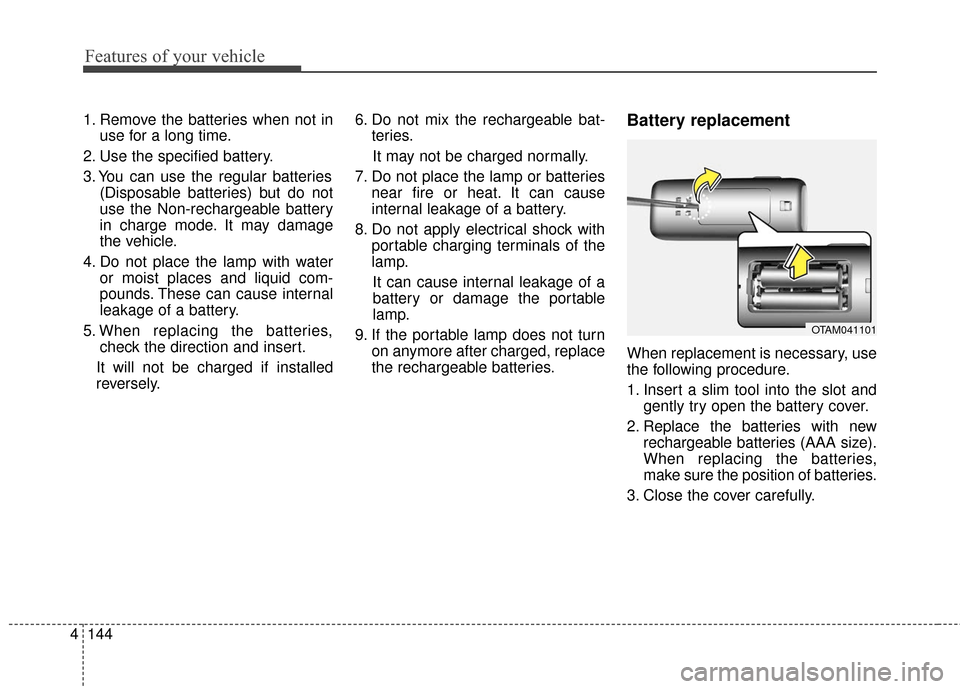
When replacement is necessary, use
the following procedure.
1. Insert a slim tool into the slot andgently try open the battery cover.
2. Replace the batteries with new rechargeable batteries (AAA size).
When replacing the batteries,
make sure the position of batteries.
3. Close the cover carefully.
OTAM041101
Page 297 of 644
4195
Features of your vehicle
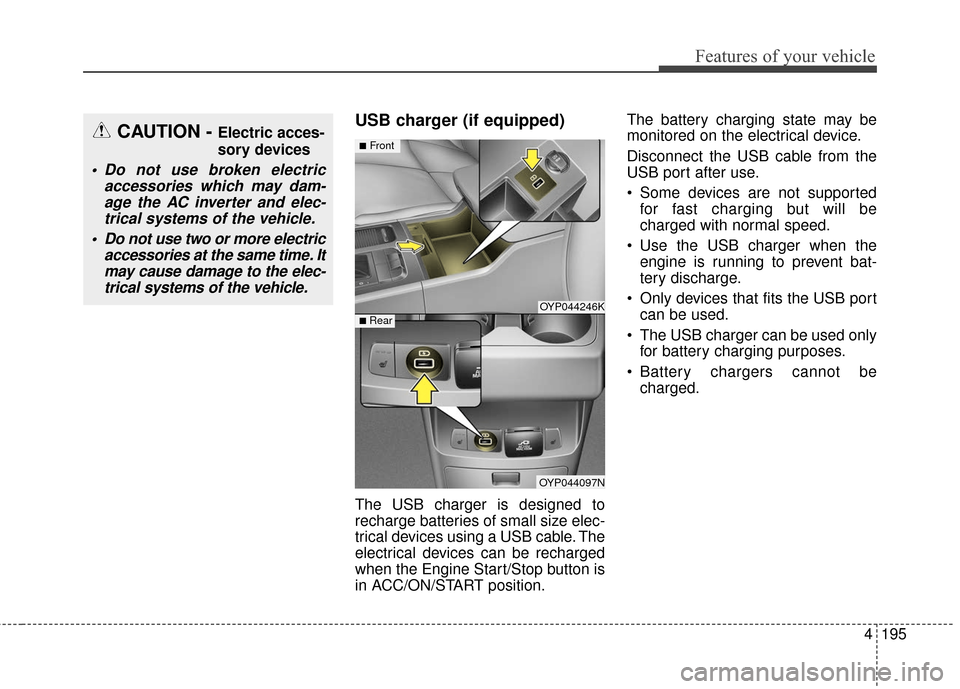
USB charger (if equipped)
The USB charger is designed to
recharge batteries of small size elec-
trical devices using a USB cable. The
electrical devices can be recharged
when the Engine Start/Stop button is
in ACC/ON/START position.The battery charging state may be
monitored on the electrical device.
Disconnect the USB cable from the
USB port after use.
Some devices are not supported
for fast charging but will be
charged with normal speed.
Use the USB charger when the engine is running to prevent bat-
tery discharge.
Only devices that fits the USB port can be used.
The USB charger can be used only for battery charging purposes.
Battery chargers cannot be charged.
CAUTION - Electric acces-
sory devices
Do not use broken electric accessories which may dam-age the AC inverter and elec-trical systems of the vehicle.
Do not use two or more electric accessories at the same time. Itmay cause damage to the elec-trical systems of the vehicle.
OYP044246K
OYP044097N
■Front
■ Rear
Page 311 of 644
4209
Features of your vehicle
(Continued)
If you use devices such as a USBhub purchased separately, the
vehicle’s audio system may not
recognize the USB device. In that
case, connect the USB device
directly to the multimedia terminal
of the vehicle.
If the USB device is divided by log- ical drives, only the music files on
the highest-priority drive are recog-
nized by car audio.
Devices such as MP3 Player/ Cellular phone/Digital camera can
be unrecognizable by standard
USB I/F can be unrecognizable.
Charging through the USB may not be supported in some mobile
devices.
USB HDD or USB types liable to connection failures due to vehicle
vibrations are not supported. (i-stick
type)
Some non-standard USB devices (METAL COVER TYPE USB) can
be unrecognizable.
(Continued)(Continued)
Some USB flash memory readers
(such as CF, SD, micro SD, etc.) or
external-HDD type devices can be
unrecognizable.
Music files protected by DRM (DIGITAL RIGHTS MANAGE-
MENT) are not recognizable.
The data in the USB memory may be lost while using this audio.
Always back up important data on
a personal storage device.
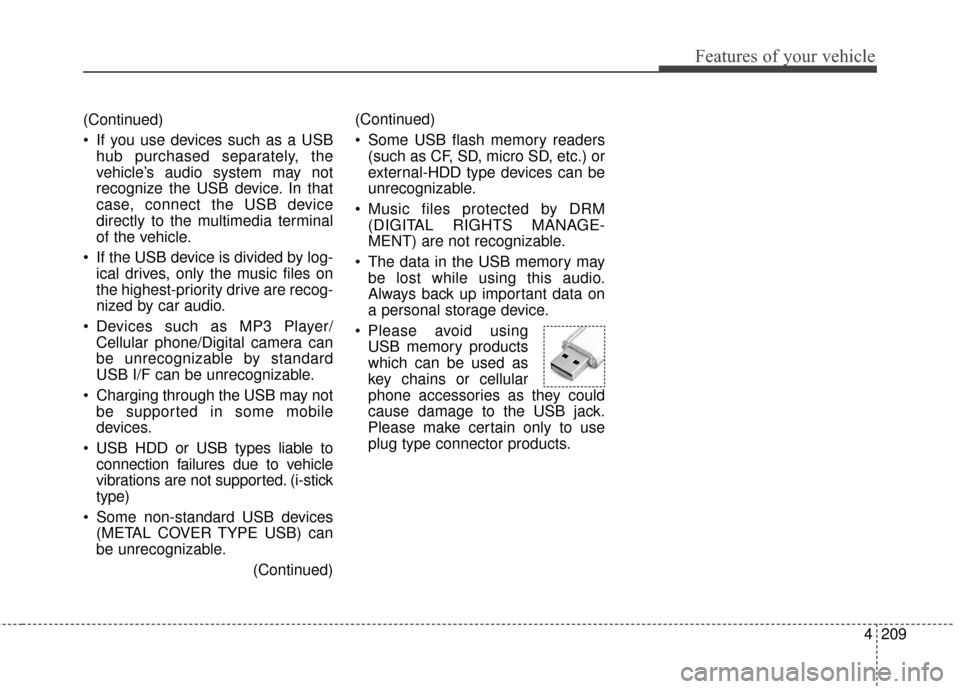
Please avoid using USB memory products
which can be used as
key chains or cellular
phone accessories as they could
cause damage to the USB jack.
Please make certain only to use
plug type connector products.
Page 574 of 644

Maintenance
46
7
BATTERY
For best battery service
Keep the battery securely mount-
ed.
Keep the battery top clean and dry.
Keep the terminals and connec- tions clean, tight, and coated with
petroleum jelly or terminal grease.
Rinse any spilled electrolyte from the battery immediately with a
solution of water and baking soda.
If the vehicle is not going to be used for an extended time, discon-
nect the battery cables. Always read the following
instructions carefully when
handling a battery.
If any electrolyte gets into your eyes, flush your eyes
with clean water for at least
15 minutes and get immedi-
ate medical attention.
If electrolyte gets on your
skin, thoroughly wash the
contacted area. If you feel
pain or burning sensation,
get medical attention imme-
diately.
An inappropriately disposed battery can be harmful to the
environment and human
health. Dispose the battery
according to your local law(s)
or regulation.
Never attempt to recharge the bat-
tery when the battery cables are con-
nected.
OYP074064N
WARNING- Risk of explosion
Keep lit cigarettes and
all other flames or
sparks away from the
battery.
The battery contains hydrogen -- a highly
combustible gas which
will explode if it comes
in contact with a flame or
spark.
Keep batteries out of the reach of children
because batteries con-
tain highly corrosive
SULFURIC ACID and
electrolytes. Do not
allow battery acid to
contact your skin, eyes,
clothing or paint finish.
Wear eye protection when charging or work-
ing near a battery.
Always provide ventila-
tion when working in an
enclosed space.
Page 575 of 644

747
Maintenance
✽
✽NOTICE
If you connect unauthorized elec-
tronic devices to the battery, the bat-
tery may be discharged. Never use
unauthorized devices.
Battery recharging
Your vehicle has a maintenance-free,
calcium-based battery.
If the battery becomes discharged
in a short time (because, for exam-
ple, the headlights or interior lights
were left on while the vehicle was
not in use), recharge it by slow
charging (trickle) for 10 hours.
If the battery gradually discharges because of high electric load while
the vehicle is being used, recharge
it at 20-30A for two hours. When recharging the battery,
observe the following precautions:
The battery must be removed from
the vehicle and placed in an area
with good ventilation.
Do not allow cigarettes, sparks, or flame near the battery.
Watch the battery during charging, and stop or reduce the charging
rate if the battery cells begin
gassing (boiling) violently or if the
temperature of the electrolyte of
any cell exceeds 49°C (120°F).
Wear eye protection when check- ing the battery during charging.
Disconnect the battery charger in the following order.
1. Turn off the battery charger main switch.
2. Unhook the negative clamp from the negative battery terminal.
3. Unhook the positive clamp from the positive battery terminal.WARNING- Risk of elec-
trocution
Never touch the electrical igni-
tion system while the vehicle is
running. This system works
with high voltage which can
"zap" you.
Page 576 of 644
Maintenance
48
7
Before performing maintenance or
recharging the battery, turn off all
accessories and stop the engine.
The negative battery cable must be removed first and installed last
when the battery is disconnected.Reset items
Items should be reset after the bat-
tery has been discharged or the bat-
tery has been disconnected.
Auto up/down window (See chapter 4)
Sunroof (See chapter 4)
Trip computer (See chapter 4)
Climate control system (See chapter 4)
Clock (See chapter 4)
Audio (See chapter 4)
Page 637 of 644

I3
Index
Battery. . . . . . . . . . . . . . . . . . . . . . . . . . . . . . . . . . . . \
. . 7-46Battery recharging . . . . . . . . . . . . . . . . . . . . . . . . . 7-47
For best battery service . . . . . . . . . . . . . . . . . . . . . . 7-46
Reset items . . . . . . . . . . . . . . . . . . . . . . . . . . . . . . . . 7-48
Before driving . . . . . . . . . . . . . . . . . . . . . . . . . . . . . . . . . 5-4 Before entering vehicle . . . . . . . . . . . . . . . . . . . . . . . 5-4
Before starting . . . . . . . . . . . . . . . . . . . . . . . . . . . . . . 5-4
Necessary inspections . . . . . . . . . . . . . . . . . . . . . . . . 5-4
Blind spot detection system (BSD) . . . . . . . . . . . . . . . 5-56 BSD (Blind Spot Detection) / LCA (Lane Change Assist) . . . . . . . . . . . . . . . . . . 5-57
Non-operating condition . . . . . . . . . . . . . . . . . . . . . 5-62
RCTA (Rear Cross Traffic Alert) . . . . . . . . . . . . . . . 5-60
Brake fluid . . . . . . . . . . . . . . . . . . . . . . . . . . . . . . . . . . 7-35\
Checking the brake fluid level . . . . . . . . . . . . . . . . . 7-35
Brake system. . . . . . . . . . . . . . . . . . . . . . . . . . . . . . . . . 5-19 Anti-lock brake system (ABS) . . . . . . . . . . . . . . . . . 5-22
Electronic stability control (ESC) . . . . . . . . . . . . . . 5-25
Good braking practices . . . . . . . . . . . . . . . . . . . . . . 5-31
Hill-start assist control (HAC) . . . . . . . . . . . . . . . . . 5-30
Parking brake – Foot type . . . . . . . . . . . . . . . . . . . . 5-21
Power brakes . . . . . . . . . . . . . . . . . . . . . . . . . . . . . . 5-19
Vehicle stability management (VSM) . . . . . . . . . . . 5-29
Bulb wattage . . . . . . . . . . . . . . . . . . . . . . . . . . . . . . . . . . 8-3 Child restraint system . . . . . . . . . . . . . . . . . . . . . . . . . . 3-51
Child restraint system. . . . . . . . . . . . . . . . . . . . . . . . 3-52
Lower anchor system . . . . . . . . . . . . . . . . . . . . . . . . 3-57
Tether anchor system . . . . . . . . . . . . . . . . . . . . . . . . 3-56
Clean air . . . . . . . . . . . . . . . . . . . . . . . . . . . . . . . . . . . 4-\
185
Climate control air filter . . . . . . . . . . . . . . . . . . . . . . . . 7-40 Filter inspection . . . . . . . . . . . . . . . . . . . . . . . . . . . . 7-40
Cruise control system . . . . . . . . . . . . . . . . . . . . . . . . . . 5-33 To cancel cruise control . . . . . . . . . . . . . . . . . . . . . . 5-35
To decrease the cruising speed . . . . . . . . . . . . . . . . . 5-34
To increase cruise control set speed . . . . . . . . . . . . . 5-34
To resume cruising speed at more than approximately 30 km/h (20 mph): . . . . . . . . . . . . . 5-36
To set cruise control speed . . . . . . . . . . . . . . . . . . . . 5-33
To temporarily accelerate with the cruise control on . . 5-35
To turn cruise control off . . . . . . . . . . . . . . . . . . . . . 5-36
Defroster . . . . . . . . . . . . . . . . . . . . . . . . . . . . . . . . . . 4-14\
5 Rear window defroster . . . . . . . . . . . . . . . . . . . . . . 4-145
Dimensions . . . . . . . . . . . . . . . . . . . . . . . . . . . . . . . . . . . 8-\
2
Door locks. . . . . . . . . . . . . . . . . . . . . . . . . . . . . . . . . . . 4-\
25 Automatic door lock system . . . . . . . . . . . . . . . . . . 4-30
Child-protector rear door lock . . . . . . . . . . . . . . . . . 4-30
Impact sensing door unlock system . . . . . . . . . . . . . 4-30
CB
D