service KIA Sedona 2016 3.G Owner's Manual
[x] Cancel search | Manufacturer: KIA, Model Year: 2016, Model line: Sedona, Model: KIA Sedona 2016 3.GPages: 644, PDF Size: 19.23 MB
Page 1 of 644
Kia, THE COMPANY
Thank you for becoming the owner of a new Kia vehicle.
As a global car manufacturer focused on building high-quality vehi-
cles with exceptional value, Kia Motors is dedicated to providing you
with a customer service experience that exceeds your expectations.
All information contained in this Owner’s Manual was accurate at the
time of publication. However, Kia reserves the right to make changes
at any time so that our policy of continual product improvement can
be carried out.
This manual applies to all models of this vehicle and includes descrip-
tions and explanations of optional as well as standard equipment. As a
result, you may encounter material in this manual that is not applica-
ble to your specific Kia vehicle.Drive safely and enjoy your Kia!
Page 2 of 644
i
Thank you for choosing a Kia vehicle.
When you require service, remember that your Kia dealer
knows your vehicle best. Your dealer has factory-trained tech-
nicians, recommended special tools and genuine Kia replace-
ment parts. It is dedicated to your complete customer satisfac-
tion.
Because subsequent owners require this important information
as well, this publication should remain with the vehicle if it is
sold.
This manual will familiarize you with operational, mainte-
nance and safety information about your new vehicle. It is sup-
plemented by a Warranty and Consumer Information manual
that provides important information on all warranties regarding
your vehicle.
We urge you to read these publications carefully and follow the
recommendations to help assure enjoyable and safe operation
of your new vehicle.
Kia offers a great variety of options, components and features
for its various models. Therefore, some of the equipment
described in this manual, along with the various illustrations,
may not be applicable to your particular vehicle.
The information and specifications provided in this manual
were accurate at the time of printing. Kia reserves the right to
discontinue or change specifications or design at any time
without notice and without incurring any obligation. If you
have questions, always check with your Kia dealer.
We assure you of our continuing interest in your motoring
pleasure and satisfaction in your Kia vehicle.
© 2015 Kia Canada Inc.
All rights reserved. Reproduction by any means, electronic or
mechanical, including photocopying, recording, or by any
information storage and retrieval system or translation in
whole or part is not permitted without written authorization
from Kia Canada Inc..
Printed in Korea
Foreword
Page 101 of 644
385
Safety features of your vehicle
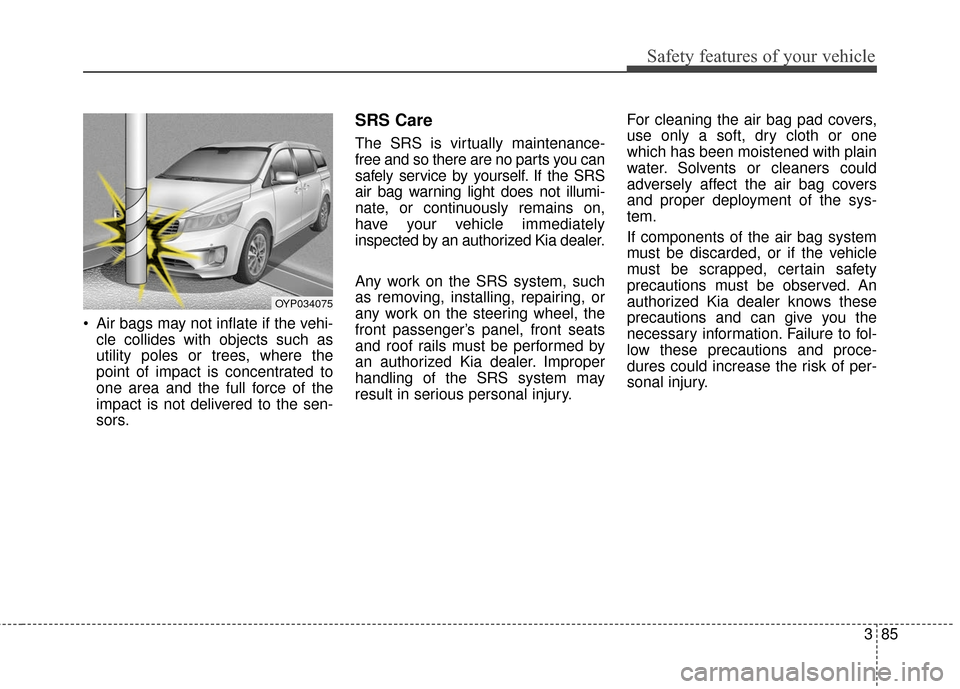
Air bags may not inflate if the vehi-cle collides with objects such as
utility poles or trees, where the
point of impact is concentrated to
one area and the full force of the
impact is not delivered to the sen-
sors.
SRS Care
The SRS is virtually maintenance-
free and so there are no parts you can
safely service by yourself. If the SRS
air bag warning light does not illumi-
nate, or continuously remains on,
have your vehicle immediately
inspected by an authorized Kia dealer.
Any work on the SRS system, such
as removing, installing, repairing, or
any work on the steering wheel, the
front passenger’s panel, front seats
and roof rails must be performed by
an authorized Kia dealer. Improper
handling of the SRS system may
result in serious personal injury. For cleaning the air bag pad covers,
use only a soft, dry cloth or one
which has been moistened with plain
water. Solvents or cleaners could
adversely affect the air bag covers
and proper deployment of the sys-
tem.
If components of the air bag system
must be discarded, or if the vehicle
must be scrapped, certain safety
precautions must be observed. An
authorized Kia dealer knows these
precautions and can give you the
necessary information. Failure to fol-
low these precautions and proce-
dures could increase the risk of per-
sonal injury.
OYP034075
Page 104 of 644

• Sunshade . . . . . . . . . . . . . . . . . . . . . . . . . . . . . . . . . . . 4-\
65
• Resetting the sunroof . . . . . . . . . . . . . . . . . . . . . . . . . 4-65
• Rear sunroof lock . . . . . . . . . . . . . . . . . . . . . . . . . . . . 4-66
• Sunroof open warning. . . . . . . . . . . . . . . . . . . . . . . . . 4-66
Steering wheel . . . . . . . . . . . . . . . . . . . . . . . . . . . . . 4-67
• Power steering . . . . . . . . . . . . . . . . . . . . . . . . . . . . . . . 4-67
• Electric power steering . . . . . . . . . . . . . . . . . . . . . . . . 4-67
• Tilt and telescopic steering . . . . . . . . . . . . . . . . . . . . 4-68
• Heated steering wheel . . . . . . . . . . . . . . . . . . . . . . . . . 4-69
• Horn . . . . . . . . . . . . . . . . . . . . . . . . . . . . . . . . . . . . \
. . . 4-70
Mirrors . . . . . . . . . . . . . . . . . . . . . . . . . . . . . . . . . . 4-71\
• Inside rearview mirror . . . . . . . . . . . . . . . . . . . . . . . . 4-71
• Outside rearview mirror . . . . . . . . . . . . . . . . . . . . . . 4-77
Instrument cluster . . . . . . . . . . . . . . . . . . . . . . . . . 4-82
• Instrument cluster control . . . . . . . . . . . . . . . . . . . . . 4-83
• LCD display control . . . . . . . . . . . . . . . . . . . . . . . . . . 4-83
• Gauges . . . . . . . . . . . . . . . . . . . . . . . . . . . . . . . . . . . . \
. 4-84
• Transaxle shift indicator . . . . . . . . . . . . . . . . . . . . . . . 4-88
LCD display . . . . . . . . . . . . . . . . . . . . . . . . . . . . . . 4-89
• LCD modes. . . . . . . . . . . . . . . . . . . . . . . . . . . . . . . . . .\
4-89
• Service mode . . . . . . . . . . . . . . . . . . . . . . . . . . . . . . . . 4-90
• User settings mode. . . . . . . . . . . . . . . . . . . . . . . . . . . . 4-92
• Turn by turn mode . . . . . . . . . . . . . . . . . . . . . . . . . . . 4-96
• SCC/LDWS mode . . . . . . . . . . . . . . . . . . . . . . . . . . . . 4-96
• A/V mode . . . . . . . . . . . . . . . . . . . . . . . . . . . . . . . . . . . 4-\
96• Warning messages . . . . . . . . . . . . . . . . . . . . . . . . . . . . 4-97
Trip computer . . . . . . . . . . . . . . . . . . . . . . . . . . . . 4-103
• Overview . . . . . . . . . . . . . . . . . . . . . . . . . . . . . . . . . . 4-10\
3
• Trip A/B . . . . . . . . . . . . . . . . . . . . . . . . . . . . . . . . . . . 4-\
104
• Fuel economy . . . . . . . . . . . . . . . . . . . . . . . . . . . . . . . 4-105
• Digital speedometer . . . . . . . . . . . . . . . . . . . . . . . . . . 4-107
• One time driving information mode . . . . . . . . . . . . 4-107
Warning and indicator lights . . . . . . . . . . . . . . . 4-108
• Warning lights . . . . . . . . . . . . . . . . . . . . . . . . . . . . . . 4-108
• Indicator lights . . . . . . . . . . . . . . . . . . . . . . . . . . . . . . 4-115
Rear parking assist system . . . . . . . . . . . . . . . . . 4-121
• Operation of the rear parking assist system . . . . . . 4-121
• Non-operational conditions of
rear parking assist system . . . . . . . . . . . . . . . . . . . 4-122
• Rear parking assist system precautions . . . . . . . . . 4-123
• Self-diagnosis . . . . . . . . . . . . . . . . . . . . . . . . . . . . . . . 4-124
Parking assist system . . . . . . . . . . . . . . . . . . . . . . 4-125
• Operation of the parking assist system . . . . . . . . . . 4-125
• Non-operational conditions of parking assist system . 4-127
• Self-diagnosis . . . . . . . . . . . . . . . . . . . . . . . . . . . . . . . 4-128
Rearview camera . . . . . . . . . . . . . . . . . . . . . . . . . 4-129
360° camera monitoring system . . . . . . . . . . . . . 4-130
Lighting . . . . . . . . . . . . . . . . . . . . . . . . . . . . . . . . . 4-131
• Battery saver function. . . . . . . . . . . . . . . . . . . . . . . . 4-131
• Headlight escort function . . . . . . . . . . . . . . . . . . . . . 4-131
4
Page 126 of 644
Features of your vehicle
24
4
✽
✽
NOTICE
• Avoid trying to start the engine
while the alarm is activated. The
vehicle starting motor is disabled
during the theft-alarm stage.
- If the system is not disarmed withthe transmitter, insert the key
into the ignition switch, turn the
ignition switch to the ON position
and wait for 30 seconds. Then the
system will be disarmed.
- If the system is not disarmed with the smart key, press the engine
start/stop button with smart key.
The side with the lock button
should contact the engine
start/stop button directly.
• If you lose your keys, consult your authorized Kia dealer.
✽ ✽ NOTICE
Malfunctions caused by improper
alterations, adjustments or modifi-
cations to the theft-alarm system are
not covered by your vehicle manu-
facturer warranty.
CAUTION - Adjusting
alarm system
Do not change, alter or adjust
the theft-alarm system becauseit could cause the theft-alarmsystem to malfunction andshould only be serviced by anauthorized Kia dealer.
Page 175 of 644
473
Features of your vehicle
✽
✽NOTICE
For non rolling code garage door
openers, follow steps 2 - 3.
For rolling code garage door open-
ers, follow steps 2 - 6.
For Canadian Programming, please
follow the Canadian Programming
section.
For help with determining whether
your garage door opener is non-
rolling code or rolling code, please
refer to the garage door openers
owner’s manual or contact
HomeLink customer service at 1-
800-355-3515.
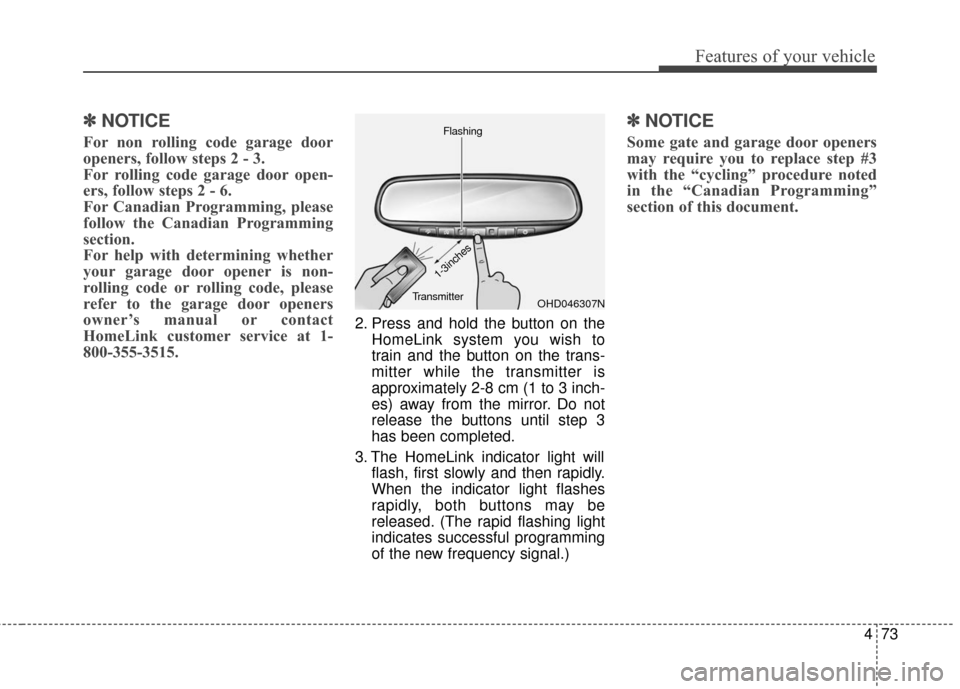
2. Press and hold the button on the
HomeLink system you wish to
train and the button on the trans-
mitter while the transmitter is
approximately 2-8 cm (1 to 3 inch-
es) away from the mirror. Do not
release the buttons until step 3
has been completed.
3. The HomeLink indicator light will flash, first slowly and then rapidly.
When the indicator light flashes
rapidly, both buttons may be
released. (The rapid flashing light
indicates successful programming
of the new frequency signal.)
✽ ✽NOTICE
Some gate and garage door openers
may require you to replace step #3
with the “cycling” procedure noted
in the “Canadian Programming”
section of this document.
OHD046307N
Flashing
1-3inches
Transmitter
Page 191 of 644
489
Features of your vehicle
LCD DISPLAY (IF EQUIPPED)
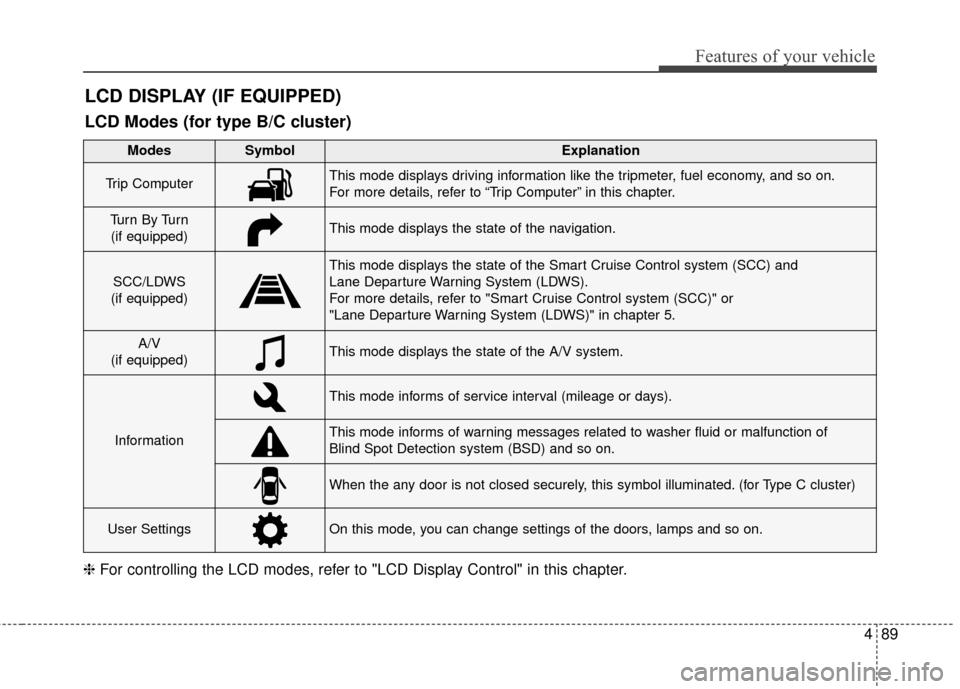
❈For controlling the LCD modes, refer to "LCD Display Control" in this chapter.
LCD Modes (for type B/C cluster)
Modes SymbolExplanation
Trip ComputerThis mode displays driving information like the tripmeter, fuel economy, and so on.
For more details, refer to “Trip Computer” in this chapter.
Tu r n B y Tu r n
(if equipped)This mode displays the state of the navigation.
SCC/LDWS
(if equipped)
This mode displays the state of the Smart Cruise Control system (SCC) and
Lane Departure Warning System (LDWS).
For more details, refer to "Smart Cruise Control system (SCC)" or
"Lane Departure Warning System (LDWS)" in chapter 5.
A/V
(if equipped)This mode displays the state of the A/V system.
Information
This mode informs of service interval (mileage or days).
This mode informs of warning messages related to washer fluid or malfunction of
Blind Spot Detection system (BSD) and so on.
When the any door is not closed securely, this symbol illuminated. (for Type C cluster)
User SettingsOn this mode, you can change settings of the doors, lamps and so on.
Page 192 of 644
Features of your vehicle
90
4
Service Mode
Service Interval
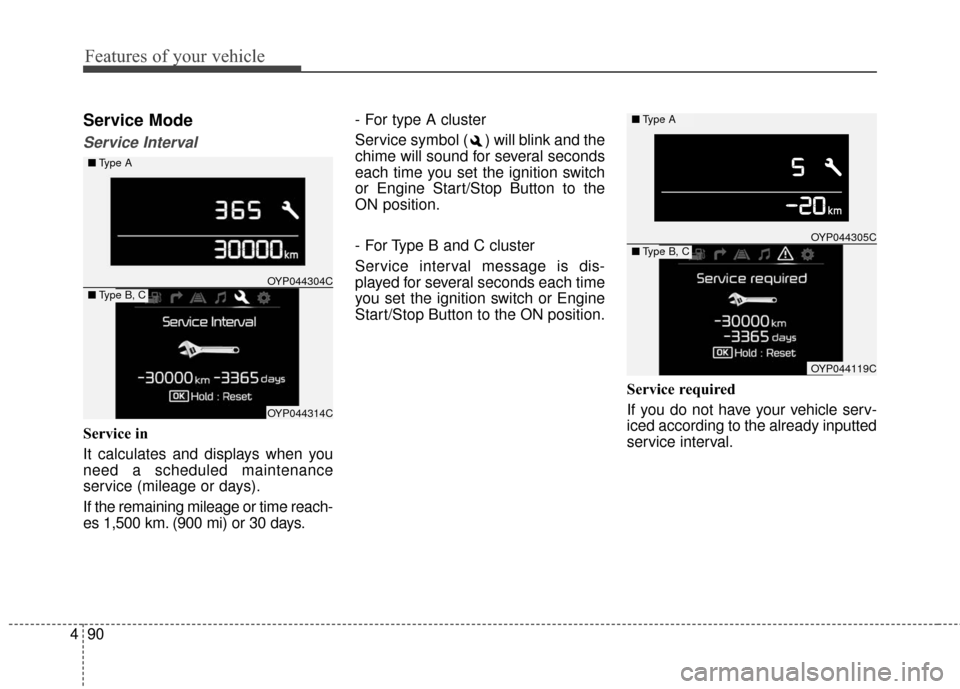
Service in
It calculates and displays when you
need a scheduled maintenance
service (mileage or days).
If the remaining mileage or time reach-
es 1,500 km. (900 mi) or 30 days. - For type A cluster
Service symbol ( ) will blink and the
chime will sound for several seconds
each time you set the ignition switch
or Engine Start/Stop Button to the
ON position.
- For Type B and C cluster
Service interval message is dis-
played for several seconds each time
you set the ignition switch or Engine
Start/Stop Button to the ON position.
Service required
If you do not have your vehicle serv-
iced according to the already inputted
service interval.
OYP044304C
OYP044314C
■Type A
■Type B, C
OYP044305C
OYP044119C
■Type A
■Type B, C
Page 193 of 644
491
Features of your vehicle
- For type A cluster
Service symbol ( ) will blink and the
chime will sound for several seconds
each time
you set the ignition switch or Engine
Start/Stop Button to the ON position.
- For Type B and C cluster
“Service required” message is dis-
played for several seconds each time
you set the ignition switch or Engine
Start/Stop Button to the ON position.
To reset the service interval to the
mileage and days you inputted
before:
- For Type A clusterConsult your authorized Kia dealer.
- For Type B and C cluster Press the RESET button (OK) for
more than 1 second. Service interval OFF
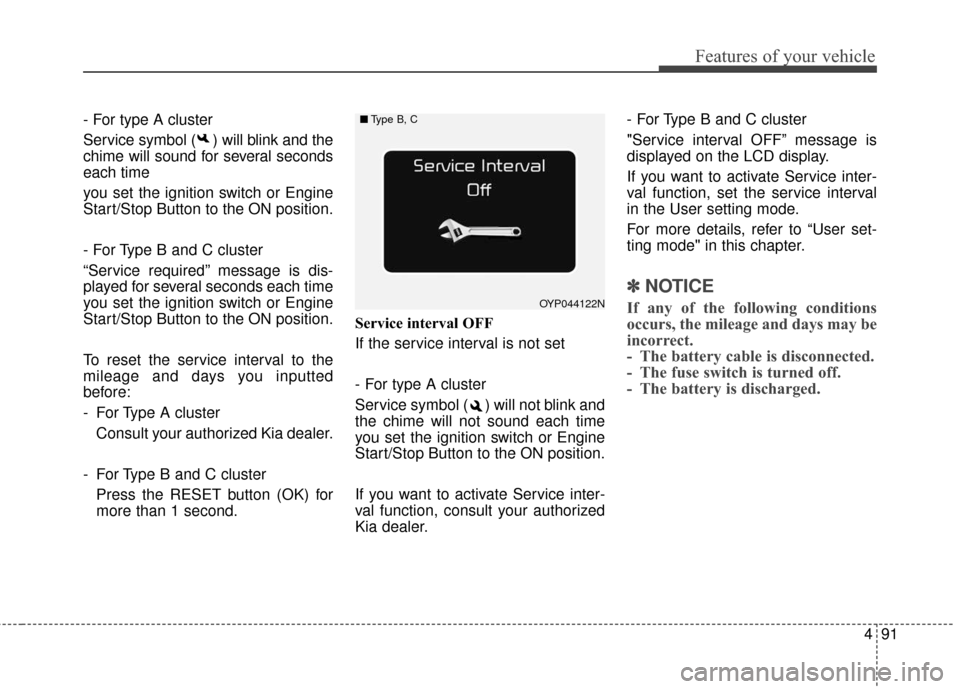
If the service interval is not set
- For type A cluster
Service symbol ( ) will not blink and
the chime will not sound each time
you set the ignition switch or Engine
Start/Stop Button to the ON position.
If you want to activate Service inter-
val function, consult your authorized
Kia dealer. - For Type B and C cluster
"Service interval OFF” message is
displayed on the LCD display.
If you want to activate Service inter-
val function, set the service interval
in the User setting mode.
For more details, refer to “User set-
ting mode" in this chapter.
✽ ✽
NOTICE
If any of the following conditions
occurs, the mileage and days may be
incorrect.
- The battery cable is disconnected.
- The fuse switch is turned off.
- The battery is discharged.OYP044122N
■ Type B, C
Page 194 of 644
Features of your vehicle
92
4
Master Warning Mode
This warning light informs the driv-
er the following situations
- Low washer fluid (if equipped)
- Blind Spot Detection (BSD) mal-function (if equipped)
- Lane Departure warning system (LDWS) malfunction (if equipped)
- Forward collision warning system (FCWS) malfunction (if equipped)
- Smart cruise control system (SCC) malfunction (if equipped)
- Service reminder (if equipped)
The Master Warning Light illumi-
nates when more than one of the
above warning situations occur. At
this time, the LCD Modes Icon will
change from ( ) to ( ).
If the warning situation is solved, the
master warning light will be turned off
and the LCD Modes Icon will be
changed back to its previous icon ( ).
(ex : refill the washer fluid)
User Settings Mode
(for type B/C cluster)
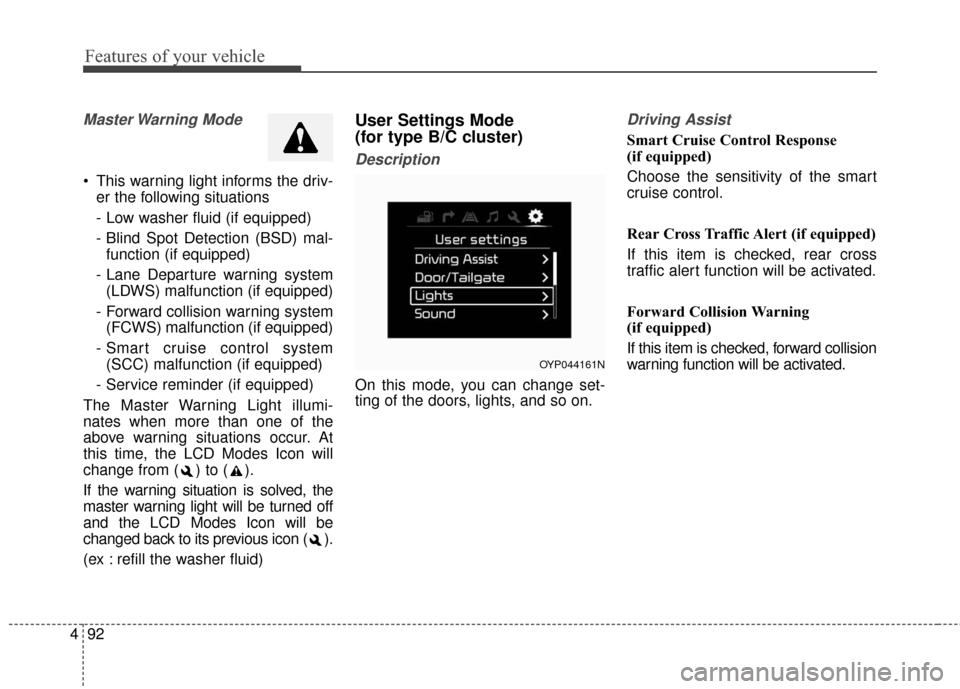
Description
On this mode, you can change set-
ting of the doors, lights, and so on.
Driving Assist
Smart Cruise Control Response
(if equipped)
Choose the sensitivity of the smart
cruise control.
Rear Cross Traffic Alert (if equipped)
If this item is checked, rear cross
traffic alert function will be activated.
Forward Collision Warning
(if equipped)
If this item is checked, forward collision
warning function will be activated.
OYP044161N