service KIA SEDONA 2017 User Guide
[x] Cancel search | Manufacturer: KIA, Model Year: 2017, Model line: SEDONA, Model: KIA SEDONA 2017Pages: 586, PDF Size: 14.12 MB
Page 197 of 586
495
Features of your vehicle
Service interval
On this mode, you can activate the
service interval function with mileage
(mi. or km) and period (months).
The service interval functionwill be deactivated.
You can set the service inter- val (mileage and months).
Other features
Fuel economy auto reset
The average fuel economy will not
reset automatically whenever refuel-
ing.
The average fuel economy will reset
automatically when refueling.
For more details, refer to “Trip A/B" in
this chapter.
Auto rear wiper (reverse)
If this item is checked, the rear wiper
will automatically activated when the
front wiper is in ON position and shift
lever is in R (reverse) position. Fuel Economy Unit
Choose the fuel economy unit. (US
gallon, UK gallon)
Temperature Unit
Convert the temperature unit from °C
to °F or from °F to °C.
Language
Choose the language you prefer
within the LCD.
Page 203 of 586
4101
Features of your vehicle
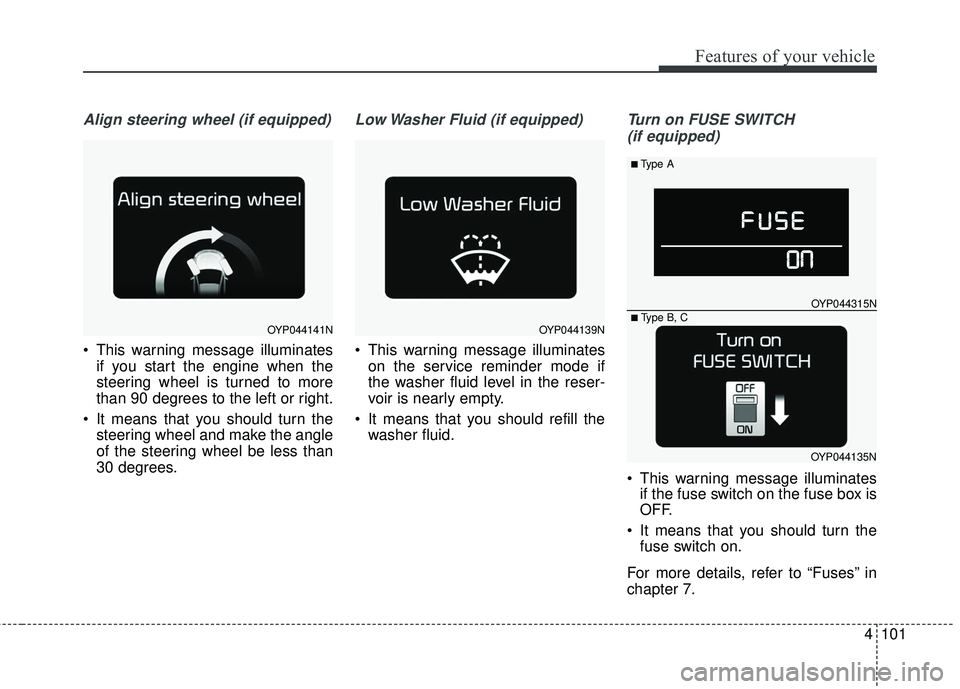
Align steering wheel (if equipped)
This warning message illuminatesif you start the engine when the
steering wheel is turned to more
than 90 degrees to the left or right.
It means that you should turn the steering wheel and make the angle
of the steering wheel be less than
30 degrees.
Low Washer Fluid (if equipped)
This warning message illuminateson the service reminder mode if
the washer fluid level in the reser-
voir is nearly empty.
It means that you should refill the washer fluid.
Turn on FUSE SWITCH
(if equipped)
This warning message illuminates if the fuse switch on the fuse box is
OFF.
It means that you should turn the fuse switch on.
For more details, refer to “Fuses” in
chapter 7.
OYP044141NOYP044139N
■Type A
OYP044315N
OYP044135N■ Type B, C
Page 205 of 586
4103
Features of your vehicle
Overview
Description
The trip computer is a microcomput-
er-controlled driver information sys-
tem that displays information related
to driving.
✽ ✽NOTICE
Some driving information stored in
the trip computer (for example
Average Vehicle Speed) resets if the
battery is disconnected.
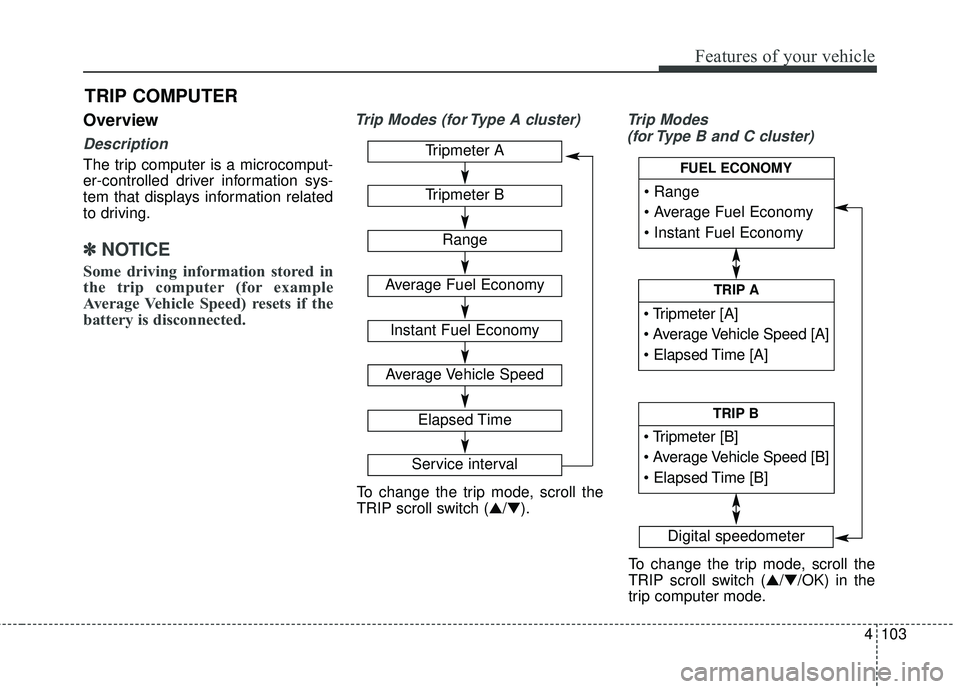
Trip Modes (for Type A cluster) Trip Modes
(for Type B and C cluster)
TRIP COMPUTER
Tripmeter A
Tripmeter B
Range
Average Fuel Economy
Instant Fuel Economy
Average Vehicle Speed
Elapsed Time
Service interval
Digital speedometer
To change the trip mode, scroll the
TRIP scroll switch (▲/▼).
To change the trip mode, scroll the
TRIP scroll switch (▲/▼/OK) in the
trip computer mode.
TRIP A
TRIP B
FUEL ECONOMY
Page 217 of 586
4115
Features of your vehicle
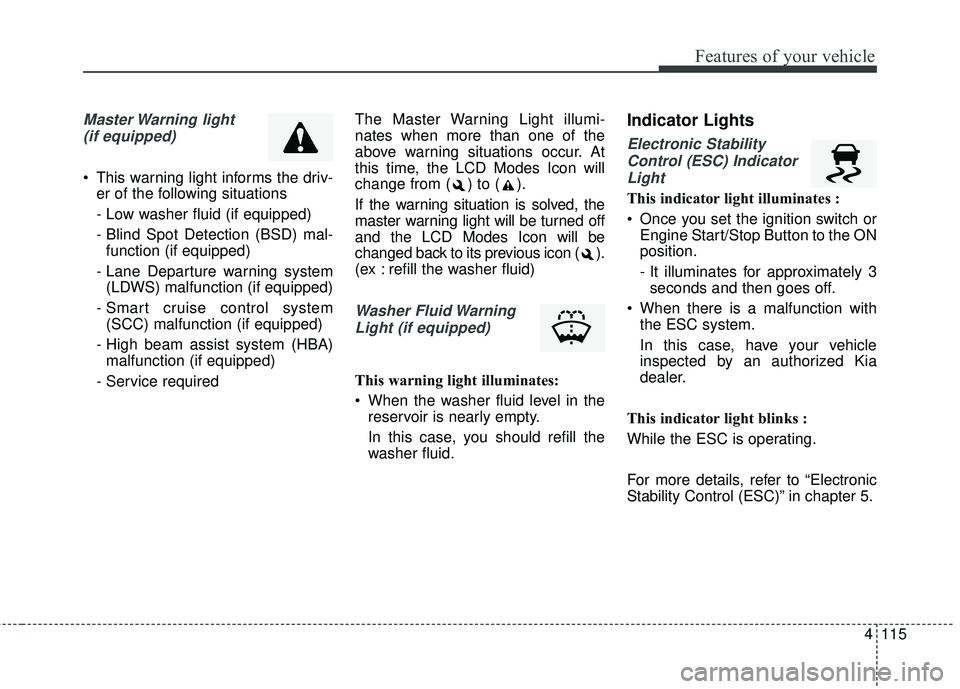
Master Warning light (if equipped)
This warning light informs the driv- er of the following situations
- Low washer fluid (if equipped)
- Blind Spot Detection (BSD) mal-function (if equipped)
- Lane Departure warning system (LDWS) malfunction (if equipped)
- Smart cruise control system (SCC) malfunction (if equipped)
- High beam assist system (HBA) malfunction (if equipped)
- Service required The Master Warning Light illumi-
nates when more than one of the
above warning situations occur. At
this time, the LCD Modes Icon will
change from ( ) to ( ).
If the warning situation is solved, the
master warning light will be turned off
and the LCD Modes Icon will be
changed back to its previous icon ( ).
(ex : refill the washer fluid)
Washer Fluid Warning
Light (if equipped)
This warning light illuminates:
When the washer fluid level in the reservoir is nearly empty.
In this case, you should refill the
washer fluid.
Indicator Lights
Electronic Stability
Control (ESC) IndicatorLight
This indicator light illuminates :
Once you set the ignition switch or Engine Start/Stop Button to the ON
position.
- It illuminates for approximately 3seconds and then goes off.
When there is a malfunction with the ESC system.
In this case, have your vehicle
inspected by an authorized Kia
dealer.
This indicator light blinks :
While the ESC is operating.
For more details, refer to “Electronic
Stability Control (ESC)” in chapter 5.
Page 261 of 586
4159
Features of your vehicle
The refrigerant system should onlybe serviced by trained and certified
technicians to insure proper and
safe operation.
The refrigerant system should be serviced in a well-ventilated place.
The air conditioning evaporator (cooling coil) shall never be repaired
or replaced with one removed from
a used or salvaged vehicle and new
replacement MAC evaporators shall
be certified (and labeled) as meet-
ing SAE Standard J2842. Air conditioning system operation tips
If the vehicle has been parked in
direct sunlight during hot weather,
open the windows for a short time
to let the hot air inside the vehicle
escape.
To help reduce moisture inside of the windows on rainy or humid
days, decrease the humidity inside
the vehicle by operating the air
conditioning system.
During air conditioning system operation, you may occasionally
notice a slight change in engine
speed as the air conditioning com-
pressor cycles. This is a normal
system operation characteristic.
Use the air conditioning system every month only for a few minutes
to ensure maximum system per-
formance.CAUTION- Excessive AC
When using the air condition- ing system, monitor the tem-perature gauge closely whiledriving up hills or in heavy traf-fic when outside temperaturesare high. Air conditioning sys-tem operation may causeengine overheating. Continueto use the blower fan but turnthe air conditioning system offif the temperature gauge indi-cates engine overheating.
When opening the windows in humid weather air condition-ing may create water dropletsinside the vehicle. Sinceexcessive water droplets maycause damage to electricalequipment, air conditioningshould only be used with thewindows closed.
Page 263 of 586
4161
Features of your vehicle
Checking the amount of air
conditioner refrigerant and
compressor lubricant
When the amount of refrigerant is
low, the performance of the air con-
ditioning is reduced. Overfilling also
has a negative influence on the air
conditioning system.
Therefore, if abnormal operation is
found, have the system inspected by
an authorized Kia dealer.
WARNING - AC Repair
The oil and refrigerant in your
vehicle’s air conditioning sys-
tem is under very high pressure.
If proper service procedures are
not followed an explosion may
result. To reduce the risk of seri-
ous injury or death, the air con-
ditioning system in your vehicle
should only be serviced by
trained and certified technicians.
CAUTION- AC Repair
It is important that the correcttype and amount of oil andrefrigerant is used, otherwisedamage to the vehicle mayoccur. To prevent damage, theair conditioning system in yourvehicle should only be servicedby trained and certified techni-cians.
Page 281 of 586
4179
Features of your vehicle
✽ ✽NOTICE
• Replace the filter every 24,000 km
(15,000 miles) or once a year.
If the vehicle is being driven in
severe conditions such as dusty or
rough roads, more frequent air
conditioner filter inspections and
changes are required.
• When the air flow rate suddenly decreases, the system should be
checked at an authorized Kia
dealer.
Checking the amount of air
conditioner refrigerant and
compressor lubricant
When the amount of refrigerant is
low, the performance of the air con-
ditioning is reduced. Overfilling also
has a negative impact on the air con-
ditioning system.
Therefore, if abnormal operation is
found, have the system inspected by
an authorized Kia dealer.
WARNING - AC Repair
The oil and refrigerant in your
vehicle’s air conditioning sys-
tem is under very high pressure.
If proper service procedures are
not followed an explosion may
result. To reduce the risk of seri-
ous injury or death, the air con-
ditioning system in your vehicle
should only be serviced by
trained and certified technicians.
CAUTION- AC Repair
It is important that the correct
type and amount of oil andrefrigerant is used, otherwisedamage to the vehicle mayoccur. To prevent damage, theair conditioning system in yourvehicle should only be servicedby trained and certified techni-cians.
Page 313 of 586
211
4
Features of your vehicle
✽ ✽
NOTICE
• If you want to change the position
of device installation, please
inquire with your place of pur-
chase or service maintenance cen-
ter. Technical expertise is required
to install or disassemble the
device.
• Turn on the car ignition before using this device. Do not operate
the audio system for long periods
of time with the ignition turned off
as such operations may lead to
battery discharge.
✽ ✽ NOTICE
In case of product malfunction,
please contact your dealer or vehicle
service center.CAUTION
Do not subject the device to
severe shock or impact. Directpressure onto the front side ofthe monitor may cause damageto the LCD or touch screen.
When cleaning the device, make sure to turn off thedevice and use a dry andsmooth cloth. Never usetough materials, chemicalcloths, or solvents (alcohol,benzene, thinners, etc.) assuch materials may damagethe device panel or causecolor/quality deterioration
Do not place beverages close to the audio system. Spillingbeverages may lead to systemmalfunction.
Placing the audio system with- in an electromagnetic environ-ment may result in noise inter-ference.
Page 337 of 586
235
4
Features of your vehicle
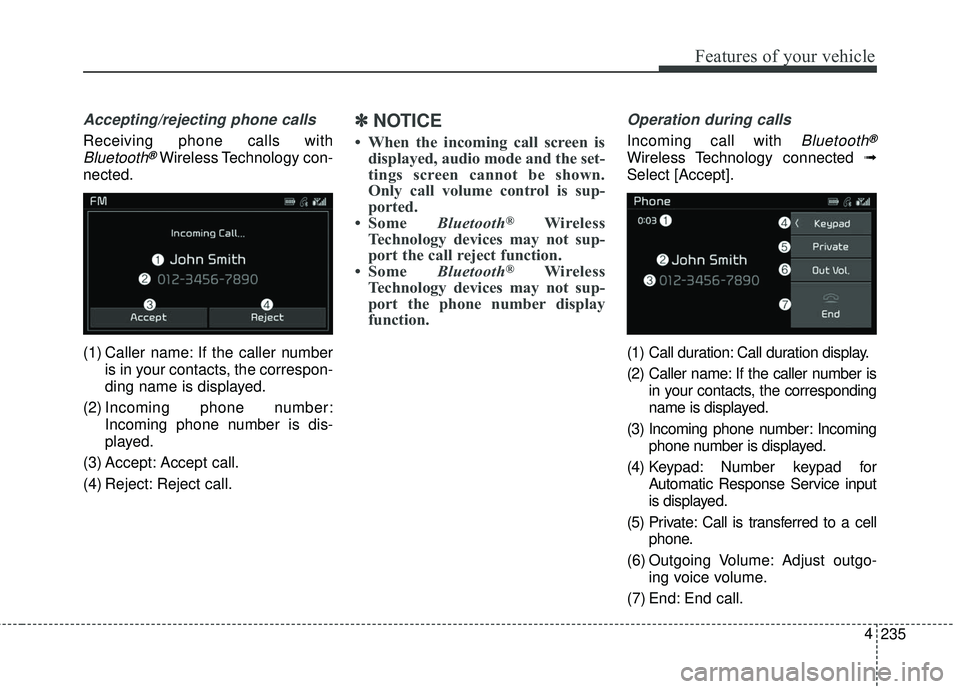
Accepting/rejecting phone calls
Receiving phone calls with
Bluetooth®Wireless Technology con-
nected.
(1) Caller name: If the caller number is in your contacts, the correspon-
ding name is displayed.
(2) Incoming phone number: Incoming phone number is dis-
played.
(3) Accept: Accept call.
(4) Reject: Reject call.
✽ ✽ NOTICE
• When the incoming call screen is
displayed, audio mode and the set-
tings screen cannot be shown.
Only call volume control is sup-
ported.
• Some Bluetooth
®Wireless
Technology devices may not sup-
port the call reject function.
• Some Bluetooth
®Wireless
Technology devices may not sup-
port the phone number display
function.
Operation during calls
Incoming call with Bluetooth®
Wireless Technology connected ➟
Select [Accept].
(1) Call duration: Call duration display.
(2) Caller name: If the caller number is in your contacts, the corresponding
name is displayed.
(3) Incoming phone number: Incoming phone number is displayed.
(4) Keypad: Number keypad for Automatic Response Service input
is displayed.
(5) Private: Call is transferred to a cell phone.
(6) Outgoing Volume: Adjust outgo- ing voice volume.
(7) End: End call.
Page 358 of 586
Driving your vehicle
14
5
For smooth operation, depress the
brake pedal and the lock release but-ton when shifting from N (Neutral) toa forward or reverse gear.
When stopped on an incline, do not
hold the vehicle with the engine
power. Use the service brake or the
parking brake.
Transaxle ranges
The indicator in the instrument clus-
ter displays the shift lever position
when the ignition switch is in the ON
position.
P (Park)
Always come to a complete stop
before shifting into P (Park). This
position locks the transaxle and pre-
vents the drive wheels from rotating.
Shifting into P (Park) while the vehi-
cle is in motion will cause the drive
wheels to lock which will cause you
to lose control of the vehicle.
WARNING- Automatic
transaxle
Before leaving the driver’s seat,
always make sure the shift lever
is in the P (Park) position; then
set the parking brake fully and
shut the engine off. Do not use
the P position in place of the
parking brake. Always make
sure the shift lever is latched in
the P position and set the park-
ing brake fully. Unexpected and
sudden vehicle movement can
occur if these precautions are
not followed.
CAUTION- Transaxle
To avoid damage to your transaxle, do not accelerate theengine in R (Reverse) or any for-ward gear position with thebrakes on. The transaxle may bedamaged if you shift into P(Park) while the vehicle is inmotion.