light KIA SEDONA 2019 Owners Manual
[x] Cancel search | Manufacturer: KIA, Model Year: 2019, Model line: SEDONA, Model: KIA SEDONA 2019Pages: 593, PDF Size: 15.93 MB
Page 253 of 593
4149
Features of your vehicle
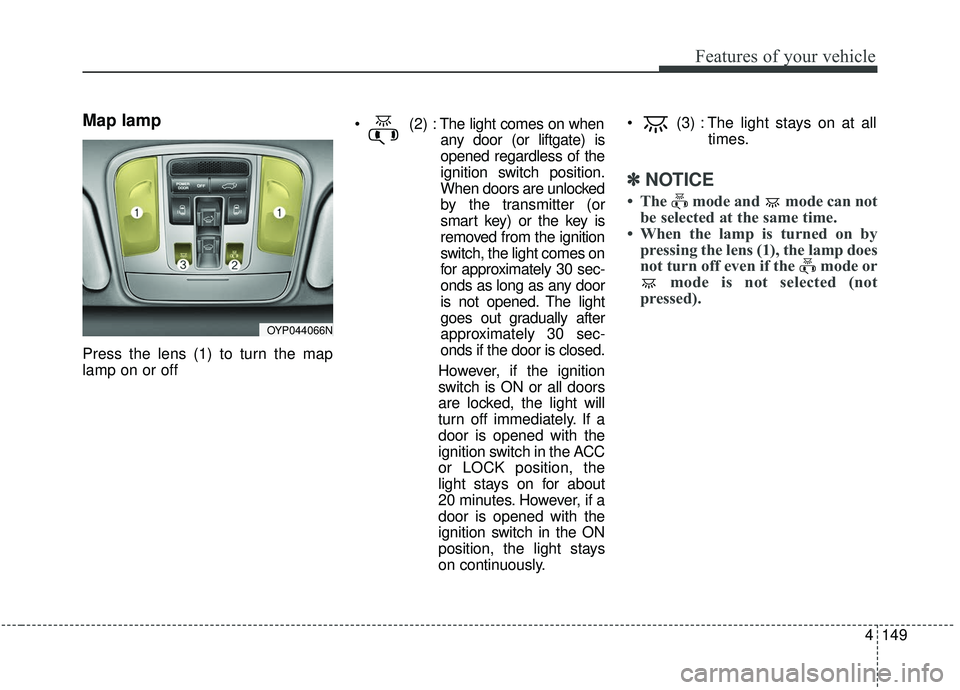
Map lamp
Press the lens (1) to turn the map
lamp on or off
The light comes on when
any door (or liftgate) is
opened regardless of the
ignition switch position.
When doors are unlocked
by the transmitter (or
smart key) or the key is
removed from the ignition
switch, the light comes on
for approximately 30 sec-
onds as long as any door
is not opened. The light
goes out gradually after
approximately 30 sec-
onds if the door is closed.
However, if the ignition
switch is ON or all doors
are locked, the light will
turn off immediately. If a
door is opened with the
ignition switch in the ACC
or LOCK position, the
light stays on for about
20 minutes. However, if a
door is opened with the
ignition switch in the ON
position, the light stays
on continuously. (3) : The light stays on at all
times.
✽ ✽NOTICE
• The mode and mode can not
be selected at the same time.
• When the lamp is turned on by pressing the lens (1), the lamp does
not turn off even if the mode or mode is not selected (not
pressed).
OYP044066N
Page 254 of 593
Features of your vehicle
150
4
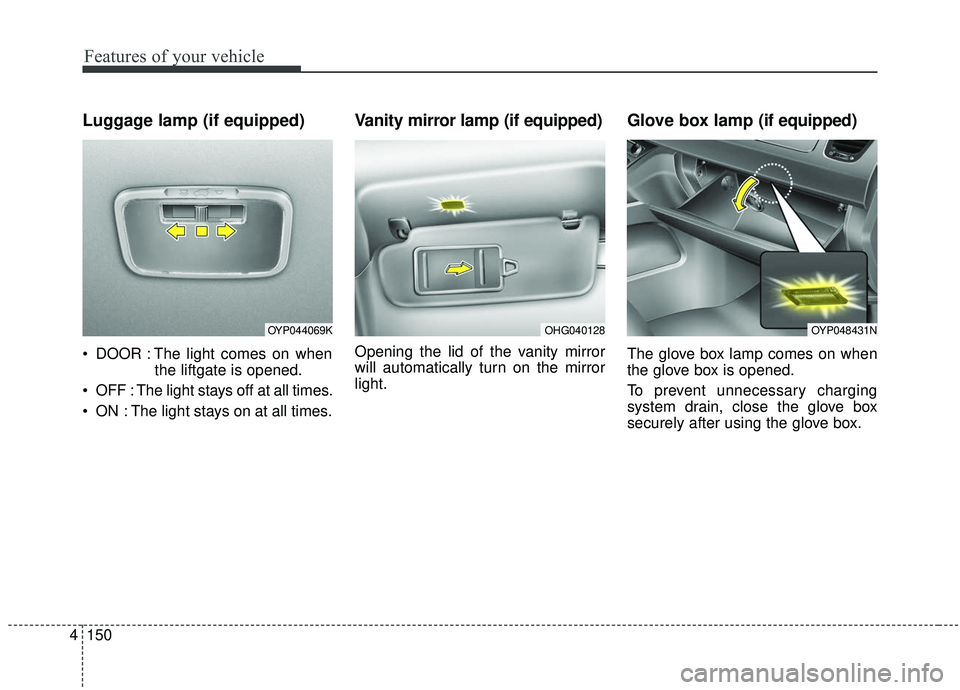
Luggage lamp (if equipped)
DOOR : The light comes on when
the liftgate is opened.
OFF : The light stays off at all times.
ON : The light stays on at all times.
Vanity mirror lamp (if equipped)
Opening the lid of the vanity mirror
will automatically turn on the mirror
light.
Glove box lamp (if equipped)
The glove box lamp comes on when
the glove box is opened.
To prevent unnecessary charging
system drain, close the glove box
securely after using the glove box.
OHG040128OYP044069KOYP048431N
Page 262 of 593
Features of your vehicle
158
4
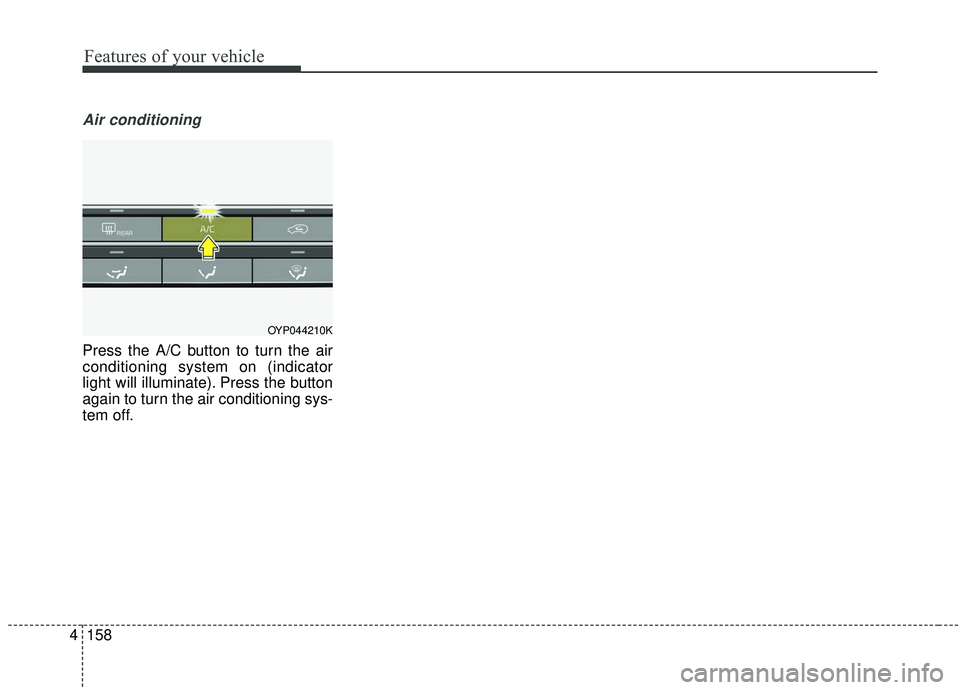
Air conditioning
Press the A/C button to turn the air
conditioning system on (indicator
light will illuminate). Press the button
again to turn the air conditioning sys-
tem off.
OYP044210K
Page 269 of 593
4165
Features of your vehicle
The refrigerant system should onlybe serviced by trained and certified
technicians to insure proper and
safe operation.
The refrigerant system should be serviced in a well-ventilated place.
The air conditioning evaporator (cooling coil) shall never be repaired
or replaced with one removed from
a used or salvaged vehicle and new
replacement MAC evaporators shall
be certified (and labeled) as meet-
ing SAE Standard J2842. Air conditioning system operation tips
If the vehicle has been parked in
direct sunlight during hot weather,
open the windows for a short time
to let the hot air inside the vehicle
escape.
To help reduce moisture inside of the windows on rainy or humid
days, decrease the humidity inside
the vehicle by operating the air
conditioning system.
During air conditioning system operation, you may occasionally
notice a slight change in engine
speed as the air conditioning com-
pressor cycles. This is a normal
system operation characteristic.
Use the air conditioning system every month only for a few minutes
to ensure maximum system per-
formance.CAUTION- Excessive AC
When using the air condition- ing system, monitor the tem-perature gauge closely whiledriving up hills or in heavy traf-fic when outside temperaturesare high. Air conditioning sys-tem operation may causeengine overheating. Continueto use the blower fan but turnthe air conditioning system offif the temperature gauge indi-cates engine overheating.
When opening the windows in humid weather air condition-ing may create water dropletsinside the vehicle. Sinceexcessive water droplets maycause damage to electricalequipment, air conditioningshould only be used with thewindows closed.
Page 281 of 593
4177
Features of your vehicle
Air conditioning
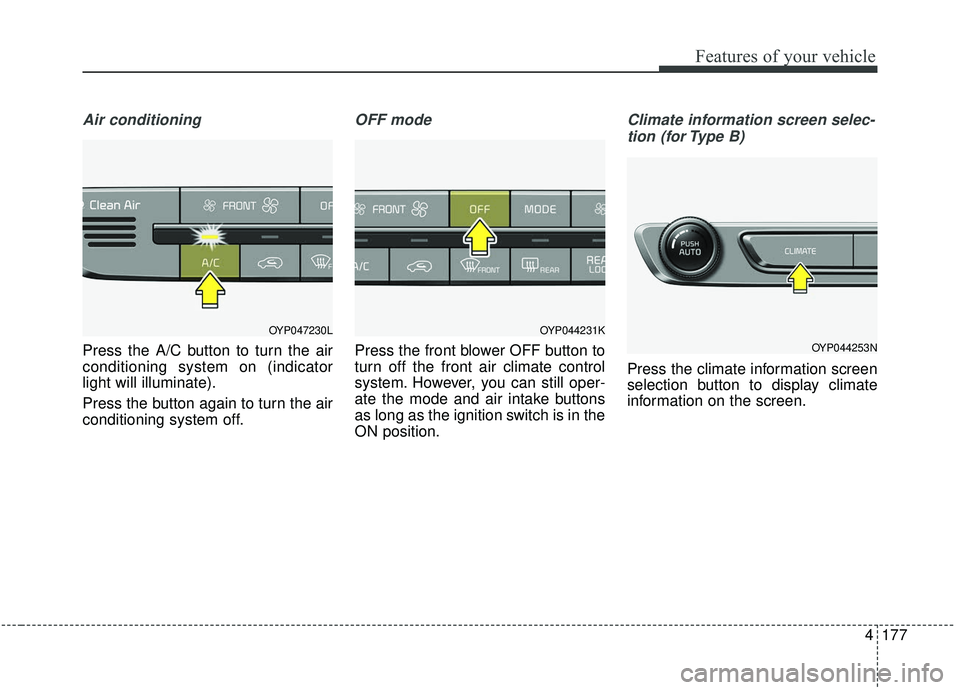
Press the A/C button to turn the air
conditioning system on (indicator
light will illuminate).
Press the button again to turn the air
conditioning system off.
OFF mode
Press the front blower OFF button to
turn off the front air climate control
system. However, you can still oper-
ate the mode and air intake buttons
as long as the ignition switch is in the
ON position.
Climate information screen selec-tion (for Type B)
Press the climate information screen
selection button to display climate
information on the screen.
OYP044231K
OYP044253N
OYP047230L
Page 288 of 593
Features of your vehicle
184
4
Air conditioning system operation tips
If the vehicle has been parked in
direct sunlight during hot weather,
open the windows for a short time
to let the hot air inside the vehicle
escape.
To help reduce moisture inside of the windows on rainy or humid
days, decrease the humidity inside
the vehicle by operating the air
conditioning system.
During air conditioning system operation, you may occasionally
notice a slight change in engine
speed as the air conditioning com-
pressor cycles. This is a normal
system operation characteristic.
Use the air conditioning system every month only for a few minutes
to ensure maximum system per-
formance. When using the air conditioning
system, you may notice clear water
dripping (or even puddling) on the
ground under the passenger side
of the vehicle. This is a normal sys-
tem operation characteristic.
Operating the air conditioning sys- tem in the recirculated air position
provides maximum cooling, how-
ever, continual operation in this
mode may cause the air inside the
vehicle to become stale.
During cooling operation, you may occasionally notice a misty air flow
because of rapid cooling and
humid air intake. This is a normal
system operation characteristic.Climate control air filter
(if equipped)
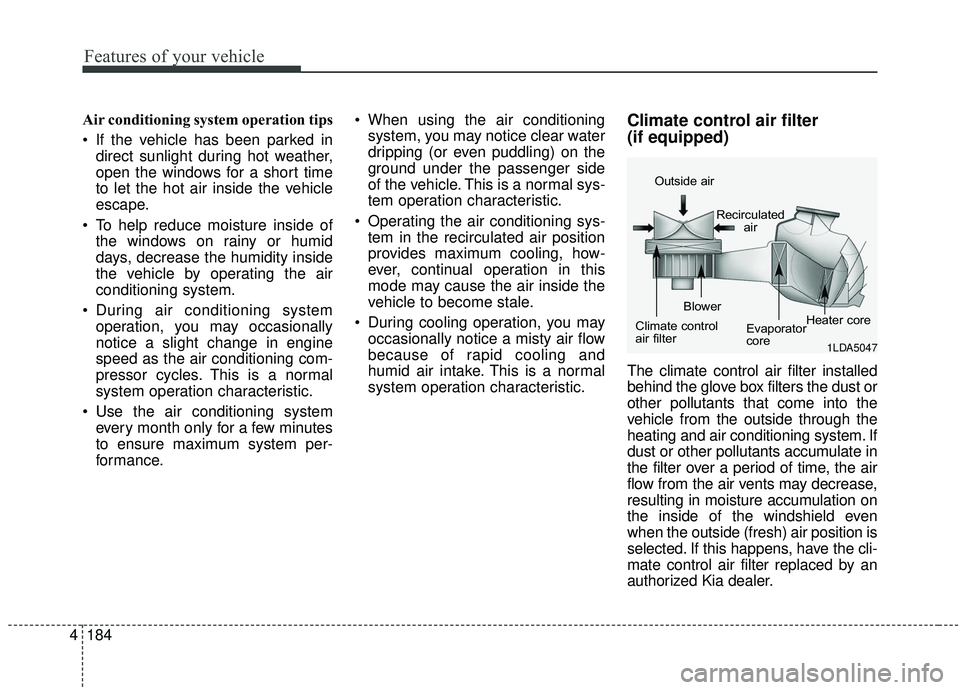
The climate control air filter installed
behind the glove box filters the dust or
other pollutants that come into the
vehicle from the outside through the
heating and air conditioning system. If
dust or other pollutants accumulate in
the filter over a period of time, the air
flow from the air vents may decrease,
resulting in moisture accumulation on
the inside of the windshield even
when the outside (fresh) air position is
selected. If this happens, have the cli-
mate control air filter replaced by an
authorized Kia dealer.
1LDA5047
Outside air
Recirculatedair
Climate control
air filter Blower
Evaporator
coreHeater core
Page 301 of 593
4197
Features of your vehicle
Air ventilation seat (if equipped)
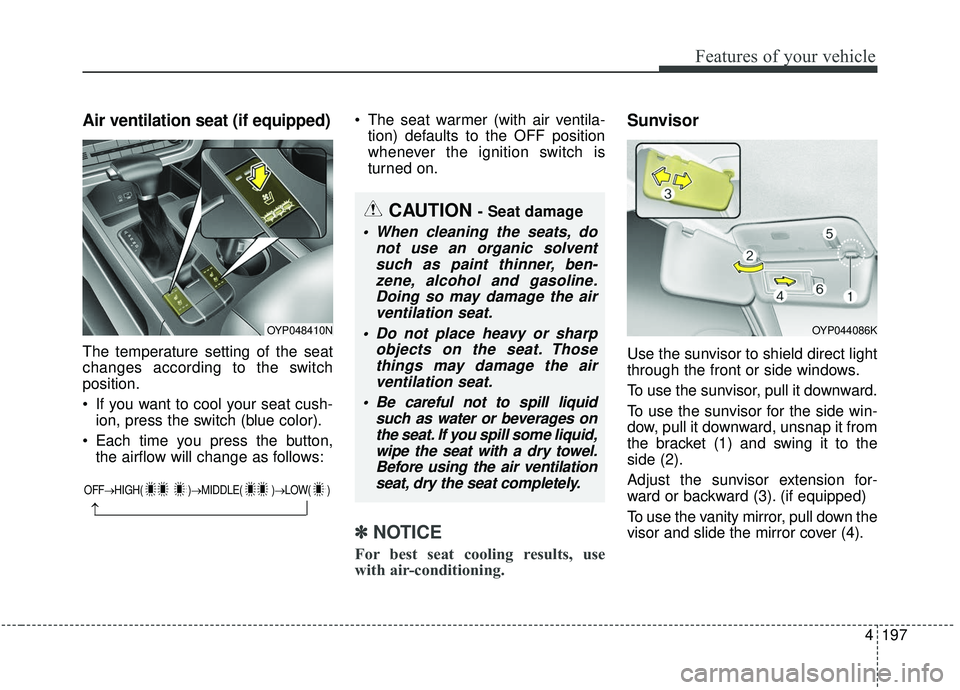
The temperature setting of the seat
changes according to the switch
position.
If you want to cool your seat cush-ion, press the switch (blue color).
Each time you press the button, the airflow will change as follows: The seat warmer (with air ventila-
tion) defaults to the OFF position
whenever the ignition switch is
turned on.
✽ ✽ NOTICE
For best seat cooling results, use
with air-conditioning.
Sunvisor
Use the sunvisor to shield direct light
through the front or side windows.
To use the sunvisor, pull it downward.
To use the sunvisor for the side win-
dow, pull it downward, unsnap it from
the bracket (1) and swing it to the
side (2).
Adjust the sunvisor extension for-
ward or backward (3). (if equipped)
To use the vanity mirror, pull down the
visor and slide the mirror cover (4).
OYP048410N
OFF→ HIGH( )→ MIDDLE( )→LOW( )
→
CAUTION - Seat damage
When cleaning the seats, do
not use an organic solventsuch as paint thinner, ben-zene, alcohol and gasoline.Doing so may damage the airventilation seat.
Do not place heavy or sharp objects on the seat. Thosethings may damage the airventilation seat.
Be careful not to spill liquid such as water or beverages onthe seat. If you spill some liquid,wipe the seat with a dry towel.Before using the air ventilationseat, dry the seat completely.
OYP044086K
Page 303 of 593
4199
Features of your vehicle
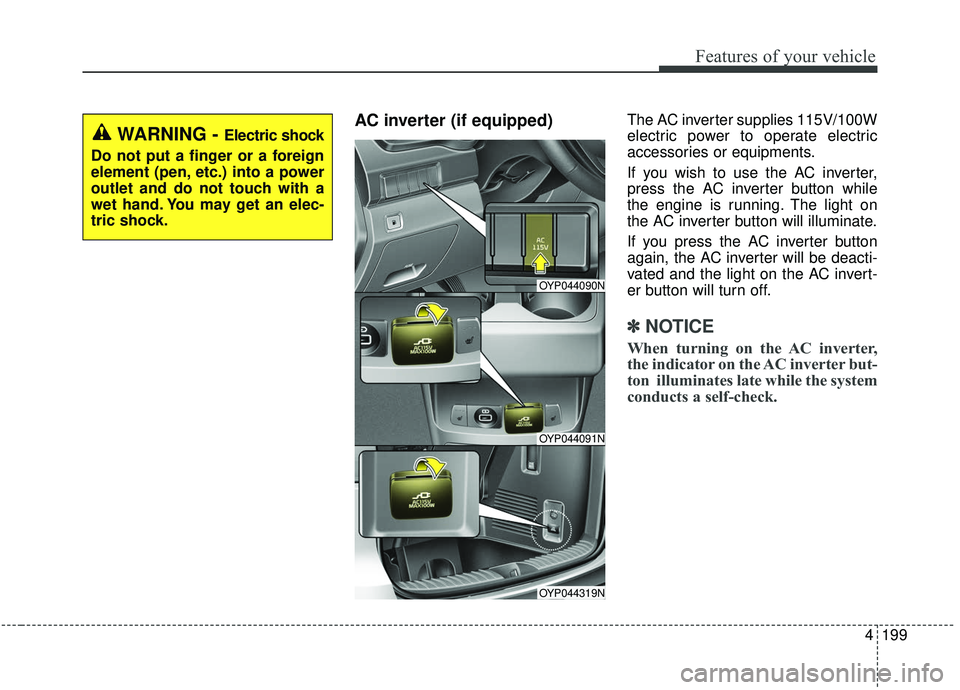
AC inverter (if equipped) The AC inverter supplies 115V/100W
electric power to operate electric
accessories or equipments.
If you wish to use the AC inverter,
press the AC inverter button while
the engine is running. The light on
the AC inverter button will illuminate.
If you press the AC inverter button
again, the AC inverter will be deacti-
vated and the light on the AC invert-
er button will turn off.
✽ ✽NOTICE
When turning on the AC inverter,
the indicator on the AC inverter but-
ton illuminates late while the system
conducts a self-check.
WARNING - Electric shock
Do not put a finger or a foreign
element (pen, etc.) into a power
outlet and do not touch with a
wet hand. You may get an elec-
tric shock.
OYP044090N
OYP044091N
OYP044319N
Page 306 of 593
Features of your vehicle
202
4
The wireless charging system is
designed for one smart phone
equipped with QI per single usage
only. Please refer to the smart phone
accessory cover or the smart phone
manufacturer homepage to check
whether your smart phone supports
QI function.Wireless smart phone charging
1. Remove any object on the smart
phone charging pad including the
smart key. If there is any foreign
object on the pad other than a
smart phone, the wireless charging
function may not operate properly.
2. Place the smart phone on the cen- ter of the wireless charging pad.
3. The indicator light will change to orange once the wireless charging
begins. After the charging is com-
plete, the orange light will change
to green.
4. You can choose to turn the wireless charging function to either ON or
OFF by selecting the USM on the
instrument cluster. (Please refer to
“Instrument Cluster” for details).
CAUTION
-
Metal in Wireless Charging
System
If any metallic object such ascoins is located between thewireless charging system andthe smart phone, the chargingmay be disrupted. Also, themetallic object may heat up andpotentially damage the chargingsystem. If there is any metallicobject between the smart phoneand the charging pad, immedi-ately remove the smart phone.Remove the metallic object afterit has cooled down.
CAUTION
-
Liquid in Wireless Smart
Phone Charger
To prevent liquid from damag-ing the wireless smart phonecharging system in your vehi-cle, securely close the traycover when charging yourphone.
Page 307 of 593
4203
Features of your vehicle
If the wireless charging is not func-
tioning properly, the orange light will
blink and flash for ten seconds then
turn off. In such cases, remove the
smart phone from the pad and
replace it on the pad again, or double
check the charging status.
If you leave the smart phone on the
charging pad when the vehicle igni-
tion is in OFF, the vehicle will alert
you through warning messages and
sound (applicable for vehicles with
voice guidance function).✽ ✽NOTICE
• Securely close the tray cover when
using the wireless smart phone
charge function.
• Close the tray cover when the smart phone is placed in it at all
times. If the vehicle is in motion
without the tray cover closed, it is
more likely that the driver may
use the smart phone. The use of
smart phones while driving may
lead to possible injuries and acci-
dents.
• If it is not possible to close the tray cover due to the size of the smart
phone, do not use the wireless
smart phone charging function at
all.
• When the tray cover is broken, do not use the wireless charging func-
tion before the tray cover is
repaired. (Continued)(Continued)
• When the interior temperature of
the wireless charging system rises
above a set temperature, the wire-
less charging will cease to func-
tion. After the interior tempera-
ture drops below the threshold,
the wireless charging function will
resume.
• The wireless charging may not function properly when there is a
heavy accessory cover on the
smart phone.
The wireless charging will stop
when the smart phone is not in
complete contact with the wireless
charging pad.
• The smart key detection feature in operation could temporarily stop
charging.
(When turning on ignition, open-
ing doors, or closing doors)
• The wireless charging will stop when the vehicle is turned OFF. (Continued)