warning KIA SEDONA 2019 Owners Manual
[x] Cancel search | Manufacturer: KIA, Model Year: 2019, Model line: SEDONA, Model: KIA SEDONA 2019Pages: 593, PDF Size: 15.93 MB
Page 297 of 593
4193
Features of your vehicle
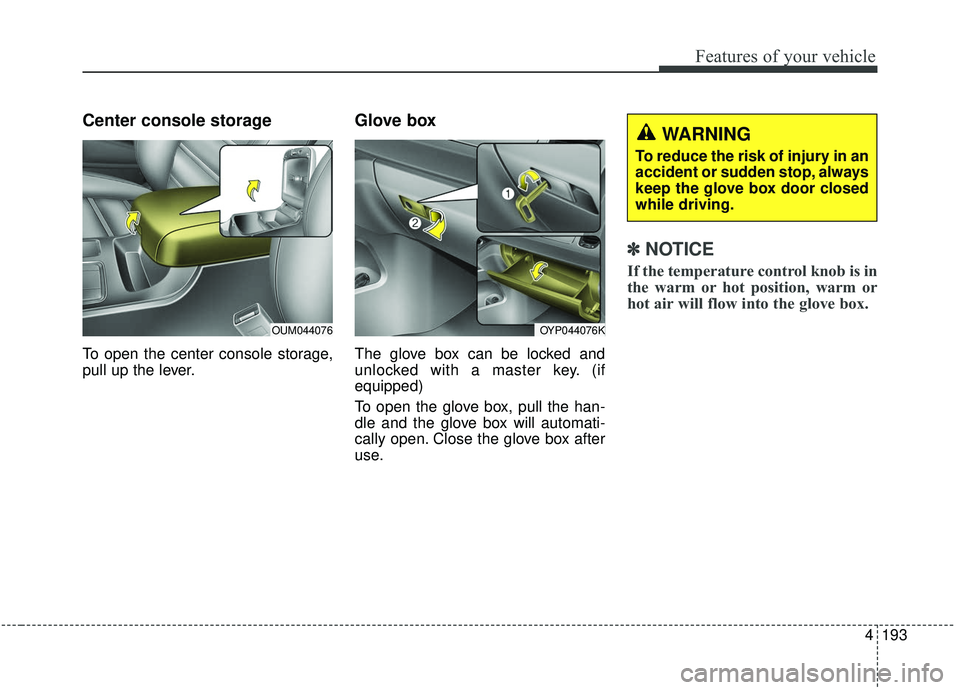
Center console storage
To open the center console storage,
pull up the lever.
Glove box
The glove box can be locked and
unlocked with a master key. (if
equipped)
To open the glove box, pull the han-
dle and the glove box will automati-
cally open. Close the glove box after
use.
✽ ✽
NOTICE
If the temperature control knob is in
the warm or hot position, warm or
hot air will flow into the glove box.
OYP044076K
WARNING
To reduce the risk of injury in an
accident or sudden stop, always
keep the glove box door closed
while driving.
OUM044076
Page 298 of 593
Features of your vehicle
194
4
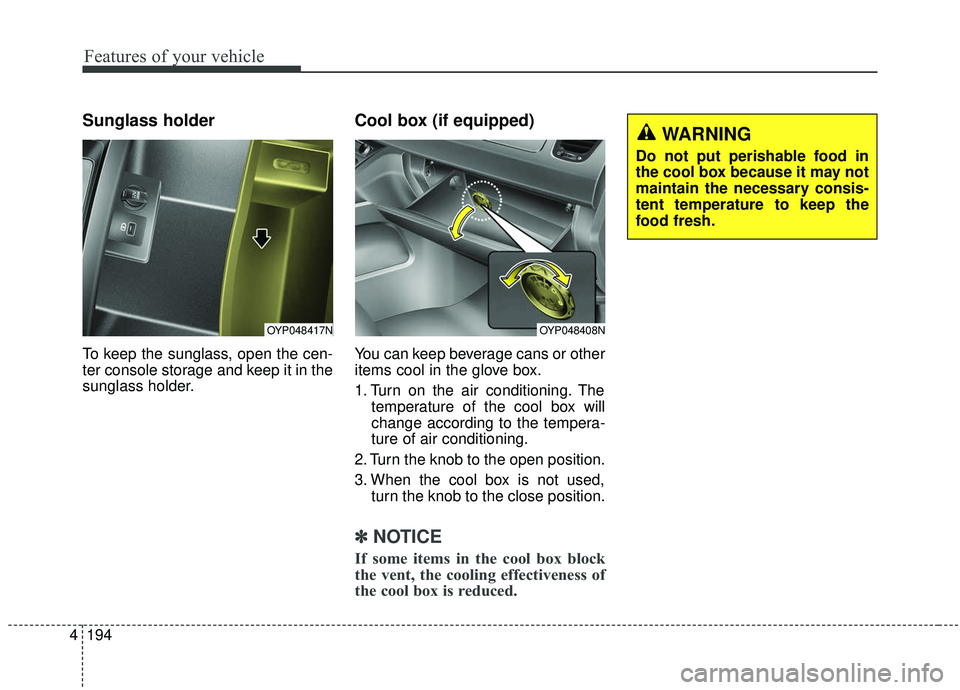
Sunglass holder
To keep the sunglass, open the cen-
ter console storage and keep it in the
sunglass holder.
Cool box (if equipped)
You can keep beverage cans or other
items cool in the glove box.
1. Turn on the air conditioning. The
temperature of the cool box will
change according to the tempera-
ture of air conditioning.
2. Turn the knob to the open position.
3. When the cool box is not used, turn the knob to the close position.
✽ ✽
NOTICE
If some items in the cool box block
the vent, the cooling effectiveness of
the cool box is reduced.
OYP048408N
WARNING
Do not put perishable food in
the cool box because it may not
maintain the necessary consis-
tent temperature to keep the
food fresh.
OYP048417N
Page 299 of 593
4195
Features of your vehicle
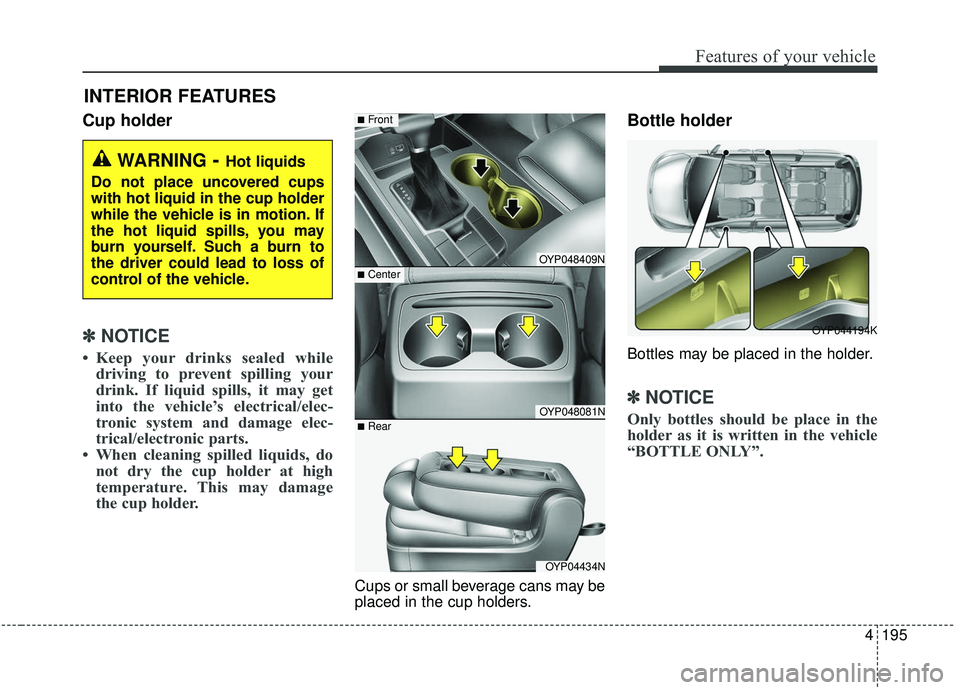
Cup holder
✽ ✽NOTICE
• Keep your drinks sealed while
driving to prevent spilling your
drink. If liquid spills, it may get
into the vehicle’s electrical/elec-
tronic system and damage elec-
trical/electronic parts.
• When cleaning spilled liquids, do not dry the cup holder at high
temperature. This may damage
the cup holder.
Cups or small beverage cans may be
placed in the cup holders.
Bottle holder
Bottles may be placed in the holder.
✽ ✽ NOTICE
Only bottles should be place in the
holder as it is written in the vehicle
“BOTTLE ONLY”.
INTERIOR FEATURES
WARNING- Hot liquids
Do not place uncovered cups
with hot liquid in the cup holder
while the vehicle is in motion. If
the hot liquid spills, you may
burn yourself. Such a burn to
the driver could lead to loss of
control of the vehicle.
OYP048409N
OYP048081N
■Front
OYP04434N
■Rear
■Center
OYP044194K
Page 300 of 593
Features of your vehicle
196
4
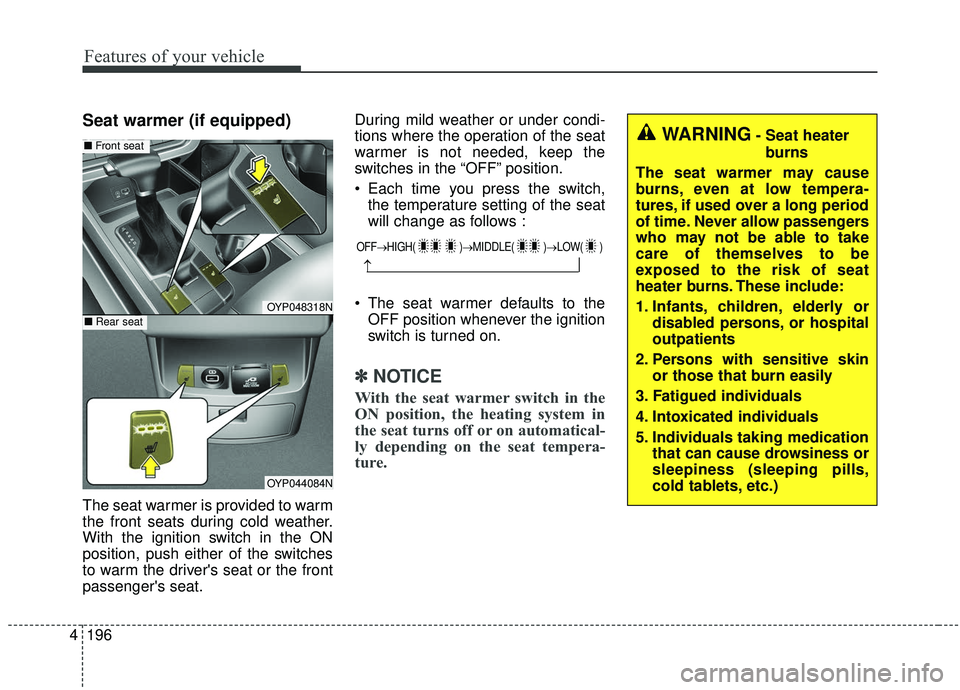
Seat warmer (if equipped)
The seat warmer is provided to warm
the front seats during cold weather.
With the ignition switch in the ON
position, push either of the switches
to warm the driver's seat or the front
passenger's seat. During mild weather or under condi-
tions where the operation of the seat
warmer is not needed, keep the
switches in the “OFF” position.
Each time you press the switch,
the temperature setting of the seat
will change as follows :
The seat warmer defaults to the OFF position whenever the ignition
switch is turned on.
✽ ✽ NOTICE
With the seat warmer switch in the
ON position, the heating system in
the seat turns off or on automatical-
ly depending on the seat tempera-
ture.
OFF→ HIGH( )→ MIDDLE( )→LOW( )
→
OYP048318N
OYP044084N
■Rear seat
■Front seatWARNING- Seat heater
burns
The seat warmer may cause
burns, even at low tempera-
tures, if used over a long period
of time. Never allow passengers
who may not be able to take
care of themselves to be
exposed to the risk of seat
heater burns. These include:
1. Infants, children, elderly or disabled persons, or hospital
outpatients
2. Persons with sensitive skin or those that burn easily
3. Fatigued individuals
4. Intoxicated individuals
5. Individuals taking medication that can cause drowsiness or
sleepiness (sleeping pills,
cold tablets, etc.)
Page 303 of 593
4199
Features of your vehicle
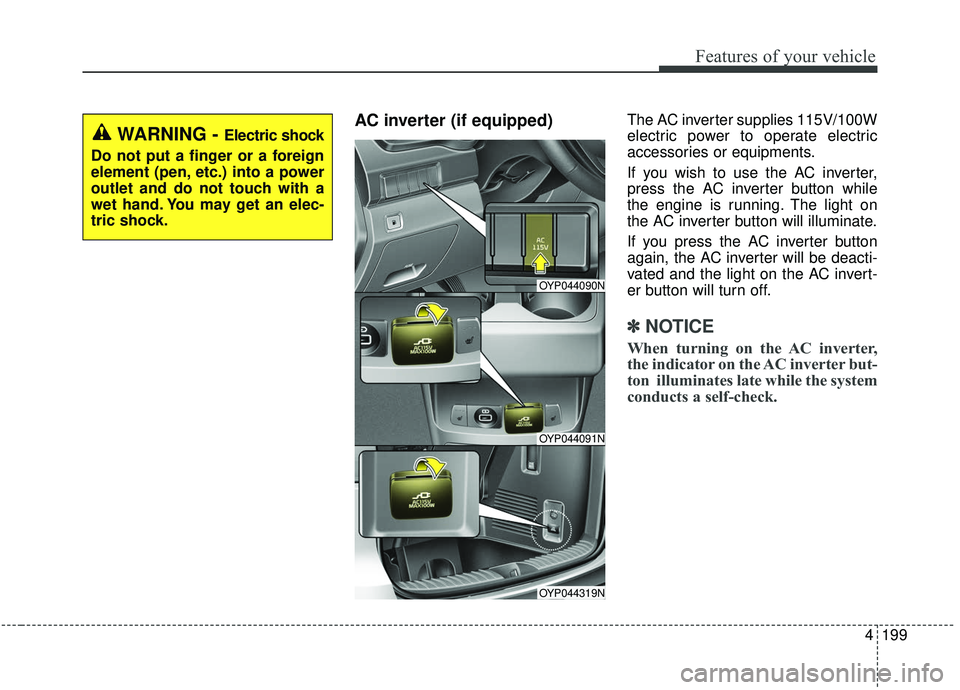
AC inverter (if equipped) The AC inverter supplies 115V/100W
electric power to operate electric
accessories or equipments.
If you wish to use the AC inverter,
press the AC inverter button while
the engine is running. The light on
the AC inverter button will illuminate.
If you press the AC inverter button
again, the AC inverter will be deacti-
vated and the light on the AC invert-
er button will turn off.
✽ ✽NOTICE
When turning on the AC inverter,
the indicator on the AC inverter but-
ton illuminates late while the system
conducts a self-check.
WARNING - Electric shock
Do not put a finger or a foreign
element (pen, etc.) into a power
outlet and do not touch with a
wet hand. You may get an elec-
tric shock.
OYP044090N
OYP044091N
OYP044319N
Page 307 of 593
4203
Features of your vehicle
If the wireless charging is not func-
tioning properly, the orange light will
blink and flash for ten seconds then
turn off. In such cases, remove the
smart phone from the pad and
replace it on the pad again, or double
check the charging status.
If you leave the smart phone on the
charging pad when the vehicle igni-
tion is in OFF, the vehicle will alert
you through warning messages and
sound (applicable for vehicles with
voice guidance function).✽ ✽NOTICE
• Securely close the tray cover when
using the wireless smart phone
charge function.
• Close the tray cover when the smart phone is placed in it at all
times. If the vehicle is in motion
without the tray cover closed, it is
more likely that the driver may
use the smart phone. The use of
smart phones while driving may
lead to possible injuries and acci-
dents.
• If it is not possible to close the tray cover due to the size of the smart
phone, do not use the wireless
smart phone charging function at
all.
• When the tray cover is broken, do not use the wireless charging func-
tion before the tray cover is
repaired. (Continued)(Continued)
• When the interior temperature of
the wireless charging system rises
above a set temperature, the wire-
less charging will cease to func-
tion. After the interior tempera-
ture drops below the threshold,
the wireless charging function will
resume.
• The wireless charging may not function properly when there is a
heavy accessory cover on the
smart phone.
The wireless charging will stop
when the smart phone is not in
complete contact with the wireless
charging pad.
• The smart key detection feature in operation could temporarily stop
charging.
(When turning on ignition, open-
ing doors, or closing doors)
• The wireless charging will stop when the vehicle is turned OFF. (Continued)
Page 309 of 593
4205
Features of your vehicle
Coat hook (if equipped)
❈This actual feature may differ from the illus-
tration.
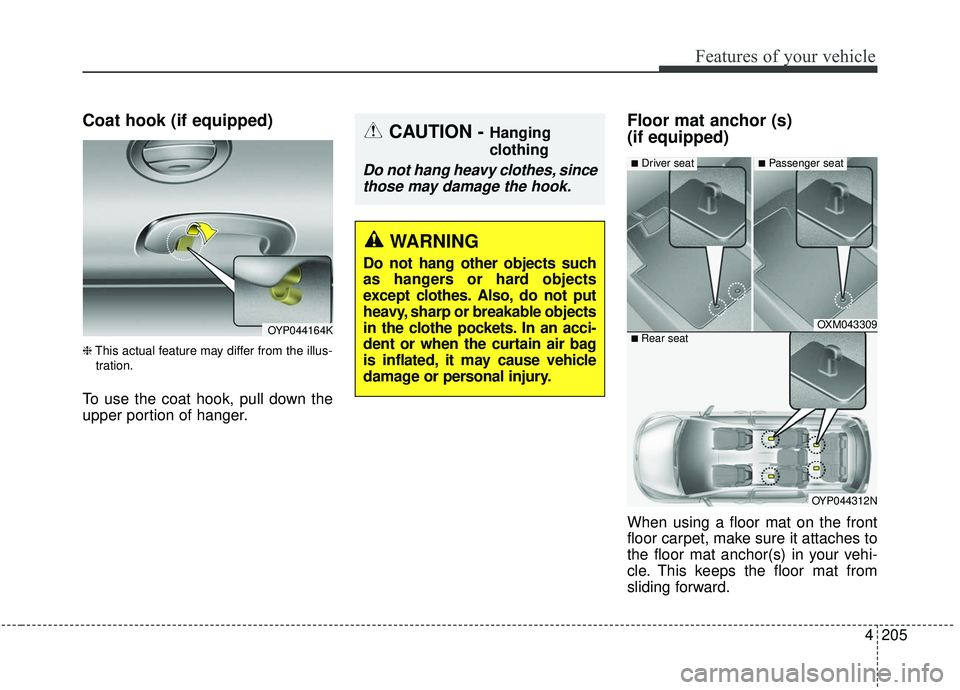
To use the coat hook, pull down the
upper portion of hanger.
Floor mat anchor (s)
(if equipped)
When using a floor mat on the front
floor carpet, make sure it attaches to
the floor mat anchor(s) in your vehi-
cle. This keeps the floor mat from
sliding forward.
OYP044164K
CAUTION - Hanging
clothing
Do not hang heavy clothes, since those may damage the hook.
WARNING
Do not hang other objects such
as hangers or hard objects
except clothes. Also, do not put
heavy, sharp or breakable objects
in the clothe pockets. In an acci-
dent or when the curtain air bag
is inflated, it may cause vehicle
damage or personal injury.
OXM043309
OYP044312N
■Driver seat■Passenger seat
■ Rear seat
Page 310 of 593
Features of your vehicle
206
4
The following must be observed
when installing ANY floor mat to the
vehicle.
Ensure that the floor mats are
securely attached to the vehicle's
floor mat anchor(s) before driving
the vehicle.
Do not use ANY floor mat that can- not be firmly attached to the vehi-
cle's floor mat anchors.
Do not stack floor mats on top of one another (e.g. all-weather rub-
ber mat on top of a carpeted floor
mat). Only a single floor mat should
be installed in each position.
IMPORTANT – Your vehicle was
manufactured with driver's side floor
mat anchors that are designed to
securely hold the floor mat in place.
To avoid any interference with pedal
operation, Kia recommends that only
the Kia floor mat designed for use in
your vehicle be installed.Side curtain (if equipped)
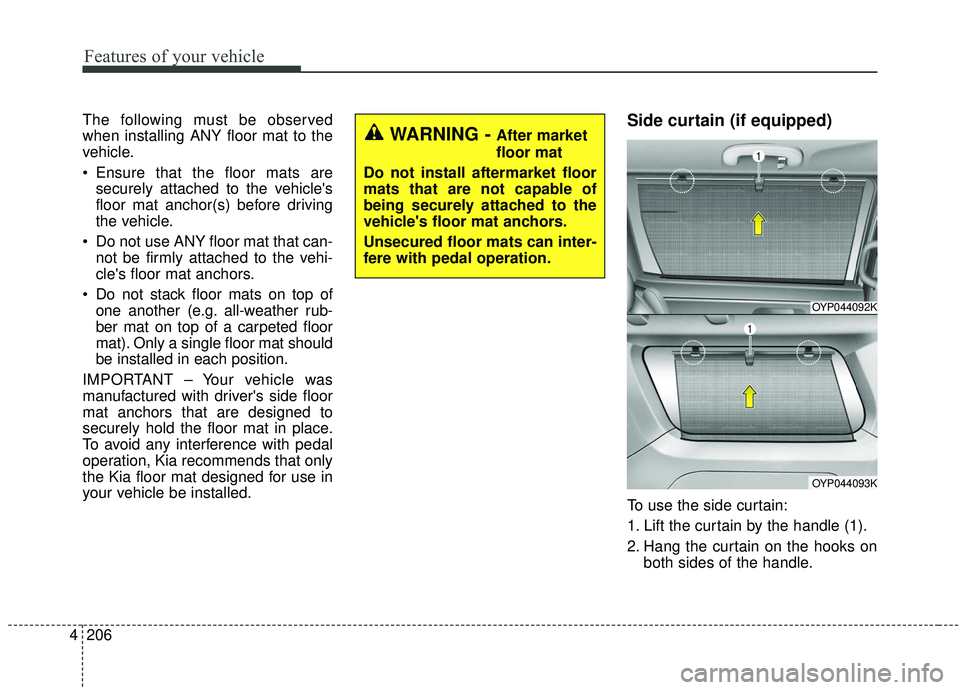
To use the side curtain:
1. Lift the curtain by the handle (1).
2. Hang the curtain on the hooks on both sides of the handle.
OYP044092K
OYP044093K
WARNING - After market
floor mat
Do not install aftermarket floor
mats that are not capable of
being securely attached to the
vehicle's floor mat anchors.
Unsecured floor mats can inter-
fere with pedal operation.
Page 311 of 593

4207
Features of your vehicle
To avoid injury or damage to the side
curtain and door moldings, lower
side curtain by the handle all the way
back to the stowed position. Do not
release handle after disengaging
from the hooks on the door.Luggage net holder
(if equipped)
To keep items from shifting in the
cargo area, you can use the holders
located in the cargo area to attach
the luggage net.
If necessary, we recommend that
you contact an authorized Kia dealer.
OUM044089
CAUTION
To prevent damage to the vehi-cle, care should be taken whencarrying fragile or bulky objectsin the luggage compartment.
WARNING - Luggage net
To avoid eye injury, DO NOT
overstretch the luggage net.
ALWAYS keep your face and
body out of the luggage net’s
recoil path. DO NOT use the lug-
gage net when the strap has vis-
ible signs of wear or damage.
Page 313 of 593
4209
Features of your vehicle
Always drive slowly and turn cornerscarefully when carrying items on the
roof rack. Severe wind updrafts,
caused by passing vehicles or natu-
ral causes, can cause sudden
upward pressure on items loaded on
the roof rack. This is especially true
when carrying large, flat items such
as wood panels or mattresses. This
could cause the items to fall off the
roof rack and cause damage to your
vehicle or others around you.
To prevent damage or loss of cargo while driving, check frequently
before or while driving to make
sure the items on the roof rack are
securely fastened.
WARNING- Driving with
roof load
Always drive slow and turn cor-
ners carefully when carrying
items on the roof rack. The vehi-
cle center of gravity will be
higher when items are loaded
onto the roof rack.