fuel KIA SEDONA 2019 User Guide
[x] Cancel search | Manufacturer: KIA, Model Year: 2019, Model line: SEDONA, Model: KIA SEDONA 2019Pages: 593, PDF Size: 15.93 MB
Page 145 of 593
441
Features of your vehicle
The left power sliding door cannotbe opened while the fuel filler lid is
open fully. If the main or sub control
button is pushed, the chime
sounds once. Also, if the fuel filler
lid open button is pushed while the
left power sliding door is opening,
the chime sounds 3 times.
✽ ✽ NOTICE
If the fuel filler lid is opened when
the left sliding door is not closed
completely, the door may be opened.
Close the left sliding door before
refueling to prevent possible dam-
age to the door or the fuel filler lid.
If the power sliding door is not
closed and latched completely
after power closing operation, the
chime sounds 3 times. Open and
close the door again.
If the power sliding door is operat- ed while the door is in partially
opened position (less than 12
in./300 mm), the door is automati-
cally opened fully.
If the power sliding door is operat- ed while the door is in half-opened
position (more than 300 mm/12
in.), the door is automatically
closed completely.
If the power sliding door is operated again while the door is closing, the
door is automatically opened fully.
If the power sliding door is operated again while the door is opening, the
door is automatically closed com-
pletely. However, If the power slid-
ing door is operated again when
the door is in partially opened posi-
tion (less than 300 mm/12 in.), the
door is opened continuously. The half-opened power sliding door
is automatically opened or closed
fully by pushing the door forward or
backward without pulling the door
handle while the power door
ON/OFF button is in ON (not
depressed). However, when the
door is in partially opened position
(less than 300 mm/12 in.), the door
is not closed automatically.
Page 164 of 593
Features of your vehicle
60
4
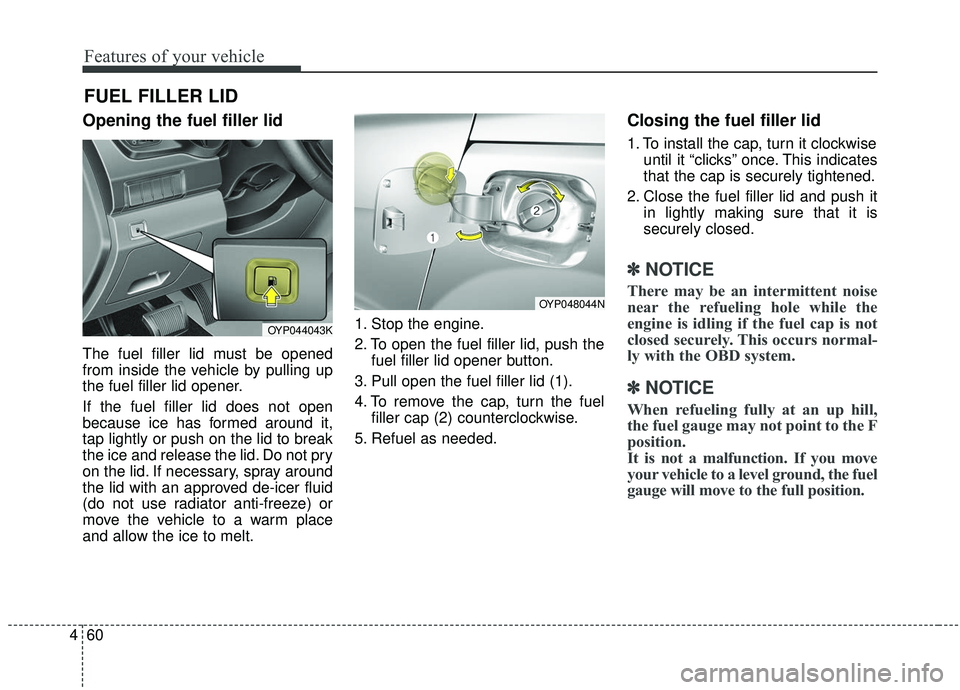
Opening the fuel filler lid
The fuel filler lid must be opened
from inside the vehicle by pulling up
the fuel filler lid opener.
If the fuel filler lid does not open
because ice has formed around it,
tap lightly or push on the lid to break
the ice and release the lid. Do not pry
on the lid. If necessary, spray around
the lid with an approved de-icer fluid
(do not use radiator anti-freeze) or
move the vehicle to a warm place
and allow the ice to melt. 1. Stop the engine.
2. To open the fuel filler lid, push the
fuel filler lid opener button.
3. Pull open the fuel filler lid (1).
4. To remove the cap, turn the fuel filler cap (2) counterclockwise.
5. Refuel as needed.
Closing the fuel filler lid
1. To install the cap, turn it clockwise until it “clicks” once. This indicates
that the cap is securely tightened.
2. Close the fuel filler lid and push it in lightly making sure that it is
securely closed.
✽ ✽NOTICE
There may be an intermittent noise
near the refueling hole while the
engine is idling if the fuel cap is not
closed securely. This occurs normal-
ly with the OBD system.
✽ ✽NOTICE
When refueling fully at an up hill,
the fuel gauge may not point to the F
position.
It is not a malfunction. If you move
your vehicle to a level ground, the fuel
gauge will move to the full position.
FUEL FILLER LID
OYP048044N
OYP044043K
Page 165 of 593
461
Features of your vehicle
Always check that the fuel cap is
installed securely to prevent fuel
spillage in the event of an accident.
✽ ✽NOTICE
Tighten the cap until it clicks once,
otherwise the fuel cap open warning
indicator light will illuminate
WARNING- Fire/explo-
sion risk
Read and follow all warnings
posted at the gas station facili-
ty. Failure to follow all warnings
will result in severe personal
injury, severe burns or death
due to fire or explosion.WARNING- Static electricity
Before touching the fuel noz- zle, you should eliminate
potentially dangerous static
electricity discharge by touch-
ing another metal part of the
vehicle, a safe distance away
from the fuel filler neck, noz-
zle, or other gas source.
Do not get back into a vehicle once you have begun refuel-
ing since you can generate
static electricity by touching,
rubbing or sliding against any
item or fabric (polyester, satin,
nylon, etc.) capable of produc-
ing static electricity. Static
electricity discharge can
ignite fuel vapors resulting in
rapid burning. If you must
reenter the vehicle, you
should once again eliminate
potentially dangerous static
electricity discharge by touch-
ing a metal part of the vehicle,
away from the fuel filler neck,
nozzle or other gasoline
source.WARNING- Refueling
Always remove the fuel cap
carefully and slowly. If the cap
is venting fuel or if you hear a
hissing sound, wait until the
condition stops before com-
pletely removing the cap. If
pressurized fuel sprays out, it
can cover your clothes or skin
and subject you to the risk of
fire and burns.
Page 166 of 593
Features of your vehicle
62
4
WARNING- Cell phone
fires
Do not use cellular phones
while refueling. Electric current
and/or electronic interference
from cellular phones can poten-
tially ignite fuel vapors causing
a fire.
WARNING- Smoking
DO NOT use matches or a lighter
and DO NOT SMOKE or leave a lit
cigarette in your vehicle while at
a gas station especially during
refueling. Automotive fuel is
highly flammable and can, when
ignited, result in fire.
WARNING- Refueling & Vehicle fires
When refueling, always shut the
engine off. Sparks produced by
electrical components related
to the engine can ignite fuel
vapors causing a fire. Once
refueling is complete, check to
make sure the filler cap and
filler door are securely closed,
before starting the engine.WARNING- Portable fuel container
When using an approved
portable fuel container, be sure
to place the container on the
ground prior to refueling. Static
electricity discharge from the
container can ignite fuel vapors
causing a fire. Once refueling
has begun, contact with the
vehicle should be maintained
until the filling is complete. Use
only approved portable plastic
fuel containers designed to
carry and store gasoline.
Page 167 of 593
463
Features of your vehicle
Make sure to refuel your vehicle
according to the “Fuel requirements”
suggested in chapter 1.
If the fuel filler cap requires replace-
ment, use only a genuine Kia cap or
the equivalent specified for your vehi-
cle. An incorrect fuel filler cap can
result in a serious malfunction of the
fuel system or emission control sys-
tem.Emergency fuel filler lid release
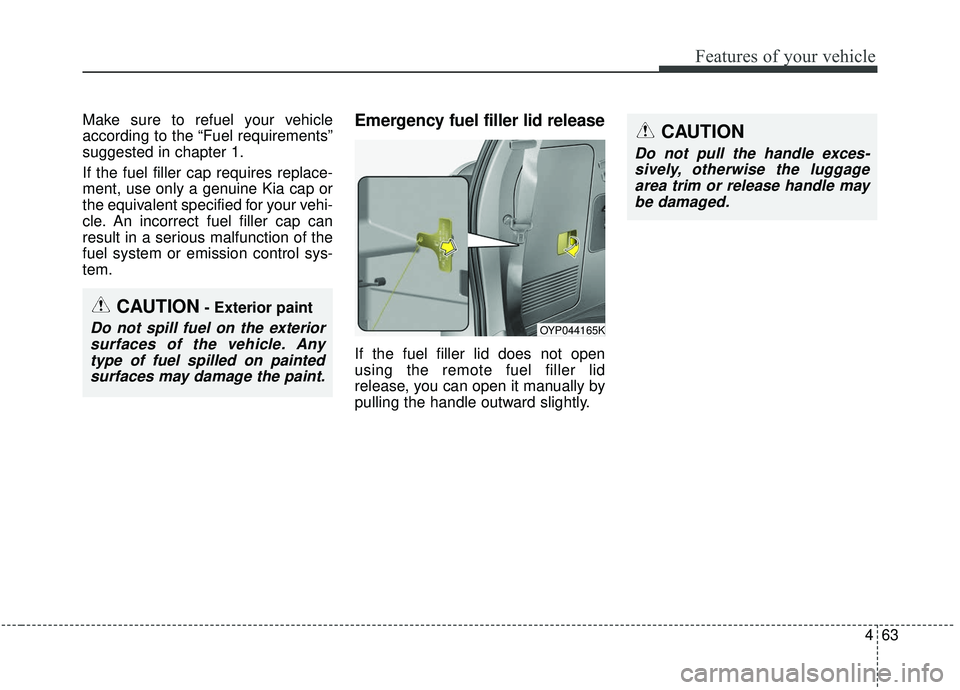
If the fuel filler lid does not open
using the remote fuel filler lid
release, you can open it manually by
pulling the handle outward slightly.
CAUTION
Do not pull the handle exces-sively, otherwise the luggagearea trim or release handle maybe damaged.
OYP044165K
CAUTION- Exterior paint
Do not spill fuel on the exteriorsurfaces of the vehicle. Anytype of fuel spilled on paintedsurfaces may damage the paint.
Page 192 of 593
Features of your vehicle
88
4
Blind zone mirror (if equipped)
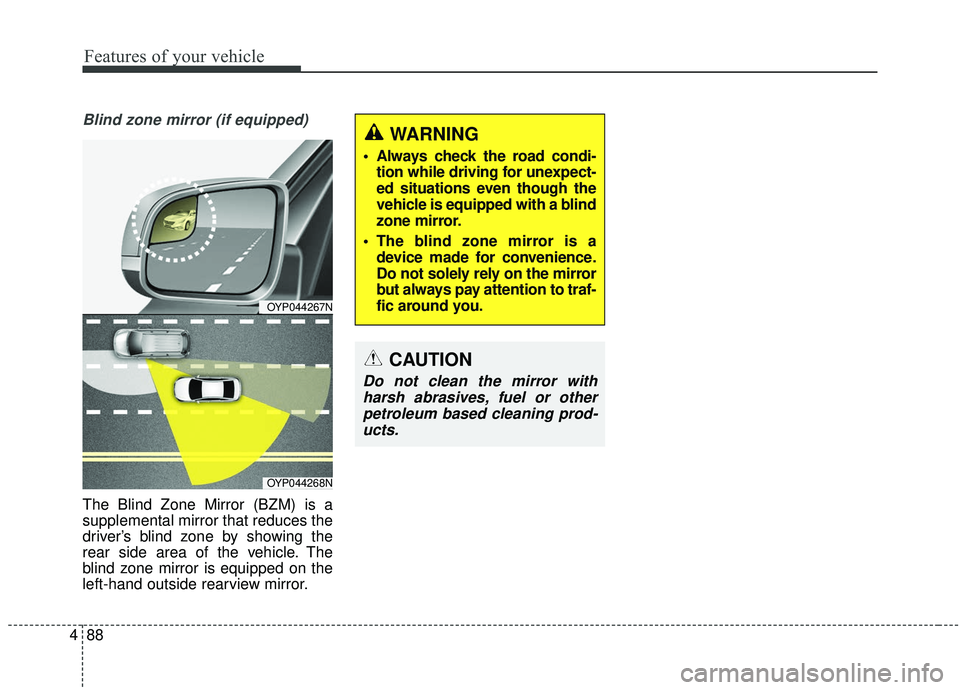
The Blind Zone Mirror (BZM) is a
supplemental mirror that reduces the
driver’s blind zone by showing the
rear side area of the vehicle. The
blind zone mirror is equipped on the
left-hand outside rearview mirror.
CAUTION
Do not clean the mirror with
harsh abrasives, fuel or otherpetroleum based cleaning prod-ucts.
OYP044267N
OYP044268N
WARNING
Always check the road condi- tion while driving for unexpect-
ed situations even though the
vehicle is equipped with a blind
zone mirror.
The blind zone mirror is a device made for convenience.
Do not solely rely on the mirror
but always pay attention to traf-
fic around you.
Page 193 of 593
489
Features of your vehicle
INSTRUMENT CLUSTER
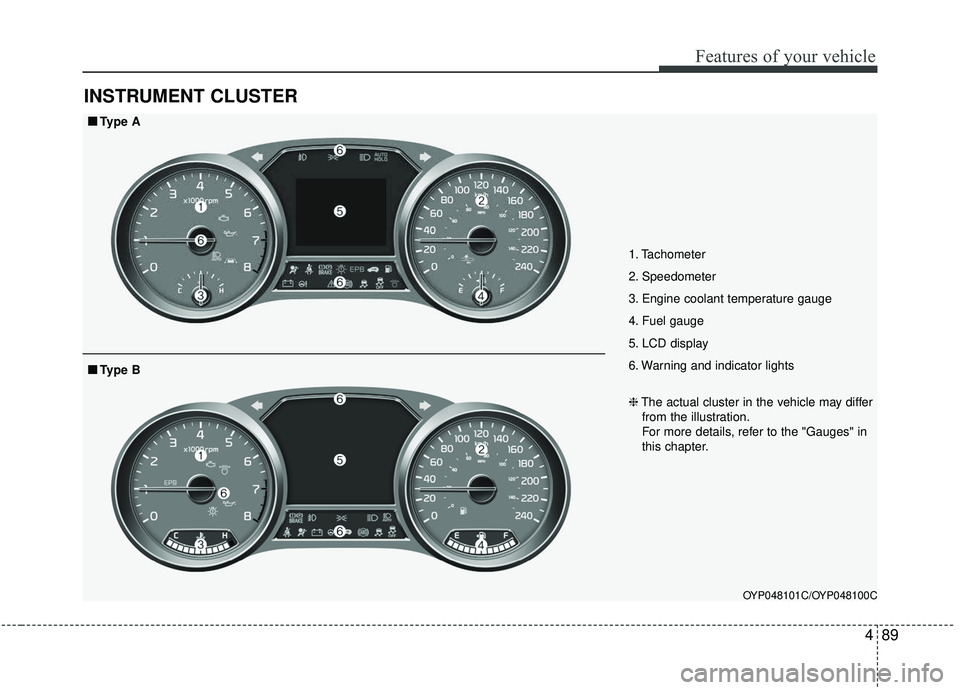
1. Tachometer
2. Speedometer
3. Engine coolant temperature gauge
4. Fuel gauge
5. LCD display
6. Warning and indicator lights
OYP048101C/OYP048100C
■ ■Type A
❈The actual cluster in the vehicle may differ
from the illustration.
For more details, refer to the "Gauges" in
this chapter.
■ ■ Type B
Page 196 of 593
Features of your vehicle
92
4
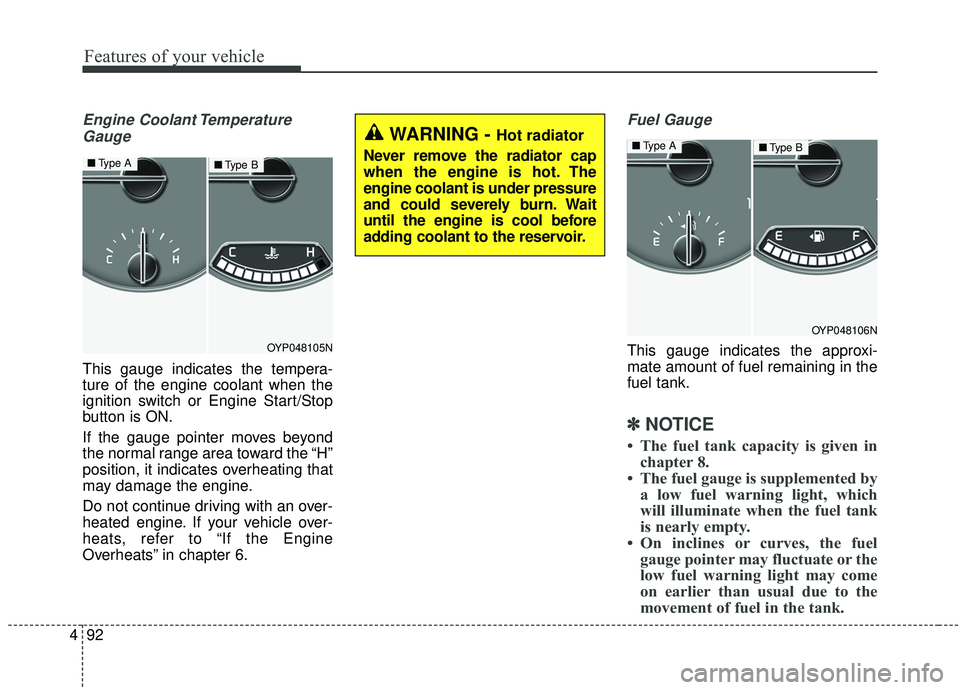
Engine Coolant Temperature
Gauge
This gauge indicates the tempera-
ture of the engine coolant when the
ignition switch or Engine Start/Stop
button is ON.
If the gauge pointer moves beyond
the normal range area toward the “H”
position, it indicates overheating that
may damage the engine.
Do not continue driving with an over-
heated engine. If your vehicle over-
heats, refer to “If the Engine
Overheats” in chapter 6.
Fuel Gauge
This gauge indicates the approxi-
mate amount of fuel remaining in the
fuel tank.
✽ ✽ NOTICE
• The fuel tank capacity is given in
chapter 8.
• The fuel gauge is supplemented by a low fuel warning light, which
will illuminate when the fuel tank
is nearly empty.
• On inclines or curves, the fuel gauge pointer may fluctuate or the
low fuel warning light may come
on earlier than usual due to the
movement of fuel in the tank.
OYP048105N
■ Type A■Type B
WARNING - Hot radiator
Never remove the radiator cap
when the engine is hot. The
engine coolant is under pressure
and could severely burn. Wait
until the engine is cool before
adding coolant to the reservoir.
OYP048106N
■ Type A■Type B
Page 197 of 593
493
Features of your vehicle
✽ ✽NOTICE
Fuel display may not be accurate if
you are filling in sloping places.
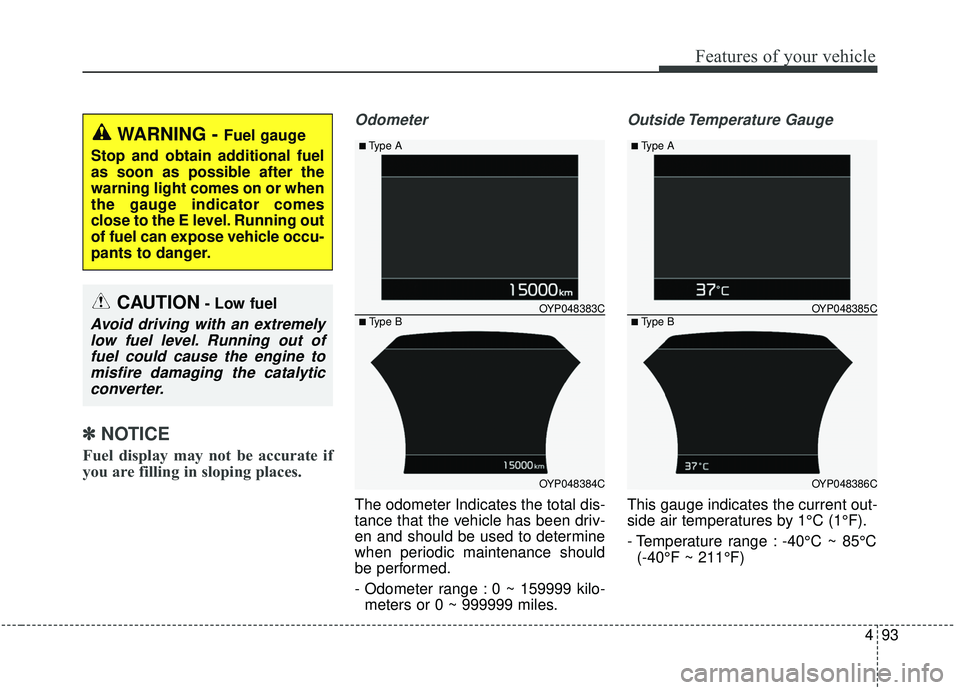
Odometer
The odometer Indicates the total dis-
tance that the vehicle has been driv-
en and should be used to determine
when periodic maintenance should
be performed.
- Odometer range : 0 ~ 159999 kilo-
meters or 0 ~ 999999 miles.
Outside Temperature Gauge
This gauge indicates the current out-
side air temperatures by 1°C (1°F).
- Temperature range : -40°C ~ 85°C(-40°F ~ 211°F)
WARNING - Fuel gauge
Stop and obtain additional fuel
as soon as possible after the
warning light comes on or when
the gauge indicator comes
close to the E level. Running out
of fuel can expose vehicle occu-
pants to danger.
CAUTION- Low fuel
Avoid driving with an extremely low fuel level. Running out offuel could cause the engine tomisfire damaging the catalyticconverter.
OYP048384C
OYP048383C
■Type A
■ Type B
OYP048386C
OYP048385C
■Type A
■ Type B
Page 199 of 593
495
Features of your vehicle
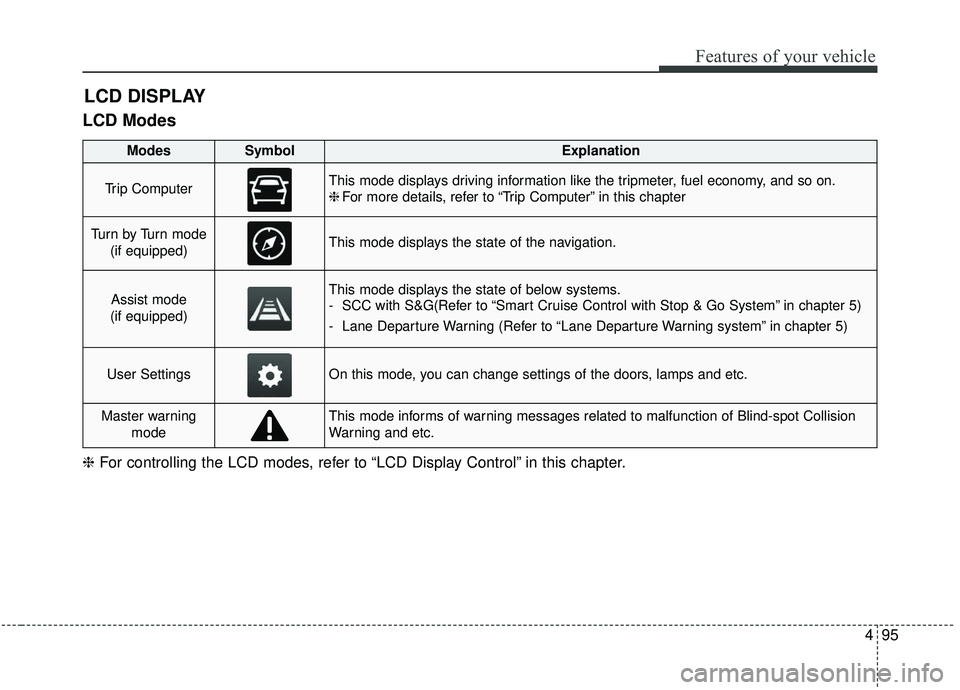
LCD Modes
LCD DISPLAY
❈For controlling the LCD modes, refer to “LCD Display Control” in this chapter.
ModesSymbolExplanation
Trip ComputerThis mode displays driving information like the tripmeter, fuel economy, and so on.
❈For more details, refer to “Trip Computer” in this chapter
Tu r n b y Tu r n m o d e
(if equipped)This mode displays the state of the navigation.
Assist mode
(if equipped)This mode displays the state of below systems.
- SCC with S&G(Refer to “Smart Cruise Control with Stop & Go System” in chapter 5)
- Lane Departure Warning (Refer to “Lane Departure Warning system” in chapter 5)
User SettingsOn this mode, you can change settings of the doors, lamps and etc.
Master warning modeThis mode informs of warning messages related to malfunction of Blind-spot Collision
Warning and etc.