open hood KIA SEDONA 2019 User Guide
[x] Cancel search | Manufacturer: KIA, Model Year: 2019, Model line: SEDONA, Model: KIA SEDONA 2019Pages: 593, PDF Size: 15.93 MB
Page 214 of 593
Features of your vehicle
110
4
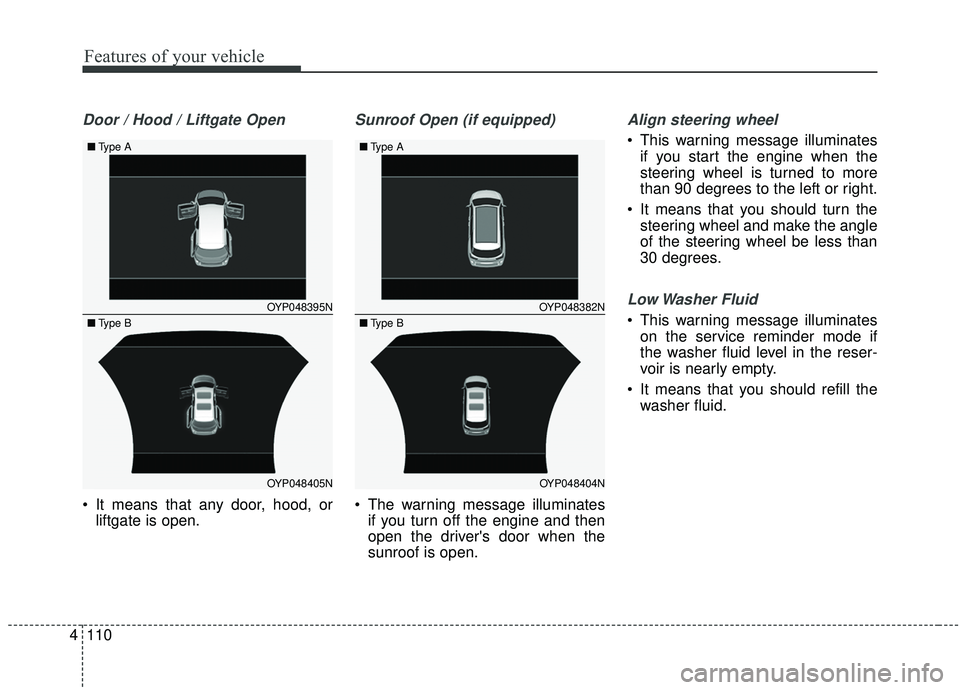
Door / Hood / Liftgate Open
It means that any door, hood, or
liftgate is open.
Sunroof Open (if equipped)
The warning message illuminatesif you turn off the engine and then
open the driver's door when the
sunroof is open.
Align steering wheel
This warning message illuminates
if you start the engine when the
steering wheel is turned to more
than 90 degrees to the left or right.
It means that you should turn the steering wheel and make the angle
of the steering wheel be less than
30 degrees.
Low Washer Fluid
This warning message illuminateson the service reminder mode if
the washer fluid level in the reser-
voir is nearly empty.
It means that you should refill the washer fluid.OYP048395N
OYP048405N
■
Type A
■Type B
OYP048382N
OYP048404N
■
Type A
■Type B
Page 341 of 593
527
Driving your vehicle
EPB (electronic parking brake) may
be automatically applied when:
The EPB is overheated
Requested by other systems
✽ ✽NOTICE
If the driver turns the engine off by
mistake while Auto Hold is operat-
ing, EPB will be automatically
applied. (Vehicles equipped with
Auto Hold)
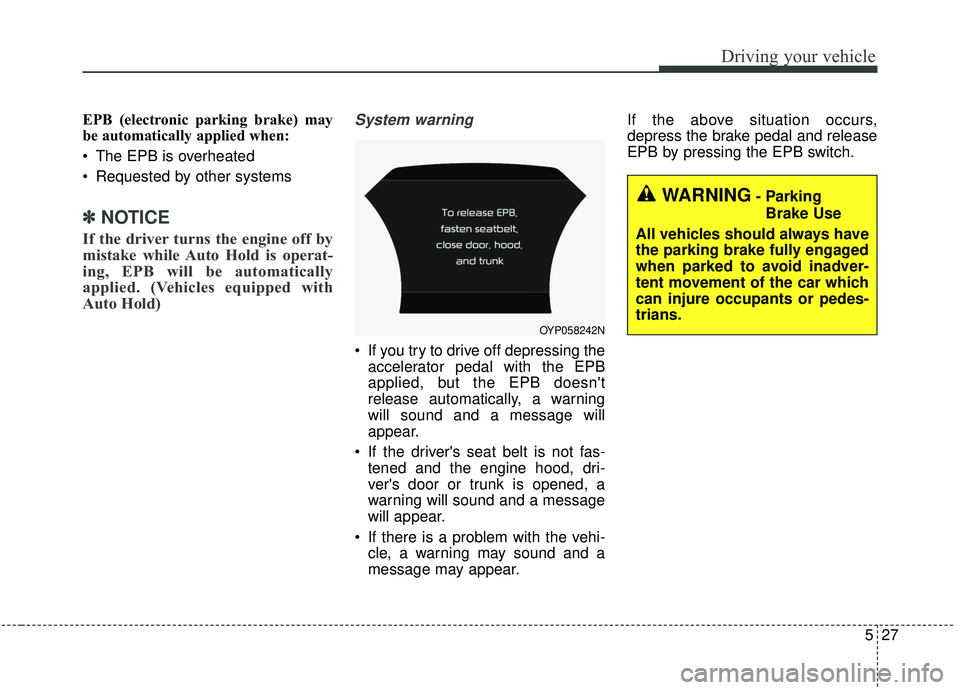
System warning
If you try to drive off depressing the
accelerator pedal with the EPB
applied, but the EPB doesn't
release automatically, a warning
will sound and a message will
appear.
If the driver's seat belt is not fas- tened and the engine hood, dri-
ver's door or trunk is opened, a
warning will sound and a message
will appear.
If there is a problem with the vehi- cle, a warning may sound and a
message may appear. If the above situation occurs,
depress the brake pedal and release
EPB by pressing the EPB switch.
WARNING- Parking
Brake Use
All vehicles should always have
the parking brake fully engaged
when parked to avoid inadver-
tent movement of the car which
can injure occupants or pedes-
trians.
OYP058242N
Page 346 of 593
Driving your vehicle
32
5
Cancel
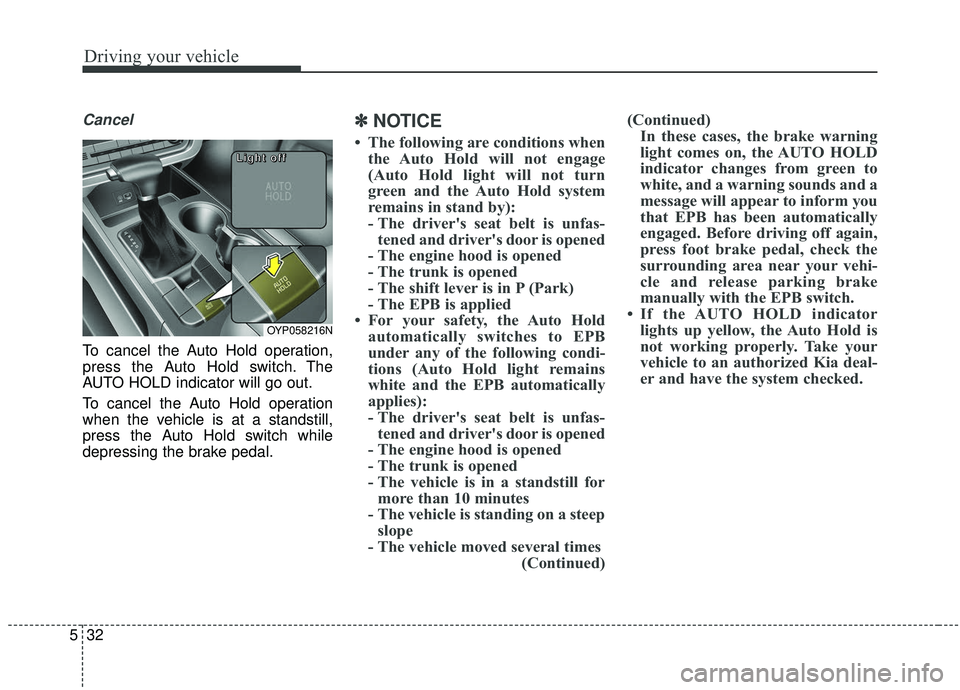
To cancel the Auto Hold operation,
press the Auto Hold switch. The
AUTO HOLD indicator will go out.
To cancel the Auto Hold operation
when the vehicle is at a standstill,
press the Auto Hold switch while
depressing the brake pedal.
✽ ✽
NOTICE
• The following are conditions when
the Auto Hold will not engage
(Auto Hold light will not turn
green and the Auto Hold system
remains in stand by):
- The driver's seat belt is unfas-tened and driver's door is opened
- The engine hood is opened
- The trunk is opened
- The shift lever is in P (Park)
- The EPB is applied
• For your safety, the Auto Hold automatically switches to EPB
under any of the following condi-
tions (Auto Hold light remains
white and the EPB automatically
applies):
- The driver's seat belt is unfas-tened and driver's door is opened
- The engine hood is opened
- The trunk is opened
- The vehicle is in a standstill for more than 10 minutes
- The vehicle is standing on a steep slope
- The vehicle moved several times (Continued)(Continued)
In these cases, the brake warning
light comes on, the AUTO HOLD
indicator changes from green to
white, and a warning sounds and a
message will appear to inform you
that EPB has been automatically
engaged. Before driving off again,
press foot brake pedal, check the
surrounding area near your vehi-
cle and release parking brake
manually with the EPB switch.
• If the AUTO HOLD indicator lights up yellow, the Auto Hold is
not working properly. Take your
vehicle to an authorized Kia deal-
er and have the system checked.
OYP058216N
L L
L L
i i
i i
g g
g g
h h
h h
t t
t t
o o
o o
f f
f f
f f
f f
Page 347 of 593
533
Driving your vehicle
If there is a malfunction with the dri-
ver’s door, engine hood or trunk open
detection system, the Auto Hold may
not work properly.
Take your vehicle to an authorized Kia
dealer and have the system checked.
✽ ✽NOTICE
A click or electric brake motor
whine sound may be heard while
operating or releasing the EPB, but
these conditions are normal and
indicate that the EPB is functioning
properly.
Anti-lock brake system (ABS)
ABS (or ESC) will not prevent acci-
dents due to improper or dangerous
driving maneuvers. Even though
vehicle control is improved during
emergency braking, always maintain
a safe distance between you and
objects ahead. Vehicle speeds
should always be reduced during
extreme road conditions. The vehicle
should be driven at reduced speeds
in the following circumstances:
When driving on rough, gravel or
snow-covered roads
When driving on roads where the road surface is pitted or has differ-
ent surface heights.
Driving in these conditions increase
the stopping distance for your vehi-
cle. The ABS continuously senses the
speed of the wheels. If the wheels
are going to lock, the ABS system
repeatedly modulates the hydraulic
brake pressure to the wheels.
When you apply your brakes under
conditions which may lock the
wheels, you may hear a “tik-tik’’
sound from the brakes, or feel a cor-
responding sensation in the brake
pedal. This is normal and it means
your ABS is active.
In order to obtain the maximum ben-
efit from your ABS in an emergency
situation, do not attempt to modulate
your brake pressure and do not try to
pump your brakes. Press your brake
pedal as hard as possible or as hard
as the situation allows the ABS to
control the force being delivered to
the brakes.WARNING
To reduce the risk of an acci-
dent, do not activate Auto Hold
while driving downhill, backing
up or parking your vehicle.
Page 451 of 593
What to do in an emergency
86
IF THE ENGINE OVERHEATS
If your temperature gauge indicates
overheating, you experience a loss
of power, or hear loud pinging or
knocking, the engine will probably be
too hot. If this happens, you should:
1.Pull off the road and stop as soonas it is safe to do so.
2.Place the shift lever in P (Park, automatic transaxle) and set the
parking brake. If the air condition-
ing is on, turn it off.
3.If engine coolant is running out under the vehicle or steam is com-
ing out from underneath the hood,
stop the engine. Do not open the
hood until the coolant has stopped
running or the steaming has
stopped. If there is no visible loss
of engine coolant and no steam,
leave the engine running and
check to be sure the engine cool-
ing fan is operating. If the fan is not
running, turn the engine off. 4.Check to see if the water pump
drive belt is missing. If it is not
missing, check to see that it is
tight. If the drive belt seems to be
satisfactory, check for coolant leak-
ing from the radiator, hoses or
under the vehicle. (If the air condi-
tioning had been in use, it is nor-
mal for cold water to be draining
from it when you stop).
5.If the water pump drive belt is bro- ken or engine coolant is leaking
out, stop the engine immediately
and call the nearest authorized Kia
dealer for assistance. 6.If you cannot find the cause of the
overheating, wait until the engine
temperature has returned to nor-
mal. Then, if coolant has been lost,
carefully add coolant to the reser-
voir to bring the fluid level in the
reservoir up to the halfway mark.
7.Proceed with caution, keeping alert for further signs of overheat-
ing. If overheating happens again,
call an authorized Kia dealer for
assistance.
Serious loss of coolant indicates
there is a leak in the cooling system
and this should be checked as soon
as possible by an authorized Kia
dealer.
WARNING - Under the hood
While the engine is running,
keep hair, hands and clothing
away from moving parts such
as the fan and drive belts to pre-
vent injury.
WARNING - Radiator cap
Do not remove the radiator cap
when the engine is hot. This
may result in coolant being
blown out of the opening and
cause serious burns.
Page 536 of 593
769
Maintenance
Light bulb position (Side)
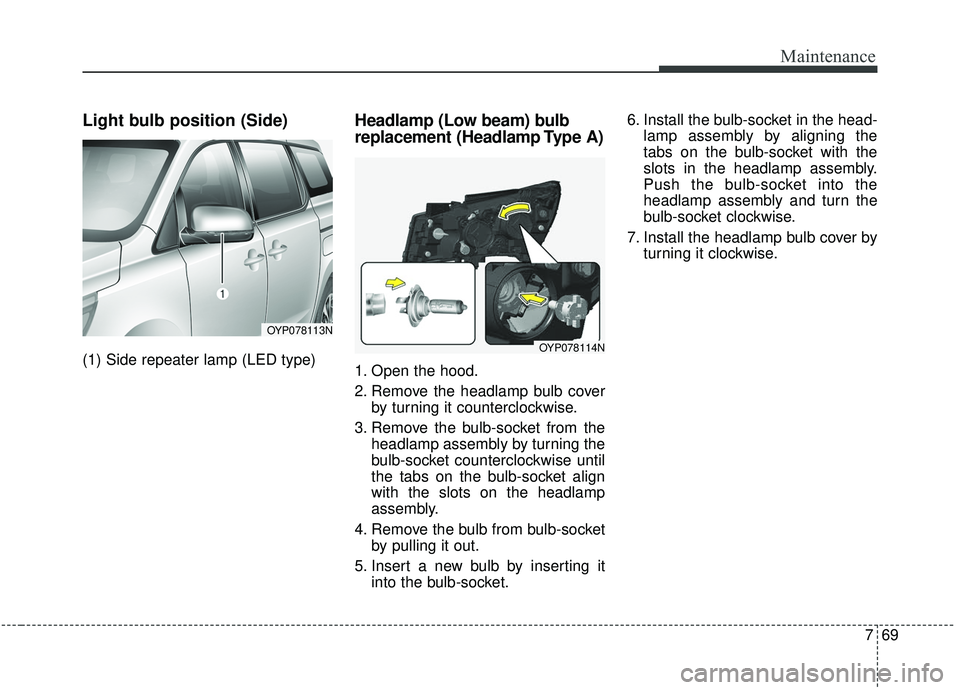
(1) Side repeater lamp (LED type)
Headlamp (Low beam) bulb
replacement (Headlamp Type A)
1. Open the hood.
2. Remove the headlamp bulb coverby turning it counterclockwise.
3. Remove the bulb-socket from the headlamp assembly by turning the
bulb-socket counterclockwise until
the tabs on the bulb-socket align
with the slots on the headlamp
assembly.
4. Remove the bulb from bulb-socket by pulling it out.
5. Insert a new bulb by inserting it into the bulb-socket. 6. Install the bulb-socket in the head-
lamp assembly by aligning the
tabs on the bulb-socket with the
slots in the headlamp assembly.
Push the bulb-socket into the
headlamp assembly and turn the
bulb-socket clockwise.
7. Install the headlamp bulb cover by turning it clockwise.
OYP078113N
OYP078114N
Page 537 of 593
Maintenance
70
7
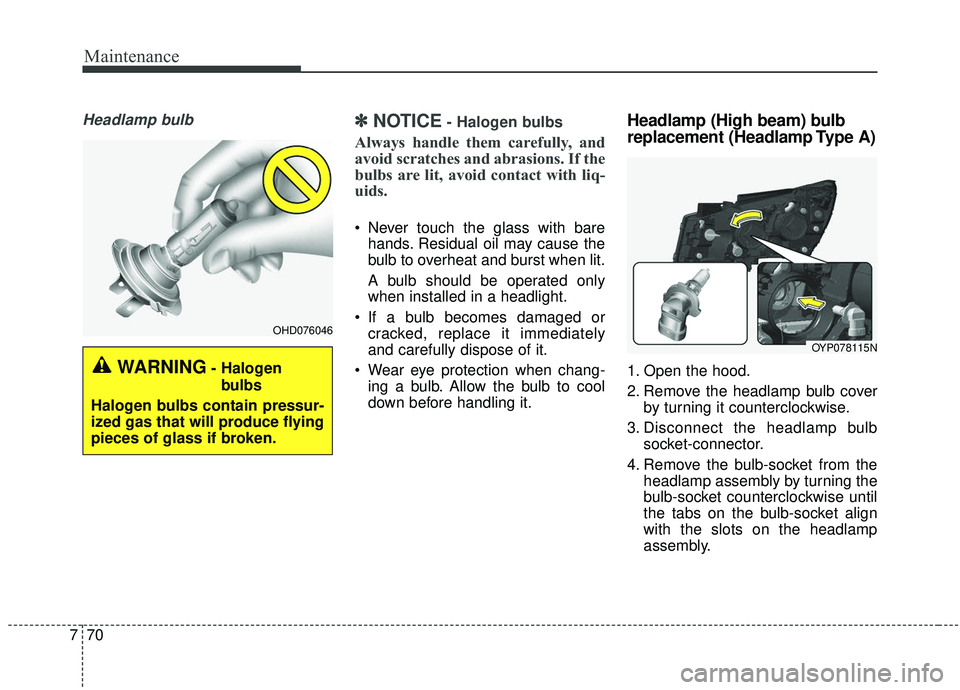
Headlamp bulb✽ ✽
NOTICE- Halogen bulbs
Always handle them carefully, and
avoid scratches and abrasions. If the
bulbs are lit, avoid contact with liq-
uids.
Never touch the glass with bare
hands. Residual oil may cause the
bulb to overheat and burst when lit.
A bulb should be operated only
when installed in a headlight.
If a bulb becomes damaged or cracked, replace it immediately
and carefully dispose of it.
Wear eye protection when chang- ing a bulb. Allow the bulb to cool
down before handling it.
Headlamp (High beam) bulb
replacement (Headlamp Type A)
1. Open the hood.
2. Remove the headlamp bulb cover by turning it counterclockwise.
3. Disconnect the headlamp bulb socket-connector.
4. Remove the bulb-socket from the headlamp assembly by turning the
bulb-socket counterclockwise until
the tabs on the bulb-socket align
with the slots on the headlamp
assembly.WARNING- Halogen
bulbs
Halogen bulbs contain pressur-
ized gas that will produce flying
pieces of glass if broken.
OHD076046
OYP078115N
Page 539 of 593
Maintenance
72
7
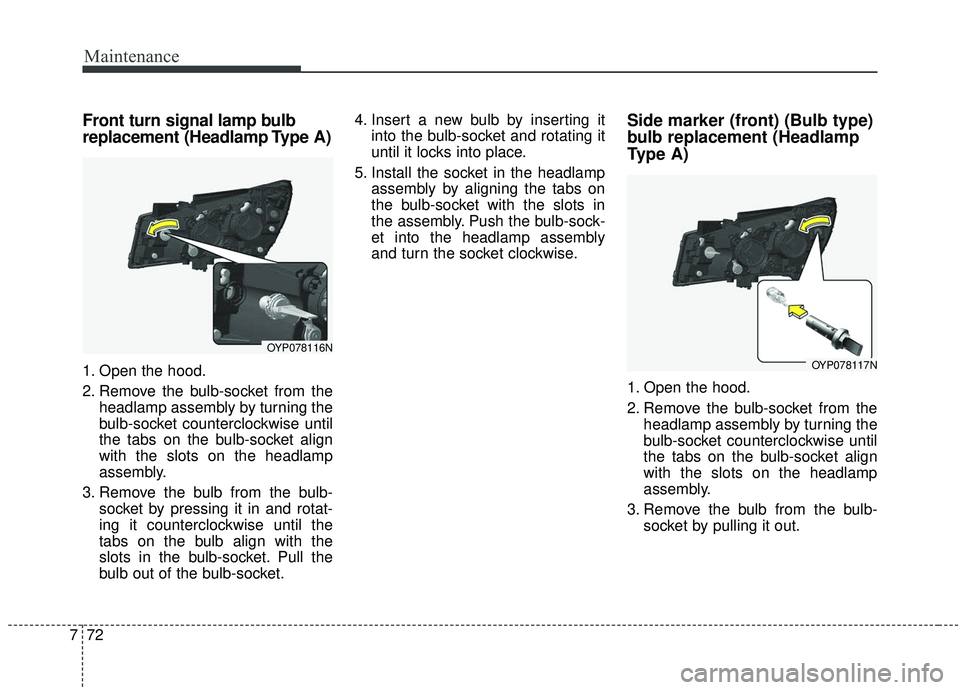
Front turn signal lamp bulb
replacement (Headlamp Type A)
1. Open the hood.
2. Remove the bulb-socket from the
headlamp assembly by turning the
bulb-socket counterclockwise until
the tabs on the bulb-socket align
with the slots on the headlamp
assembly.
3. Remove the bulb from the bulb- socket by pressing it in and rotat-
ing it counterclockwise until the
tabs on the bulb align with the
slots in the bulb-socket. Pull the
bulb out of the bulb-socket. 4. Insert a new bulb by inserting it
into the bulb-socket and rotating it
until it locks into place.
5. Install the socket in the headlamp assembly by aligning the tabs on
the bulb-socket with the slots in
the assembly. Push the bulb-sock-
et into the headlamp assembly
and turn the socket clockwise.
Side marker (front) (Bulb type)
bulb replacement (Headlamp
Type A)
1. Open the hood.
2. Remove the bulb-socket from theheadlamp assembly by turning the
bulb-socket counterclockwise until
the tabs on the bulb-socket align
with the slots on the headlamp
assembly.
3. Remove the bulb from the bulb- socket by pulling it out.
OYP078116N
OYP078117N
Page 541 of 593
Maintenance
74
7
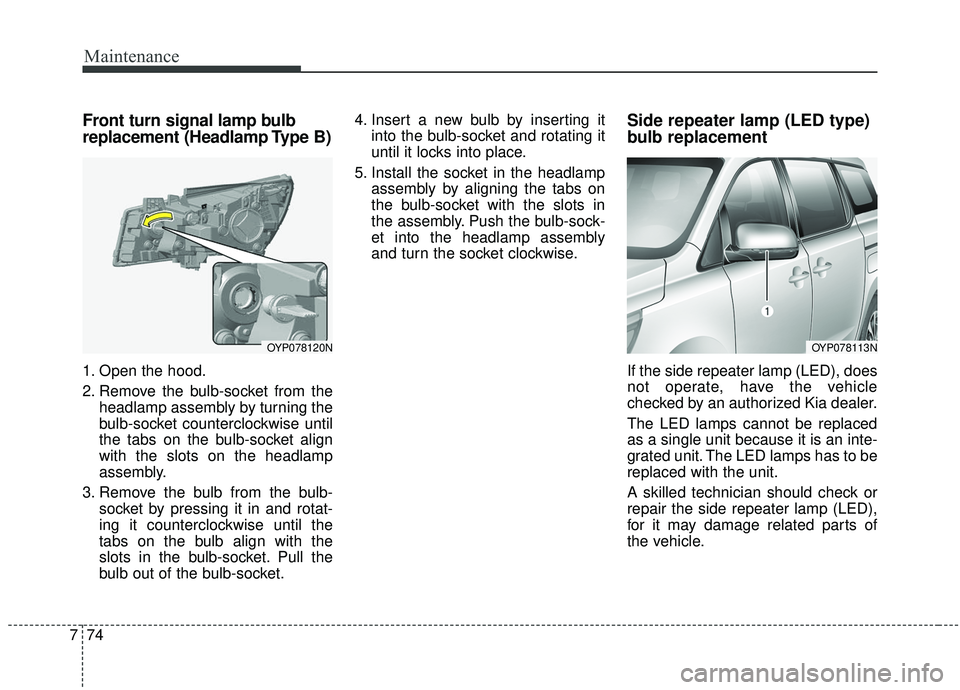
Front turn signal lamp bulb
replacement (Headlamp Type B)
1. Open the hood.
2. Remove the bulb-socket from the
headlamp assembly by turning the
bulb-socket counterclockwise until
the tabs on the bulb-socket align
with the slots on the headlamp
assembly.
3. Remove the bulb from the bulb- socket by pressing it in and rotat-
ing it counterclockwise until the
tabs on the bulb align with the
slots in the bulb-socket. Pull the
bulb out of the bulb-socket. 4. Insert a new bulb by inserting it
into the bulb-socket and rotating it
until it locks into place.
5. Install the socket in the headlamp assembly by aligning the tabs on
the bulb-socket with the slots in
the assembly. Push the bulb-sock-
et into the headlamp assembly
and turn the socket clockwise.
Side repeater lamp (LED type)
bulb replacement
If the side repeater lamp (LED), does
not operate, have the vehicle
checked by an authorized Kia dealer.
The LED lamps cannot be replaced
as a single unit because it is an inte-
grated unit. The LED lamps has to be
replaced with the unit.
A skilled technician should check or
repair the side repeater lamp (LED),
for it may damage related parts of
the vehicle.
OYP078120NOYP078113N
Page 585 of 593
Index
8I
Highway driving . . . . . . . . . . . . . . . . . . . . . . . . . . . . . 5-109
Hill-start Assist Control (HAC) . . . . . . . . . . . . . . . . . . 5-42
Hitches . . . . . . . . . . . . . . . . . . . . . . . . . . . . . . . . . . . . \
5-115
Hood . . . . . . . . . . . . . . . . . . . . . . . . . . . . . . . . . . . . \
. . . 4-57Closing the hood . . . . . . . . . . . . . . . . . . . . . . . . . . . 4-58
Hood open warning . . . . . . . . . . . . . . . . . . . . . . . . . 4-58
Opening the hood . . . . . . . . . . . . . . . . . . . . . . . . . . . 4-55
Horn . . . . . . . . . . . . . . . . . . . . . . . . . . . . . . . . . . . . \
. . . 4-73
How to use this manual . . . . . . . . . . . . . . . . . . . . . . . . . 1-2
If you do decide to pull a trailer . . . . . . . . . . . . . . . . . 5-120
Immobilizer system (Folding key) . . . . . . . . . . . . . . . . 4-11
Immobilizer system(Smart key) . . . . . . . . . . . . . . . . . . 4-21
Indicator lights . . . . . . . . . . . . . . . . . . . . . . . . . . . . . . 4-120
Inside rearview mirror . . . . . . . . . . . . . . . . . . . . . . . . . 4-74
Instrument cluster . . . . . . . . . . . . . . . . . . . . . . . . . . . . . 4-88 Gauges . . . . . . . . . . . . . . . . . . . . . . . . . . . . . . . . . . . 4-\
90
Indicator lights . . . . . . . . . . . . . . . . . . . . . . . . . . . . 4-120
Instrument cluster control . . . . . . . . . . . . . . . . . . . . 4-89
LCD display control . . . . . . . . . . . . . . . . . . . . . . . . . 4-89
Warning lights . . . . . . . . . . . . . . . . . . . . . . . . . . . . 4-113
Instrument panel overview . . . . . . . . . . . . . . . . . . . . . . . 2-5
Interior care. . . . . . . . . . . . . . . . . . . . . . . . . . . . . . . . . . 7-95\
Interior features. . . . . . . . . . . . . . . . . . . . . . . . . . . . . . 4-195 AC inverter . . . . . . . . . . . . . . . . . . . . . . . . . . . . . . . 4-199
Air ventilation seat . . . . . . . . . . . . . . . . . . . . . . . . . 4-197 Coat hook . . . . . . . . . . . . . . . . . . . . . . . . . . . . . . . . 4-205
Cup holder . . . . . . . . . . . . . . . . . . . . . . . . . . . . . . . 4-197
Floor mat anchor(s) . . . . . . . . . . . . . . . . . . . . . . . . 4-205
Luggage net (holder) . . . . . . . . . . . . . . . . . . . . . . . 4-209
Power outlet . . . . . . . . . . . . . . . . . . . . . . . . . . . . . . 4-199
Seat warmer . . . . . . . . . . . . . . . . . . . . . . . . . . . . . . 4-198
Side curtain. . . . . . . . . . . . . . . . . . . . . . . . . . . . . . . 4-208
Sunvisor . . . . . . . . . . . . . . . . . . . . . . . . . . . . . . . . . 4-197
USB charger . . . . . . . . . . . . . . . . . . . . . . . . . . . . . . 4-201
Wireless smart phone charging system . . . . . . . . . 4-201
Interior light . . . . . . . . . . . . . . . . . . . . . . . . . . . . . . . . 4-148 Automatic turn off function . . . . . . . . . . . . . . . . . . 4-148
Glove box lamp . . . . . . . . . . . . . . . . . . . . . . . . . . . 4-149
Luggage lamp . . . . . . . . . . . . . . . . . . . . . . . . . . . . . 4-149
Map lamp . . . . . . . . . . . . . . . . . . . . . . . . . . . . . . . . 4-149
Room lamp . . . . . . . . . . . . . . . . . . . . . . . . . . . . . . . 4-148
Vanity mirror lamp . . . . . . . . . . . . . . . . . . . . . . . . . 4-149
Interior overview. . . . . . . . . . . . . . . . . . . . . . . . . . . . . . . 2-4
Jump starting. . . . . . . . . . . . . . . . . . . . . . . . . . . . . . . . . . 6-5
Key operations (Folding key) . . . . . . . . . . . . . . . . . . . . . 4-5
Key positions . . . . . . . . . . . . . . . . . . . . . . . . . . . . . . . . . 5-7 Ignition switch position . . . . . . . . . . . . . . . . . . . . . . . 5-7
I
J
K