phone KIA SEDONA 2019 User Guide
[x] Cancel search | Manufacturer: KIA, Model Year: 2019, Model line: SEDONA, Model: KIA SEDONA 2019Pages: 593, PDF Size: 15.93 MB
Page 302 of 593
Features of your vehicle
198
4
The ticket holder (5) is provided for
holding a tollgate ticket. (if equipped)
* The actual sunvisor lamp in the vehi-
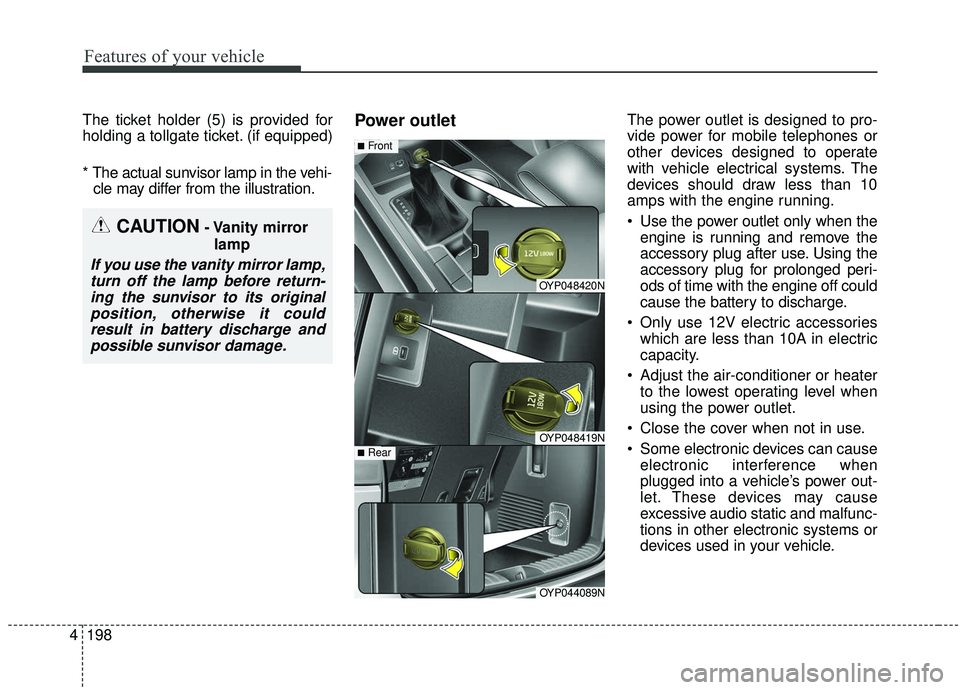
cle may differ from the illustration.Power outletThe power outlet is designed to pro-
vide power for mobile telephones or
other devices designed to operate
with vehicle electrical systems. The
devices should draw less than 10
amps with the engine running.
Use the power outlet only when the engine is running and remove the
accessory plug after use. Using the
accessory plug for prolonged peri-
ods of time with the engine off could
cause the battery to discharge.
Only use 12V electric accessories which are less than 10A in electric
capacity.
Adjust the air-conditioner or heater to the lowest operating level when
using the power outlet.
Close the cover when not in use.
Some electronic devices can cause electronic interference when
plugged into a vehicle’s power out-
let. These devices may cause
excessive audio static and malfunc-
tions in other electronic systems or
devices used in your vehicle.
CAUTION- Vanity mirror
lamp
If you use the vanity mirror lamp,turn off the lamp before return-ing the sunvisor to its originalposition, otherwise it couldresult in battery discharge andpossible sunvisor damage.
OYP048420N
OYP048419N
■Front
OYP044089N
■Rear
Page 305 of 593
4201
Features of your vehicle
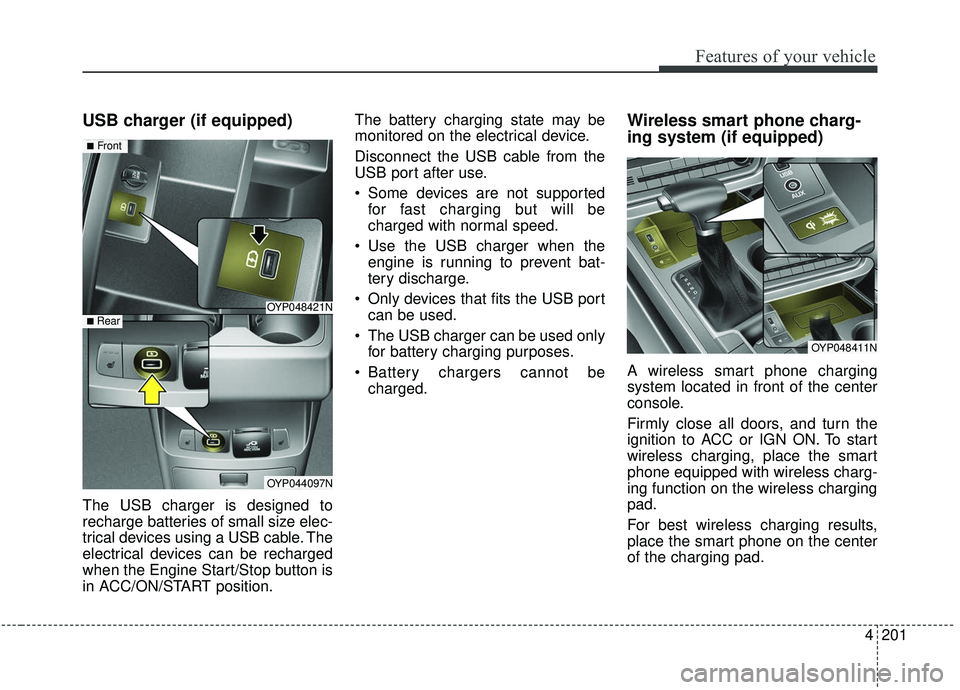
USB charger (if equipped)
The USB charger is designed to
recharge batteries of small size elec-
trical devices using a USB cable. The
electrical devices can be recharged
when the Engine Start/Stop button is
in ACC/ON/START position.The battery charging state may be
monitored on the electrical device.
Disconnect the USB cable from the
USB port after use.
Some devices are not supported
for fast charging but will be
charged with normal speed.
Use the USB charger when the engine is running to prevent bat-
tery discharge.
Only devices that fits the USB port can be used.
The USB charger can be used only for battery charging purposes.
Battery chargers cannot be charged.
Wireless smart phone charg-
ing system (if equipped)
A wireless smart phone charging
system located in front of the center
console.
Firmly close all doors, and turn the
ignition to ACC or IGN ON. To start
wireless charging, place the smart
phone equipped with wireless charg-
ing function on the wireless charging
pad.
For best wireless charging results,
place the smart phone on the center
of the charging pad.
OYP048421N
OYP044097N
■Front
■ Rear
OYP048411N
Page 306 of 593
Features of your vehicle
202
4
The wireless charging system is
designed for one smart phone
equipped with QI per single usage
only. Please refer to the smart phone
accessory cover or the smart phone
manufacturer homepage to check
whether your smart phone supports
QI function.Wireless smart phone charging
1. Remove any object on the smart
phone charging pad including the
smart key. If there is any foreign
object on the pad other than a
smart phone, the wireless charging
function may not operate properly.
2. Place the smart phone on the cen- ter of the wireless charging pad.
3. The indicator light will change to orange once the wireless charging
begins. After the charging is com-
plete, the orange light will change
to green.
4. You can choose to turn the wireless charging function to either ON or
OFF by selecting the USM on the
instrument cluster. (Please refer to
“Instrument Cluster” for details).
CAUTION
-
Metal in Wireless Charging
System
If any metallic object such ascoins is located between thewireless charging system andthe smart phone, the chargingmay be disrupted. Also, themetallic object may heat up andpotentially damage the chargingsystem. If there is any metallicobject between the smart phoneand the charging pad, immedi-ately remove the smart phone.Remove the metallic object afterit has cooled down.
CAUTION
-
Liquid in Wireless Smart
Phone Charger
To prevent liquid from damag-ing the wireless smart phonecharging system in your vehi-cle, securely close the traycover when charging yourphone.
Page 307 of 593
4203
Features of your vehicle
If the wireless charging is not func-
tioning properly, the orange light will
blink and flash for ten seconds then
turn off. In such cases, remove the
smart phone from the pad and
replace it on the pad again, or double
check the charging status.
If you leave the smart phone on the
charging pad when the vehicle igni-
tion is in OFF, the vehicle will alert
you through warning messages and
sound (applicable for vehicles with
voice guidance function).✽ ✽NOTICE
• Securely close the tray cover when
using the wireless smart phone
charge function.
• Close the tray cover when the smart phone is placed in it at all
times. If the vehicle is in motion
without the tray cover closed, it is
more likely that the driver may
use the smart phone. The use of
smart phones while driving may
lead to possible injuries and acci-
dents.
• If it is not possible to close the tray cover due to the size of the smart
phone, do not use the wireless
smart phone charging function at
all.
• When the tray cover is broken, do not use the wireless charging func-
tion before the tray cover is
repaired. (Continued)(Continued)
• When the interior temperature of
the wireless charging system rises
above a set temperature, the wire-
less charging will cease to func-
tion. After the interior tempera-
ture drops below the threshold,
the wireless charging function will
resume.
• The wireless charging may not function properly when there is a
heavy accessory cover on the
smart phone.
The wireless charging will stop
when the smart phone is not in
complete contact with the wireless
charging pad.
• The smart key detection feature in operation could temporarily stop
charging.
(When turning on ignition, open-
ing doors, or closing doors)
• The wireless charging will stop when the vehicle is turned OFF. (Continued)
Page 308 of 593
Features of your vehicle
204
4
(Continued)
• Items equipped with magnetic
components such as credit card,
telephone card, bankbook, any
transportation ticket and such
may become damaged during
wireless charging.
• Place the smart phone on the cen- ter of the charge pad for best
results. The smart phone may not
charge when placed near the rim
of the charging pad. When the
smart phone does get charged, it
may heat up excessively.
• For smart phones without built-in wireless charging system, an
appropriate accessory has to be
equipped.
• Cellphones without the certifica- tion for wireless charging ( )
could fail to charge.
• The self-protection feature equipped in some mobile phones
could slow down or stop charging. (Continued)(Continued)
• The indicator light of some manu-
facturers’ smart phones may still
be yellow after the smart phone is
fully charged. This is due to the
particular characteristic of the
smart phone and not a malfunc-
tion of the wireless charging.
• When any smart phone without a wireless charging function or a
metallic object is placed on the
charging pad, a small noise may
sound. This small sound is due to
the vehicle discerning compatibili-
ty of the object placed on the
charging pad. It does not affect
your vehicle or the smart phone in
any way. This device complies with
Industry Canada licence-exempt
RSS standard(s).
Operation is subject to the following
two conditions:
(1) This device may not cause inter-
ference, and
(2) This device must accept any
interference, including interfer-
ence that may cause undesired
operation of the device.
Page 522 of 593
755
Maintenance
✽ ✽NOTICE- Remodeling
Prohibited
Do not rewire your vehicle in any
way as doing so may affect the per-
formance of several safety features
in your vehicle. Rewiring your vehi-
cle may also void your warranty and
cause you to be responsible for any
subsequent vehicle damage which
may result.
✽ ✽ NOTICE- Window tinting pre-
caution
Window tint (especially metallic
film) might cause communication
errors or poor radio reception, and
malfunctioning automatic lighting
system due to reflections from the
mirror tint inside the vehicle. The
solution used might also leak into
the electronic components, causing
malfunctions or damage.
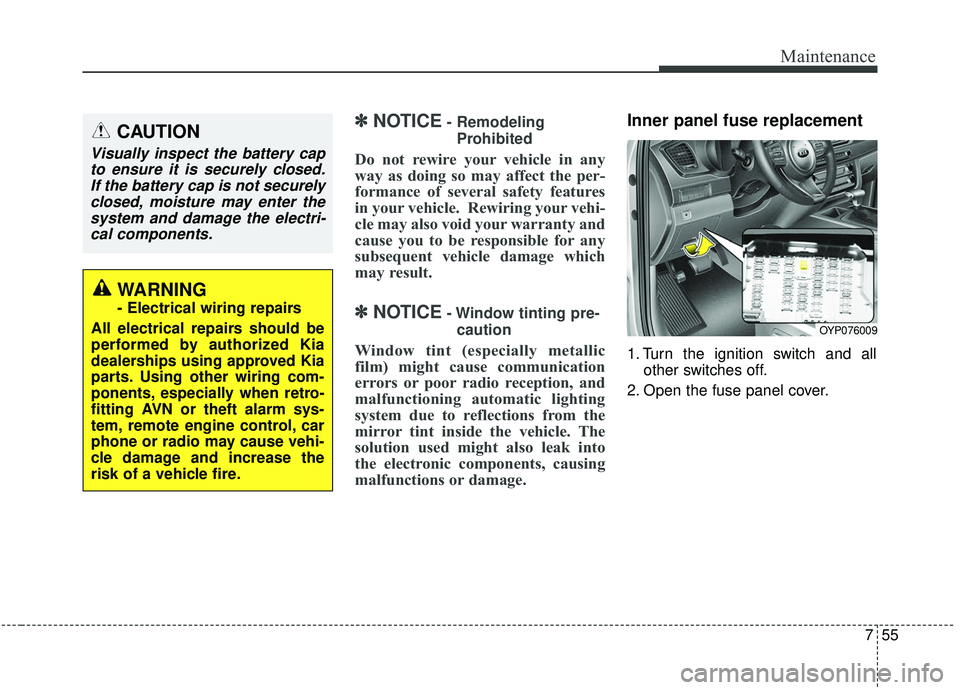
Inner panel fuse replacement
1. Turn the ignition switch and all other switches off.
2. Open the fuse panel cover.
CAUTION
Visually inspect the battery cap to ensure it is securely closed.If the battery cap is not securelyclosed, moisture may enter thesystem and damage the electri-cal components.
WARNING
- Electrical wiring repairs
All electrical repairs should be
performed by authorized Kia
dealerships using approved Kia
parts. Using other wiring com-
ponents, especially when retro-
fitting AVN or theft alarm sys-
tem, remote engine control, car
phone or radio may cause vehi-
cle damage and increase the
risk of a vehicle fire.
OYP076009
Page 585 of 593
Index
8I
Highway driving . . . . . . . . . . . . . . . . . . . . . . . . . . . . . 5-109
Hill-start Assist Control (HAC) . . . . . . . . . . . . . . . . . . 5-42
Hitches . . . . . . . . . . . . . . . . . . . . . . . . . . . . . . . . . . . . \
5-115
Hood . . . . . . . . . . . . . . . . . . . . . . . . . . . . . . . . . . . . \
. . . 4-57Closing the hood . . . . . . . . . . . . . . . . . . . . . . . . . . . 4-58
Hood open warning . . . . . . . . . . . . . . . . . . . . . . . . . 4-58
Opening the hood . . . . . . . . . . . . . . . . . . . . . . . . . . . 4-55
Horn . . . . . . . . . . . . . . . . . . . . . . . . . . . . . . . . . . . . \
. . . 4-73
How to use this manual . . . . . . . . . . . . . . . . . . . . . . . . . 1-2
If you do decide to pull a trailer . . . . . . . . . . . . . . . . . 5-120
Immobilizer system (Folding key) . . . . . . . . . . . . . . . . 4-11
Immobilizer system(Smart key) . . . . . . . . . . . . . . . . . . 4-21
Indicator lights . . . . . . . . . . . . . . . . . . . . . . . . . . . . . . 4-120
Inside rearview mirror . . . . . . . . . . . . . . . . . . . . . . . . . 4-74
Instrument cluster . . . . . . . . . . . . . . . . . . . . . . . . . . . . . 4-88 Gauges . . . . . . . . . . . . . . . . . . . . . . . . . . . . . . . . . . . 4-\
90
Indicator lights . . . . . . . . . . . . . . . . . . . . . . . . . . . . 4-120
Instrument cluster control . . . . . . . . . . . . . . . . . . . . 4-89
LCD display control . . . . . . . . . . . . . . . . . . . . . . . . . 4-89
Warning lights . . . . . . . . . . . . . . . . . . . . . . . . . . . . 4-113
Instrument panel overview . . . . . . . . . . . . . . . . . . . . . . . 2-5
Interior care. . . . . . . . . . . . . . . . . . . . . . . . . . . . . . . . . . 7-95\
Interior features. . . . . . . . . . . . . . . . . . . . . . . . . . . . . . 4-195 AC inverter . . . . . . . . . . . . . . . . . . . . . . . . . . . . . . . 4-199
Air ventilation seat . . . . . . . . . . . . . . . . . . . . . . . . . 4-197 Coat hook . . . . . . . . . . . . . . . . . . . . . . . . . . . . . . . . 4-205
Cup holder . . . . . . . . . . . . . . . . . . . . . . . . . . . . . . . 4-197
Floor mat anchor(s) . . . . . . . . . . . . . . . . . . . . . . . . 4-205
Luggage net (holder) . . . . . . . . . . . . . . . . . . . . . . . 4-209
Power outlet . . . . . . . . . . . . . . . . . . . . . . . . . . . . . . 4-199
Seat warmer . . . . . . . . . . . . . . . . . . . . . . . . . . . . . . 4-198
Side curtain. . . . . . . . . . . . . . . . . . . . . . . . . . . . . . . 4-208
Sunvisor . . . . . . . . . . . . . . . . . . . . . . . . . . . . . . . . . 4-197
USB charger . . . . . . . . . . . . . . . . . . . . . . . . . . . . . . 4-201
Wireless smart phone charging system . . . . . . . . . 4-201
Interior light . . . . . . . . . . . . . . . . . . . . . . . . . . . . . . . . 4-148 Automatic turn off function . . . . . . . . . . . . . . . . . . 4-148
Glove box lamp . . . . . . . . . . . . . . . . . . . . . . . . . . . 4-149
Luggage lamp . . . . . . . . . . . . . . . . . . . . . . . . . . . . . 4-149
Map lamp . . . . . . . . . . . . . . . . . . . . . . . . . . . . . . . . 4-149
Room lamp . . . . . . . . . . . . . . . . . . . . . . . . . . . . . . . 4-148
Vanity mirror lamp . . . . . . . . . . . . . . . . . . . . . . . . . 4-149
Interior overview. . . . . . . . . . . . . . . . . . . . . . . . . . . . . . . 2-4
Jump starting. . . . . . . . . . . . . . . . . . . . . . . . . . . . . . . . . . 6-5
Key operations (Folding key) . . . . . . . . . . . . . . . . . . . . . 4-5
Key positions . . . . . . . . . . . . . . . . . . . . . . . . . . . . . . . . . 5-7 Ignition switch position . . . . . . . . . . . . . . . . . . . . . . . 5-7
I
J
K
Page 593 of 593
Index
16I
Vanity mirror lamp . . . . . . . . . . . . . . . . . . . . . . . . . . . 4-149
Vanity mirror lamp (Bulb type) bulb replacement . . . . 7-87
Vehicle break-in process . . . . . . . . . . . . . . . . . . . . . . . . . 1-6
Vehicle certification label . . . . . . . . . . . . . . . . . . . . . . . . 8-8
Vehicle data collection and event data recorders . . . . . . 1-7
Vehicle handling instructions . . . . . . . . . . . . . . . . . . . . . 1-6
Vehicle identification number (VIN) . . . . . . . . . . . . . . . 8-8
Vehicle load limit . . . . . . . . . . . . . . . . . . . . . . . . . . . . 5-123Certification label . . . . . . . . . . . . . . . . . . . . . . . . . . 5-127
Tire and loading information label. . . . . . . . . . . . . 5-123
Vehicle stability management (VSM) . . . . . . . . . . . . . 5-40
Vehicle weight glossary . . . . . . . . . . . . . . . . . . . . . . . 5-129
Warning and Indicator lights . . . . . . . . . . . . . . . . . . . 4-108
Warning lights . . . . . . . . . . . . . . . . . . . . . . . . . . . . . . . 4-113
Warning messages. . . . . . . . . . . . . . . . . . . . . . . . . . . . 4-107
Washer fluid . . . . . . . . . . . . . . . . . . . . . . . . . . . . . . . . . 7-27 Checking the washer fluid level . . . . . . . . . . . . . . . . 7-27
Wheel alignment and tire balance . . . . . . . . . . . . . . . . 7-42
Wheel replacement . . . . . . . . . . . . . . . . . . . . . . . . . . . . 7-44
Windows . . . . . . . . . . . . . . . . . . . . . . . . . . . . . . . . . . . . \
4-52 Power window lock button and rear sunroof lock button . . . . . . . . . . . . . . . . . . . . . . . . . . . . . . . 4-55 Windshield defrosting and defogging. . . . . . . . . . . . . 4-186
Automatic climate control system . . . . . . . . . . . . . 4-189
Defogging logic . . . . . . . . . . . . . . . . . . . . . . . . . . . 4-190
Manual climate control system . . . . . . . . . . . . . . . 4-186
Windshield washers . . . . . . . . . . . . . . . . . . . . . . . . . . 4-146
Windshield wipers . . . . . . . . . . . . . . . . . . . . . . . . . . . 4-145
Winter driving . . . . . . . . . . . . . . . . . . . . . . . . . . . . . . . 5-113 Snow tires . . . . . . . . . . . . . . . . . . . . . . . . . . . . . . . . 5-113
Wiper blades . . . . . . . . . . . . . . . . . . . . . . . . . . . . . . . . . 7-32 Blade inspection . . . . . . . . . . . . . . . . . . . . . . . . . . . . 7-32
Blade replacement . . . . . . . . . . . . . . . . . . . . . . . . . . 7-32
Wipers and washers . . . . . . . . . . . . . . . . . . . . . . . . . . 4-145 Rear window wiper and washer switch . . . . . . . . . 4-147
Windshield washers . . . . . . . . . . . . . . . . . . . . . . . . 4-146
Windshield wipers . . . . . . . . . . . . . . . . . . . . . . . . . 4-145
Wireless smart phone charging system . . . . . . . . . . . 4-201
360° camera monitoring system . . . . . . . . . . . . . . . . . 4-134
W
V
ETC