warning light KIA SEDONA 2020 User Guide
[x] Cancel search | Manufacturer: KIA, Model Year: 2020, Model line: SEDONA, Model: KIA SEDONA 2020Pages: 604, PDF Size: 16.24 MB
Page 91 of 604
375
Safety features of your vehicle
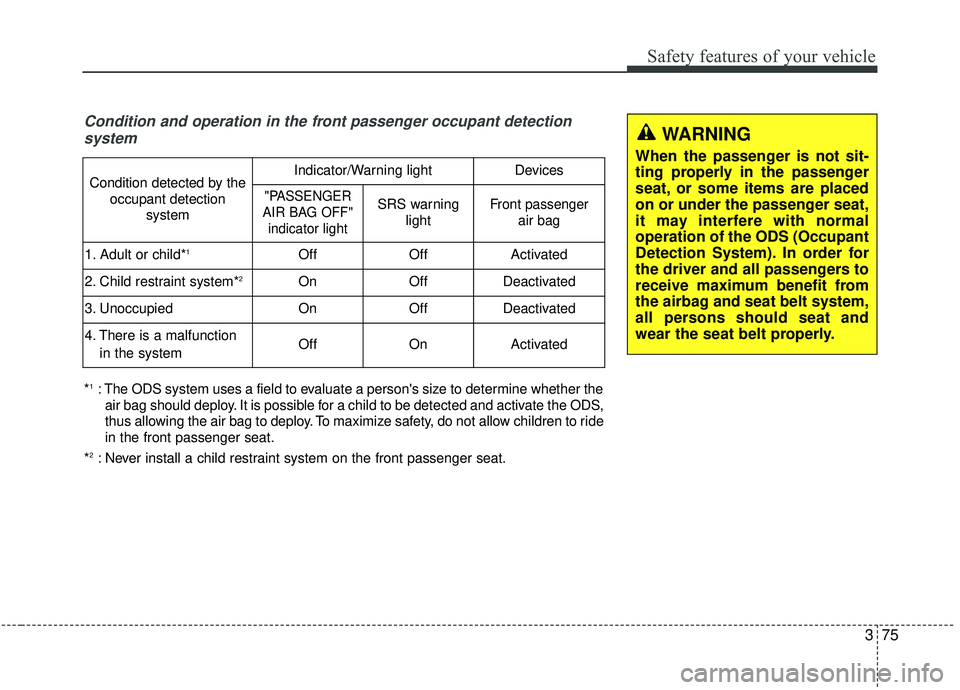
Condition and operation in the front passenger occupant detectionsystem
*1: The ODS system uses a field to evaluate a person's size to determine whether the
air bag should deploy. It is possible for a child to be detected and activate the ODS,
thus allowing the air bag to deploy. To maximize safety, do not allow children to ride
in the front passenger seat.
*
2: Never install a child restraint system on the front passenger seat.
Condition detected by the occupant detection systemIndicator/Warning lightDevices
"PASSENGER
AIR BAG OFF" indicator lightSRS warning lightFront passenger air bag
1. Adult or child*1OffOffActivated
2. Child restraint system*2OnOffDeactivated
3. Unoccupied OnOffDeactivated
4. There is a malfunction
in the systemOffOnActivated
WARNING
When the passenger is not sit-
ting properly in the passenger
seat, or some items are placed
on or under the passenger seat,
it may interfere with normal
operation of the ODS (Occupant
Detection System). In order for
the driver and all passengers to
receive maximum benefit from
the airbag and seat belt system,
all persons should seat and
wear the seat belt properly.
Page 94 of 604
Safety features of your vehicle
78
3
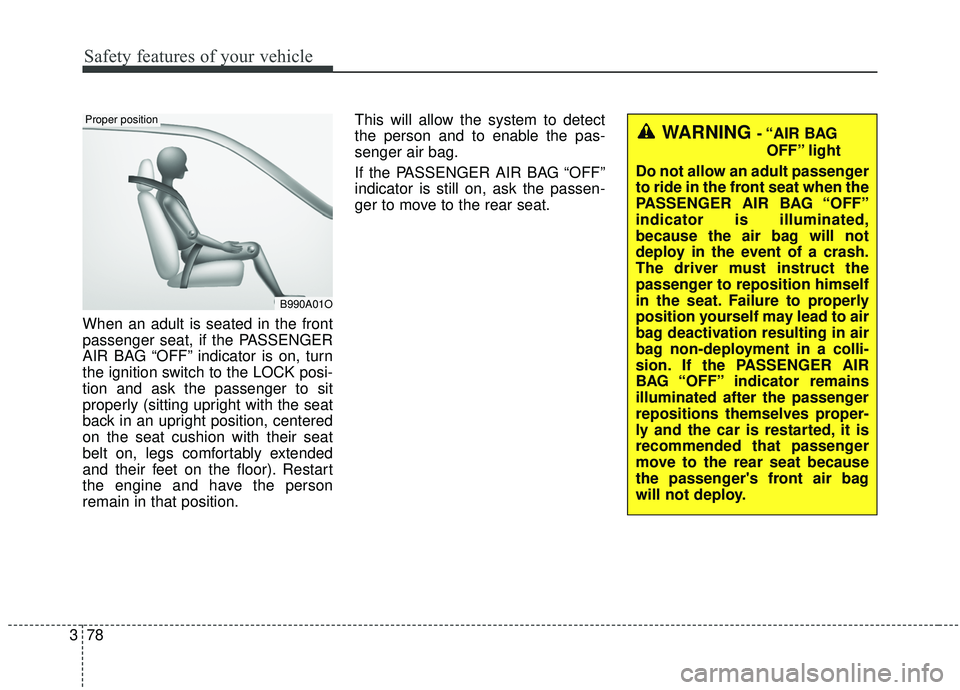
When an adult is seated in the front
passenger seat, if the PASSENGER
AIR BAG “OFF” indicator is on, turn
the ignition switch to the LOCK posi-
tion and ask the passenger to sit
properly (sitting upright with the seat
back in an upright position, centered
on the seat cushion with their seat
belt on, legs comfortably extended
and their feet on the floor). Restart
the engine and have the person
remain in that position. This will allow the system to detect
the person and to enable the pas-
senger air bag.
If the PASSENGER AIR BAG “OFF”
indicator is still on, ask the passen-
ger to move to the rear seat.
B990A01O
Proper position
WARNING - “AIR BAG
OFF” light
Do not allow an adult passenger
to ride in the front seat when the
PASSENGER AIR BAG “OFF”
indicator is illuminated,
because the air bag will not
deploy in the event of a crash.
The driver must instruct the
passenger to reposition himself
in the seat. Failure to properly
position yourself may lead to air
bag deactivation resulting in air
bag non-deployment in a colli-
sion. If the PASSENGER AIR
BAG “OFF” indicator remains
illuminated after the passenger
repositions themselves proper-
ly and the car is restarted, it is
recommended that passenger
move to the rear seat because
the passenger's front air bag
will not deploy.
Page 96 of 604
Safety features of your vehicle
80
3
If the occupant detection system is
not working properly, the SRS air
bag warning light on the instrument
panel will illuminate because the
passenger's front air bag is connect-
ed with the occupant detection sys-
tem. If there is a malfunction of the
occupant detection system, the PAS-
SENGER AIR BAG “OFF” indicator
will not illuminate and the passen-
ger's front air bag will inflate in frontal
impact crashes even if there is no
occupant in the front passenger's
seat.Driver's and passenger's front
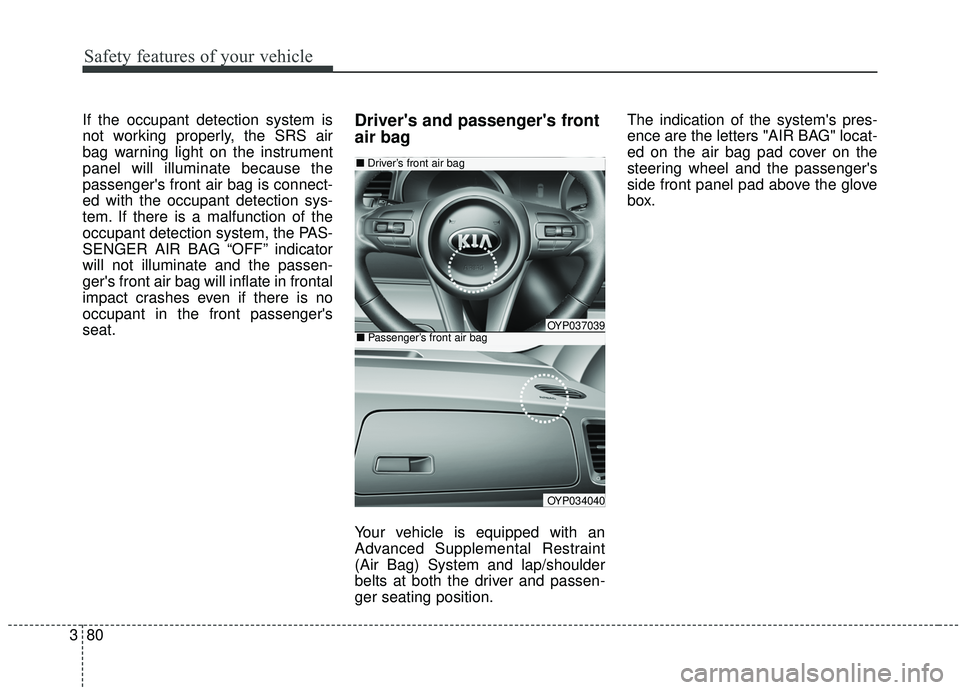
air bag
Your vehicle is equipped with an
Advanced Supplemental Restraint
(Air Bag) System and lap/shoulder
belts at both the driver and passen-
ger seating position. The indication of the system's pres-
ence are the letters "AIR BAG" locat-
ed on the air bag pad cover on the
steering wheel and the passenger's
side front panel pad above the glove
box.
OYP034040
■
Driver’s front air bag
■Passenger’s front air bagOYP037039
Page 108 of 604
Safety features of your vehicle
92
3
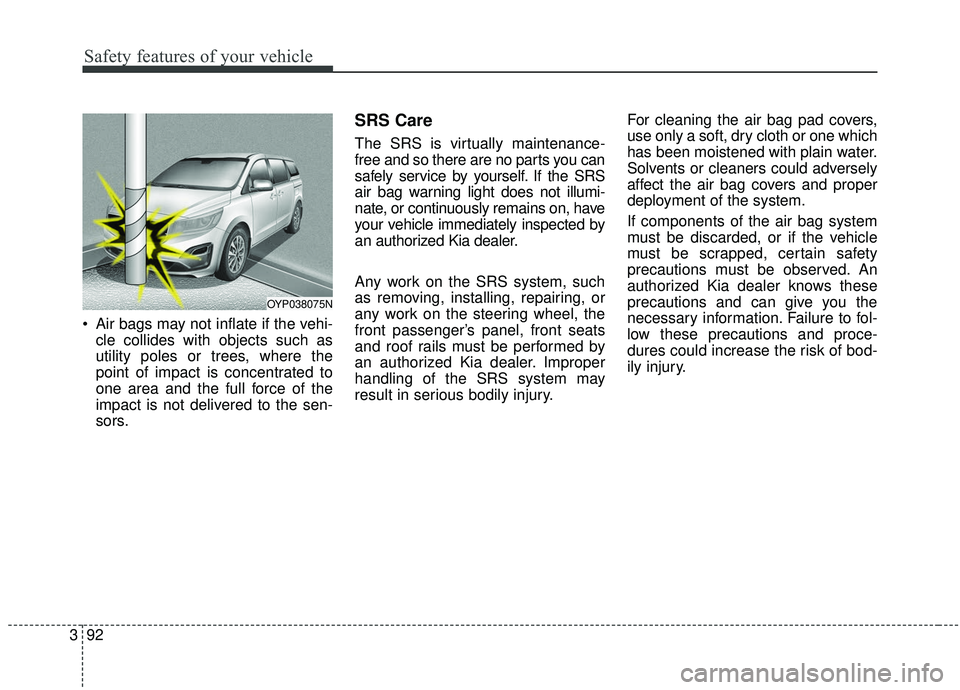
Air bags may not inflate if the vehi-
cle collides with objects such as
utility poles or trees, where the
point of impact is concentrated to
one area and the full force of the
impact is not delivered to the sen-
sors.
SRS Care
The SRS is virtually maintenance-
free and so there are no parts you can
safely service by yourself. If the SRS
air bag warning light does not illumi-
nate, or continuously remains on, have
your vehicle immediately inspected by
an authorized Kia dealer.
Any work on the SRS system, such
as removing, installing, repairing, or
any work on the steering wheel, the
front passenger’s panel, front seats
and roof rails must be performed by
an authorized Kia dealer. Improper
handling of the SRS system may
result in serious bodily injury. For cleaning the air bag pad covers,
use only a soft, dry cloth or one which
has been moistened with plain water.
Solvents or cleaners could adversely
affect the air bag covers and proper
deployment of the system.
If components of the air bag system
must be discarded, or if the vehicle
must be scrapped, certain safety
precautions must be observed. An
authorized Kia dealer knows these
precautions and can give you the
necessary information. Failure to fol-
low these precautions and proce-
dures could increase the risk of bod-
ily injury.
OYP038075N
Page 111 of 604

Sunroof . . . . . . . . . . . . . . . . . . . . . . . . . . . . . . . . . . 4-65\
• Sliding the sunroof . . . . . . . . . . . . . . . . . . . . . . . . . . . 4-66
• Tilting the sunroof (for front sunroof) . . . . . . . . . . . 4-68
• Sunshade. . . . . . . . . . . . . . . . . . . . . . . . . . . . . . . . \
. . . . 4-69
• Resetting the sunroof . . . . . . . . . . . . . . . . . . . . . . . . . 4-69
• Rear sunroof lock . . . . . . . . . . . . . . . . . . . . . . . . . . . . 4-70
• Sunroof open warning. . . . . . . . . . . . . . . . . . . . . . . . . 4-71
Steering wheel . . . . . . . . . . . . . . . . . . . . . . . . . . . . . 4-72
• Power steering . . . . . . . . . . . . . . . . . . . . . . . . . . . . . . . 4-72
• Electric power steering . . . . . . . . . . . . . . . . . . . . . . . . 4-72
• Tilt and telescopic steering . . . . . . . . . . . . . . . . . . . . . 4-73
• Heated steering wheel . . . . . . . . . . . . . . . . . . . . . . . . . 4-74
• Horn . . . . . . . . . . . . . . . . . . . . . . . . . . . . . . . . . . . . \
. . . 4-75
Mirrors . . . . . . . . . . . . . . . . . . . . . . . . . . . . . . . . . . 4-76\
• Inside rearview mirror . . . . . . . . . . . . . . . . . . . . . . . . 4-76
• Outside rearview mirror. . . . . . . . . . . . . . . . . . . . . . . 4-86
Instrument cluster . . . . . . . . . . . . . . . . . . . . . . . . . 4-91
• Instrument cluster control . . . . . . . . . . . . . . . . . . . . . 4-92
• LCD display control . . . . . . . . . . . . . . . . . . . . . . . . . . 4-92
• Gauges . . . . . . . . . . . . . . . . . . . . . . . . . . . . . . . . . . . . \
. 4-93
• Transmission shift indicator . . . . . . . . . . . . . . . . . . . . 4-96
LCD display . . . . . . . . . . . . . . . . . . . . . . . . . . . . . . 4-98
• LCD modes. . . . . . . . . . . . . . . . . . . . . . . . . . . . . . . . . . 4-98\
Trip modes (Trip computer) . . . . . . . . . . . . . . . . . 4-99
• Trip modes . . . . . . . . . . . . . . . . . . . . . . . . . . . . . . . . . . 4-99\
• Fuel economy . . . . . . . . . . . . . . . . . . . . . . . . . . . . . . . . 4-99
• Accumulated driving information mode . . . . . . . . . 4-101
• One time driving information mode . . . . . . . . . . . . 4-101
• Digital speedometer . . . . . . . . . . . . . . . . . . . . . . . . . . 4-102
• Smart shift . . . . . . . . . . . . . . . . . . . . . . . . . . . . . . . . . 4-102
• Turn by turn mode . . . . . . . . . . . . . . . . . . . . . . . . . . 4-102
• Assist mode. . . . . . . . . . . . . . . . . . . . . . . . . . . . . . . . . 4-103
• Distance to empty . . . . . . . . . . . . . . . . . . . . . . . . . . . 4-105
• User settings mode. . . . . . . . . . . . . . . . . . . . . . . . . . . 4-106
• Warning messages . . . . . . . . . . . . . . . . . . . . . . . . . . . 4-111
Warning and indicator lights . . . . . . . . . . . . . . . 4-116
• Warning lights . . . . . . . . . . . . . . . . . . . . . . . . . . . . . . 4-116
• Indicator lights. . . . . . . . . . . . . . . . . . . . . . . . . . . . . . 4-123
Parking distance warning-reverse . . . . . . . . . . . 4-128
• Operation of the parking distance warning-reverse . 4-128
• Non-operational conditions of the parking distance warning-reverse . . . . . . . . . . . . . . . . . . . . . . . . . . . . 4-129
• Parking distance warning-reverse precautions . . . 4-130
• Self-diagnosis . . . . . . . . . . . . . . . . . . . . . . . . . . . . . . . 4-131
4
Page 112 of 604
Parking distance warning . . . . . . . . . . . . . . . . . . 4-132
• Operation of the parking distance warning . . . . . . 4-133
• Non-operational conditions of parking distance warning. . . . . . . . . . . . . . . . . . . . . . . . . . . . . . . . . . . 4-\
134
• Self-diagnosis . . . . . . . . . . . . . . . . . . . . . . . . . . . . . . . 4-136
Rear view monitor . . . . . . . . . . . . . . . . . . . . . . . . 4-137
360° camera monitoring system . . . . . . . . . . . . . 4-138
Lighting . . . . . . . . . . . . . . . . . . . . . . . . . . . . . . . . . 4-139
• Battery saver function. . . . . . . . . . . . . . . . . . . . . . . . 4-139
• Headlight escort function . . . . . . . . . . . . . . . . . . . . . 4-139
• Daytime running light . . . . . . . . . . . . . . . . . . . . . . . . 4-139
• Lighting control . . . . . . . . . . . . . . . . . . . . . . . . . . . . . 4-140
• High beam operation. . . . . . . . . . . . . . . . . . . . . . . . . 4-142
• High beam assist . . . . . . . . . . . . . . . . . . . . . . . . . . . . 4-143
• Turn signals and lane change signals . . . . . . . . . . . 4-146
• Front fog light . . . . . . . . . . . . . . . . . . . . . . . . . . . . . . 4-147
• Headlight leveling device . . . . . . . . . . . . . . . . . . . . . 4-147
• Dynamic Bending Light (DBL) . . . . . . . . . . . . . . . . 4-147
Wipers and washers . . . . . . . . . . . . . . . . . . . . . . . 4-149
• Windshield wipers . . . . . . . . . . . . . . . . . . . . . . . . . . . 4-149
• Front windshield washers . . . . . . . . . . . . . . . . . . . . . 4-150
• Rear window wiper and washer switch. . . . . . . . . . 4-151
Interior lights . . . . . . . . . . . . . . . . . . . . . . . . . . . . 4-152
• Automatic turn off function . . . . . . . . . . . . . . . . . . . 4-152
• Room lamp . . . . . . . . . . . . . . . . . . . . . . . . . . . . . . . . . 4-152 • Map lamp . . . . . . . . . . . . . . . . . . . . . . . . . . . . . . . . . . 4-15\
3
• Luggage lamp. . . . . . . . . . . . . . . . . . . . . . . . . . . . . . . 4-154
• Vanity mirror lamp . . . . . . . . . . . . . . . . . . . . . . . . . . 4-154
• Glove box lamp . . . . . . . . . . . . . . . . . . . . . . . . . . . . . 4-154
Defroster . . . . . . . . . . . . . . . . . . . . . . . . . . . . . . . . 4-155
• Rear window defroster . . . . . . . . . . . . . . . . . . . . . . . 4-155
Manual climate control system . . . . . . . . . . . . . . 4-156
• Heating and air conditioning . . . . . . . . . . . . . . . . . . 4-157
• Rear climate control . . . . . . . . . . . . . . . . . . . . . . . . . 4-164
• System operation . . . . . . . . . . . . . . . . . . . . . . . . . . . . 4-167
• Climate control air filter . . . . . . . . . . . . . . . . . . . . . . 4-170
• Checking the amount of air conditioner
refrigerant and compressor lubricant . . . . . . . . . . 4-171
Automatic climate control system . . . . . . . . . . . 4-172
• Automatic heating and air conditioning . . . . . . . . . 4-173
• Manual heating and air conditioning . . . . . . . . . . . 4-174
• Outside thermometer . . . . . . . . . . . . . . . . . . . . . . . . 4-178
• Rear climate control . . . . . . . . . . . . . . . . . . . . . . . . . 4-183
• System operation . . . . . . . . . . . . . . . . . . . . . . . . . . . . 4-186
• Climate control air filter . . . . . . . . . . . . . . . . . . . . . . 4-188
• Checking the amount of air conditionerrefrigerant and compressor lubricant . . . . . . . . . . 4-189
4
Page 116 of 604
47
Features of your vehicle
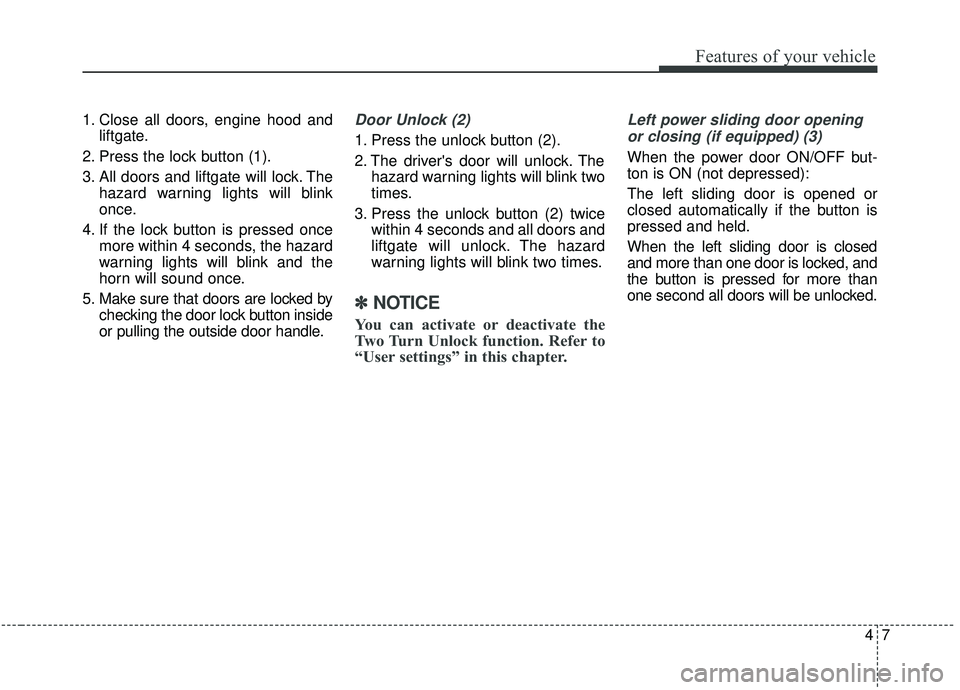
1. Close all doors, engine hood andliftgate.
2. Press the lock button (1).
3. All doors and liftgate will lock. The hazard warning lights will blink
once.
4. If the lock button is pressed once more within 4 seconds, the hazard
warning lights will blink and the
horn will sound once.
5. Make sure that doors are locked by checking the door lock button inside
or pulling the outside door handle.Door Unlock (2)
1. Press the unlock button (2).
2. The driver's door will unlock. Thehazard warning lights will blink two
times.
3. Press the unlock button (2) twice within 4 seconds and all doors and
liftgate will unlock. The hazard
warning lights will blink two times.
✽ ✽NOTICE
You can activate or deactivate the
Two Turn Unlock function. Refer to
“User settings” in this chapter.
Left power sliding door opening
or closing (if equipped) (3)
When the power door ON/OFF but-
ton is ON (not depressed):
The left sliding door is opened or
closed automatically if the button is
pressed and held.
When the left sliding door is closed
and more than one door is locked, and
the button is pressed for more than
one second all doors will be unlocked.
Page 119 of 604
Features of your vehicle
10
4
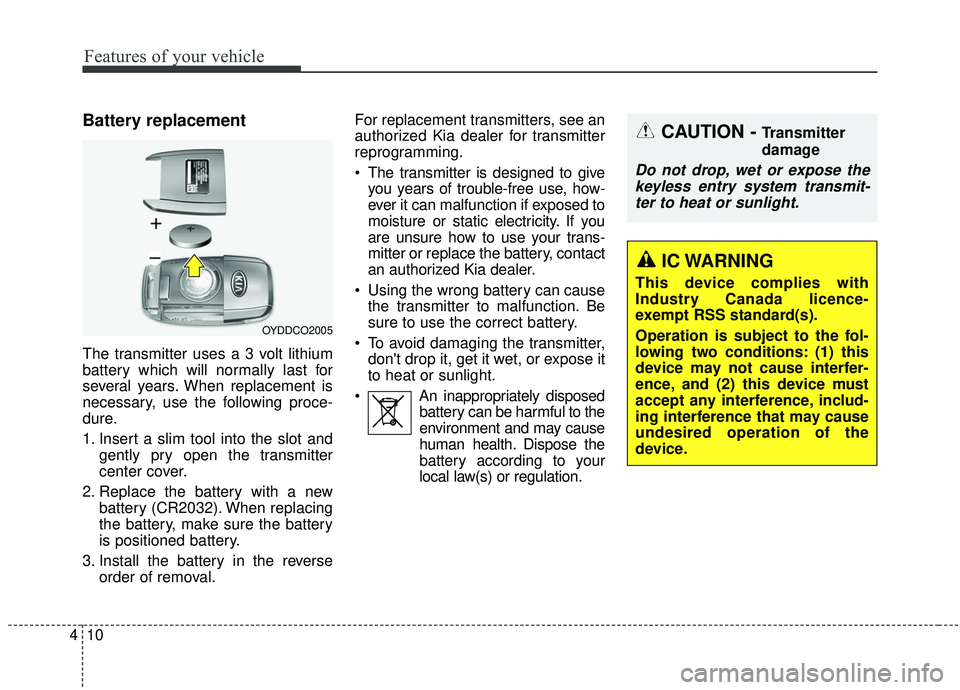
Battery replacement
The transmitter uses a 3 volt lithium
battery which will normally last for
several years. When replacement is
necessary, use the following proce-
dure.
1. Insert a slim tool into the slot and
gently pry open the transmitter
center cover.
2. Replace the battery with a new battery (CR2032). When replacing
the battery, make sure the battery
is positioned battery.
3. Install the battery in the reverse order of removal. For replacement transmitters, see an
authorized Kia dealer for transmitter
reprogramming.
The transmitter is designed to give
you years of trouble-free use, how-
ever it can malfunction if exposed to
moisture or static electricity. If you
are unsure how to use your trans-
mitter or replace the battery, contact
an authorized Kia dealer.
Using the wrong battery can cause the transmitter to malfunction. Be
sure to use the correct battery.
To avoid damaging the transmitter, don't drop it, get it wet, or expose it
to heat or sunlight.
An inappropriately disposed battery can be harmful to the
environment and may cause
human health. Dispose the
battery according to your
local law(s) or regulation.
OYDDCO2005
CAUTION - Transmitter
damage
Do not drop, wet or expose thekeyless entry system transmit-ter to heat or sunlight.
IC WARNING
This device complies with
Industry Canada licence-
exempt RSS standard(s).
Operation is subject to the fol-
lowing two conditions: (1) this
device may not cause interfer-
ence, and (2) this device must
accept any interference, includ-
ing interference that may cause
undesired operation of the
device.
Page 124 of 604
415
Features of your vehicle
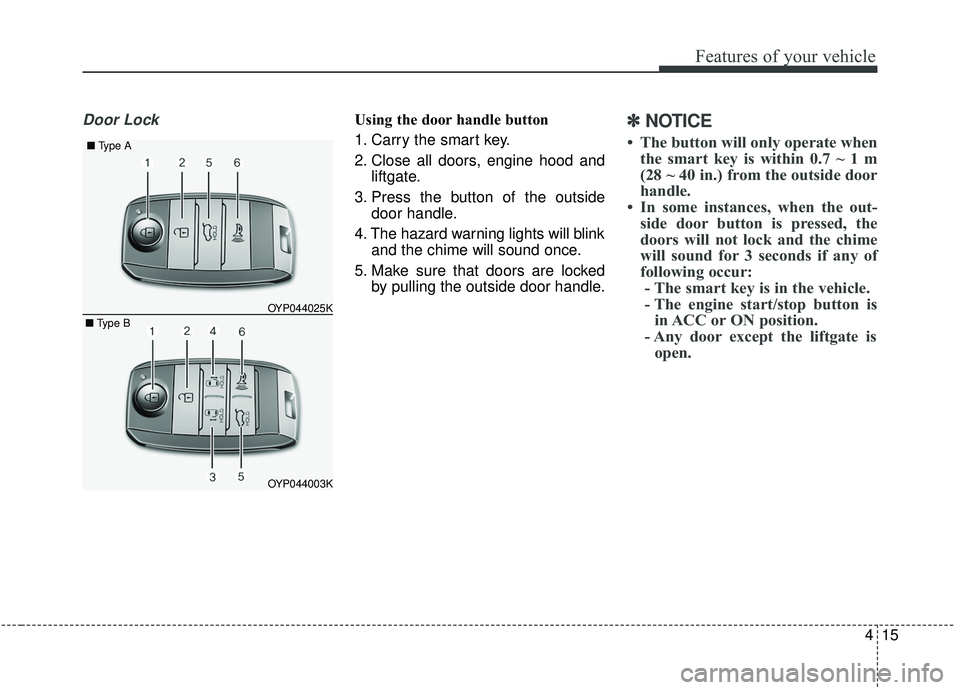
Door LockUsing the door handle button
1. Carry the smart key.
2. Close all doors, engine hood andliftgate.
3. Press the button of the outside door handle.
4. The hazard warning lights will blink and the chime will sound once.
5. Make sure that doors are locked by pulling the outside door handle.✽ ✽NOTICE
• The button will only operate when
the smart key is within 0.7 ~ 1 m
(28 ~ 40 in.) from the outside door
handle.
• In some instances, when the out- side door button is pressed, the
doors will not lock and the chime
will sound for 3 seconds if any of
following occur:- The smart key is in the vehicle.
- The engine start/stop button is in ACC or ON position.
- Any door except the liftgate is open.
OYP044003K
OYP044025K
■
Type A
■ Type B
Page 125 of 604
Features of your vehicle
16
4
Using the button on the smart key
1. Close all doors, engine hood and
liftgate.
2. Press the lock button (1).
3. The hazard warning lights will blink and the chime will sound once.
4. Make sure that doors are locked by pulling the outside door handle.Unlocking
Using the door handle button
1. Carry the smart key.
2. Press the button of the driver'soutside door handle.
3. The driver’s door will unlock. The hazard warning lights will blink and
the chime will sound two times.
4. Press the button twice within 4 seconds and all doors and the lift-
gate will unlock and the hazard
warning lights will blink and the
chime will sound two times.
✽ ✽NOTICE
• The button will only operate when
the smart key is within 0.7 ~ 1 m
(28 ~ 40 in.) from the outside door
handle.
• When the smart key is recognized in the area of 0.7 ~ 1 m (28 ~ 40 in.)
from the front outside door handle,
other people can also open the
doors.
• After unlocking the driver’s door or all doors, the door(s) will lock
automatically unless the door is
opened.