brake sensor KIA SEDONA 2020 Owners Manual
[x] Cancel search | Manufacturer: KIA, Model Year: 2020, Model line: SEDONA, Model: KIA SEDONA 2020Pages: 604, PDF Size: 16.24 MB
Page 107 of 604
391
Safety features of your vehicle
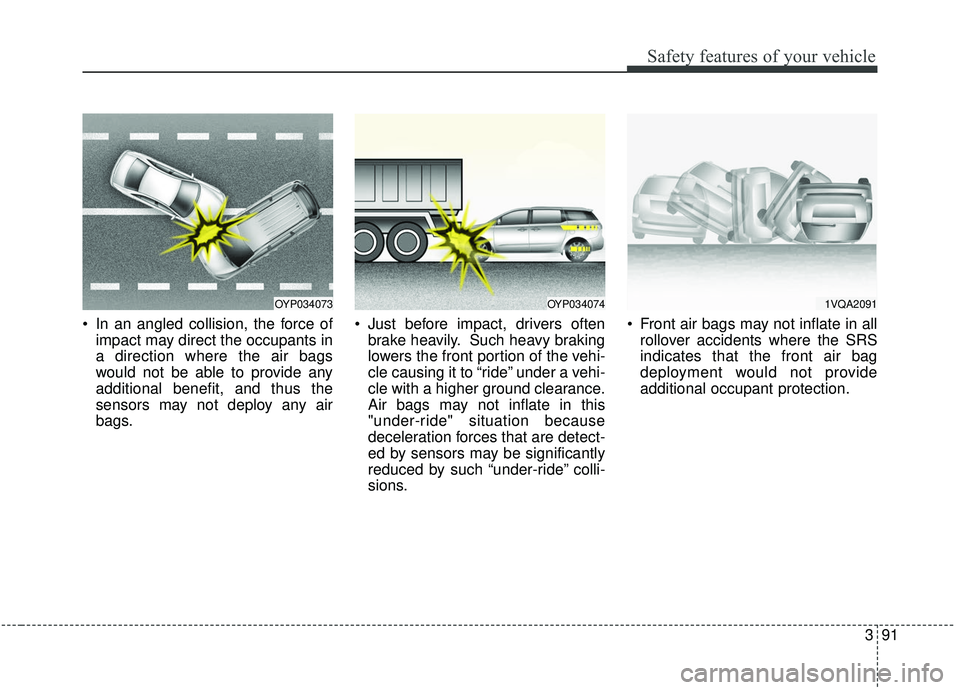
In an angled collision, the force ofimpact may direct the occupants in
a direction where the air bags
would not be able to provide any
additional benefit, and thus the
sensors may not deploy any air
bags. Just before impact, drivers often
brake heavily. Such heavy braking
lowers the front portion of the vehi-
cle causing it to “ride” under a vehi-
cle with a higher ground clearance.
Air bags may not inflate in this
"under-ride" situation because
deceleration forces that are detect-
ed by sensors may be significantly
reduced by such “under-ride” colli-
sions. Front air bags may not inflate in all
rollover accidents where the SRS
indicates that the front air bag
deployment would not provide
additional occupant protection.
OYP0340741VQA2091OYP034073
Page 238 of 604
4129
Features of your vehicle
Types of warning sound
When an object is 120 cm to 61 cm(47 in. to 24 in.) from the rear
bumper: Buzzer beeps intermit-
tently.
When an object is 60 cm to 31 cm (24 in. to 12 in.) from the rear
bumper: Buzzer beeps more fre-
quently.
When an object is within 30 cm (12 in.) of the rear bumper : Buzzer
sounds continuously.
Non-operational conditions of
the parking distance warning-
reverse
The parking distance warning-
reverse may not operate properly
when:
1. Moisture is frozen to the sensor. (It will operate normally when the
moisture has been cleared.)
2. The sensor is covered with foreign matter, such as snow or water, or
the sensor cover is blocked. (It will
operate normally when the materi-
al is removed or the sensor is no
longer blocked.)
3. Driving on uneven road surfaces (unpaved roads, gravel, bumps,
gradient).
4. Objects generating excessive noise (vehicle horns, loud motor-
cycle engines, or truck air brakes)
are within range of the sensor.
5. The weather conditions produce heavy rain or water spray. 6. Wireless transmitters or mobile
phones are within range of the
sensor.
7. The sensor is covered with snow.
8. Trailer towing
Page 244 of 604
4135
Features of your vehicle
There is a possibility of parkingdistance warning malfunctionwhen:
1. Driving on uneven road surfaces such as unpaved roads, gravel,
bumps, or gradient.
2. Objects generating excessive noise such as vehicle horns, loud motor-
cycle engines, or truck air brakes
can interfere with the sensor.
3. The weather conditions produce heavy rain or water spray.
4. Wireless transmitters or mobile phones are present near the sen-
sor.
5. Sensor is covered with snow.
Detecting range may decrease when:
1. Outside air temperature is extremely hot or cold.
2. Undetectable objects smaller than 1 m (39 in.) and narrower than 14
cm (5.5 in.) in diameter.
The following objects may not be
recognized by the sensor:
1. Sharp or slim objects such as ropes, chains or small poles.
2. Objects, which tend to absorb sen- sor frequency such as clothes,
spongy material or snow.
✽ ✽NOTICE
1. The warning may not sound
depending on the speed and
shapes of the objects detected.
2. The parking distance warning may malfunction if the vehicle
bumper height or sensor installa-
tion has been modified. Any non-
factory installed equipment or
accessories may also interfere
with the sensor performance.
3. Sensor may not recognize objects less than 30 cm (12 in.) from the
sensor, or it may sense an incor-
rect distance. Use with caution.
4. When the sensor is frozen or stained with snow or water, the
sensor may be inoperative until
the stains are removed using a
soft cloth.
5. Do not push, scratch or strike the sensor with any hard objects that
could damage the surface of the
sensor. Sensor damage could occur.
Page 395 of 604
Driving your vehicle
66
5
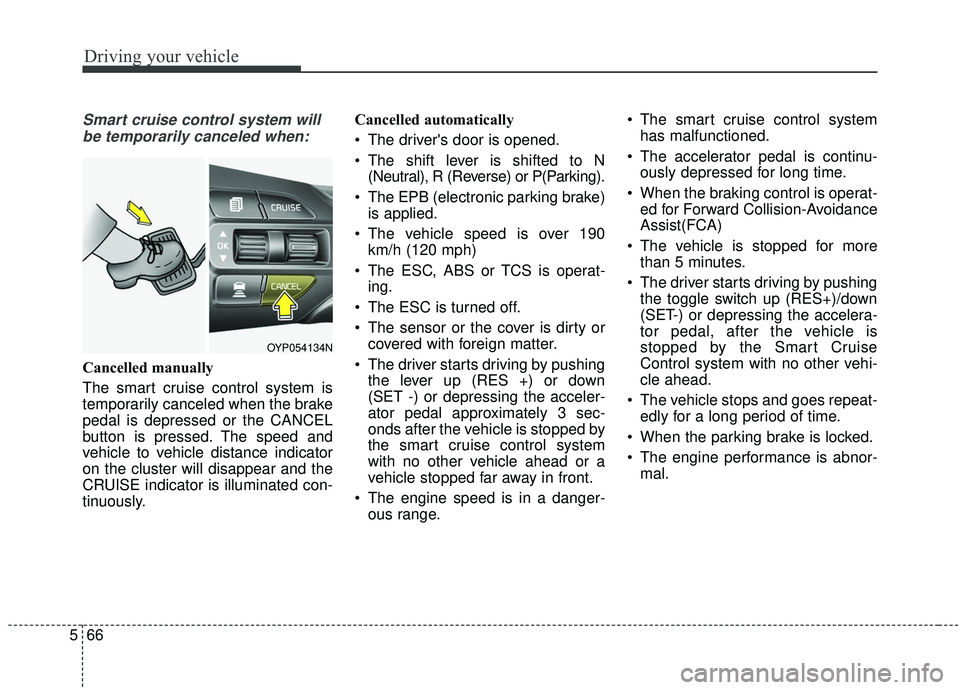
Smart cruise control system will
be temporarily canceled when:
Cancelled manually
The smart cruise control system is
temporarily canceled when the brake
pedal is depressed or the CANCEL
button is pressed. The speed and
vehicle to vehicle distance indicator
on the cluster will disappear and the
CRUISE indicator is illuminated con-
tinuously. Cancelled automatically
The driver's door is opened.
The shift lever is shifted to N
(Neutral), R (Reverse) or P(Parking).
The EPB (electronic parking brake) is applied.
The vehicle speed is over 190 km/h (120 mph)
The ESC, ABS or TCS is operat- ing.
The ESC is turned off.
The sensor or the cover is dirty or covered with foreign matter.
The driver starts driving by pushing the lever up (RES +) or down
(SET -) or depressing the acceler-
ator pedal approximately 3 sec-
onds after the vehicle is stopped by
the smart cruise control system
with no other vehicle ahead or a
vehicle stopped far away in front.
The engine speed is in a danger- ous range. The smart cruise control system
has malfunctioned.
The accelerator pedal is continu- ously depressed for long time.
When the braking control is operat- ed for Forward Collision-Avoidance
Assist(FCA)
The vehicle is stopped for more than 5 minutes.
The driver starts driving by pushing the toggle switch up (RES+)/down
(SET-) or depressing the accelera-
tor pedal, after the vehicle is
stopped by the Smart Cruise
Control system with no other vehi-
cle ahead.
The vehicle stops and goes repeat- edly for a long period of time.
When the parking brake is locked.
The engine performance is abnor- mal.
OYP054134N
Page 401 of 604
Driving your vehicle
72
5
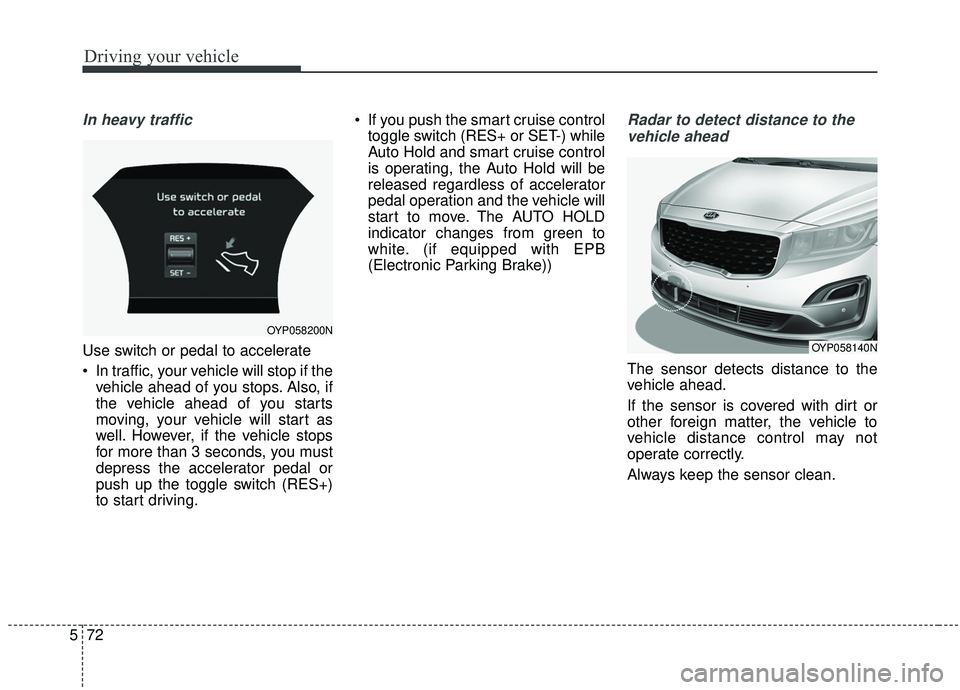
In heavy traffic
Use switch or pedal to accelerate
In traffic, your vehicle will stop if the
vehicle ahead of you stops. Also, if
the vehicle ahead of you starts
moving, your vehicle will start as
well. However, if the vehicle stops
for more than 3 seconds, you must
depress the accelerator pedal or
push up the toggle switch (RES+)
to start driving. If you push the smart cruise control
toggle switch (RES+ or SET-) while
Auto Hold and smart cruise control
is operating, the Auto Hold will be
released regardless of accelerator
pedal operation and the vehicle will
start to move. The AUTO HOLD
indicator changes from green to
white. (if equipped with EPB
(Electronic Parking Brake))
Radar to detect distance to the
vehicle ahead
The sensor detects distance to the
vehicle ahead.
If the sensor is covered with dirt or
other foreign matter, the vehicle to
vehicle distance control may not
operate correctly.
Always keep the sensor clean.
OYP058200N
OYP058140N
Page 405 of 604
Driving your vehicle
76
5
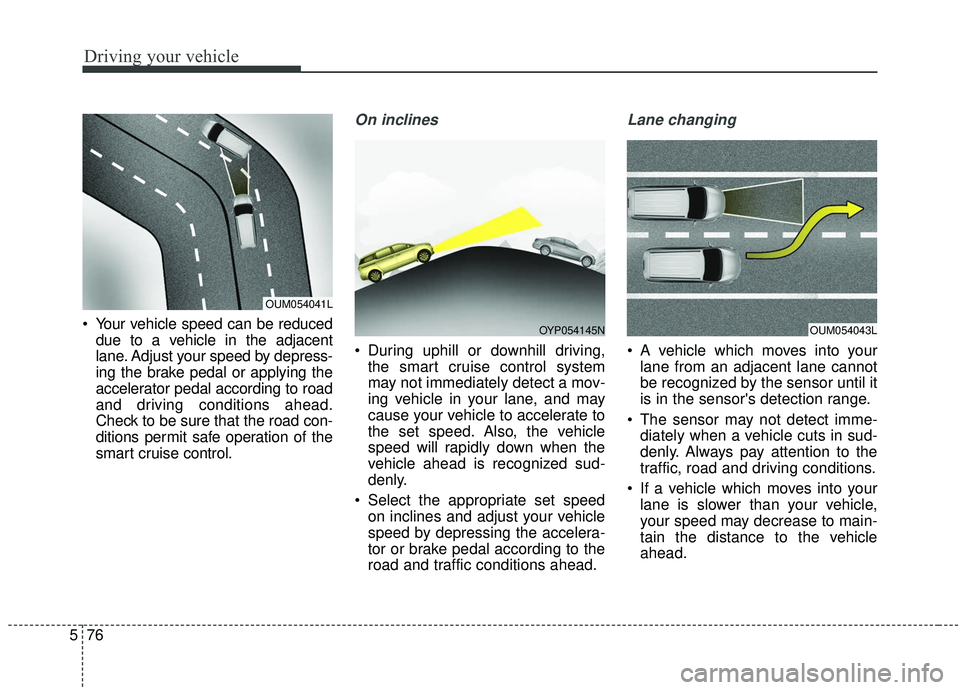
Your vehicle speed can be reduced
due to a vehicle in the adjacent
lane. Adjust your speed by depress-
ing the brake pedal or applying the
accelerator pedal according to road
and driving conditions ahead.
Check to be sure that the road con-
ditions permit safe operation of the
smart cruise control.
On inclines
During uphill or downhill driving,the smart cruise control system
may not immediately detect a mov-
ing vehicle in your lane, and may
cause your vehicle to accelerate to
the set speed. Also, the vehicle
speed will rapidly down when the
vehicle ahead is recognized sud-
denly.
Select the appropriate set speed on inclines and adjust your vehicle
speed by depressing the accelera-
tor or brake pedal according to the
road and traffic conditions ahead.
Lane changing
A vehicle which moves into yourlane from an adjacent lane cannot
be recognized by the sensor until it
is in the sensor's detection range.
The sensor may not detect imme- diately when a vehicle cuts in sud-
denly. Always pay attention to the
traffic, road and driving conditions.
If a vehicle which moves into your lane is slower than your vehicle,
your speed may decrease to main-
tain the distance to the vehicle
ahead.
OUM054041L
OUM054043LOYP054145N
Page 407 of 604
Driving your vehicle
78
5
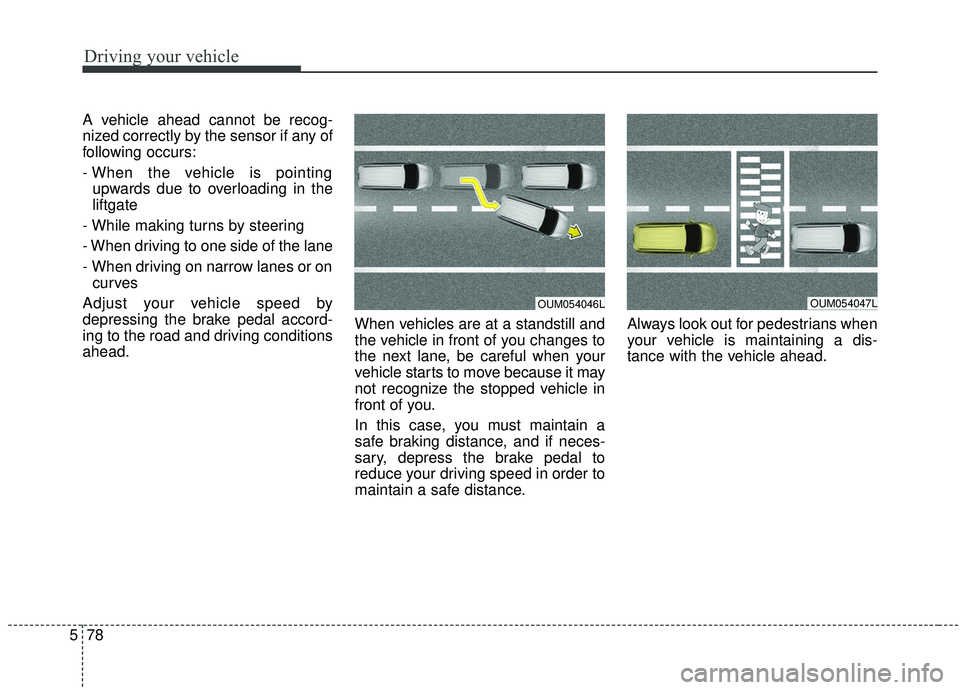
A vehicle ahead cannot be recog-
nized correctly by the sensor if any of
following occurs:
- When the vehicle is pointing
upwards due to overloading in the
liftgate
- While making turns by steering
- When driving to one side of the lane
- When driving on narrow lanes or on curves
Adjust your vehicle speed by
depressing the brake pedal accord-
ing to the road and driving conditions
ahead. When vehicles are at a standstill and
the vehicle in front of you changes to
the next lane, be careful when your
vehicle starts to move because it may
not recognize the stopped vehicle in
front of you.
In this case, you must maintain a
safe braking distance, and if neces-
sary, depress the brake pedal to
reduce your driving speed in order to
maintain a safe distance.Always look out for pedestrians when
your vehicle is maintaining a dis-
tance with the vehicle ahead.
OUM054047LOUM054046L
Page 409 of 604
Driving your vehicle
80
5
(Continued)
Always be aware of the select-
ed speed and vehicle to vehi-
cle distance.
Always maintain sufficient braking distance and deceler-
ate your vehicle by applying
the brakes if necessary.(Continued)
If an emergency stop is nec-
essary, you must apply the
brakes.
Keep a safe distance accord- ing to road conditions and
vehicle speed. If the vehicle to
vehicle distance is too close
during a high-speed driving, a
serious collision may result.
The smart cruise control sys- tem cannot recognize a
stopped vehicle, pedestrians
or an oncoming vehicle.
Always look ahead cautiously
to prevent unexpected and
suddensituations from occur-
ring.
When other vehicles are changing lanes in front of you
frequently, the smart cruise
control system may not oper-
ate appropriately. Always look
ahead cautiously to prevent
unexpected and sudden situa-
tions from occurring.
(Continued)WARNING
After starting the engine,please stop for several sec-
onds. If system initialization is
not completed, the smart
cruise control system does
not normally operate.
After starting the engine, if any objects are not detected
or the sensor cover is
obscured with foreign sub-
stances, there is a possibility
that the smart cruise control
system may not work.
The following conditions may cause a malfunction: over-
loading the liftgate, suspen-
sion modification, tire
replacement with unautho-
rized tires or tires with differ-
ent tread wear and pressure
levels.
The Smart Cruise Control sys- tem may not be able to com-
pletely stop the vehicle or
avoid a collision in every situ-
ation.
(Continued)
Page 544 of 604
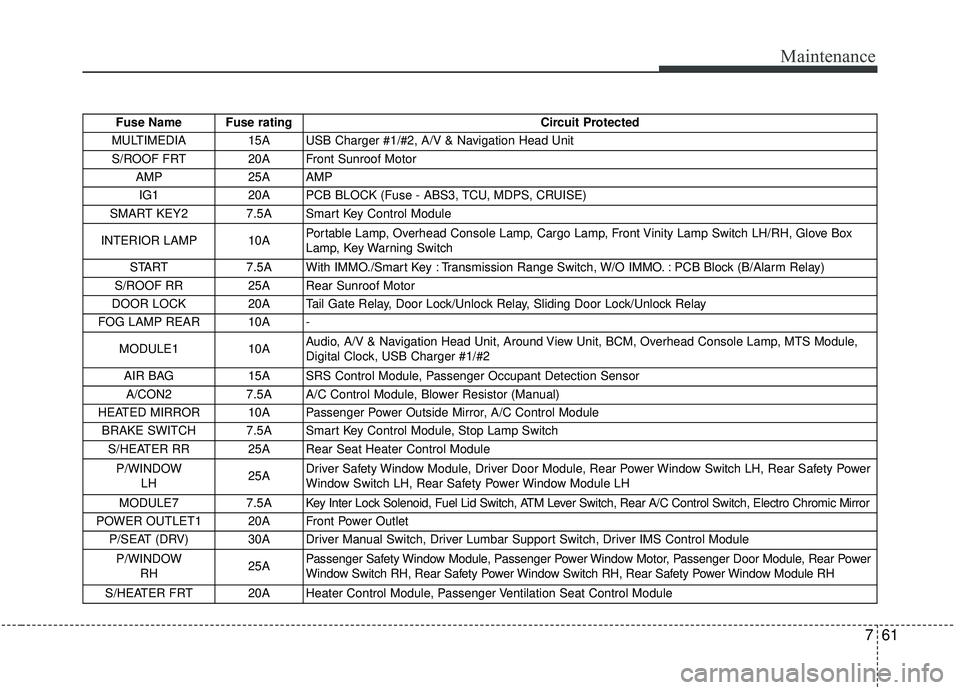
761
Maintenance
Fuse Name Fuse ratingCircuit Protected
MULTIMEDIA 15A USB Charger #1/#2, A/V & Navigation Head Unit S/ROOF FRT 20A Front Sunroof Motor AMP 25A AMP IG1 20A PCB BLOCK (Fuse - ABS3, TCU, MDPS, CRUISE)
SMART KEY2 7.5A Smart Key Control Module
INTERIOR LAMP 10A Portable Lamp, Overhead Console Lamp, Cargo Lamp, Front Vinity Lamp Switch LH/RH, Glove Box
Lamp, Key Warning Switch
START 7.5A With IMMO./Smart Key : Transmission Range Switch, W/O IMMO. : PCB Block (B/Alarm Relay)
S/ROOF RR 25A Rear Sunroof Motor
DOOR LOCK 20A Tail Gate Relay, Door Lock/Unlock Relay, Sliding Door Lock/Unlock Relay
FOG LAMP REAR 10A -
MODULE1 10A Audio, A/V & Navigation Head Unit, Around View Unit, BCM, Overhead Console Lamp, MTS Module,
Digital Clock, USB Charger #1/#2
AIR BAG 15A SRS Control Module, Passenger Occupant Detection Sensor
A/CON2 7.5A A/C Control Module, Blower Resistor (Manual)
HEATED MIRROR 10A Passenger Power Outside Mirror, A/C Control Module BRAKE SWITCH 7.5A Smart Key Control Module, Stop Lamp Switch S/HEATER RR 25A Rear Seat Heater Control Module
P/WINDOW LH 25ADriver Safety Window Module, Driver Door Module, Rear Power Window Switch LH, Rear Safety Power
Window Switch LH, Rear Safety Power Window Module LH
MODULE7 7.5A Key Inter Lock Solenoid, Fuel Lid Switch, ATM Lever Switch, Rear A/C Control Switch, Electro Chromic Mirror
POWER OUTLET1 20A Front Power Outlet P/SEAT (DRV) 30A Driver Manual Switch, Driver Lumbar Support Switch, Driver IMS Control Module
P/WINDOW RH 25APassenger Safety Window Module, Passenger Power Window Motor, Passenger Door Module, Rear Power
Window Switch RH, Rear Safety Power Window Switch RH, Rear Safety Power Window Module RH
S/HEATER FRT 20A Heater Control Module, Passenger Ventilation Seat Control Module
Page 597 of 604
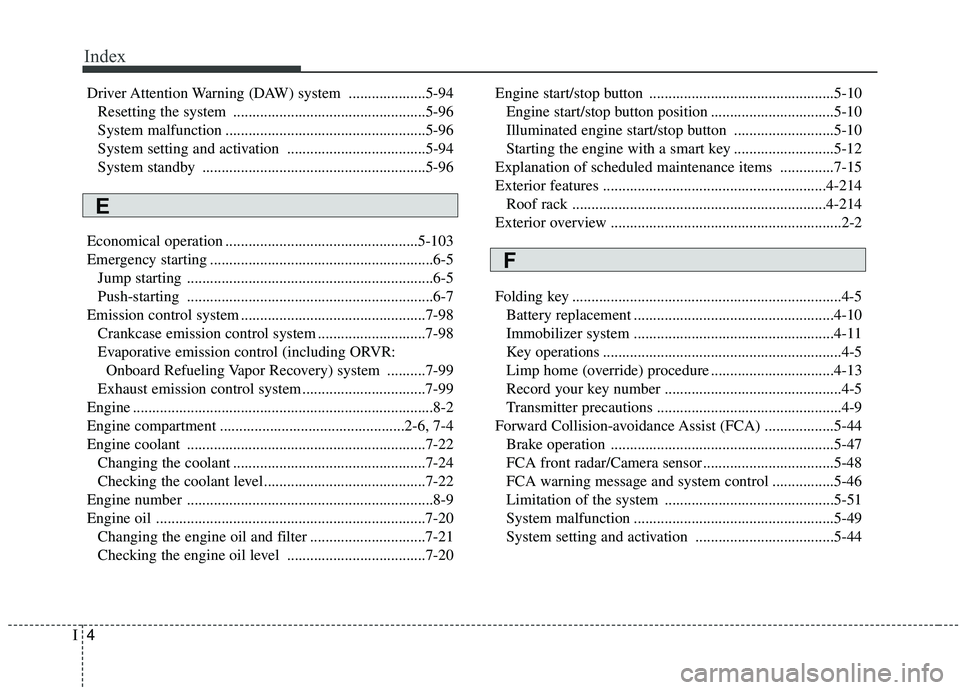
Index
4I
Driver Attention Warning (DAW) system ....................5-94Resetting the system ..................................................5-96
System malfunction ....................................................5-96
System setting and activation ....................................5-94
System standby ..........................................................5-96
Economical operation ..................................................5-103
Emergency starting ..........................................................6-5 Jump starting ................................................................6-5
Push-starting ................................................................6-7
Emission control system ................................................7-98 Crankcase emission control system ............................7-98
Evaporative emission control (including ORVR: Onboard Refueling Vapor Recovery) system ..........7-99
Exhaust emission control system ................................7-99
Engine ........................................................................\
......8-2
Engine compartment ................................................2-6, 7-4
Engine coolant ..............................................................7-22 Changing the coolant ..................................................7-24
Checking the coolant level..........................................7-22
Engine number ................................................................8-9
Engine oil ......................................................................7-\
20 Changing the engine oil and filter ..............................7-21
Checking the engine oil level ....................................7-20 Engine start/stop button ................................................5-10
Engine start/stop button position ................................5-10
Illuminated engine start/stop button ..........................5-10
Starting the engine with a smart key ..........................5-12
Explanation of scheduled maintenance items ..............7-15
Exterior features ..........................................................4-214 Roof rack ..................................................................4-214
Exterior overview ............................................................2-2
Folding key ......................................................................4-\
5 Battery replacement ....................................................4-10
Immobilizer system ....................................................4-11
Key operations ..............................................................4-5
Limp home (override) procedure ................................4-13
Record your key number ..............................................4-5
Transmitter precautions ................................................4-9
Forward Collision-avoidance Assist (FCA) ..................5-44 Brake operation ..........................................................5-47
FCA front radar/Camera sensor ..................................5-48
FCA warning message and system control ................5-46
Limitation of the system ............................................5-51
System malfunction ....................................................5-49
System setting and activation ....................................5-44
E
F