warning KIA SEDONA 2020 Repair Manual
[x] Cancel search | Manufacturer: KIA, Model Year: 2020, Model line: SEDONA, Model: KIA SEDONA 2020Pages: 604, PDF Size: 16.24 MB
Page 112 of 604
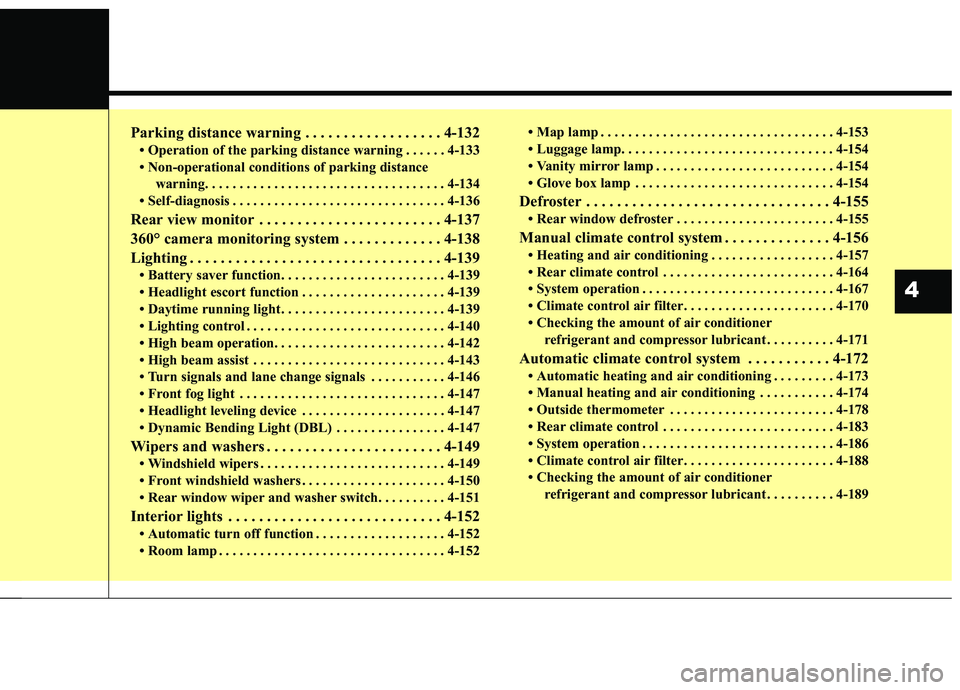
Parking distance warning . . . . . . . . . . . . . . . . . . 4-132
• Operation of the parking distance warning . . . . . . 4-133
• Non-operational conditions of parking distance warning. . . . . . . . . . . . . . . . . . . . . . . . . . . . . . . . . . . 4-\
134
• Self-diagnosis . . . . . . . . . . . . . . . . . . . . . . . . . . . . . . . 4-136
Rear view monitor . . . . . . . . . . . . . . . . . . . . . . . . 4-137
360° camera monitoring system . . . . . . . . . . . . . 4-138
Lighting . . . . . . . . . . . . . . . . . . . . . . . . . . . . . . . . . 4-139
• Battery saver function. . . . . . . . . . . . . . . . . . . . . . . . 4-139
• Headlight escort function . . . . . . . . . . . . . . . . . . . . . 4-139
• Daytime running light . . . . . . . . . . . . . . . . . . . . . . . . 4-139
• Lighting control . . . . . . . . . . . . . . . . . . . . . . . . . . . . . 4-140
• High beam operation. . . . . . . . . . . . . . . . . . . . . . . . . 4-142
• High beam assist . . . . . . . . . . . . . . . . . . . . . . . . . . . . 4-143
• Turn signals and lane change signals . . . . . . . . . . . 4-146
• Front fog light . . . . . . . . . . . . . . . . . . . . . . . . . . . . . . 4-147
• Headlight leveling device . . . . . . . . . . . . . . . . . . . . . 4-147
• Dynamic Bending Light (DBL) . . . . . . . . . . . . . . . . 4-147
Wipers and washers . . . . . . . . . . . . . . . . . . . . . . . 4-149
• Windshield wipers . . . . . . . . . . . . . . . . . . . . . . . . . . . 4-149
• Front windshield washers . . . . . . . . . . . . . . . . . . . . . 4-150
• Rear window wiper and washer switch. . . . . . . . . . 4-151
Interior lights . . . . . . . . . . . . . . . . . . . . . . . . . . . . 4-152
• Automatic turn off function . . . . . . . . . . . . . . . . . . . 4-152
• Room lamp . . . . . . . . . . . . . . . . . . . . . . . . . . . . . . . . . 4-152 • Map lamp . . . . . . . . . . . . . . . . . . . . . . . . . . . . . . . . . . 4-15\
3
• Luggage lamp. . . . . . . . . . . . . . . . . . . . . . . . . . . . . . . 4-154
• Vanity mirror lamp . . . . . . . . . . . . . . . . . . . . . . . . . . 4-154
• Glove box lamp . . . . . . . . . . . . . . . . . . . . . . . . . . . . . 4-154
Defroster . . . . . . . . . . . . . . . . . . . . . . . . . . . . . . . . 4-155
• Rear window defroster . . . . . . . . . . . . . . . . . . . . . . . 4-155
Manual climate control system . . . . . . . . . . . . . . 4-156
• Heating and air conditioning . . . . . . . . . . . . . . . . . . 4-157
• Rear climate control . . . . . . . . . . . . . . . . . . . . . . . . . 4-164
• System operation . . . . . . . . . . . . . . . . . . . . . . . . . . . . 4-167
• Climate control air filter . . . . . . . . . . . . . . . . . . . . . . 4-170
• Checking the amount of air conditioner
refrigerant and compressor lubricant . . . . . . . . . . 4-171
Automatic climate control system . . . . . . . . . . . 4-172
• Automatic heating and air conditioning . . . . . . . . . 4-173
• Manual heating and air conditioning . . . . . . . . . . . 4-174
• Outside thermometer . . . . . . . . . . . . . . . . . . . . . . . . 4-178
• Rear climate control . . . . . . . . . . . . . . . . . . . . . . . . . 4-183
• System operation . . . . . . . . . . . . . . . . . . . . . . . . . . . . 4-186
• Climate control air filter . . . . . . . . . . . . . . . . . . . . . . 4-188
• Checking the amount of air conditionerrefrigerant and compressor lubricant . . . . . . . . . . 4-189
4
Page 115 of 604
Features of your vehicle
64
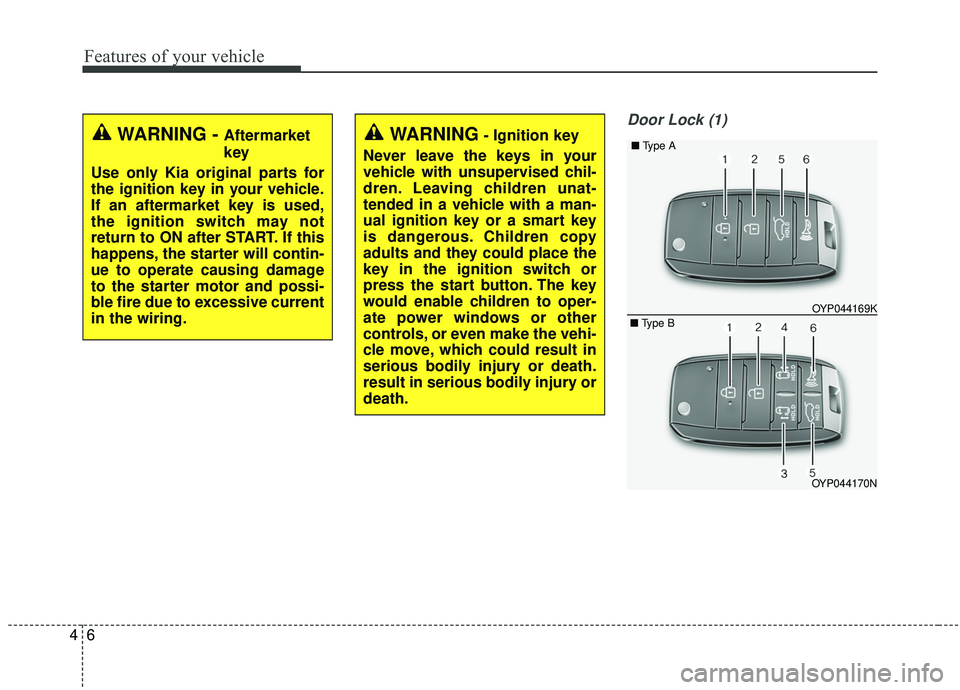
Door Lock (1)
WARNING - Aftermarket
key
Use only Kia original parts for
the ignition key in your vehicle.
If an aftermarket key is used,
the ignition switch may not
return to ON after START. If this
happens, the starter will contin-
ue to operate causing damage
to the starter motor and possi-
ble fire due to excessive current
in the wiring.WARNING- Ignition key
Never leave the keys in your
vehicle with unsupervised chil-
dren. Leaving children unat-
tended in a vehicle with a man-
ual ignition key or a smart key
is dangerous. Children copy
adults and they could place the
key in the ignition switch or
press the start button. The key
would enable children to oper-
ate power windows or other
controls, or even make the vehi-
cle move, which could result in
serious bodily injury or death.
result in serious bodily injury or
death.
OYP044170N OYP044169K
■
Type A
■ Type B
Page 116 of 604
47
Features of your vehicle
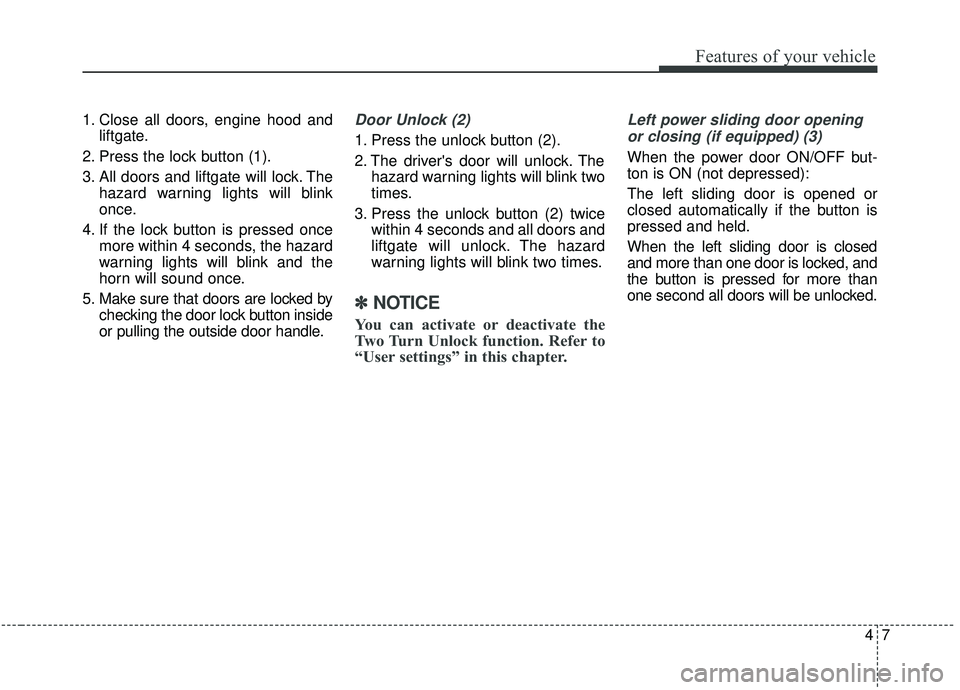
1. Close all doors, engine hood andliftgate.
2. Press the lock button (1).
3. All doors and liftgate will lock. The hazard warning lights will blink
once.
4. If the lock button is pressed once more within 4 seconds, the hazard
warning lights will blink and the
horn will sound once.
5. Make sure that doors are locked by checking the door lock button inside
or pulling the outside door handle.Door Unlock (2)
1. Press the unlock button (2).
2. The driver's door will unlock. Thehazard warning lights will blink two
times.
3. Press the unlock button (2) twice within 4 seconds and all doors and
liftgate will unlock. The hazard
warning lights will blink two times.
✽ ✽NOTICE
You can activate or deactivate the
Two Turn Unlock function. Refer to
“User settings” in this chapter.
Left power sliding door opening
or closing (if equipped) (3)
When the power door ON/OFF but-
ton is ON (not depressed):
The left sliding door is opened or
closed automatically if the button is
pressed and held.
When the left sliding door is closed
and more than one door is locked, and
the button is pressed for more than
one second all doors will be unlocked.
Page 119 of 604
Features of your vehicle
10
4
Battery replacement
The transmitter uses a 3 volt lithium
battery which will normally last for
several years. When replacement is
necessary, use the following proce-
dure.
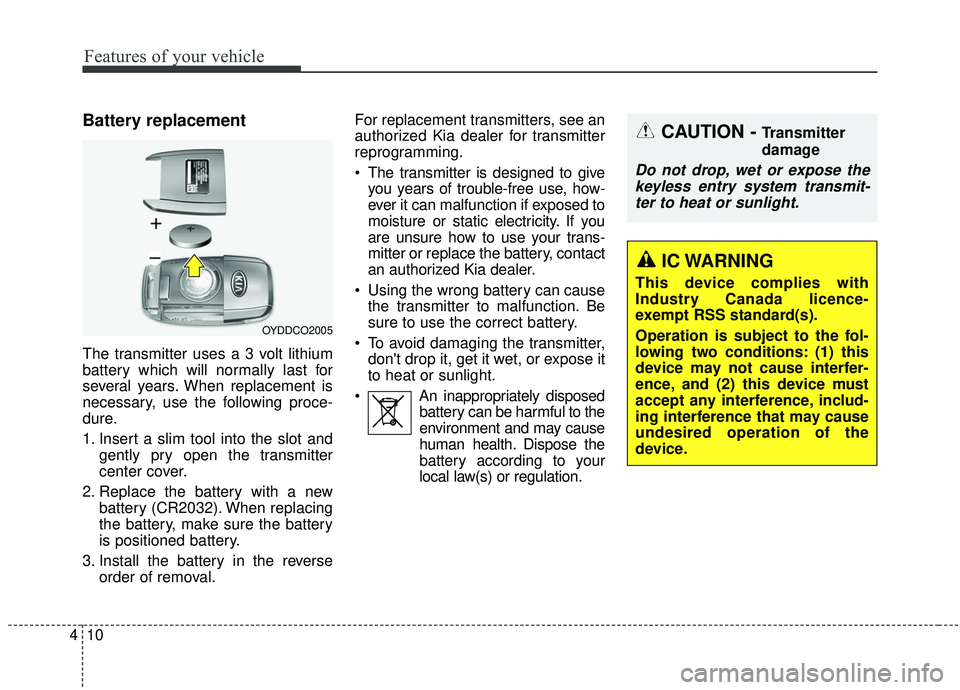
1. Insert a slim tool into the slot and
gently pry open the transmitter
center cover.
2. Replace the battery with a new battery (CR2032). When replacing
the battery, make sure the battery
is positioned battery.
3. Install the battery in the reverse order of removal. For replacement transmitters, see an
authorized Kia dealer for transmitter
reprogramming.
The transmitter is designed to give
you years of trouble-free use, how-
ever it can malfunction if exposed to
moisture or static electricity. If you
are unsure how to use your trans-
mitter or replace the battery, contact
an authorized Kia dealer.
Using the wrong battery can cause the transmitter to malfunction. Be
sure to use the correct battery.
To avoid damaging the transmitter, don't drop it, get it wet, or expose it
to heat or sunlight.
An inappropriately disposed battery can be harmful to the
environment and may cause
human health. Dispose the
battery according to your
local law(s) or regulation.
OYDDCO2005
CAUTION - Transmitter
damage
Do not drop, wet or expose thekeyless entry system transmit-ter to heat or sunlight.
IC WARNING
This device complies with
Industry Canada licence-
exempt RSS standard(s).
Operation is subject to the fol-
lowing two conditions: (1) this
device may not cause interfer-
ence, and (2) this device must
accept any interference, includ-
ing interference that may cause
undesired operation of the
device.
Page 123 of 604
Features of your vehicle
14
4
Record your key number
The key code number
is stamped on the bar
code tag attached to
the key set. Should
you lose your keys,
this number will enable an author-
ized Kia dealer to duplicate the keys
easily. Remove the bar code tag and
store it in a safe place. Also, record
the code number and keep it in a
safe and handy place, but not in the
vehicle.
Smart key function
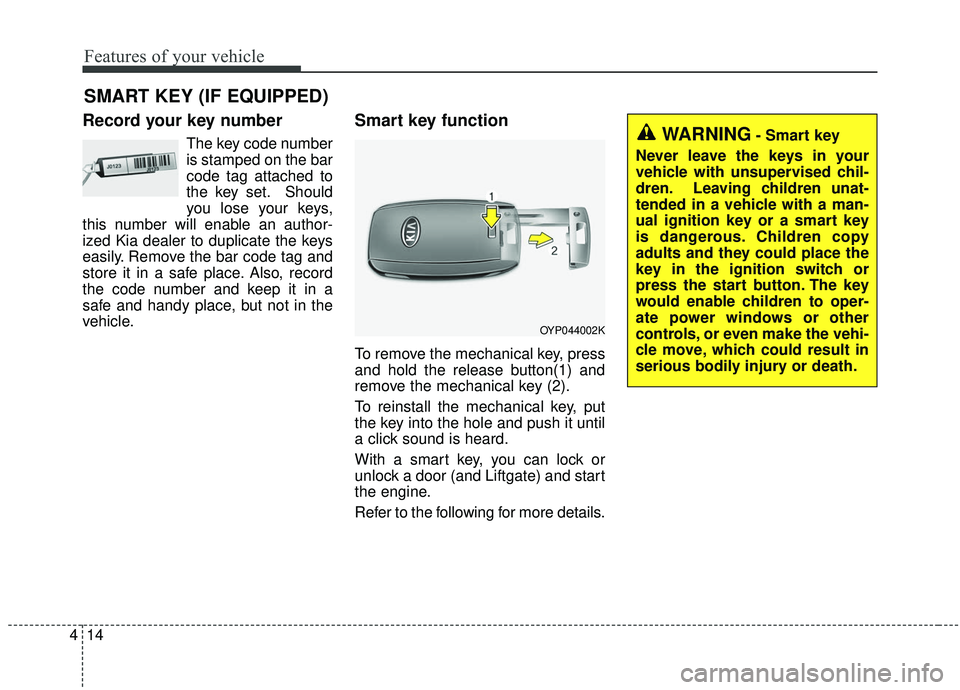
To remove the mechanical key, press
and hold the release button(1) and
remove the mechanical key (2).
To reinstall the mechanical key, put
the key into the hole and push it until
a click sound is heard.
With a smart key, you can lock or
unlock a door (and Liftgate) and start
the engine.
Refer to the following for more details.
SMART KEY (IF EQUIPPED)
OYP044002K
WARNING- Smart key
Never leave the keys in your
vehicle with unsupervised chil-
dren. Leaving children unat-
tended in a vehicle with a man-
ual ignition key or a smart key
is dangerous. Children copy
adults and they could place the
key in the ignition switch or
press the start button. The key
would enable children to oper-
ate power windows or other
controls, or even make the vehi-
cle move, which could result in
serious bodily injury or death.
Page 124 of 604
415
Features of your vehicle
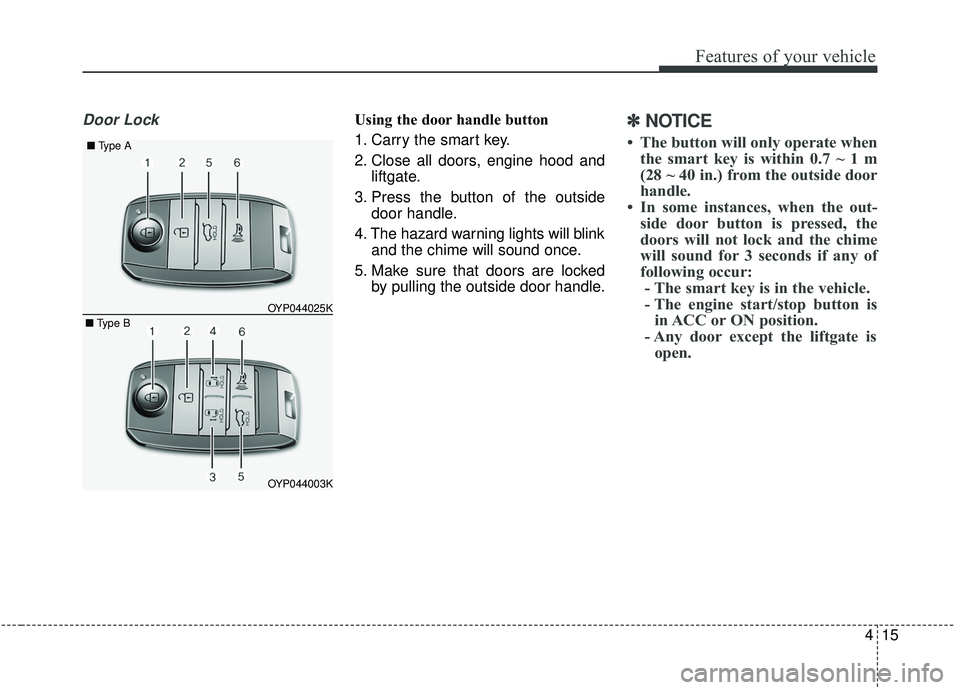
Door LockUsing the door handle button
1. Carry the smart key.
2. Close all doors, engine hood andliftgate.
3. Press the button of the outside door handle.
4. The hazard warning lights will blink and the chime will sound once.
5. Make sure that doors are locked by pulling the outside door handle.✽ ✽NOTICE
• The button will only operate when
the smart key is within 0.7 ~ 1 m
(28 ~ 40 in.) from the outside door
handle.
• In some instances, when the out- side door button is pressed, the
doors will not lock and the chime
will sound for 3 seconds if any of
following occur:- The smart key is in the vehicle.
- The engine start/stop button is in ACC or ON position.
- Any door except the liftgate is open.
OYP044003K
OYP044025K
■
Type A
■ Type B
Page 125 of 604
Features of your vehicle
16
4
Using the button on the smart key
1. Close all doors, engine hood and
liftgate.
2. Press the lock button (1).
3. The hazard warning lights will blink and the chime will sound once.
4. Make sure that doors are locked by pulling the outside door handle.Unlocking
Using the door handle button
1. Carry the smart key.
2. Press the button of the driver'soutside door handle.
3. The driver’s door will unlock. The hazard warning lights will blink and
the chime will sound two times.
4. Press the button twice within 4 seconds and all doors and the lift-
gate will unlock and the hazard
warning lights will blink and the
chime will sound two times.
✽ ✽NOTICE
• The button will only operate when
the smart key is within 0.7 ~ 1 m
(28 ~ 40 in.) from the outside door
handle.
• When the smart key is recognized in the area of 0.7 ~ 1 m (28 ~ 40 in.)
from the front outside door handle,
other people can also open the
doors.
• After unlocking the driver’s door or all doors, the door(s) will lock
automatically unless the door is
opened.
Page 126 of 604
417
Features of your vehicle
Using the button on the smart key
1. Press the unlock button (2) of thesmart key.
2. The driver’s door will unlock. The hazard warning lights will blink and
the chime will sound two times.
3. Press the unlock button (2) twice within 4 seconds and all doors and
the liftgate will unlock. The hazard
warning lights will blink and the
chime will sound two times.
✽ ✽NOTICE
After pressing the button, the doors
will lock automatically unless any
door is opened within 30 seconds.
✽ ✽NOTICE
You can activate or deactivate the
Two Turn Unlock function. Refer to
“User settings” in this chapter.
Left or Right power sliding door
opening or closing (if equipped)
This function will operate when the
power door ON/OFF button is ON
(not depressed).
Using the power sliding door handle
1. Carry the smart key.
2. Pull the power sliding door handle once.
3. The power sliding door will be opened or closed automatically. At
this time, the hazard warning
lights will blink and the chime will
sound two times.
Using the button on the smart key
Press and hold the power sliding
door open (or close) button (3), (4)
more than 1 second.
❈ For detailed information refer to
the “Power sliding door and power
liftgate” in this chapter.
Liftgate unlocking
Using the liftgate handle button
1. Carry the smart key.
2. Press the liftgate handle button.
3. When all doors are locked, the
hazard warning lights will blink two
times.
Once the liftgate is opened and
then closed, the liftgate will lock
automatically.
✽ ✽NOTICE
The button will only operate when
the smart key is within 0.7 ~ 1 m (28
~ 40 in.) from the liftgate handle.
Page 127 of 604
Features of your vehicle
18
4
Using the button on the smart key
1. Press the liftgate unlock button (5)
for more than 1 second.
2. When all doors are locked, the hazard warning lights will blink two
times.
For Power Liftgate Only:
The Power Liftgate will open if the
button is pressed for more than 1
second. Also, once the liftgate is
opened and then closed, the liftgate
will be locked again automatically.
❈ For detailed information refer to
the “Power sliding door and power
liftgate”in this chapter.Panic
1. Press the panic button (6) for more
than 1 second.
2. The horn sounds and hazard warning light flash for about 27
seconds.
✽ ✽NOTICE
To stop the horn and lights, press
any button on the smart key.
Start-up
You can start the engine without
inserting the key.
❈ For detailed information refer to
the “Engine start/stop button” in
chapter 5.
Loss of the smart key
A maximum of 2 smart keys can be
registered to a single vehicle.
If you happen to lose your smart key,
you will not be able to start the
engine. You should immediately take
the vehicle and remaining key to your
authorized Kia dealer(tow the vehi-
cle, if necessary) to protect it from
potential theft.
Page 129 of 604
Features of your vehicle
20
4
Battery replacement
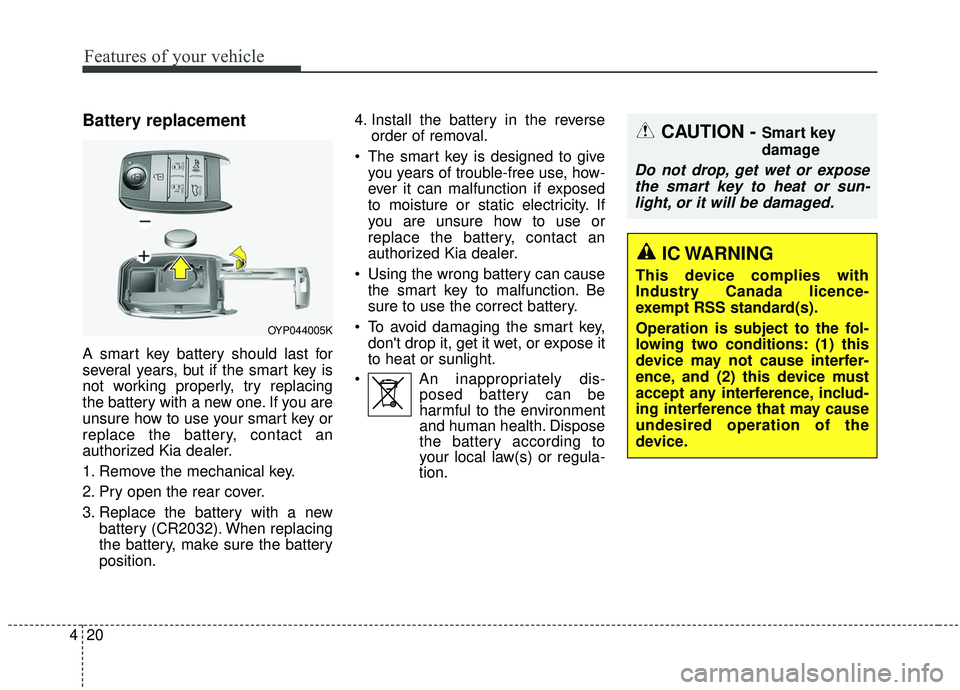
A smart key battery should last for
several years, but if the smart key is
not working properly, try replacing
the battery with a new one. If you are
unsure how to use your smart key or
replace the battery, contact an
authorized Kia dealer.
1. Remove the mechanical key.
2. Pry open the rear cover.
3. Replace the battery with a new
battery (CR2032). When replacing
the battery, make sure the battery
position. 4. Install the battery in the reverse
order of removal.
The smart key is designed to give you years of trouble-free use, how-
ever it can malfunction if exposed
to moisture or static electricity. If
you are unsure how to use or
replace the battery, contact an
authorized Kia dealer.
Using the wrong battery can cause the smart key to malfunction. Be
sure to use the correct battery.
To avoid damaging the smart key, don't drop it, get it wet, or expose it
to heat or sunlight.
An inappropriately dis- posed battery can be
harmful to the environment
and human health. Dispose
the battery according to
your local law(s) or regula-
tion.
CAUTION - Smart key
damage
Do not drop, get wet or expose
the smart key to heat or sun-light, or it will be damaged.
OYP044005K
IC WARNING
This device complies with
Industry Canada licence-
exempt RSS standard(s).
Operation is subject to the fol-
lowing two conditions: (1) this
device may not cause interfer-
ence, and (2) this device must
accept any interference, includ-
ing interference that may cause
undesired operation of the
device.