all wheel drive KIA SELTOS 2021 Features and Functions Guide
[x] Cancel search | Manufacturer: KIA, Model Year: 2021, Model line: SELTOS, Model: KIA SELTOS 2021Pages: 62, PDF Size: 4.82 MB
Page 19 of 62

ALWAYS CHECK THE OWNER’S MANUAL FOR COMPLETE OPER ATING INFORMATION AND SAFET Y WARNINGS. *IF EQUIPPED †LEGAL DISCL AIMERS ON BACK INSIDE COVER17
ADVANCED DRIVER ASSISTANCE SYSTEMS (ADAS)
Highway Driving Assist is not a substitute for safe driving, may not detect all objects around the vehicle, and only functions on certain federal highways.
Always drive safely and use caution. See section 5 in the Owner’s Manual for more detailed information, limitations and conditions. Images are for illustrative purposes only and may not reflect actual feature or operation.
Highway Driving Assist (HDA)*
Highway Driving Assist (HDA) is designed to adjust the speed of the vehicle
when driving on federal highways. The system can adjust the vehicle’s speed
based on available highway speed information. The automatic speed setting
mode is designed to set the speed automatically by adjusting to the current
speed limits of the highway the vehicle is traveling on.
To turn HDA on, go to User Settings in the Instrument Cluster or the Vehicle
Settings* in the audio head unit. Go to Drive Assistance > Driving Assist >
Highway Driving Assist and press the OK button B on the Steering Wheel.
HDA will operate only when these conditions are met:
•The vehicle is traveling slower than 95 mph
•
When driving on federal highways
•
When the SCC is on and operating
•
When the SCC speed is set to current federal
highway speed
To activate HDA, turn Smart Cruise Control (SCC) on by pressing the Driving Assist CRUISE button C on the
Steering Wheel. When HDA is activated and the conditions are met, the Instrument Cluster indicator light D
will illuminate green. If the conditions are not met, HDA will be in standby mode and the indicator light D will
illuminate white.
When in operation, and if both lanes are recognized, a display E will show the
lanes illuminated white and the steering wheel indicator illuminated green.
If HDA is activated, conditions are met and the SCC speed is set by the
driver (at the posted highway speed limit or slower), HDA will enter the
automatic speed setting mode. The set speed and AUTO will be displayed F in green and an audible alert will sound.
Safe Exit Assist (SEA) System*†6
Safe Exit Assist (SE A) can help prevent
passengers from opening their door by
displaying a warning message on the
Instrument Cluster A and sounding an
audible warning when a vehicle is detected,
approaching from behind, and after your
vehicle has stopped.
To turn on SE A, go to User Settings in the
Instrument Cluster or the Vehicle Settings* in
the audio head unit, select Driver Assistance,
then Blind-Spot Safety, and select Safe Exit
Assistance.
Images are for illustrative purposes only and may not reflect actual feature or operation.
See section 5 in the Owner’s Manual for more information.
Vehicle Settings
Driver
Assistance
Blind-Spot
>Climate
Lights
Door
Menu
A
ADAS
D
mphE60mphF
RES
SET
CNCL+
–
CRUISE
OK
RESSET
CNCL+
–
CRUISE
OKRESSET
CNCL+
–
CRUISE
OK
RESSET+
–
CRUISE
OK
RESSET+
–
CRUISE
OKRESSET+
–
CRUISE MODE
OK
RES
SET+
–
CRUISE
CANCEL
CANCEL
OKRESSET+
–
CRUISE
CANCEL
OK
MODE
B
C
REMINDERS:
• If the driver changes the speed while in automatic speed setting mode, it deactivates and enters a manual mode
• When the ignition is cycled, the system returns to its previous state, on or off
Refer to the inside front cover for more information on QR codes.www.youtube.com/KiaFeatureVideos
QR CODES
Highway Driving Assist (HDA) Video
Page 20 of 62
*IF EQUIPPED †LEGAL DISCL AIMERS ON BACK INSIDE COVER18SELTOS FEATURES & FUNCTIONS GUIDE
Hill-Start Assist Control (HAC)†8
HAC is designed to help prevent the vehicle from rolling backward when
accelerating from a stop while on a steep incline.
The HAC automatically activates whether the ESC is OFF or ON but does
NOT activate when the ESC has malfunctioned.
REMINDERS:
•
The HAC does not operate when the gear shift is in the P (Park) or the N (Neutral) position
•
HAC does not replace the need to apply brakes while the vehicle is stopped on an incline
•In the event of HAC system malfunction, see an Authorized Kia Dealer for service
•
•When HAC is active (e.g., during initial acceleration from a stop on an incline), you may notice that the brakes will momentarily remain engaged after you depress the accelerator – this is normal operation
•HAC provides a two-second delay before the vehicle may start rolling backward
QUICK TIPS
OFF
(Buttons located on left of Steering Wheel)
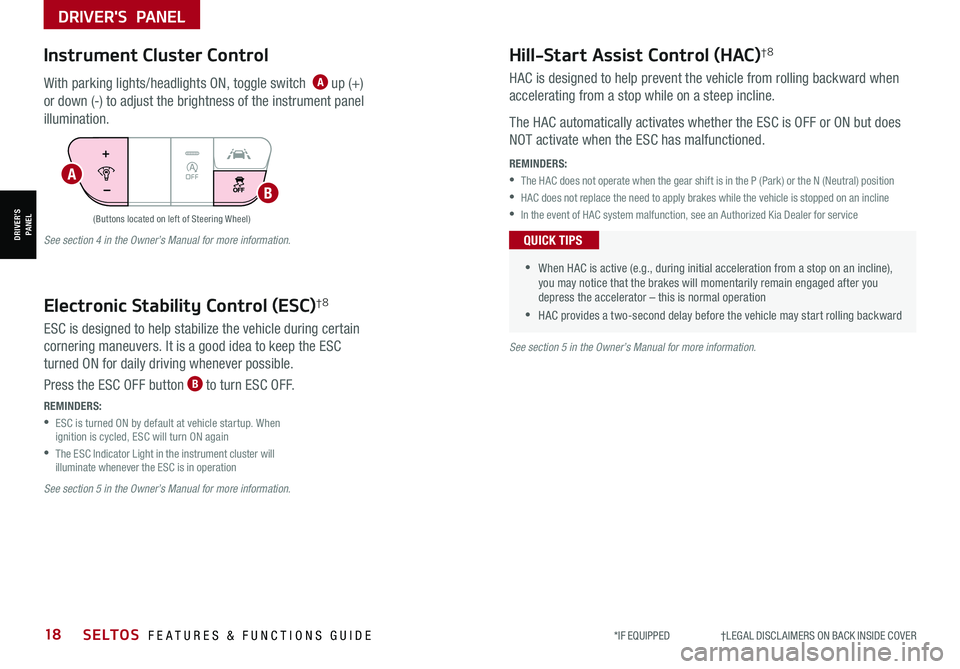
Instrument Cluster Control
With parking lights/headlights ON, toggle switch A up (+)
or down (-) to adjust the brightness of the instrument panel
illumination.
Electronic Stability Control (ESC)†8
ESC is designed to help stabilize the vehicle during certain
cornering maneuvers. It is a good idea to keep the ESC
turned ON for daily driving whenever possible.
Press the ESC OFF button B to turn ESC OFF.
See section 5 in the Owner’s Manual for more information.
See section 4 in the Owner’s Manual for more information.
See section 5 in the Owner’s Manual for more information.
REMINDERS:
•
ESC is turned ON by default at vehicle startup. When ignition is cycled, ESC will turn ON again
•
The ESC Indicator Light in the instrument cluster will illuminate whenever the ESC is in operation
A
B
DRIVER'S PANEL
DRIVER’SPANEL
Page 23 of 62

ALWAYS CHECK THE OWNER’S MANUAL FOR COMPLETE OPER ATING INFORMATION AND SAFET Y WARNINGS. *IF EQUIPPED †LEGAL DISCL AIMERS ON BACK INSIDE COVER21
DRIVER'S PANEL
DRIVER’SPANEL
A
B
Do not adjust the steering wheel while driving as this may cause you to lose control of the vehicle.
See section 4 in the Owner’s Manual for more information.
It may be helpful to pull/push bottom of Steering Wheel towards/away from you to adjust desired distance prior to adjusting the angle.
QUICK TIP
Tilt/Telescoping Steering Wheel†2 3
To adjust the Steering Wheel, press the lock-release lever C down and
adjust to the desired angle D and then the distance E.
When finished, pull the lock-release lever C up to lock Steering Wheel
in place.
C
D
E
Power Outside Mirrors
A Press the L or R buttons to select the
mirror to adjust
B
Press button arrows left /right or up/down
to adjust mirror position
Refer to section 4 in the Owner’s Manual for more
information.
Heated Outside Mirrors*
Mirror heaters automatically turn ON/OFF at the same time the Rear Window
Defroster is turned ON/OFF. The Rear Window Defroster button* is located
on climate control system panel.
Refer to section 4 in the Owner’s Manual for more information.
Manual Folding Mirrors*
To fold the mirrors in manually, pull the mirror towards the window.
If needed, pull the mirror firmly until it folds
QUICK TIP
Refer to section 4 in the Owner’s Manual for more information.
Images are for illustrative purposes only and may not reflect actual feature or operation.
STEERING WHEEL CONTROLS
STEERING WHEEL CONTROLS
Page 26 of 62

STEERING WHEEL CONTROLS
STEERING WHEEL CONTROLS
Smart Cruise Control (SCC) is designed to maintain a speed and predetermined distance
from vehicles detected ahead by automatically adjusting the driving speed as needed.
When traffic is detected, the vehicle will slow down to maintain a set distance behind
traffic without depressing the accelerator or brake pedal.
With SCC on and activated, the vehicle distance set, and the system detects a vehicle
slowing or stopping, the system can bring the vehicle to a complete stop. When the
vehicle ahead starts to move forward, SCC re-engages. If the vehicle ahead stops for
more than 3 seconds, the accelerator pedal or the RES+ button must be pressed to start
moving the vehicle.
To set/adjust SCC speed:
•Accelerate/decelerate to the desired speed
•Press the Driving Assist CRUISE button A to turn system ON. The CRUISE indicator
will illuminate on the instrument cluster
•Press SET- button B down to set speed. The SET indicator light will illuminate.
The set speed and vehicle distance will illuminate on the LCD screen
•Press button B up or down to adjust the set speed
To set the vehicle distance C: Press the Vehicle Distance button D on the steering
wheel. The image on the LCD screen E will change when scrolling through the settings.
Each time the button is pressed, the vehicle distance changes E.
To cancel SCC operation: Press button B or press the brake pedal. The LCD screen will
display a message that the SCC operation is canceled.
To turn SCC OFF: Press the Driving Assist CRUISE button A. The CRUISE indicator on
the instrument cluster will turn OFF.
To adjust the sensitivity of SCC (if equipped): Press the Mode/Menu button F on
the Steering Wheel. When in User Settings, select Driver Assistance, then SCC Reaction.
Then select Slow, Normal or Fast.
Smart Cruise Control (SCC)†6
Images are for illustrative purposes only and may vary on actual vehicle.
See section 5 in the Owner’s Manual for more information.60
60
60
60
( Type B; buttons located on right side of Steering Wheel)
REMINDER: Above are approximate distances based on 56 mph vehicle speed. The SCC vehicle distance increments are based on vehicle speed.
17 2 f t13 0 f t
82ft
10 6 f t
SCC is a supplemental system and is not a substitute for safe driving. It is the responsibility of the driver to always check the speed and distance to the vehicle ahead.
*IF EQUIPPED †LEGAL DISCL AIMERS ON BACK INSIDE COVER24SELTOS FEATURES & FUNCTIONS GUIDE
C
E
RESSET
CNCL+
–
CRUISE
OK
RESSET
CNCL+
–
CRUISE
OKRESSET
CNCL+
–
CRUISE
OK
RESSET+
–
CRUISE
OK
RESSET+
–
CRUISE
OKRESSET+
–
CRUISE MODE
OK
RES
SET+
–
CRUISE
CANCEL
CANCEL
OKRESSET+
–
CRUISE
CANCEL
OK
MODE
D
A
F
B
Refer to the inside front cover for more information on QR codes.www.youtube.com/KiaFeatureVideos
QR CODES
Smart Cruise Control (SCC) with Stop & Go Videoa
Page 27 of 62
STEERING WHEEL CONTROLS
STEERING WHEEL CONTROLS
Smart Cruise Control (SCC)*†6 (continued)
( Type A; buttons located on right side of Steering Wheel)
REMINDERS: •Cruise Control button must be ON in order to turn SCC ON/OFF
•SCC can operate when the vehicle is driving faster than 6 mph
•
SCC is activated when ignition is turned on. Speed will need to be reset when ignition is cycled on
•
SCC is turned ON again when the ignition is cycled off, then on again. The speed setting will need to be reset when ignition is cycled
•
SCC is also canceled when the driver’s door is opened, gear shift is changed out of D (Drive), EPB is activated and various other conditions. See Owner’s Manual for other conditions
•
In standard Cruise Control, the driver needs to manually assess the distance from other vehicles as the system will not automatically apply brakes
•
If SCC is left on, it can be activated inadvertently. Keep the system off when not in use to avoid setting a speed that the driver is not aware of
•
When following a vehicle, the system will automatically adjust your cruise speed based on the vehicle detected in front
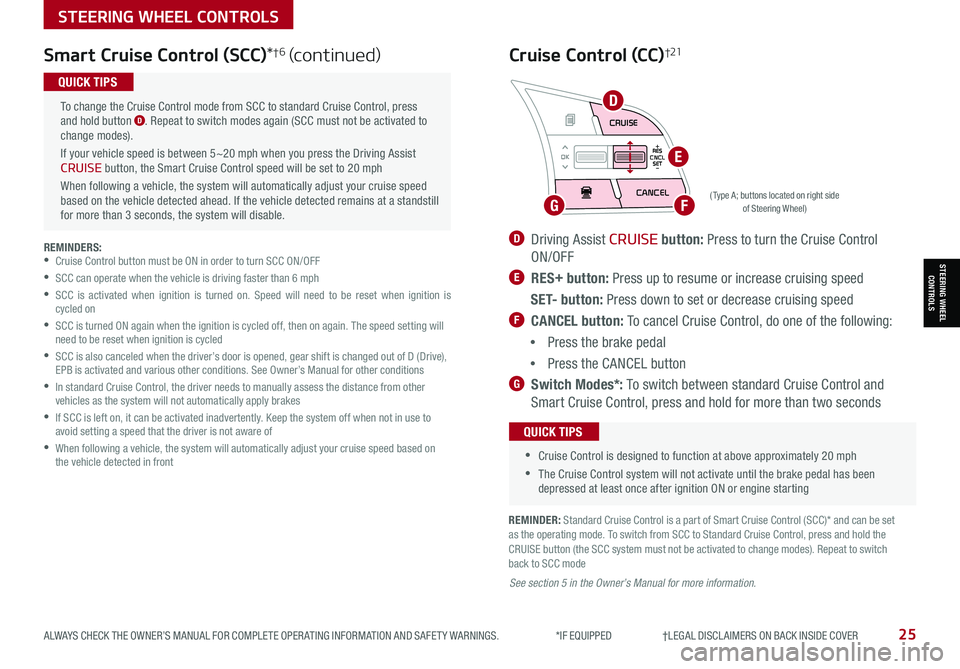
To change the Cruise Control mode from SCC to standard Cruise Control, press and hold button D. Repeat to switch modes again (SCC must not be activated to change modes).
If your vehicle speed is between 5~20 mph when you press the Driving Assist CRUISE button, the Smart Cruise Control speed will be set to 20 mph
When following a vehicle, the system will automatically adjust your cruise speed based on the vehicle detected ahead. If the vehicle detected remains at a standstill for more than 3 seconds, the system will disable.
QUICK TIPS
ALWAYS CHECK THE OWNER’S MANUAL FOR COMPLETE OPER ATING INFORMATION AND SAFET Y WARNINGS. *IF EQUIPPED †LEGAL DISCL AIMERS ON BACK INSIDE COVER25
REMINDER: Standard Cruise Control is a part of Smart Cruise Control (SCC)* and can be set as the operating mode. To switch from SCC to Standard Cruise Control, press and hold the CRUISE button (the SCC system must not be activated to change modes). Repeat to switch back to SCC mode
D Driving Assist CRUISE button: Press to turn the Cruise Control
ON/OFF
E RES+ button: Press up to resume or increase cruising speed
S E T- button: Press down to set or decrease cruising speed
F CANCEL button: To cancel Cruise Control, do one of the following:
•Press the brake pedal
•Press the CANCEL button
G Switch Modes*: To switch between standard Cruise Control and
Smart Cruise Control, press and hold for more than two seconds
Cruise Control (CC)†21
•
•Cruise Control is designed to function at above approximately 20 mph
•The Cruise Control system will not activate until the brake pedal has been depressed at least once after ignition ON or engine starting
QUICK TIPS
See section 5 in the Owner’s Manual for more information.
RES
SET
CNCL+
–
CRUISE
OK
RESSET
CNCL+
–
CRUISE
OKRESSET
CNCL+
–
CRUISE
OK
RESSET+
–
CRUISE
OK
RESSET+
–
CRUISE
OKRESSET+
–
CRUISEMODE
OK
RESSET+
–
CRUISE
CANCEL
CANCEL
OKRESSET+
–
CRUISE
CANCEL
OK
MODED
FG
E
Page 28 of 62
AUDIO SYSTEMS
AUDIOSYSTEMS
*IF EQUIPPED †LEGAL DISCL AIMERS ON BACK INSIDE COVER26SELTOS FEATURES & FUNCTIONS GUIDE
RESSET
CNCL+
–
CRUISE
OK
RESSET
CNCL+
–
CRUISE
OKRESSET
CNCL+
–
CRUISE
OK
RESSET+
–
CRUISE
OK
RESSET+
–
CRUISE
OKRESSET+
–
CRUISE MODE
OK
RES
SET+
–
CRUISE
CANCEL
CANCEL
OKRESSET+
–
CRUISE
CANCEL
OK
MODE
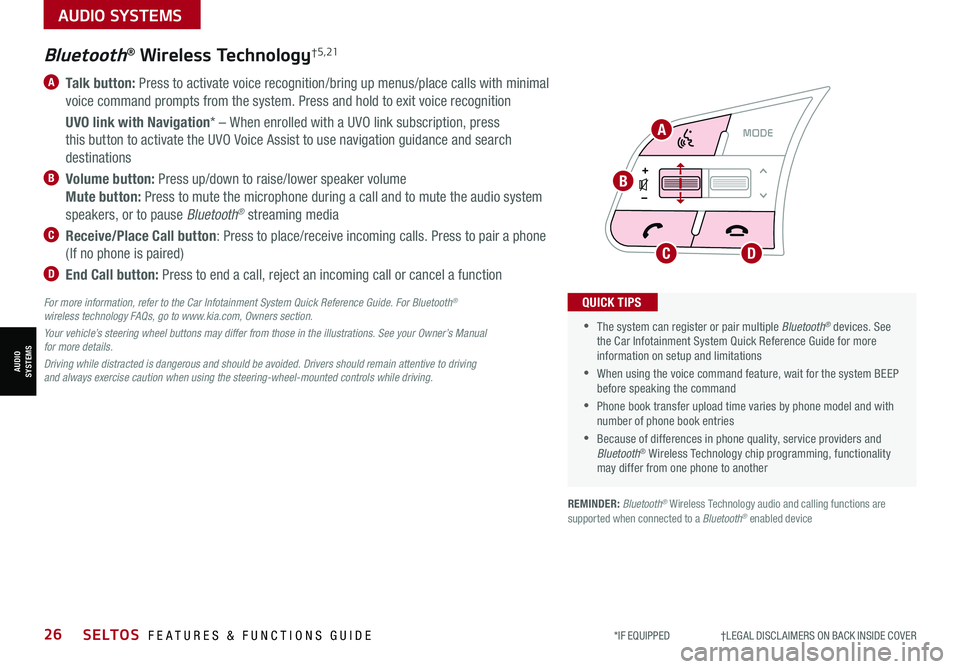
A Talk button: Press to activate voice recognition/bring up menus/place calls with minimal
voice command prompts from the system. Press and hold to exit voice recognition
UVO link with Navigation* – When enrolled with a UVO link subscription, press
this button to activate the UVO Voice Assist to use navigation guidance and search
destinations
B Volume button: Press up/down to raise/lower speaker volume
Mute button: Press to mute the microphone during a call and to mute the audio system
speakers, or to pause Bluetooth® streaming media
C Receive/Place Call button: Press to place/receive incoming calls. Press to pair a phone
(If no phone is paired)
D End Call button: Press to end a call, reject an incoming call or cancel a function
•
•The system can register or pair multiple Bluetooth® devices. See the Car Infotainment System Quick Reference Guide for more information on setup and limitations
•When using the voice command feature, wait for the system BEEP before speaking the command
•Phone book transfer upload time varies by phone model and with number of phone book entries
•Because of differences in phone quality, service providers and Bluetooth® Wireless Technology chip programming, functionality may differ from one phone to another
QUICK TIPS
Bluetooth® Wireless Technology† 5 , 21
For more information, refer to the Car Infotainment System Quick Reference Guide. For Bluetooth® wireless technology FAQs, go to www.kia.com, Owners section.
Your vehicle’s steering wheel buttons may differ from those in the illustrations. See your Owner’s Manual for more details.
Driving while distracted is dangerous and should be avoided. Drivers should remain attentive to driving and always exercise caution when using the steering-wheel-mounted controls while driving.
A
B
CD
REMINDER: Bluetooth® Wireless Technology audio and calling functions are supported when connected to a Bluetooth® enabled device
Page 30 of 62
AUDIO SYSTEMS
AUDIOSYSTEMS
RESSET
CNCL+
–
CRUISE
OK
RESSET
CNCL+
–
CRUISE
OKRESSET
CNCL+
–
CRUISE
OK
RESSET+
–
CRUISE
OK
RESSET+
–
CRUISE
OKRESSET+
–
CRUISEMODE
OK
RESSET+
–
CRUISE
CANCEL
CANCEL
OKRESSET+
–
CRUISE
CANCEL
OK
MODE
*IF EQUIPPED †LEGAL DISCL AIMERS ON BACK INSIDE COVER28SELTOS FEATURES & FUNCTIONS GUIDE
A
BC
Audio Controls†21
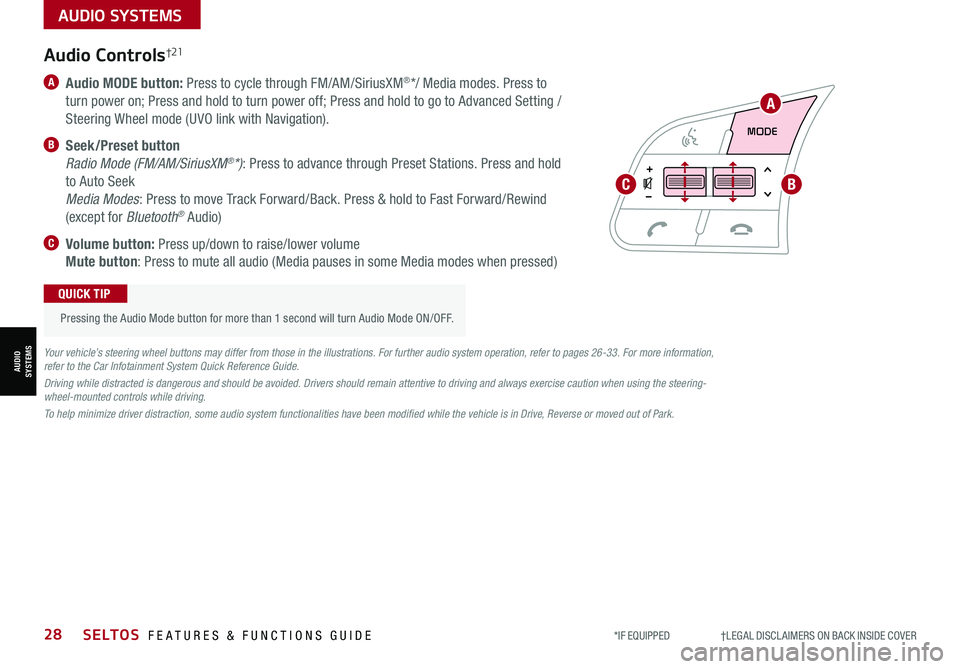
A Audio MODE button: Press to cycle through FM/AM/SiriusXM®*/ Media modes. Press to
turn power on; Press and hold to turn power off; Press and hold to go to Advanced Setting /
Steering Wheel mode (UVO link with Navigation).
B Seek/Preset button
Radio Mode (FM/AM/SiriusXM®*): Press to advance through Preset Stations. Press and hold
to Auto Seek
Media Modes: Press to move Track Forward/Back. Press & hold to Fast Forward/Rewind
(except for Bluetooth® Audio)
C Volume button: Press up/down to raise/lower volume
Mute button: Press to mute all audio (Media pauses in some Media modes when pressed)
Pressing the Audio Mode button for more than 1 second will turn Audio Mode ON/OFF.
QUICK TIP
Your vehicle’s steering wheel buttons may differ from those in the illustrations. For further audio system operation, refer to pages 26-33. For more information, refer to the Car Infotainment System Quick Reference Guide.
Driving while distracted is dangerous and should be avoided. Drivers should remain attentive to driving and always exercise caution when using the steering-wheel-mounted controls while driving.
To help minimize driver distraction, some audio system functionalities have been modified while the vehicle is in Drive, Reverse or moved out of Park.
Page 35 of 62
AUDIO SYSTEMS
AUDIOSYSTEMS
ALWAYS CHECK THE OWNER’S MANUAL FOR COMPLETE OPER ATING INFORMATION AND SAFET Y WARNINGS. *IF EQUIPPED †LEGAL DISCL AIMERS ON BACK INSIDE COVER33
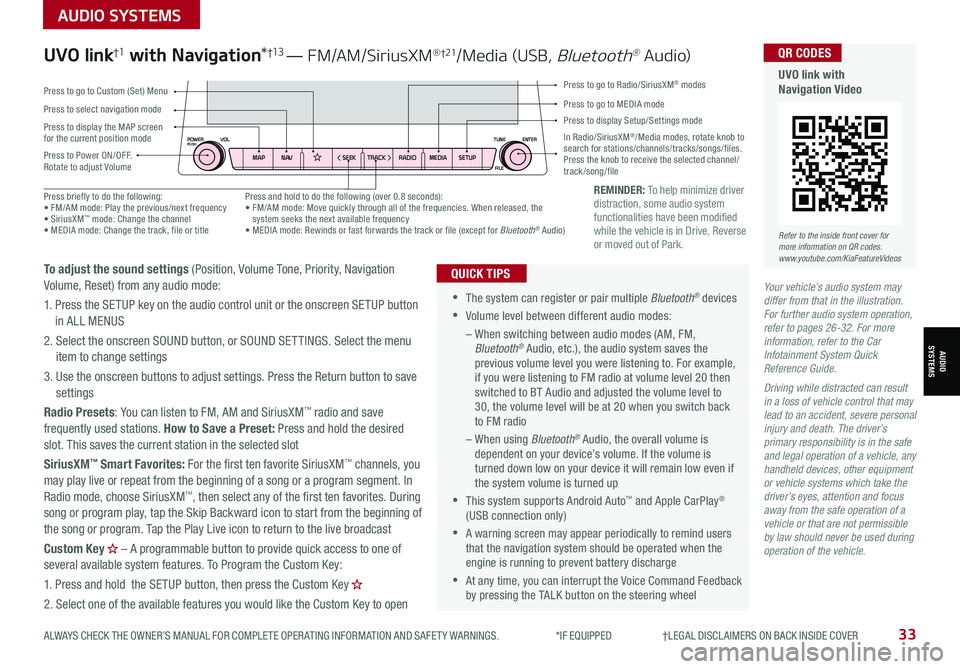
REMINDER: To help minimize driver distraction, some audio system functionalities have been modified while the vehicle is in Drive, Reverse or moved out of Park.
Your vehicle’s audio system may differ from that in the illustration. For further audio system operation, refer to pages 26-32. For more information, refer to the Car Infotainment System Quick Reference Guide.
Driving while distracted can result in a loss of vehicle control that may lead to an accident, severe personal injury and death. The driver’s primary responsibility is in the safe and legal operation of a vehicle, any handheld devices, other equipment or vehicle systems which take the driver’s eyes, attention and focus away from the safe operation of a vehicle or that are not permissible by law should never be used during operation of the vehicle.
•
•The system can register or pair multiple Bluetooth® devices
•Volume level between different audio modes:
– When switching between audio modes (AM, FM, Bluetooth® Audio, etc.), the audio system saves the previous volume level you were listening to. For example, if you were listening to FM radio at volume level 20 then switched to BT Audio and adjusted the volume level to 30, the volume level will be at 20 when you switch back to FM radio
– When using Bluetooth® Audio, the overall volume is dependent on your device’s volume. If the volume is turned down low on your device it will remain low even if the system volume is turned up
•This system supports Android Auto™ and Apple CarPlay® (USB connection only)
•A warning screen may appear periodically to remind users that the navigation system should be operated when the engine is running to prevent battery discharge
•At any time, you can interrupt the Voice Command Feedback by pressing the TALK button on the steering wheel
QUICK TIPS
UVO link†1 with Navigation*†13 — FM/AM/SiriusXM® †21/Media (USB, Bluetooth® Au dio)
To adjust the sound settings (Position, Volume Tone, Priority, Navigation Volume, Reset) from any audio mode:
1. Press the SETUP key on the audio control unit or the onscreen SETUP button in ALL MENUS
2. Select the onscreen SOUND button, or SOUND SET TINGS. Select the menu item to change settings
3. Use the onscreen buttons to adjust settings. Press the Return button to save settings
Radio Presets: You can listen to FM, AM and SiriusXM™ radio and save frequently used stations. How to Save a Preset: Press and hold the desired slot. This saves the current station in the selected slot
SiriusXM™ Smart Favorites: For the first ten favorite SiriusXM™ channels, you may play live or repeat from the beginning of a song or a program segment. In Radio mode, choose SiriusXM™, then select any of the first ten favorites. During song or program play, tap the Skip Backward icon to start from the beginning of the song or program. Tap the Play Live icon to return to the live broadcast
Custom Key H
Page 40 of 62
*IF EQUIPPED38
Idle, Stop & Go (ISG) System
The ISG system is designed to help reduce fuel consumption by automatically shutting
down the engine when the vehicle is at a standstill.
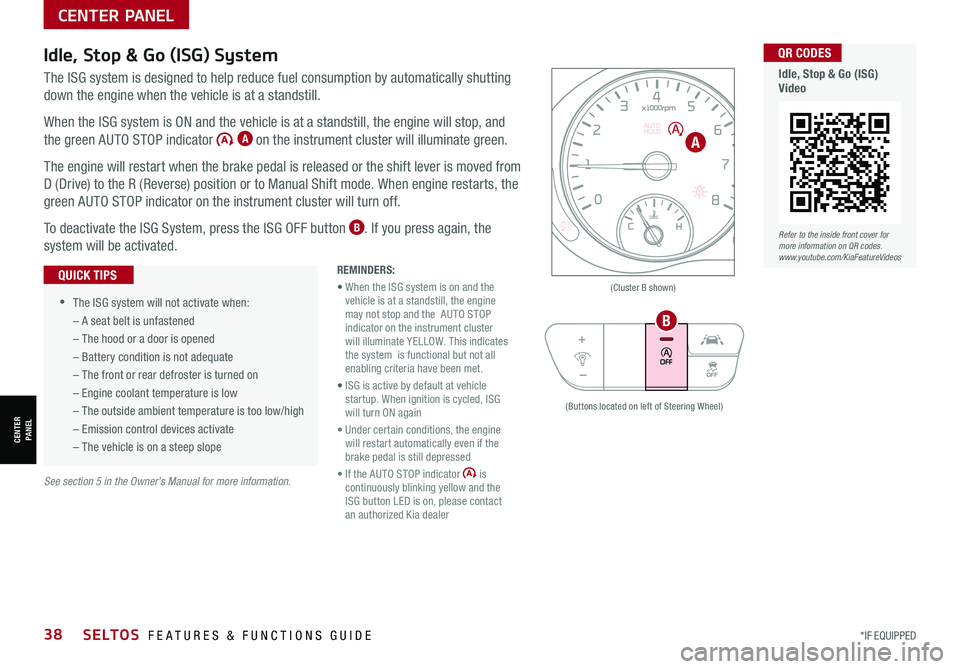
When the ISG system is ON and the vehicle is at a standstill, the engine will stop, and
the green AUTO STOP indicator A on the instrument cluster will illuminate green.
The engine will restart when the brake pedal is released or the shift lever is moved from
D (Drive) to the R (Reverse) position or to Manual Shift mode. When engine restarts, the
green AUTO STOP indicator on the instrument cluster will turn off.
To deactivate the ISG System, press the ISG OFF button B. If you press again, the
system will be activated.
See section 5 in the Owner’s Manual for more information.
SELTOS FEATURES & FUNCTIONS GUIDE
CENTER PANEL
CENTER PANEL
REMINDERS:
• When the ISG system is on and the vehicle is at a standstill, the engine may not stop and the AUTO STOP indicator on the instrument cluster will illuminate YELLOW. This indicates the system is functional but not all enabling criteria have been met.
• ISG is active by default at vehicle startup. When ignition is cycled, ISG will turn ON again
• Under certain conditions, the engine will restart automatically even if the brake pedal is still depressed
• If the AUTO STOP indicator is continuously blinking yellow and the ISG button LED is on, please contact an authorized Kia dealer
•
•The ISG system will not activate when:
– A seat belt is unfastened
– The hood or a door is opened
– Battery condition is not adequate
– The front or rear defroster is turned on
– Engine coolant temperature is low
– The outside ambient temperature is too low/high
– Emission control devices activate
– The vehicle is on a steep slope
QUICK TIPS(Cluster B shown)
(Buttons located on left of Steering Wheel)
A
B
Refer to the inside front cover for more information on QR codes.www.youtube.com/KiaFeatureVideos
QR CODES
Idle, Stop & Go (ISG)Video
Page 43 of 62

ALWAYS CHECK THE OWNER’S MANUAL FOR COMPLETE OPER ATING INFORMATION AND SAFET Y WARNINGS. *IF EQUIPPED †LEGAL DISCL AIMERS ON BACK INSIDE COVER41
CENTER PANEL
CENTER PANEL
Downhill Brake Control (DBC)†8All Wheel Drive (AWD) System*
DBC helps drivers maneuver down steep hills by automatically
applying braking inputs, allowing drivers to concentrate on
steering.
Press button A to turn DBC ON/OFF.
When you select AWD LOCK mode (indicator is illuminated) by pressing the AWD
LOCK button B, the AWD LOCK mode increases the drive power when driving on wet
pavement, snow-covered roads and/or on unpaved roads.
• This mode is used for climbing or descending sharp grades, driving on unpaved roads,
driving on sandy and muddy roads, etc., to improve traction
• This mode automatically begins to deactivate at speeds above 38 mph and is shifted
to AWD AUTO mode at speeds above 38 mph. If the vehicle decelerates to speeds
below approximately 38 mph, however, the transfer mode is shifted into AWD LOCK
mode again
When the AWD LOCK mode is deactivated, a shock may be felt as the drive power is
delivered entirely to the front wheels. This shock is not a mechanical failure.
The AWD system is a supplemental system only. It is the driver’s responsibility to drive carefully depending on road and traffic conditions.
See section 5 in the Owner’s Manual for more information.
LOCK
(Type A shown. Located below gear shift)
•
•When on, DBC will turn OFF when button is pressed again or vehicle speed is over 38 mph •If the red indicator illuminates, the DBC system may have malfunctioned. Take your vehicle to an authorized Kia dealer and have the system checked
QUICK TIPS
REMINDER: DBC defaults to OFF when ignition is cycled.
The DBC system is a supplemental system and does not replace the need for the driver to apply the brakes. Pay attention to road and traffic conditions and be prepared to depress the brakes.
See section 5 in the Owner’s Manual for more information.
A
B