check KIA SELTOS 2022 Navigation System Quick Reference Guide
[x] Cancel search | Manufacturer: KIA, Model Year: 2022, Model line: SELTOS, Model: KIA SELTOS 2022Pages: 316, PDF Size: 10.48 MB
Page 118 of 316
5-24
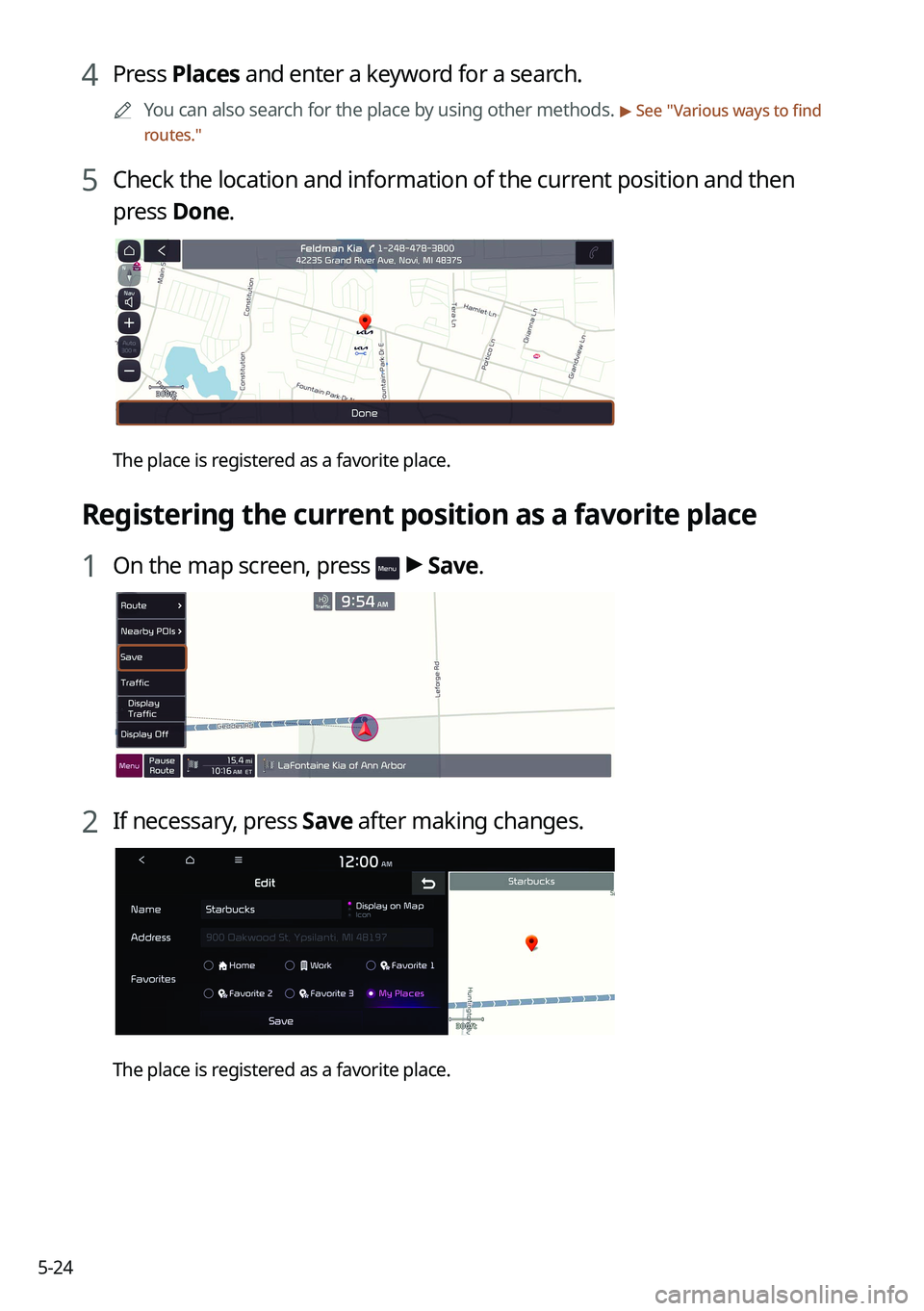
4 Press Places and enter a keyword for a search.
0000
A
You can also search for the place by using other methods. > See "Various ways to find
routes."
5 Check the location and information of the current position and then
press Done.
The place is registered as a favorite place.
Registering the current position as a favorite place
1 On the map screen, press > Save.
2 If necessary, press Save after making changes.
The place is registered as a favorite place.
Page 119 of 316
5-25
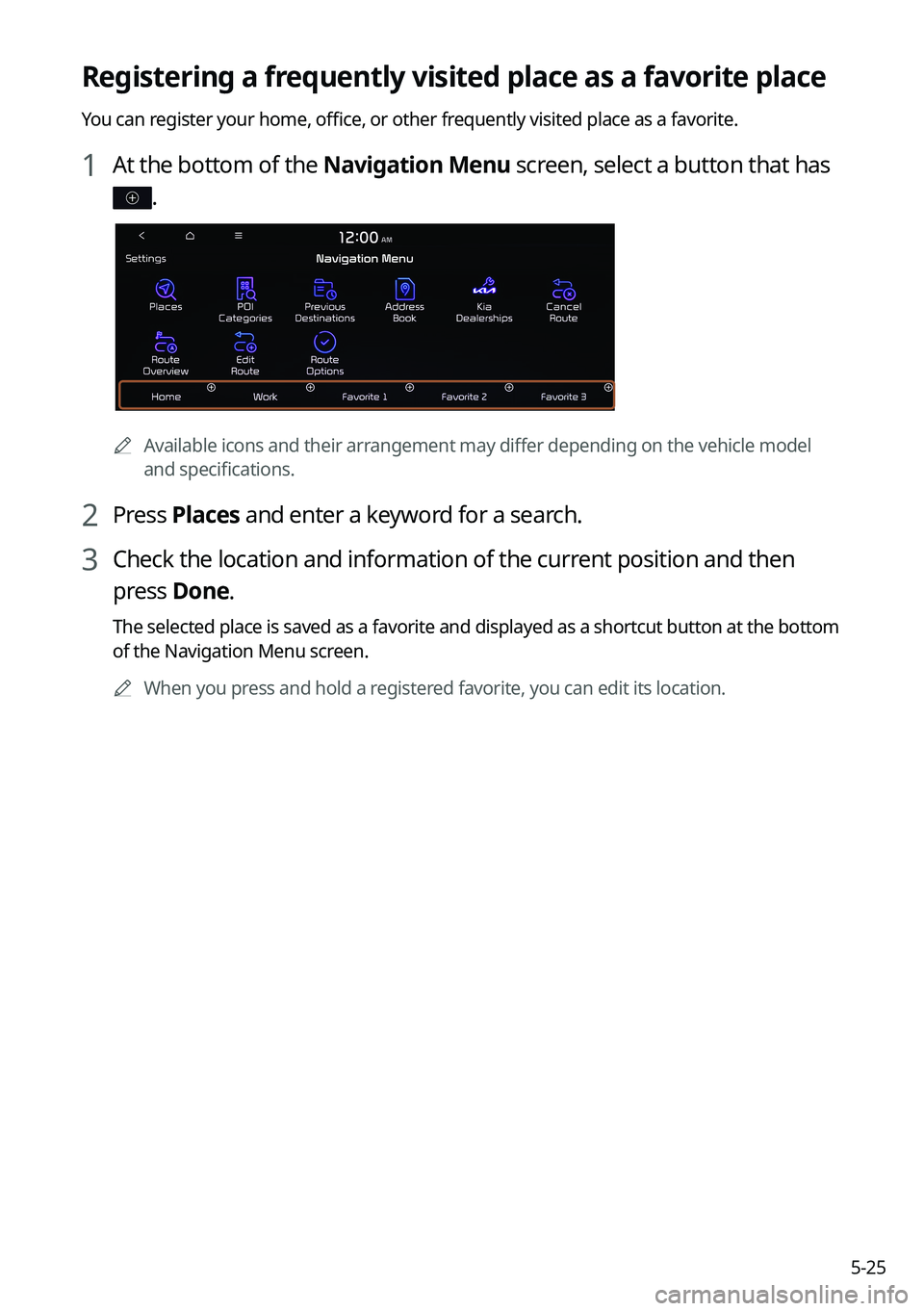
Registering a frequently visited place as a favorite place
You can register your home, office, or other frequently visited place as a favorite.
1 At the bottom of the Navigation Menu screen, select a button that has
.
0000AAvailable icons and their arrangement may differ depending on the vehicle model
and specifications.
2 Press Places and enter a keyword for a search.
3 Check the location and information of the current position and then
press Done.
The selected place is saved as a favorite and displayed as a shortcut button at the bottom
of the Navigation Menu screen.
0000
A
When you press and hold a registered favorite, you can edit its location.
Page 120 of 316
5-26
Setting a registered favorite place as a destination
You can set any in the address book of the navigation system as a destination.
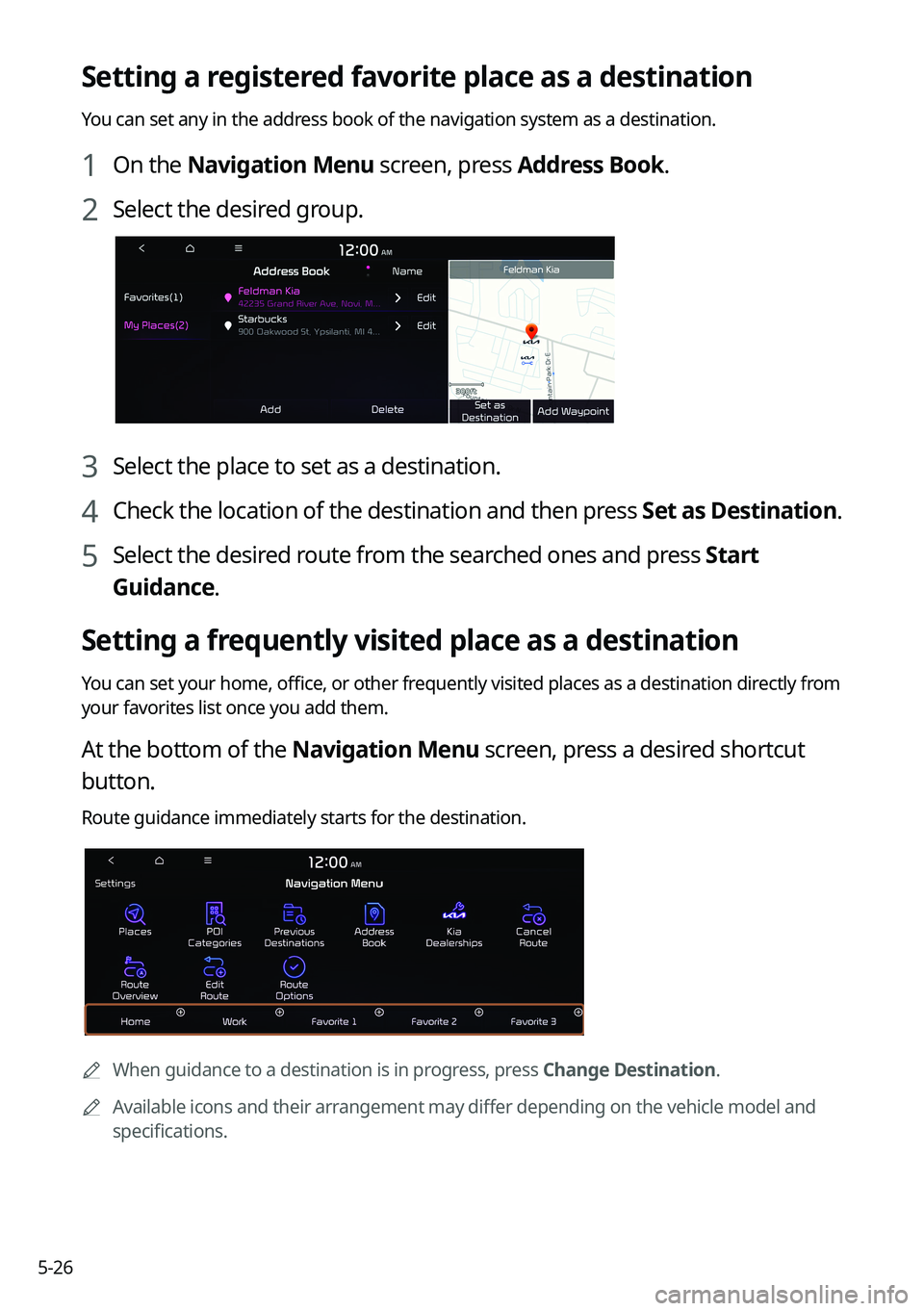
1 On the Navigation Menu screen, press Address Book.
2 Select the desired group.
3 Select the place to set as a destination.
4 Check the location of the destination and then press Set as Destination.
5 Select the desired route from the searched ones and press Start
Guidance.
Setting a frequently visited place as a destination
You can set your home, office, or other frequently visited places as a destination directly from
your favorites list once you add them.
At the bottom of the Navigation Menu screen, press a desired shortcut
button.
Route guidance immediately starts for the destination.
0000A When guidance to a destination is in progress, press Change Destination.
0000
A
Available icons and their arrangement may differ depending on the vehicle model and
specifications.
Page 122 of 316
5-28
Searching for gas stations
You can search nearby gas stations.
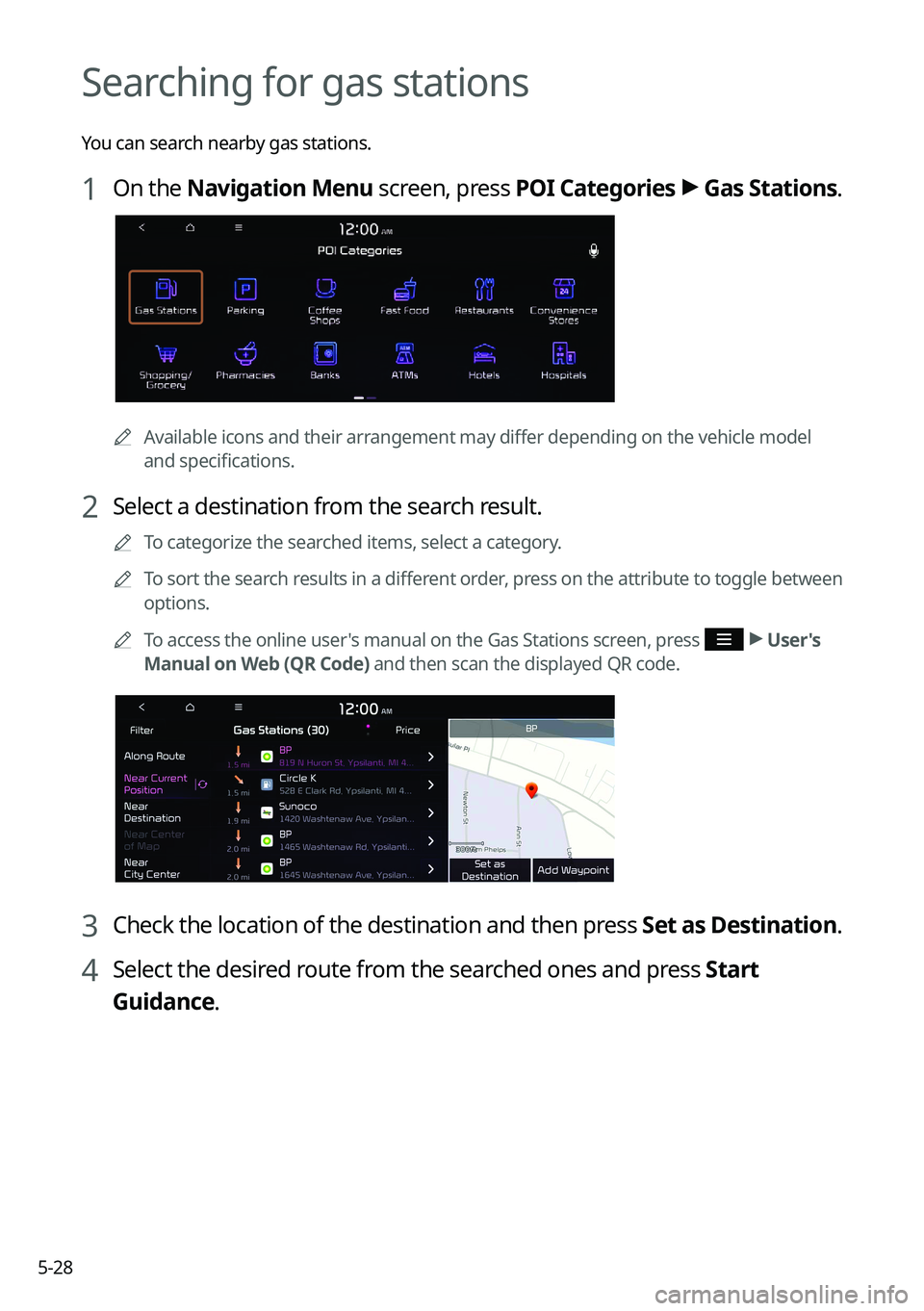
1 On the Navigation Menu screen, press POI Categories >
Gas Stations .
0000A
Available icons and their arrangement may differ depending on the vehicle model
and specifications.
2 Select a destination from the search result.
0000
A
To categorize the searched items, select a category.
0000
A
To sort the search results in a different order, press on the attribute to toggle between
options.
0000
A
To access the online user's manual on the Gas Stations screen, press
>
User's
Manual on Web (QR Code) and then scan the displayed QR code.
3 Check the location of the destination and then press Set as Destination.
4 Select the desired route from the searched ones and press Start
Guidance.
Page 123 of 316
5-29
Searching for EV (Electric Vehicle) charging
stations
(EV only)
You can search nearby charging stations.
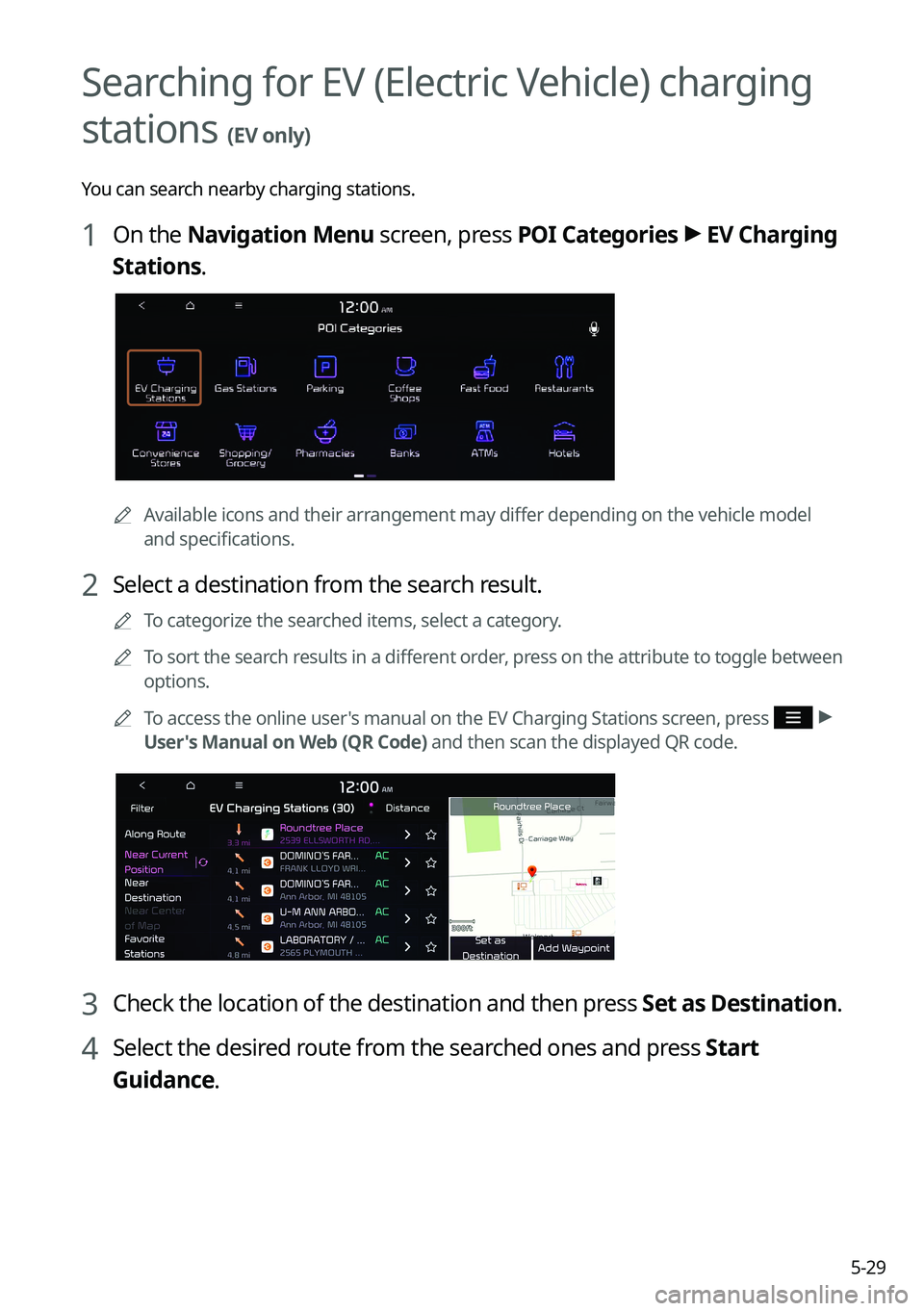
1 On the Navigation Menu screen, press POI Categories >
EV Charging
Stations.
0000A Available icons and their arrangement may differ depending on the vehicle model
and specifications.
2 Select a destination from the search result.
0000
A
To categorize the searched items, select a category.
0000
A
To sort the search results in a different order, press on the attribute to toggle between
options.
0000
A
To access the online user's manual on the EV Charging Stations screen, press
>
User's Manual on Web (QR Code) and then scan the displayed QR code.
3 Check the location of the destination and then press Set as Destination.
4 Select the desired route from the searched ones and press Start
Guidance.
Page 131 of 316
Phone
Connecting a Bluetooth deviceMaking a call via Bluetooth
Accepting an incoming call over Bluetooth Checking a new message over Bluetooth
06
Page 132 of 316

6-2
Connecting a Bluetooth device
Bluetooth is a short-range wireless networking technology. The Bluetooth communication
function allows you to exchange data by connecting a Bluetooth device to another
neighboring Bluetooth device without a cable connection. With this function, you can use
different types of devices more efficiently.
To make a phone call or play audio from a Bluetooth device, check the following first:
\225For a device that is not registered to the system, > see "
Registering a device."
\225 A registered device will automatically connect to the system when you bring it near
the system. If it does not automatically connect,
> see "
Connecting a registered device ",
" Disconnecting a registered device."
\335Warning
\225 Driving while distracted can result in a loss of vehicle control that may lead to an accident,
severe bodily injury, or death. The driver's primary responsibility is the safe and legal
operation of the vehicle, and the use of any vehicle systems, including the \
touch screen
and steering wheel controls, which take the driver's eyes, attention, and focus away from
the safe operation of the vehicle, or which are not permissible by law, should never be
used during the operation of the vehicle.
\225Park the vehicle at a safe place before connecting a Bluetooth device to the system. It
may take the driver attention off the road and cause a traffic accident which can result in
damages, injuries, and/or death.
0000
A
The Bluetooth connection function supports only the hands-free and audio related
functions. Connect your mobile phone, MP3 player, or device that supports the hands-
free or audio function.
0000
A
For more information on Bluetooth-enabled devices and their functional compatibility,
visit the KIA America website (https://www.kia.com).
Registering a device
To connect a Bluetooth device to the system, first add the device to the list of Bluetooth
devices on the system.
1 On the All Menus screen, press Setup >
Device Connections >
Bluetooth >
Bluetooth Connections >
Add New.
0000
A
To register a device for the first time, press the Call button on the steering wheel or by
pressing Phone on the All Menus screen.
Page 133 of 316

6-3
2 Select the function to connect.
0000
A
To use your phone on the system via Bluetooth communication, press Handsfree
Calling.
0000
A
To listen to music on the system via Bluetooth communication, press Bluetooth
Audio.
3 Turn on Bluetooth on the Bluetooth device to connect and select the
vehicle system on the list of searched devices.
0000
A
The system's Bluetooth name can be seen on the Add New Device window.
4 Check that the authentication code on the Bluetooth device screen
matches the one on the system screen and approve the connection on
the device.
5 When your smartphone is using Bluetooth communication, to download
contacts from the phone to the system or use the text message
notification, allow access to your phone.
0000
A
Access is only required to use Bluetooth calling. There will be no access request when
you connect an audio device.
0000
A
After the access request is approved, it may take a while until the Bluetooth connection is
completed. As soon as the Bluetooth connection is completed, the Bluetoo\
th connection
indicator icon appears at the top of the screen.
Page 134 of 316

6-40000
A
Access to data can be enabled or disabled by using the Bluetooth Settings menu on the
mobile phone. For more details, refer to the mobile phone's user manual.
0000
A
You cannot register another device while operating a Bluetooth device.
0000
A
In order not to use the automatic Bluetooth connection, turn off the Bluetooth function
on the device. To use this function again, turn on the Bluetooth function on the device.
0000
A
You can add Bluetooth devices up to 6.
Connecting a registered device
To use a Bluetooth device, first connect a registered Bluetooth device to the system.
0000
A
You can add one Bluetooth hands-free kit or up to two Bluetooth audio devices.
1 On the All Menus screen, press Setup >
Device Connections >
Bluetooth >
Bluetooth Connections.
2 Press the device name or icons to connect.
3 Select the function to connect and press OK.
0000
A
If you cannot connect your device, check to make sure its Bluetooth option is enabled.
0000
A
When the connection is terminated abnormally due to being out of range or device
failures, the connection is automatically restored as soon as the device returns to the
connection range or normal state.
Bluetooth connection screen
\037
\036
\035
\034
\033
\032
Page 137 of 316

6-7
0000
A
The download may not work in some phone models.
0000
A
You can download up to 50 call records for each list.
0000
A
Call durations do not appear on the system screen.
0000
A
You cannot download call records when the download is prohibited by the phone. Some
phone models may require approval for a download. When a successful download is not
made, check the phone screen or its settings.
0000
A
When call records are newly downloaded, the previous records are removed.
0000
A
Learn more about receiving calls while using a Bluetooth connection.
> See "Accepting an
incoming call over Bluetooth."
Recent calls list screen
\037
\036\035\034\033
\032\031\030\027
a a Returns to the previous step.
b b View a list of recent calls downloaded to the system from the device.
c c View all recent calls.
d d View only dialed calls in the list.
e e View only received calls in the list.
f f View only missed calls in the list.
g g Make a phone call using voice recognition. > See " Dialing with voice recognition."
h h Find and connect other Bluetooth devices.
i i The list of menu items appears.
\225 Display Off: Turns off the screen. To switch the screen back on, press the screen or
briefly press the power button.
\225Download: Download the list of recent calls from the connected mobile device.
\225Privacy Mode: Activate privacy mode to protect personal data. The data downloaded
from the mobile phone stays hidden while this mode is on.
\225Change Device: Find and connect other Bluetooth devices.