check KIA SELTOS 2022 Navigation System Quick Reference Guide
[x] Cancel search | Manufacturer: KIA, Model Year: 2022, Model line: SELTOS, Model: KIA SELTOS 2022Pages: 316, PDF Size: 10.48 MB
Page 141 of 316

6-11
3 Select a contact from the list.
The system dials the selected contact.
0000AYou can download only the contacts that can be displayed on the connected Bluetoot\
h
device. The contacts may not appear in some Apps.
0000
A
You can download up to 5,000 contacts for each device.
0000
A
The download may not work in some phone models.
0000
A
Contacts from both the mobile device and its SIM card are downloaded at the same time.
The system may not be able to download SIM card contacts from all phone models.
0000
A
When speed dial numbers are set to contacts on the phone, press and hold a speed
dial number on the dial pad to make a call easily. Some mobile phone models may not
support the speed dial function.
0000
A
You cannot download contacts when the download is prohibited by the phone. Some
phone models may require approval for a download. When a successful download is not
made, check the phone screen or its settings.
0000
A
Depending on the phone model or operation status, downloading may take longer than
usual.
0000
A
When a new contacts list is downloaded, the previous records are removed.
0000
A
The downloaded contacts cannot be edited or deleted from the system.
0000
A
When another mobile phone is connected, the screen does not display the contacts
downloaded from the previous phone, but they are kept in the system until the phone is
deleted from the list.
0000
A
Learn more about receiving calls while using a Bluetooth connection.
> See "Accepting an
incoming call over Bluetooth."
Page 148 of 316
6-18
Checking a new message over Bluetooth
After connecting a mobile phone via Bluetooth, you can check the received messages
through the system screen and listen to voice messages converted from the text messages.
This option is available when a mobile phone is connected via Bluetooth.\
You can also send
the brief reply message registered in the system.
Checking a new message
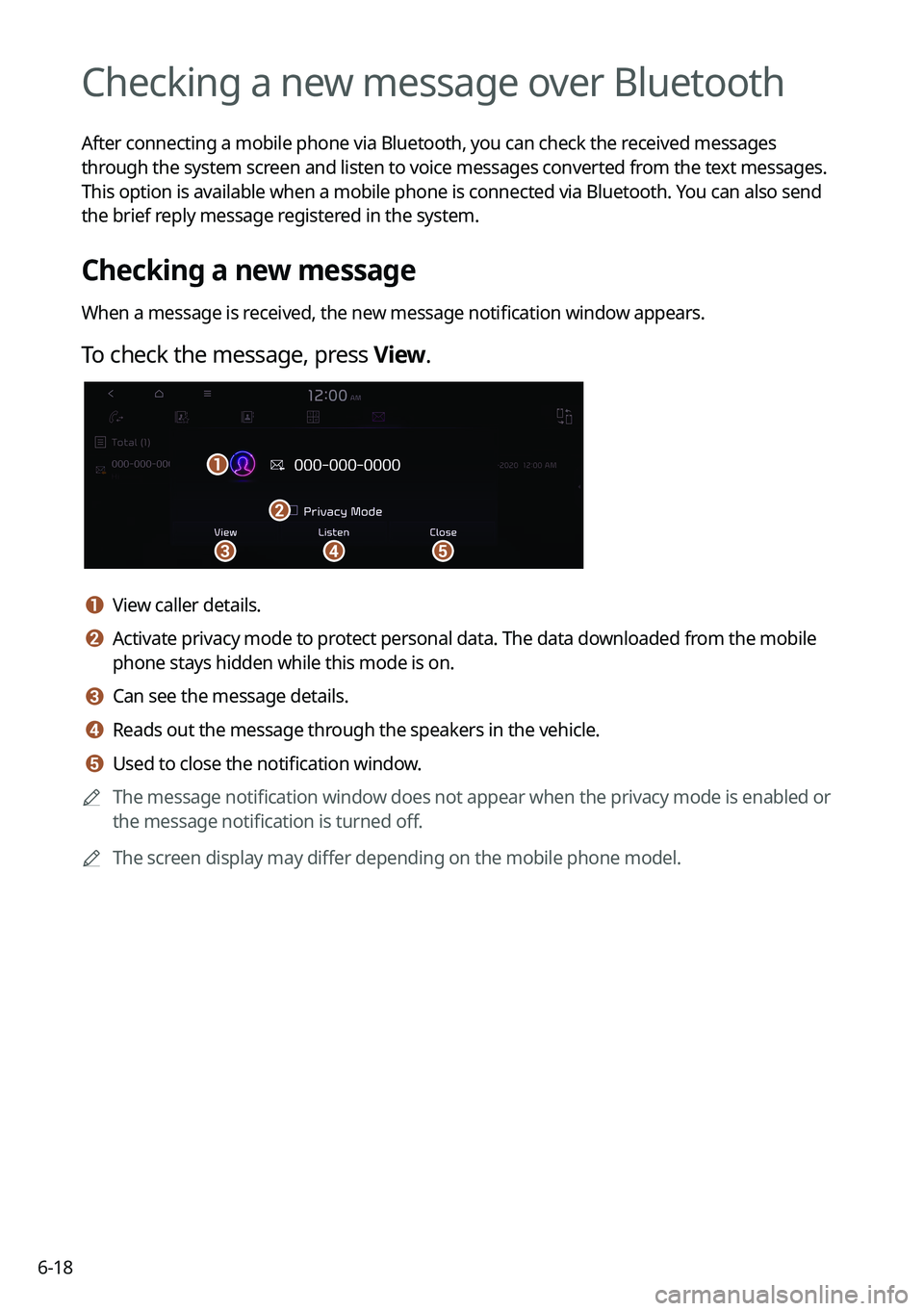
When a message is received, the new message notification window appears.
To check the message, press View.
\037\036
\035
\034
\033
a a View caller details.
b b Activate privacy mode to protect personal data. The data downloaded from the mobile
phone stays hidden while this mode is on.
c c Can see the message details.
d d Reads out the message through the speakers in the vehicle.
e e Used to close the notification window.
0000
A
The message notification window does not appear when the privacy mode is enabled or
the message notification is turned off.
0000
A
The screen display may differ depending on the mobile phone model.
Page 149 of 316

6-19
Bluetooth message screen
\037
\036
\035
\034
\033
a a Returns to the previous step.
b b View the list of received messages.
c c Can text a message by using the voice recognition. > See "Sending a text by using the voice
recognition."
d d Find and connect other Bluetooth devices.
e e The list of menu items appears.
\225 Display Off: Turns off the screen. To switch the screen back on, press the screen or
briefly press the power button.
\225Privacy Mode: Activate privacy mode to protect personal data. The data downloaded
from the mobile phone stays hidden while this mode is on.
\225Change Device: Find and connect other Bluetooth devices.
\225Device Connections Settings or Bluetooth Settings: Can change the Bluetooth
settings.
\225User's Manual on Web (QR Code): Displays the QR code that provides access to the
online user manual for the system.
\225Split Screen: Can turn on or off the split screen mode.
0000
A
The displayed name may differ depending on the vehicle model and specifications.
Checking a new message from the list
1 Perform any of the following methods:
\225On the All Menus screen, press Phone.
\225On the steering wheel, press the Call button.
2 On the Bluetooth Call screen, press .
3 Select a message from the list.
Page 150 of 316
6-20
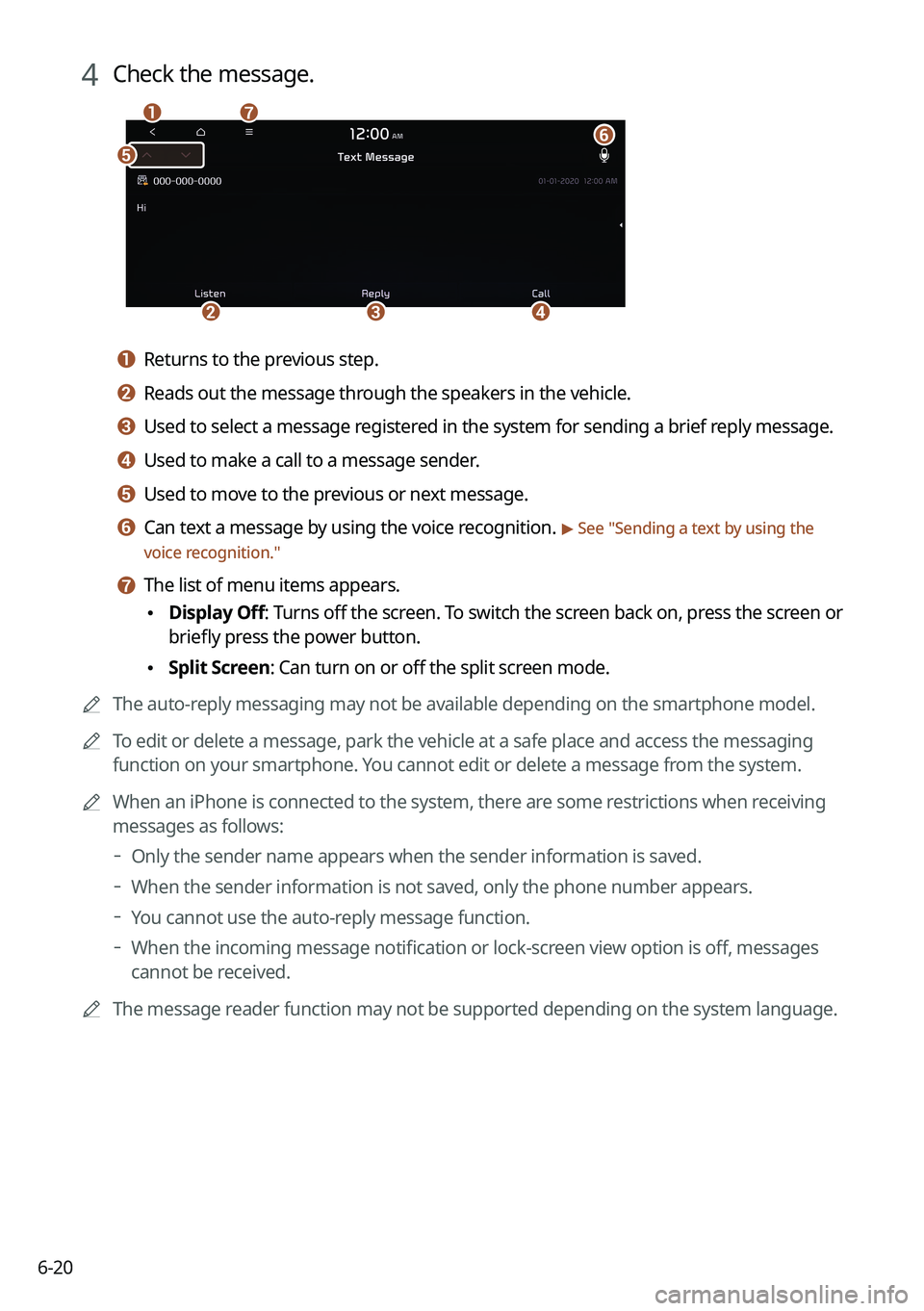
4 Check the message.
\037
\036
\035
\034
\033\032
\031
a a Returns to the previous step.
b b Reads out the message through the speakers in the vehicle.
c c Used to select a message registered in the system for sending a brief reply message.
d d Used to make a call to a message sender.
e e Used to move to the previous or next message.
f f Can text a message by using the voice recognition. > See "Sending a text by using the
voice recognition."
g g The list of menu items appears.
\225 Display Off
: Turns off the screen. To switch the screen back on, press the screen or
briefly press the power button.
\225 Split Screen: Can turn on or off the split screen mode.
0000
A
The auto-reply messaging may not be available depending on the smartphone model.
0000
A
To edit or delete a message, park the vehicle at a safe place and access \
the messaging
function on your smartphone. You cannot edit or delete a message from the system.
0000
A
When an iPhone is connected to the system, there are some restrictions when receiving
messages as follows:
000DOnly the sender name appears when the sender information is saved.
000DWhen the sender information is not saved, only the phone number appears.\
000DYou cannot use the auto-reply message function.
000DWhen the incoming message notification or lock-screen view option is off, messages
cannot be received.
0000
A
The message reader function may not be supported depending on the system language.
Page 163 of 316

7-11
POI nameWendy's
White Castle
Blimpie
Checkers
Culver's
Five Guys Burgers and Fries
Jersey Mike's Subs
Steak n Shake
Whataburger
Coffee Shops Starbucks
Dunkin' Donuts
Tim Hortons
Baskin-Robbins
Cold Stone Creamery
Jamba Juice
Smoothie King
American Applebee's
Bahama Breeze
Boston's Restaurant & Sports Bar
Cheeseburger in Paradise
Chili's Grill & Bar
Cool River
Denny's
Frisch's Big Boy
Good Eats
III Forks
Lee Roy Selmon's
Lone Star Steakhouse
Longhorn Steakhouse
Luckys Cafe
Outback SteakhousePOI names
Restaurants
POI name
Fast FoodArby's
Boston Market
BURGER KING
Carl's Jr
Chick-fil-A
Chipotle
Church's Chicken
Dairy Queen
Firehouse Subs
Hardee's
IHOP
In-N-Out Burger
Jack in the Box
Jimmy John's
KFC
Little Caesars
Long John Silver's
McAlister's Deli
McDonald's
Panda Express
Panera Bread
Popeyes
Quiznos Sub
Schlotzsky's
SONIC
SUBWAY
Taco Bell
Taco John's
Waffle House
Page 171 of 316
7-19
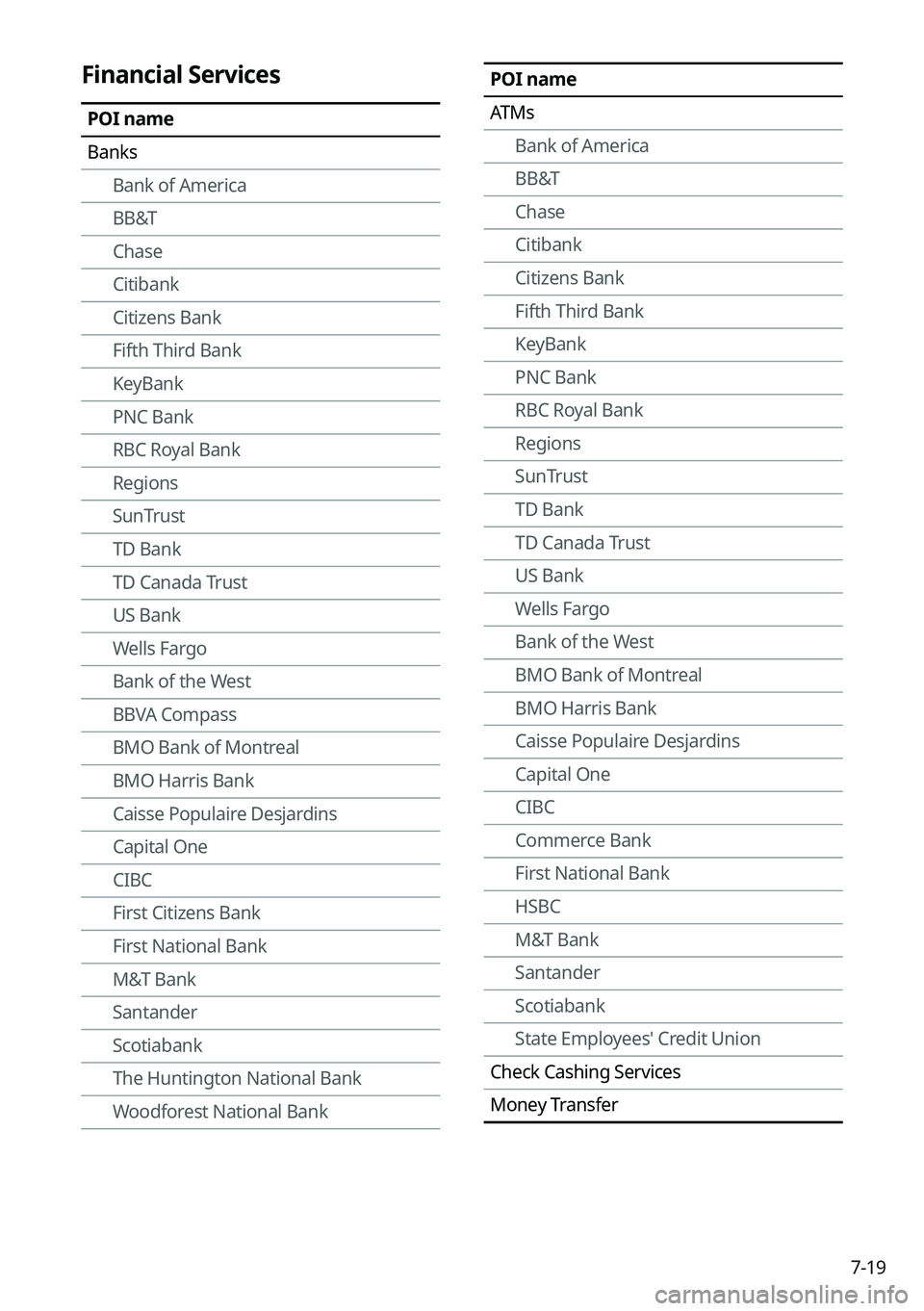
POI name
ATMsBank of America
BB&T
Chase
Citibank
Citizens Bank
Fifth Third Bank
KeyBank
PNC Bank
RBC Royal Bank
Regions
SunTrust
TD Bank
TD Canada Trust
US Bank
Wells Fargo
Bank of the West
BMO Bank of Montreal
BMO Harris Bank
Caisse Populaire Desjardins
Capital One
CIBC
Commerce Bank
First National Bank
HSBC
M&T Bank
Santander
Scotiabank
State Employees' Credit Union
Check Cashing Services
Money TransferFinancial Services
POI name
Banks Bank of America
BB&T
Chase
Citibank
Citizens Bank
Fifth Third Bank
KeyBank
PNC Bank
RBC Royal Bank
Regions
SunTrust
TD Bank
TD Canada Trust
US Bank
Wells Fargo
Bank of the West
BBVA Compass
BMO Bank of Montreal
BMO Harris Bank
Caisse Populaire Desjardins
Capital One
CIBC
First Citizens Bank
First National Bank
M&T Bank
Santander
Scotiabank
The Huntington National Bank
Woodforest National Bank
Page 174 of 316
7-22
Voice Memo
You can use the microphone on the vehicle to record and play voice memos.
Using the voice memos
On the All Menus screen, press Voice Memo.
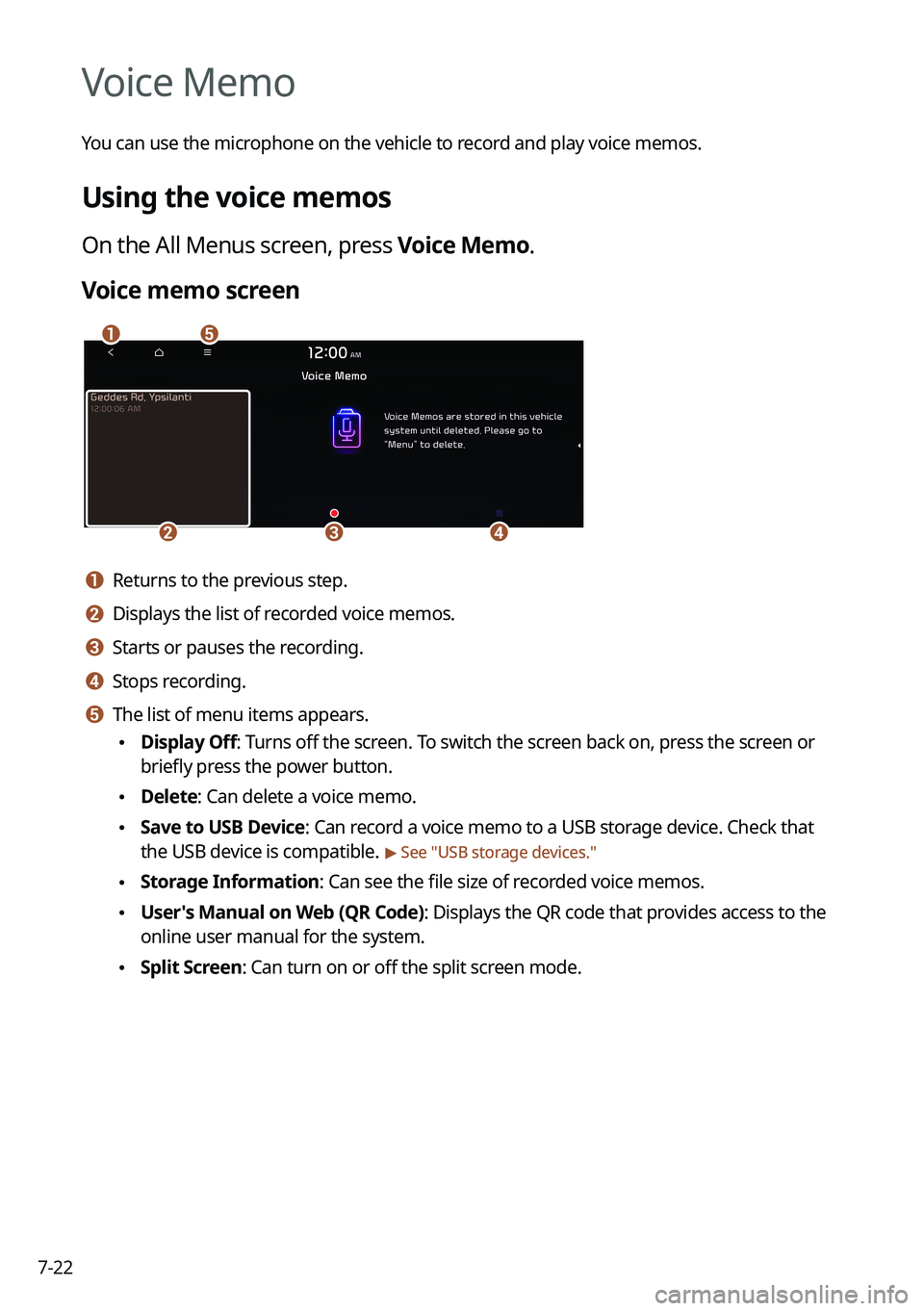
Voice memo screen
\037\036
\035\034\033
a a Returns to the previous step.
b b Displays the list of recorded voice memos.
c c Starts or pauses the recording.
d d Stops recording.
e e The list of menu items appears.
\225Display Off: Turns off the screen. To switch the screen back on, press the screen or
briefly press the power button.
\225Delete: Can delete a voice memo.
\225Save to USB Device: Can record a voice memo to a USB storage device. Check that
the USB device is compatible.
> See "USB storage devices."
\225Storage Information: Can see the file size of recorded voice memos.
\225User's Manual on Web (QR Code): Displays the QR code that provides access to the
online user manual for the system.
\225Split Screen: Can turn on or off the split screen mode.
Page 178 of 316
8-2
UVO service
UVO provides connected car services, such as roadside assistance and emergency rescue, via
the latest IT and communication technologies.
When you have subscribed to UVO, you can use the UVO service by using the [
]
buttons. You can also access other useful features using the UVO menu on your system.
0000
A
You must be an active UVO subscriber or within the initial free trial period to receive UVO
services, including Auto Collision Notification.
0000
A
Depending on the conditions such as vehicle type, system type, and the s\
ubscribed
service package, available services may differ.
0000
A
Some services may incur additional charges.
0000
A
Services may be modified, added, or deleted by changes in the company's policies.
Service restrictions
UVO services are provided via the mobile communication network. Accordingly, the
service may be restricted depending on the mobile communication network condition.
Use the network signal strength icon (
) at the top of the screen to check the mobile
communication status.
0000
A
It is recommended to use the service when the number of signal bars in the icon\
is 4 or
more.
0000
A
Depending on the network signal status, access to UVO may be restricted in the following
locations:
000DInside a building or tunnel
000DMountain or forest area
000DRoad close to a cliff
000DArea densely populated with tall buildings
000DRoad under expressway or multi-level road
000DCommunication shadow area according to the service provider's network coverage
policy
Page 180 of 316
8-4
Running the UVO
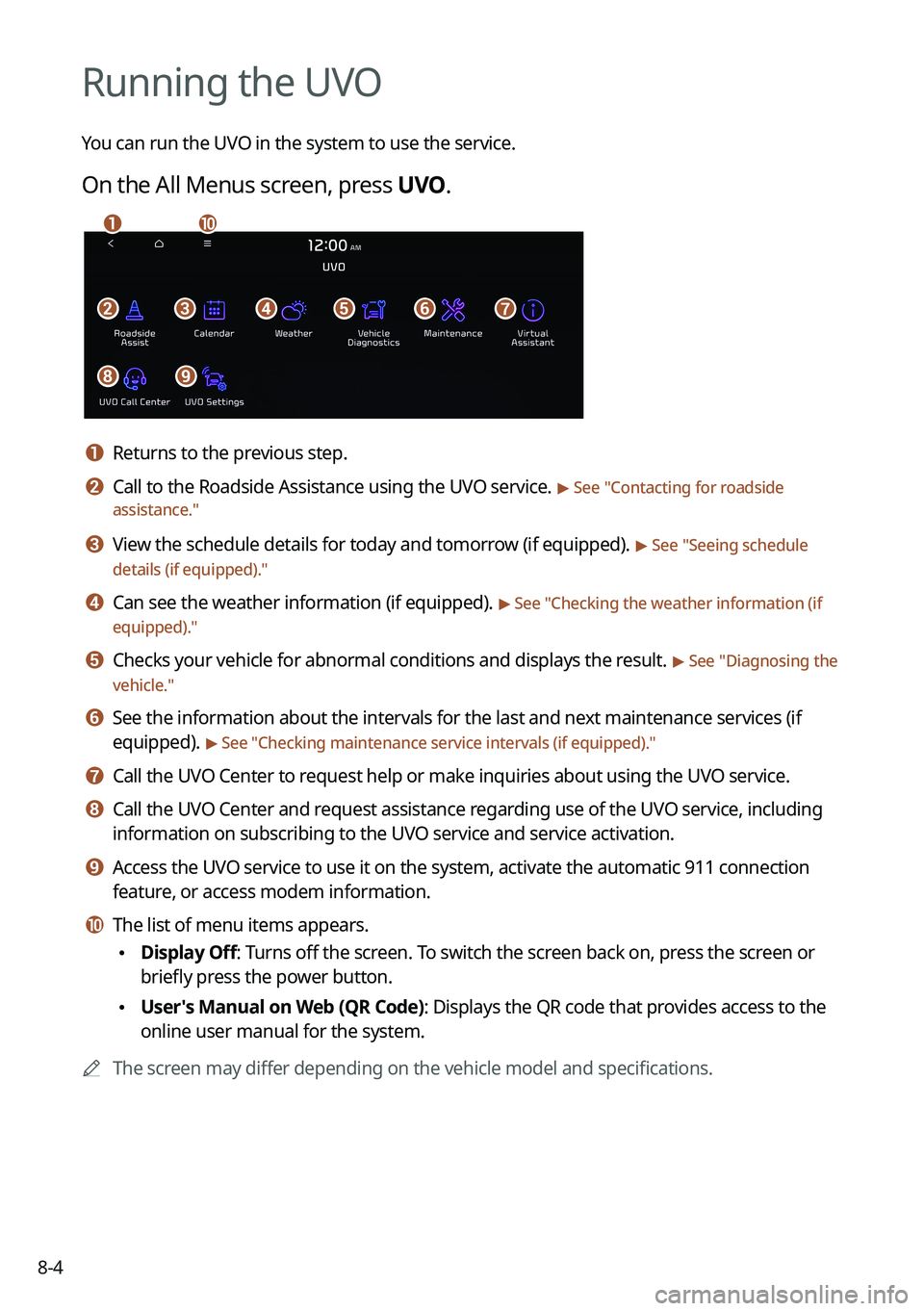
You can run the UVO in the system to use the service.
On the All Menus screen, press UVO.
\037\036\035\034\033\032
\031\030
\027\026
a a Returns to the previous step.
b b Call to the Roadside Assistance using the UVO service. > See "Contacting for roadside
assistance."
c c View the schedule details for today and tomorrow (if equipped). > See " Seeing schedule
details (if equipped)."
d d Can see the weather information (if equipped). > See "Checking the weather information (if
equipped)."
e e Checks your vehicle for abnormal conditions and displays the result. > See " Diagnosing the
vehicle."
f f See the information about the intervals for the last and next maintenance services (if
equipped).
> See "Checking maintenance service intervals (if equipped) ."
g g Call the UVO Center to request help or make inquiries about using the UVO service.
h h Call the UVO Center and request assistance regarding use of the UVO service, including
information on subscribing to the UVO service and service activation.
i i Access the UVO service to use it on the system, activate the automatic 911 connection\
feature, or access modem information.
j j The list of menu items appears.
\225Display Off: Turns off the screen. To switch the screen back on, press the screen or
briefly press the power button.
\225User's Manual on Web (QR Code): Displays the QR code that provides access to the
online user manual for the system.
0000
A
The screen may differ depending on the vehicle model and specifications.
Page 183 of 316
8-7
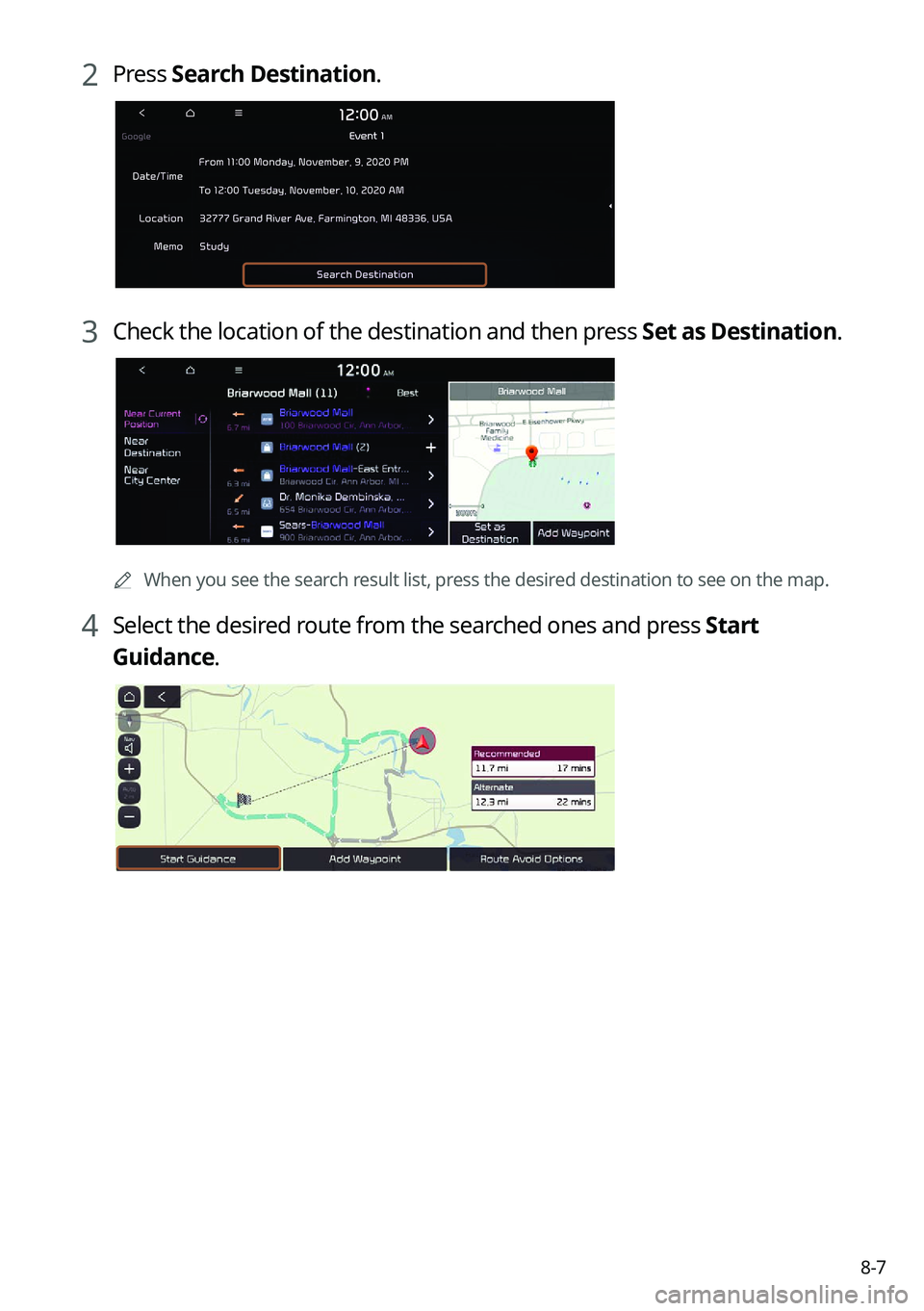
2 Press Search Destination.
3 Check the location of the destination and then press Set as Destination.
0000A
When you see the search result list, press the desired destination to see on the map.
4 Select the desired route from the searched ones and press Start
Guidance.