Speed KIA Sorento 2007 1.G User Guide
[x] Cancel search | Manufacturer: KIA, Model Year: 2007, Model line: Sorento, Model: KIA Sorento 2007 1.GPages: 325, PDF Size: 5.01 MB
Page 118 of 325
3 109
Knowing your vehicle
1. SCAN buttonFrequency band scan function
Press the SCANbutton for the tuner to
scan for radio signals in the selected fre-
quency band (AM or FM). Once the tuner
locks onto the signal of a transmitting
station, it plays that station for 5 seconds
before scanning for the next available
station in the selected frequency band.
If you want to keep listening to a particu-
lar station and want to stop the scanning,
press the SCAN button again.
This function is useful for providing you
with a good overview of all the radio sta-
tions within range of your tuner.2. PRESET SCAN functionPress and hold the SCAN button for
more than 2 seconds. Each preset radio
stations will be automatically played for 5
seconds. If you want to keep listening to
a particular preset station and want to
stop the scanning, press the SCAN but-
ton again.
3. SEEK and buttonsAutomatic Channel Selection function
Press the and buttons to scan up
and down the frequency range for the
next available radio station and automat-
ically lock on to that frequency.
The LCD screen displays the frequency
of the radio station transmitting a clear
and strong signal.
Use this function to search for a radio
station you want. If you like a particular
station, you can store it as one of 6
Presets using the Preset buttons below.✽ ✽
NOTICEThis function is not effective if you are
experiencing poor reception in your
vicinity.
4. Tuning KnobManual Channel Selection
Rotate the knob clockwise or counter-
clockwise to manually advance up or
down the frequency range. The tuning
knob also gives you fine-grain control
which you can use to manually fine-tune
your frequency selection. This is useful if
you are searching for a radio signal
which is not strong enough for you to use
the Automatic Channel Selection func-
tion✽ ✽NOTICEThe speed at which you advance up or
down the frequency range depends on
how fast you turn the knob.
Page 136 of 325
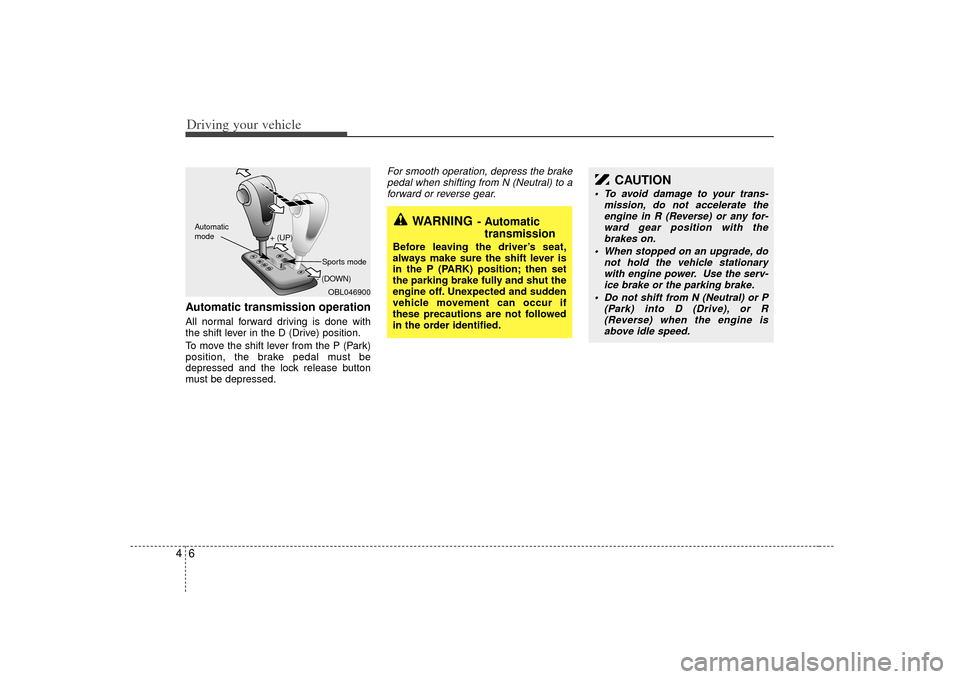
Driving your vehicle64Automatic transmission operationAll normal forward driving is done with
the shift lever in the D (Drive) position.
To move the shift lever from the P (Park)
position, the brake pedal must be
depressed and the lock release button
must be depressed.
For smooth operation, depress the brakepedal when shifting from N (Neutral) to a forward or reverse gear.
WARNING
- Automatic transmission
Before leaving the driver’s seat,
always make sure the shift lever is
in the P (PARK) position; then set
the parking brake fully and shut the
engine off. Unexpected and sudden
vehicle movement can occur if
these precautions are not followed
in the order identified.
OBL046900
+ (UP)
- (DOWN)
Automatic
modeSports mode
CAUTION
To avoid damage to your trans-
mission, do not accelerate theengine in R (Reverse) or any for-ward gear position with the brakes on.
When stopped on an upgrade, do not hold the vehicle stationarywith engine power. Use the serv-ice brake or the parking brake.
Do not shift from N (Neutral) or P (Park) into D (Drive), or R(Reverse) when the engine is above idle speed.
Page 138 of 325
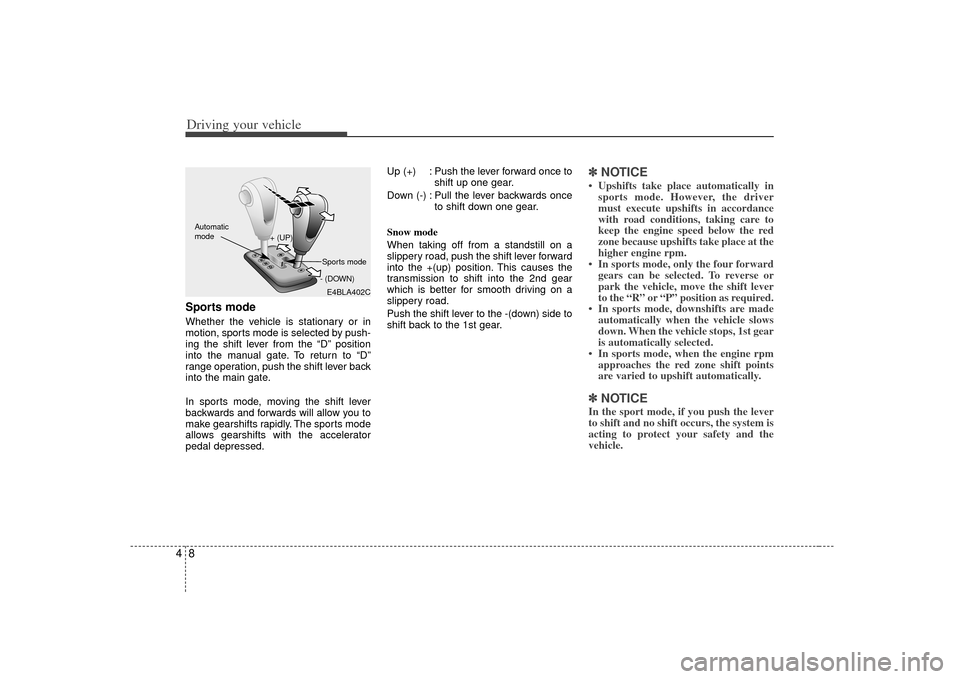
Driving your vehicle84Sports modeWhether the vehicle is stationary or in
motion, sports mode is selected by push-
ing the shift lever from the “D” position
into the manual gate. To return to “D”
range operation, push the shift lever back
into the main gate.
In sports mode, moving the shift lever
backwards and forwards will allow you to
make gearshifts rapidly. The sports mode
allows gearshifts with the accelerator
pedal depressed.Up (+) : Push the lever forward once to
shift up one gear.
Down (-) : Pull the lever backwards once to shift down one gear.
Snow mode
When taking off from a standstill on a
slippery road, push the shift lever forward
into the +(up) position. This causes the
transmission to shift into the 2nd gear
which is better for smooth driving on a
slippery road.
Push the shift lever to the -(down) side to
shift back to the 1st gear.
✽ ✽ NOTICE• Upshifts take place automatically in
sports mode. However, the driver
must execute upshifts in accordance
with road conditions, taking care to
keep the engine speed below the red
zone because upshifts take place at the
higher engine rpm.
• In sports mode, only the four forward gears can be selected. To reverse or
park the vehicle, move the shift lever
to the “R” or “P” position as required.
• In sports mode, downshifts are made automatically when the vehicle slows
down. When the vehicle stops, 1st gear
is automatically selected.
• In sports mode, when the engine rpm approaches the red zone shift points
are varied to upshift automatically.✽ ✽ NOTICEIn the sport mode, if you push the lever
to shift and no shift occurs, the system is
acting to protect your safety and the
vehicle.
E4BLA402C
+ (UP)
- (DOWN)
Automatic
modeSports mode
Page 140 of 325
Driving your vehicle10
4For safe four-wheel drive opera-
tion Your vehicle allows you to drive in on-
road and off-road conditions.
However, do not try to drive in deep standing water, mud, or over steep
hills.
When you are driving up or down hills drive as close to straight up and down
the hill as possible. Use extreme cau-
tion in going up or down steep hills,
since you may flip your vehicle over
depending on the grade, terrain and
water/mud conditions.
You must learn how to corner in a 4WDvehicle as soon as possible. Do not
rely on your experience in convention-
al 2WD vehicles in choosing safe cor-
nering speed. You must drive more
slowly.
Drive off-road carefully because your vehicle may be damaged by rocks or
roots of trees. Become familiar with the
off-road conditions you are going to
drive before you start.FOUR WHEEL DRIVE (4WD) (IF EQUIPPED)
WARNING -
Four wheel
drive
Driving across the contour of steep
hills can be extremely dangerous.
This danger can come from slight
changes in the wheel angle which
can destabilize the vehicle or, even
if the vehicle is maintaining stabili-
ty under power, it can lose that sta-
bility if the vehicle stops its forward
motion. Your vehicle may roll over
without warning and without time
for you to correct a mistake that
could cause serious injury or death.
WARNING
Reduce speed when you turn cor-
ners. The center of gravity of 4WD
vehicles is higher than that of con-
ventional 2WD vehicles, making
them more likely to roll over when
you turn corners too fast.
WARNING
Do not grab inside of the steering
wheel when you are driving off-
road. Your arm may be hurt by a
sudden steering maneuver or from
steering wheel rebound due to
impact with objects on the ground.
This may cause you to lose steering
wheel control.
Page 142 of 325
Driving your vehicle12
4✽
✽
NOTICEWhen the vehicle shifts into 4WD mode,
a slight mechanical sound and vibration
may be felt and does not indicate a prob-
lem with the system. To avoid shift shock, when the vehicle is
stopped and you make a transfer case
shift using the transfer shift knob, wait
until the corresponding indicator light in
the instrument cluster illuminates before
driving.
Knob positionThis is used to set different positions.
AUTO
Full power delivered to front and rear
axle for increased traction. Use this mode
for normal on-road driving.
The 4WD LOW indicator light ( ) will
be turned off after blinking for a few sec-
onds to remind you that you are in the
AUTO mode.
LOW
Full power to both axles, including a
lower gear ratio for low speed applica-
tions that require extra power such as
wet pavement, snow-covered roads
and/or off-road.
LOW Mode is not recommended on dry
pavement.
The 4WD LOW indicator light
( )
will
be turned on after blinking for a few sec-
onds to remind you that you are in the
LOW mode.
Transfer shift knob operationAUTO ↔ ↔
LOW
1. Stop the vehicle.
2. Depress the clutch pedal (Manual transmission) or put the shift lever into
N (Neutral) position (Automatic trans-
mission).
3. AUTO ➝ ➝
LOW
: Turn the transfer shift knob to LOW mode.
LOW ➝
➝
AUTO
: Turn the transfer shift knob to AUTO mode.
4. Before releasing the clutch pedal (Manual transmission) or shifting to
other ranges from N (Automatic trans-
mission), wait for the corresponding
indicator light in the instrument cluster
to go ON or OFF.
4WD
LOW4WD
LOW
CAUTION
If the vehicle moves while the trans-
fer shift is in process, the gearbox may be damaged.
Page 144 of 325
Driving your vehicle14
4Knob positionThis is used to set different positions.
2HI (Rear-wheel drive)
This mode is used, when driving on nor-
mal roads and highway.
4HI (High-range 4-wheel drive)
This mode is used, when driving off-
roads, wet or snow covered roads with
normal speed.
The 4WD indicator light
()
will be
turned on to remind you that you are in
the 4HI mode.
4LO (Low-range 4-wheel drive)
Use 4LO for climbing or descending hills,
off-roads driving and towing the vehicle,
especially when increased power is
required.
The 4WD LOW indicator light
( )
will
be turned on to remind you that you are
in the 4LO mode.
Transfer shift knob operationBy turning the transfer knob (4HI, 4LO),
both front and rear axles are engaged.
This improves the traction characteristic.
2HI ➝ ➝
4HI
Turn the transfer knob from the 2HI mode
to 4HI mode at speed below 80 km/h (50
mph).
It is not necessary to depress the clutch
pedal or put the shift lever into N
(Neutral) position (Manual transmission)
or put the shift lever into N (Neutral) posi-
tion (Automatic transmission).
Perform this operation when driving
straight. There will be a few seconds of
time delay before come into 4HI mode
when you shift the knob to 4 HI from 2HI. 4HI
➝ ➝
2HI
Turn the transfer knob from the 4HI mode
to the 2HI mode at speed below 80 km/h
(50 mph). It is not necessary to depress
the clutch pedal (Manual transmission) or
put the shift lever into N (Neutral)
(Automatic transmission). Perform this
operation when driving straight.
If the transfer mode does not shift into
2HI mode when you turn the transfer
knob to 2HI, drive straight ahead with
accelerating or decelerating, or drive in
reverse.
4WD
LOW
Page 146 of 325
Driving your vehicle16
4 You must learn how to corner in a 4WD
vehicle as soon as possible. Do not rely
on your experience in conventional
2WD vehicles in choosing a safe cor-
nering speed. You must drive more
slowly.
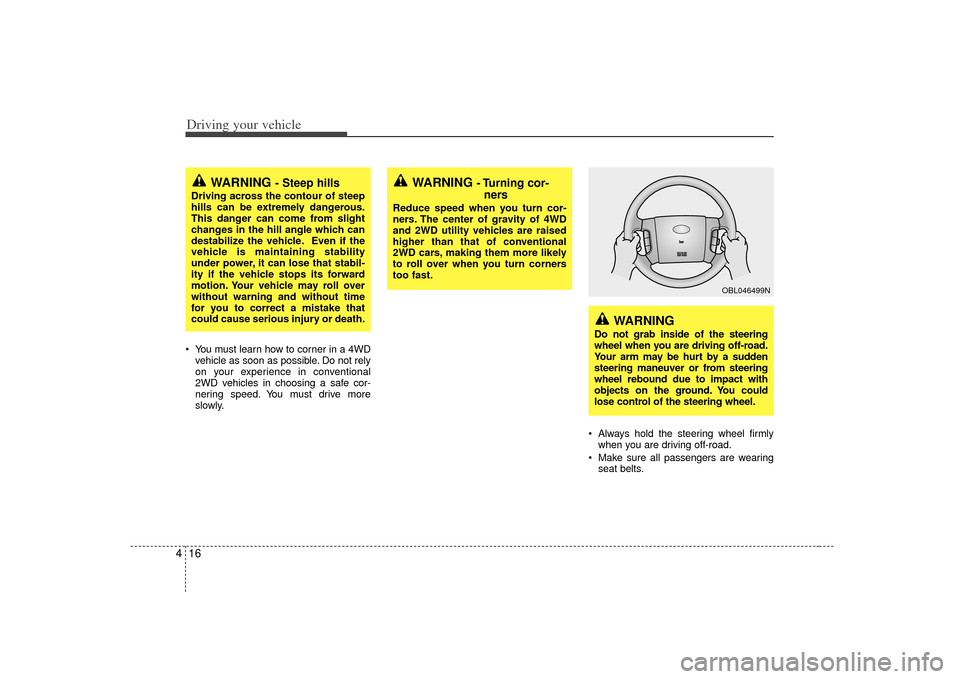
Always hold the steering wheel firmlywhen you are driving off-road.
Make sure all passengers are wearing seat belts.
WARNING
- Steep hills
Driving across the contour of steep
hills can be extremely dangerous.
This danger can come from slight
changes in the hill angle which can
destabilize the vehicle. Even if the
vehicle is maintaining stability
under power, it can lose that stabil-
ity if the vehicle stops its forward
motion. Your vehicle may roll over
without warning and without time
for you to correct a mistake that
could cause serious injury or death.
WARNING
- Turning cor-ners
Reduce speed when you turn cor-
ners. The center of gravity of 4WD
and 2WD utility vehicles are raised
higher than that of conventional
2WD cars, making them more likely
to roll over when you turn corners
too fast.
WARNING
Do not grab inside of the steering
wheel when you are driving off-road.
Your arm may be hurt by a sudden
steering maneuver or from steering
wheel rebound due to impact with
objects on the ground. You could
lose control of the steering wheel.
OBL046499N
Page 148 of 325
Driving your vehicle18
4 For speedometer test or inspection/
maintenance (I/M) program of full-time
4WD vehicle, use a four wheel chassis
dynamometer. A 4WD vehicle should not be tested on
a 2WD drive roll tester. If a 2WD roll
tester must be used, perform the fol-
lowing:
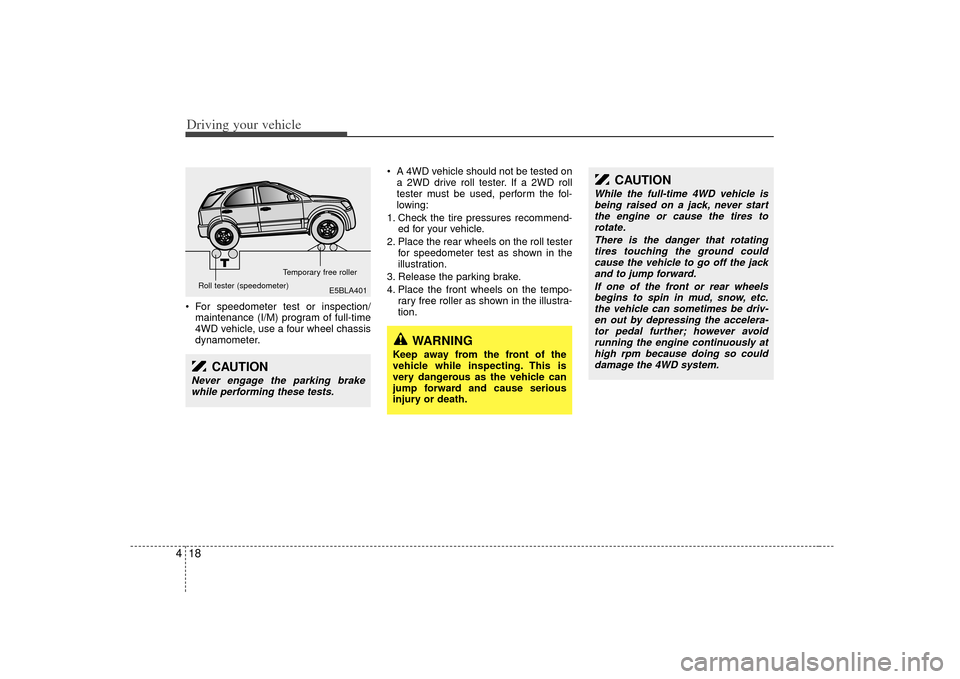
1. Check the tire pressures recommend- ed for your vehicle.
2. Place the rear wheels on the roll tester for speedometer test as shown in the
illustration.
3. Release the parking brake.
4. Place the front wheels on the tempo- rary free roller as shown in the illustra-
tion.
E5BLA401
Roll tester (speedometer) Temporary free roller
CAUTION
Never engage the parking brake
while performing these tests.
CAUTION
While the full-time 4WD vehicle isbeing raised on a jack, never start the engine or cause the tires torotate.
There is the danger that rotatingtires touching the ground couldcause the vehicle to go off the jack and to jump forward.
If one of the front or rear wheelsbegins to spin in mud, snow, etc.the vehicle can sometimes be driv-en out by depressing the accelera- tor pedal further; however avoidrunning the engine continuously at high rpm because doing so coulddamage the 4WD system.
WARNING
Keep away from the front of the
vehicle while inspecting. This is
very dangerous as the vehicle can
jump forward and cause serious
injury or death.
Page 149 of 325
419
Driving your vehicle
A limited slip differential if equipped, is for
the rear wheel differential only. The fea-
tures of this limited slip differential are
described below;
Just as with conventional differential, the
wheel on one side is allowed to turn at a
different speed from the wheel on the
other side when the vehicle is cornering.
The difference between the limited slip
differential and a conventional differential
is that if the wheel on one side of the
vehicle loses traction, a greater amount
of torque is applied to the rear wheel on
the other side to improve traction.
WARNING
To avoid injury, never run the
engine with one wheel off the
ground, such as when changing a
tire.
WARNING
Avoid high cornering speed.
Do not make quick steering wheelmovements, such as sharp lane
changes or fast, sharp turns.
The risk of rollover is greatly increased if you lose control of
your vehicle at high speeds.
In a collision crash, an unbelted person is significantly more likely
to die compared to a person
wearing a seat belt.
Loss of control often occurs if two or more wheels drop off the
roadway and the driver over
steers to re-enter the roadway.
In the event your vehicle leaves the roadway, do not steer sharply.
Instead, slow down before pulling
back into the travel lanes.
LIMITED SLIP DIFFERENTIAL (IF EQUIPPED)
Page 150 of 325
Driving your vehicle20
4Power brakes Your vehicle has power-assisted brakes
that adjust automatically through normal
usage.
In the event that the power-assisted
brakes lose power because of a stalled
engine or some other reason, you can
still stop your vehicle by applying greater
force to the brake pedal than you nor-
mally would. The stopping distance, how-
ever, will be somewhat longer.
When the engine is not running, the
reserve brake power is partially depleted
each time the brake pedal is applied. Do
not pump the brake pedal when the
power assist has been interrupted.
Pump the brake pedal only when neces-
sary to maintain steering control on slip-
pery surfaces.
In the event of brake failure If service brakes fail to operate while the
vehicle is in motion, you can make an
emergency stop with the parking brake.
The stopping distance, however, will be
much greater than normal.
BRAKE SYSTEM
WARNING
- Brakes
Do not drive with your foot rest-
ing on the brake pedal. This will
create abnormal high brake tem-
peratures, excessive brake lining
and pad wear, and increased
stopping distances.
When descending a long or steep hill, shift to a lower gear and
avoid continuous application of
the brakes. Continuous brake
application will cause the brakes
to overheat and could result in a
temporary loss of braking per-
formance.
Wet brakes may result in the vehi- cle not slowing down at the usual
rate and pulling to one side when
the brakes are applied. After
going through water, apply the
brakes lightly to regain smooth
braking performance.
WARNING
- Parking brake
Operating the parking brake while
the vehicle is moving at normal
speeds can cause a sudden loss of
control of the vehicle. If you must
use the parking brake to stop the
vehicle, use great caution in apply-
ing the brake.