steering KIA Sorento 2007 1.G Owner's Guide
[x] Cancel search | Manufacturer: KIA, Model Year: 2007, Model line: Sorento, Model: KIA Sorento 2007 1.GPages: 325, PDF Size: 5.01 MB
Page 150 of 325
Driving your vehicle20
4Power brakes Your vehicle has power-assisted brakes
that adjust automatically through normal
usage.
In the event that the power-assisted
brakes lose power because of a stalled
engine or some other reason, you can
still stop your vehicle by applying greater
force to the brake pedal than you nor-
mally would. The stopping distance, how-
ever, will be somewhat longer.
When the engine is not running, the
reserve brake power is partially depleted
each time the brake pedal is applied. Do
not pump the brake pedal when the
power assist has been interrupted.
Pump the brake pedal only when neces-
sary to maintain steering control on slip-
pery surfaces.
In the event of brake failure If service brakes fail to operate while the
vehicle is in motion, you can make an
emergency stop with the parking brake.
The stopping distance, however, will be
much greater than normal.
BRAKE SYSTEM
WARNING
- Brakes
Do not drive with your foot rest-
ing on the brake pedal. This will
create abnormal high brake tem-
peratures, excessive brake lining
and pad wear, and increased
stopping distances.
When descending a long or steep hill, shift to a lower gear and
avoid continuous application of
the brakes. Continuous brake
application will cause the brakes
to overheat and could result in a
temporary loss of braking per-
formance.
Wet brakes may result in the vehi- cle not slowing down at the usual
rate and pulling to one side when
the brakes are applied. After
going through water, apply the
brakes lightly to regain smooth
braking performance.
WARNING
- Parking brake
Operating the parking brake while
the vehicle is moving at normal
speeds can cause a sudden loss of
control of the vehicle. If you must
use the parking brake to stop the
vehicle, use great caution in apply-
ing the brake.
Page 155 of 325
425
Driving your vehicle
Power steeringPower Steering uses energy from the
engine to assist you in steering the vehi-
cle. If the engine is off or if the power
steering system becomes inoperative,
the vehicle may still be steered, but it will
require increased steering effort.
Should you notice any change in the
effort required to steer during normal
vehicle operation, have the power steer-
ing checked by an Authorized Kia Dealer.
✽ ✽
NOTICEIf the power steering drive belt breaks
or if the power steering pump malfunc-
tions, the steering effort will greatly
increase.
✽ ✽
NOTICEIf the vehicle is parked for extended
periods outside in cold weather (below -
10°C/14°F), the power steering may
require increased effort when the engine
is first started. This is caused by
increased fluid viscosity due to the cold
weather and does not indicate a mal-
function.
When this happens, increase the engine
RPM by depressing accelerator until the
RPM reaches 1,500 rpm then release or
let the engine idle for two or three min-
utes to warm up the fluid.
STEERING WHEEL
CAUTION
Never hold the steering wheel
against a stop (extreme right or leftturn) for more than 5 seconds with the engine running. Holding thesteering wheel for more than 5 sec-onds in either position may causedamage to the power steering pump.
Page 156 of 325
Driving your vehicle26
4Tilt steering (if equipped)A tilt steering wheel allows you to adjust
the steering wheel before you drive. You
can also raise it to the highest level to
give your legs more room when you exit
and enter the vehicle.
The steering wheel should be positioned
so that it is comfortable for you to drive,
while permitting you to see the instru-
ment panel warning lights and gauges.
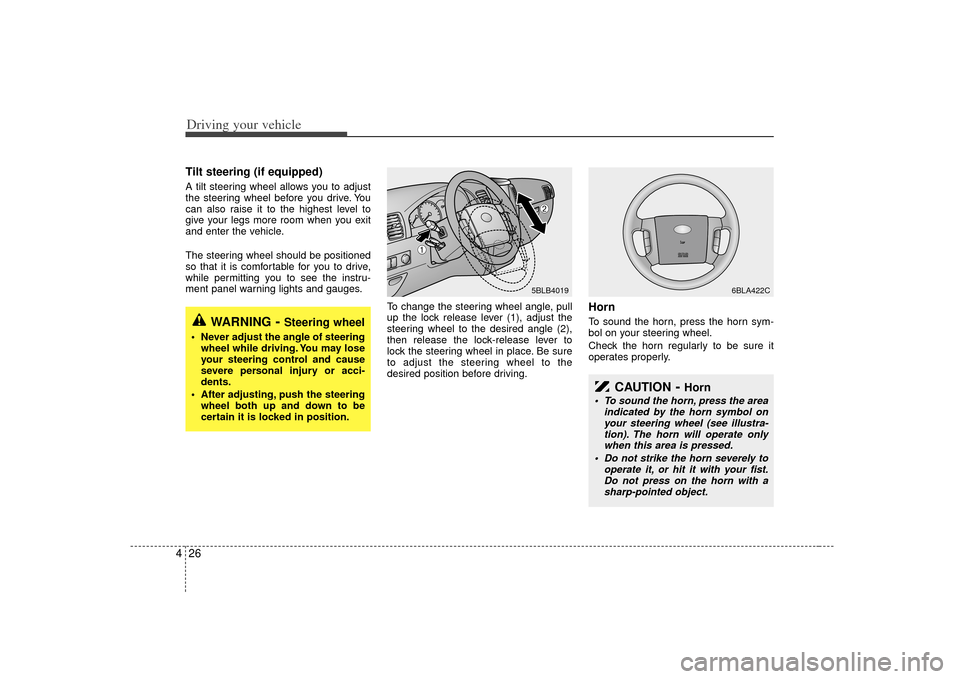
To change the steering wheel angle, pull
up the lock release lever (1), adjust the
steering wheel to the desired angle (2),
then release the lock-release lever to
lock the steering wheel in place. Be sure
to adjust the steering wheel to the
desired position before driving.
HornTo sound the horn, press the horn sym-
bol on your steering wheel.
Check the horn regularly to be sure it
operates properly.
WARNING
- Steering wheel
Never adjust the angle of steeringwheel while driving. You may lose
your steering control and cause
severe personal injury or acci-
dents.
After adjusting, push the steering wheel both up and down to be
certain it is locked in position.
5BLB4019
6BLA422C
➀
➁
CAUTION
- Horn
To sound the horn, press the area indicated by the horn symbol onyour steering wheel (see illustra-tion). The horn will operate only when this area is pressed.
Do not strike the horn severely to operate it, or hit it with your fist.Do not press on the horn with asharp-pointed object.
Page 157 of 325
427
Driving your vehicle
The cruise control system allows you to
program the vehicle to maintain a con-
stant speed without resting your foot on
the accelerator pedal.
With cruise control, you can set and
automatically maintain any speed of
between 40 km/h (24 mph) and
160 km/h (96 mph).
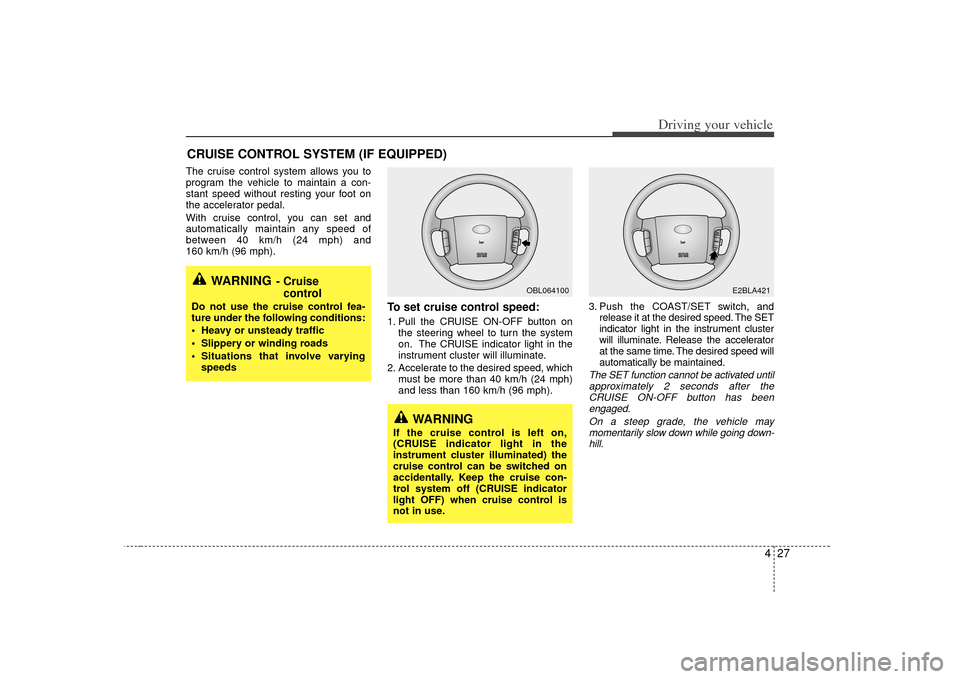
To set cruise control speed:1. Pull the CRUISE ON-OFF button onthe steering wheel to turn the system
on. The CRUISE indicator light in the
instrument cluster will illuminate.
2. Accelerate to the desired speed, which must be more than 40 km/h (24 mph)
and less than 160 km/h (96 mph). 3. Push the COAST/SET switch, and
release it at the desired speed. The SET
indicator light in the instrument cluster
will illuminate. Release the accelerator
at the same time. The desired speed will
automatically be maintained.
The SET function cannot be activated untilapproximately 2 seconds after theCRUISE ON-OFF button has beenengaged.
On a steep grade, the vehicle maymomentarily slow down while going down-hill.
CRUISE CONTROL SYSTEM (IF EQUIPPED)
WARNING
- Cruise control
Do not use the cruise control fea-
ture under the following conditions:
Heavy or unsteady traffic
Slippery or winding roads
Situations that involve varying
speeds
WARNING
If the cruise control is left on,
(CRUISE indicator light in the
instrument cluster illuminated) the
cruise control can be switched on
accidentally. Keep the cruise con-
trol system off (CRUISE indicator
light OFF) when cruise control is
not in use.
OBL064100
E2BLA421
Page 158 of 325
Driving your vehicle28
4To cancel cruise control, do one
of the following: Press the brake pedal.
Press the clutch pedal with a manual
transmission or shift into N (Neutral)
with an automatic transmission.
Press the CANCEL switch located on the steering wheel.
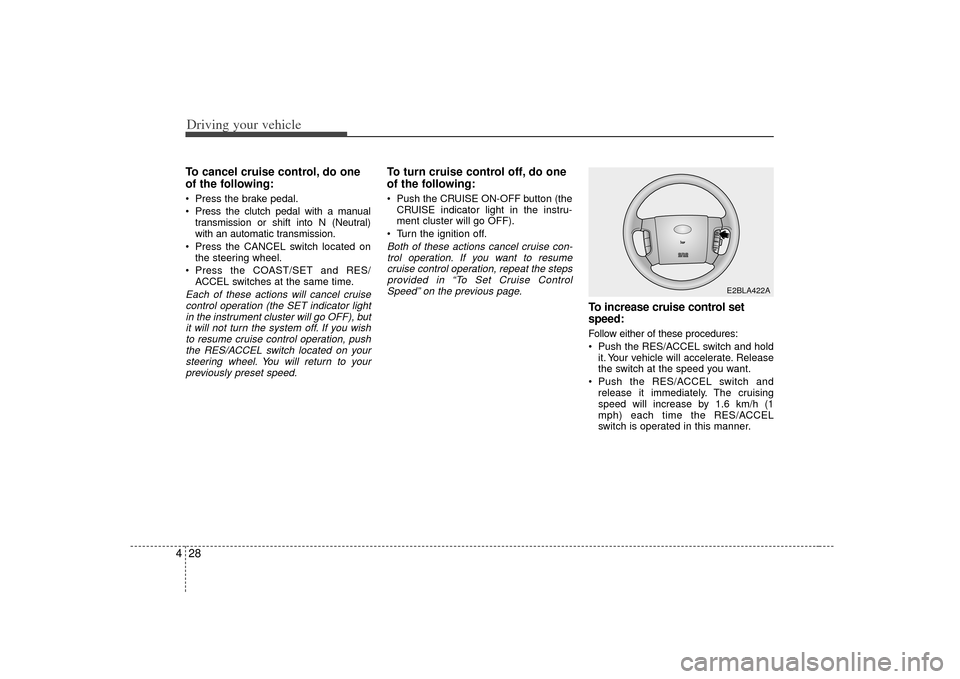
Press the COAST/SET and RES/ ACCEL switches at the same time.Each of these actions will cancel cruisecontrol operation (the SET indicator lightin the instrument cluster will go OFF), butit will not turn the system off. If you wishto resume cruise control operation, push the RES/ACCEL switch located on yoursteering wheel. You will return to yourpreviously preset speed.
To turn cruise control off, do one
of the following: Push the CRUISE ON-OFF button (the CRUISE indicator light in the instru-
ment cluster will go OFF).
Turn the ignition off.Both of these actions cancel cruise con- trol operation. If you want to resumecruise control operation, repeat the stepsprovided in “To Set Cruise ControlSpeed” on the previous page.
To increase cruise control set
speed:Follow either of these procedures:
Push the RES/ACCEL switch and hold it. Your vehicle will accelerate. Release
the switch at the speed you want.
Push the RES/ACCEL switch and release it immediately. The cruising
speed will increase by 1.6 km/h (1
mph) each time the RES/ACCEL
switch is operated in this manner.
E2BLA422A
Page 181 of 325
451
Driving your vehicle
Battery saver function The purpose of this feature is to pre-vent the battery from being dis-
charged. The system automatically
turns off the headlights and parking
lights when the driver removes the igni-
tion key and opens the driver- side
door.
With this feature, the parklight will be turned off automatically if the driver
parks on the side of road at night.
If necessary, to keep the lights on when
the ignition key is removed, perform the
following :
1) Open the driver-side door.
2) Turn the parklights OFF and ON again using the light switch on the steering
column.
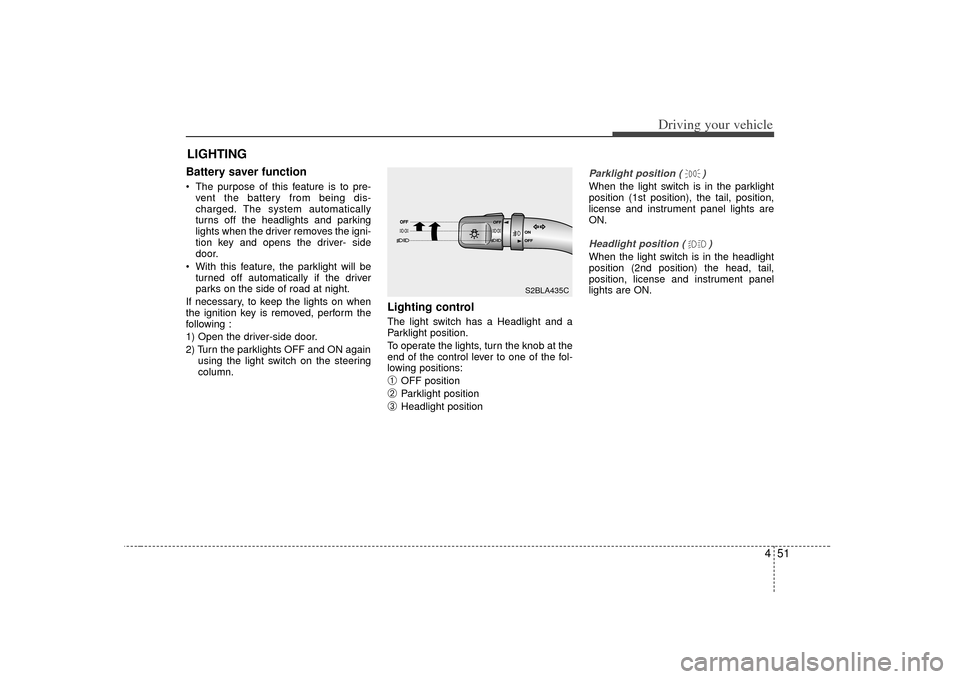
Lighting control The light switch has a Headlight and a
Parklight position.
To operate the lights, turn the knob at the
end of the control lever to one of the fol-
lowing positions:➀
OFF position
➁
Parklight position
\b
Headlight position
Parklight position ( )When the light switch is in the parklight
position (1st position), the tail, position,
license and instrument panel lights are
ON.Headlight position ( )When the light switch is in the headlight
position (2nd position) the head, tail,
position, license and instrument panel
lights are ON.
LIGHTING
S2BLA435C
Page 214 of 325
Driving tips65SUGGESTIONS FOR ECONOMICAL OPERATIONYour vehicle's fuel economy depends
mainly on your style of driving, where you
drive and when you drive.
Each of these factors affects how many
kilometers (miles) you can get from a
liter (gallon) of fuel. To operate your vehi-
cle as economically as possible, use the
following driving suggestions to help
save money in both fuel and repairs:
Avoid lengthy warm-up idling. Once theengine is running smoothly, begin driv-
ing. Remember, engine warm-up may
take a little longer on cold days.
Save fuel by accelerating slowly after stopping.
Keep the engine in tune and follow the recommended periodic maintenance
schedule. This will increase the life of
all parts and lower your operating
costs. Do not use the air conditioner unnec-
essarily.
Slow down when driving on rough roads.
For longer tire life and better fuel econ- omy, always keep the tires inflated to
the recommended pressures.
Maintain a safe distance from other vehicles to avoid sudden stops. This
will reduce wear on brake linings and
pads. Driving in such a way will also
save fuel because extra fuel is required
to accelerate back to driving speed.
Do not carry unnecessary weight in the vehicle.
Do not rest your foot on the brake pedal while driving. This can cause
needless wear, possible damage to the
brakes, and poor fuel economy.
Improper wheel alignment results in faster tire wear and lower fuel econo-
my. Open windows at high speeds can
reduce fuel economy.
Fuel economy is less in crosswinds and headwinds. To help offset some of
this loss, slow down when driving in
these conditions.
Keeping a vehicle in good operating con-
dition is important both for economy and
safety. Therefore, have an authorized Kia
dealer perform scheduled inspections
and maintenance.
WARNING
- Engine off dur- ing motion
Never turn the engine off to coast
down hills or anytime the vehicle is
in motion. The power steering and
power brakes will not function with-
out the engine running. Instead,
keep the engine on and downshift
to an appropriate gear for engine
braking effect.
Page 215 of 325
57
Driving tips
SPECIAL DRIVING CONDITIONS Hazardous driving conditions When hazardous driving conditions are
encountered such as water, snow, ice,
mud, sand, or similar hazards, follow
these suggestions:
Drive cautiously and allow extra dis-tance for braking.
Avoid sudden movements in braking or steering.
When braking with non-ABS brakes pump the brake pedal with a light up-
and-down motion until the vehicle is
stopped. If stalled in snow, mud, or sand, use
second gear. Accelerate slowly to
avoid spinning the drive wheels.
Use sand, rock salt, tire chains, or other non-slip material under the drive
wheels to provide traction when stalled
in ice, snow, or mud.
Rocking the vehicle If it is necessary to rock the vehicle to
free it from snow, sand, or mud, first turn
the steering wheel right and left to clear
the area around your front wheels. Then,
shift back and forth between 1 (First) and
R (Reverse) in vehicles equipped with a
manual transmission or R (Reverse) and
any forward gear in vehicles equipped
with an automatic transmission. Do not
race the engine, and spin the wheels as
little as possible. If you are still stuck after
a few tries, have the vehicle pulled out by
a tow vehicle to avoid engine overheating
and possible damage to the transmis-
sion.
WARNING
- Downshifting
Downshifting with an automatic
transmission, while driving on slip-
pery surfaces can cause an acci-
dent. The sudden change in tire
speed could cause the tires to skid.
Be careful when downshifting on
slippery surfaces.
WARNING
Do not pump the brake pedal on a
vehicle equipped with ABS.
CAUTION
Prolonged rocking may causeengine over-heating, transmission damage or failure, and tire damage.
Page 219 of 325
511
Driving tips
USING FOUR-WHEEL DRIVEDriving on snow- or ice-covered
roads ("4HI, 4LO" for part-time
4WD operation or "AUTO" for full-
time 4WD operation) Use snow tires. See “Tires” in this sec-tion for more information.
Keep an adequate distance between yourself and other vehicles.
Avoid sudden braking, acceleration or steering. These actions can cause your
vehicle to lose traction.
Driving in sand or mud ("4HI,
4LO" for part-time 4WD operation
or "AUTO" for full-time 4WD oper-
ation) Avoid sudden braking, acceleration orsteering. These actions can cause your
vehicle to get stuck in the sand or mud.
Drive at low speeds whenever possi- ble.
You may need to get out of your vehi- cle at times to check road conditions.
If you get stuck in the sand or mud, try placing stones, wood or other similar
materials under the tires to get traction,
or move forward and backward repeat-
edly to get unstuck.
WARNING
- Traction
Make sure that no one stands in
front of or behind the tires when
materials are placed under the tires
to get more traction. The tires may
cause loose materials to fly out
from under the vehicle, potentially
causing serious bodily injury or
death.
CAUTION
Prolonged rocking may causeengine damage, overheating, trans-mission differential or transfer case damage or failure and tire damage.
Page 220 of 325
Driving tips12
5Driving on a hill ("4LO" for part-
time 4WD operation or "LOW" for
full-time 4WD operation) Use low gear when going uphill or
downhill and avoid sudden braking.
Do not shift gears or use your clutch when going downhill. Do not coast
downhill in Neutral.
Crossing a ditch ("4LO" for part-
time 4WD operation or "LOW" for
full-time 4WD operation) Avoid driving through ditches if possi-ble, especially if there is water in the
ditch. Your vehicle may stall if the elec-
trical system gets wet. If you must
cross a ditch, select 4LO or LOW
mode.
Avoid driving where the water level is higher than the bottom of the wheel
hub. If the water level rises above this
mark, your vehicle will need to be serv-
iced.
Tap lightly on the brake pedal during and after driving through water. This
will help keep the brakes dry and in
proper working order.
Do not shift gears while crossing a ditch.
Tight corner brake effectThis is called tight corner brake effect.
Tight corner brake effect is a unique
characteristic of four-wheel drive vehicles
caused by the difference in tire rotation at
the four wheels and the zero-degree
alignment of the front wheels and sus-
pension.
Sharp turns at low speeds should be car-
ried out with caution.
WARNING
- 4WD
When turning sharply on a paved
road at low speed while in four-
wheel drive, steering control will be
difficult.