warning KIA Sorento 2007 1.G Workshop Manual
[x] Cancel search | Manufacturer: KIA, Model Year: 2007, Model line: Sorento, Model: KIA Sorento 2007 1.GPages: 325, PDF Size: 5.01 MB
Page 85 of 325
Knowing your vehicle76
3Outside rearview mirror heater
(if equipped) The outside rearview mirror heater is
actuated in connection with the rear win-
dow defroster. To heat the outside
rearview mirror glass, push the button for
the rear window defroster.
The rearview mirror heater (and rear win-
dow defroster) will not operate unless the
engine is running.
The outside rearview mirror glass will be
heated for defrosting or defogging and
will give you improved rear vision in
inclement weather conditions. Push the
button again to turn the heater off. The
outside rearview mirror heater automati-
cally turns off after 20 minutes.
Day/night rearview mirror Adjust the rearview mirror to center on
the view through the rear window. Make
this adjustment before you start driving.
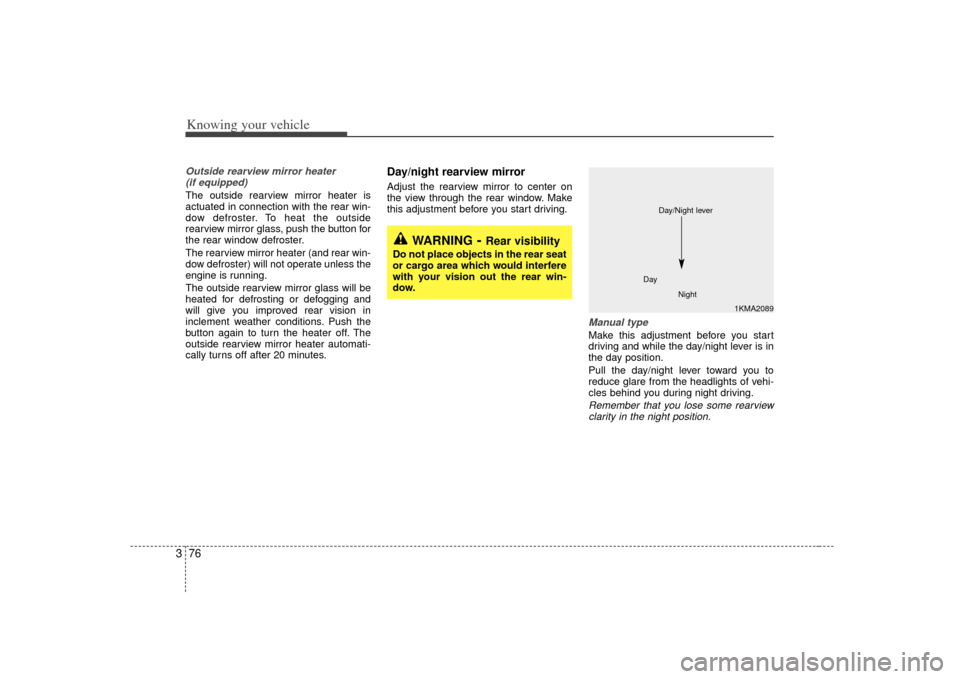
Manual type Make this adjustment before you start
driving and while the day/night lever is in
the day position.
Pull the day/night lever toward you to
reduce glare from the headlights of vehi-
cles behind you during night driving.Remember that you lose some rearviewclarity in the night position.
1KMA2089
Day
Night
Day/Night lever
WARNING
- Rear visibility
Do not place objects in the rear seat
or cargo area which would interfere
with your vision out the rear win-
dow.
Page 86 of 325
377
Knowing your vehicle
Electric type (if equipped)The electric day/night rearview mirror
automatically controls the glare from the
headlights of the car behind you in night-
time or low light driving conditions. The
sensor mounted in the mirror senses the
light level around the vehicle, and
through a chemical reaction, automati-
cally controls the headlight glare from
vehicles behind you.
When the engine is running, the glare is
automatically controlled by the sensor
mounted in the rearview mirror.
Whenever the shift lever is shifted into
reverse (R), the mirror will automatically
go to the brightest setting in order to
improve the drivers view behind the vehi-
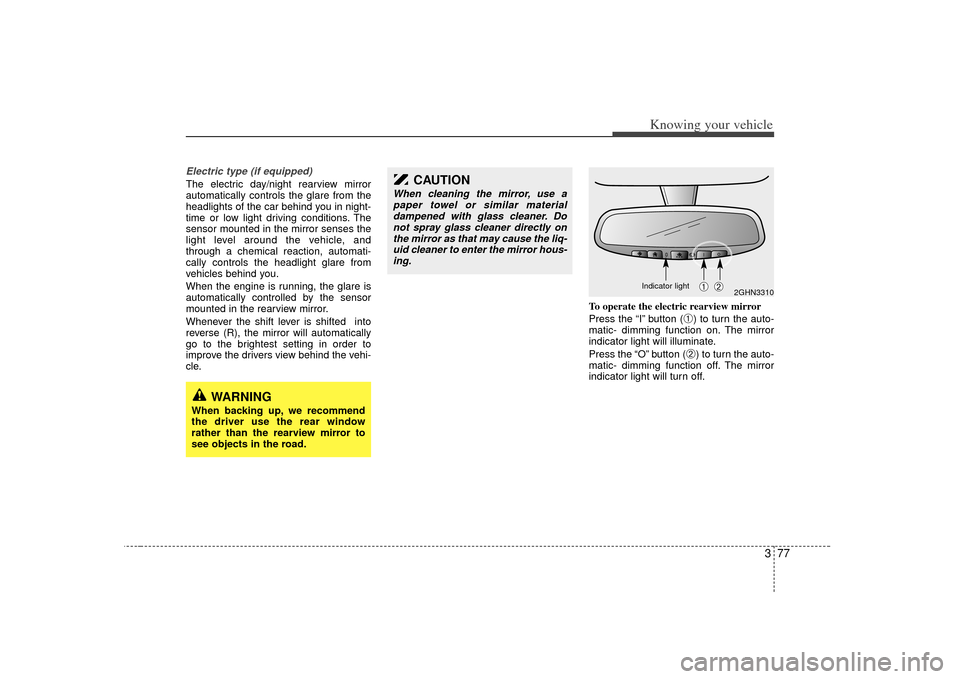
cle.To operate the electric rearview mirror
Press the “I” button (
➀) to turn the auto-
matic- dimming function on. The mirror
indicator light will illuminate.
Press the “O” button (➁) to turn the auto-
matic- dimming function off. The mirror
indicator light will turn off.
2GHN3310
➀
➁
CAUTION
When cleaning the mirror, use a paper towel or similar materialdampened with glass cleaner. Do not spray glass cleaner directly onthe mirror as that may cause the liq-uid cleaner to enter the mirror hous-ing.
WARNING
When backing up, we recommend
the driver use the rear window
rather than the rearview mirror to
see objects in the road.
Indicator light
Page 87 of 325
Knowing your vehicle78
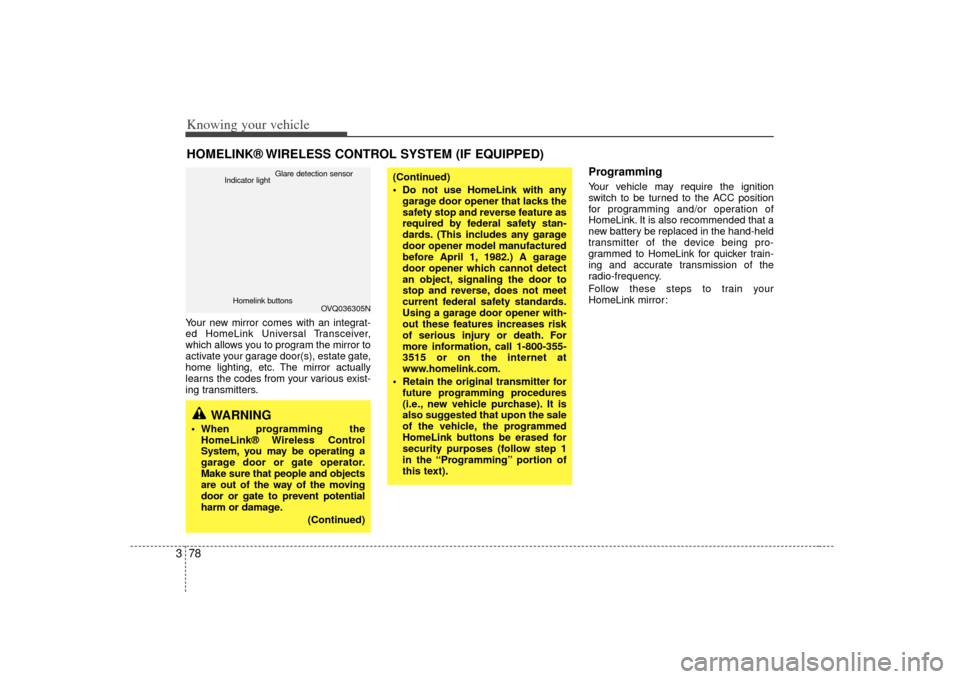
3Your new mirror comes with an integrat-
ed HomeLink Universal Transceiver,
which allows you to program the mirror to
activate your garage door(s), estate gate,
home lighting, etc. The mirror actually
learns the codes from your various exist-
ing transmitters.
ProgrammingYour vehicle may require the ignition
switch to be turned to the ACC position
for programming and/or operation of
HomeLink. It is also recommended that a
new battery be replaced in the hand-held
transmitter of the device being pro-
grammed to HomeLink for quicker train-
ing and accurate transmission of the
radio-frequency.
Follow these steps to train your
HomeLink mirror:
HOMELINK® WIRELESS CONTROL SYSTEM (IF EQUIPPED)
WARNING
When programming the
HomeLink® Wireless Control
System, you may be operating a
garage door or gate operator.
Make sure that people and objects
are out of the way of the moving
door or gate to prevent potential
harm or damage.
(Continued)
(Continued)
Do not use HomeLink with anygarage door opener that lacks the
safety stop and reverse feature as
required by federal safety stan-
dards. (This includes any garage
door opener model manufactured
before April 1, 1982.) A garage
door opener which cannot detect
an object, signaling the door to
stop and reverse, does not meet
current federal safety standards.
Using a garage door opener with-
out these features increases risk
of serious injury or death. For
more information, call 1-800-355-
3515 or on the internet at
www.homelink.com.
Retain the original transmitter for future programming procedures
(i.e., new vehicle purchase). It is
also suggested that upon the sale
of the vehicle, the programmed
HomeLink buttons be erased for
security purposes (follow step 1
in the “Programming” portion of
this text).
OVQ036305N
Glare detection sensor
Indicator light
Homelink buttons
Page 90 of 325
381
Knowing your vehicle
Reprogramming a single
HomeLink buttonTo program a device to HomeLink using
a HomeLink button previously trained,
follow these steps:
1. Press and hold the desired HomeLinkbutton. Do NOT release until step 4
has been completed.
2. When the indicator light begins to flash slowly (after 20 seconds), position the
hand-held transmitter 1 to 3 inches
away from the HomeLink surface.
3. Press and hold the hand-held trans- mitter button (or press and “cycle” - as
described in “Canadian Programming”
above).
4. The HomeLink indicator light will flash, first slowly and then rapidly. When the
indicator light begins to flash rapidly,
release both buttons.
The previous device has now been
erased and the new device can be acti-
vated by pushing the HomeLink button
that has just been programmed. This pro-
cedure will not affect any other pro-
grammed HomeLink buttons.
Gate operator programming &
canadian programmingDuring programming, your hand-held
transmitter may automatically stop trans-
mitting. Continue to press and hold the
HomeLink button (note steps 2 through 4
in the “Programming” portion of this text)
while you press and re-press (“cycle”)
your handheld transmitter every two sec-
onds until the frequency signal has been
learned. The indicator light will flash
slowly and then rapidly after several sec-
onds upon successful training.
AccessoriesIf you would like additional information on
the HomeLink Wireless Control System,
HomeLink compatible products, or to
purchase other accessories such as the
HomeLink® Lighting Package, please
contact HomeLink at 1-800-355-3515 or
on the internet at www.homelink.com.
This device complies with Industry
Canada Standard RSS-210. Operation
is subject to the following two conditions:
1. This device may not cause harmful interference, and
2. This device must accept any interfer- ence including interference that may
cause undesired operation of the vehi-
cle.
CAUTION
If programming a garage dooropener or gate, it is advised tounplug the device during the“cycling” process to prevent possi- ble motor burn-up.
WARNING
Changes or modifications not
expressly approved by the party
responsible for compliance could
void the user’s authority to operate
the equipment.
IC: 4112104541A Gentex
MODEL/FCC ID: NZLSTDHL3
Page 92 of 325

383
Knowing your vehicle
Door courtesy lamp
(if equipped)The door courtesy lamp comes ON when
the door is opened to assist entering or
exiting the vehicle. It also serves as a
warning to passing vehicles that the
vehicle door is open.
Center trayTo use the storage compartment, press
the front face, and then release it to allow
the storage compartment to slowly
extend from the instrument panel.
E2BLA750A
WARNING -
Flammable
materials
Do not store cigarette lighters,
propane cylinders, or other
flammable/explosive materials in
the vehicle. These items may catch
fire and/or explode if the vehicle is
exposed to hot temperatures for
extended periods.
CAUTION
To avoid possible theft, do notleave valuables in the storagecompartment.
Always keep the storage com- partment covers closed whiledriving. Do not attempt to place so many items in the storagecompartment that the storage compartment cover can not closesecurely.
OBL026020N
STORAGE COMPARTMENT
Page 94 of 325
385
Knowing your vehicle
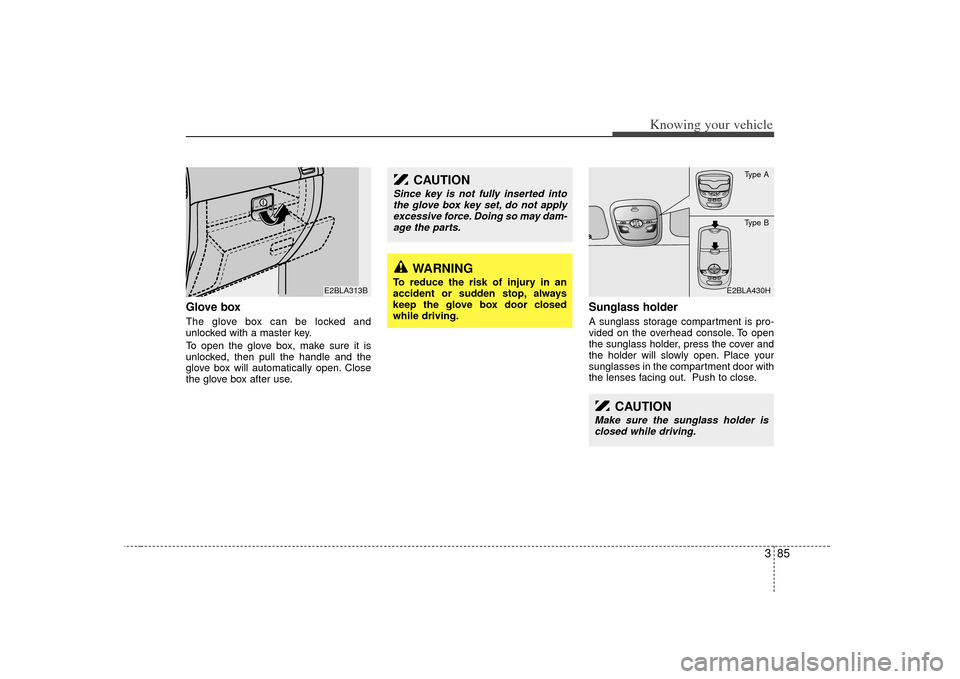
Glove boxThe glove box can be locked and
unlocked with a master key.
To open the glove box, make sure it is
unlocked, then pull the handle and the
glove box will automatically open. Close
the glove box after use.
Sunglass holder A sunglass storage compartment is pro-
vided on the overhead console. To open
the sunglass holder, press the cover and
the holder will slowly open. Place your
sunglasses in the compartment door with
the lenses facing out. Push to close.
E2BLA313B
CAUTION
Since key is not fully inserted intothe glove box key set, do not applyexcessive force. Doing so may dam- age the parts.
WARNING
To reduce the risk of injury in an
accident or sudden stop, always
keep the glove box door closed
while driving.
P U SH
E2BLA430H
CAUTION
Make sure the sunglass holder is
closed while driving.
Type AType B
Page 96 of 325

387
Knowing your vehicle
RearYou can open the rear ashtray by pulling
it out by its top edge. To remove the ash-
tray to empty or clean it, push the tab
inside and pull it all the way out.
Cup holder
WARNING
- Ashtray use
Do not use the vehicle’s ashtraysas waste receptacles.
Putting lit cigarettes or matches in an ashtray with other com-
bustible materials may cause a
fire.
WARNING
- Hot liquids
Do not place uncovered cups ofhot liquid in the cup holder while
the vehicle is in motion. If the hot
liquid spills, you could be burned.
Such a burn to the driver could
cause a loss of control of the
vehicle.
To reduce the risk of personal injury in the event of sudden stop
or collision, do not place uncov-
ered or insecure bottles, glasses,
cans, etc., in the cup holder while
the vehicle is in motion.
OBL026019L
Page 101 of 325

Knowing your vehicle92
3Sunshade The sunshade will be opened with the
glass panel automatically when the glass
panel is slid. After closing the glass panel
the sunshade will only close manually.
In case of an emergency Type A (without multi-meter)
If the sunroof does not open electrically:
1. Remove the interior light lens by using
a flat blade screwdriver.
2. Remove the two (2) screws, and then remove the overhead console.
3. Insert the emergency handle (provided with the vehicle) and turn the handle
clockwise to open or counterclockwise
to close.
E2BLA361
S2BLA329N
CAUTION
Do not press any sunroof control button longer than necessary.Damage to the motor or systemcomponents could occur.
Periodically remove any dirt that may accumulate on the guide rail.
If you try to open the sunroof when the temperature is belowfreezing or when the sunroof iscovered with snow or ice, the glass or the motor could be dam-aged.
The sunroof is made to slide together with sunshade. Do notleave the sunshade closed whilethe sunroof is open.
WARNING -
Sunroof
Do not extend face or arms out- side through the sunroof opening
while driving.
Make sure hand and face are safely out of the way before clos-
ing a sunroof.
Page 103 of 325
Knowing your vehicle94
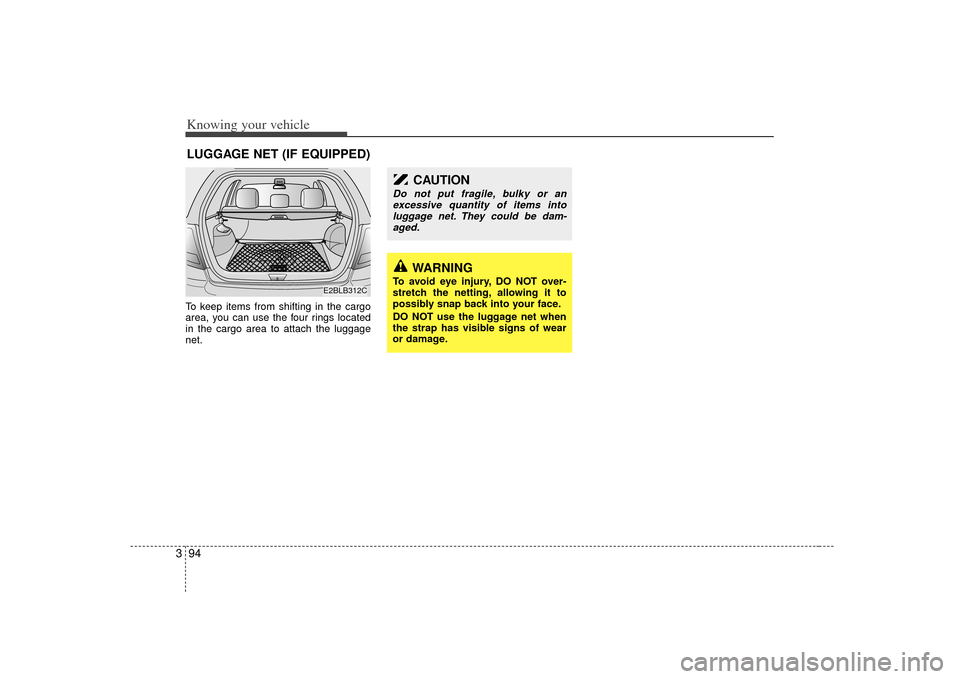
3To keep items from shifting in the cargo
area, you can use the four rings located
in the cargo area to attach the luggage
net.LUGGAGE NET (IF EQUIPPED)
WARNING
To avoid eye injury, DO NOT over-
stretch the netting, allowing it to
possibly snap back into your face.
DO NOT use the luggage net when
the strap has visible signs of wear
or damage.
CAUTION
Do not put fragile, bulky or an
excessive quantity of items intoluggage net. They could be dam-aged.
E2BLB312C
Page 104 of 325

395
Knowing your vehicle
Use the tonneau cover to hide items
stored in the cargo area.To use the rear shade of the tonneau
cover, pull the handle backward and
insert the edges into the slots.TONNEAU COVER (IF EQUIPPED)
E2BLB312A
E2BLB313
WARNING
Do not place objects on the ton-
neau cover. Such objects may be
thrown about inside the vehicle
and possibly injure vehicle occu-
pants during an accident or when
braking.
Never allow anyone to ride in the luggage compartment. It is
designed for luggage only.
Maintain the balance of the vehi- cle and locate the weight as far
forward as possible.
CAUTION
Since the tonneau cover may bedamaged or malformed, do not putthe luggage on it when it is used.