ESP KIA Sorento 2008 1.G Owner's Guide
[x] Cancel search | Manufacturer: KIA, Model Year: 2008, Model line: Sorento, Model: KIA Sorento 2008 1.GPages: 326, PDF Size: 8.63 MB
Page 142 of 326
Driving your vehicle
12 4
✽
NOTICE
When the vehicle shifts into 4WD mode,
a slight mechanical sound and vibration
may be felt and does not indicate a prob-
lem with the system.
To avoid shift shock, when the vehicle is
stopped and you make a transfer case
shift using the transfer shift knob, wait
until the corresponding indicator light in
the instrument cluster illuminates before
driving.
Knob position
This is used to set different positions.
AUTO
Full power delivered to front and rear
axle for increased traction. Use this mode
for normal on-road driving.
The 4WD LOW indicator light ( ) will
be turned off after blinking for a few sec-
onds to remind you that you are in the
AUTO mode.
LOW
Full power to both axles, including a
lower gear ratio for low speed applica-
tions that require extra power such as
wet pavement, snow-covered roads
and/or off-road.
LOW Mode is not recommended on dry
pavement.
The 4WD LOW indicator light
( )will
be turned on after blinking for a few sec-
onds to remind you that you are in the
LOW mode.
Transfer shift knob operation
AUTO ↔
LOW
1. Stop the vehicle.
2. Depress the clutch pedal (Manual
transmission) or put the shift lever into
N (Neutral) position (Automatic trans-
mission).
3.AUTO ➝
LOW
: Turn the transfer shift knob to LOW
mode.
LOW ➝
AUTO
: Turn the transfer shift knob to AUTO
mode.
4. Before releasing the clutch pedal
(Manual transmission) or shifting to
other ranges from N (Automatic trans-
mission), wait for the corresponding
indicator light in the instrument cluster
to go ON or OFF.
4WD
LOW
4WD
LOW
CAUTION
If the vehicle moves while the trans-
fer shift is in process, the gearbox
may be damaged.
Page 143 of 326
413
Driving your vehicle
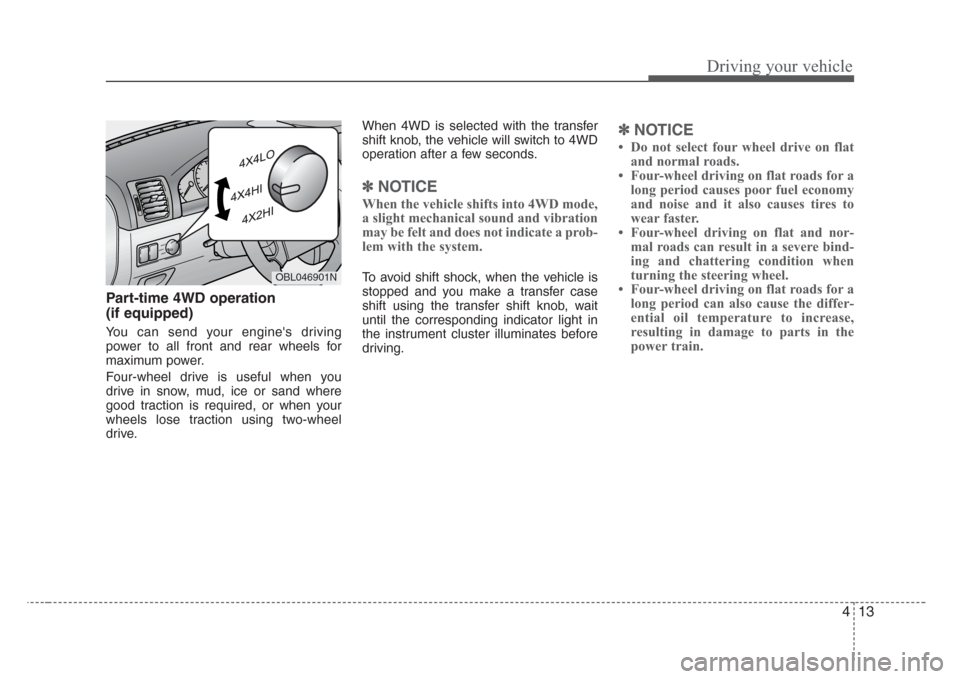
Part-time 4WD operation
(if equipped)
You can send your engine's driving
power to all front and rear wheels for
maximum power.
Four-wheel drive is useful when you
drive in snow, mud, ice or sand where
good traction is required, or when your
wheels lose traction using two-wheel
drive.When 4WD is selected with the transfer
shift knob, the vehicle will switch to 4WD
operation after a few seconds.
✽
NOTICE
When the vehicle shifts into 4WD mode,
a slight mechanical sound and vibration
may be felt and does not indicate a prob-
lem with the system.
To avoid shift shock, when the vehicle is
stopped and you make a transfer case
shift using the transfer shift knob, wait
until the corresponding indicator light in
the instrument cluster illuminates before
driving.
✽
NOTICE
Do not select four wheel drive on flat
and normal roads.
Four-wheel driving on flat roads for a
long period causes poor fuel economy
and noise and it also causes tires to
wear faster.
Four-wheel driving on flat and nor-
mal roads can result in a severe bind-
ing and chattering condition when
turning the steering wheel.
Four-wheel driving on flat roads for a
long period can also cause the differ-
ential oil temperature to increase,
resulting in damage to parts in the
power train.
OBL046901N
Page 144 of 326
Driving your vehicle
14 4
Knob position
This is used to set different positions.
2HI (Rear-wheel drive)
This mode is used, when driving on nor-
mal roads and highway.
4HI (High-range 4-wheel drive)
This mode is used, when driving off-
roads, wet or snow covered roads with
normal speed.
The 4WD indicator light
()will be
turned on to remind you that you are in
the 4HI mode.
4LO (Low-range 4-wheel drive)
Use 4LO for climbing or descending hills,
off-roads driving and towing the vehicle,
especially when increased power is
required.
The 4WD LOW indicator light
( )will
be turned on to remind you that you are
in the 4LO mode.
Transfer shift knob operation
By turning the transfer knob (4HI, 4LO),
both front and rear axles are engaged.
This improves the traction characteristic.
2HI➝
4HI
Turn the transfer knob from the 2HI mode
to 4HI mode at speed below 80 km/h (50
mph).
It is not necessary to depress the clutch
pedal or put the shift lever into N
(Neutral) position (Manual transmission)
or put the shift lever into N (Neutral) posi-
tion (Automatic transmission).
Perform this operation when driving
straight. There will be a few seconds of
time delay before come into 4HI mode
when you shift the knob to 4 HI from 2HI.4HI➝
2HI
Turn the transfer knob from the 4HI mode
to the 2HI mode at speed below 80 km/h
(50 mph). It is not necessary to depress
the clutch pedal (Manual transmission) or
put the shift lever into N (Neutral)
(Automatic transmission). Perform this
operation when driving straight.
If the transfer mode does not shift into
2HI mode when you turn the transfer
knob to 2HI, drive straight ahead with
accelerating or decelerating, or drive in
reverse.
4WD
LOW
Page 145 of 326
415
Driving your vehicle
4HI↔
4LO
1. Stop the vehicle.
2. Depress the clutch pedal for the man-
ual transmission or put the shift lever
into N (Neutral) for the automatic
transmission.
3.4HI➝
4LO
: Select the 4LO mode.
4LO➝
4HI
: Select the 4HI mode.
4. Before releasing the clutch pedal
(Manual transmission) or shifting to
other ranges from N range (Automatic
transmission), wait for corresponding
indicator light turns on or off in the
cluster.For safe four-wheel drive opera-
tion
• Your vehicle allows you to drive in on-
road and off-road conditions.
• However, do not try to drive in deep
standing water, mud, or over steep
hills.
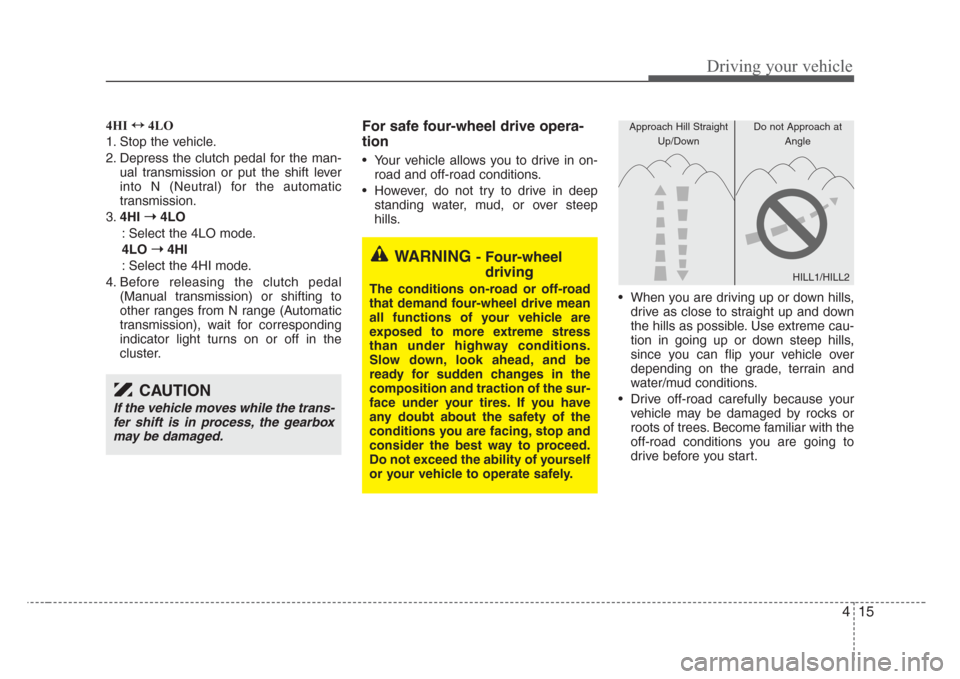
• When you are driving up or down hills,
drive as close to straight up and down
the hills as possible. Use extreme cau-
tion in going up or down steep hills,
since you can flip your vehicle over
depending on the grade, terrain and
water/mud conditions.
• Drive off-road carefully because your
vehicle may be damaged by rocks or
roots of trees. Become familiar with the
off-road conditions you are going to
drive before you start.
CAUTION
If the vehicle moves while the trans-
fer shift is in process, the gearbox
may be damaged.
WARNING - Four-wheel
driving
The conditions on-road or off-road
that demand four-wheel drive mean
all functions of your vehicle are
exposed to more extreme stress
than under highway conditions.
Slow down, look ahead, and be
ready for sudden changes in the
composition and traction of the sur-
face under your tires. If you have
any doubt about the safety of the
conditions you are facing,stop and
consider the best way to proceed.
Do not exceed the ability of yourself
or your vehicle to operate safely.
HILL1/HILL2
Approach Hill Straight
Up/DownDo not Approach at
Angle
Page 153 of 326
423
Driving your vehicle
Parking on curbed streets
• When parking your vehicle on an uphill
grade, park as close to the curb as
possible and turn the front wheels
away from the curb so that the front
wheels will contact the curb if the vehi-
cle moves backward.
• When parking your vehicle on a down-
hill grade, park as close to the curb as
possible and turn the front wheels
toward the curb so that the front
wheels will contact the curb if the vehi-
cle moves forward.
Anti-lock brake system (ABS)
(if equipped)The ABS system continuously senses
the speed of the wheels. If the wheels are
going to lock, the ABS system repeated-
ly modulates the hydraulic brake pres-
sure to the wheels.
When you apply your brakes under con-
ditions which may lock the wheels, you
may hear a “tik-tik’’ sound from the
brakes, or feel a corresponding sensation
in the brake pedal. This is normal and it
means your ABS system is active.
In order to obtain the maximum benefit
from your ABS system in an emergency
situation, do not attempt to modulate
your brake pressure and do not try to
pump your brakes. Press your brake
pedal as hard as possible or as hard as
the situation warrants and allow the ABS
system to control the force being deliv-
ered to the brakes.
WARNING- ABS Brakes
Your ABS is not a substitute for
good driving judgement. You can
still have an accident. In fact, your
ABS system will not be able to pre-
vent an accident. You must espe-
cially avoid:
• Dangerous driving,such as
neglecting safety precautions,
speeding, or driving too close to
the vehicle in front of you.
• Driving at high speed in situa-
tions providing considerably less
traction,such as wet conditions
where hydroplaning could occur.
• Driving too fast on poor road sur-
faces. The ABS is designed to
improve maximum braking effec-
tiveness on typical highways and
roads in good condition. On poor
road surfaces, the ABS may actu-
ally reduce braking effectiveness.
Page 163 of 326
433
Driving your vehicle
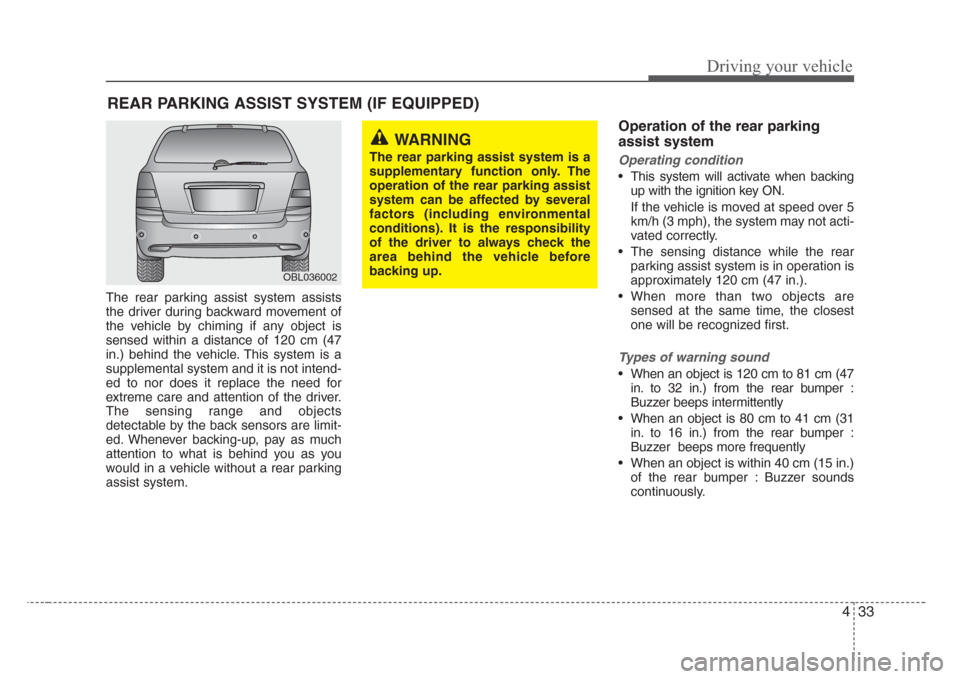
The rear parking assist system assists
the driver during backward movement of
the vehicle by chiming if any object is
sensed within a distance of 120 cm (47
in.) behind the vehicle. This system is a
supplemental system and it is not intend-
ed to nor does it replace the need for
extreme care and attention of the driver.
The sensing range and objects
detectable by the back sensors are limit-
ed. Whenever backing-up, pay as much
attention to what is behind you as you
would in a vehicle without a rear parking
assist system.
Operation of the rear parking
assist system
Operating condition
• This system will activate when backing
up with the ignition key ON.
If the vehicle is moved at speed over 5
km/h (3 mph), the system may not acti-
vated correctly.
• The sensing distance while the rear
parking assist system is in operation is
approximately 120 cm (47 in.).
• When more than two objects are
sensed at the same time, the closest
one will be recognized first.
Types of warning sound
• When an object is 120 cm to 81 cm (47
in. to 32 in.) from the rear bumper :
Buzzer beeps intermittently
• When an object is 80 cm to 41 cm (31
in. to 16 in.) from the rear bumper :
Buzzer beeps more frequently
• When an object is within 40 cm (15 in.)
of the rear bumper : Buzzer sounds
continuously.
REAR PARKING ASSIST SYSTEM (IF EQUIPPED)
OBL036002
WARNING
The rear parking assist system is a
supplementary function only. The
operation of the rear parking assist
system can be affected by several
factors (including environmental
conditions). It is the responsibility
of the driver to always check the
area behind the vehicle before
backing up.
Page 165 of 326
435
Driving your vehicle
✽
NOTICE
If you don’t hear an audible warning
sound or if the buzzer sounds intermit-
tently when shifting the gear to “R” posi-
tion, this may indicate a malfunction in
the rear parking assist system. If this
occurs, have your vehicle checked by an
authorized Kia dealer as soon as possi-
ble.WARNING
Pay close attention when the vehi-
cle is driven close to objects on the
road, particularly pedestrians,
especially children. Be aware that
some objects may not be detected
by the sensors, due to the object’s
distance,size or material, all of
which can limit the effectiveness of
the sensor. Always perform a visual
inspection to make sure the vehicle
is clear of all obstructions before
moving the vehicle in any direction.
CAUTION
This system can only sense objects
within the range and location of the
sensors; It can not detect objects in
other areas where sensors are not
installed. Also,small or slim
objects,such as poles or objects
located between sensors may not
be detected by the sensors.
Always visually check behind the
vehicle when driving back up.
Be sure to inform any drivers in the
vehicle that may be unfamiliar with
the system regarding the systems
capabilities and limitations.
Your new vehicle warranty does not
cover any accidents or damage to
the vehicle or its occupants due to
rear parking assist system malfunc-
tion. Always drive safely and cau-
tiously.
Page 183 of 326
453
Driving your vehicle
Lane change signals (B)
To signal a lane change, move the turn
signal lever slightly and hold it in position.
The lever will return to the OFF position
when released.
If an indicator stays on and does not
flash or if it flashes abnormally, one of the
turn signal bulbs may be burned out and
will require replacement.
✽
NOTICE
If an indicator flash is abnormally quick
or slow, bulb may be burned out or have
a poor electrical connection in the cir-
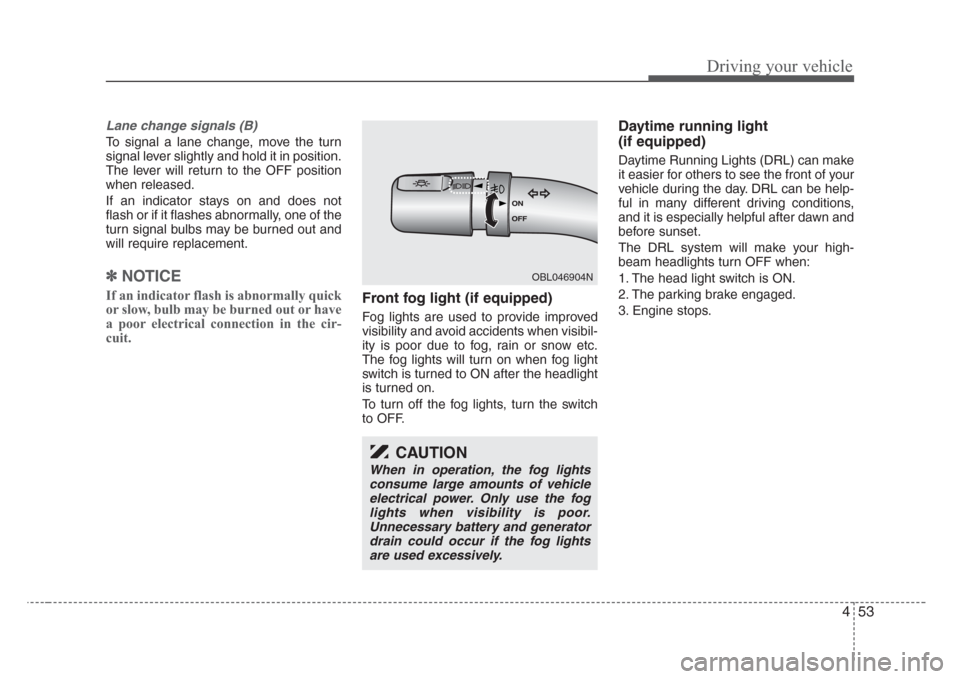
cuit.Front fog light (if equipped)
Fog lights are used to provide improved
visibility and avoid accidents when visibil-
ity is poor due to fog, rain or snow etc.
The fog lights will turn on when fog light
switch is turned to ON after the headlight
is turned on.
To turn off the fog lights, turn the switch
to OFF.
Daytime running light
(if equipped)
Daytime Running Lights (DRL) can make
it easier for others to see the front of your
vehicle during the day. DRL can be help-
ful in many different driving conditions,
and it is especially helpful after dawn and
before sunset.
The DRL system will make your high-
beam headlights turn OFF when:
1. The head light switch is ON.
2. The parking brake engaged.
3. Engine stops.
OBL046904N
CAUTION
When in operation, the fog lights
consume large amounts of vehicle
electrical power. Only use the fog
lights when visibility is poor.
Unnecessary battery and generator
drain could occur if the fog lights
are used excessively.
Page 216 of 326
Driving tips
8 5
Driving at night
Because night driving presents more
hazards than driving in the daylight, here
are some important tips to remember:
• Slow down and keep more distance
between you and other vehicles, as it
may be more difficult to see at night,
especially in areas where there may
not be any street lights.
• Adjust your mirrors to reduce the glare
from other driver's headlights.
• Keep your headlights clean and prop-
erly aimed on vehicles not equipped
with the automatic headlight aiming
feature. Dirty or improperly aimed
headlights will make it much more diffi-
cult to see at night.
• Avoid staring directly at the headlights
of oncoming vehicles. You could be
temporarily blinded, and it will take
several seconds for your eyes to read-
just to the darkness.
Driving in the rain
Rain and wet roads can make driving
dangerous, especially if you’re not pre-
pared for the slick pavement. Here are a
few things to consider when driving in the
rain:
• A heavy rainfall will make it harder to
see and will increase the distance
needed to stop your vehicle, so slow
down.
• Keep your windshield wiping equip-
ment in good shape. Replace your
windshield wiper blades when they
show signs of streaking or missing
areas on the windshield.
• If your tires are not in good condition,
making a quick stop on wet pavement
can cause a skid and possibly lead to
an accident. Be sure your tires are in
good shape.
• Turn on your headlights to make it eas-
ier for others to see you.
• Driving too fast through large puddles
can affect your brakes. If you must go
through puddles, try to drive through
them slowly.
• If you believe you may have gotten
your brakes wet, apply them lightly
while driving until normal braking oper-
ation returns.WARNING- Spinning tires
Do not spin the wheels, especially
at speeds more than 56 km/h (35
mph). Spinning the wheels at high
speeds when the vehicle is station-
ary could cause a tire to overheat,
explode and injure bystanders.
CAUTION
The ESC system (if equipped)
should be turned OFF prior to rock-
ing the vehicle.
Page 220 of 326
Driving tips
12 5
Driving on a hill ("4LO" for part-
time 4WD operation or "LOW" for
full-time 4WD operation)
• Use low gear when going uphill or
downhill and avoid sudden braking.
• Do not shift gears or use your clutch
when going downhill. Do not coast
downhill in Neutral.
Crossing a ditch ("4LO" for part-
time 4WD operation or "LOW" for
full-time 4WD operation)
• Avoid driving through ditches if possi-
ble, especially if there is water in the
ditch. Your vehicle may stall if the elec-
trical system gets wet. If you must
cross a ditch, select 4LO or LOW
mode.
• Avoid driving where the water level is
higher than the bottom of the wheel
hub. If the water level rises above this
mark, your vehicle will need to be serv-
iced.
• Tap lightly on the brake pedal during
and after driving through water. This
will help keep the brakes dry and in
proper working order.
• Do not shift gears while crossing a
ditch.
Tight corner brake effect
This is called tight corner brake effect.
Tight corner brake effect is a unique
characteristic of four-wheel drive vehicles
caused by the difference in tire rotation at
the four wheels and the zero-degree
alignment of the front wheels and sus-
pension.
Sharp turns at low speeds should be car-
ried out with caution.
WARNING -4WD
When turning sharply on a paved
road at low speed while in four-
wheel drive, steering control will be
difficult.