transmission KIA Sorento 2009 2.G User Guide
[x] Cancel search | Manufacturer: KIA, Model Year: 2009, Model line: Sorento, Model: KIA Sorento 2009 2.GPages: 327, PDF Size: 5.03 MB
Page 134 of 327
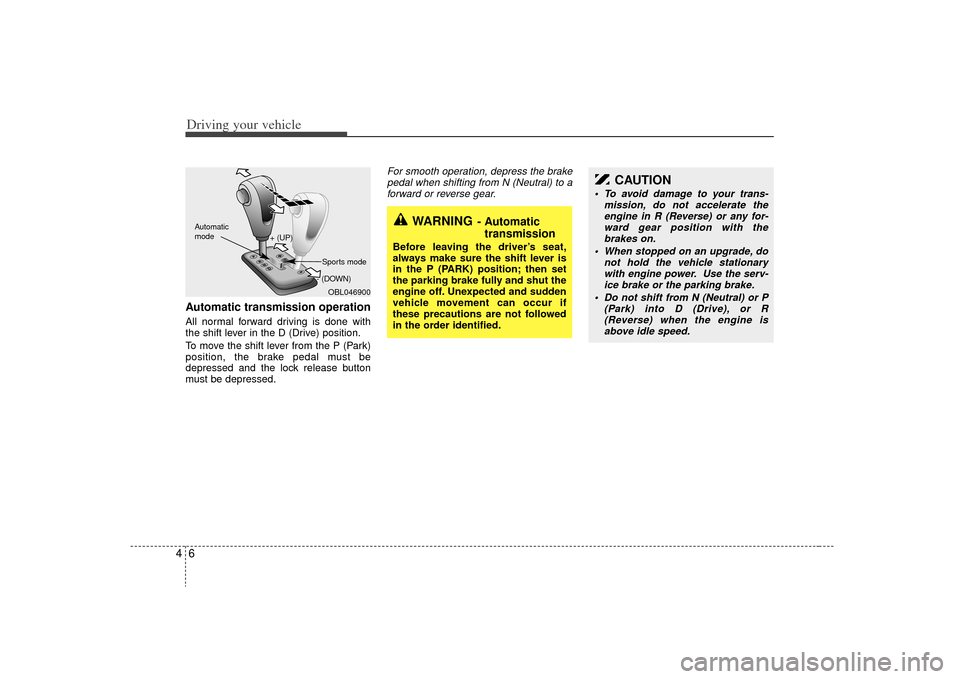
Driving your vehicle64Automatic transmission operationAll normal forward driving is done with
the shift lever in the D (Drive) position.
To move the shift lever from the P (Park)
position, the brake pedal must be
depressed and the lock release button
must be depressed.
For smooth operation, depress the brakepedal when shifting from N (Neutral) to a forward or reverse gear.
WARNING
- Automatic transmission
Before leaving the driver’s seat,
always make sure the shift lever is
in the P (PARK) position; then set
the parking brake fully and shut the
engine off. Unexpected and sudden
vehicle movement can occur if
these precautions are not followed
in the order identified.
OBL046900
+ (UP)
- (DOWN)
Automatic
modeSports mode
CAUTION
To avoid damage to your trans-
mission, do not accelerate theengine in R (Reverse) or any for-ward gear position with the brakes on.
When stopped on an upgrade, do not hold the vehicle stationarywith engine power. Use the serv-ice brake or the parking brake.
Do not shift from N (Neutral) or P (Park) into D (Drive), or R(Reverse) when the engine is above idle speed.
Page 135 of 327
47
Driving your vehicle
Transmission rangesP (park)Always come to a complete stop before
shifting into P. This position locks the
transmission and prevents the drive
wheels from rotating.
R (reverse)Use this position to drive the vehicle
backward.
N (neutral)The wheels and transmission are not
locked. The vehicle will roll freely even on
the slightest incline unless the parking
brake or service brakes are applied.D (drive)This is the normal forward driving posi-
tion. The transmission will automatically
shift through a 4-gear sequence, provid-
ing the best fuel economy and power.
For extra power when passing another
vehicle or climbing grades, depress the
accelerator fully, at which time the trans-
mission will automatically downshift to
the next lower gear.✽ ✽NOTICEAlways come to a complete stop before
shifting into D (Drive).
(Continued)
Before leaving the driver’s seat,
always make sure the shift lever
is in the P (PARK) position. Set
the parking brake fully, shut the
engine off and take the key with
you. Unexpected and sudden
vehicle movement can occur if
you do not follow these precau-
tions in the order specified.
Never leave a child unattended in a vehicle.
WARNING
- Automatic
transmission
Shifting into P (Park) while thevehicle is in motion will cause the
drive wheels to lock which will
cause you to lose control of the
vehicle.
Do not use the P (Park) position in place of the parking brake.
Always make sure the shift lever
is latched in the P (Park) position
so that it cannot be moved unless
the lock release button is pushed
in, AND set the parking brake
fully.
(Continued)
CAUTION
The transmission may be damagedif you shift into P (Park) while thevehicle is in motion.
CAUTION
Always come to a complete stopbefore shifting into or out of R (Reverse); you may damage thetransmission if you shift into Rwhile the vehicle is in motion.
Page 136 of 327
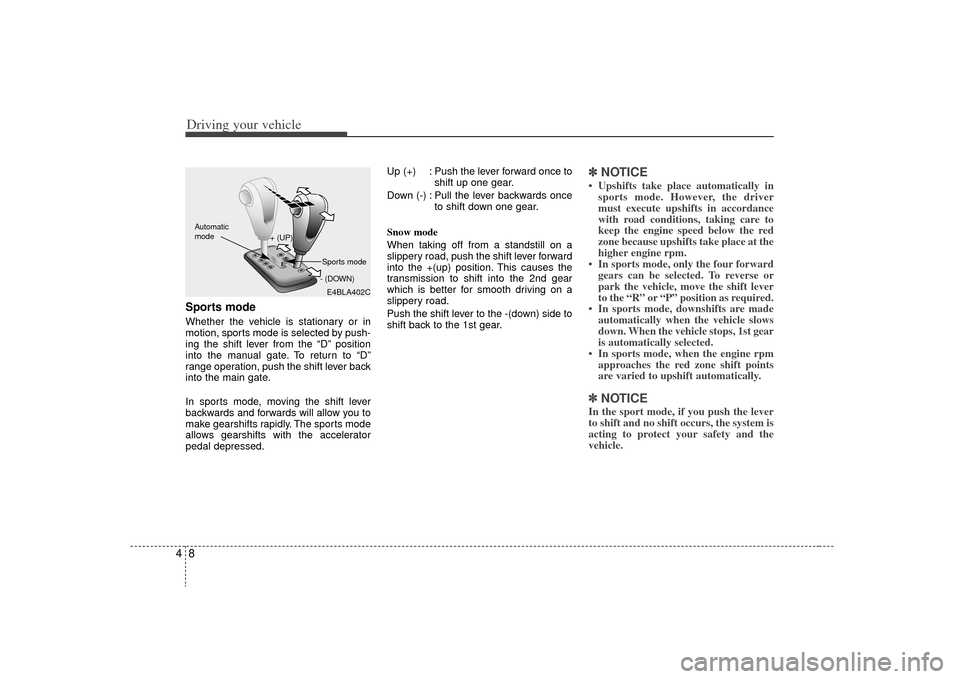
Driving your vehicle84Sports modeWhether the vehicle is stationary or in
motion, sports mode is selected by push-
ing the shift lever from the “D” position
into the manual gate. To return to “D”
range operation, push the shift lever back
into the main gate.
In sports mode, moving the shift lever
backwards and forwards will allow you to
make gearshifts rapidly. The sports mode
allows gearshifts with the accelerator
pedal depressed.Up (+) : Push the lever forward once to
shift up one gear.
Down (-) : Pull the lever backwards once to shift down one gear.
Snow mode
When taking off from a standstill on a
slippery road, push the shift lever forward
into the +(up) position. This causes the
transmission to shift into the 2nd gear
which is better for smooth driving on a
slippery road.
Push the shift lever to the -(down) side to
shift back to the 1st gear.
✽ ✽ NOTICE• Upshifts take place automatically in
sports mode. However, the driver
must execute upshifts in accordance
with road conditions, taking care to
keep the engine speed below the red
zone because upshifts take place at the
higher engine rpm.
• In sports mode, only the four forward gears can be selected. To reverse or
park the vehicle, move the shift lever
to the “R” or “P” position as required.
• In sports mode, downshifts are made automatically when the vehicle slows
down. When the vehicle stops, 1st gear
is automatically selected.
• In sports mode, when the engine rpm approaches the red zone shift points
are varied to upshift automatically.✽ ✽ NOTICEIn the sport mode, if you push the lever
to shift and no shift occurs, the system is
acting to protect your safety and the
vehicle.
E4BLA402C
+ (UP)
- (DOWN)
Automatic
modeSports mode
Page 137 of 327
49
Driving your vehicle
Moving up a steep grade from a
standing startTo move up a steep grade from a stand-
ing start, depress the brake pedal, shift
the shift lever to D (Drive). Select the
appropriate gear depending on load
weight and steepness of the grade, and
release the parking brake. Depress the
accelerator gradually while releasing the
service brakes.
When accelerating from a stop on a
steep hill, the vehicle may have a ten-
dency to roll backwards. Shifting the
shift lever into 2 (Second Gear) while
in Sport mode will help prevent the
vehicle from rolling backwards.
Shift lock systemFor your safety, the Automatic
Transmission has a shift lock system
which prevents shifting the transmission
out of P (Park) unless the brake pedal is
depressed.
To shift the transmission out of P (Park):
1. Depress and hold the brake pedal.
2. Start the engine or turn the ignition tothe ACC or ON position.
3. Depress the lock release button and move the shift lever.
When the ignition switch is in the LOCK
position, the transmission cannot be
shifted from P (Park).
If the brake pedal is repeatedly
depressed and released with the shift
lever in the P (Park) position, a chattering
noise near the shift lever may be heard.
This is a normal condition.
Ignition key interlock systemThe ignition key cannot be removed
unless the shift lever is in the P (Park)
position. If the ignition switch is in any
other position, the key cannot be
removed.
Page 140 of 327
Driving your vehicle12
4✽
✽
NOTICEWhen the vehicle shifts into 4WD mode,
a slight mechanical sound and vibration
may be felt and does not indicate a prob-
lem with the system. To avoid shift shock, when the vehicle is
stopped and you make a transfer case
shift using the transfer shift knob, wait
until the corresponding indicator light in
the instrument cluster illuminates before
driving.
Knob positionThis is used to set different positions.
AUTO
Full power delivered to front and rear
axle for increased traction. Use this mode
for normal on-road driving.
The 4WD LOW indicator light ( ) will
be turned off after blinking for a few sec-
onds to remind you that you are in the
AUTO mode.
LOW
Full power to both axles, including a
lower gear ratio for low speed applica-
tions that require extra power such as
wet pavement, snow-covered roads
and/or off-road.
LOW Mode is not recommended on dry
pavement.
The 4WD LOW indicator light
( )
will
be turned on after blinking for a few sec-
onds to remind you that you are in the
LOW mode.
Transfer shift knob operationAUTO ↔ ↔
LOW
1. Stop the vehicle.
2. Depress the clutch pedal (Manual transmission) or put the shift lever into
N (Neutral) position (Automatic trans-
mission).
3. AUTO ➝ ➝
LOW
: Turn the transfer shift knob to LOW mode.
LOW ➝
➝
AUTO
: Turn the transfer shift knob to AUTO mode.
4. Before releasing the clutch pedal (Manual transmission) or shifting to
other ranges from N (Automatic trans-
mission), wait for the corresponding
indicator light in the instrument cluster
to go ON or OFF.
4WD
LOW4WD
LOW
CAUTION
If the vehicle moves while the trans-
fer shift is in process, the gearbox may be damaged.
Page 142 of 327
Driving your vehicle14
4Knob positionThis is used to set different positions.
2HI (Rear-wheel drive)
This mode is used, when driving on nor-
mal roads and highway.
4HI (High-range 4-wheel drive)
This mode is used, when driving off-
roads, wet or snow covered roads with
normal speed.
The 4WD indicator light
()
will be
turned on to remind you that you are in
the 4HI mode.
4LO (Low-range 4-wheel drive)
Use 4LO for climbing or descending hills,
off-roads driving and towing the vehicle,
especially when increased power is
required.
The 4WD LOW indicator light
( )
will
be turned on to remind you that you are
in the 4LO mode.
Transfer shift knob operationBy turning the transfer knob (4HI, 4LO),
both front and rear axles are engaged.
This improves the traction characteristic.
2HI ➝ ➝
4HI
Turn the transfer knob from the 2HI mode
to 4HI mode at speed below 80 km/h (50
mph).
It is not necessary to depress the clutch
pedal or put the shift lever into N
(Neutral) position (Manual transmission)
or put the shift lever into N (Neutral) posi-
tion (Automatic transmission).
Perform this operation when driving
straight. There will be a few seconds of
time delay before come into 4HI mode
when you shift the knob to 4 HI from 2HI. 4HI
➝ ➝
2HI
Turn the transfer knob from the 4HI mode
to the 2HI mode at speed below 80 km/h
(50 mph). It is not necessary to depress
the clutch pedal (Manual transmission) or
put the shift lever into N (Neutral)
(Automatic transmission). Perform this
operation when driving straight.
If the transfer mode does not shift into
2HI mode when you turn the transfer
knob to 2HI, drive straight ahead with
accelerating or decelerating, or drive in
reverse.
4WD
LOW
Page 143 of 327
415
Driving your vehicle
4HI ↔
↔
4LO
1. Stop the vehicle.
2. Depress the clutch pedal for the man- ual transmission or put the shift lever
into N (Neutral) for the automatic
transmission.
3. 4HI ➝ ➝
4LO
: Select the 4LO mode.
4LO ➝ ➝
4HI
: Select the 4HI mode.
4. Before releasing the clutch pedal (Manual transmission) or shifting to
other ranges from N range (Automatic
transmission), wait for corresponding
indicator light turns on or off in the
cluster.
For safe four-wheel drive opera-
tion Your vehicle allows you to drive in on-road and off-road conditions.
However, do not try to drive in deep standing water, mud, or over steep
hills.
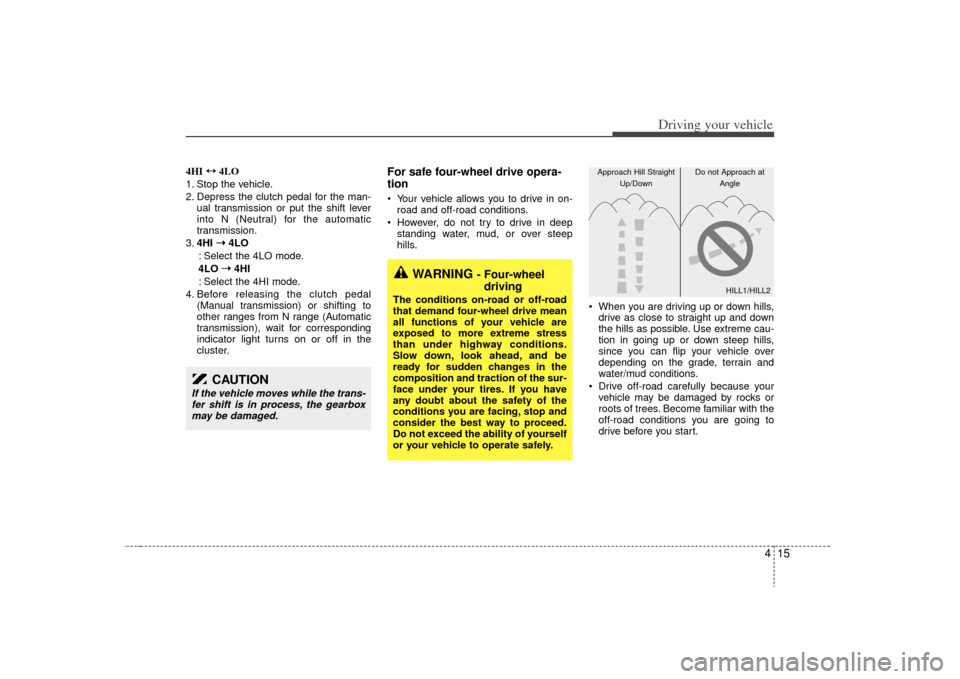
When you are driving up or down hills,drive as close to straight up and down
the hills as possible. Use extreme cau-
tion in going up or down steep hills,
since you can flip your vehicle over
depending on the grade, terrain and
water/mud conditions.
Drive off-road carefully because your vehicle may be damaged by rocks or
roots of trees. Become familiar with the
off-road conditions you are going to
drive before you start.
CAUTION
If the vehicle moves while the trans-fer shift is in process, the gearboxmay be damaged.
WARNING
- Four-wheel driving
The conditions on-road or off-road
that demand four-wheel drive mean
all functions of your vehicle are
exposed to more extreme stress
than under highway conditions.
Slow down, look ahead, and be
ready for sudden changes in the
composition and traction of the sur-
face under your tires. If you have
any doubt about the safety of the
conditions you are facing, stop and
consider the best way to proceed.
Do not exceed the ability of yourself
or your vehicle to operate safely.
HILL1/HILL2
Approach Hill Straight
Up/Down Do not Approach at
Angle
Page 150 of 327
Driving your vehicle22
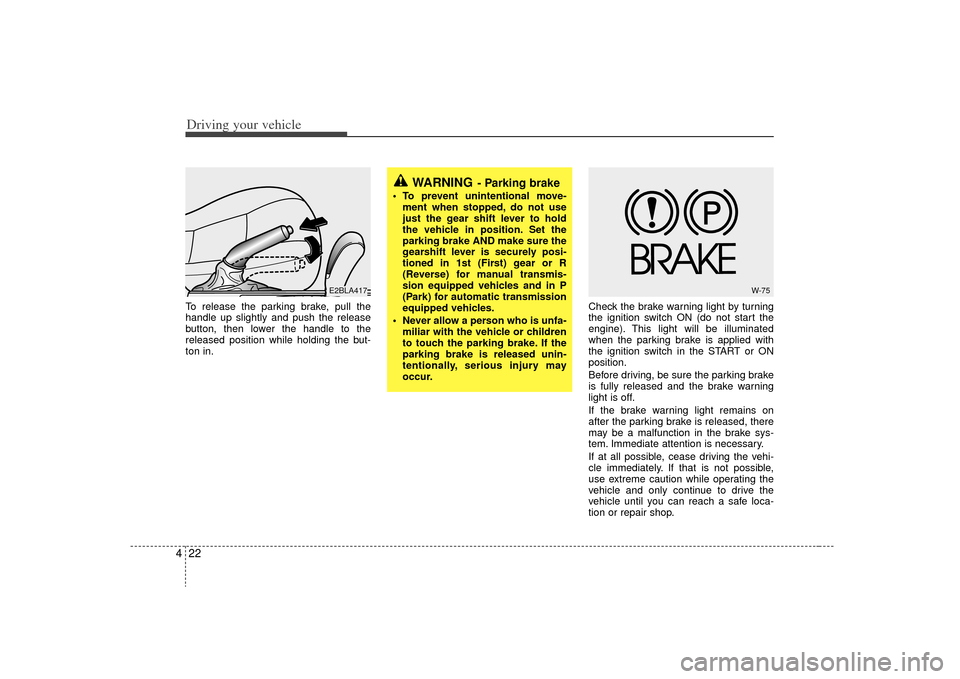
4To release the parking brake, pull the
handle up slightly and push the release
button, then lower the handle to the
released position while holding the but-
ton in. Check the brake warning light by turning
the ignition switch ON (do not start the
engine). This light will be illuminated
when the parking brake is applied with
the ignition switch in the START or ON
position.
Before driving, be sure the parking brake
is fully released and the brake warning
light is off.
If the brake warning light remains on
after the parking brake is released, there
may be a malfunction in the brake sys-
tem. Immediate attention is necessary.
If at all possible, cease driving the vehi-
cle immediately. If that is not possible,
use extreme caution while operating the
vehicle and only continue to drive the
vehicle until you can reach a safe loca-
tion or repair shop.
WARNING
- Parking brake
To prevent unintentional move-
ment when stopped, do not use
just the gear shift lever to hold
the vehicle in position. Set the
parking brake AND make sure the
gearshift lever is securely posi-
tioned in 1st (First) gear or R
(Reverse) for manual transmis-
sion equipped vehicles and in P
(Park) for automatic transmission
equipped vehicles.
Never allow a person who is unfa- miliar with the vehicle or children
to touch the parking brake. If the
parking brake is released unin-
tentionally, serious injury may
occur.
E2BLA417
W-75
Page 156 of 327
Driving your vehicle28
4To cancel cruise control, do one
of the following: Press the brake pedal.
Press the clutch pedal with a manual
transmission or shift into N (Neutral)
with an automatic transmission.
Press the CANCEL switch located on the steering wheel.
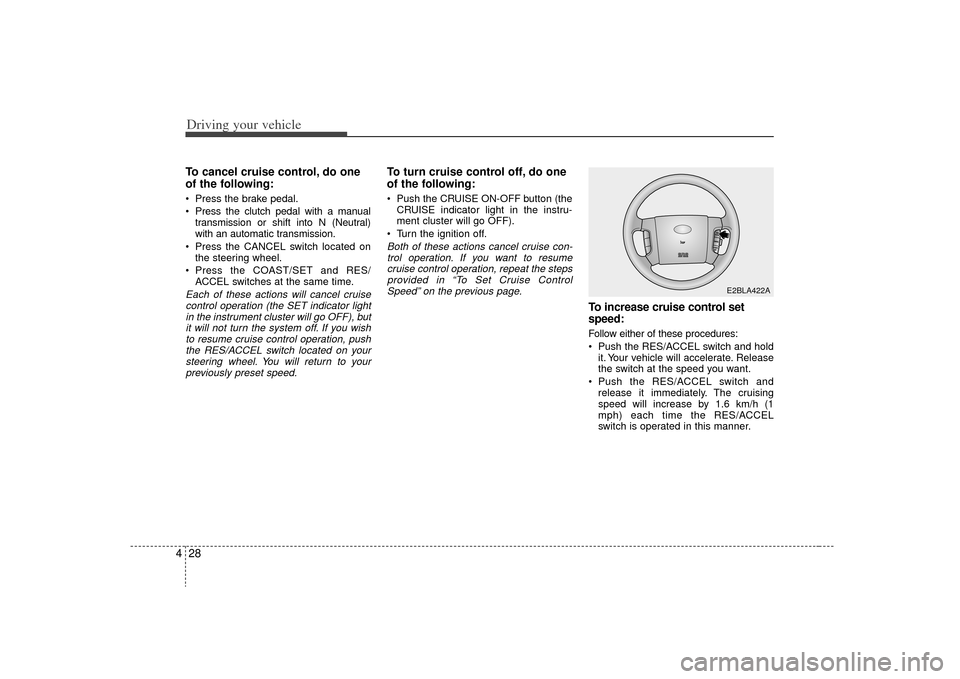
Press the COAST/SET and RES/ ACCEL switches at the same time.Each of these actions will cancel cruisecontrol operation (the SET indicator lightin the instrument cluster will go OFF), butit will not turn the system off. If you wishto resume cruise control operation, push the RES/ACCEL switch located on yoursteering wheel. You will return to yourpreviously preset speed.
To turn cruise control off, do one
of the following: Push the CRUISE ON-OFF button (the CRUISE indicator light in the instru-
ment cluster will go OFF).
Turn the ignition off.Both of these actions cancel cruise con- trol operation. If you want to resumecruise control operation, repeat the stepsprovided in “To Set Cruise ControlSpeed” on the previous page.
To increase cruise control set
speed:Follow either of these procedures:
Push the RES/ACCEL switch and hold it. Your vehicle will accelerate. Release
the switch at the speed you want.
Push the RES/ACCEL switch and release it immediately. The cruising
speed will increase by 1.6 km/h (1
mph) each time the RES/ACCEL
switch is operated in this manner.
E2BLA422A
Page 164 of 327
Driving your vehicle36
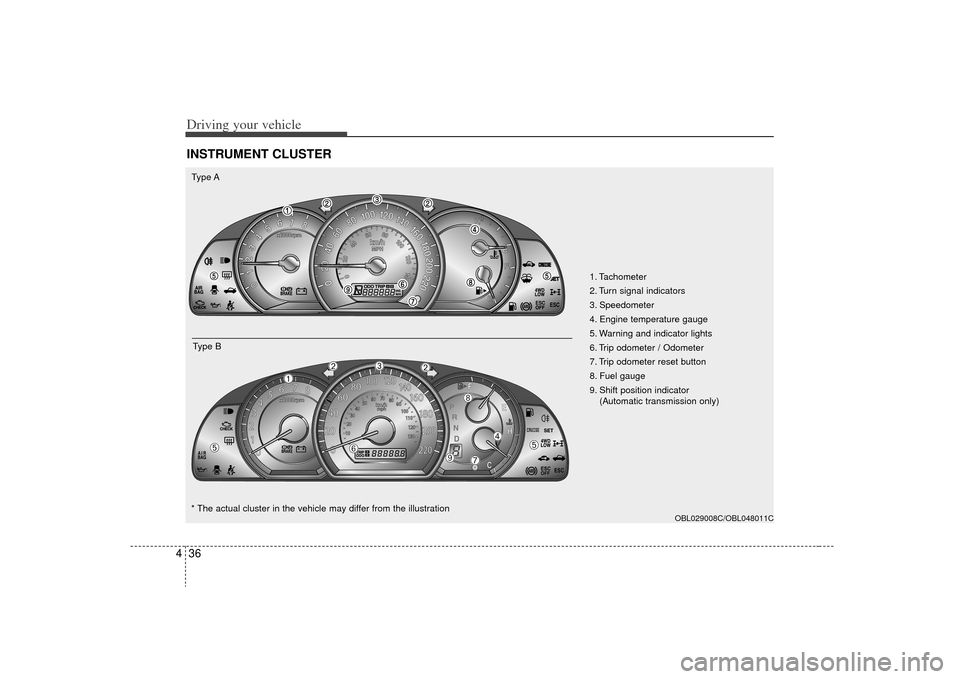
4INSTRUMENT CLUSTER
ESC
ESC
OBL029008C/OBL048011C
1. Tachometer
2. Turn signal indicators
3. Speedometer
4. Engine temperature gauge
5. Warning and indicator lights
6. Trip odometer / Odometer
7. Trip odometer reset button
8. Fuel gauge
9. Shift position indicator
(Automatic transmission only)
Type A
Type B
➀
➁
➁
\b
➃
➄
➄
➅
\f➇
➈
* The actual cluster in the vehicle may differ from the illustration