Start button KIA Sorento 2011 2.G Owner's Manual
[x] Cancel search | Manufacturer: KIA, Model Year: 2011, Model line: Sorento, Model: KIA Sorento 2011 2.GPages: 377, PDF Size: 7.51 MB
Page 12 of 377
23
Your vehicle at a glance
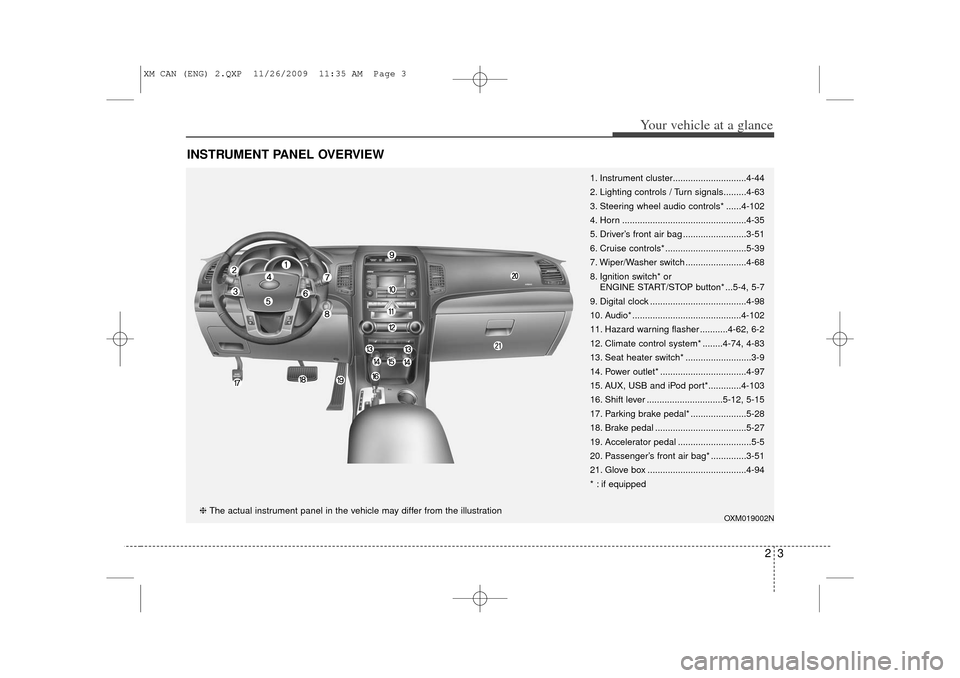
INSTRUMENT PANEL OVERVIEW
1. Instrument cluster.............................4-44
2. Lighting controls / Turn signals.........4-63
3. Steering wheel audio controls* ......4-102
4. Horn .................................................4-35
5. Driver’s front air bag .........................3-51
6. Cruise controls* ................................5-39
7. Wiper/Washer switch ........................4-68
8. Ignition switch* orENGINE START/STOP button* ...5-4, 5-7
9. Digital clock ......................................4-98
10. Audio* ...........................................4-102
11. Hazard warning flasher ...........4-62, 6-2
12. Climate control system* ........4-74, 4-83
13. Seat heater switch* ..........................3-9
14. Power outlet* ..................................4-97
15. AUX, USB and iPod port*.............4-103
16. Shift lever ..............................5-12, 5-15
17. Parking brake pedal* ......................5-28
18. Brake pedal ....................................5-27
19. Accelerator pedal .............................5-5
20. Passenger’s front air bag* ..............3-51
21. Glove box .......................................4-94
* : if equipped
OXM019002N
❈ The actual instrument panel in the vehicle may differ from the illustration
XM CAN (ENG) 2.QXP 11/26/2009 11:35 AM Page 3
Page 87 of 377
49
Features of your vehicle
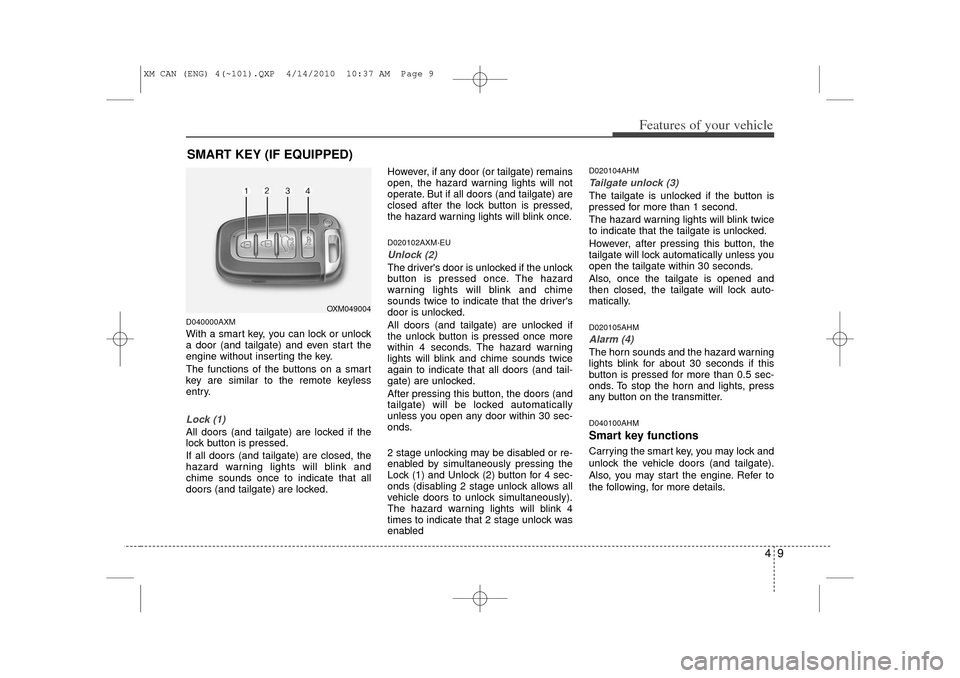
D040000AXMWith a smart key, you can lock or unlock
a door (and tailgate) and even start the
engine without inserting the key.
The functions of the buttons on a smart
key are similar to the remote keyless
entry.Lock (1)All doors (and tailgate) are locked if the
lock button is pressed.
If all doors (and tailgate) are closed, the
hazard warning lights will blink and
chime sounds once to indicate that all
doors (and tailgate) are locked.However, if any door (or tailgate) remains
open, the hazard warning lights will not
operate. But if all doors (and tailgate) are
closed after the lock button is pressed,
the hazard warning lights will blink once.
D020102AXM-EUUnlock (2)The driver's door is unlocked if the unlock
button is pressed once. The hazard
warning lights will blink and chime
sounds twice to indicate that the driver's
door is unlocked.
All doors (and tailgate) are unlocked if
the unlock button is pressed once more
within 4 seconds. The hazard warning
lights will blink and chime sounds twice
again to indicate that all doors (and tail-
gate) are unlocked.
After pressing this button, the doors (and
tailgate) will be locked automatically
unless you open any door within 30 sec-
onds.
2 stage unlocking may be disabled or re-
enabled by simultaneously pressing the
Lock (1) and Unlock (2) button for 4 sec-
onds (disabling 2 stage unlock allows all
vehicle doors to unlock simultaneously).
The hazard warning lights will blink 4
times to indicate that 2 stage unlock was
enabled
D020104AHMTailgate unlock (3)The tailgate is unlocked if the button is
pressed for more than 1 second.
The hazard warning lights will blink twice
to indicate that the tailgate is unlocked.
However, after pressing this button, the
tailgate will lock automatically unless you
open the tailgate within 30 seconds.
Also, once the tailgate is opened and
then closed, the tailgate will lock auto-
matically.D020105AHMAlarm (4)The horn sounds and the hazard warning
lights blink for about 30 seconds if this
button is pressed for more than 0.5 sec-
onds. To stop the horn and lights, press
any button on the transmitter.D040100AHMSmart key functionsCarrying the smart key, you may lock and
unlock the vehicle doors (and tailgate).
Also, you may start the engine. Refer to
the following, for more details.
SMART KEY (IF EQUIPPED)
OXM049004
XM CAN (ENG) 4(~101).QXP 4/14/2010 10:37 AM Page 9
Page 88 of 377
Features of your vehicle10
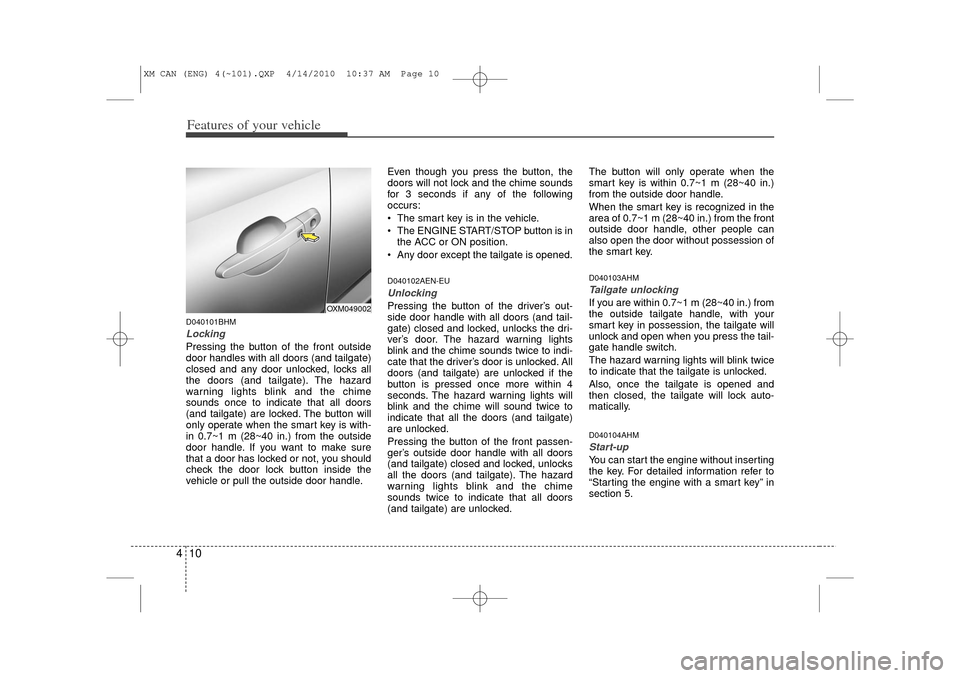
4D040101BHMLocking Pressing the button of the front outside
door handles with all doors (and tailgate)
closed and any door unlocked, locks all
the doors (and tailgate). The hazard
warning lights blink and the chime
sounds once to indicate that all doors
(and tailgate) are locked. The button will
only operate when the smart key is with-
in 0.7~1 m (28~40 in.) from the outside
door handle. If you want to make sure
that a door has locked or not, you should
check the door lock button inside the
vehicle or pull the outside door handle. Even though you press the button, the
doors will not lock and the chime sounds
for 3 seconds if any of the following
occurs:
The smart key is in the vehicle.
The ENGINE START/STOP button is in
the ACC or ON position.
Any door except the tailgate is opened.
D040102AEN-EUUnlocking Pressing the button of the driver’s out-
side door handle with all doors (and tail-
gate) closed and locked, unlocks the dri-
ver’s door. The hazard warning lights
blink and the chime sounds twice to indi-
cate that the driver’s door is unlocked. All
doors (and tailgate) are unlocked if the
button is pressed once more within 4
seconds. The hazard warning lights will
blink and the chime will sound twice to
indicate that all the doors (and tailgate)
are unlocked.
Pressing the button of the front passen-
ger’s outside door handle with all doors
(and tailgate) closed and locked, unlocks
all the doors (and tailgate). The hazard
warning lights blink and the chime
sounds twice to indicate that all doors
(and tailgate) are unlocked. The button will only operate when the
smart key is within 0.7~1 m (28~40 in.)
from the outside door handle.
When the smart key is recognized in the
area of 0.7~1 m (28~40 in.) from the front
outside door handle, other people can
also open the door without possession of
the smart key.
D040103AHMTailgate unlockingIf you are within 0.7~1 m (28~40 in.) from
the outside tailgate handle, with your
smart key in possession, the tailgate will
unlock and open when you press the tail-
gate handle switch.
The hazard warning lights will blink twice
to indicate that the tailgate is unlocked.
Also, once the tailgate is opened and
then closed, the tailgate will lock auto-
matically.D040104AHMStart-upYou can start the engine without inserting
the key. For detailed information refer to
“Starting the engine with a smart key” in
section 5.
OXM049002
XM CAN (ENG) 4(~101).QXP 4/14/2010 10:37 AM Page 10
Page 89 of 377
411
Features of your vehicle
D040300AHM-ECSmart key precautions✽
✽NOTICE• If, for some reason, you happen to lose
your smart key, you will not be able to
start the engine. Tow the vehicle, if
necessary, and contact an authorized
KIA dealer.
• A maximum of 2 smart keys can be registered to a single vehicle. If you
lose a smart key, you should immedi-
ately take the vehicle and key to your
authorized KIA dealer to protect it
from potential theft.
• The smart key will not work if any of the following occurs:
- The smart key is close to a radiotransmitter such as a radio station or
an airport which can interfere with
normal operation of the smart key.
- The smart key is near a mobile two- way radio system or a cellular
phone.
- Another vehicle’s smart key is being operated close to your vehicle.
When the smart key does not work
properly, open and close the door with
the mechanical key. If you have a
problem with the smart key, contact
an authorized KIA dealer.
This device complies with Industry
Canada Standard RSS-210.
Operation is subject to the following two
conditions:
1. This device may not cause harmful
interference, and
2. This device must accept any interfer- ence received, including interference
that may cause undesired operation.
D040400AHMRestrictions in handling keysWhen leaving keys with parking lot and
valet attendants, the following proce-
dures will ensure that your vehicle’s
glove box compartment can not be
opened in your absence.
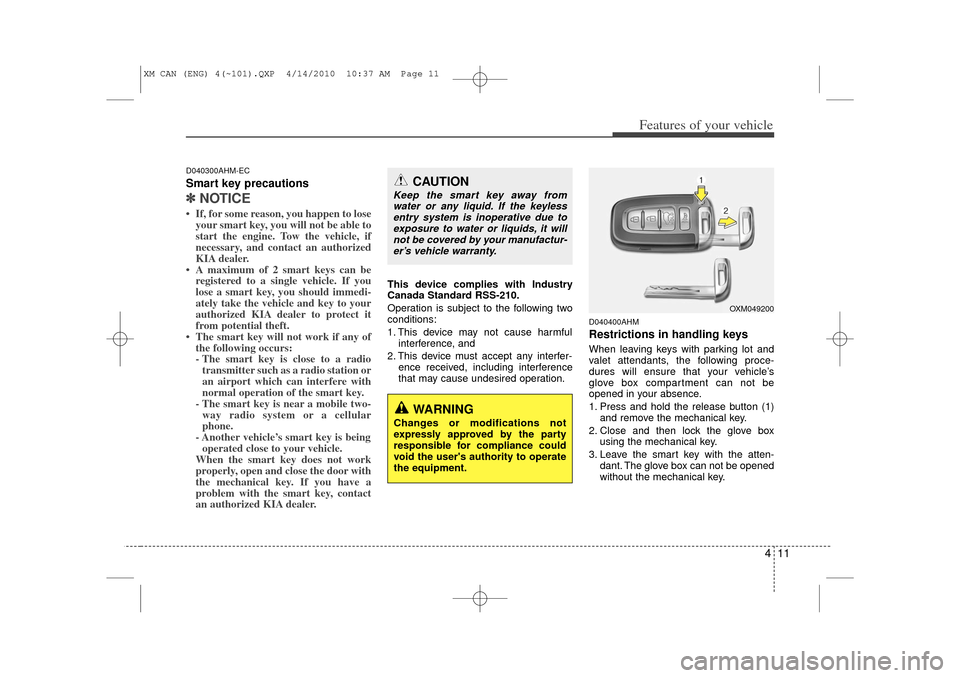
1. Press and hold the release button (1)and remove the mechanical key.
2. Close and then lock the glove box using the mechanical key.
3. Leave the smart key with the atten- dant. The glove box can not be opened
without the mechanical key.
CAUTION
Keep the smart key away fromwater or any liquid. If the keylessentry system is inoperative due toexposure to water or liquids, it will not be covered by your manufactur-er’s vehicle warranty.
WARNING
Changes or modifications not
expressly approved by the party
responsible for compliance could
void the user's authority to operate
the equipment.
OXM049200
XM CAN (ENG) 4(~101).QXP 4/14/2010 10:37 AM Page 11
Page 92 of 377
Features of your vehicle14
4D030200AEN-EUTheft-alarm stageThe alarm will be activated if any of the
following occurs while the system is
armed.
A front or rear door is opened without
using the ignition key or transmitter (or
smart key).
The tailgate is opened without using the transmitter (or smart key).
The engine hood is opened.
The horn will sound and the hazard
warning lights will blink continuously for
approximately 27 seconds, and repeat
the horn 3 times unless the system is dis-
armed. To turn off the system, unlock the
doors with the ignition key or transmitter
(or smart key).
D030400BEN-EUDisarmed stageThe system will be disarmed when the
doors (and tailgate) are unlocked with the
transmitter (or smart key) or the ignition
key.
After depressing the unlock button, the
hazard warning lights will blink and the
chime will sound twice to indicate that the
system is disarmed.
After depressing the unlock button, if any
door (or tailgate) is not opened within 30
seconds, the system will be rearmed.✽ ✽ NOTICE• Avoid trying to start the engine while
the alarm is activated. The vehicle
starting motor is disabled during the
theft-alarm stage.
If the system is not disarmed with the
transmitter, insert the key into the
ignition switch, turn the ignition
switch to the ON position and wait for
30 seconds. Then the system will be
disarmed. (if equipped)
• If you lose your keys, consult your authorized KIA dealer.
CAUTION
Do not change, alter or adjust the
theft-alarm system because it could
cause the theft-alarm system tomalfunction and should only be serviced by an authorized KIA deal-er.
Malfunctions caused by improperalterations, adjustments or modifi- cations to the theft-alarm systemare not covered by your vehiclemanufacturer warranty.
XM CAN (ENG) 4(~101).QXP 4/14/2010 10:38 AM Page 14
Page 129 of 377
451
Features of your vehicle
D150300AAMWarnings and indicatorsAll warning lights are checked by turning
the ignition switch ON (do not start the
engine). Any light that does not illuminate
should be checked by an authorized KIA
dealer.
After starting the engine, check to make
sure that all warning lights are off. If any
warning lights are still on, this indicates a
situation that needs attention. When
releasing the parking brake, the brake
system warning light should go off. The
fuel warning light will stay on if the fuel
level is low.
D150301AXM-EUECOMINDER
TMindicator
(if equipped)
The ECOMINDER
TMindicator is a system
that illuminates "ECO" when the driver
has reached optimum fuel efficiency.
The ECOMINDERTM
indicator will turn
the ECO light green on the instrument
panel when you are driving fuel effi-
ciently in the ECO ON mode.
If you don't want the indicator dis-
played, you can turn the ECO ON
mode to OFF mode by pressing the
TRIP button.
For ECO ON/OFF Mode operation,
please refer to the previous page.
Fuel efficient driving can be influenced by driving habits and road conditions.
The indicator will not display while in P (Park), N (Neutral) or R (Reverse).
ECO
ECOMINDER
TMWARNING
Don't keep watching the “ECO”
ECOMINDER
TM indicator while driv-
ing. It may distract you while driv-
ing and cause an accident that
could result in severe personal
injury.
XM CAN (ENG) 4(~101).QXP 4/14/2010 10:41 AM Page 51
Page 136 of 377
Features of your vehicle58
4D150327AUNKey reminder warning chime
(if equipped)If the driver’s door is opened while the
ignition key is left in the ignition switch
(ACC or LOCK position), the key
reminder warning chime will sound. This
is to prevent you from locking your keys
in the vehicle. The chime sounds until the
key is removed from the ignition switch or
the driver’s door is closed.KEY OUT indicator (if equipped)When the ENGINE START/STOP button
is in the ACC or ON position, if any door
is open, the system checks for the smart
key. If the smart key is not in the vehicle,
the indicator will blink, and if all doors are
closed, the chime will also sound for
about 5 seconds. The indicator will go off
while the vehicle is moving. Keep the
smart key in the vehicle or insert it in the
smart key holder.
4WD system warning light(if equipped) When the ignition switch is turned to the
ON position, the 4WD indicator will illu-
minate and then go off in a few seconds.
If the 4WD system warning light
illuminates, this indicates that there is a
malfunction in the 4WD system. If this
occurs, have your vehicle checked by an
authorized KIA dealer as soon as possi-
ble.
4WD LOCK indicator (if equipped)The 4WD LOCK indicator light is illumi-
nated when the 4WD LOCK button is
pushed. The purpose of this 4WD LOCK
mode is to increase the drive power
when driving on dry road surfaces, wet
pavement, snow-covered roads and/or
off-road. The 4WD LOCK indicator light is
turned off by pushing the button again.
KEY
OUT
CAUTION
Do not use 4WD LOCK mode on dry
paved roads or highway, it cancause noise, vibration or damage of4WD related parts.
XM CAN (ENG) 4(~101).QXP 4/14/2010 10:41 AM Page 58
Page 158 of 377
Features of your vehicle80
4System operationVentilation1. Set the mode to the position.
2. Set the air intake control to the outside
(fresh) air position.
3. Set the temperature control to the desired position.
4. Set the fan speed control to the desired speed.Heating1. Set the mode to the position.
2. Set the air intake control to the outside(fresh) air position.
3. Set the temperature control to the desired position.
4. Set the fan speed control to the desired speed.
5. If dehumidified heating is desired, turn the air conditioning system (if
equipped) on.
If the windshield fogs up, set the mode to the
or
position. Operation Tips
To keep dust or unpleasant fumes from
entering the vehicle through the venti-
lation system, temporarily set the air
intake control to the recirculated air
position. Be sure to return the control
to the fresh air position when the irrita-
tion has passed to keep fresh air in the
vehicle. This will help keep the driver
alert and comfortable.
Air for the heating/cooling system is drawn in through the grilles just ahead
of the windshield. Care should be
taken that these are not blocked by
leaves, snow, ice or other obstructions.
To prevent interior fog on the wind- shield, set the air intake control to the
fresh air position and fan speed to the
desired position, turn on the air condi-
tioning system, and adjust the temper-
ature control to desired temperature.
Air conditioningAll KIA Air Conditioning Systems are
filled with environmentally friendly
R-134a refrigerant which does not dam-
age the ozone layer.
1. Start the engine. Press the air condi- tioning button.
2. Set the mode to the position.
3. Set the air intake control to the outside air or recirculated air position.
4. Adjust the fan speed control and tem- perature control to maintain maximum
comfort.
When maximum cooling is desired, set the temperature control to the extreme
left position, set the mode control to
the MAX A/C position, then set the fan
speed control to the highest speed.
XM CAN (ENG) 4(~101).QXP 4/14/2010 10:45 AM Page 80
Page 163 of 377
485
Features of your vehicle
Manual heating and air condition-
ingThe heating and cooling system can be
controlled manually by pressing buttons
or turning knob(s) other than the AUTO
button. In this case, the system works
sequentially according to the order of
buttons or knob(s) selected.
1. Start the engine.
2. Set the mode to the desired position.For improving the effectiveness of
heating and cooling;
- Heating:
- Cooling:
3. Set the temperature control to the desired position.
4. Set the air intake control to the outside (fresh) air position.
5. Set the fan speed control to the desired speed.
6. If air conditioning is desired, turn the air conditioning system on.
Press the AUTO button in order to con-
vert to full automatic control of the sys-
tem.
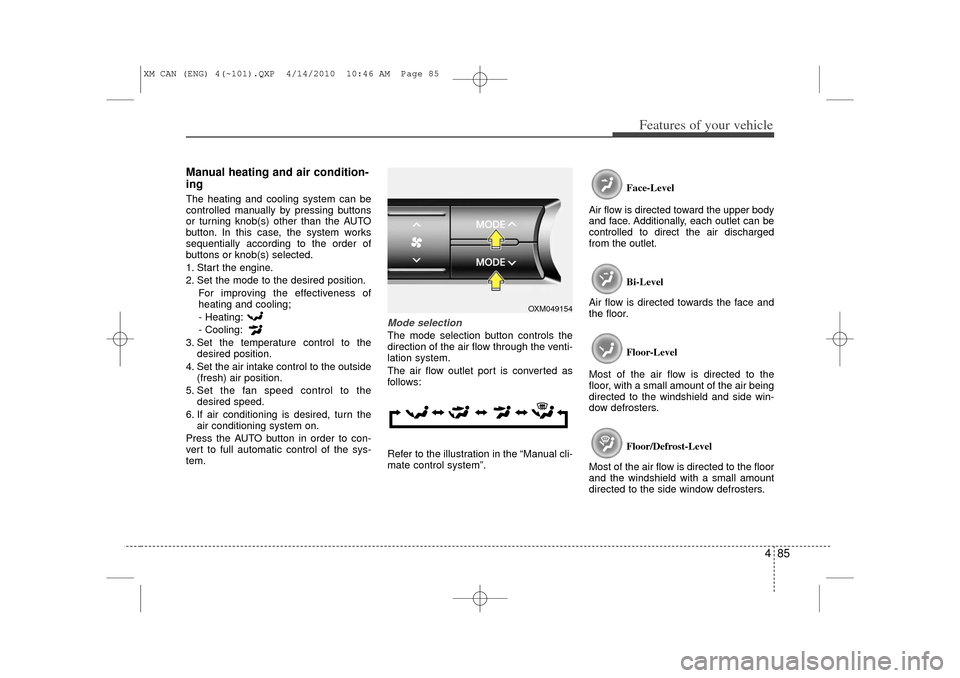
Mode selectionThe mode selection button controls the
direction of the air flow through the venti-
lation system.
The air flow outlet port is converted as
follows:
Refer to the illustration in the “Manual cli-
mate control system”. Face-Level
Air flow is directed toward the upper body
and face. Additionally, each outlet can be
controlled to direct the air discharged
from the outlet.
Bi-Level
Air flow is directed towards the face and
the floor.
Floor-Level
Most of the air flow is directed to the
floor, with a small amount of the air being
directed to the windshield and side win-
dow defrosters.
Floor/Defrost-Level
Most of the air flow is directed to the floor
and the windshield with a small amount
directed to the side window defrosters.
OXM049154
XM CAN (ENG) 4(~101).QXP 4/14/2010 10:46 AM Page 85
Page 187 of 377
4 109
Features of your vehicle
Using RADIO, SETUP, VOLUME
and AUDIO CONTROL
1. FM/AM Selection Button The FM/AM button toggles between FM
and AM. Listed below are the paths as
the system switches from FM to AM and
back to FM.
FM/AM : FM1
➟FM2
➟AM
➟FM1...
FM : FM1
➟FM2
➟FM1...
2. Power ON/OFF Button & Volume Control Knob Turns the audio system on/off when
the ignition switch is on ACC or ON.
If the knob is turned clockwise/counter- clockwise, the volume will increase
/decrease.3. Automatic Station Seek Button When the [SEEK ] is pressed, it will
automatically tune to the next lower
station.
When the [SEEK ] is pressed, it will automatically tune to the next higher
station.
4. SCAN Button When the button is pressed, it auto-matically scans the radio stations
upwards.
The SCAN feature steps through each station, starting from the initial station,
for ten seconds.
Press the [SCAN] button again to stop the scan feature and to listen to the
currently selected channel.5. MUTE ButtonWhen the button is pressed, stops sound
and “Audio Mute” is displayed on LCD.6. Preset Selection Button Press [1]~[6] buttons less than 0.8 sec-onds to play the station saved in each
button.
Press [1]~[6] b utton more than 0.8 sec-
onds or longer to save the current sta-
tion to the respective button with a
beep.
7. TUNE Knob & Audio Control Knob Rotate the knob clockwise or counter-
clock wise to increase or decrease from
current frequency.
(AM 10 kHz, FM 200 kHz)
Pressing the button changes the BASS,
MIDDLE, TREBLE, FADER and BAL-
ANCE TUNE mode. The mode selected
is shown on the display. After selecting
each mode, rotate the Audio control knob
clockwise or counterclockwise.
BASS Control
To increase the BASS, rotate the knob
clockwise, while to decrease the BASS,
rotate the knob counterclockwise.
MIDDLE Control
To increase the MIDDLE, rotate the knob
clockwise, while to decrease the MID-
DLE, rotate the knob counterclockwise.
TREBLE Control
To increase the TREBLE, rotate the knob
clockwise, while to decrease the TRE-
BLE, rotate the knob counterclockwise.
XM CAN (ENG) 4(102~audio).qxp 4/14/2010 10:53 AM Page 109