Start button KIA Sorento 2011 2.G User Guide
[x] Cancel search | Manufacturer: KIA, Model Year: 2011, Model line: Sorento, Model: KIA Sorento 2011 2.GPages: 377, PDF Size: 7.51 MB
Page 201 of 377
4 123
Features of your vehicle
Using SIRIUS Satellite RadioYour Kia vehicle is equipped with a 3
month complimentary period of SIRIUS
Satellite Radio so you have access to
over 130 channels of music, information,
and entertainment programming.ActivationIn order to extend or reactivate your sub-
scription to SIRIUS Satellite Radio, you
will need to contact SIRIUS Customer
Care at 888-539-7474. Have your 12 digit
SID (Sirius Identification Number)/ESN
(Electronic Serial Number) ready. To
retrieve the SID/ESN, turn on the radio,
press the [SAT] button, and tune to chan-
nel zero. Please note that the vehicle will
need to be turned on, in Sirius mode, and
have an unobstructed view of the sky in
order for the radio to receive the activa-
tion signal.
1. SATELLITE RADIO SelectionButton (SIRIUS Satellite Radio)Press the [SAT] button to switch to SIR-
IUS Satellite Radio. It cycles through the
different bands as noted below.
SAT1
➟SAT2
➟SAT3
➟SAT1
➟...
2. Channel Selection Button Press [ SEEK ] button for less
than 0.8 seconds to select previous or
next channel.
Press [ SEEK ] button for 0.8 seconds or longer to continuously
move to previous or next channel.
If "CATEGORY" Icon is displayed at the top of the screen, channel up/down
is done through the channels within
current category.3. Preset Selection Button Press [1]~[6] buttons less than 0.8 sec-onds to play the channel saved in each
button.
Press [1]~[6] button for 0.8 seconds or longer to save current channel to the
respective button with a beep.
4. SCAN Selection Button When the [SCAN] button is pressed, itautomatically scans the radio stations
upwards.
The SCAN feature steps through every channel, starting from the initial chan-
nel, for ten seconds.
Press the [SCAN] button again to stop the scan feature and to listen to the
currently selected channel.
If "CATEGORY" Icon is displayed at the top of the screen, channel chang-
ing is done through the channels with-
in current category.5. Tune Knob and Enter Button Rotate clockwise to increase the chan-nel number or to scroll down the cate-
gory list.
Rotate counterclockwise to decrease the channel number or to scroll up the
category list.
Press this to make selection of chan- nels or items.
XM CAN (ENG) 4(102~audio).qxp 4/14/2010 10:53 AM Page 123
Page 207 of 377
4 129
Features of your vehicle
6. Bluetooth
®
system will repeat the
name you stated.
7. Say "Yes" to confirm.
8. The audio displays “searching ---- passkey: 0000” and asks you to initiate
pairing procedure from the phone.
9. Search the Bluetooth
®system on your
phone .Your phone should display your
[vehicle model name] on the
Bluetooth
®
device list. Then attempt
pairing on your phone
10. After Pairing is completed, your phone will start to transfer
phone/contact list to the audio sys-
tem.
- This process may take from a few minutes to over 10 minutes depend-
ing on the phone model and number
of entries in the phone/contact list.
11. By manual operation: - Select “PAIR” in PHONE menu, thenproceed from step 5
Note:Until the audio displays “Transfer
Complete”, Bluetooth
®
hands-free
feature may not be fully operational.
Note:If the phone is paired to two or more
vehicles of the same model, i.e. both
vehicles are KIA SORENTO, some
phones may not handle Bluetooth
®
devices of that name correctly. In this
case, you may need to change the
name displayed on your phone from
Sorento to Sorento1 and Sorento2.
Refer to your phone’s User’s Guide, or
contact your cellular carrier or phone
manufacturer for instructions.
Connecting phone
When the Bluetooth
®system is enabled,
the phone previously used is automati-
cally selected and re-connected. If you
want to select different phone previously
paired, the phone can be selected
through “Select Phone” menu.
Only a selected phone can be used with
the hands-free system at a time.
1. Press button.
2. Say "Set Up".
3. Say "Select Phone" after prompt
- The system lists all the registeredphone names.
4. Say the name or number of desired phone from the list.
5. Say "Yes" to confirm. 6. By manual operation:
- Select “SELECT” in PHONE menu,then select desired phone from the list.
Deleting Phone
The paired phone can be deleted.
- When the phone is deleted, all the infor- mation associated with that phone is
also deleted (including phonebook).
- If you want to use the deleted phone with the audio system again, pairing
procedure must be completed once
more.
1. Press button.
2. Say “Set Up”.
3. Say “Delete Phone” after prompt. - The system lists all the registeredphone names.
4. Say the name or number of desired phone from the list.
5. Say “Yes” to confirm.
6. By manual operation: - Select “DELETE” in PHONE menu,then select desired phone from the list.
XM CAN (ENG) 4(102~audio).qxp 4/14/2010 10:53 AM Page 129
Page 209 of 377
4 131
Features of your vehicle
✽
✽NOTICE- The system can recognize single digits
from zero to nine. Numbers that are
ten or greater cannot be recognized.
- You can enter each digit individually or group digits together in preferred
string lengths.
- To speed up input, it is a good idea to group all digits into a continuous
string.
- The display corresponding to each operation appears on the screen as fol-
lows:
- Input operation example: 1. Say: “Nine, nine, five”➟ Display: “995”
2. And say: “Seven, three, four”➟ Display: “995734”
Adding Entry by Phone
1. Press button.
2. Say "Phonebook".
3. Say "Add Entry" after prompt.
4. Say "By Phone" to proceed.
5. Say “Yes” to confirm.
6. Your phone will start to transfer phone/contact list to the audio system.
This process may take over 10 minutes
depending on the phone model and
number of entries
7. Wait until the audio displays “Transfer Complete” message.
Changing Name
The registered names can be modified.
1. Press button.
2. Say “Phonebook”.
3. Say “Change Name” after prompt.
4. Say the name of the entry (voice tag).
5. Say “Yes” to confirm.
6. Say new desired name.
Deleting Name
The registered names can be deleted.
1. Press button.
2. Say “Phonebook”.
3. Say “Delete Name” after prompt.
4. Say the name of the entry (voice tag).
5. Say “Yes” to confirm.
■Making a Phone Call Calling by Name
A phone call can be made by speaking
names registered in the audio system.
1. Press button.
2. Say "Call".
3. Say “Name” when prompted.
4. Say desired name (voice tag).
5. Say desired location (phone number type). Only stored locations can be
selected.
6. Say “Yes” to confirm and make a call.
✽ ✽ TipA shortcut to each of the following func-
tions is available:
1. Say “Call Name”
2. Say “Call
3. Say “Call
XM CAN (ENG) 4(102~audio).qxp 4/14/2010 10:53 AM Page 131
Page 212 of 377
5
Before driving / 5-3
Key positions / 5-4
Engine start/stop button / 5-7
Manual Transaxle / 5-12
Automatic transaxle / 5-15
Four wheel drive (4WD) / 5-21
Brake system / 5-27
Cruise control system / 5-39
Economical operation / 5-43
Special driving conditions / 5-45
Winter driving / 5-50
Trailer towing / 5-53
Vehicle load limit / 5-62
Vehicle weight glossary/ 5-67
Driving your vehicle
XM CAN (ENG) 5.qxp 11/26/2009 12:00 PM Page 1
Page 218 of 377
57
Driving your vehicle
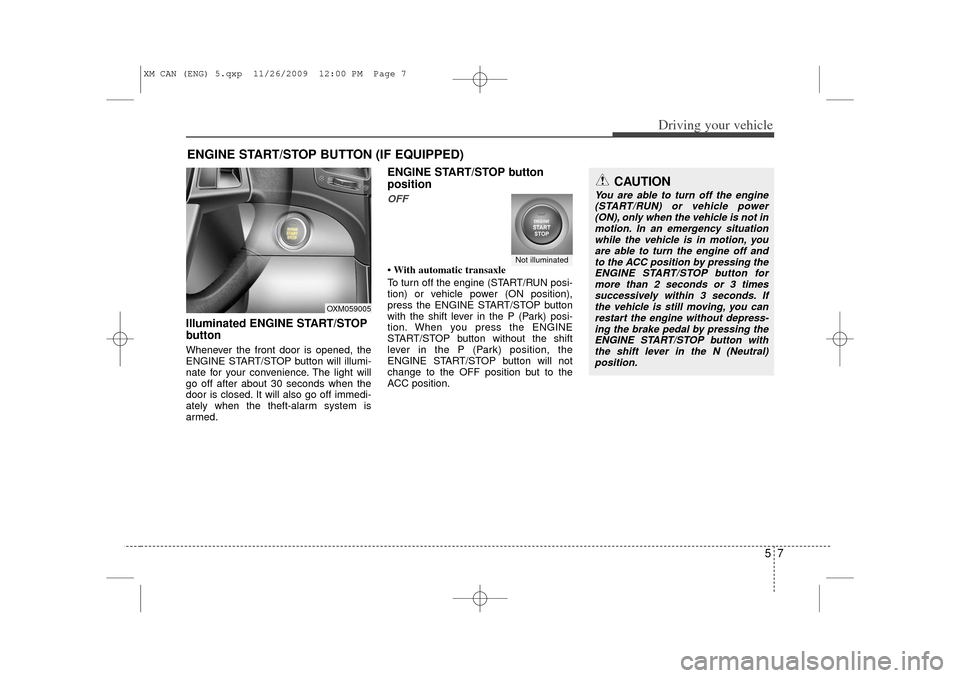
Illuminated ENGINE START/STOP
buttonWhenever the front door is opened, the
ENGINE START/STOP button will illumi-
nate for your convenience. The light will
go off after about 30 seconds when the
door is closed. It will also go off immedi-
ately when the theft-alarm system is
armed.
ENGINE START/STOP button
positionOFF• With automatic transaxle
To turn off the engine (START/RUN posi-
tion) or vehicle power (ON position),
press the ENGINE START/STOP button
with the shift lever in the P (Park) posi-
tion. When you press the ENGINE
START/STOP button without the shift
lever in the P (Park) position, the
ENGINE START/STOP button will not
change to the OFF position but to the
ACC position.
ENGINE START/STOP BUTTON (IF EQUIPPED)
Not illuminated
CAUTION
You are able to turn off the engine(START/RUN) or vehicle power(ON), only when the vehicle is not in motion. In an emergency situationwhile the vehicle is in motion, youare able to turn the engine off and to the ACC position by pressing theENGINE START/STOP button for more than 2 seconds or 3 timessuccessively within 3 seconds. Ifthe vehicle is still moving, you can restart the engine without depress-ing the brake pedal by pressing theENGINE START/STOP button with the shift lever in the N (Neutral)position.
OXM059005
XM CAN (ENG) 5.qxp 11/26/2009 12:00 PM Page 7
Page 219 of 377
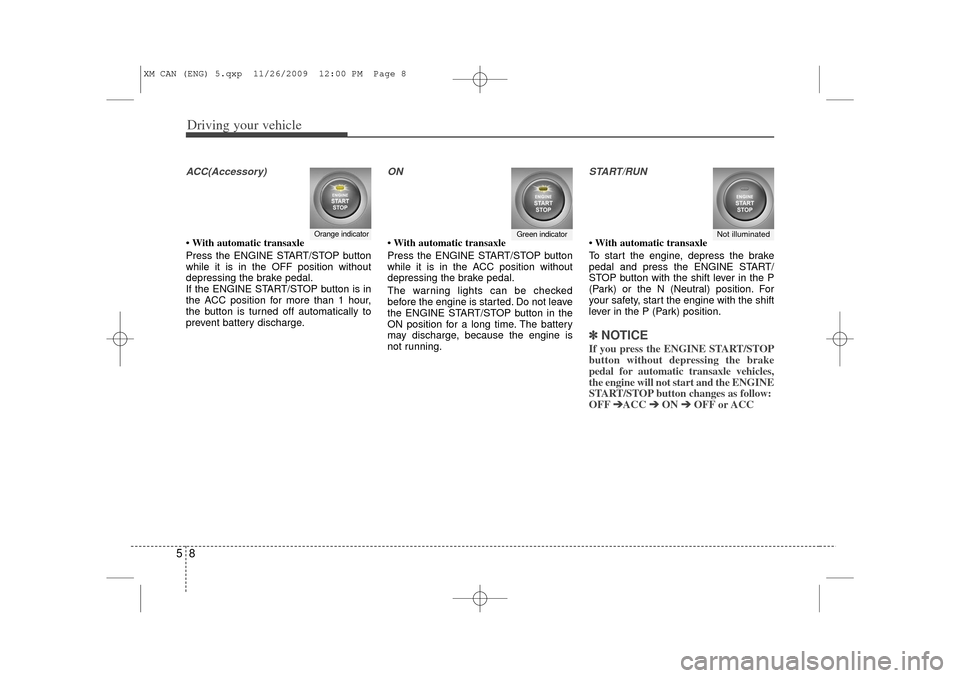
Driving your vehicle85ACC(Accessory)• With automatic transaxle
Press the ENGINE START/STOP button
while it is in the OFF position without
depressing the brake pedal.
If the ENGINE START/STOP button is in
the ACC position for more than 1 hour,
the button is turned off automatically to
prevent battery discharge.
ON• With automatic transaxle
Press the ENGINE START/STOP button
while it is in the ACC position without
depressing the brake pedal.
The warning lights can be checked
before the engine is started. Do not leave
the ENGINE START/STOP button in the
ON position for a long time. The battery
may discharge, because the engine is
not running.
START/RUN• With automatic transaxle
To start the engine, depress the brake
pedal and press the ENGINE START/
STOP button with the shift lever in the P
(Park) or the N (Neutral) position. For
your safety, start the engine with the shift
lever in the P (Park) position.✽ ✽
NOTICEIf you press the ENGINE START/STOP
button without depressing the brake
pedal for automatic transaxle vehicles,
the engine will not start and the ENGINE
START/STOP button changes as follow:
OFF ➔ ➔
ACC ➔
➔
ON ➔
➔
OFF or ACC
Orange indicator
Green indicator
Not illuminated
XM CAN (ENG) 5.qxp 11/26/2009 12:00 PM Page 8
Page 220 of 377
59
Driving your vehicle
✽
✽
NOTICEIf you leave the ENGINE START/ STOP
button in the ACC or ON position for a
long time, the battery will discharge.
E040300AHM-EUStarting the engine with a smart
key (if equipped)1. Carry the smart key or leave it inside
the vehicle.
2. Make sure the parking brake is firmly applied
3. Automatic Transaxle - Place the
transaxle shift lever in P (Park).
Depress the brake pedal fully.
4. Press the ENGINE START/STOP but- ton while depressing the brake pedal.
5. In extremely cold weather (below - 18°C (0°F)) or after the vehicle has not
been operated for several days, let the
engine warm up without depressing
the accelerator.
Whether the engine is cold or warm, it
should be started without depressing the
accelerator.
WARNING
Never press the ENGINE START/
STOP button while the vehicle is
in motion except in an emer-
gency. If the engine stops while
the vehicle is in motion, this
would result in loss of directional
control and braking function,
which could cause an accident.
Before leaving the driver's seat, always make sure the shift lever
is engaged in P (Park), set the
parking brake fully and shut the
engine off. Unexpected and sud-
den vehicle movement may occur
if these precautions are not
taken.
(Continued)
(Continued)
Never reach for the ENGINESTART/STOP button or any other
controls through the steering
wheel while the vehicle is in
motion. The presence of your
hand or arm in the area could
cause loss of vehicle control, an
accident and serious bodily
injury or death.
Do not place any movable objects around the driver's seat as they
may move while driving, interfere
with the driver and lead to an
accident.
XM CAN (ENG) 5.qxp 11/26/2009 12:00 PM Page 9
Page 221 of 377
Driving your vehicle10
5 Even if the smart key is in the vehicle,
if it is far away from you, the engine
may not start.
When the ENGINE START/STOP but- ton is in the ACC position or above, if
any door is opened, the system checks
for the smart key. If the smart key is not
in the vehicle, the "KEY OUT" indicator
will blink. And if all doors are closed,
the chime will sound for 5 seconds. The
indicator or warning will turn off while
the vehicle is moving. Always have the
smart key with you.
WARNING
The engine will start, only when the
smart key is in the vehicle.
Never allow children or any person
who is unfamiliar with the vehicle
touch the ENGINE START/STOP
button or related parts.
CAUTION
If the engine stalls while the vehicleis in motion, do not attempt to move the shift lever to the P (Park) posi-tion. If the traffic and road condi-tions permit, you may put the shift lever in the N (Neutral) positionwhile the vehicle is still moving and press the ENGINE START/STOPbutton in an attempt to restart the engine.
XM CAN (ENG) 5.qxp 11/26/2009 12:00 PM Page 10
Page 222 of 377
511
Driving your vehicle
✽
✽
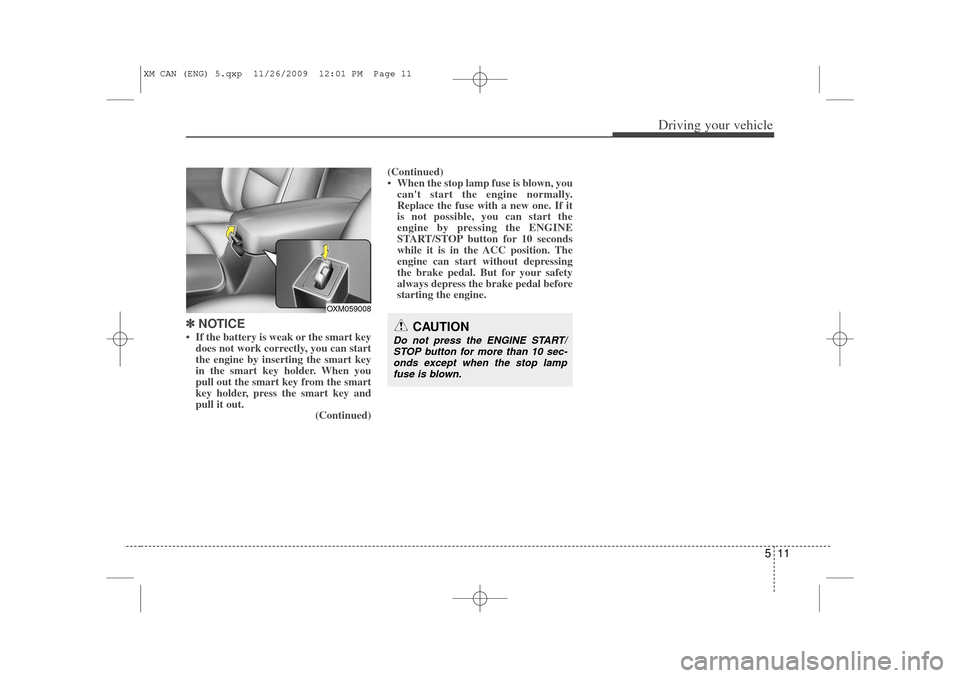
NOTICE• If the battery is weak or the smart key
does not work correctly, you can start
the engine by inserting the smart key
in the smart key holder. When you
pull out the smart key from the smart
key holder, press the smart key and
pull it out. (Continued)(Continued)
• When the stop lamp fuse is blown, you
can't start the engine normally.
Replace the fuse with a new one. If it
is not possible, you can start the
engine by pressing the ENGINE
START/STOP button for 10 seconds
while it is in the ACC position. The
engine can start without depressing
the brake pedal. But for your safety
always depress the brake pedal before
starting the engine.
CAUTION
Do not press the ENGINE START/
STOP button for more than 10 sec- onds except when the stop lampfuse is blown.
OXM059008
XM CAN (ENG) 5.qxp 11/26/2009 12:01 PM Page 11
Page 230 of 377
519
Driving your vehicle
E060103AHMIgnition key interlock system The ignition key cannot be removed
unless the shift lever is in the P (Park)
position. Even if the ignition switch is in
the LOCK position, the key also cannot
be removed.
If your vehicle is equipped with ENGINE
START/STOP button, the button will not
change to the OFF position unless the
shift lever is in the P (Park) position.
E060200AAMGood driving practices Never move the gear shift lever from P(Park) or N (Neutral) to any other posi-
tion with the accelerator pedal
depressed.
Never move the gear shift lever into P (Park) when the vehicle is in motion.
Be sure the vehicle is completely stopped before you attempt to shift into
R (Reverse) or D (Drive).
Never take the vehicle out of gear and coast down a hill. This may be
extremely hazardous. Always leave the
car in gear when moving.
Do not "ride" the brakes. This can cause them to overheat and malfunc-
tion. Instead, when you are driving
down a long hill, slow down and shift to
a lower gear. When you do this, engine
braking will help slow down the car.
Slow down before shifting to a lower gear. Otherwise, the lower gear may
not be engaged. Always use the parking brake. Do not
depend on placing the transaxle in P
(Park) to keep the vehicle from moving.
Exercise extreme caution when driving on a slippery surface. Be especially
careful when braking, accelerating or
shifting gears. On a slippery surface,
an abrupt change in vehicle speed can
cause the drive wheels to lose traction
and the vehicle to go out of control.
Optimum vehicle performance and economy is obtained by smoothly
depressing and releasing the accelera-
tor pedal.
XM CAN (ENG) 5.qxp 11/26/2009 12:01 PM Page 19