battery KIA Sorento 2014 3.G User Guide
[x] Cancel search | Manufacturer: KIA, Model Year: 2014, Model line: Sorento, Model: KIA Sorento 2014 3.GPages: 508, PDF Size: 7.59 MB
Page 118 of 508
427
Features of your vehicle
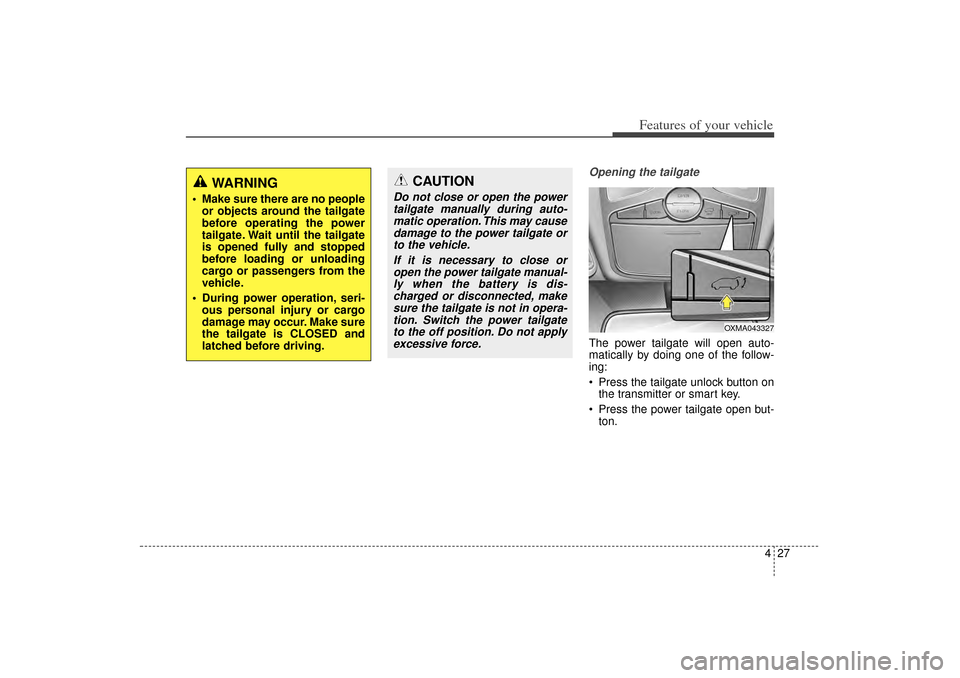
Opening the tailgateThe power tailgate will open auto-
matically by doing one of the follow-
ing:
Press the tailgate unlock button onthe transmitter or smart key.
Press the power tailgate open but- ton.
WARNING
Make sure there are no peopleor objects around the tailgate
before operating the power
tailgate. Wait until the tailgate
is opened fully and stopped
before loading or unloading
cargo or passengers from the
vehicle.
During power operation, seri- ous personal injury or cargo
damage may occur. Make sure
the tailgate is CLOSED and
latched before driving.
CAUTION
Do not close or open the powertailgate manually during auto-matic operation. This may causedamage to the power tailgate orto the vehicle.
If it is necessary to close oropen the power tailgate manual-ly when the battery is dis-charged or disconnected, makesure the tailgate is not in opera-tion. Switch the power tailgateto the off position. Do not applyexcessive force.
OXMA043327
XM(FL) CAN(ENG) 4a(~158).QXP 1/23/2013 3:47 PM Page 27
Page 120 of 508
429
Features of your vehicle
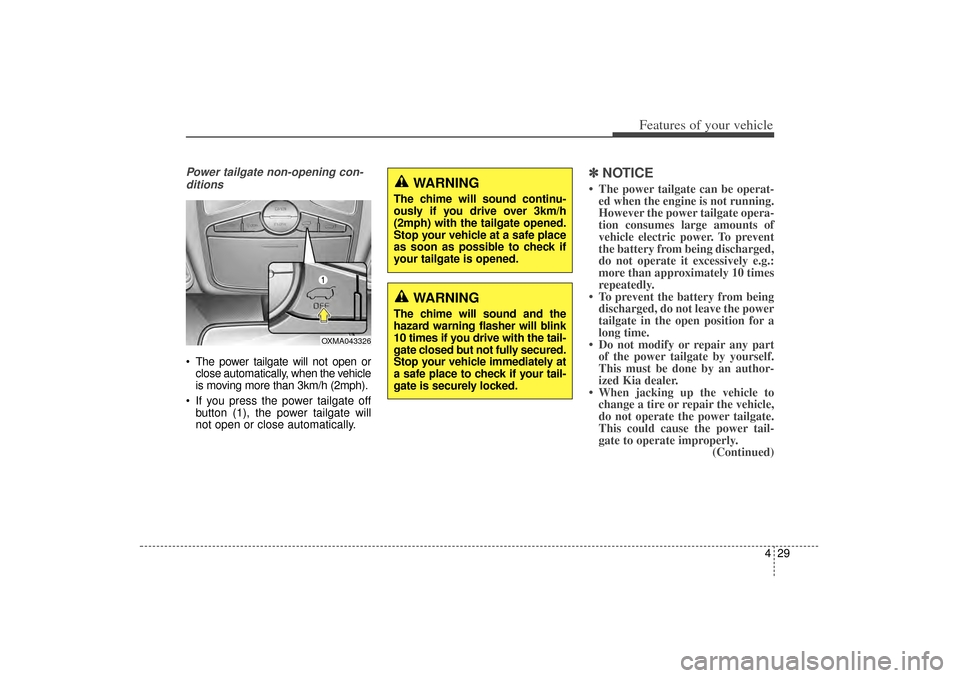
Power tailgate non-opening con-ditions The power tailgate will not open or close automatically, when the vehicle
is moving more than 3km/h (2mph).
If you press the power tailgate off button (1), the power tailgate will
not open or close automatically.
✽ ✽ NOTICE• The power tailgate can be operat-
ed when the engine is not running.
However the power tailgate opera-
tion consumes large amounts of
vehicle electric power. To prevent
the battery from being discharged,
do not operate it excessively e.g.:
more than approximately 10 times
repeatedly.
• To prevent the battery from being discharged, do not leave the power
tailgate in the open position for a
long time.
• Do not modify or repair any part of the power tailgate by yourself.
This must be done by an author-
ized Kia dealer.
• When jacking up the vehicle to change a tire or repair the vehicle,
do not operate the power tailgate.
This could cause the power tail-
gate to operate improperly. (Continued)
OXMA043326
WARNING
The chime will sound continu-
ously if you drive over 3km/h
(2mph) with the tailgate opened.
Stop your vehicle at a safe place
as soon as possible to check if
your tailgate is opened.
WARNING
The chime will sound and the
hazard warning flasher will blink
10 times if you drive with the tail-
gate closed but not fully secured.
Stop your vehicle immediately at
a safe place to check if your tail-
gate is securely locked.
XM(FL) CAN(ENG) 4a(~158).QXP 1/23/2013 3:47 PM Page 29
Page 122 of 508
431
Features of your vehicle
How to reset the power tailgateIf the battery has been discharged or
disconnected, or if the related fuse has
been replaced or disconnected, for the
power tailgate to operate normally,
reset the power tailgate as follows:
1. Put the shift lever in P (Park).
2. Press the tailgate handle switchand tailgate close button at the
same time for more than 3 sec-
onds. (the chime will sound).
3. Close the tailgate manually.
4. Open the tailgate using the tail- gate handle switch and allow it to
fully open.
5. After fully opening, the tailgate will complete initialization and lights
will flash twice indicating reset
complete.
If the power tailgate does not work
properly after the above procedure,
have the system checked by an
authorized Kia dealer.
✽ ✽ NOTICEIf the power tailgate does not oper-
ate normally, first check the follow-
ing condition before using the power
tailgate.
• Make sure the shift lever is in
Park
• Make sure the Power Tailgate Off switch is not pressed.
If any of the power tailgate buttons
are pressed while the power tailgate
is in operation, the power tailgate
will stop. If any button is pressed
again the power tailgate will reverse
direction.
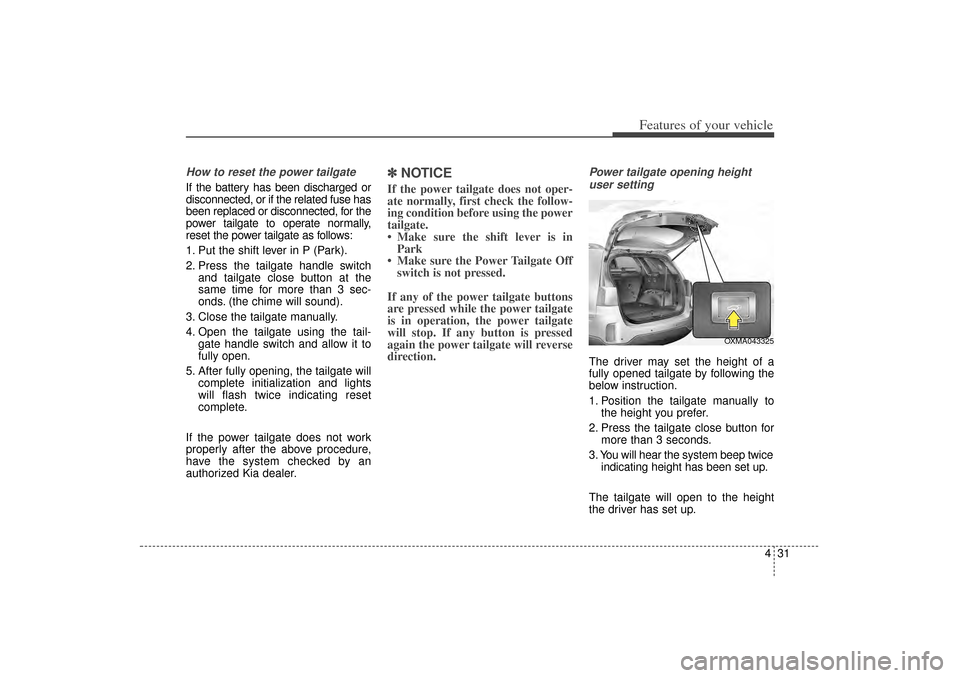
Power tailgate opening height user settingThe driver may set the height of a
fully opened tailgate by following the
below instruction.
1. Position the tailgate manually to the height you prefer.
2. Press the tailgate close button for more than 3 seconds.
3. You will hear the system beep twice indicating height has been set up.
The tailgate will open to the height
the driver has set up.
OXMA043325
XM(FL) CAN(ENG) 4a(~158).QXP 1/23/2013 3:47 PM Page 31
Page 139 of 508
Features of your vehicle48
4Resetting the sunroofWhenever the vehicle battery is dis-
connected or discharged, you must
reset your sunroof system as follows:
1.Turn the ignition switch to the ON
position.
2.Close the sunshade and sunroof completely if opened.
3.Release the sunroof control lever.
4.Push the sunroof control lever for- ward in the direction of close (about
10 seconds) until the sunroof moves
a little. Then, release the lever. 5.Push the sunroof control lever for-
ward in the direction of close, until
the sunroof operates as follows
again:
The sunshade and sunroof glass
slide open → The sunroof glass
slide close → The sunshade close
Then, release the lever.
When this is complete, the sunroof
system has been reset.
✽ ✽ NOTICEIf you do not reset the sunroof, it
may not work properly.
XM(FL) CAN(ENG) 4a(~158).QXP 1/23/2013 3:48 PM Page 48
Page 141 of 508
Features of your vehicle50
4(Continued)
• When you operate the steering
wheel in low temperature, abnor-
mal noise may occur. If tempera-
ture rises, the noise will likely dis-
appear. This is a normal condition.
• When the charging system warn- ing light comes on due to the low
voltage (When the alternator or
battery) does not operate normal-
ly or it malfunctions), the steering
wheel may require increased
steering effort.
Tilt and telescopic steering Tilt and telescopic steering allows
you to adjust the steering wheel
before you drive. You can also raise it
to give your legs more room when
you exit and enter the vehicle.
The steering wheel should be posi-
tioned so that it is comfortable for
you to drive, while permitting you to
see the instrument panel warning
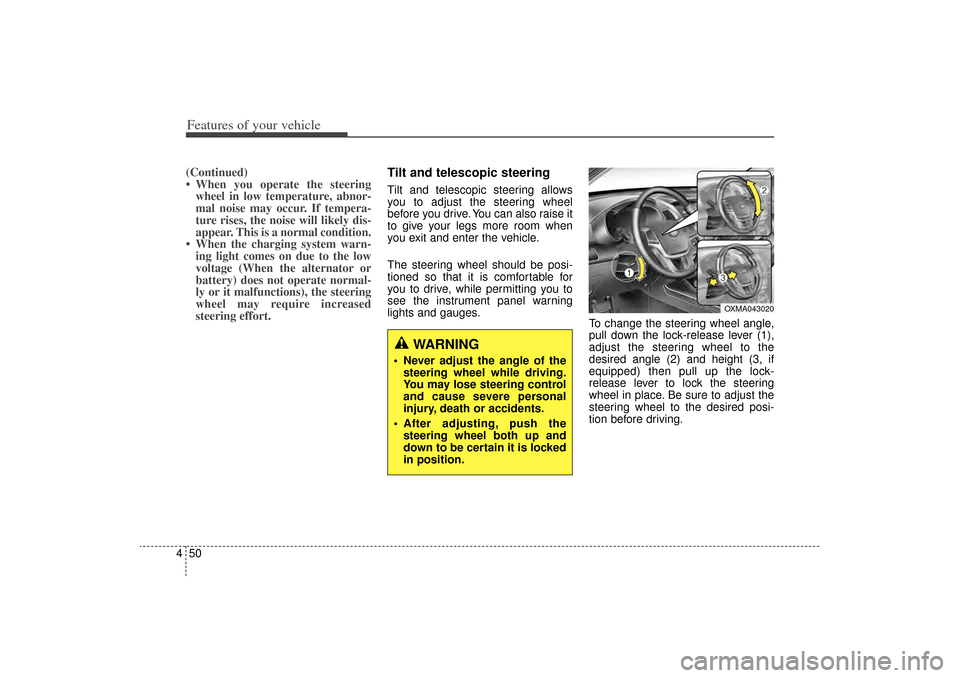
lights and gauges. To change the steering wheel angle,
pull down the lock-release lever (1),
adjust the steering wheel to the
desired angle (2) and height (3, if
equipped) then pull up the lock-
release lever to lock the steering
wheel in place. Be sure to adjust the
steering wheel to the desired posi-
tion before driving.
WARNING
Never adjust the angle of the
steering wheel while driving.
You may lose steering control
and cause severe personal
injury, death or accidents.
After adjusting, push the steering wheel both up and
down to be certain it is locked
in position.
OXMA043020
XM(FL) CAN(ENG) 4a(~158).QXP 1/23/2013 3:48 PM Page 50
Page 151 of 508
Features of your vehicle60
4
Retain the original transmitter for
future programming procedures (i.e.,
new vehicle purchase). It is also sug-
gested that upon the sale of the vehi-
cle, the programmed HomeLink but-
tons be erased for security purposes
(follow step 1 in the “Programming”
portion of this text).
Programming
Your vehicle may require the ignition
switch to be turned to the ACC posi-
tion for programming and/or opera-
tion of HomeLink. It is also recom-
mended that a new battery be
replaced in the hand-held transmitter
of the device being programmed to
HomeLink for quicker training and
accurate transmission of the radio-
frequency.
Follow these steps to train your
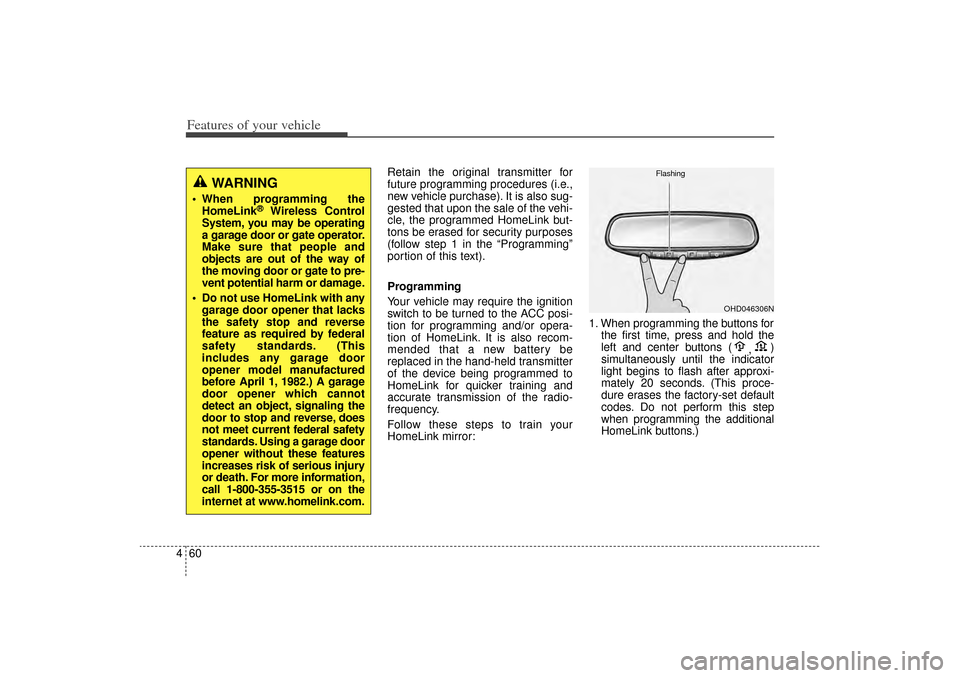
HomeLink mirror: 1. When programming the buttons for
the first time, press and hold the
left and center buttons ( ,)
simultaneously until the indicator
light begins to flash after approxi-
mately 20 seconds. (This proce-
dure erases the factory-set default
codes. Do not perform this step
when programming the additional
HomeLink buttons.)
WARNING
When programming the HomeLink
®
Wireless Control
System, you may be operating
a garage door or gate operator.
Make sure that people and
objects are out of the way of
the moving door or gate to pre-
vent potential harm or damage.
Do not use HomeLink with any garage door opener that lacks
the safety stop and reverse
feature as required by federal
safety standards. (This
includes any garage door
opener model manufactured
before April 1, 1982.) A garage
door opener which cannot
detect an object, signaling the
door to stop and reverse, does
not meet current federal safety
standards. Using a garage door
opener without these features
increases risk of serious injury
or death. For more information,
call 1-800-355-3515 or on the
internet at www.homelink.com.
OHD046306N
Flashing
XM(FL) CAN(ENG) 4a(~158).QXP 1/23/2013 3:49 PM Page 60
Page 157 of 508

Features of your vehicle66
4Folding the outside rearview mirrorManual type
To fold the outside rearview mirror,
grasp the housing of the mirror and
then fold it toward the rear of the
vehicle. Electric type
To fold the outside rearview mirror,
press the button.
To unfold it, press the button again or
press the unlock button.The outside rearview mirror can be
folded when you press the door lock
button on the smart key within 4 sec-
onds after locking the doors by
pressing the button.
The outside rearview mirror can be
unfolded when you press the door
unlock button on the smart key with-
in 4 seconds after unlocking the
doors by pressing the button.
OXM049039
OXMA042040
CAUTION
In case it is an electric type out-
side rearview mirror, don’t fold itby hand. It could cause motorfailure.
CAUTION
The electric type outsiderearview mirror operates eventhough the ignition switch is inthe LOCK position. However, toprevent unnecessary batterydischarge, do not adjust themirrors longer than necessarywhile the engine is not running.
XM(FL) CAN(ENG) 4a(~158).QXP 1/23/2013 3:49 PM Page 66
Page 167 of 508
Features of your vehicle76
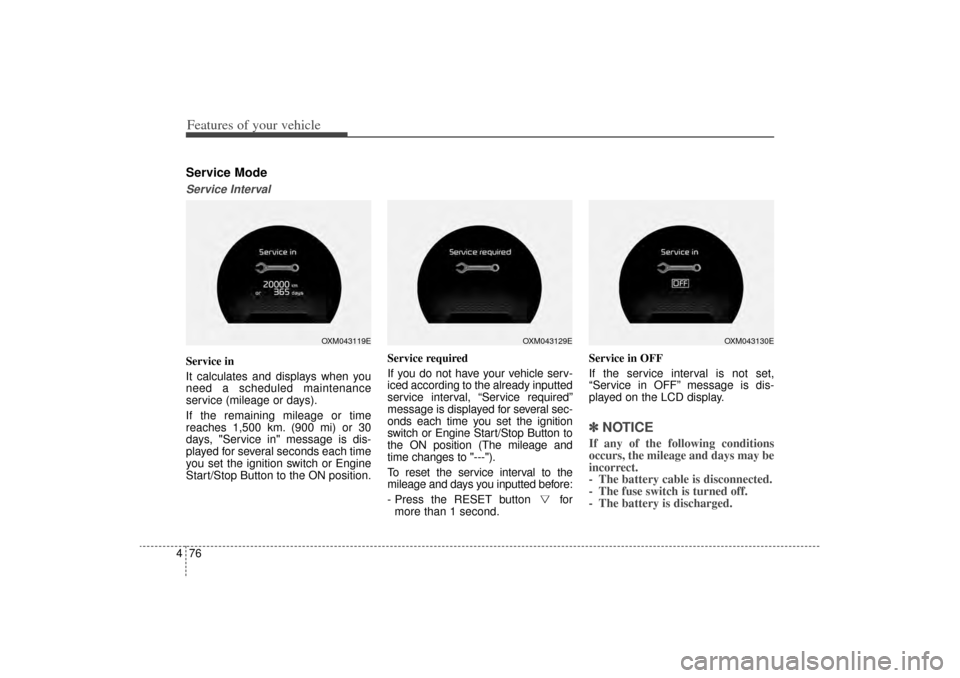
4Service ModeService IntervalService in
It calculates and displays when you
need a scheduled maintenance
service (mileage or days).
If the remaining mileage or time
reaches 1,500 km. (900 mi) or 30
days, "Service in" message is dis-
played for several seconds each time
you set the ignition switch or Engine
Start/Stop Button to the ON position. Service required
If you do not have your vehicle serv-
iced according to the already inputted
service interval, “Service required”
message is displayed for several sec-
onds each time you set the ignition
switch or Engine Start/Stop Button to
the ON position (The mileage and
time changes to "---").
To reset the service interval to the
mileage and days you inputted before:
- Press the RESET button for
more than 1 second. Service in OFF
If the service interval is not set,
“Service in OFF” message is dis-
played on the LCD display.
✽ ✽
NOTICE If any of the following conditions
occurs, the mileage and days may be
incorrect.
- The battery cable is disconnected.
- The fuse switch is turned off.
- The battery is discharged.
OXM043119E
OXM043129E
OXM043130E
XM(FL) CAN(ENG) 4a(~158).QXP 1/23/2013 3:49 PM Page 76
Page 172 of 508
481
Features of your vehicle
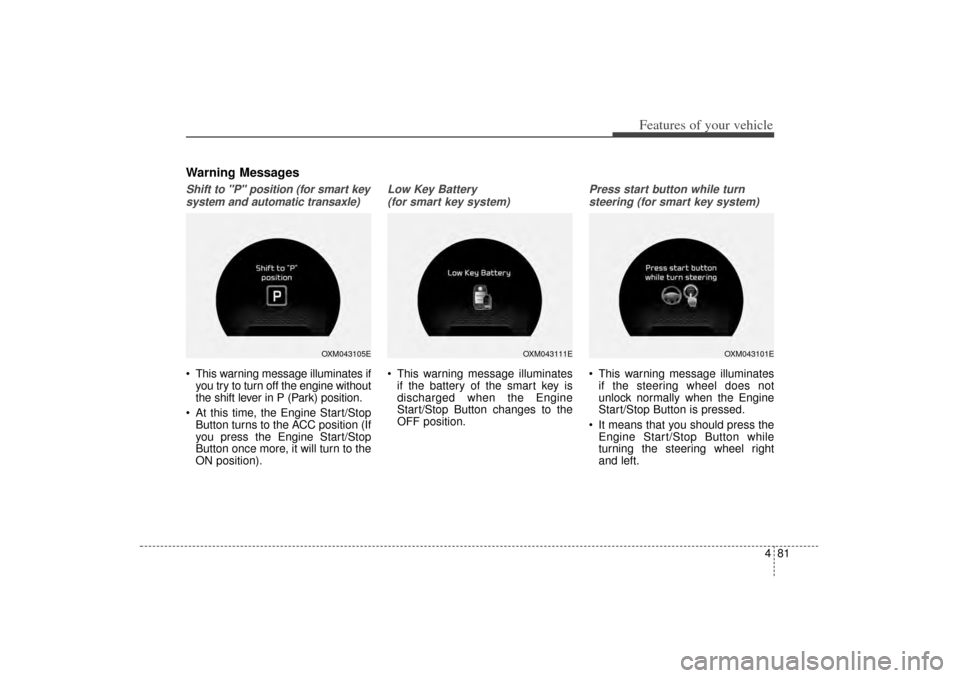
Warning MessagesShift to "P" position (for smart keysystem and automatic transaxle) This warning message illuminates if you try to turn off the engine without
the shift lever in P (Park) position.
At this time, the Engine Start/Stop Button turns to the ACC position (If
you press the Engine Start/Stop
Button once more, it will turn to the
ON position).
Low Key Battery
(for smart key system) This warning message illuminates if the battery of the smart key is
discharged when the Engine
Start/Stop Button changes to the
OFF position.
Press start button while turn
steering (for smart key system) This warning message illuminates if the steering wheel does not
unlock normally when the Engine
Start/Stop Button is pressed.
It means that you should press the Engine Start/Stop Button while
turning the steering wheel right
and left.
OXM043105E
OXM043111E
OXM043101E
XM(FL) CAN(ENG) 4a(~158).QXP 1/23/2013 3:50 PM Page 81
Page 178 of 508
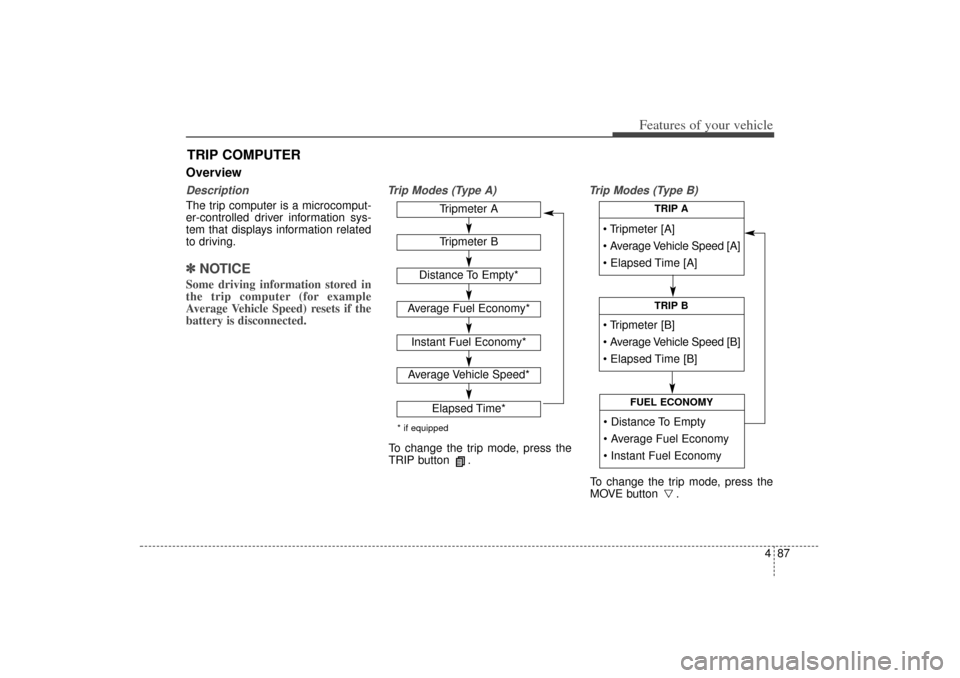
487
Features of your vehicle
OverviewDescriptionThe trip computer is a microcomput-
er-controlled driver information sys-
tem that displays information related
to driving.✽ ✽NOTICESome driving information stored in
the trip computer (for example
Average Vehicle Speed) resets if the
battery is disconnected.
Trip Modes (Type A) Trip Modes (Type B)
TRIP COMPUTER
Tripmeter [A]
Average Vehicle Speed [A]
Elapsed Time [A]
TRIP A
Tripmeter [B]
Average Vehicle Speed [B]
Elapsed Time [B]
TRIP B
Distance To Empty
Average Fuel Economy
Instant Fuel Economy
FUEL ECONOMY
Tripmeter ATripmeter B
Distance To Empty*
Average Fuel Economy*Instant Fuel Economy*Average Vehicle Speed*
Elapsed Time*
* if equippedTo change the trip mode, press the
TRIP button .
To change the trip mode, press the
MOVE button .
XM(FL) CAN(ENG) 4a(~158).QXP 1/23/2013 3:50 PM Page 87