mirror KIA Sorento 2014 3.G User Guide
[x] Cancel search | Manufacturer: KIA, Model Year: 2014, Model line: Sorento, Model: KIA Sorento 2014 3.GPages: 508, PDF Size: 7.59 MB
Page 151 of 508
Features of your vehicle60
4
Retain the original transmitter for
future programming procedures (i.e.,
new vehicle purchase). It is also sug-
gested that upon the sale of the vehi-
cle, the programmed HomeLink but-
tons be erased for security purposes
(follow step 1 in the “Programming”
portion of this text).
Programming
Your vehicle may require the ignition
switch to be turned to the ACC posi-
tion for programming and/or opera-
tion of HomeLink. It is also recom-
mended that a new battery be
replaced in the hand-held transmitter
of the device being programmed to
HomeLink for quicker training and
accurate transmission of the radio-
frequency.
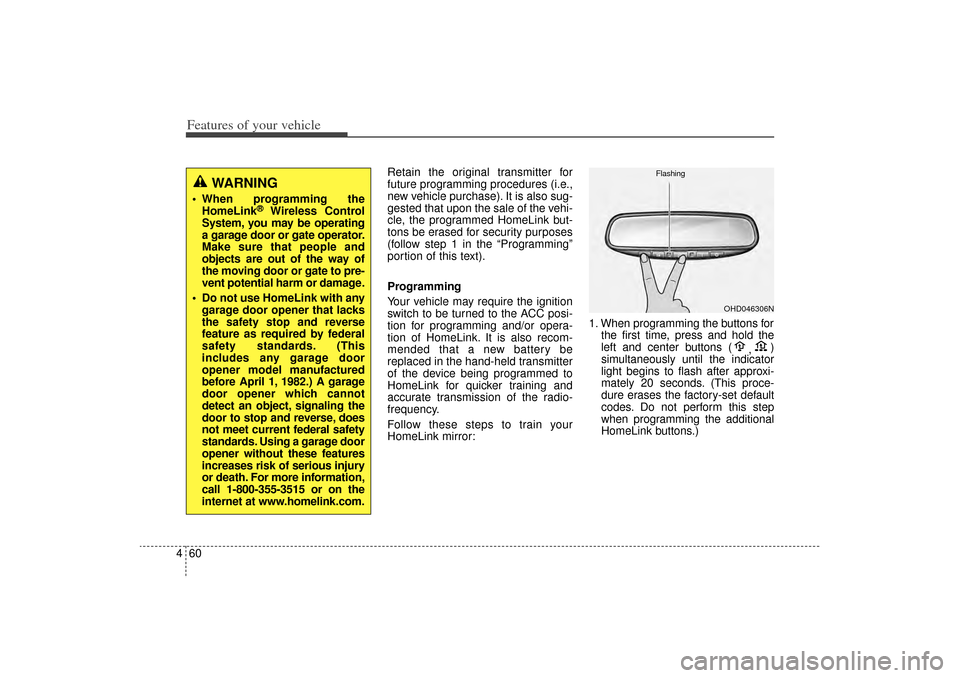
Follow these steps to train your
HomeLink mirror: 1. When programming the buttons for
the first time, press and hold the
left and center buttons ( ,)
simultaneously until the indicator
light begins to flash after approxi-
mately 20 seconds. (This proce-
dure erases the factory-set default
codes. Do not perform this step
when programming the additional
HomeLink buttons.)
WARNING
When programming the HomeLink
®
Wireless Control
System, you may be operating
a garage door or gate operator.
Make sure that people and
objects are out of the way of
the moving door or gate to pre-
vent potential harm or damage.
Do not use HomeLink with any garage door opener that lacks
the safety stop and reverse
feature as required by federal
safety standards. (This
includes any garage door
opener model manufactured
before April 1, 1982.) A garage
door opener which cannot
detect an object, signaling the
door to stop and reverse, does
not meet current federal safety
standards. Using a garage door
opener without these features
increases risk of serious injury
or death. For more information,
call 1-800-355-3515 or on the
internet at www.homelink.com.
OHD046306N
Flashing
XM(FL) CAN(ENG) 4a(~158).QXP 1/23/2013 3:49 PM Page 60
Page 152 of 508
461
Features of your vehicle
✽
✽NOTICEFor non rolling code garage door
openers, follow steps 2 - 3.
For rolling code garage door open-
ers, follow steps 2 - 6.
For Canadian Programming, please
follow the Canadian Programming
section.
For help with determining whether
your garage door opener is non-
rolling code or rolling code, please
refer to the garage door openers
owner’s manual or contact
HomeLink customer service at 1-
800-355-3515.
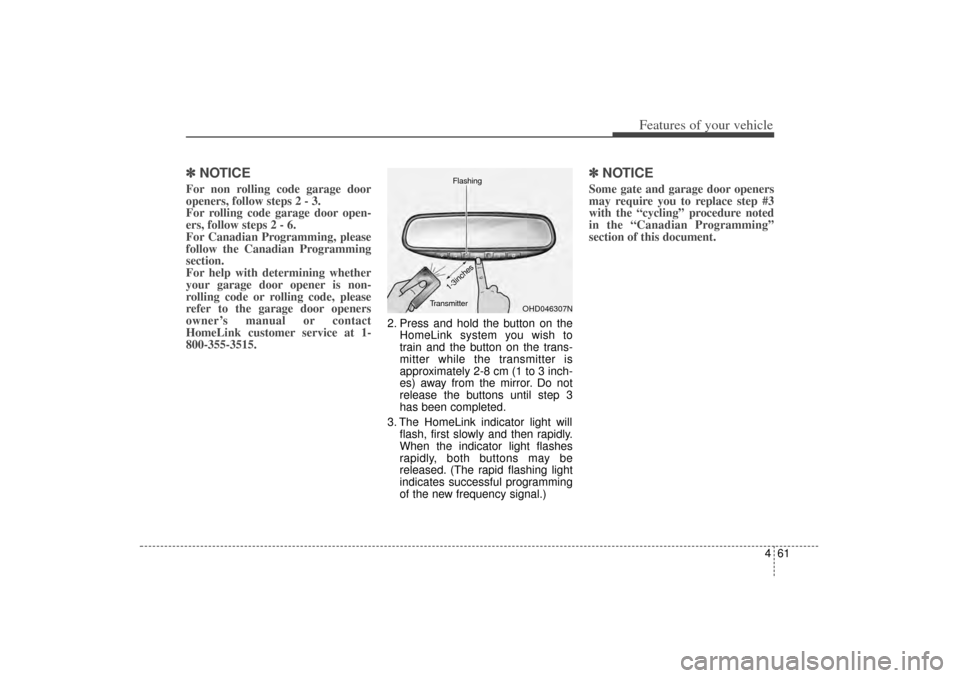
2. Press and hold the button on the
HomeLink system you wish to
train and the button on the trans-
mitter while the transmitter is
approximately 2-8 cm (1 to 3 inch-
es) away from the mirror. Do not
release the buttons until step 3
has been completed.
3. The HomeLink indicator light will flash, first slowly and then rapidly.
When the indicator light flashes
rapidly, both buttons may be
released. (The rapid flashing light
indicates successful programming
of the new frequency signal.)
✽ ✽NOTICESome gate and garage door openers
may require you to replace step #3
with the “cycling” procedure noted
in the “Canadian Programming”
section of this document.
OHD046307N
Flashing
1-3inches
Transmitter
XM(FL) CAN(ENG) 4a(~158).QXP 1/23/2013 3:49 PM Page 61
Page 155 of 508
Features of your vehicle64
4Accessories
If you would like additional informa-
tion on the HomeLink Wireless
Control System, HomeLink compati-
ble products, or to purchase other
accessories such as the HomeLink
®
Lighting Package, please contact
HomeLink at 1-800-355-3515 or on
the internet at www.homelink.com. FCC ID: NZLZTVHL3
IC: 4112A-ZTVHL3
This device complies with Industry
Canada Standard RSS-210.
Operation is subject to the following
two conditions:
1. This device may not cause harm-
ful interference, and
2. This device must accept any inter- ference received, including inter-
ference that may cause undesired
operation.
Outside rearview mirror Be sure to adjust the mirror angles
before driving.
Your vehicle is equipped with both
left-hand and right-hand outside
rearview mirrors. The mirrors can be
adjusted remotely with the remote
switch. The mirror heads can be fold-
ed back to prevent damage during an
automatic vehicle wash or when
passing through a narrow street.
WARNING -
Rearview
mirrors
The right outside rearview mirror is convex. Objects seen
in the mirror are closer than
they appear.
Use your interior rearview mirror or direct observation to
determine the actual distance
of following vehicles when
changing lanes.
WARNING
The transceiver has been tested
and complies with FCC and
Industry Canada rules. Changes
or modifications not expressly
approved by the party responsi-
ble for compliance could void
the user's authority to operate
the device.
XM(FL) CAN(ENG) 4a(~158).QXP 1/23/2013 3:49 PM Page 64
Page 156 of 508
465
Features of your vehicle
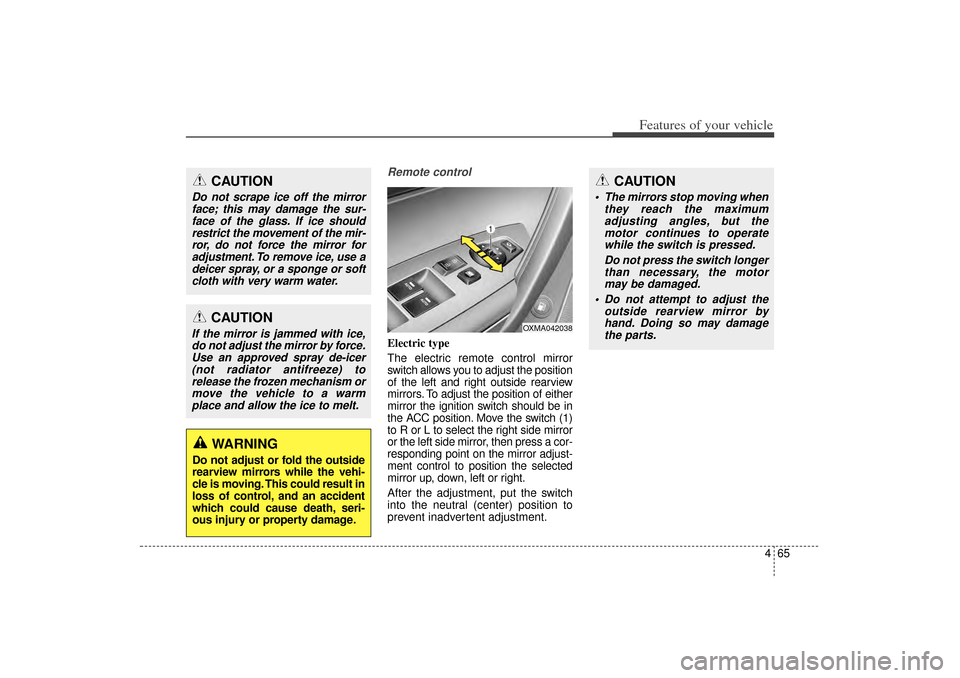
Remote controlElectric type
The electric remote control mirror
switch allows you to adjust the position
of the left and right outside rearview
mirrors. To adjust the position of either
mirror the ignition switch should be in
the ACC position. Move the switch (1)
to R or L to select the right side mirror
or the left side mirror, then press a cor-
responding point on the mirror adjust-
ment control to position the selected
mirror up, down, left or right.
After the adjustment, put the switch
into the neutral (center) position to
prevent inadvertent adjustment.
CAUTION
Do not scrape ice off the mirrorface; this may damage the sur-face of the glass. If ice shouldrestrict the movement of the mir-ror, do not force the mirror foradjustment. To remove ice, use adeicer spray, or a sponge or softcloth with very warm water.
CAUTION
If the mirror is jammed with ice,do not adjust the mirror by force.Use an approved spray de-icer(not radiator antifreeze) torelease the frozen mechanism ormove the vehicle to a warmplace and allow the ice to melt.
WARNING
Do not adjust or fold the outside
rearview mirrors while the vehi-
cle is moving. This could result in
loss of control, and an accident
which could cause death, seri-
ous injury or property damage.
OXMA042038
CAUTION
The mirrors stop moving when they reach the maximumadjusting angles, but themotor continues to operatewhile the switch is pressed.
Do not press the switch longerthan necessary, the motormay be damaged.
Do not attempt to adjust the outside rearview mirror byhand. Doing so may damagethe parts.
XM(FL) CAN(ENG) 4a(~158).QXP 1/23/2013 3:49 PM Page 65
Page 157 of 508

Features of your vehicle66
4Folding the outside rearview mirrorManual type
To fold the outside rearview mirror,
grasp the housing of the mirror and
then fold it toward the rear of the
vehicle. Electric type
To fold the outside rearview mirror,
press the button.
To unfold it, press the button again or
press the unlock button.The outside rearview mirror can be
folded when you press the door lock
button on the smart key within 4 sec-
onds after locking the doors by
pressing the button.
The outside rearview mirror can be
unfolded when you press the door
unlock button on the smart key with-
in 4 seconds after unlocking the
doors by pressing the button.
OXM049039
OXMA042040
CAUTION
In case it is an electric type out-
side rearview mirror, don’t fold itby hand. It could cause motorfailure.
CAUTION
The electric type outsiderearview mirror operates eventhough the ignition switch is inthe LOCK position. However, toprevent unnecessary batterydischarge, do not adjust themirrors longer than necessarywhile the engine is not running.
XM(FL) CAN(ENG) 4a(~158).QXP 1/23/2013 3:49 PM Page 66
Page 158 of 508
467
Features of your vehicle
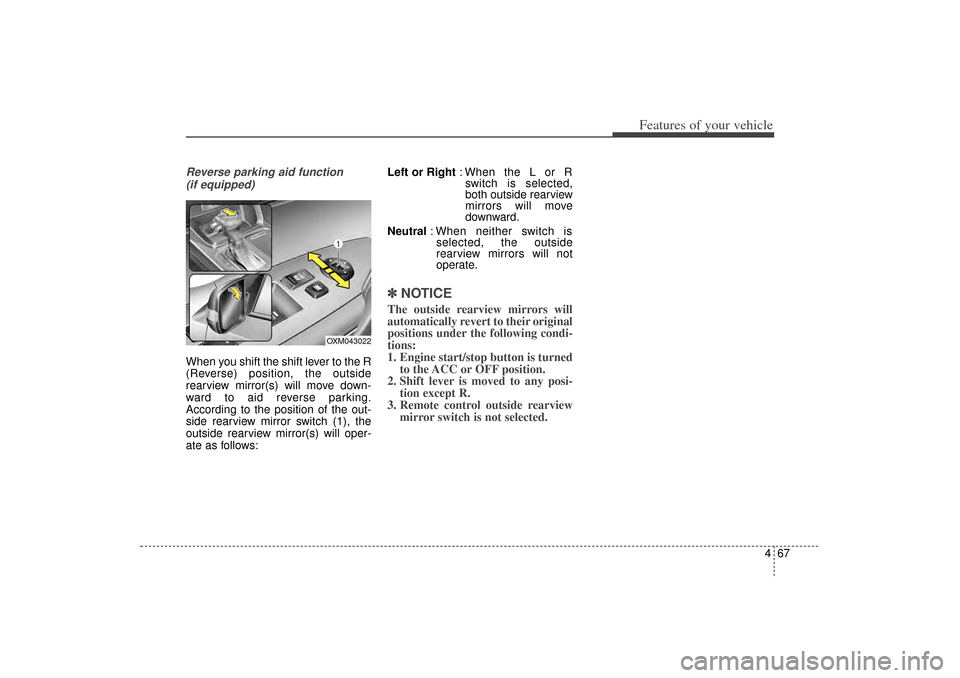
Reverse parking aid function (if equipped)When you shift the shift lever to the R
(Reverse) position, the outside
rearview mirror(s) will move down-
ward to aid reverse parking.
According to the position of the out-
side rearview mirror switch (1), the
outside rearview mirror(s) will oper-
ate as follows: Left or Right
: When the L or R
switch is selected,
both outside rearview
mirrors will move
downward.
Neutral : When neither switch is
selected, the outside
rearview mirrors will not
operate.
✽ ✽ NOTICEThe outside rearview mirrors will
automatically revert to their original
positions under the following condi-
tions:
1. Engine start/stop button is turned
to the ACC or OFF position.
2. Shift lever is moved to any posi- tion except R.
3. Remote control outside rearview mirror switch is not selected.
OXM043022
XM(FL) CAN(ENG) 4a(~158).QXP 1/23/2013 3:49 PM Page 67
Page 197 of 508
Features of your vehicle106
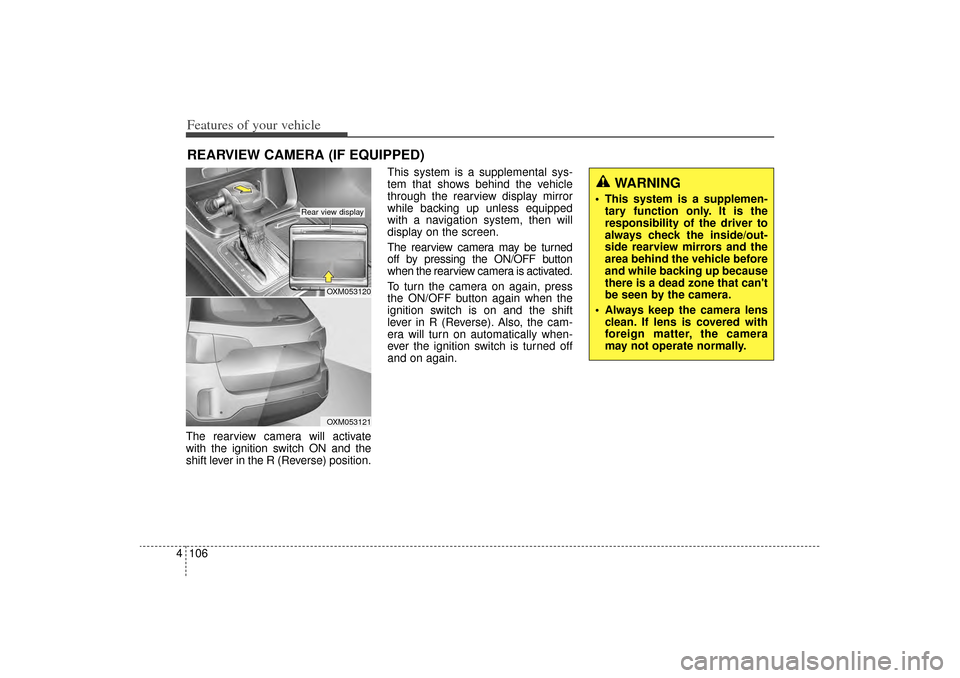
4The rearview camera will activate
with the ignition switch ON and the
shift lever in the R (Reverse) position. This system is a supplemental sys-
tem that shows behind the vehicle
through the rearview display mirror
while backing up unless equipped
with a navigation system, then will
display on the screen.
The rearview camera may be turned
off by pressing the ON/OFF button
when the rearview camera is activated.
To turn the camera on again, press
the ON/OFF button again when the
ignition switch is on and the shift
lever in R (Reverse). Also, the cam-
era will turn on automatically when-
ever the ignition switch is turned off
and on again.REARVIEW CAMERA (IF EQUIPPED)
WARNING
This system is a supplemen-
tary function only. It is the
responsibility of the driver to
always check the inside/out-
side rearview mirrors and the
area behind the vehicle before
and while backing up because
there is a dead zone that can't
be seen by the camera.
Always keep the camera lens clean. If lens is covered with
foreign matter, the camera
may not operate normally.
OXM053120OXM053121
Rear view display
XM(FL) CAN(ENG) 4a(~158).QXP 1/23/2013 3:50 PM Page 106
Page 210 of 508
4 119
Features of your vehicle
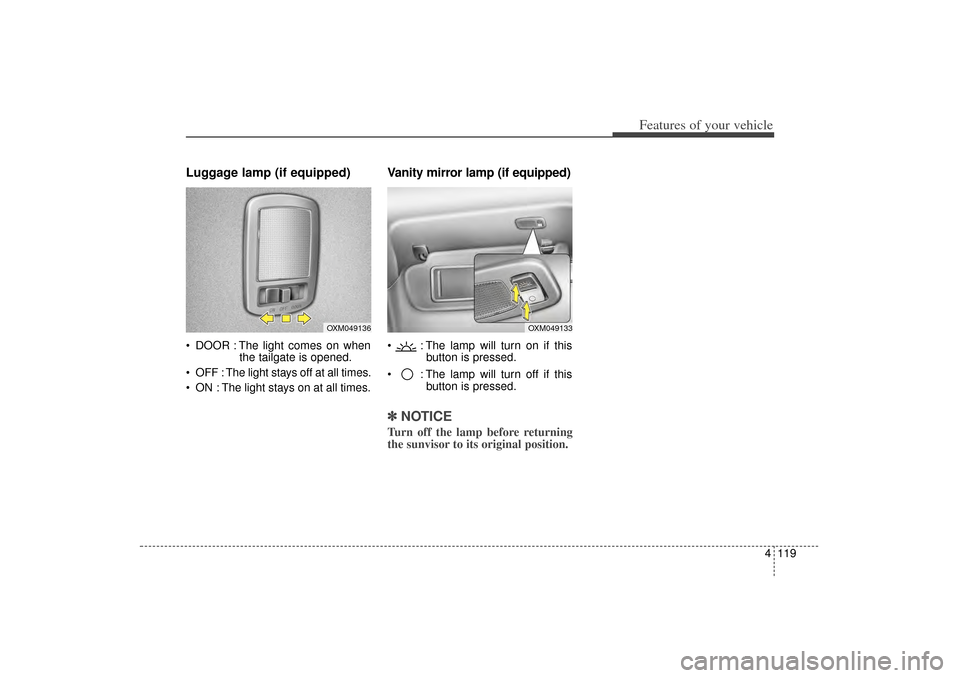
Luggage lamp (if equipped) DOOR : The light comes on whenthe tailgate is opened.
OFF : The light stays off at all times.
ON : The light stays on at all times.
Vanity mirror lamp (if equipped) : The lamp will turn on if this button is pressed.
: The lamp will turn off if this button is pressed.✽ ✽NOTICETurn off the lamp before returning
the sunvisor to its original position.
OXM049136
OXM049133
XM(FL) CAN(ENG) 4a(~158).QXP 1/23/2013 3:51 PM Page 119
Page 211 of 508
Features of your vehicle120
4✽
✽
NOTICEIf you want to defrost and defog the
front windshield, refer to
“Windshield defrosting and defog-
ging” in this section.
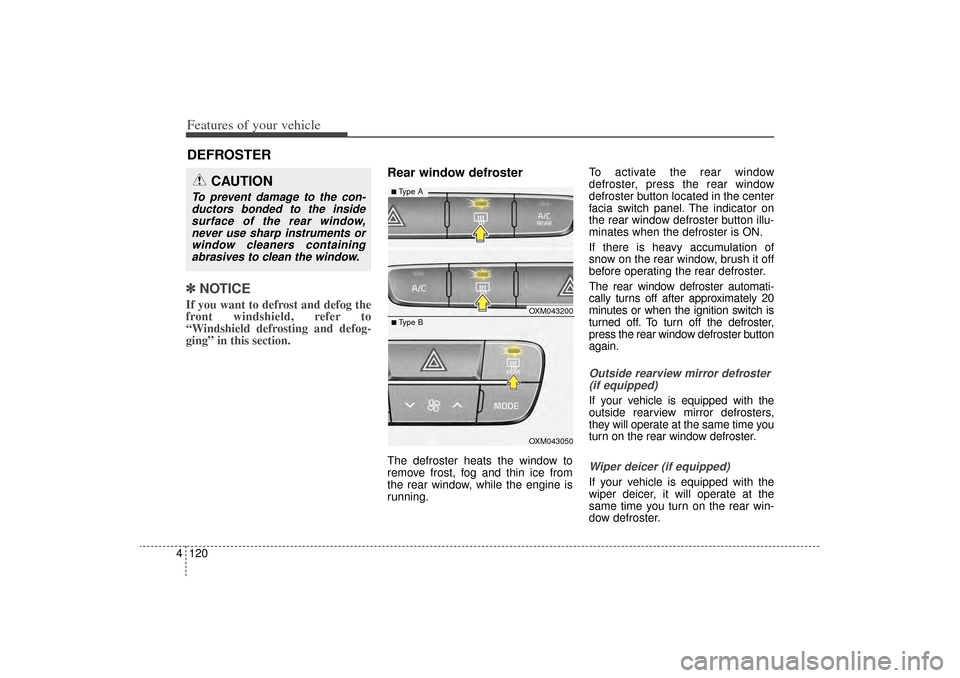
Rear window defrosterThe defroster heats the window to
remove frost, fog and thin ice from
the rear window, while the engine is
running. To activate the rear window
defroster, press the rear window
defroster button located in the center
facia switch panel. The indicator on
the rear window defroster button illu-
minates when the defroster is ON.
If there is heavy accumulation of
snow on the rear window, brush it off
before operating the rear defroster.
The rear window defroster automati-
cally turns off after approximately 20
minutes or when the ignition switch is
turned off. To turn off the defroster,
press the rear window defroster button
again.
Outside rearview mirror defroster
(if equipped)If your vehicle is equipped with the
outside rearview mirror defrosters,
they will operate at the same time you
turn on the rear window defroster.Wiper deicer (if equipped)If your vehicle is equipped with the
wiper deicer, it will operate at the
same time you turn on the rear win-
dow defroster.
DEFROSTER
CAUTION
To prevent damage to the con-ductors bonded to the insidesurface of the rear window,never use sharp instruments orwindow cleaners containingabrasives to clean the window.
OXM043200OXM043050
■ Type B■ Type A
XM(FL) CAN(ENG) 4a(~158).QXP 1/23/2013 3:51 PM Page 120
Page 233 of 508
Features of your vehicle142
4
For maximum defrosting, set the
temperature control to the extreme
right/hot position and the fan speed
control to the highest speed.
If warm air to the floor is desired while defrosting or defogging, set
the mode to the floor-defrost posi-
tion.
Before driving, clear all snow and ice from the windshield, rear win-
dow, outside rear view mirrors, and
all side windows.
Clear all snow and ice from the hood and air inlet in the cowl grill to
improve heater and defroster effi-
ciency and to reduce the probabili-
ty of fogging up the inside of the
windshield.
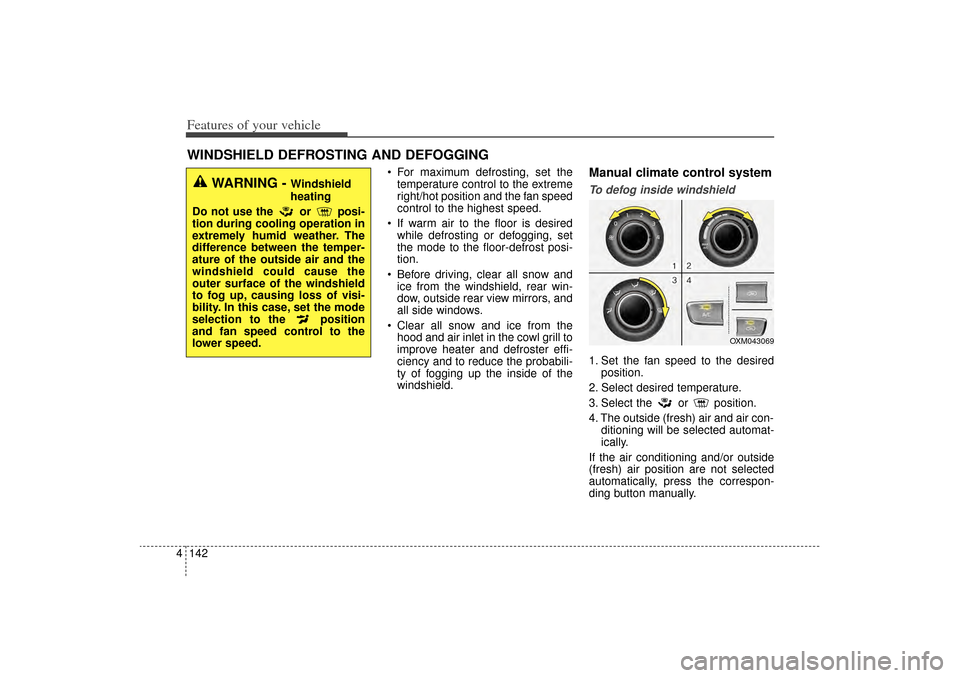
Manual climate control systemTo defog inside windshield 1. Set the fan speed to the desired position.
2. Select desired temperature.
3. Select the or position.
4. The outside (fresh) air and air con- ditioning will be selected automat-
ically.
If the air conditioning and/or outside
(fresh) air position are not selected
automatically, press the correspon-
ding button manually.
WINDSHIELD DEFROSTING AND DEFOGGING
WARNING -
Windshield
heating
Do not use the or posi-
tion during cooling operation in
extremely humid weather. The
difference between the temper-
ature of the outside air and the
windshield could cause the
outer surface of the windshield
to fog up, causing loss of visi-
bility. In this case, set the mode
selection to the position
and fan speed control to the
lower speed.
OXM043069
XM(FL) CAN(ENG) 4a(~158).QXP 1/23/2013 3:55 PM Page 142