warning light KIA Sorento 2014 3.G Owner's Guide
[x] Cancel search | Manufacturer: KIA, Model Year: 2014, Model line: Sorento, Model: KIA Sorento 2014 3.GPages: 508, PDF Size: 7.59 MB
Page 93 of 508

Mirrors . . . . . . . . . . . . . . . . . . . . . . . . . . . . . . . . . . 4-55\
• Inside rearview mirror . . . . . . . . . . . . . . . . . . . . . . . . 4-55
• Outside rearview mirror . . . . . . . . . . . . . . . . . . . . . . 4-64Instrument cluster . . . . . . . . . . . . . . . . . . . . . . . . . 4-68• Instrument cluster control . . . . . . . . . . . . . . . . . . . . . 4-69
• LCD display control . . . . . . . . . . . . . . . . . . . . . . . . . . 4-70
• Gauges . . . . . . . . . . . . . . . . . . . . . . . . . . . . . . . . . . . . \
. 4-71
• Transaxle shift indicator . . . . . . . . . . . . . . . . . . . . . . . 4-74LCD display . . . . . . . . . . . . . . . . . . . . . . . . . . . . . . 4-75• LCD modes. . . . . . . . . . . . . . . . . . . . . . . . . . . . . . . . . .\
4-75
• Service mode . . . . . . . . . . . . . . . . . . . . . . . . . . . . . . . . 4-76
• User settings mode. . . . . . . . . . . . . . . . . . . . . . . . . . . . 4-78
• A/V Mode . . . . . . . . . . . . . . . . . . . . . . . . . . . . . . . . . . . 4-\
80
• Turn by turn mode . . . . . . . . . . . . . . . . . . . . . . . . . . . 4-80
• Warning messages . . . . . . . . . . . . . . . . . . . . . . . . . . . . 4-81Trip computer . . . . . . . . . . . . . . . . . . . . . . . . . . . . . 4-87• Overview . . . . . . . . . . . . . . . . . . . . . . . . . . . . . . . . . . . 4-\
87
• Trip A/B . . . . . . . . . . . . . . . . . . . . . . . . . . . . . . . . . . . . \
4-88
• Fuel economy . . . . . . . . . . . . . . . . . . . . . . . . . . . . . . . . 4-89Warning and indicator lights . . . . . . . . . . . . . . . . 4-91• Warning lights . . . . . . . . . . . . . . . . . . . . . . . . . . . . . . . 4-91
• Indicator lights. . . . . . . . . . . . . . . . . . . . . . . . . . . . . . . 4-98Rear parking assist system . . . . . . . . . . . . . . . . . 4-102• Operation of the rear parking assist system . . . . . . 4-102• Non-operational conditions of
rear parking assist system . . . . . . . . . . . . . . . . . . . 4-103
• Rear parking assist system precautions . . . . . . . . . 4-104
• Self-diagnosis . . . . . . . . . . . . . . . . . . . . . . . . . . . . . . . 4-105
Rearview camera . . . . . . . . . . . . . . . . . . . . . . . . . 4-106
Hazard warning flasher . . . . . . . . . . . . . . . . . . . . 4-107
Lighting . . . . . . . . . . . . . . . . . . . . . . . . . . . . . . . . . 4-108• Battery saver function. . . . . . . . . . . . . . . . . . . . . . . . 4-108
• Headlight escort function . . . . . . . . . . . . . . . . . . . . . 4-108
• Headlight welcome function . . . . . . . . . . . . . . . . . . . 4-108
• Daytime running light . . . . . . . . . . . . . . . . . . . . . . . . 4-109
• Lighting control . . . . . . . . . . . . . . . . . . . . . . . . . . . . . 4-109
• High beam operation . . . . . . . . . . . . . . . . . . . . . . . . . 4-111
• Turn signals and lane change signals . . . . . . . . . . . 4-112
• Front fog light . . . . . . . . . . . . . . . . . . . . . . . . . . . . . . 4-112Windshield wiper/washers . . . . . . . . . . . . . . . . . . 4-113• Windshield wipers . . . . . . . . . . . . . . . . . . . . . . . . . . 4-114
• Front windshield washers . . . . . . . . . . . . . . . . . . . . . 4-115
• Rear window wiper and washer switch . . . . . . . . . 4-116Interior lights . . . . . . . . . . . . . . . . . . . . . . . . . . . . 4-117• Automatic turn off function . . . . . . . . . . . . . . . . . . . 4-117
• Room lamp . . . . . . . . . . . . . . . . . . . . . . . . . . . . . . . . . 4-117
• Map lamp . . . . . . . . . . . . . . . . . . . . . . . . . . . . . . . . . 4-118
• Luggage lamp . . . . . . . . . . . . . . . . . . . . . . . . . . . . . . . 4-119
• Vanity mirror lamp . . . . . . . . . . . . . . . . . . . . . . . . . . 4-119
4XM(FL) CAN(ENG) 4a(~158).QXP 1/23/2013 3:46 PM Page 2
Page 96 of 508
45
Features of your vehicle
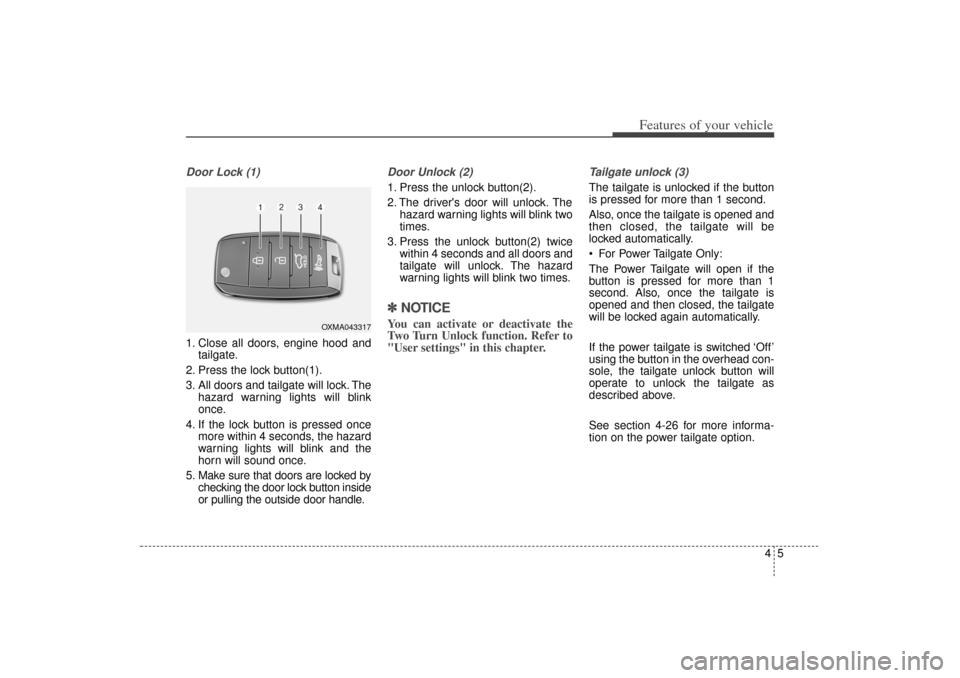
Door Lock (1)1. Close all doors, engine hood andtailgate.
2. Press the lock button(1).
3. All doors and tailgate will lock. The hazard warning lights will blink
once.
4. If the lock button is pressed once more within 4 seconds, the hazard
warning lights will blink and the
horn will sound once.
5. Make sure that doors are locked by checking the door lock button inside
or pulling the outside door handle.
Door Unlock (2) 1. Press the unlock button(2).
2. The driver's door will unlock. Thehazard warning lights will blink two
times.
3. Press the unlock button(2) twice within 4 seconds and all doors and
tailgate will unlock. The hazard
warning lights will blink two times.✽ ✽NOTICEYou can activate or deactivate the
Two Turn Unlock function. Refer to
"User settings" in this chapter.
Tailgate unlock (3)The tailgate is unlocked if the button
is pressed for more than 1 second.
Also, once the tailgate is opened and
then closed, the tailgate will be
locked automatically.
For Power Tailgate Only:
The Power Tailgate will open if the
button is pressed for more than 1
second. Also, once the tailgate is
opened and then closed, the tailgate
will be locked again automatically.
If the power tailgate is switched ‘Off’
using the button in the overhead con-
sole, the tailgate unlock button will
operate to unlock the tailgate as
described above.
See section 4-26 for more informa-
tion on the power tailgate option.
OXMA043317
XM(FL) CAN(ENG) 4a(~158).QXP 1/23/2013 3:46 PM Page 5
Page 98 of 508
47
Features of your vehicle
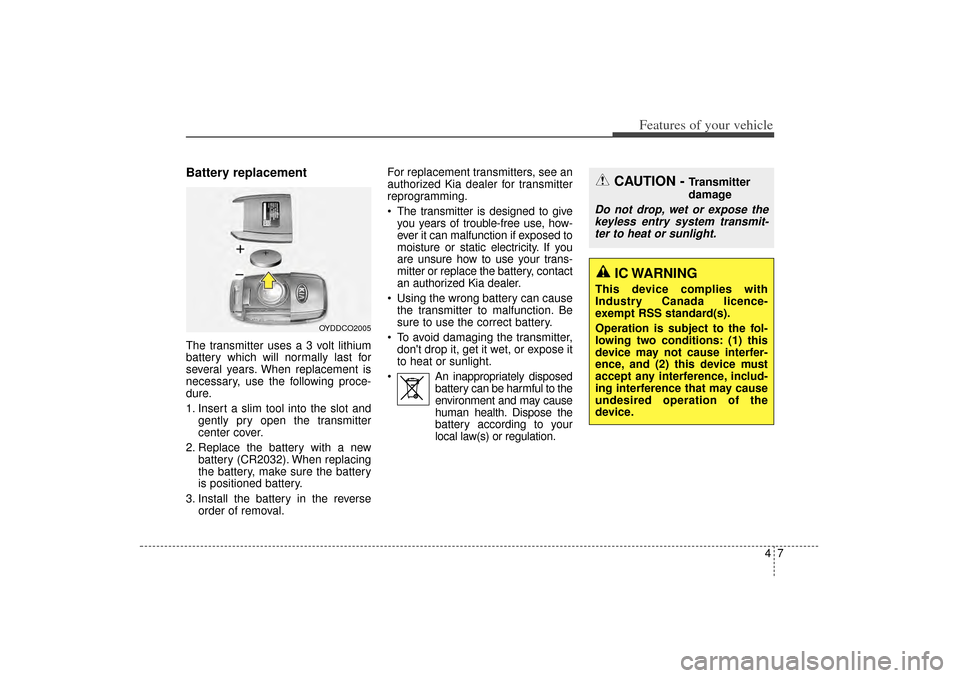
Battery replacementThe transmitter uses a 3 volt lithium
battery which will normally last for
several years. When replacement is
necessary, use the following proce-
dure.
1. Insert a slim tool into the slot andgently pry open the transmitter
center cover.
2. Replace the battery with a new battery (CR2032). When replacing
the battery, make sure the battery
is positioned battery.
3. Install the battery in the reverse order of removal. For replacement transmitters, see an
authorized Kia dealer for transmitter
reprogramming.
The transmitter is designed to give
you years of trouble-free use, how-
ever it can malfunction if exposed to
moisture or static electricity. If you
are unsure how to use your trans-
mitter or replace the battery, contact
an authorized Kia dealer.
Using the wrong battery can cause the transmitter to malfunction. Be
sure to use the correct battery.
To avoid damaging the transmitter, don't drop it, get it wet, or expose it
to heat or sunlight.
An inappropriately disposed battery can be harmful to the
environment and may cause
human health. Dispose the
battery according to your
local law(s) or regulation.
OYDDCO2005
CAUTION -
Transmitter
damage
Do not drop, wet or expose thekeyless entry system transmit-ter to heat or sunlight.
IC WARNING
This device complies with
Industry Canada licence-
exempt RSS standard(s).
Operation is subject to the fol-
lowing two conditions: (1) this
device may not cause interfer-
ence, and (2) this device must
accept any interference, includ-
ing interference that may cause
undesired operation of the
device.
XM(FL) CAN(ENG) 4a(~158).QXP 1/23/2013 3:46 PM Page 7
Page 103 of 508
Features of your vehicle12
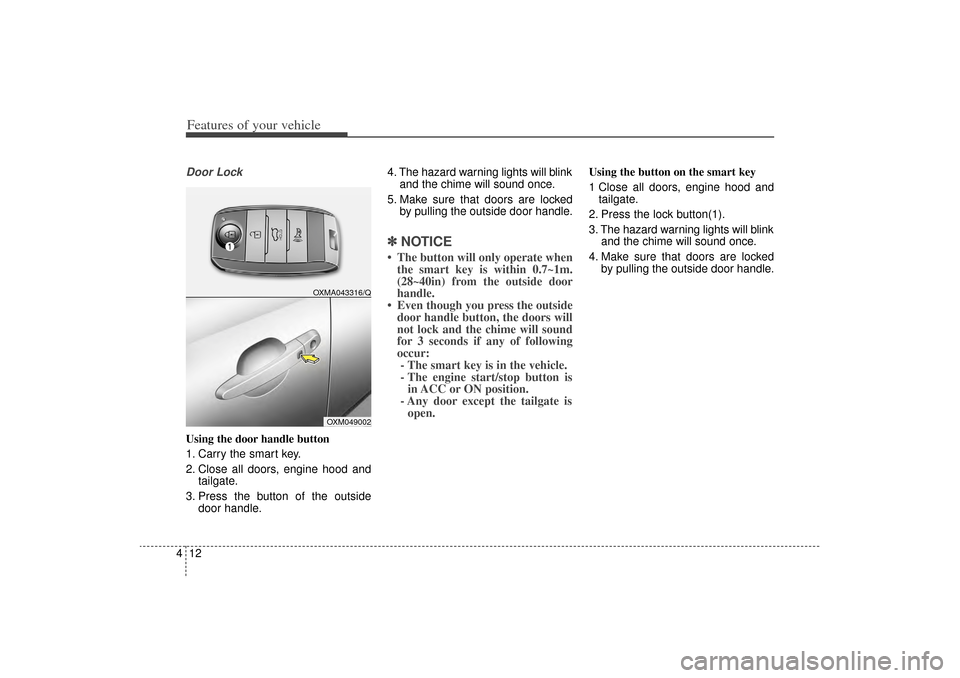
4Door LockUsing the door handle button
1. Carry the smart key.
2. Close all doors, engine hood and
tailgate.
3. Press the button of the outside door handle. 4. The hazard warning lights will blink
and the chime will sound once.
5. Make sure that doors are locked by pulling the outside door handle.
✽ ✽NOTICE• The button will only operate when
the smart key is within 0.7~1m.
(28~40in) from the outside door
handle.
• Even though you press the outside door handle button, the doors will
not lock and the chime will sound
for 3 seconds if any of following
occur:- The smart key is in the vehicle.
- The engine start/stop button is in ACC or ON position.
- Any door except the tailgate is open.
Using the button on the smart key
1 Close all doors, engine hood and
tailgate.
2. Press the lock button(1).
3. The hazard warning lights will blink and the chime will sound once.
4. Make sure that doors are locked by pulling the outside door handle.
OXM049002
OXMA043316/Q
XM(FL) CAN(ENG) 4a(~158).QXP 1/23/2013 3:46 PM Page 12
Page 104 of 508
413
Features of your vehicle
UnlockingUsing the door handle button
1. Carry the smart key.
2. Press the button of the driver'soutside door handle.
3. The driver’s door will unlock. The hazard warning lights will blink and
the chime will sound two times.
4. Press the button twice within 4 seconds and all doors and the tail-
gate will unlock and the hazard
warning lights will blink and the
chime will sound two times.
❈ If you press the button of the front
passenger’s outside door handle
while carrying the smart key, all
doors will unlock.
✽ ✽
NOTICE• The button will only operate when
the smart key is within 0.7~1m.
(28~40in) from the outside door
handle.
• When the smart key is recognized in the area of 0.7~1m. (28~40in)
from the front outside door han-
dle, other people can also open the
doors.
• After unlocking the driver’s door or all doors, the door(s) will lock
automatically unless the door is
opened.
Using the button on the smart key
1. Press the unlock button(2) of the
smart key.
2. The driver’s door will unlock. The hazard warning lights will blink and
the chime will sound two times.
3. Press the unlock button(2) twice within 4 seconds and all doors and
the tailgate will unlock. The hazard
warning lights will blink and the
chime will sound two times.✽ ✽NOTICEAfter pressing the button, the doors
will lock automatically unless any
door is opened within 30 seconds.✽ ✽NOTICEYou can activate or deactivate the
Two Turn Unlock function. Refer to
"User settings" in this chapter.
XM(FL) CAN(ENG) 4a(~158).QXP 1/23/2013 3:46 PM Page 13
Page 105 of 508
Features of your vehicle14
4Tailgate unlockingUsing the tailgate handle button
1. Carry the smart key.
2. Press the tailgate handle button.
3. When all doors are locked, the
hazard warning lights will blink two
times.
Once the tailgate is opened and
then closed, the tailgate will lock
automatically.✽ ✽NOTICEThe button will only operate when
the smart key is within 0.7~1m.
(28~40in) from the tailgate handle.
Using the button on the smart key
1. Press the tailgate unlock button(3)
for more than 1 second.
2. When all doors are locked, the hazard warning lights will blink two
times.
For Power Tailgate Only:
The Power Tailgate will open if the
button is pressed for more than 1
second. Also, once the tailgate is
opened and then closed, the tailgate
will be locked again automatically.
If the power tailgate is switched ‘Off’
using the button in the overhead con-
sole, the tailgate unlock button will
operate to unlock the tailgate as
described above.
See section 4-26 for more informa-
tion on the power tailgate option.
Panic1. Press the panic button(4) for more than 1 second.
2. The horn sounds and hazard warning light flash for about 30
seconds.✽ ✽NOTICETo stop the horn and lights, press
any button on the smart key.Start-upYou can start the engine without
inserting the key. For detailed infor-
mation refer to the “Engine start/stop
button” in chapter 5.
XM(FL) CAN(ENG) 4a(~158).QXP 1/23/2013 3:46 PM Page 14
Page 109 of 508
Features of your vehicle18
4Battery replacementA smart key battery should last for
several years, but if the smart key is
not working properly, try replacing
the battery with a new one. If you are
unsure how to use your smart key or
replace the battery, contact an
authorized Kia dealer.
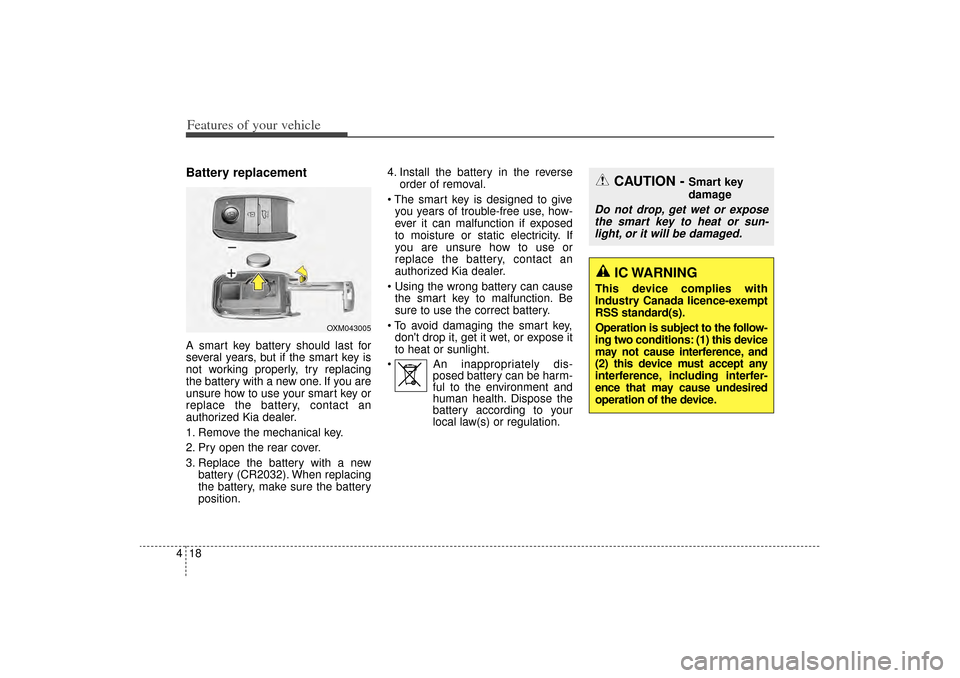
1. Remove the mechanical key.
2. Pry open the rear cover.
3. Replace the battery with a new
battery (CR2032). When replacing
the battery, make sure the battery
position. 4. Install the battery in the reverse
order of removal.
The smart key is designed to give you years of trouble-free use, how-
ever it can malfunction if exposed
to moisture or static electricity. If
you are unsure how to use or
replace the battery, contact an
authorized Kia dealer.
Using the wrong battery can cause the smart key to malfunction. Be
sure to use the correct battery.
To avoid damaging the smart key, don't drop it, get it wet, or expose it
to heat or sunlight.
An inappropriately dis- posed battery can be harm-
ful to the environment and
human health. Dispose the
battery according to your
local law(s) or regulation.
CAUTION -
Smart key
damage
Do not drop, get wet or expose
the smart key to heat or sun-light, or it will be damaged.
OXM043005
IC WARNING
This device complies with
Industry Canada licence-exempt
RSS standard(s).
Operation is subject to the follow-
ing two conditions: (1) this device
may not cause interference, and
(2) this device must accept any
interference, including interfer-
ence that may cause undesired
operation of the device.
XM(FL) CAN(ENG) 4a(~158).QXP 1/23/2013 3:46 PM Page 18
Page 110 of 508
419
Features of your vehicle
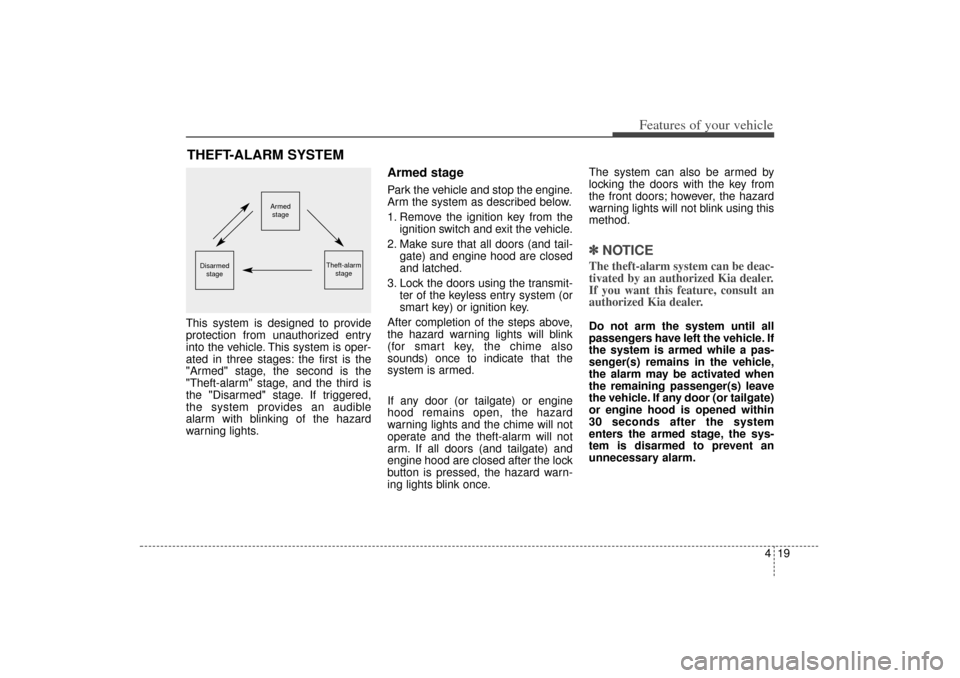
This system is designed to provide
protection from unauthorized entry
into the vehicle. This system is oper-
ated in three stages: the first is the
"Armed" stage, the second is the
"Theft-alarm" stage, and the third is
the "Disarmed" stage. If triggered,
the system provides an audible
alarm with blinking of the hazard
warning lights.
Armed stagePark the vehicle and stop the engine.
Arm the system as described below.
1. Remove the ignition key from theignition switch and exit the vehicle.
2. Make sure that all doors (and tail- gate) and engine hood are closed
and latched.
3. Lock the doors using the transmit- ter of the keyless entry system (or
smart key) or ignition key.
After completion of the steps above,
the hazard warning lights will blink
(for smart key, the chime also
sounds) once to indicate that the
system is armed.
If any door (or tailgate) or engine
hood remains open, the hazard
warning lights and the chime will not
operate and the theft-alarm will not
arm. If all doors (and tailgate) and
engine hood are closed after the lock
button is pressed, the hazard warn-
ing lights blink once. The system can also be armed by
locking the doors with the key from
the front doors; however, the hazard
warning lights will not blink using this
method.
✽ ✽
NOTICEThe theft-alarm system can be deac-
tivated by an authorized Kia dealer.
If you want this feature, consult an
authorized Kia dealer.Do not arm the system until all
passengers have left the vehicle. If
the system is armed while a pas-
senger(s) remains in the vehicle,
the alarm may be activated when
the remaining passenger(s) leave
the vehicle. If any door (or tailgate)
or engine hood is opened within
30 seconds after the system
enters the armed stage, the sys-
tem is disarmed to prevent an
unnecessary alarm.
THEFT-ALARM SYSTEM
Armed
stage
Theft-alarm stage
Disarmedstage
XM(FL) CAN(ENG) 4a(~158).QXP 1/23/2013 3:46 PM Page 19
Page 111 of 508
Features of your vehicle20
4Theft-alarm stageThe alarm will be activated if any of
the following occurs while the system
is armed.
A front or rear door is opened with-
out using the ignition key or trans-
mitter (or smart key).
The tailgate is opened without using the transmitter (or smart
key).
The engine hood is opened.
The horn will sound and the hazard
warning lights will blink continuously
for approximately 27 seconds, and
repeat the horn 3 times unless the
system is disarmed. To turn off the
system, unlock the doors with the
ignition key or transmitter (or smart
key).
Disarmed stageThe system will be disarmed when
the doors (and tailgate) are unlocked
with the transmitter (or smart key) or
the ignition key.
After depressing the unlock button,
the hazard warning lights will blink
and the chime will sound twice (in
smart key) to indicate that the sys-
tem is disarmed.
After depressing the unlock button, if
any door (or tailgate) is not opened
within 30 seconds, the system will be
rearmed.✽ ✽ NOTICE• Avoid trying to start the engine
while the alarm is activated. The
vehicle starting motor is disabled
during the theft-alarm stage.
If the system is not disarmed with
the transmitter, insert the key into
the ignition switch, turn the igni-
tion switch to the ON position and
wait for 30 seconds. Then the sys-
tem will be disarmed. (if equipped)
• If you lose your keys, consult your authorized Kia dealer.
CAUTION
Do not change, alter or adjust
the theft-alarm system becauseit could cause the theft-alarmsystem to malfunction andshould only be serviced by anauthorized Kia dealer.
Malfunctions caused by improp-er alterations, adjustments ormodifications to the theft-alarmsystem are not covered by yourvehicle manufacturer warranty.
XM(FL) CAN(ENG) 4a(~158).QXP 1/23/2013 3:46 PM Page 20
Page 129 of 508
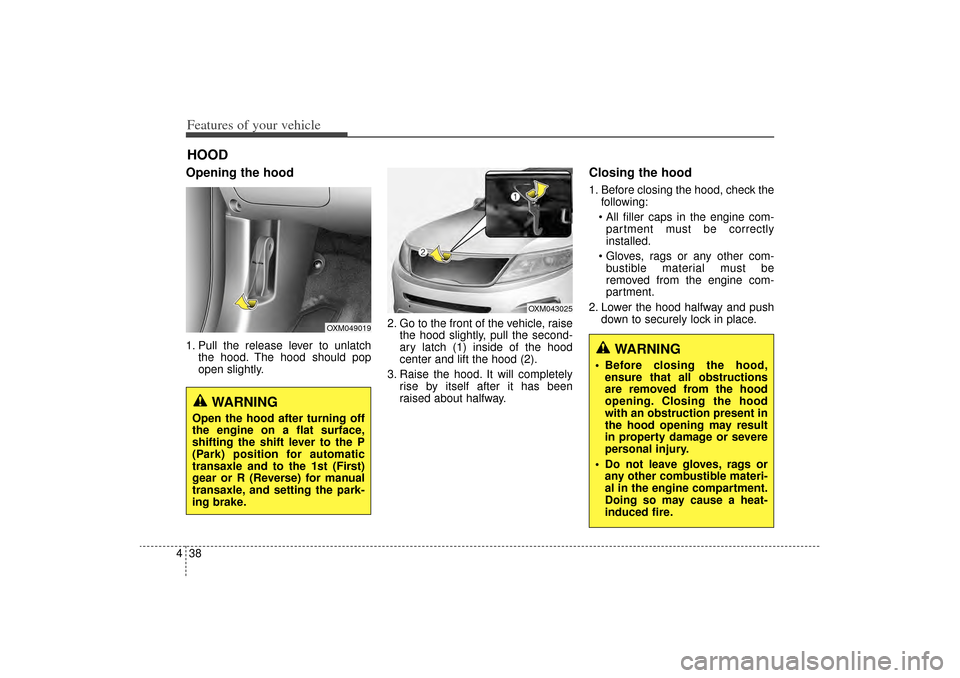
Features of your vehicle38
4Opening the hood 1. Pull the release lever to unlatch
the hood. The hood should pop
open slightly. 2. Go to the front of the vehicle, raise
the hood slightly, pull the second-
ary latch (1) inside of the hood
center and lift the hood (2).
3. Raise the hood. It will completely rise by itself after it has been
raised about halfway.
Closing the hood1. Before closing the hood, check thefollowing:
All filler caps in the engine com- partment must be correctly
installed.
Gloves, rags or any other com- bustible material must be
removed from the engine com-
partment.
2. Lower the hood halfway and push down to securely lock in place.
HOOD
OXM049019
OXM043025
WARNING
Open the hood after turning off
the engine on a flat surface,
shifting the shift lever to the P
(Park) position for automatic
transaxle and to the 1st (First)
gear or R (Reverse) for manual
transaxle, and setting the park-
ing brake.
WARNING
Before closing the hood,ensure that all obstructions
are removed from the hood
opening. Closing the hood
with an obstruction present in
the hood opening may result
in property damage or severe
personal injury.
Do not leave gloves, rags or any other combustible materi-
al in the engine compartment.
Doing so may cause a heat-
induced fire.
XM(FL) CAN(ENG) 4a(~158).QXP 1/23/2013 3:47 PM Page 38