air KIA SORENTO 2014 Navigation System Quick Reference Guide
[x] Cancel search | Manufacturer: KIA, Model Year: 2014, Model line: SORENTO, Model: KIA SORENTO 2014Pages: 236, PDF Size: 7.61 MB
Page 140 of 236
4-26
Using Bluetooth® Wireless Technology
Pairing a New Device
For more information on pairing, refer to
the When no phones have been paired'
section.
i Information
• Bluetooth® features supported within the
vehicle are as follow
s. Some features may
not be supported depending on your
Bluetooth
® device.
-A n s w e r i n g a n d p l a c i n g B l u e t o o t h®
Handsfree calls
-Menu operation during call (Switch to Private,
Switch to Call Waiting, Outgoing Volume
-Download Call History
-Download Mobile Contacts
-Download SIM Contacts
-Contacts/ Call History Auto Download
-Bluetooth® device auto connection
-Playing Bluetooth® Streaming Audio
• It is possible to pair up to five Bluetooth®
devices to the car system.
• Only one Bluetooth® device can be con-
nected at a time.
• Other devices cannot be paired while a
Bluetooth
® device is already connected.
• When a Bluetooth® device is in the pro-
ces
s of connecting, the connection pro
-
ces
s cannot be canceled.
• Only Bluetooth® Handsfree and Bluetooth®
Audio related features will operate within
this system.
• Normal operation is possible only for
devices that support handsfree or audio
features, such as a Bluetooth
® mobile
phone or a Bluetooth
® audio device.
• Only one function can be used at a time
between the Bluetooth
® handsfree and
Bluetooth
® audio. (While playing Bluetooth®
audio, streaming will end upon entering the
Bluetooth
® phone screen.)
i Information
• If a connected Bluetooth® device becomes
disconnected for various reasons, such
as being out of range, turning the device
OFF, or a Bluetooth
® communication error,
B l u e t o o t h
® d e v i c e s a r e a u t o m a t i c a l l y
searched and connected.
• If the system becomes unstable due to
communication errors between the vehi-
cle and the Bluetooth
® device, reset the
Bluetooth
® feature and try again. Upon
resetting Bluetooth
® feature, the system
is restored to its factory release state.
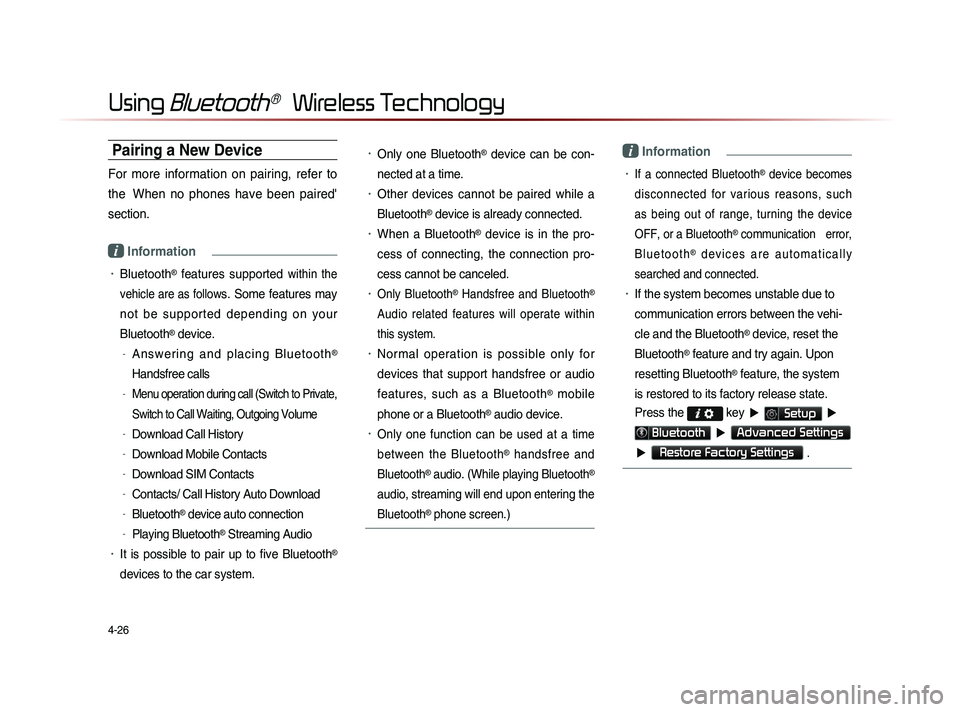
Press the
key ▶ Setup ▶
Bluetooth ▶ Advanced Settings
▶
Restore Factory Settings .
Page 141 of 236
Using
Bluetooth
® Wireless Technology
Bluetooth® Handsfree l
4-27
Disconnecting a Device
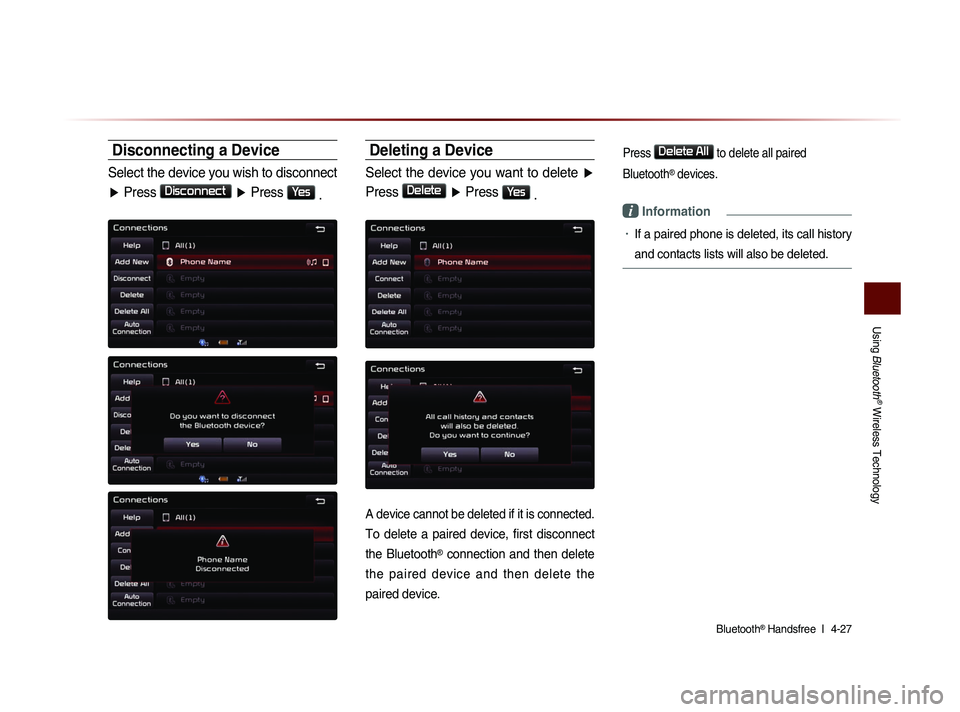
Select the device you wish to disconnect
▶ Press
Disconnect
▶ Press Yes
.
Deleting a Device
Select the device you want to delete ▶
Press
Delete
▶ Press Yes
.
A device cannot be deleted if it is connected.
To delete a paired device, first disconnect
the Bluetooth
® connection and then delete
the paired device and then delete the
paired device.
Press Delete All to delete all paired
Bluetooth
® devices.
i Information
• If a paired phone is deleted, its call history
and contacts lists will also be deleted.
Page 142 of 236
4-28
Using Bluetooth® Wireless Technology
Setting Auto Connection
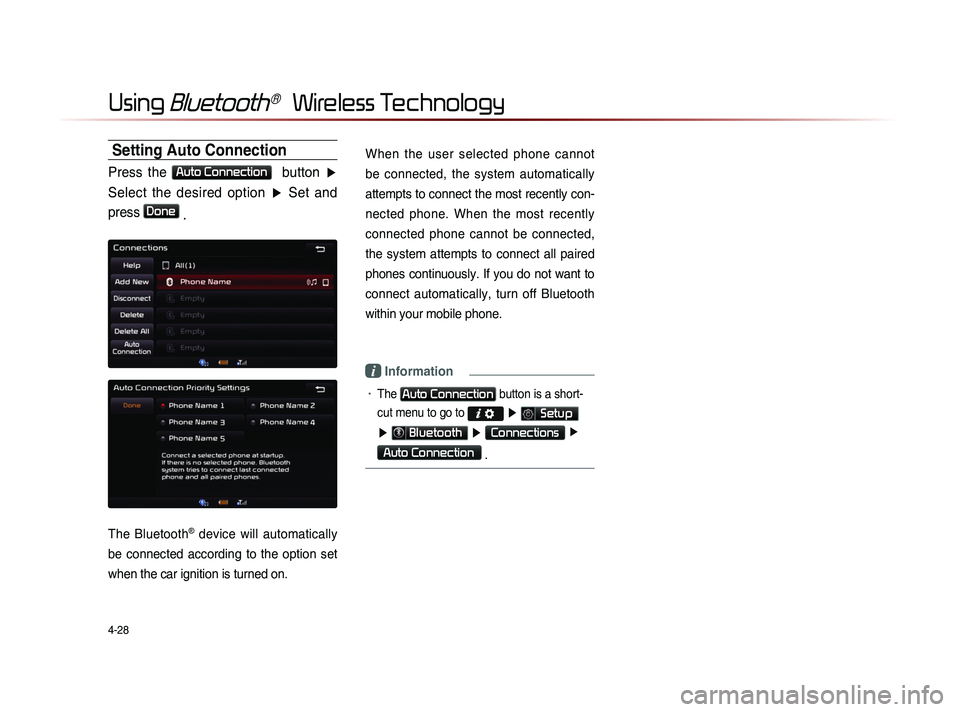
Press the Auto Connection button ▶
Select the desired option ▶ Set and
press
Done .
The Bluetooth® device will automatically
be connected according to the option set
when the car ignition is turned on.
When the user selected phone cannot
be connected, the system automatically
attempts to connect the most recently con-
nected phone. When the most recently
connected phone cannot be connected,
the system attempts to connect all paired
phones continuously. If you do not want to
connect automatically, turn off Bluetooth
within your mobile phone.
i Information
• The Auto Connection button is a short-
cut menu to go to
▶ Setup
▶ Bluetooth ▶ Connections ▶
Auto Connection
.
Page 158 of 236

5-16
Voice Command Lists
POI Category List
Restaurants
African Restaurants
American Restaurants
Asian Restaurants
Chinese Restaurants
Coffee Shop
Continental Restaurants
Fast Food
French Restaurants
Italian Restaurants
Japanese Restaurants
Korean Restaurants
Latin American Restaurants
Mexican Restaurants
Seafood Restaurants
Vegetarian Restaurants
Other Restaurants
Automotive
Auto Parts
Auto Service
Automobile Dealership
Car Wash
Gas Station
Hyundai Dealership
Motorcycle Dealership
Parking Rest Area
Road Assistance
Travel
Airport
Bus Station
Campground
City Center
Ferry Terminal
Hotel
Local Transit
Rental Car Agency
Tourist Attraction
Tourist Information
Train Station
Travel Agent
Shopping
Bookstore
Clothing Shop
Convenience Store
Department Store
Electronics Store
Gift Shop
Grocery Store
Home Specialty Store
Music Store
Pharmacy Shoe Store
Shopping Center
Sporting Goods Store
Recreation
Amusement Park
Cinema
Golf Course
Museum
Recreation Area
Ski Resort
Sports Activities
Sports Complex
Video & Game Rental
Winery
Other Recreation
Financial Services
ATM
Bank
Business Facility
Check Cashing Service
Money Transfer
Community
City Hall
Civic Center
Convention Center
Court House Fire Department
Government Offices
Library
Police Station
Post Office
School
Utilities
Waste & Sanitary
Services
Attorney
Cleaning & Laundry
Communication Services
Dentist
Funeral Home
Hair & Beauty
Hospital
Medical Service
Mover Services
Photography
Physician
Social Service
Tailor & Alteration
Tax Service
Page 160 of 236
UVO eServices(Optional)
When the vehicle ignition is not turned on
When the phone Bluetooth® feature is set to off
When the phone Bluetooth® cannot be connected or becomes
disconnected
When there are no phones paired with the vehicle
When calls are unavailable by being within out of service zones
When the power turns off due to phone power (battery) issues
When a Bluetooth® device without phone feature support has
been connected, such as an MP3 device
When the system is booting
When the system power supply is unstable
When the attempted call is blocked due to user operations
When the 9-1-1 call is unstable due to phone or other communi- cation network issues
When the call feature is not operating due to phone settings set by the user
When the phone cannot be controlled via Bluetooth® due to
phone states and characteristics
The Crash Notification Assist feature may not operate in the following situations.
Page 161 of 236
UVO eServices
Using UVO eServices and Cautions
Download the UVO eServices App and install it on your smart-phone. The app can be downloaded from the Apple App Store
or Google Play depending on the kind of smartphone you have.
Pair and connect your smartphone with the vehicle. For informa-tion on connecting your Bluetooth device, refer to the smart-
phone user's manual and instructions on the Phone Help screen
on your radio. Up to 5 Bluetooth devices can be paired with the
vehicle.
Login and activate the UVO eServices App on your smartphone.
The first activated device paired with the vehicle is the Registered Phone. You can set another paired phone as the
Registered Phone. Some UVO eServices features will only be
available when the Registered Phone is connected with the
vehicle via Bluetooth and the UVO eServices App is running.
UVO eServices is fully compatible within some smartphones but may not operate properly within incompatible smartphones.
To view the list of compatible smartphones, please visit MyUVO.com.
Communication between the vehicle and smartphone app may temporarily break depending on the phone state.
If the feature is not operating properly, you may need to reset the UVO eServices App or the smartphone to try again accord-
ing to the following steps.
1. Try again
2.
Reset smartphone app
3. Re-connect BT
4.
Reset smartphone
5. Delete BT and pair again
Some services use the customer’s mobile phone data plan for data communication.
Use of the most up-to-date app version is recommended.
For smartphone related inquiries, please visit MyUVO.com.
Page 162 of 236
6-2
UVO eServices(Optional)
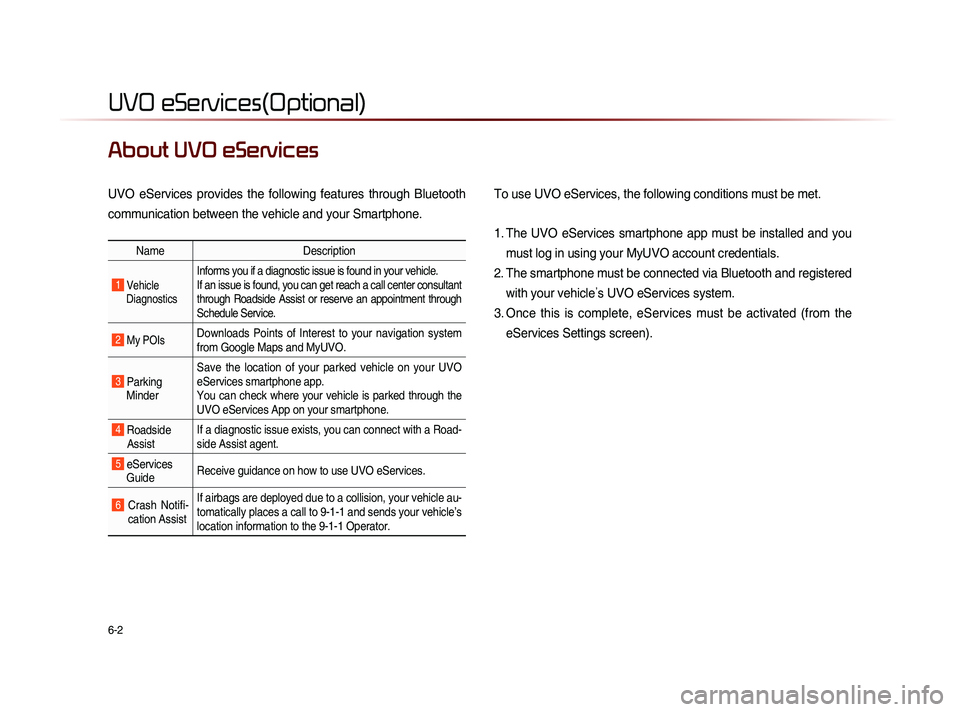
About UVO eServices
UVO eServices provides the following features through Bluetooth
communication between the vehicle and your Smartphone. To use UVO eServices, the following conditions must be met.
1. The UVO eServices smartphone app must be installed and you
must log in using your MyUVO account credentials.
2. The smartphone must be connected via Bluetooth and registered with your vehicle ’s UVO eServices system.
3. Once this is complete, eServices must be activated (from the eServices Settings screen).
Name Description
1 Vehicle
Diagnostics
Informs you if a diagnostic issue is found in your vehicle.
If an issue is found, you can get reach a call center consultant
through Roadside Assist or reserve an appointment through
Schedule Service.
2 My POIsDownloads Points of Interest to your navigation system
from Google Maps and MyUVO.
3 Parking Minder Save the location of your parked vehicle on your UVO
eServices smartphone app.
You can check where your vehicle is parked through the
UVO eServices App on your smartphone.
4 Roadside
Assist If a diagnostic issue exists, you can connect with a Road-
side Assist agent.
5 eServices
Guide Receive guidance on how to use UVO eServices.
6 Crash Notifi-
cation Assist If airbags are deployed due to a collision, your vehicle au-
tomatically places a call to 9-1-1 and sends your vehicle’s
location information to the 9-1-1 Operator.
Page 163 of 236
UVO eServices
Information l
6-3
Before using UVO
eServices
Installing the UVO eServices app on your
smartphone
1.
Do
wnload and install the UVO eServices
app on your smartphone.
The app can be downloaded from the
Apple App Store.
2.
Re
gister your vehicle and account at
myuvo.com.
Note: myuvo.com is accessible from
your phone’s browser.
3.
St
art the UVO eServices app on your
smartphone and log in.
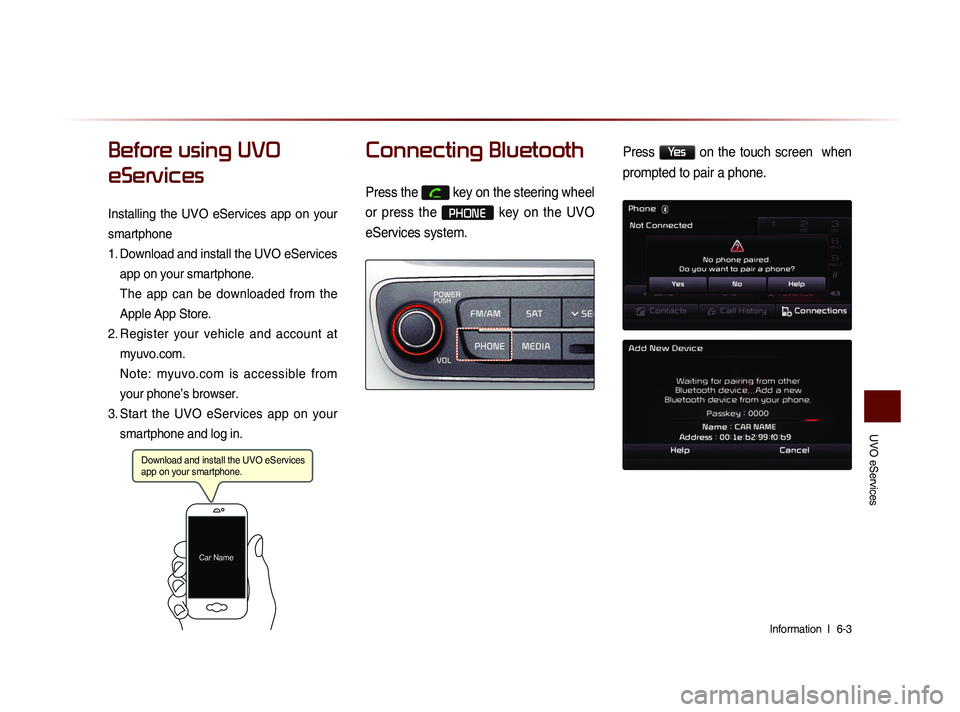
Connecting Bluetooth
Press the key on the steering wheel
or press the
PHONE key on the UVO
eServices system.
Press Yes on the touch screen when
prompted to pair a phone.
Download and install the UVO eServices
app on your smartphone.
Car Name
Page 164 of 236
6-4
UVO eServices(Optional)
Pair a device from
Bluetooth-enabled phone
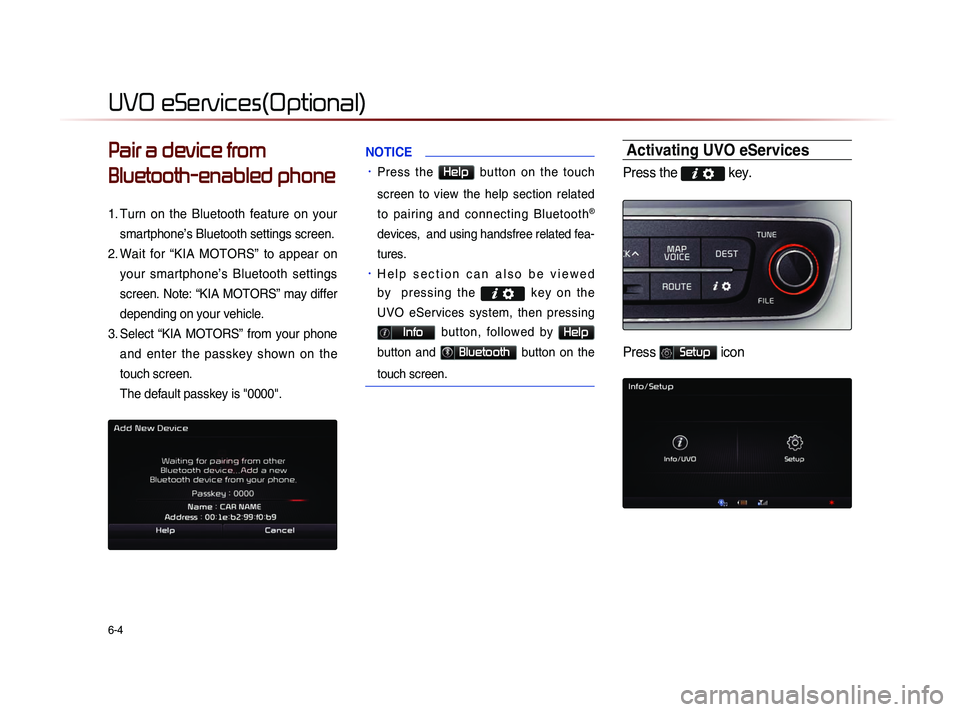
1. Turn on the Bluetooth feature on your
smartphone’s Bluetooth settings screen.
2.
Wa
it for “KIA MOTORS” to appear on
your smartphone’s Bluetooth settings
screen. Note: “KIA MOTORS” may differ
depending on your vehicle.
3.
Se
lect “KIA MOTORS” from your phone
and enter the passkey shown on the
touch screen.
The default passkey is "0000".
NOTICE
• Press the Help button on the touch
screen to view the help section related
to pairing and connecting Bluetooth
®
devices, and using handsfree related fea-
tures.
• H e l p s e c t i o n c a n a l s o b e v i e w e d
b y p r e s s i n g t h e
k e y o n t h e
UVO eServices system, then pressing
Info button, followed by Help
button and Bluetooth button on the
touch screen.
Activating UVO eServices
Press the key.
Press Setup icon
Page 174 of 236
6-14
UVO eServices(Optional)
Crash Notification Assist
Crash Notification Assist
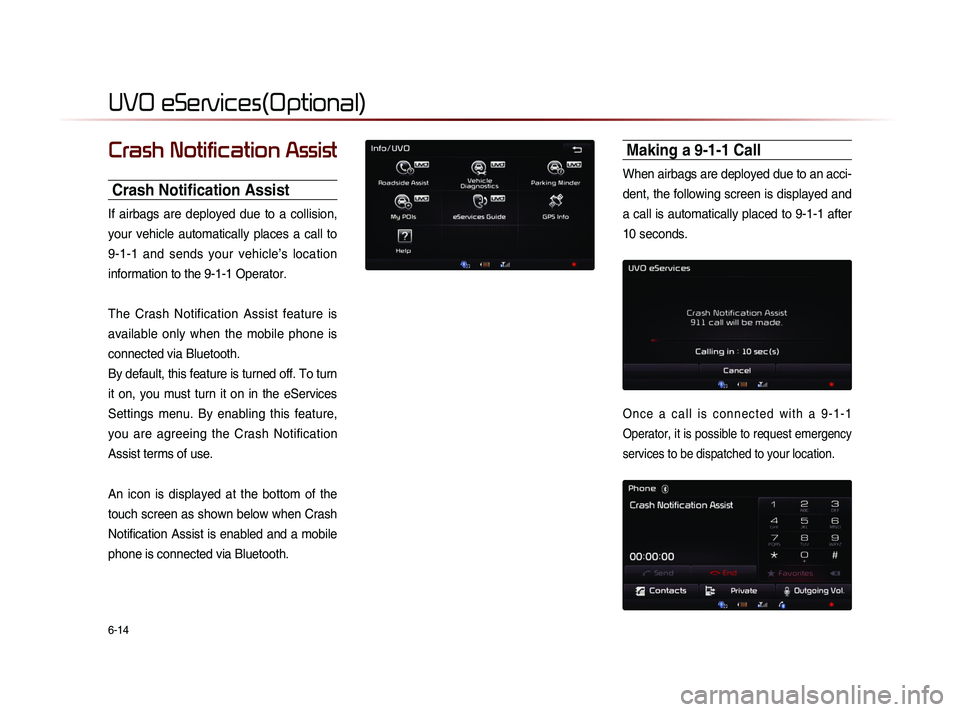
If airbags are deployed due to a collision,
your vehicle automatically places a call to
9-1-1 and sends your vehicle’s location
information to the 9-1-1 Operator.
The Crash Notification Assist feature is
available only when the mobile phone is
connected via Bluetooth.
By default, this feature is turned off. To turn
it on, you must turn it on in the eServices
Settings menu. By enabling this feature,
you are agreeing the Crash Notification
Assist terms of use.
An icon is displayed at the bottom of the
touch screen as shown below when Crash
Notification Assist is enabled and a mobile
phone is connected via Bluetooth.
Making a 9-1-1 Call
When airbags are deployed due to an acci-
dent, the following screen is displayed and
a call is automatically placed to 9-1-1 after
10 seconds.
O n c e a c a l l i s c o n n e c t e d w i t h a 9 - 1 - 1
Operator, it is possible to request emergency
services to be dispatched to your location.