air KIA SORENTO 2014 Navigation System Quick Reference Guide
[x] Cancel search | Manufacturer: KIA, Model Year: 2014, Model line: SORENTO, Model: KIA SORENTO 2014Pages: 236, PDF Size: 7.61 MB
Page 117 of 236
Bluetooth® Handsfree l
4-3
Before Use
CAUTIONS upon Connecting
Bluetooth
® Phone
Before connecting the head unit with the mobile phone, check to see that the mobile phone supports Bluetooth® features.
Even if the phone supports Bluetooth® Wireless Technology, the
phone will not be found during device searches if the phone has
been set to hidden state or the Bluetooth
® power is turned off.
Disable the hidden state or turn on the Bluetooth® power prior to
searching/connecting with the head unit.
If Auto Connection is used, the Bluetooth® phone is automatically
connected when the ignition is turned on, making it unnecessary to
have to connect the phone with the head unit every time.
If you do not want automatic connection with your Bluetooth® de-
vice, turn the Bluetooth® feature off of the Bluetooth® device.
To set Auto Connection, go to ▶ Setup ▶
Bluetooth ▶ Connections ▶ Auto Connection.
The car name can be set at ▶ Setup ▶
Bluetooth ▶ Advanced Settings ▶
Device Information
.
The passkey needed to connect the mobile phone can be verified/
changed at
▶ Setup ▶ Bluetooth ▶
Advanced Settings
▶ Change Passkey .
If the Bluetooth® audio does not play, go to ▶ Setup
▶ Bluetooth ▶ Streaming Audio Setting . If the feature
is set to
Off , turn On and try again.
Park the vehicle when connecting the head unit with the mobile phone.
Bluetooth® connection may become intermittently disconnected in
some mobile phones. Follow these steps to try again.
1. Turn the Bluetooth® function within the mobile phone OFF/ON and try
again.
2. Turn the mobile phone power OFF/ON and try again.
3. Completely remove the mobile phone battery, reboot, and then again.
4. Reboot the Audio Navigation System and try again.
5. Delete all paired devices, pair and try again.
The handsfree call volume and quality may differ depending on the mobile phone.
Pairing Bluetooth® devices and use of other Bluetooth® features
are not supported when the vehicle is in motion. For safety, please
first park your vehicle.
When downloading contacts, phenomenon not described within
this user’s manual may be related with the mobile device. When
such occurs, inquire within the mobile phone manufacturer.
Page 118 of 236
4-4
Basic Mode Screen
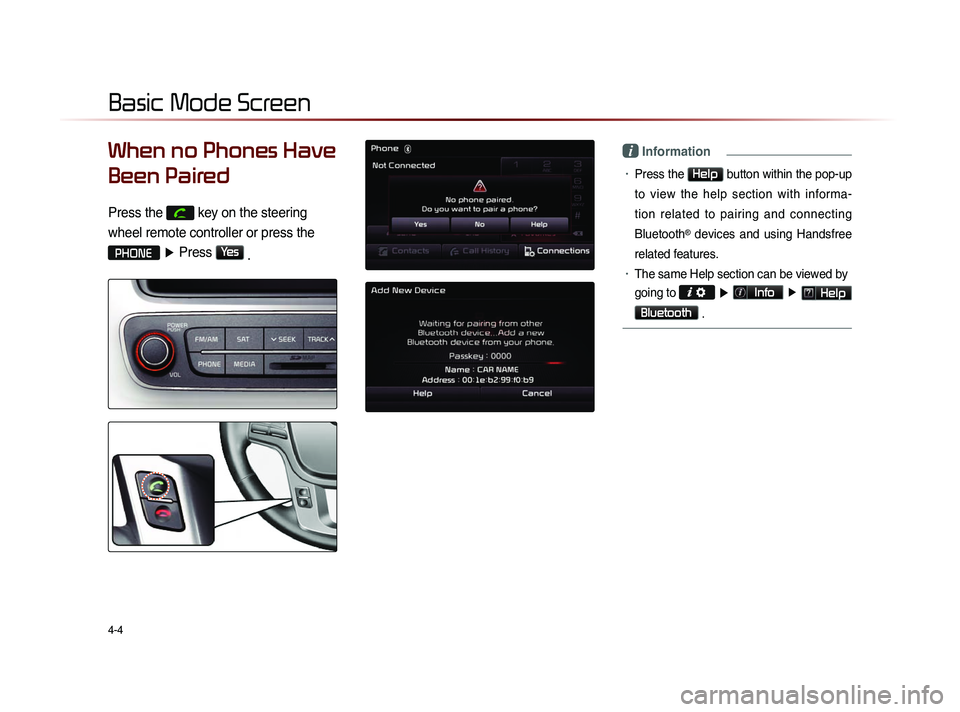
When no Phones Have
Been Paired
Press the
key on the steering
wheel remote controller or press the
PHONE ▶ Press Yes
.
i Information
• Press the Help button within the pop-up
to view the help section with informa-
tion related to pairing and connecting
Bluetooth
® devices and using Handsfree
related features.
• The same Help section can be viewed by
going to
▶ Info ▶ Help
Bluetooth
.
Page 119 of 236
Basic Mode Screen
Bluetooth® Handsfree l
4-5
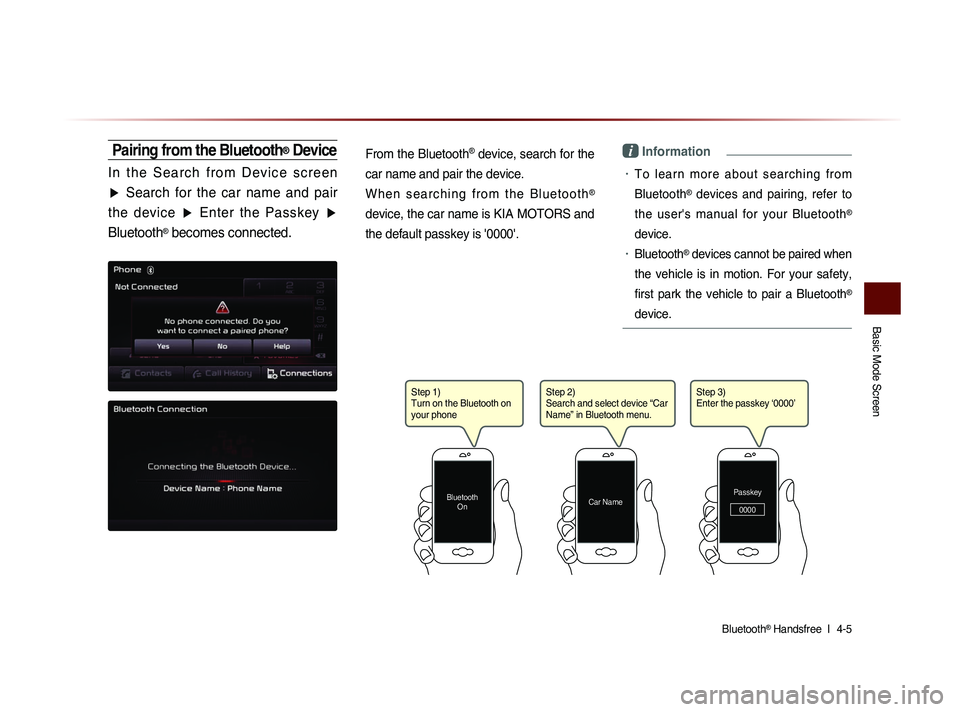
Pairing from the Bluetooth® Device
I n t h e S e a r c h f r o m D e v i c e s c r e e n
▶ Search for the car name and pair
the device ▶ Enter the Passkey ▶
Bluetooth
® becomes connected.
From the Bluetooth
® device, search for the
car name and pair the device.
W h e n s e a r c h i n g f r o m t h e B l u e t o o t h
®
device, the car name is KIA MOTORS and
the default passkey is '0000'.
i Information
• To learn more about searching from
Bluetooth
® devices and pairing, refer to
the user's manual for your Bluetooth
®
device.
• Bluetooth® devices cannot be paired when
the vehicle is in motion. For your safety,
first park the vehicle to pair a Bluetooth
®
device.
Step 1)
Turn on the Bluetooth on
your phone
Bluetooth On
Step 2)
Search and select device “Car
Name” in Bluetooth menu.
Car NamePasskey
0000
Step 3)
Enter the passkey ‘0000’
Page 120 of 236
4-6
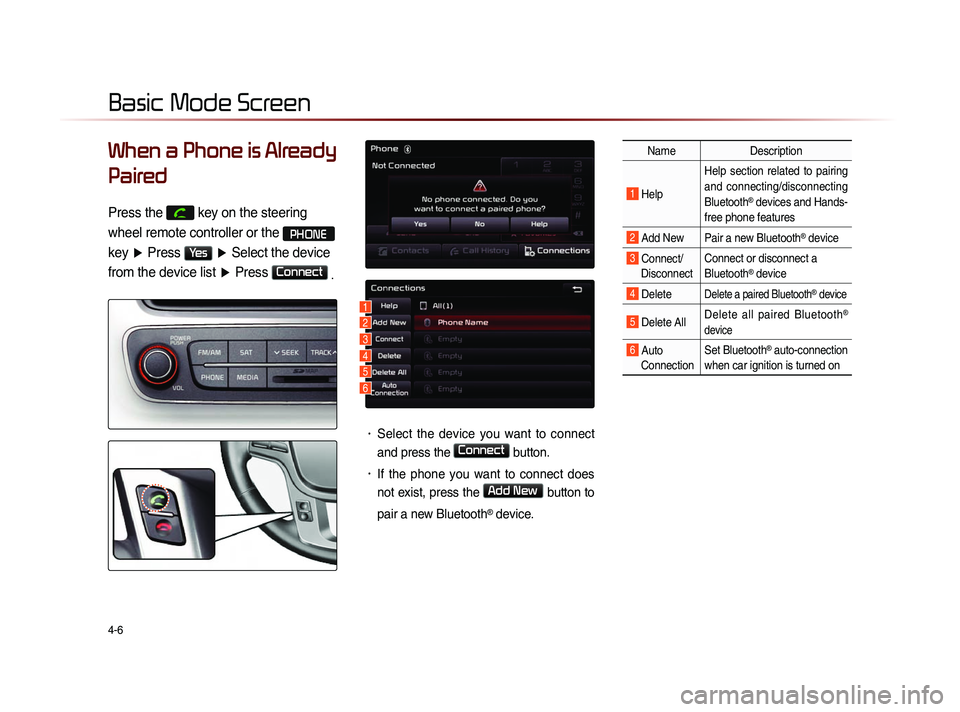
When a Phone is Already
Paired
Press the key on the steering
wheel remote controller or the
PHONE
key ▶ Press
Yes ▶ Select the device
from the device list ▶ Press
Connect
.
• Select the device you want to connect
and press the
Connect button.
• If the phone you want to connect does
not exist, press the
Add New button to
pair a new Bluetooth
® device.
Name Description
1 Help Help section related to pairing
and connecting/disconnecting
Bluetooth® devices and Hands-
free phone features
2 Add New Pair a new Bluetooth® device
3 Connect/ Disconnect Connect or disconnect a
Bluetooth® device
4 Delete Delete a paired Bluetooth® device
5 Delete All
Delete all paired Bluetooth®
device
6 Auto Connection Set Bluetooth® auto-connection
when car ignition is turned on
Basic Mode Screen
1
2
3
4
5
6
Page 121 of 236
Basic Mode Screen
Bluetooth® Handsfree l
4-7
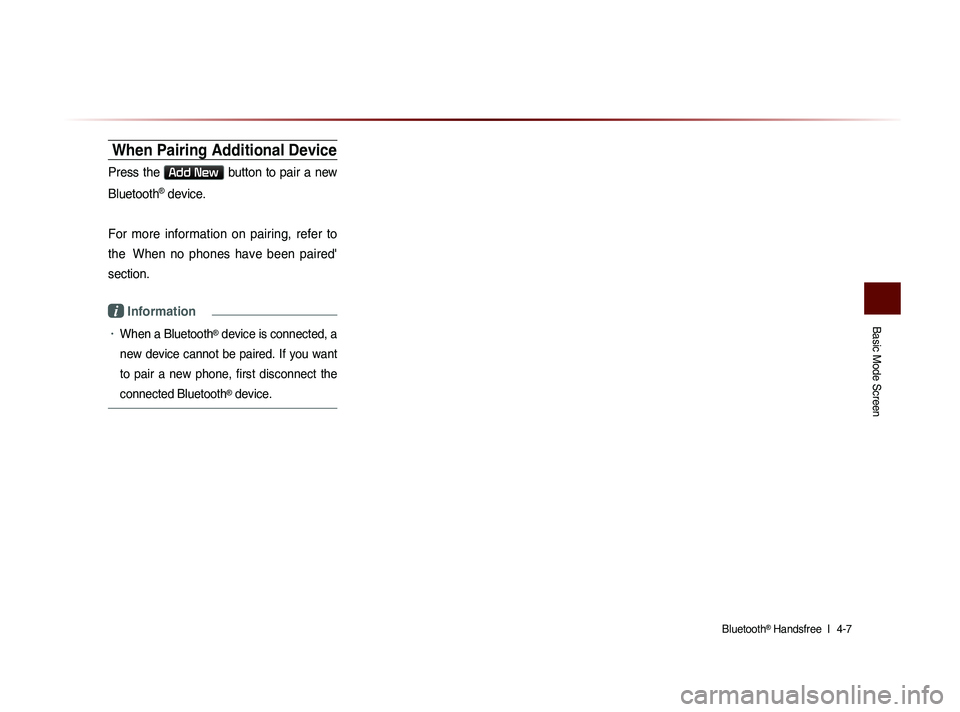
When Pairing Additional Device
Press the Add New button to pair a new
Bluetooth
® device.
For more information on pairing, refer to
the When no phones have been paired'
section.
i Information
• When a Bluetooth® device is connected, a
new device cannot be paired. If you want
to pair a new phone, first disconnect the
connected Bluetooth
® device.
Page 130 of 236
4-16
Using Bluetooth® Wireless Technology
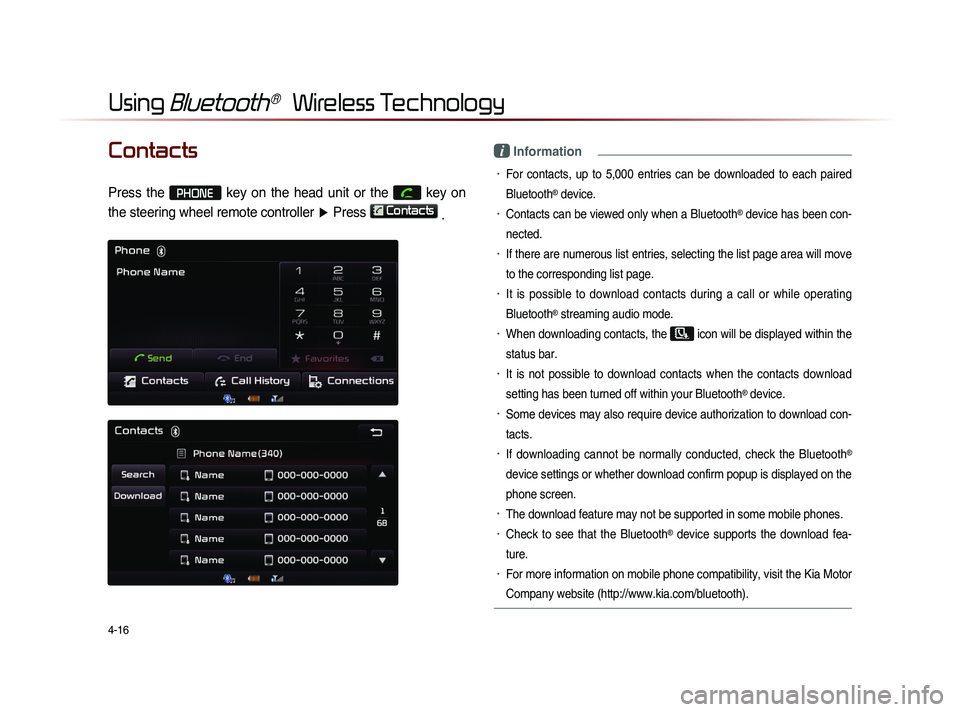
Contacts
Press the PHONE key on the head unit or the
key on
the steering wheel remote controller ▶ Press
Contacts
.
i Information
• For contacts, up to 5,000 entries can be downloaded to each paired
Bluetooth
® device.
• Contacts can be viewed only when a Bluetooth® device has been con-
nected.
• If there are numerous list entries, selecting the list page area will move
to the corresponding list page.
• It is possible to download contacts during a call or while operating
Bluetooth
® streaming audio mode.
• When downloading contacts, the icon will be displayed within the
status bar.
• It is not possible to download contacts when the contacts download
setting has been turned off within your Bluetooth
® device.
• Some devices may also require device authorization to download con-
tacts.
• If downloading cannot be normally conducted, check the Bluetooth®
device settings or whether download confirm popup is displayed on the
phone screen.
• The download feature may not be supported in some mobile phones.
• Check to see that the Bluetooth® device supports the download fea-
ture.
• For more information on mobile phone compatibility, visit the Kia Motor
Company website (http://www.kia.com/bluetooth).
Page 131 of 236
Using
Bluetooth
® Wireless Technology
Bluetooth® Handsfree l
4-17
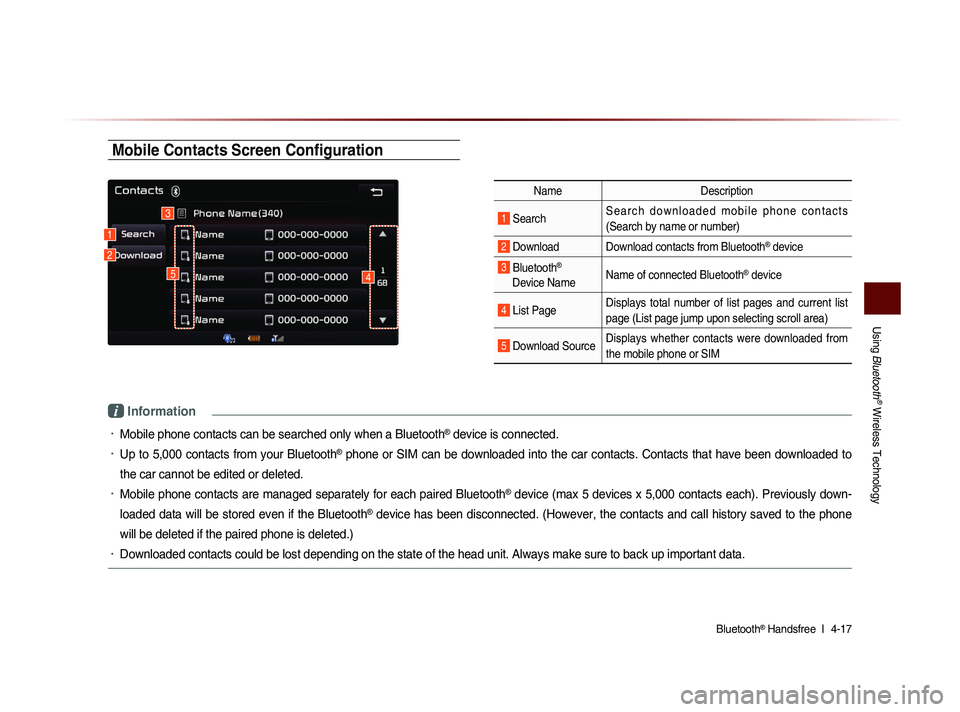
Mobile Contacts Screen Configuration
Name Description
1 Search S e a r c h d o w n l o a d e d m o b i l e p h o n e c o n t a c t s
(Search by name or number)
2 Download Download contacts from Bluetooth® device
3 Bluetooth®
Device Name Name of connected Bluetooth® device
4 List Page Displays total number of list pages and current list
page (List page jump upon selecting scroll area)
5 Download SourceDisplays whether contacts were downloaded from
the mobile phone or SIM
i Information
• Mobile phone contacts can be searched only when a Bluetooth® device is connected.
• Up to 5,000 contacts from your Bluetooth® phone or SIM can be downloaded into the car contacts. Contacts that have been downloaded to
the car cannot be edited or deleted.
• Mobile phone contacts are managed separately for each paired Bluetooth® device (max 5 devices x 5,000 contacts each). Previously down-
loaded data will be stored even if the Bluetooth
® device has been disconnected. (However, the contacts and call history saved to the phone
will be deleted if the paired phone is deleted.)
• Downloaded contacts could be lost depending on the state of the head unit. Always make sure to back up important data.
1
3
2
45
Page 132 of 236
4-18
Using Bluetooth® Wireless Technology
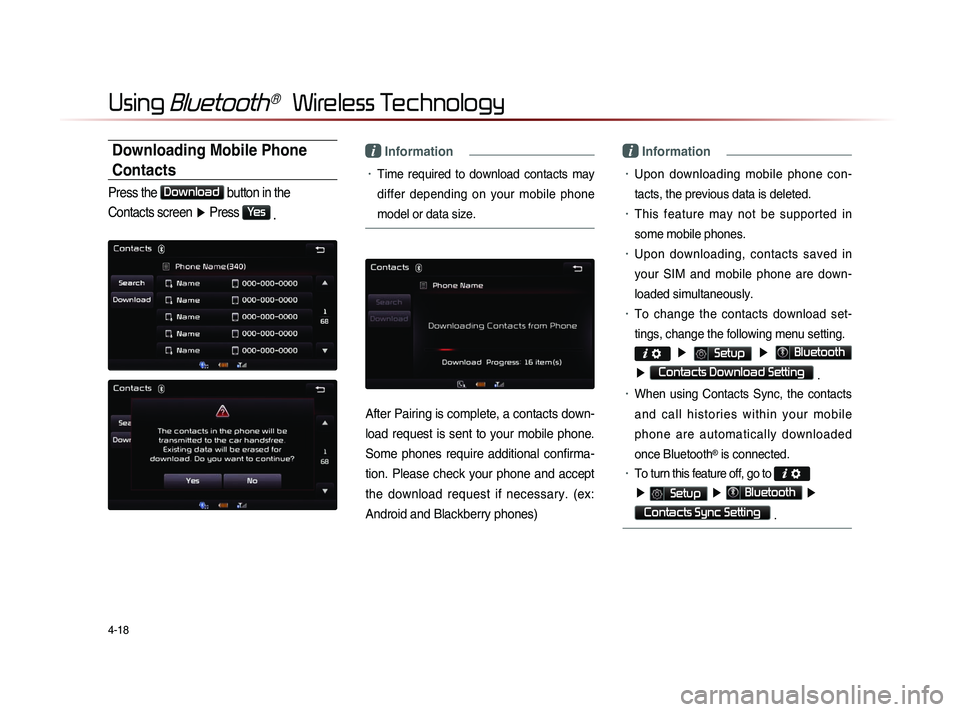
Downloading Mobile Phone
Contacts
Press the Download
button in the
Contacts screen ▶ Press
Yes
.
i Information
• Time required to download contacts may
differ depending on your mobile phone
model or data size.
After Pairing is complete, a contacts down-
load request is sent to your mobile phone.
Some phones require additional confirma-
tion. Please check your phone and accept
the download request if necessary. (ex:
Android and Blackberry phones)
i Information
• Upon downloading mobile phone con-
tacts, the previous data is deleted.
• This feature may not be supported in
some mobile phones.
• Upon downloading, contacts saved in
your SIM and mobile phone are down-
loaded simultaneously.
• To change the contacts download set-
tings, change the following menu setting.
▶ Setup ▶ Bluetooth
▶ Contacts Download Setting .
• When using Contacts Sync, the contacts
a n d c a l l h i s t o r i e s w i t h i n y o u r m o b i l e
phone are automatically downloaded
once Bluetooth
® is connected.
• To turn this feature off, go to
▶ Setup ▶ Bluetooth ▶
Contacts Sync Setting .
Page 137 of 236
Using
Bluetooth
® Wireless Technology
Bluetooth® Handsfree l
4-23
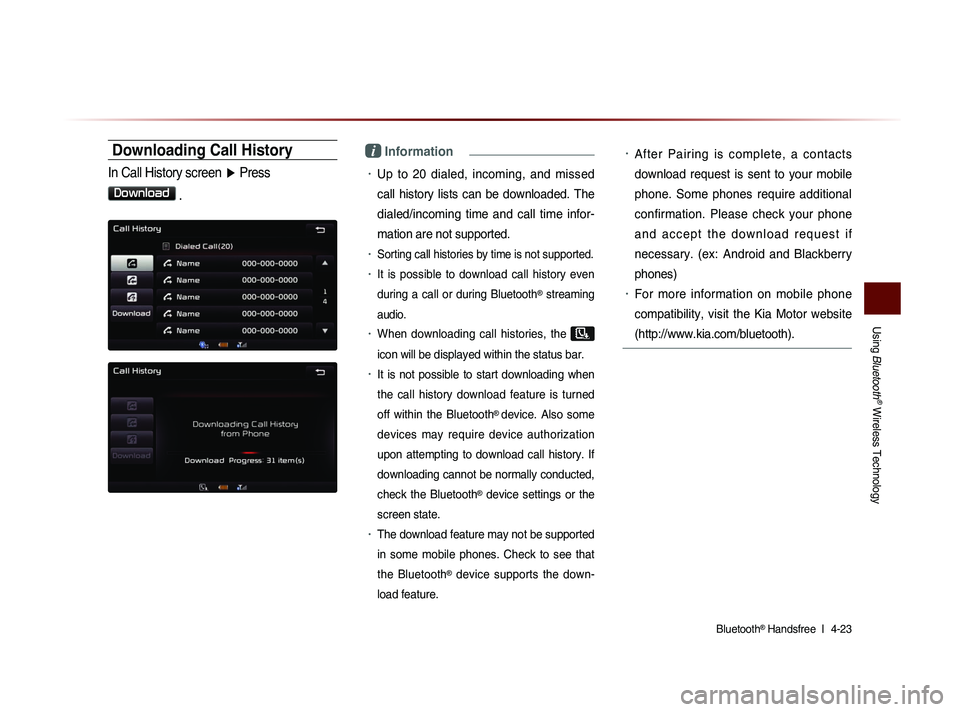
Downloading Call History
In Call History screen ▶ Press
Download
.
i Information
• Up to 20 dialed, incoming, and missed
call history lists can be downloaded. The
dialed/incoming time and call time infor-
mation are not supported.
• Sorting call histories by time is not supported.
• It is possible to download call history even
during a call or during Bluetooth
® streaming
audio.
• When downloading call histories, the
icon will be displayed within the status bar.
• It is not possible to start downloading when
the call history download feature is turned
off within the Bluetooth
® device. Also some
devices may require device authorization
upon attempting to download call history. If
downloading cannot be normally conducted,
check the Bluetooth
® device settings or the
screen state.
• The download feature may not be supported
in some mobile phones. Check to see that
the Bluetooth
® device supports the down-
load feature.
• After Pairing is complete, a contacts
download request is sent to your mobile
phone. Some phones require additional
confirmation. Please check your phone
a n d a c c e p t t h e d o w n l o a d r e q u e s t i f
necessary. (ex: Android and Blackberry
phones)
• For more information on mobile phone
compatibility, visit the Kia Motor website
(http://www.kia.com/bluetooth).
Page 139 of 236
Using
Bluetooth
® Wireless Technology
Bluetooth® Handsfree l
4-25
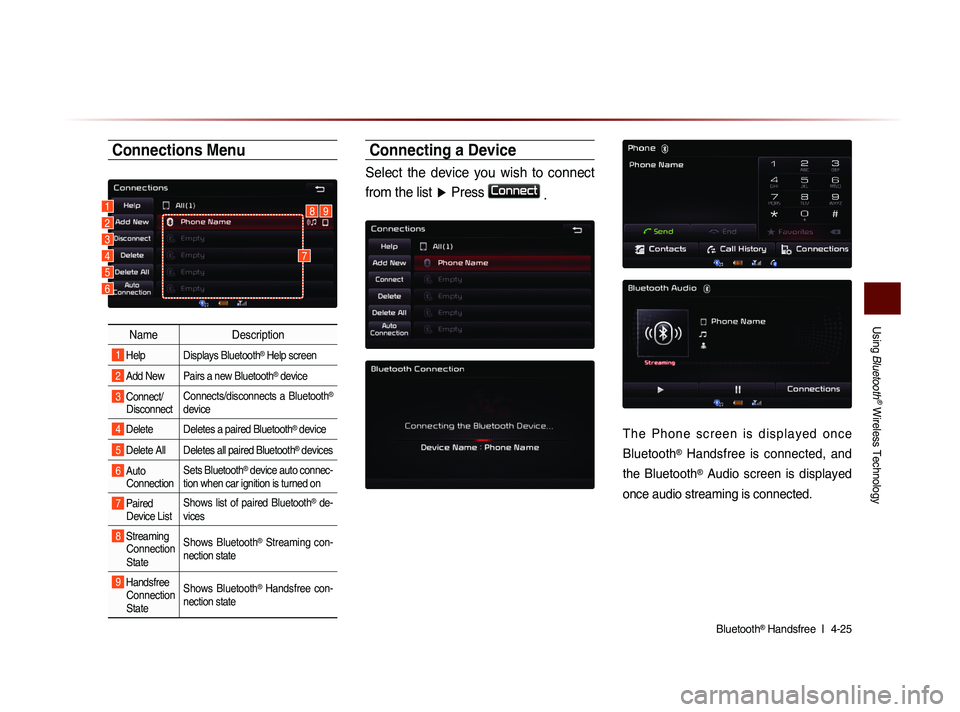
Connections Menu
Name Description
1 Help Displays Bluetooth® Help screen
2 Add New Pairs a new Bluetooth® device
3 Connect/
Disconnect Connects/disconnects a Bluetooth®
device
4 Delete Deletes a paired Bluetooth® device
5 Delete All Deletes all paired Bluetooth® devices
6 Auto
Connection Sets Bluetooth® device auto connec-
tion when car ignition is turned on
7 Paired Device List Shows list of paired Bluetooth® de-
vices
8 Streaming Connection
State Shows Bluetooth® Streaming con-
nection state
9 Handsfree Connection
State Shows Bluetooth® Handsfree con-
nection state
Connecting a Device
Select the device you wish to connect
from the list ▶ Press
Connect
.
T h e P h o n e s c r e e n i s d i s p l a y e d o n c e
Bluetooth
® Handsfree is connected, and
the Bluetooth
® Audio screen is displayed
once audio streaming is connected.
1892
3
4
5
6
7