change time KIA Sorento 2015 3.G User Guide
[x] Cancel search | Manufacturer: KIA, Model Year: 2015, Model line: Sorento, Model: KIA Sorento 2015 3.GPages: 508, PDF Size: 7.59 MB
Page 168 of 508
477
Features of your vehicle
Master Warning Mode (if equipped) This warning light informs the driv- er the following situations
- Low washer fluid (if equipped)
- TPMS (if equipped)
- Service reminder (if equipped)
The Master Warning Light illumi-
nates when more than one of the
above warning situations occur. At
this time, the LCD Modes Icon will
change from ( ) to ( ).
If the warning situation is solved, the
master warning light will be turned off
and the LCD Modes Icon will be
changed back to its previous icon ( ).
(ex : refill the washer fluid)
XM(FL) CAN(ENG) 4a(~158).QXP 1/23/2013 3:49 PM Page 77
Page 170 of 508
479
Features of your vehicle
Two Press Unlock (if equipped)
Off:The two press unlock function will
be deactivated. Therefore, all doors
will unlock if the door is unlocked.
On: The driver’s door will unlock if the
door is unlocked. When the door is
unlocked again within 4 seconds,
all doors will unlock.
Horn Feedback (if equipped)
Off: The Horn feedback operation will
be deactivated.
On: After locking the door by pressing
the lock button on the transmitter, if
you press the lock button again
within 4 seconds, the warning
sound will operate once to indicate
that all doors are locked.
LampHead Lamp Delay (if equipped)
If this item is checked, the headlamp
delay and headlamp welcome func-
tion will be activated.
Welcome Light (if equipped)
If this item is checked, the welcome
light function of the pocket lamp will
be activated.
Auto Triple Turn (One-touch triple
turn signal) (if equipped)
If this item is checked, the lane
change signals will blink 3 times when
the turn signal lever is moved slightly.
SettingsTemperature Unit
Convert the temperature unit from °C
to °F or from °F to °C.
Welcome Sound
If this item is checked, the welcome
sound function will be activated.
Seat Easy Access (if equipped)
If this item is checked, the driver’s
seat will automatically move forward
or rearward for the driver to enter or
exit the vehicle comfortably.
AVG Fuel Eco Reset
Auto Reset:The average fuel economy will
reset automatically when refueling.
Manual Reset: The average fuel economy will not
reset automatically whenever refu-
eling.
For more details, refer to “Trip
Computer” in this chapter.
XM(FL) CAN(ENG) 4a(~158).QXP 1/23/2013 3:49 PM Page 79
Page 172 of 508
481
Features of your vehicle
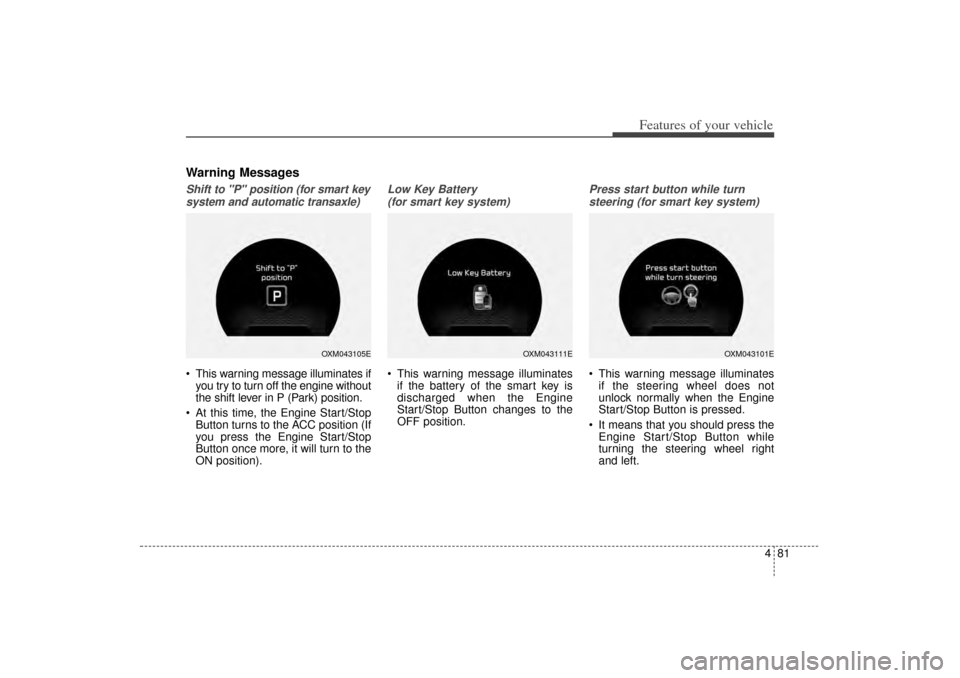
Warning MessagesShift to "P" position (for smart keysystem and automatic transaxle) This warning message illuminates if you try to turn off the engine without
the shift lever in P (Park) position.
At this time, the Engine Start/Stop Button turns to the ACC position (If
you press the Engine Start/Stop
Button once more, it will turn to the
ON position).
Low Key Battery
(for smart key system) This warning message illuminates if the battery of the smart key is
discharged when the Engine
Start/Stop Button changes to the
OFF position.
Press start button while turn
steering (for smart key system) This warning message illuminates if the steering wheel does not
unlock normally when the Engine
Start/Stop Button is pressed.
It means that you should press the Engine Start/Stop Button while
turning the steering wheel right
and left.
OXM043105E
OXM043111E
OXM043101E
XM(FL) CAN(ENG) 4a(~158).QXP 1/23/2013 3:50 PM Page 81
Page 178 of 508
487
Features of your vehicle
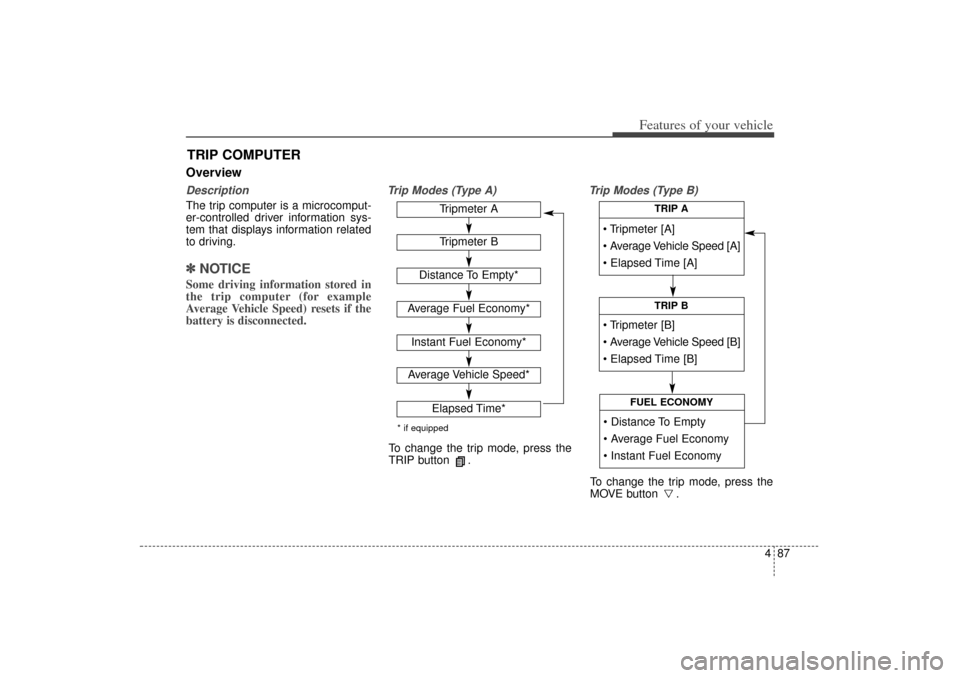
OverviewDescriptionThe trip computer is a microcomput-
er-controlled driver information sys-
tem that displays information related
to driving.✽ ✽NOTICESome driving information stored in
the trip computer (for example
Average Vehicle Speed) resets if the
battery is disconnected.
Trip Modes (Type A) Trip Modes (Type B)
TRIP COMPUTER
Tripmeter [A]
Average Vehicle Speed [A]
Elapsed Time [A]
TRIP A
Tripmeter [B]
Average Vehicle Speed [B]
Elapsed Time [B]
TRIP B
Distance To Empty
Average Fuel Economy
Instant Fuel Economy
FUEL ECONOMY
Tripmeter ATripmeter B
Distance To Empty*
Average Fuel Economy*Instant Fuel Economy*Average Vehicle Speed*
Elapsed Time*
* if equippedTo change the trip mode, press the
TRIP button .
To change the trip mode, press the
MOVE button .
XM(FL) CAN(ENG) 4a(~158).QXP 1/23/2013 3:50 PM Page 87
Page 203 of 508
Features of your vehicle112
4Turn signals and lane change
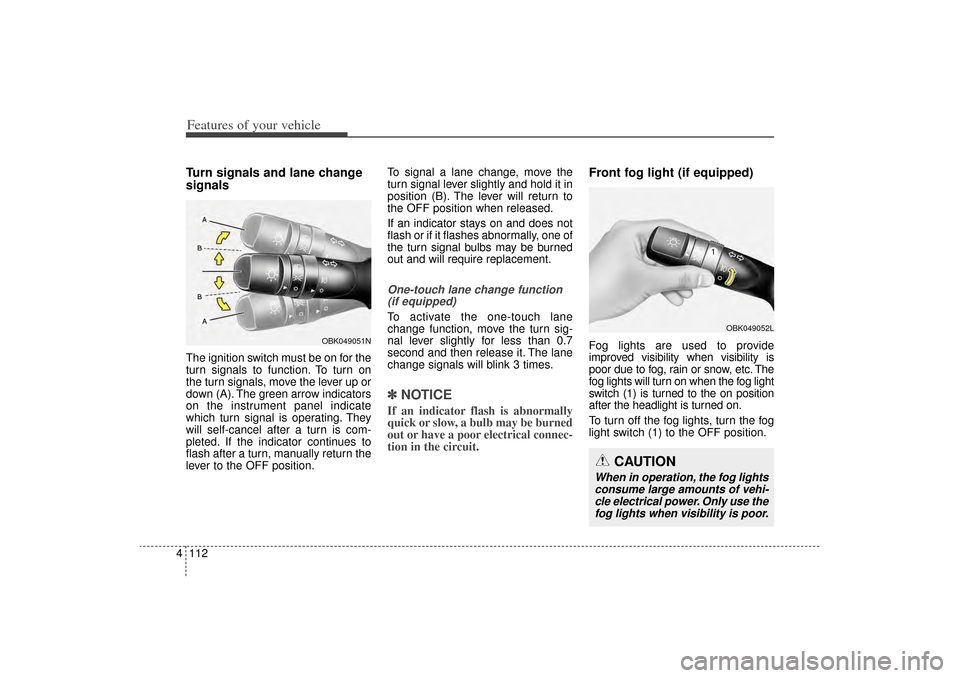
signalsThe ignition switch must be on for the
turn signals to function. To turn on
the turn signals, move the lever up or
down (A). The green arrow indicators
on the instrument panel indicate
which turn signal is operating. They
will self-cancel after a turn is com-
pleted. If the indicator continues to
flash after a turn, manually return the
lever to the OFF position. To signal a lane change, move the
turn signal lever slightly and hold it in
position (B). The lever will return to
the OFF position when released.
If an indicator stays on and does not
flash or if it flashes abnormally, one of
the turn signal bulbs may be burned
out and will require replacement.
One-touch lane change function
(if equipped)To activate the one-touch lane
change function, move the turn sig-
nal lever slightly for less than 0.7
second and then release it. The lane
change signals will blink 3 times.✽ ✽ NOTICEIf an indicator flash is abnormally
quick or slow, a bulb may be burned
out or have a poor electrical connec-
tion in the circuit.
Front fog light (if equipped)Fog lights are used to provide
improved visibility when visibility is
poor due to fog, rain or snow, etc. The
fog lights will turn on when the fog light
switch (1) is turned to the on position
after the headlight is turned on.
To turn off the fog lights, turn the fog
light switch (1) to the OFF position.
OBK049052L
CAUTION
When in operation, the fog lights
consume large amounts of vehi-cle electrical power. Only use thefog lights when visibility is poor.
OBK049051N
XM(FL) CAN(ENG) 4a(~158).QXP 1/23/2013 3:50 PM Page 112
Page 209 of 508
Features of your vehicle118
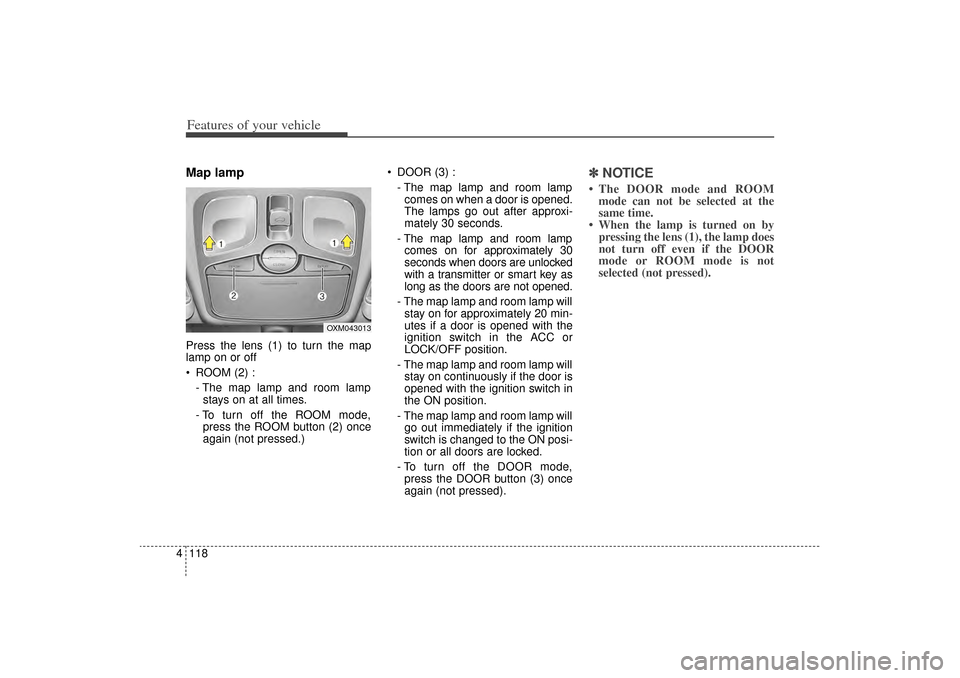
4Map lamp Press the lens (1) to turn the map
lamp on or off
ROOM (2) :
- The map lamp and room lampstays on at all times.
- To turn off the ROOM mode, press the ROOM button (2) once
again (not pressed.) DOOR (3) :
- The map lamp and room lampcomes on when a door is opened.
The lamps go out after approxi-
mately 30 seconds.
- The map lamp and room lamp comes on for approximately 30
seconds when doors are unlocked
with a transmitter or smart key as
long as the doors are not opened.
- The map lamp and room lamp will stay on for approximately 20 min-
utes if a door is opened with the
ignition switch in the ACC or
LOCK/OFF position.
- The map lamp and room lamp will stay on continuously if the door is
opened with the ignition switch in
the ON position.
- The map lamp and room lamp will go out immediately if the ignition
switch is changed to the ON posi-
tion or all doors are locked.
- To turn off the DOOR mode, press the DOOR button (3) once
again (not pressed).
✽ ✽ NOTICE• The DOOR mode and ROOM
mode can not be selected at the
same time.
• When the lamp is turned on by pressing the lens (1), the lamp does
not turn off even if the DOOR
mode or ROOM mode is not
selected (not pressed).
OXM043013
XM(FL) CAN(ENG) 4a(~158).QXP 1/23/2013 3:51 PM Page 118
Page 219 of 508
Features of your vehicle128
4Air conditioningKia Air Conditioning Systems are
filled with refrigerant*.
1. Start the engine. Push the air con-
ditioning button.
2. Set the mode to the position.
3. Set the air intake control to the outside air or recirculated air posi-
tion.
4. Adjust the fan speed control and temperature control to maintain
maximum comfort.
✽ ✽NOTICE• When using the air conditioning sys-
tem, monitor the temperature gauge
closely while driving up hills or in
heavy traffic when outside tempera-
tures are high. Air conditioning sys-
tem operation may cause engine
overheating. Continue to use the
blower fan but turn the air condi-
tioning system off if the temperature
gauge indicates engine overheating.
• When opening the windows in humid weather air conditioning
may create water droplets inside
the vehicle. Since excessive water
droplets may cause damage to
electrical equipment, air condi-
tioning should only be used with
the windows closed.
Air conditioning system operation tips
If the vehicle has been parked in
direct sunlight during hot weather,
open the windows for a short time
to let the hot air inside the vehicle
escape.
To help reduce moisture inside of the windows on rainy or humid
days, decrease the humidity inside
the vehicle by operating the air
conditioning system.
During air conditioning system operation, you may occasionally
notice a slight change in engine
speed as the air conditioning com-
pressor cycles. This is a normal
system operation characteristic.
Use the air conditioning system every month only for a few minutes
to ensure maximum system per-
formance.
CAUTION
The refrigerant system should only be serviced by trainedand certified technicians toinsure proper and safe opera-tion.
The refrigerant system should be serviced in a well-ventilat-ed place.
(Continued)
(Continued) The air conditioning evaporator (cooling coil) shall never berepaired or replaced with oneremoved from a used or sal-vaged vehicle and new replace-ment MAC evaporators shall becertified (and labeled) as meet-ing SAE Standard J2842.
XM(FL) CAN(ENG) 4a(~158).QXP 1/23/2013 3:53 PM Page 128
Page 220 of 508
4 129
Features of your vehicle
When using the air conditioningsystem, you may notice clear water
dripping (or even puddling) on the
ground under the passenger side
of the vehicle. This is a normal sys-
tem operation characteristic.
Operating the air conditioning sys- tem in the recirculated air position
provides maximum cooling, how-
ever, continual operation in this
mode may cause the air inside the
vehicle to become stale.
During cooling operation, you may occasionally notice a misty air flow
because of rapid cooling and
humid air intake. This is a normal
system operation characteristic.
Climate control air filter
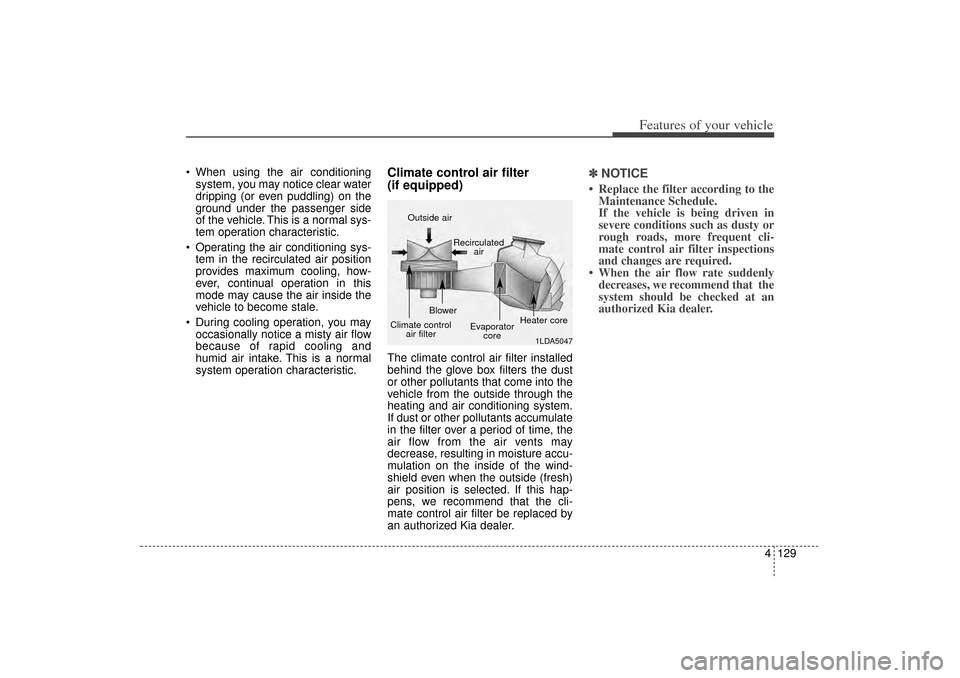
(if equipped)The climate control air filter installed
behind the glove box filters the dust
or other pollutants that come into the
vehicle from the outside through the
heating and air conditioning system.
If dust or other pollutants accumulate
in the filter over a period of time, the
air flow from the air vents may
decrease, resulting in moisture accu-
mulation on the inside of the wind-
shield even when the outside (fresh)
air position is selected. If this hap-
pens, we recommend that the cli-
mate control air filter be replaced by
an authorized Kia dealer.
✽ ✽ NOTICE• Replace the filter according to the
Maintenance Schedule.
If the vehicle is being driven in
severe conditions such as dusty or
rough roads, more frequent cli-
mate control air filter inspections
and changes are required.
• When the air flow rate suddenly decreases, we recommend that the
system should be checked at an
authorized Kia dealer.
1LDA5047
Outside air
Recirculatedair
Climate control air filter Blower
Evaporatorcore Heater core
XM(FL) CAN(ENG) 4a(~158).QXP 1/23/2013 3:53 PM Page 129
Page 245 of 508
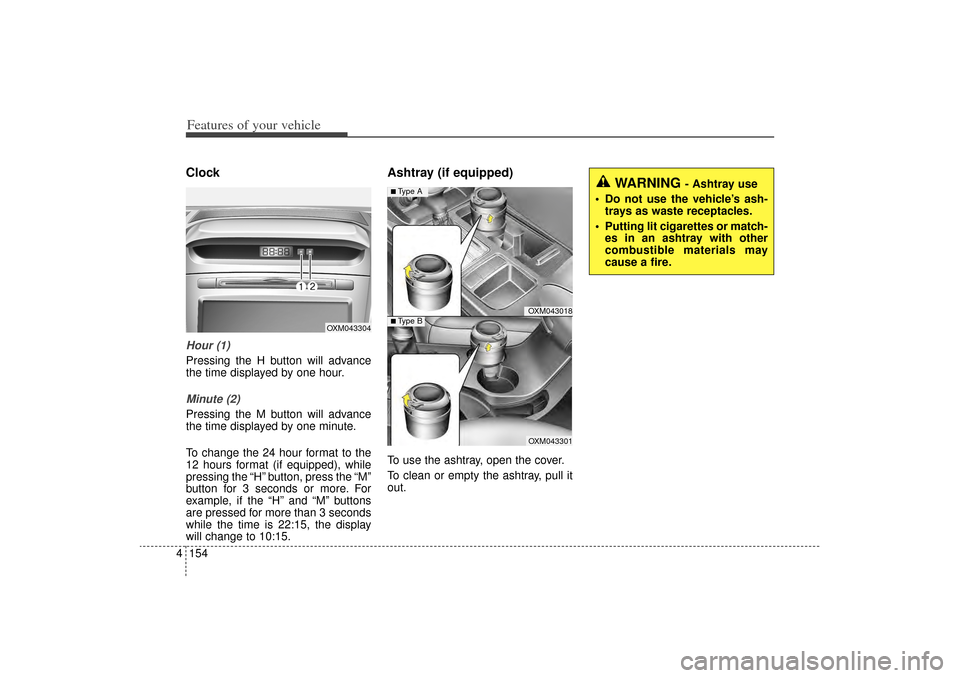
Features of your vehicle154
4ClockHour (1)Pressing the H button will advance
the time displayed by one hour.Minute (2)Pressing the M button will advance
the time displayed by one minute.
To change the 24 hour format to the
12 hours format (if equipped), while
pressing the “H” button, press the “M”
button for 3 seconds or more. For
example, if the “H” and “M” buttons
are pressed for more than 3 seconds
while the time is 22:15, the display
will change to 10:15.
Ashtray (if equipped)To use the ashtray, open the cover.
To clean or empty the ashtray, pull it
out.
OXM043304
WARNING
- Ashtray use
Do not use the vehicle’s ash- trays as waste receptacles.
Putting lit cigarettes or match- es in an ashtray with other
combustible materials may
cause a fire.
OXM043018OXM043301
■Type A■ Type B
XM(FL) CAN(ENG) 4a(~158).QXP 1/23/2013 3:56 PM Page 154
Page 258 of 508
4 167
Features of your vehicle
(Continued) If you want to change the posi- tion of device installation,please inquire with your placeof purchase or service mainte-nance center. Technicalexpertise is required to installor disassemble the device.
Turn on the car ignition before using this device. Do not oper-ate the audio system for longperiods of time with the igni-tion turned off as such opera-tions may lead to battery dis-charge.
Do not subject the device to severe shock or impact. Directpressure onto the front side ofthe monitor may cause dam-age to the LCD or touchscreen.
(Continued)
(Continued) When cleaning the device, make sure to turn off thedevice and use a dry andsmooth cloth. Never usetough materials, chemicalcloths, or solvents (alcohol,benzene, thinners, etc.) assuch materials may damagethe device panel or causecolor/quality deterioration
Do not place beverages close to the audio system. Spillingbeverages may lead to systemmalfunction.
In case of product malfunction, please contact your place of pur-chase or After Service center.
Placing the audio system within an electromagneticenvironment may result innoise interference.
XM(FL) CAN(ENG) 4b(AUDIO).qxp 1/23/2013 3:42 PM Page 167