wheel KIA Sorento 2015 3.G Owner's Guide
[x] Cancel search | Manufacturer: KIA, Model Year: 2015, Model line: Sorento, Model: KIA Sorento 2015 3.GPages: 508, PDF Size: 7.59 MB
Page 161 of 508
![KIA Sorento 2015 3.G Owners Guide Features of your vehicle70
4LCD Display ControlThe LCD display modes can be
changed by using the control buttons
on the steering wheel.
[Type A]
(1) : TRIP button for changing trip
modes
(2) : RESET](/img/2/2967/w960_2967-160.png "KIA Sorento 2015 3.G Owners Guide Features of your vehicle70
4LCD Display ControlThe LCD display modes can be
changed by using the control buttons
on the steering wheel.
[Type A]
(1) : TRIP button for changing trip
modes
(2) : RESET")
Features of your vehicle70
4LCD Display ControlThe LCD display modes can be
changed by using the control buttons
on the steering wheel.
[Type A]
(1) : TRIP button for changing trip
modes
(2) : RESET button for resetting items
❈ For the LCD modes, refer to “LCD
Display” in this chapter. [Type B]
(1) : MODE button for changing
modes or SELECT button
for setting the selected item
(2) : MOVE button for changing items or RESET button for
resetting the selected item
OXM043124
XM(FL) CAN(ENG) 4a(~158).QXP 1/23/2013 3:49 PM Page 70
Page 172 of 508
481
Features of your vehicle
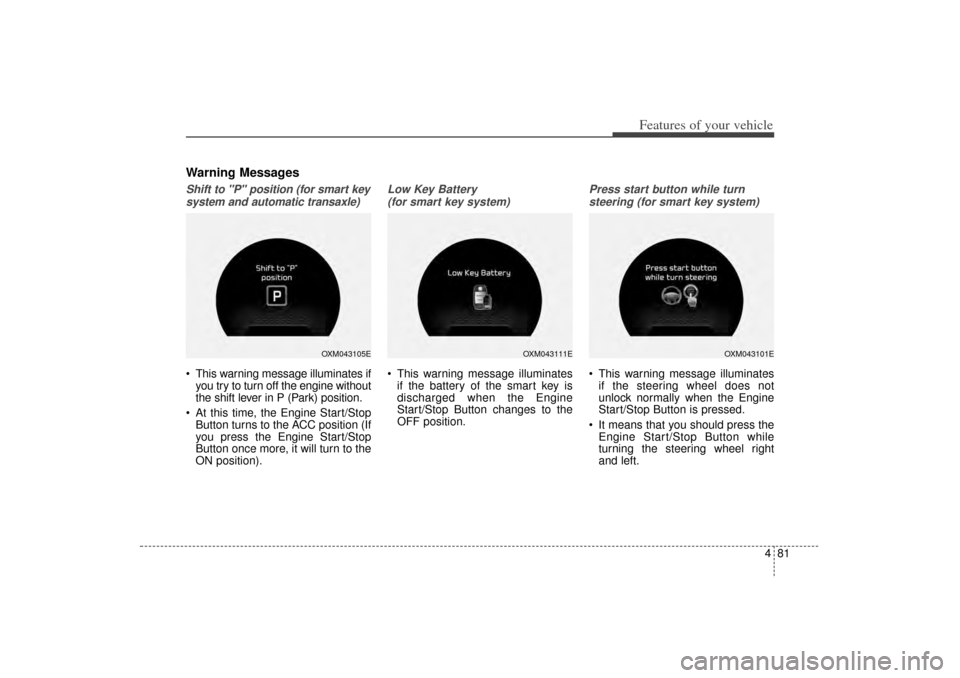
Warning MessagesShift to "P" position (for smart keysystem and automatic transaxle) This warning message illuminates if you try to turn off the engine without
the shift lever in P (Park) position.
At this time, the Engine Start/Stop Button turns to the ACC position (If
you press the Engine Start/Stop
Button once more, it will turn to the
ON position).
Low Key Battery
(for smart key system) This warning message illuminates if the battery of the smart key is
discharged when the Engine
Start/Stop Button changes to the
OFF position.
Press start button while turn
steering (for smart key system) This warning message illuminates if the steering wheel does not
unlock normally when the Engine
Start/Stop Button is pressed.
It means that you should press the Engine Start/Stop Button while
turning the steering wheel right
and left.
OXM043105E
OXM043111E
OXM043101E
XM(FL) CAN(ENG) 4a(~158).QXP 1/23/2013 3:50 PM Page 81
Page 176 of 508
485
Features of your vehicle
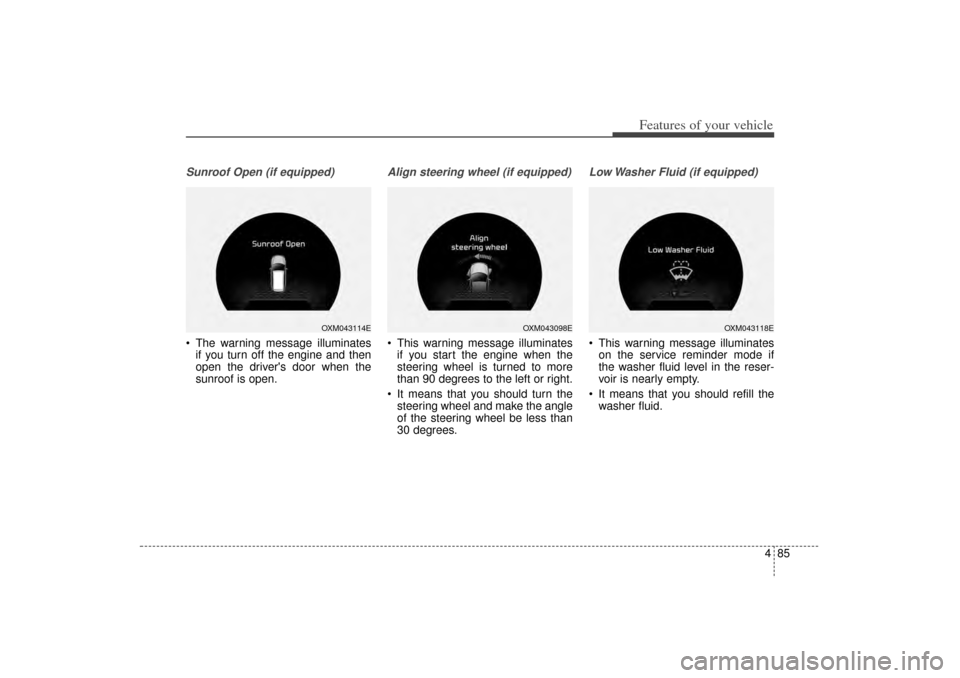
Sunroof Open (if equipped) The warning message illuminatesif you turn off the engine and then
open the driver's door when the
sunroof is open.
Align steering wheel (if equipped) This warning message illuminatesif you start the engine when the
steering wheel is turned to more
than 90 degrees to the left or right.
It means that you should turn the steering wheel and make the angle
of the steering wheel be less than
30 degrees.
Low Washer Fluid (if equipped) This warning message illuminateson the service reminder mode if
the washer fluid level in the reser-
voir is nearly empty.
It means that you should refill the washer fluid.
OXM043114E
OXM043098E
OXM043118E
XM(FL) CAN(ENG) 4a(~158).QXP 1/23/2013 3:50 PM Page 85
Page 179 of 508
Features of your vehicle88
4Trip A/B
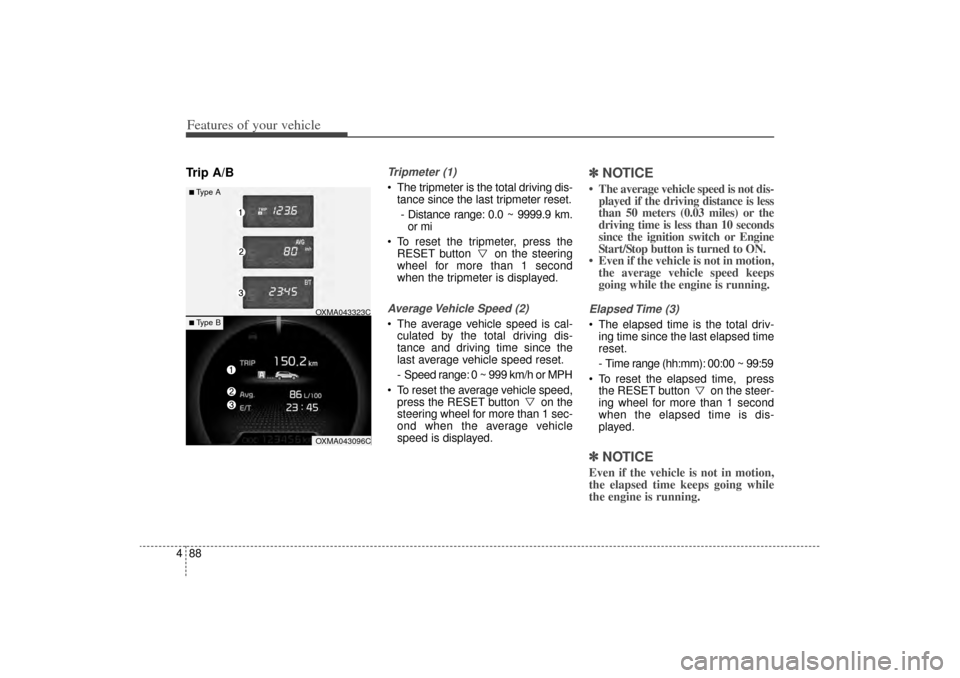
Tripmeter (1) The tripmeter is the total driving dis-
tance since the last tripmeter reset.
- Distance range: 0.0 ~ 9999.9 km. or mi
To reset the tripmeter, press the RESET button on the steering
wheel for more than 1 second
when the tripmeter is displayed.Average Vehicle Speed (2) The average vehicle speed is cal-culated by the total driving dis-
tance and driving time since the
last average vehicle speed reset.
- Speed range: 0 ~ 999 km/h or MPH
To reset the average vehicle speed, press the RESET button on the
steering wheel for more than 1 sec-
ond when the average vehicle
speed is displayed.
✽ ✽ NOTICE• The average vehicle speed is not dis-
played if the driving distance is less
than 50 meters (0.03 miles) or the
driving time is less than 10 seconds
since the ignition switch or Engine
Start/Stop button is turned to ON.
• Even if the vehicle is not in motion, the average vehicle speed keeps
going while the engine is running.Elapsed Time (3) The elapsed time is the total driv-
ing time since the last elapsed time
reset.
- Time range (hh:mm): 00:00 ~ 99:59
To reset the elapsed time, press the RESET button on the steer-
ing wheel for more than 1 second
when the elapsed time is dis-
played.✽ ✽ NOTICEEven if the vehicle is not in motion,
the elapsed time keeps going while
the engine is running.
■Type A
OXMA043323COXMA043096C
■ Type B
XM(FL) CAN(ENG) 4a(~158).QXP 1/23/2013 3:50 PM Page 88
Page 180 of 508
489
Features of your vehicle
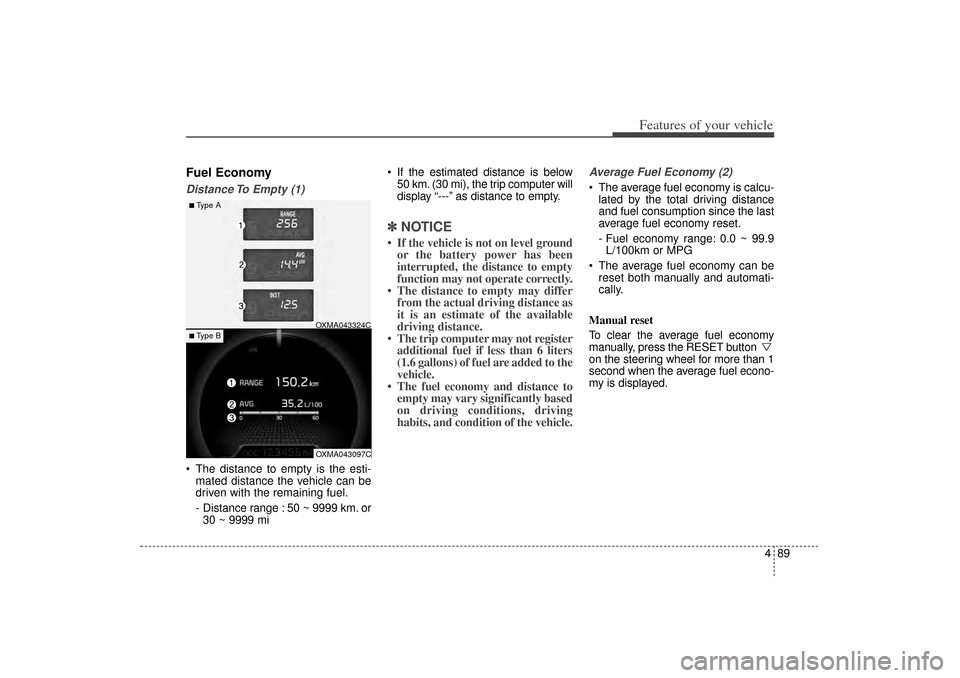
Fuel EconomyDistance To Empty (1) The distance to empty is the esti-mated distance the vehicle can be
driven with the remaining fuel.
- Distance range : 50 ~ 9999 km. or30 ~ 9999 mi If the estimated distance is below
50 km. (30 mi), the trip computer will
display “---” as distance to empty.
✽ ✽ NOTICE• If the vehicle is not on level ground
or the battery power has been
interrupted, the distance to empty
function may not operate correctly.
• The distance to empty may differ from the actual driving distance as
it is an estimate of the available
driving distance.
• The trip computer may not register additional fuel if less than 6 liters
(1.6 gallons) of fuel are added to the
vehicle.
• The fuel economy and distance to empty may vary significantly based
on driving conditions, driving
habits, and condition of the vehicle.
Average Fuel Economy (2) The average fuel economy is calcu-
lated by the total driving distance
and fuel consumption since the last
average fuel economy reset.
- Fuel economy range: 0.0 ~ 99.9L/100km or MPG
The average fuel economy can be reset both manually and automati-
cally.
Manual reset
To clear the average fuel economy
manually, press the RESET button
on the steering wheel for more than 1
second when the average fuel econo-
my is displayed.
■Type A
OXMA043324COXMA043097C
■ Type B
XM(FL) CAN(ENG) 4a(~158).QXP 1/23/2013 3:50 PM Page 89
Page 183 of 508
Features of your vehicle92
4Parking Brake & Brake
Fluid Warning LightThis warning light illuminates:
Once you set the ignition switch or Engine Start/Stop Button to the ON
position.
- It illuminates for approximately 3seconds
- It remains on if the parking brake is applied.
When the parking brake is applied.
When the brake fluid level in the reservoir is low.
- If the warning light illuminateswith the parking brake released, it
indicates the brake fluid level in
reservoir is low. If the brake fluid level in the reservoir
is low:
1. Drive carefully to the nearest safe
location and stop your vehicle.
2. With the engine stopped, check the brake fluid level immediately and add
fluid as required (For more details,
refer to “Brake Fluid” in chapter 7).
Then check all brake components
for fluid leaks. If any leaks in the
brake system is still found, the
warning light remains on, or the
brakes do not operate properly, do
not drive the vehicle.
In this case, have your vehicle
towed to an authorized Kia dealer
and inspected. Dual-diagonal braking system
Your vehicle is equipped with dual-
diagonal braking systems. This
means you still have braking on two
wheels even if one of the dual sys-
tems should fail.
With only one of the dual systems
working, more than normal pedal
travel and greater pedal pressure are
required to stop the vehicle.
Also, the vehicle will not stop in as
short a distance with only a portion
of the brake system working.
If the brakes fail while you are driv-
ing, shift to a lower gear for addition-
al engine braking and stop the vehi-
cle as soon as it is safe to do so.
XM(FL) CAN(ENG) 4a(~158).QXP 1/23/2013 3:50 PM Page 92
Page 188 of 508
497
Features of your vehicle
Door Ajar Warning LightThis warning light illuminates:
When a door is not closed securely.Tailgate Open WarningLightThis warning light illuminates:
When the tailgate is not closed
securely.
All Wheel Drive (AWD)Warning Light (if equipped)This warning light illuminates:
Once you set the ignition switch or Engine Start/Stop Button to the ON
position.
- It illuminates for approximately 3seconds and then goes off.
When there is a malfunction with the AWD system.
In this case, have your vehicle
inspected by an authorized Kia
dealer.
XM(FL) CAN(ENG) 4a(~158).QXP 1/23/2013 3:50 PM Page 97
Page 192 of 508
4 101
Features of your vehicle
All Wheel Drive (AWD)LOCK Indicator Light (if equipped)This indicator light illuminates:
Once you set the ignition switch or Engine Start/Stop Button to the ON
position.
- It illuminates for approximately 3seconds and then goes off.
When you select AWD Lock mode by pressing the AWD LOCK button.
- The AWD LOCK mode is toincrease the drive power when
driving on wet pavement, snow
covered roads and/or off-road.
Washer Fluid Warning
Light (if equipped)This warning light illuminates:
When the washer fluid level in the reservoir is nearly empty.
In this case, you should refill the
washer fluid.Cruise Indicator Light
(if equipped)This indicator light illuminates:
When the cruise control system is enabled.
For more details, refer to “Cruise
Control System” in chapter 5.
Cruise SET Indicator Light (if equipped)This indicator light illuminates:
When the cruise control speed is set.
For more details, refer to “Cruise
Control System” in chapter 5.
CAUTION -
AWD Lock
Mode
Do not use AWD LOCK mode ondry paved roads or highway, itcan cause noise, vibration ordamage of AWD related parts.
CRUISE
SET
XM(FL) CAN(ENG) 4a(~158).QXP 1/23/2013 3:50 PM Page 101
Page 215 of 508
Features of your vehicle124
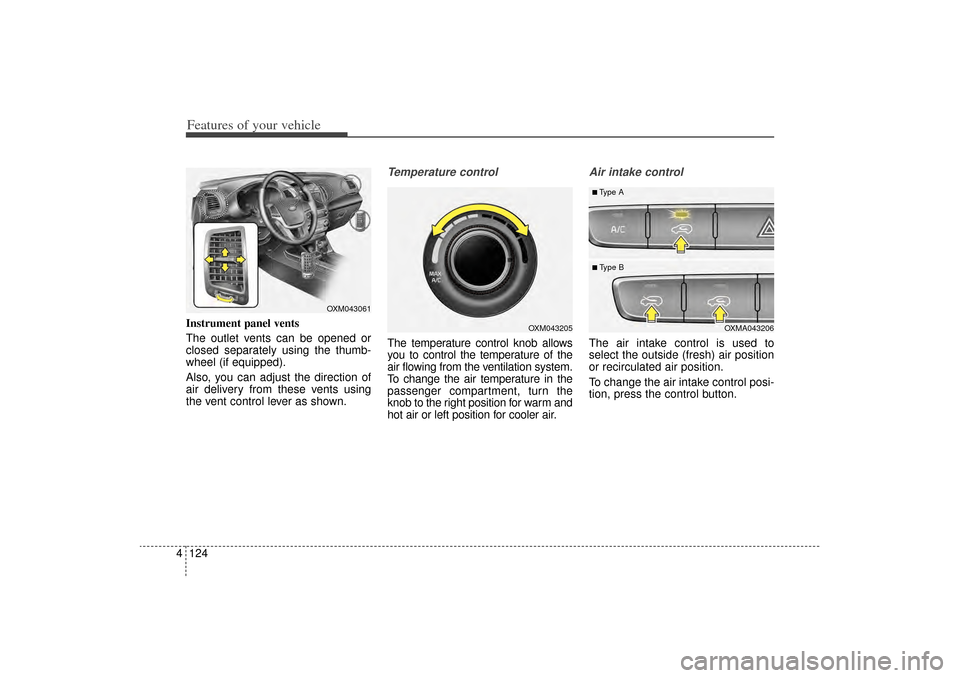
4Instrument panel vents
The outlet vents can be opened or
closed separately using the thumb-
wheel (if equipped).
Also, you can adjust the direction of
air delivery from these vents using
the vent control lever as shown.
Temperature controlThe temperature control knob allows
you to control the temperature of the
air flowing from the ventilation system.
To change the air temperature in the
passenger compartment, turn the
knob to the right position for warm and
hot air or left position for cooler air.
Air intake control The air intake control is used to
select the outside (fresh) air position
or recirculated air position.
To change the air intake control posi-
tion, press the control button.
OXM043205
OXM043061
OXMA043206
■Type A■ Type B
XM(FL) CAN(ENG) 4a(~158).QXP 1/23/2013 3:53 PM Page 124
Page 227 of 508
Features of your vehicle136
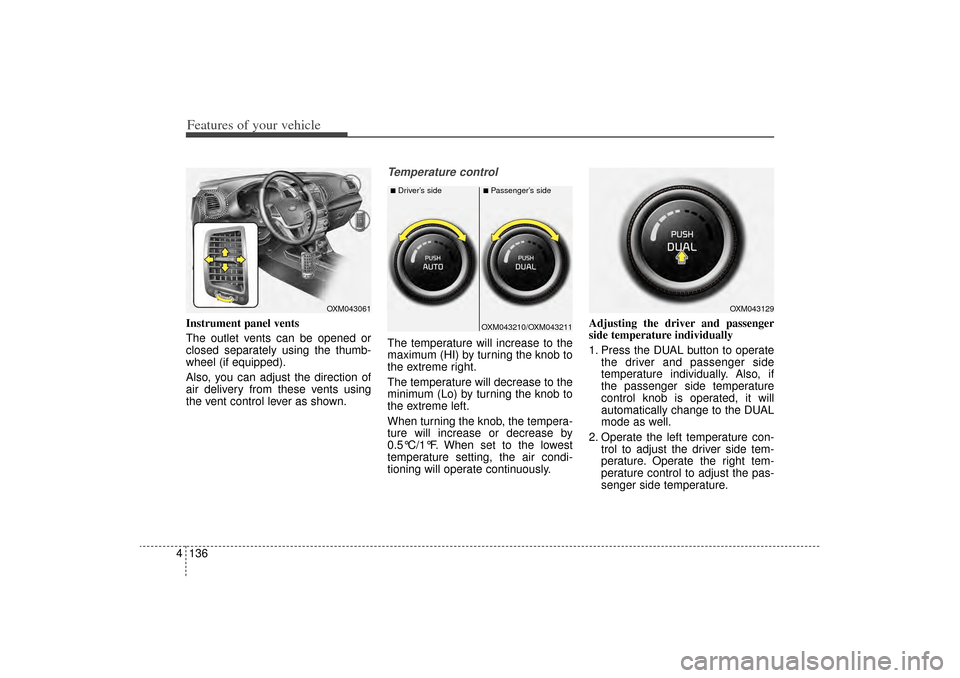
4Instrument panel vents
The outlet vents can be opened or
closed separately using the thumb-
wheel (if equipped).
Also, you can adjust the direction of
air delivery from these vents using
the vent control lever as shown.
Temperature controlThe temperature will increase to the
maximum (HI) by turning the knob to
the extreme right.
The temperature will decrease to the
minimum (Lo) by turning the knob to
the extreme left.
When turning the knob, the tempera-
ture will increase or decrease by
0.5°C/1°F. When set to the lowest
temperature setting, the air condi-
tioning will operate continuously. Adjusting the driver and passenger
side temperature individually
1. Press the DUAL button to operate
the driver and passenger side
temperature individually. Also, if
the passenger side temperature
control knob is operated, it will
automatically change to the DUAL
mode as well.
2. Operate the left temperature con- trol to adjust the driver side tem-
perature. Operate the right tem-
perature control to adjust the pas-
senger side temperature.
OXM043061
OXM043210/OXM043211
■Driver’s side
■Passenger’s side
OXM043129
XM(FL) CAN(ENG) 4a(~158).QXP 1/23/2013 3:55 PM Page 136