set clock KIA Sorento 2016 3.G User Guide
[x] Cancel search | Manufacturer: KIA, Model Year: 2016, Model line: Sorento, Model: KIA Sorento 2016 3.GPages: 565, PDF Size: 10.63 MB
Page 295 of 565
![KIA Sorento 2016 3.G User Guide 4211
Features of your vehicle
Disconnecting a Device
Press the key Select
[Phone] Select [Phone List]
From the paired phone list, select the
currently connected device and
select [Disconnect] button.](/img/2/2978/w960_2978-294.png "KIA Sorento 2016 3.G User Guide 4211
Features of your vehicle
Disconnecting a Device
Press the key Select
[Phone] Select [Phone List]
From the paired phone list, select the
currently connected device and
select [Disconnect] button.")
4211
Features of your vehicle
Disconnecting a Device
Press the key Select
[Phone] Select [Phone List]
From the paired phone list, select the
currently connected device and
select [Disconnect] button.
Deleting a Device
Press the key Select
[Phone] Select [Phone List]
From the paired phone list, select the
device you want to delete and select
[Delete] button. When deleting the currently con-
nected device, the device will auto-
matically be disconnected to pro-
ceed with the deleting process.
If a paired
Bluetooth®Wireless
Technology device is deleted, the
device’s call history and contacts
data will also be deleted.
To re-use a deleted device, you must pair the device again.
SETUPCLOCKSETUPCLOCK
UM CAN (ENG) 4b (Audio).qxp 11/7/2014 3:02 PM Page 211
Page 296 of 565
Features of your vehicle
212
4
USING Bluetooth®Wireless
Technology
Phone Menu Screen
Phone Menus
With a Bluetooth®Wireless
Technology device connected, press
the key to display the Phone
menu screen.
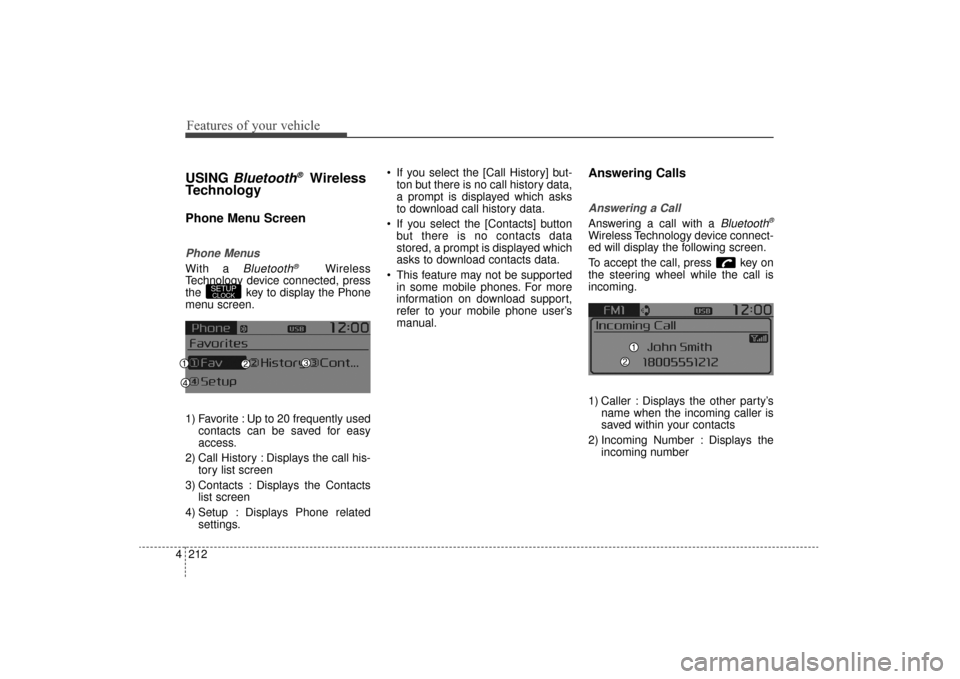
1) Favorite : Up to 20 frequently used contacts can be saved for easy
access.
2) Call History : Displays the call his- tory list screen
3) Contacts : Displays the Contacts list screen
4) Setup : Displays Phone related settings. If you select the [Call History] but-
ton but there is no call history data,
a prompt is displayed which asks
to download call history data.
If you select the [Contacts] button but there is no contacts data
stored, a prompt is displayed which
asks to download contacts data.
This feature may not be supported in some mobile phones. For more
information on download support,
refer to your mobile phone user’s
manual.
Answering Calls
Answering a Call
Answering a call with a Bluetooth®
Wireless Technology device connect-
ed will display the following screen.
To accept the call, press key on
the steering wheel while the call is
incoming.
1) Caller : Displays the other party’s name when the incoming caller is
saved within your contacts
2) Incoming Number : Displays the incoming number
SETUPCLOCK
UM CAN (ENG) 4b (Audio).qxp 11/7/2014 3:02 PM Page 212
Page 299 of 565
4215
Features of your vehicle
Bluetooth®Wireless Technology
Setting
The Bluetooth®word mark and logos
are registered trademarks owned by
Bluetooth SIG, Inc. and any use of
such marks by Kia is under license.
Other trademarks and trade names
are those of their respective owners.
A
Bluetooth®enabled cell phone is
required to use
Bluetooth®Wireless
Technology
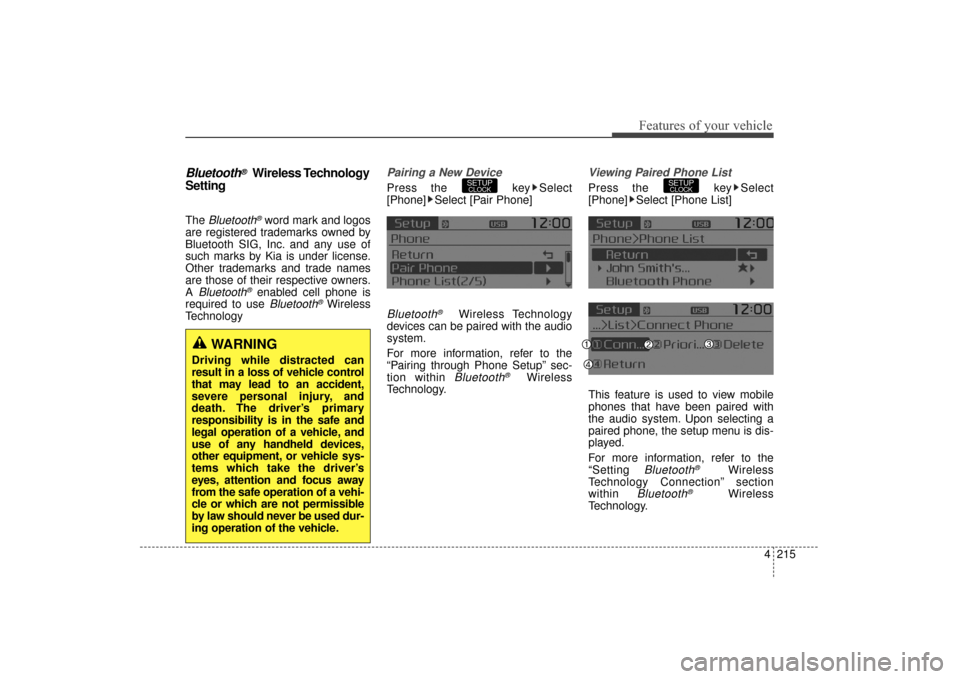
Pairing a New Device
Press the key Select
[Phone] Select [Pair Phone]
Bluetooth®Wireless Technology
devices can be paired with the audio
system.
For more information, refer to the
“Pairing through Phone Setup” sec-
tion within
Bluetooth®Wireless
Technology.
Viewing Paired Phone List
Press the key Select
[Phone] Select [Phone List]
This feature is used to view mobile
phones that have been paired with
the audio system. Upon selecting a
paired phone, the setup menu is dis-
played.
For more information, refer to the
“Setting
Bluetooth®Wireless
Technology Connection” section
within
Bluetooth®Wireless
Technology.
SETUPCLOCKSETUPCLOCK
WARNING
Driving while distracted can
result in a loss of vehicle control
that may lead to an accident,
severe personal injury, and
death. The driver’s primary
responsibility is in the safe and
legal operation of a vehicle, and
use of any handheld devices,
other equipment, or vehicle sys-
tems which take the driver’s
eyes, attention and focus away
from the safe operation of a vehi-
cle or which are not permissible
by law should never be used dur-
ing operation of the vehicle.
UM CAN (ENG) 4b (Audio).qxp 11/7/2014 3:02 PM Page 215
Page 300 of 565
Features of your vehicle
216
4
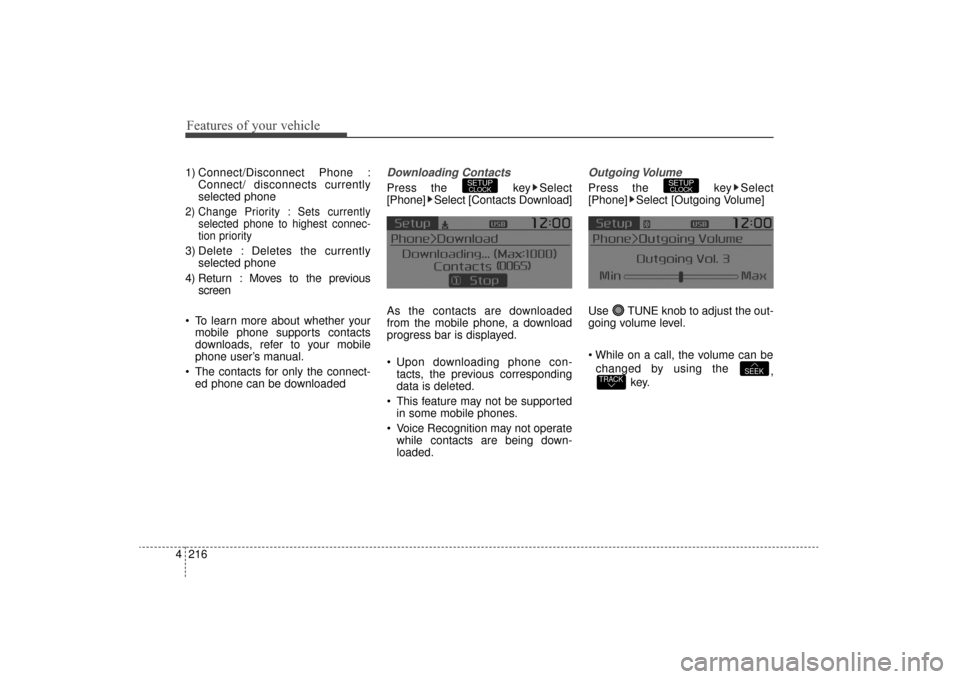
1) Connect/Disconnect Phone :
Connect/ disconnects currently
selected phone
2) Change Priority : Sets currently selected phone to highest connec-
tion priority
3) Delete : Deletes the currentlyselected phone
4) Return : Moves to the previous screen
To learn more about whether your mobile phone supports contacts
downloads, refer to your mobile
phone user’s manual.
The contacts for only the connect- ed phone can be downloaded
Downloading Contacts
Press the key Select
[Phone] Select [Contacts Download]
As the contacts are downloaded
from the mobile phone, a download
progress bar is displayed.
Upon downloading phone con-tacts, the previous corresponding
data is deleted.
This feature may not be supported in some mobile phones.
Voice Recognition may not operate while contacts are being down-
loaded.
Outgoing Volume
Press the key Select
[Phone] Select [Outgoing Volume]
Use TUNE knob to adjust the out-
going volume level.
changed by using the ,
key.
TRACKSEEK
SETUPCLOCKSETUPCLOCK
UM CAN (ENG) 4b (Audio).qxp 11/7/2014 3:02 PM Page 216
Page 301 of 565
![KIA Sorento 2016 3.G User Guide 4217
Features of your vehicle
Turning Bluetooth System Off
Press the key Select
[Phone] Select [Bluetooth System
Off]
Once
Bluetooth®Wireless
Technology is turned off,
Bluetooth®
Wireless Technol](/img/2/2978/w960_2978-300.png "KIA Sorento 2016 3.G User Guide 4217
Features of your vehicle
Turning Bluetooth System Off
Press the key Select
[Phone] Select [Bluetooth System
Off]
Once
Bluetooth®Wireless
Technology is turned off,
Bluetooth®
Wireless Technol")
4217
Features of your vehicle
Turning Bluetooth System Off
Press the key Select
[Phone] Select [Bluetooth System
Off]
Once
Bluetooth®Wireless
Technology is turned off,
Bluetooth®
Wireless Technology related features
will not be supported within the audio
system.
To turn
Bluetooth®Wireless
Technology back on, go to [Phone] and select “Yes”.SETUPCLOCK
SETUPCLOCK
UM CAN (ENG) 4b (Audio).qxp 11/7/2014 3:02 PM Page 217
Page 302 of 565
![KIA Sorento 2016 3.G User Guide Features of your vehicle
218
4
VOICE RECOGNITION
Using Voice Recognition
Starting Voice Recognition
Shortly press the key on the
steering wheel. Say a command If prompt feedback is in [ON], then
th](/img/2/2978/w960_2978-301.png "KIA Sorento 2016 3.G User Guide Features of your vehicle
218
4
VOICE RECOGNITION
Using Voice Recognition
Starting Voice Recognition
Shortly press the key on the
steering wheel. Say a command If prompt feedback is in [ON], then
th")
Features of your vehicle
218
4
VOICE RECOGNITION
Using Voice Recognition
Starting Voice Recognition
Shortly press the key on the
steering wheel. Say a command If prompt feedback is in [ON], then
the system will say “Please say a
command after the beep (BEEP)”
If prompt feedback is in [OFF]
mode, then the system will only
say “(BEEP)”
To change Prompt Feedback [On]/[Off], go to [System][Prompt Feedback]
For proper recognition, say the command after the voice instruc-
tion and beep tone.
Contact List Best Practices
1) Use full names vs. short or single syllable names (“John Smith” vs.
“Dad”, “Smith Residence” vs.
“Home”)
2) Avoid using special characters or hyphens (@, &, #, /, -, *, +, etc.)
3) Avoid using acronyms (“In Case Emergency” vs. “ICE”)
4) Spell words completely, no abbre- viations (“Doctor Goodman” vs.
“Dr. Goodman”)
SETUPCLOCK
UM CAN (ENG) 4b (Audio).qxp 11/7/2014 4:49 PM Page 218
Page 442 of 565
619
What to do in an emergency
When towing your vehicle in an
emergency without wheel dollies :
1. Set the ignition switch in the ACCposition.
2. Place the transaxle shift lever in N (Neutral).
3. Release the parking brake.Removable towing hook
(if equipped)
1. Remove the towing hook from the tool case.
2. Remove the hole cover pressing the lower part of the cover on the
front bumper.
3. Install the towing hook by turning it clockwise into the hole until it is
fully secured.
4. Remove the towing hook and install the cover after use.
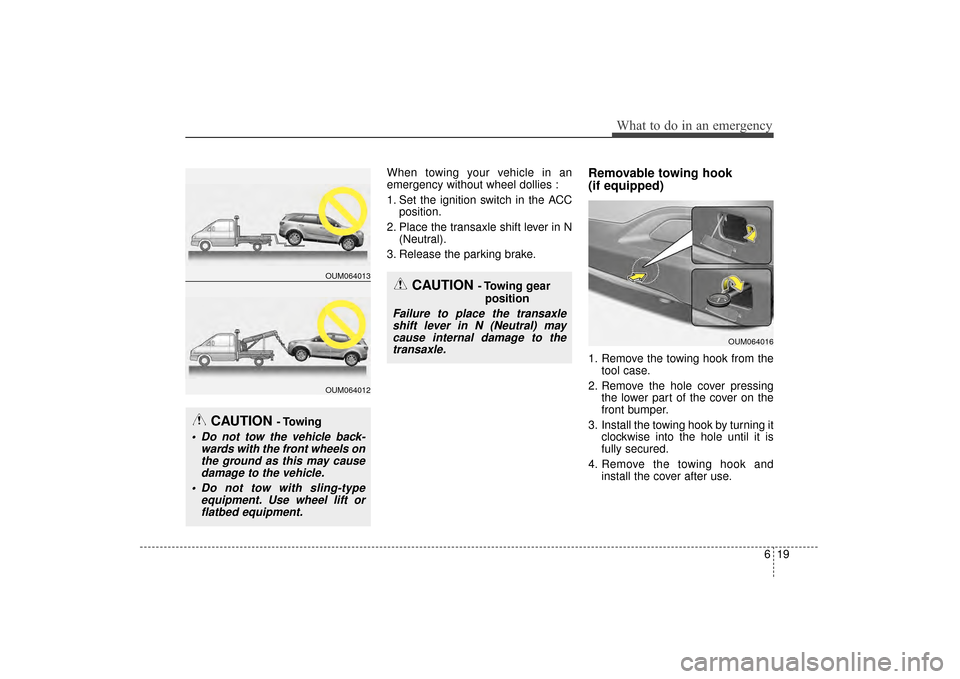
CAUTION - Towing
Do not tow the vehicle back-wards with the front wheels onthe ground as this may causedamage to the vehicle.
Do not tow with sling-type equipment. Use wheel lift orflatbed equipment.
CAUTION - Towing gear
position
Failure to place the transaxleshift lever in N (Neutral) maycause internal damage to thetransaxle.
OUM064013
OUM064012
OUM064016
UM CAN (ENG) 6.QXP 12/1/2014 1:09 PM Page 19
Page 510 of 565
Maintenance
66
7
If you do not have a spare, use a
fuse of the same rating from a circuityou may not need for operating thevehicle, such as the power outletfuse.
If the head lamp, turn signal lamp,
stop signal lamp, fog lamp, DRL, tail
lamp, HMSL do not work and the
fuses are OK, check the fuse panel
in the engine compartment. If a fuse
is blown, it must be replaced.
✽ ✽ NOTICE
If the headlamp, fog lamp, turn sig-
nal lamp, or tail lamp malfunction
even without any problem to the
lamps, have the vehicle checked by
an authorized Kia dealer for assis-
tance.
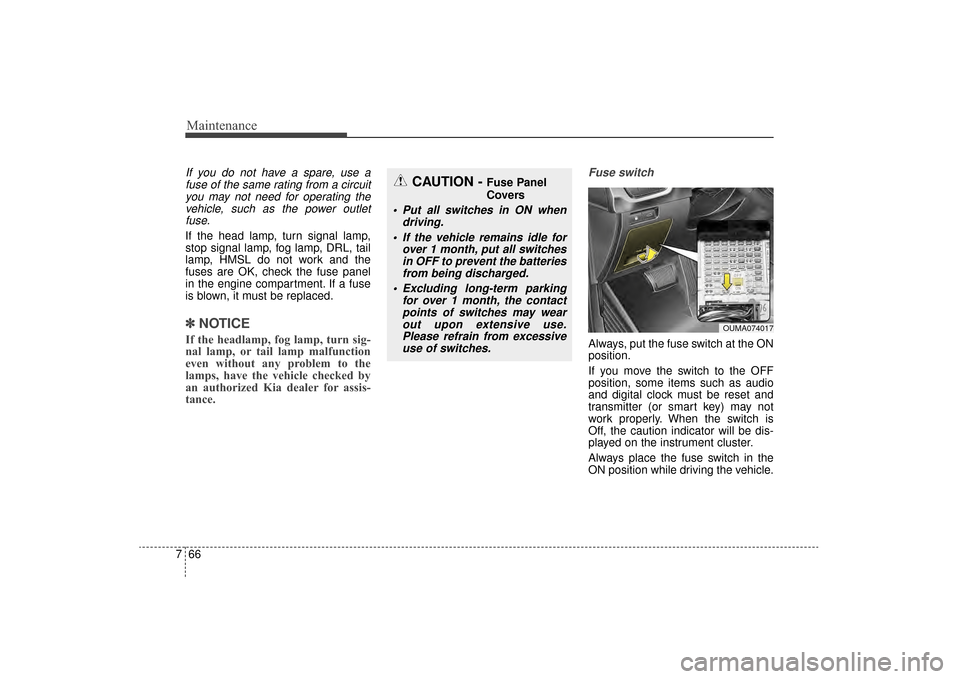
Fuse switch
Always, put the fuse switch at the ON
position.
If you move the switch to the OFF
position, some items such as audio
and digital clock must be reset and
transmitter (or smart key) may not
work properly. When the switch is
Off, the caution indicator will be dis-
played on the instrument cluster.
Always place the fuse switch in the
ON position while driving the vehicle.
OUMA074017
CAUTION - Fuse Panel
Covers
Put all switches in ON when
driving.
If the vehicle remains idle for over 1 month, put all switchesin OFF to prevent the batteriesfrom being discharged.
Excluding long-term parking for over 1 month, the contactpoints of switches may wearout upon extensive use.Please refrain from excessiveuse of switches.
UM CAN (ENG) 7.qxp 12/1/2014 1:18 PM Page 66
Page 527 of 565
783
Maintenance
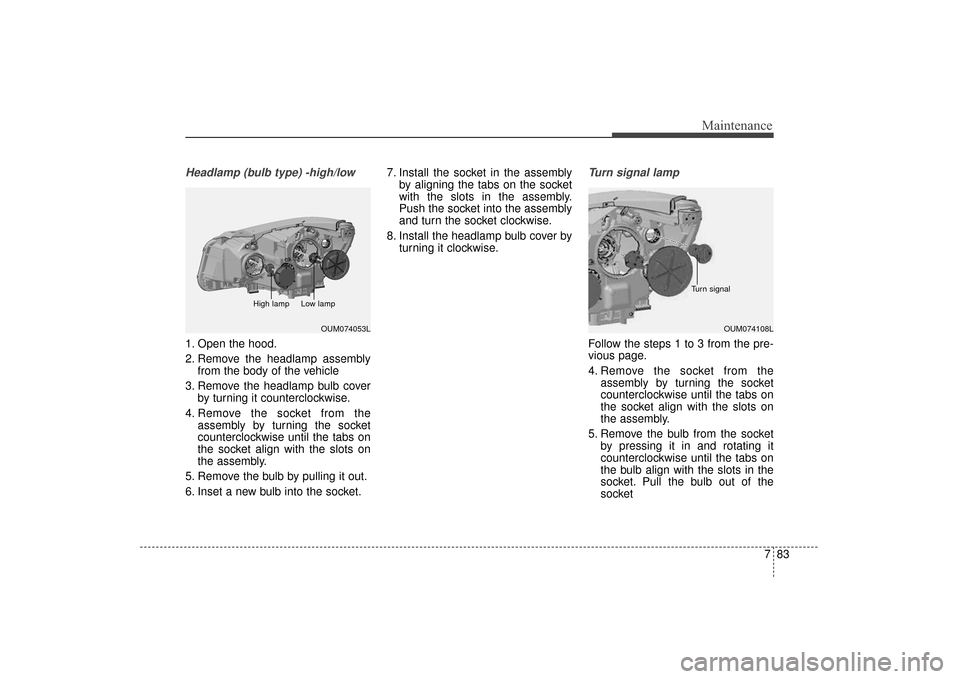
Headlamp (bulb type) -high/low
1. Open the hood.
2. Remove the headlamp assemblyfrom the body of the vehicle
3. Remove the headlamp bulb cover by turning it counterclockwise.
4. Remove the socket from the assembly by turning the socket
counterclockwise until the tabs on
the socket align with the slots on
the assembly.
5. Remove the bulb by pulling it out.
6. Inset a new bulb into the socket. 7. Install the socket in the assembly
by aligning the tabs on the socket
with the slots in the assembly.
Push the socket into the assembly
and turn the socket clockwise.
8. Install the headlamp bulb cover by turning it clockwise.
Turn signal lamp
Follow the steps 1 to 3 from the pre-
vious page.
4. Remove the socket from theassembly by turning the socket
counterclockwise until the tabs on
the socket align with the slots on
the assembly.
5. Remove the bulb from the socket by pressing it in and rotating it
counterclockwise until the tabs on
the bulb align with the slots in the
socket. Pull the bulb out of the
socket
OUM074108L
Turn signal
OUM074053L
High lamp Low lamp
UM CAN (ENG) 7.qxp 12/1/2014 1:19 PM Page 83
Page 557 of 565
Index
2I
Advanced smart cruise control system (ASCC) . . . . . . 5-53Limitations of the system . . . . . . . . . . . . . . . . . . . . . 5-63
Speed setting (ASCC) . . . . . . . . . . . . . . . . . . . . . . . 5-54
To adjust the sensitivity of advanced smartcruise control . . . . . . . . . . . . . . . . . . . . . . . . . . . . . 5-62
To convert to cruise control mode . . . . . . . . . . . . . . 5-63
Vehicle to vehicle distance setting (ASCC) . . . . . . . 5-58
Air bag - advanced supplemental restraint system . . . 3-43 Air bag warning label. . . . . . . . . . . . . . . . . . . . . . . . 3-67
Air bag warning light . . . . . . . . . . . . . . . . . . . . . . . . 3-46
Curtain air bag . . . . . . . . . . . . . . . . . . . . . . . . . . . . . 3-60
Do not install a child restraint on the frontpassenger’s seat . . . . . . . . . . . . . . . . . . . . . . . . . . . 3-46
Driver's and passenger's front air bag . . . . . . . . . . . 3-56
How does the air bag system operate . . . . . . . . . . . 3-44
Inflation and non-inflation conditions of the air bag . . 3-61
Occupant Detection System (ODS) . . . . . . . . . . . . . 3-50
Side air bag. . . . . . . . . . . . . . . . . . . . . . . . . . . . . . . . 3-58
SRS Care . . . . . . . . . . . . . . . . . . . . . . . . . . . . . . . . . 3-66
SRS components and functions . . . . . . . . . . . . . . . . 3-47
Air cleaner . . . . . . . . . . . . . . . . . . . . . . . . . . . . . . . . . . 7-40\
Filter replacement. . . . . . . . . . . . . . . . . . . . . . . . . . . 7-40
Air conditioning system . . . . . . . . . . . . . . . . . . . . . . . . . 8-5
All wheel drive (AWD). . . . . . . . . . . . . . . . . . . . . . . . . 5-19 All wheel drive (AWD) transfer mode selection . . . 5-21
For safe all wheel drive operation . . . . . . . . . . . . . . 5-22 Tight corner brake effect . . . . . . . . . . . . . . . . . . . . . 5-20
Appearance care . . . . . . . . . . . . . . . . . . . . . . . . . . . . . . 7-91 Exterior care . . . . . . . . . . . . . . . . . . . . . . . . . . . . . . . 7-91
Interior care . . . . . . . . . . . . . . . . . . . . . . . . . . . . . . . 7-96
Audio system . . . . . . . . . . . . . . . . . . . . . . . . . . . . . . . 4-171 Antenna . . . . . . . . . . . . . . . . . . . . . . . . . . . . . . . . . 4-171
Aux, USB and iPod
®port . . . . . . . . . . . . . . . . . . . 4-173
Basic method of use . . . . . . . . . . . . . . . . . . . . . . . . 4-195
Bluetooth
®Wireless Technology . . . . . . . . . . . . . . 4-180
Bluetooth®wireless technology audio . . . . . . . . . . 4-202
Clock settings . . . . . . . . . . . . . . . . . . . . . . . . . . . . . 4-188
How vehicle audio works . . . . . . . . . . . . . . . . . . . . 4-174
Phone . . . . . . . . . . . . . . . . . . . . . . . . . . . . . . . . . . . 4-\
204
Radio . . . . . . . . . . . . . . . . . . . . . . . . . . . . . . . . . . . 4-\
190
Set up . . . . . . . . . . . . . . . . . . . . . . . . . . . . . . . . . . . 4-\
186
SIRIUS™ Satellite Radio information . . . . . . . . . 4-192
SIRIUS™ radio . . . . . . . . . . . . . . . . . . . . . . . . . . . 4-193
Sound settings . . . . . . . . . . . . . . . . . . . . . . . . . . . . 4-187
Standard audio system . . . . . . . . . . . . . . . . . . . . . . 4-183
Steering wheel remote controller . . . . . . . . . . . . . . 4-172
System controllers and functions . . . . . . . . . . . . . . 4-184
System settings . . . . . . . . . . . . . . . . . . . . . . . . . . . . 4-189
Using iPod
®device . . . . . . . . . . . . . . . . . . . . . . . . 4-179
Using the USB device . . . . . . . . . . . . . . . . . . . . . . 4-178
Voice command list . . . . . . . . . . . . . . . . . . . . . . . . 4-221
Voice recognition . . . . . . . . . . . . . . . . . . . . . . . . . . 4-182
Voice recognition . . . . . . . . . . . . . . . . . . . . . . . . . . 4-218
Automatic climate control system . . . . . . . . . . . . . . . 4-139
A
UM CAN (ENG) INDEX.qxp 12/1/2014 11:55 AM Page 2