lock KIA Sorento 2016 3.G Owner's Guide
[x] Cancel search | Manufacturer: KIA, Model Year: 2016, Model line: Sorento, Model: KIA Sorento 2016 3.GPages: 565, PDF Size: 10.63 MB
Page 71 of 565
Safety features of your vehicle
54
3
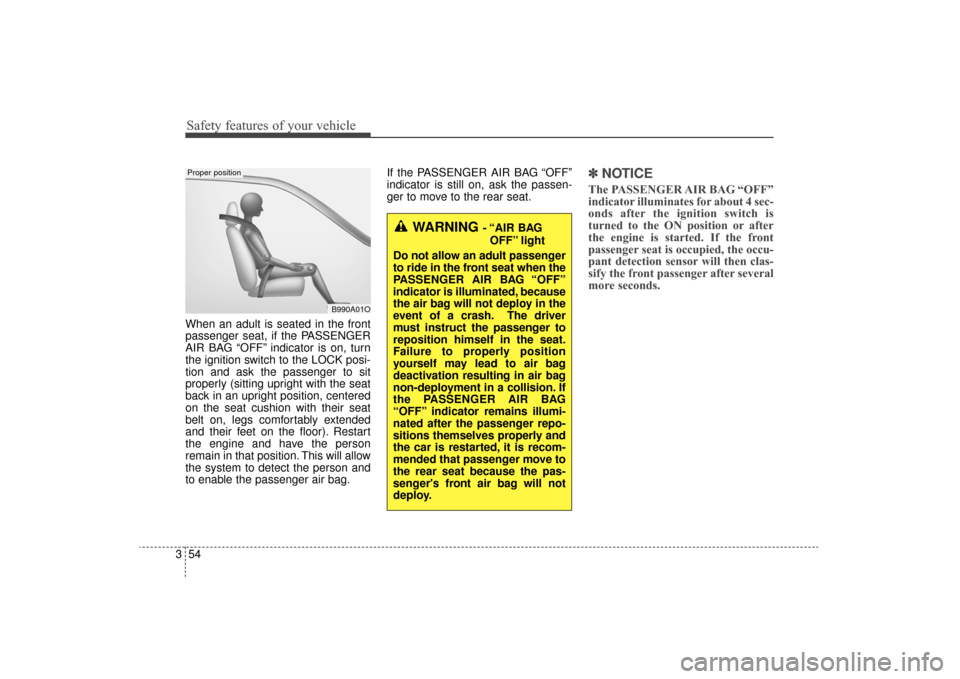
When an adult is seated in the front
passenger seat, if the PASSENGER
AIR BAG “OFF” indicator is on, turn
the ignition switch to the LOCK posi-
tion and ask the passenger to sit
properly (sitting upright with the seat
back in an upright position, centered
on the seat cushion with their seat
belt on, legs comfortably extended
and their feet on the floor). Restart
the engine and have the person
remain in that position. This will allow
the system to detect the person and
to enable the passenger air bag. If the PASSENGER AIR BAG “OFF”
indicator is still on, ask the passen-
ger to move to the rear seat.
✽ ✽
NOTICE
The PASSENGER AIR BAG “OFF”
indicator illuminates for about 4 sec-
onds after the ignition switch is
turned to the ON position or after
the engine is started. If the front
passenger seat is occupied, the occu-
pant detection sensor will then clas-
sify the front passenger after several
more seconds.
B990A01O
Proper position
WARNING - “AIR BAG
OFF” light
Do not allow an adult passenger
to ride in the front seat when the
PASSENGER AIR BAG “OFF”
indicator is illuminated, because
the air bag will not deploy in the
event of a crash. The driver
must instruct the passenger to
reposition himself in the seat.
Failure to properly position
yourself may lead to air bag
deactivation resulting in air bag
non-deployment in a collision. If
the PASSENGER AIR BAG
“OFF” indicator remains illumi-
nated after the passenger repo-
sitions themselves properly and
the car is restarted, it is recom-
mended that passenger move to
the rear seat because the pas-
senger's front air bag will not
deploy.
UM CAN (ENG) 3.QXP 12/1/2014 12:00 PM Page 54
Page 85 of 565
Features of your vehicle
Folding key . . . . . . . . . . . . . . . . . . . . . . . . . . . . . . . . 4-5
• Record your key number . . . . . . . . . . . . . . . . . . . . . . . 4-5
• Key operations . . . . . . . . . . . . . . . . . . . . . . . . . . . . . . . . 4-5
• Transmitter precautions . . . . . . . . . . . . . . . . . . . . . . . . 4-7
• Battery replacement . . . . . . . . . . . . . . . . . . . . . . . . . . . 4-8
• Immobilizer system . . . . . . . . . . . . . . . . . . . . . . . . . . . . 4-9
Smart key . . . . . . . . . . . . . . . . . . . . . . . . . . . . . . . . 4-12
• Record your key number . . . . . . . . . . . . . . . . . . . . . . 4-12
• Smart key function . . . . . . . . . . . . . . . . . . . . . . . . . . . 4-12
• Loss of the smart key . . . . . . . . . . . . . . . . . . . . . . . . . 4-16
• Smart key precautions . . . . . . . . . . . . . . . . . . . . . . . . 4-16
• Battery replacement . . . . . . . . . . . . . . . . . . . . . . . . . . 4-17
• Smart key immobilizer system . . . . . . . . . . . . . . . . . . 4-18
Theft-alarm system . . . . . . . . . . . . . . . . . . . . . . . . 4-19
• Armed stage . . . . . . . . . . . . . . . . . . . . . . . . . . . . . . . . . 4-19
• Theft-alarm stage . . . . . . . . . . . . . . . . . . . . . . . . . . . . 4-20
• Disarmed stage. . . . . . . . . . . . . . . . . . . . . . . . . . . . . . . 4-20
Door locks . . . . . . . . . . . . . . . . . . . . . . . . . . . . . . . 4-22
• Operating door locks from outside the vehicle . . . . 4-22
• Operating door locks from inside the vehicle . . . . . . 4-23
• Impact sensing door unlock system . . . . . . . . . . . . . . 4-24
• Child-protector rear door lock. . . . . . . . . . . . . . . . . . 4-25
Liftgate (tailgate) (for manual liftgate (tailgate)) . . . . . . . . . . . . . . 4-26
• Opening the liftgate (tailgate) . . . . . . . . . . . . . . . . . . 4-26
• Closing the liftgate (tailgate) . . . . . . . . . . . . . . . . . . . 4-26
• Emergency liftgate (tailgate) safety release . . . . . . . 4-27
Power liftgate (tailgate) . . . . . . . . . . . . . . . . . . . . . 4-28
• Opening the liftgate (tailgate) . . . . . . . . . . . . . . . . . . 4-29
• Closing the liftgate (tailgate) . . . . . . . . . . . . . . . . . . . 4-30
• Smart liftgate (tailgate) . . . . . . . . . . . . . . . . . . . . . . . . 4-34
• Emergency liftgate (tailgate) safety release . . . . . . . 4-38
Windows . . . . . . . . . . . . . . . . . . . . . . . . . . . . . . . . . 4-39
• Power windows . . . . . . . . . . . . . . . . . . . . . . . . . . . . . . 4-40
Hood. . . . . . . . . . . . . . . . . . . . . . . . . . . . . . . . . . . . \
. 4-44
• Opening the hood . . . . . . . . . . . . . . . . . . . . . . . . . . . . 4-44
• Closing the hood . . . . . . . . . . . . . . . . . . . . . . . . . . . . . 4-45
Fuel filler lid . . . . . . . . . . . . . . . . . . . . . . . . . . . . . . 4-46
• Opening the fuel filler lid . . . . . . . . . . . . . . . . . . . . . . 4-46
• Closing the fuel filler lid . . . . . . . . . . . . . . . . . . . . . . . 4-46
• Emergency fuel filler lid release . . . . . . . . . . . . . . . . 4-49
Panoramic sunroof . . . . . . . . . . . . . . . . . . . . . . . . . 4-50
• Sunroof open warning. . . . . . . . . . . . . . . . . . . . . . . . . 4-51
• Sunshade . . . . . . . . . . . . . . . . . . . . . . . . . . . . . . . . . . . 4-\
51
• Sliding the sunroof . . . . . . . . . . . . . . . . . . . . . . . . . . . 4-52
• Tilting the sunroof . . . . . . . . . . . . . . . . . . . . . . . . . . . 4-53
• Closing the sunroof . . . . . . . . . . . . . . . . . . . . . . . . . . . 4-54
• Resetting the sunroof . . . . . . . . . . . . . . . . . . . . . . . . . 4-54
4
UM CAN (ENG) 4.qxp 12/1/2014 12:49 PM Page 1
Page 88 of 565
• Side curtain . . . . . . . . . . . . . . . . . . . . . . . . . . . . . . . . 4-168
• Luggage net holder . . . . . . . . . . . . . . . . . . . . . . . . . . 4-168
Exterior features . . . . . . . . . . . . . . . . . . . . . . . . . . 4-170
• Roof rack . . . . . . . . . . . . . . . . . . . . . . . . . . . . . . . . . . 4-17\
0
Audio system . . . . . . . . . . . . . . . . . . . . . . . . . . . . . 4-171
• Antenna . . . . . . . . . . . . . . . . . . . . . . . . . . . . . . . . . . . 4-\
171
• Steering wheel remote controller . . . . . . . . . . . . . . . 4-172
• Aux, USB and iPod
®port . . . . . . . . . . . . . . . . . . . . . 4-173
• How vehicle audio works . . . . . . . . . . . . . . . . . . . . . 4-174
• Using the USB device . . . . . . . . . . . . . . . . . . . . . . . . 4-178
• Using iPod
®device. . . . . . . . . . . . . . . . . . . . . . . . . . . 4-179
• Bluetooth®Wireless Technology . . . . . . . . . . . . . . . . 4-180
• Voice recognition . . . . . . . . . . . . . . . . . . . . . . . . . . . . 4-182
• Standard audio system . . . . . . . . . . . . . . . . . . . . . . . 4-183
• System controllers and functions . . . . . . . . . . . . . . . 4-184
• Set up . . . . . . . . . . . . . . . . . . . . . . . . . . . . . . . . . . . . \
. 4-186
• Sound settings . . . . . . . . . . . . . . . . . . . . . . . . . . . . . . 4-187
• Clock settings . . . . . . . . . . . . . . . . . . . . . . . . . . . . . . . 4-188
• System settings . . . . . . . . . . . . . . . . . . . . . . . . . . . . . . 4-189
• Radio . . . . . . . . . . . . . . . . . . . . . . . . . . . . . . . . . . . . \
. . 4-190
• SIRIUS™ Satellite Radio information . . . . . . . . . . 4-192
• SIRIUS™ radio . . . . . . . . . . . . . . . . . . . . . . . . . . . . . 4-193
• Basic method of use . . . . . . . . . . . . . . . . . . . . . . . . . . 4-195
• Bluetooth
®wireless technology audio . . . . . . . . . . . 4-202
• Phone . . . . . . . . . . . . . . . . . . . . . . . . . . . . . . . . . . . . \
. 4-204 • Voice recognition . . . . . . . . . . . . . . . . . . . . . . . . . . . . 4-218
• Voice command list . . . . . . . . . . . . . . . . . . . . . . . . . . 4-221
4
UM CAN (ENG) 4.qxp 12/1/2014 12:49 PM Page 4
Page 89 of 565
45
Features of your vehicle
Record your key number
The key code num-
ber is stamped on
the key code tag
attached to the key
set. Should you
lose your keys, this number will
enable an authorized Kia dealer to
duplicate the keys easily. Remove
the key code tag and store it in a safe
place. Also, record the key code
number and keep it in a safe
place.(not in the vehicle)
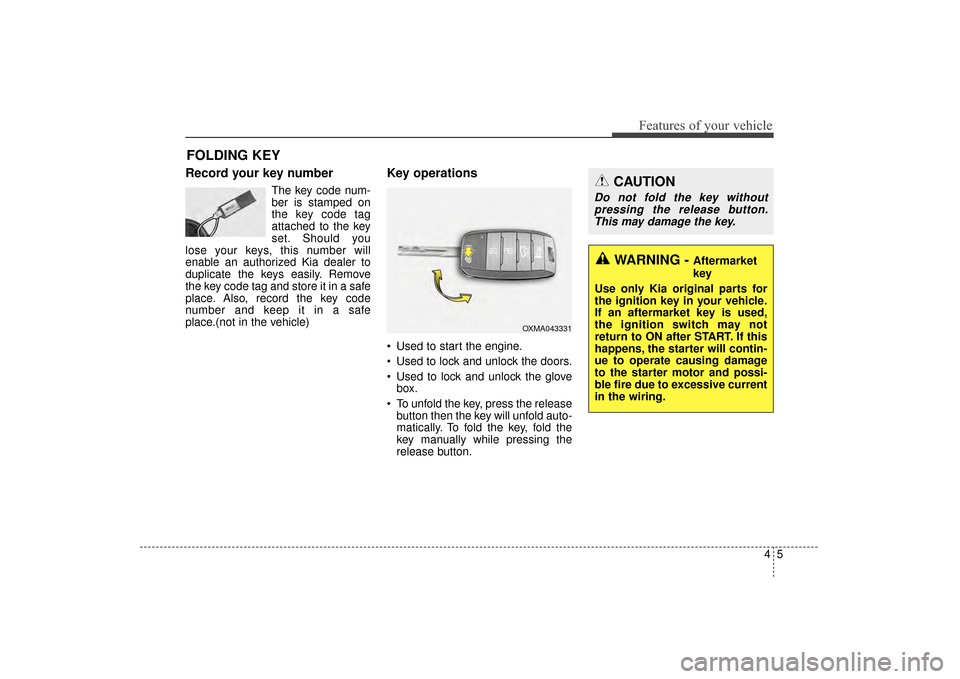
Key operations
• Used to start the engine.
Used to lock and unlock the doors.
Used to lock and unlock the glove box.
To unfold the key, press the release button then the key will unfold auto-
matically. To fold the key, fold the
key manually while pressing the
release button.
FOLDING KEY
CAUTION
Do not fold the key withoutpressing the release button.This may damage the key.
WARNING - Aftermarket
key
Use only Kia original parts for
the ignition key in your vehicle.
If an aftermarket key is used,
the ignition switch may not
return to ON after START. If this
happens, the starter will contin-
ue to operate causing damage
to the starter motor and possi-
ble fire due to excessive current
in the wiring.
OXMA043331
UM CAN (ENG) 4.qxp 12/1/2014 12:49 PM Page 5
Page 90 of 565
Features of your vehicle
64
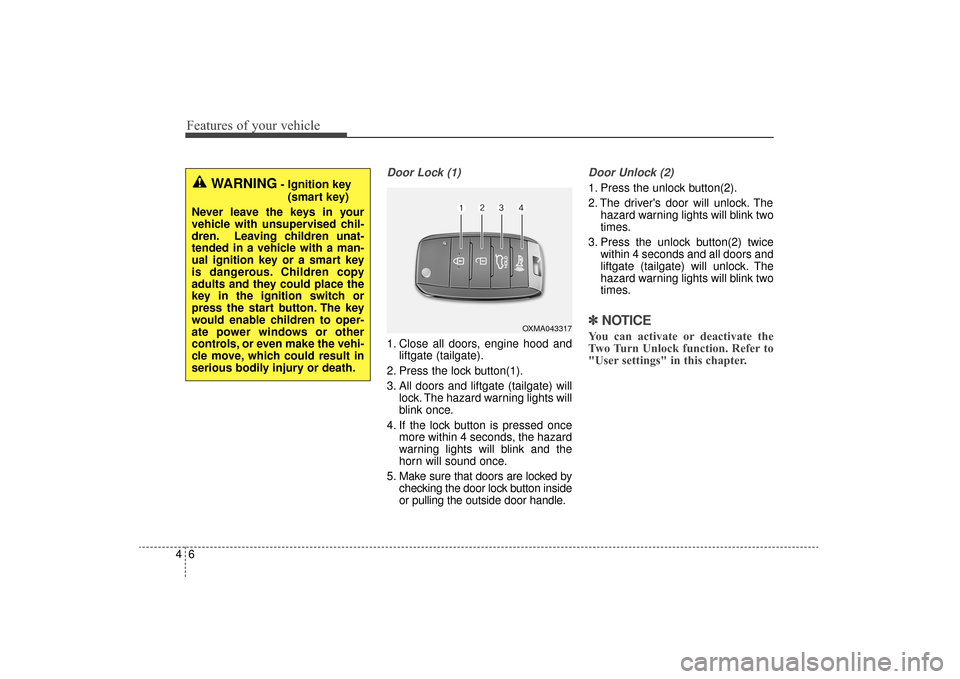
Door Lock (1)
1. Close all doors, engine hood andliftgate (tailgate).
2. Press the lock button(1).
3. All doors and liftgate (tailgate) will lock. The hazard warning lights will
blink once.
4. If the lock button is pressed once more within 4 seconds, the hazard
warning lights will blink and the
horn will sound once.
5. Make sure that doors are locked by checking the door lock button inside
or pulling the outside door handle.
Door Unlock (2)
1. Press the unlock button(2).
2. The driver's door will unlock. Thehazard warning lights will blink two
times.
3. Press the unlock button(2) twice within 4 seconds and all doors and
liftgate (tailgate) will unlock. The
hazard warning lights will blink two
times.
✽ ✽NOTICE
You can activate or deactivate the
Two Turn Unlock function. Refer to
"User settings" in this chapter.
WARNING- Ignition key
(smart key)
Never leave the keys in your
vehicle with unsupervised chil-
dren. Leaving children unat-
tended in a vehicle with a man-
ual ignition key or a smart key
is dangerous. Children copy
adults and they could place the
key in the ignition switch or
press the start button. The key
would enable children to oper-
ate power windows or other
controls, or even make the vehi-
cle move, which could result in
serious bodily injury or death.
OXMA043317
UM CAN (ENG) 4.qxp 12/1/2014 12:49 PM Page 6
Page 91 of 565
47
Features of your vehicle
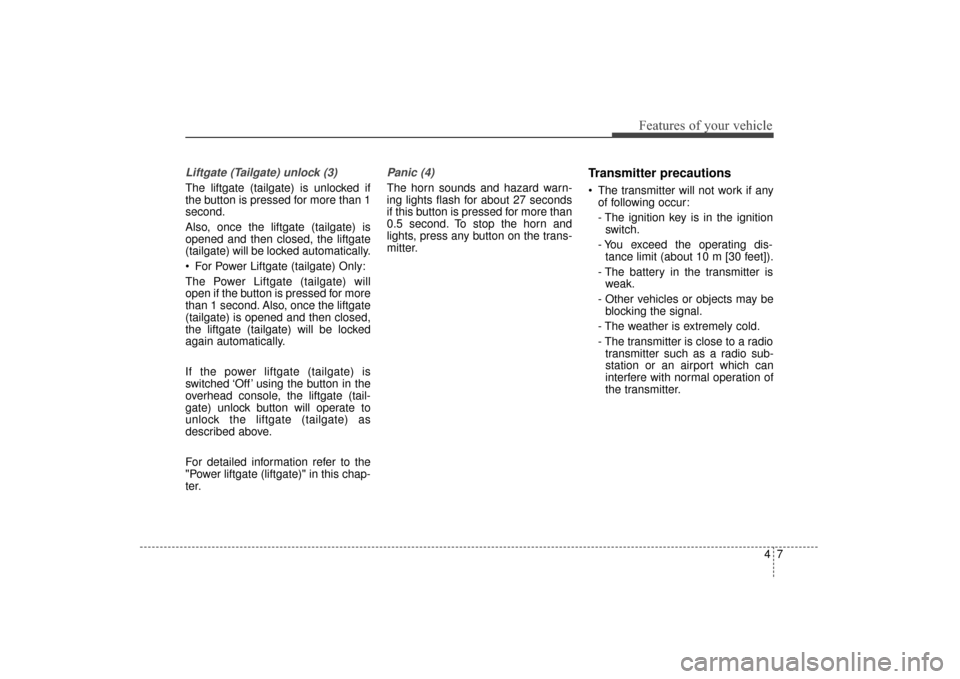
Liftgate (Tailgate) unlock (3)
The liftgate (tailgate) is unlocked if
the button is pressed for more than 1
second.
Also, once the liftgate (tailgate) is
opened and then closed, the liftgate
(tailgate) will be locked automatically.
For Power Liftgate (tailgate) Only:
The Power Liftgate (tailgate) will
open if the button is pressed for more
than 1 second. Also, once the liftgate
(tailgate) is opened and then closed,
the liftgate (tailgate) will be locked
again automatically.
If the power liftgate (tailgate) is
switched ‘Off’ using the button in the
overhead console, the liftgate (tail-
gate) unlock button will operate to
unlock the liftgate (tailgate) as
described above.
For detailed information refer to the
"Power liftgate (liftgate)" in this chap-
ter.
Panic (4)
The horn sounds and hazard warn-
ing lights flash for about 27 seconds
if this button is pressed for more than
0.5 second. To stop the horn and
lights, press any button on the trans-
mitter.
Transmitter precautions
The transmitter will not work if anyof following occur:
- The ignition key is in the ignitionswitch.
- You exceed the operating dis- tance limit (about 10 m [30 feet]).
- The battery in the transmitter is weak.
- Other vehicles or objects may be blocking the signal.
- The weather is extremely cold.
- The transmitter is close to a radio transmitter such as a radio sub-
station or an airport which can
interfere with normal operation of
the transmitter.
UM CAN (ENG) 4.qxp 12/1/2014 12:49 PM Page 7
Page 92 of 565
Features of your vehicle
84
When the transmitter does not workcorrectly, open and close the door
with the ignition key. If you have a
problem with the transmitter, con-
tact an authorized Kia dealer.
If the transmitter is in close proxim- ity to your mobile phone, the signal
could be blocked by your mobile
phones normal operational signals.
This is especially important when
the phone is active such as making
and receiving calls, text messag-
ing, and/or sending/receiving
emails. Avoid placing the transmit-
ter and your mobile phone in the
same pants or jacket pocket and
always try to maintain an adequate
distance between the two devices.
✽ ✽ NOTICE
If the keyless entry system is inoper-
ative due to exposure to water or liq-
uids, it will not be covered by your
manufacturer’s vehicle warranty.
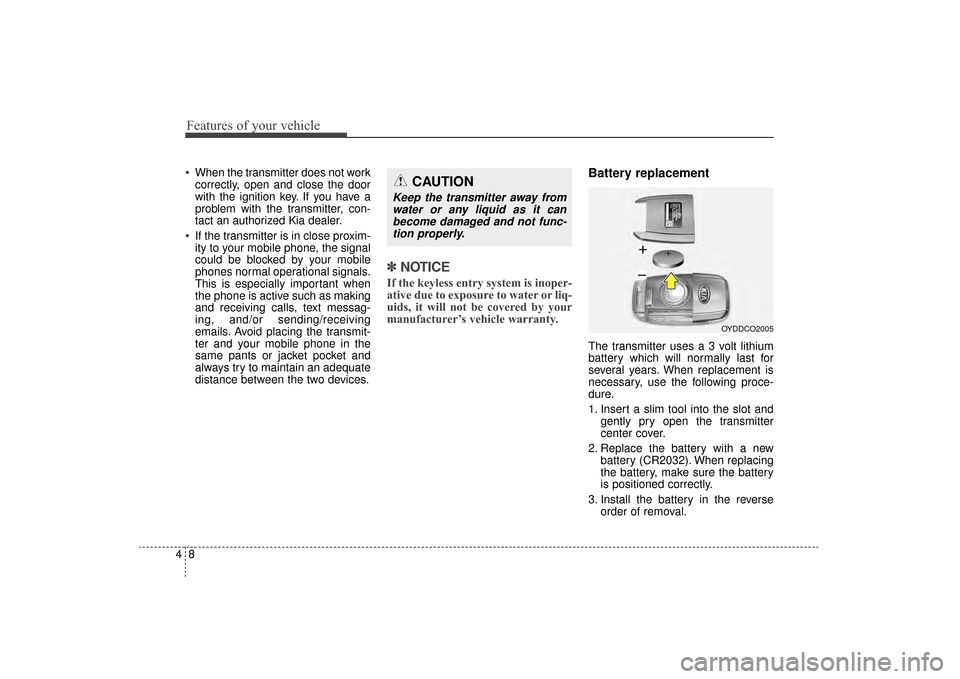
Battery replacement
The transmitter uses a 3 volt lithium
battery which will normally last for
several years. When replacement is
necessary, use the following proce-
dure.
1. Insert a slim tool into the slot and
gently pry open the transmitter
center cover.
2. Replace the battery with a new battery (CR2032). When replacing
the battery, make sure the battery
is positioned correctly.
3. Install the battery in the reverse order of removal.
OYDDCO2005
CAUTION
Keep the transmitter away fromwater or any liquid as it canbecome damaged and not func-tion properly.
UM CAN (ENG) 4.qxp 12/1/2014 12:49 PM Page 8
Page 96 of 565
Features of your vehicle
12
4
Record your key number
The key code number
is stamped on the bar
code tag attached to
the key set. Should
you lose your keys,
this number will enable an author-
ized Kia dealer to duplicate the keys
easily. Remove the bar code tag and
store it in a safe place. Also, record
the code number and keep it in a
safe and handy place, but not in the
vehicle.
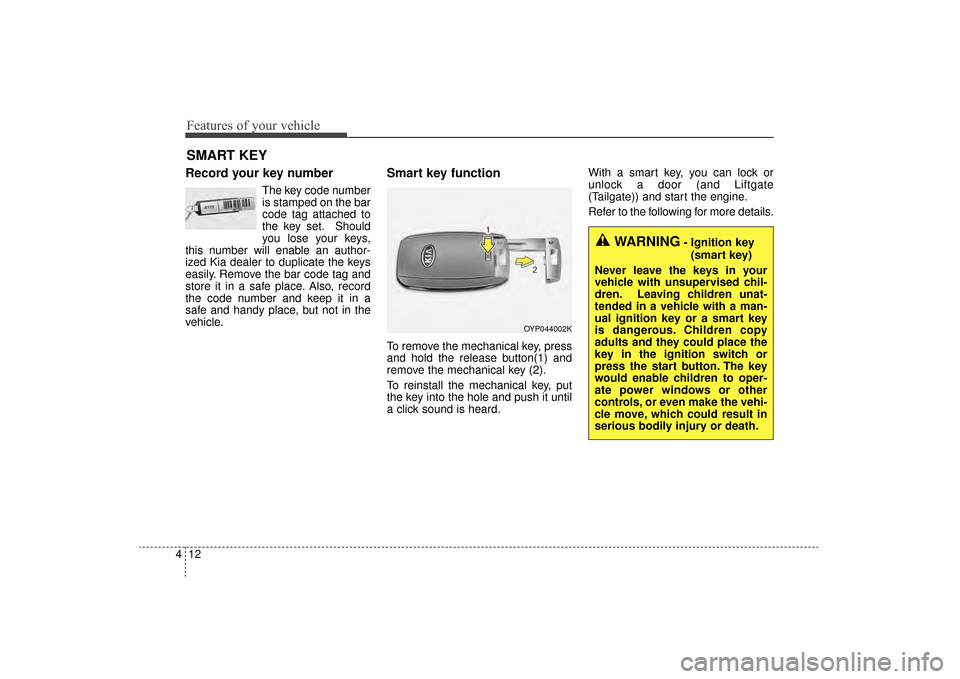
Smart key function
To remove the mechanical key, press
and hold the release button(1) and
remove the mechanical key (2).
To reinstall the mechanical key, put
the key into the hole and push it until
a click sound is heard. With a smart key, you can lock or
unlock a door (and Liftgate
(Tailgate)) and start the engine.
Refer to the following for more details.
SMART KEY
OYP044002K
WARNING- Ignition key
(smart key)
Never leave the keys in your
vehicle with unsupervised chil-
dren. Leaving children unat-
tended in a vehicle with a man-
ual ignition key or a smart key
is dangerous. Children copy
adults and they could place the
key in the ignition switch or
press the start button. The key
would enable children to oper-
ate power windows or other
controls, or even make the vehi-
cle move, which could result in
serious bodily injury or death.
UM CAN (ENG) 4.qxp 12/1/2014 12:49 PM Page 12
Page 97 of 565
413
Features of your vehicle
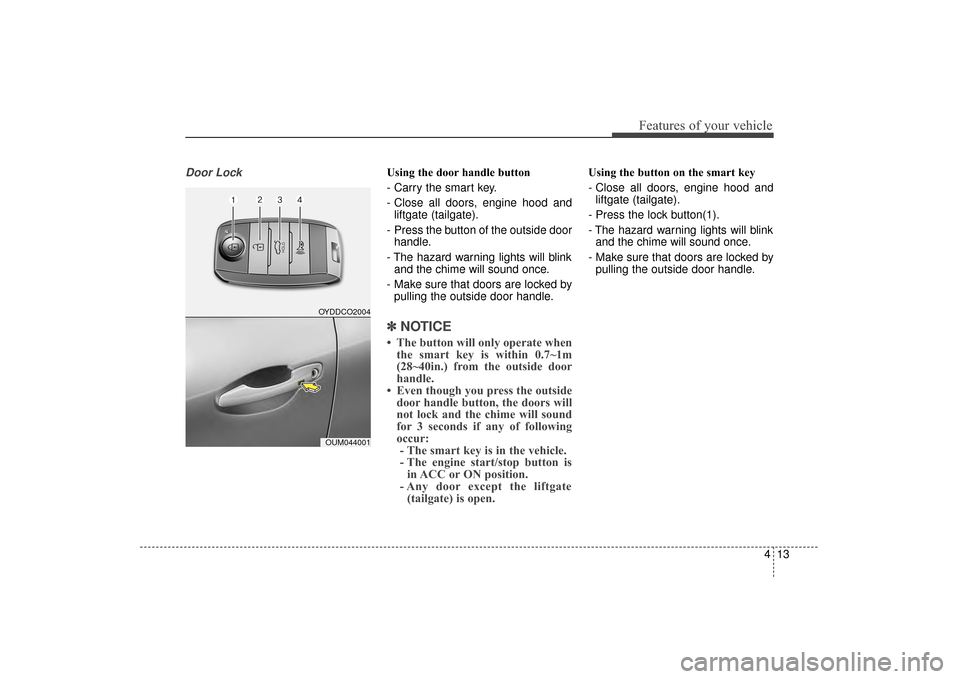
Door LockUsing the door handle button
- Carry the smart key.
- Close all doors, engine hood andliftgate (tailgate).
- Press the button of the outside door handle.
- The hazard warning lights will blink and the chime will sound once.
- Make sure that doors are locked by pulling the outside door handle.
✽ ✽ NOTICE
• The button will only operate when
the smart key is within 0.7~1m
(28~40in.) from the outside door
handle.
• Even though you press the outside door handle button, the doors will
not lock and the chime will sound
for 3 seconds if any of following
occur:- The smart key is in the vehicle.
- The engine start/stop button is in ACC or ON position.
- Any door except the liftgate (tailgate) is open.
Using the button on the smart key
- Close all doors, engine hood and
liftgate (tailgate).
- Press the lock button(1).
- The hazard warning lights will blink and the chime will sound once.
- Make sure that doors are locked by pulling the outside door handle.
OYDDCO2004
OUM044001
UM CAN (ENG) 4.qxp 12/1/2014 12:49 PM Page 13
Page 98 of 565
Features of your vehicle
14
4
Unlocking
Using the door handle button
1. Carry the smart key.
2. Press the button of the driver's
outside door handle.
3. The driver’s door will unlock. The hazard warning lights will blink and
the chime will sound two times.
4. Press the button twice within 4 seconds and all doors and the lift-
gate (tailgate) will unlock and the
hazard warning lights will blink and
the chime will sound two times.
✽ ✽NOTICE
• The button will only operate when
the smart key is within 0.7~1m
(28~40in.) from the outside door
handle.
• When the smart key is recognized in the area of 0.7~1m (28~40in.) from
the front outside door handle, other
people can also open the doors.
• After unlocking the driver’s door or all doors, the door(s) will lock
automatically unless the door is
opened.
Using the button on the smart key
1. Press the unlock button(2) of the
smart key.
2. The driver’s door will unlock. The hazard warning lights will blink and
the chime will sound two times.
3. Press the unlock button(2) twice within 4 seconds and all doors and
the liftgate (tailgate) will unlock.
The hazard warning lights will
blink and the chime will sound two
times.
✽ ✽NOTICE
After pressing the button, the doors
will lock automatically unless any
door is opened within 30 seconds.
✽ ✽NOTICE
You can activate or deactivate the
Two Turn Unlock function. Refer to
"User settings" in this chapter.
Liftgate (Tailgate) unlocking
Using the liftgate (tailgate) handle
button
1. Carry the smart key.
2. Press the liftgate (tailgate) handle
button.
3. When all doors are locked, the hazard warning lights will blink two
times.
Once the liftgate (tailgate) is
opened and then closed, the lift-
gate (tailgate) will lock automati-
cally.
✽ ✽NOTICE
The button will only operate when
the smart key is within 0.7~1m
(28~40in.) from the liftgate handle.
UM CAN (ENG) 4.qxp 12/1/2014 12:49 PM Page 14