tailgate KIA Sorento 2016 3.G Owner's Guide
[x] Cancel search | Manufacturer: KIA, Model Year: 2016, Model line: Sorento, Model: KIA Sorento 2016 3.GPages: 565, PDF Size: 10.63 MB
Page 117 of 565
433
Features of your vehicle
How to reset the power liftgate(tailgate)
If the battery has been discharged or
disconnected, or if the related fuse has
been replaced or disconnected, for the
power liftgate (tailgate) to operate nor-
mally, reset the power liftgate (tailgate)
as follows:
1. Put the shift lever in P (Park).
2. While pressing the liftgate (tailgate) close button, press the liftgate (tail-
gate) handle switch for more than 3
seconds. (the chime will sound)
3. Close the liftgate (tailgate) manually.
If the power liftgate (tailgate) does
not work properly after the above
procedure, have the system checked
by an authorized Kia dealer.
✽ ✽ NOTICE
If the power liftgate (tailgate) does
not operate normally, first check the
following condition before using the
power liftgate (tailgate).
• Make sure the shift lever is in P
(Park).
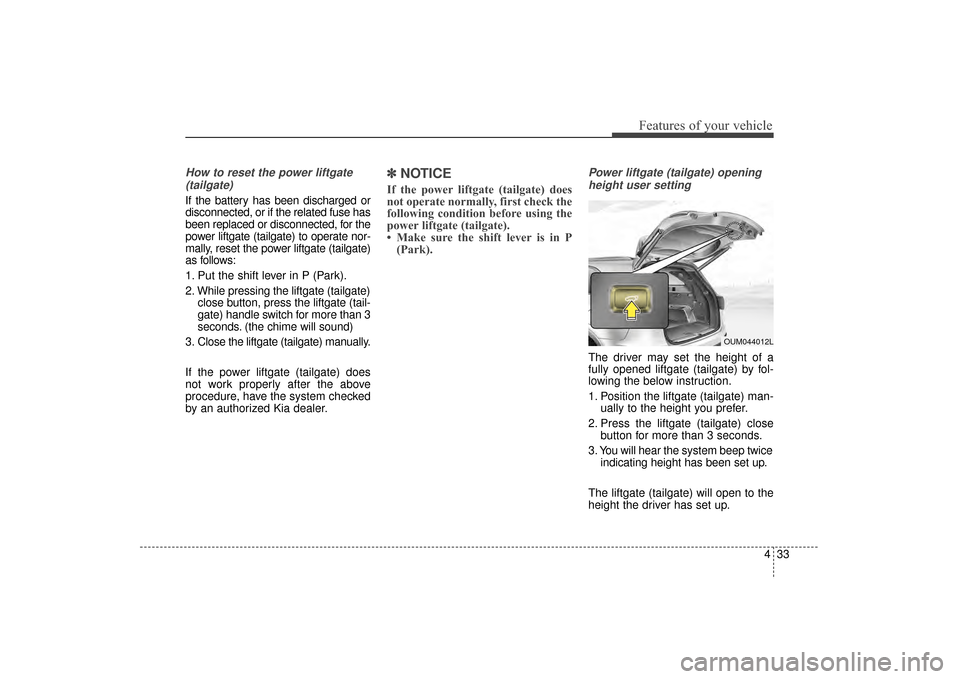
Power liftgate (tailgate) opening
height user setting
The driver may set the height of a
fully opened liftgate (tailgate) by fol-
lowing the below instruction.
1. Position the liftgate (tailgate) man- ually to the height you prefer.
2. Press the liftgate (tailgate) close button for more than 3 seconds.
3. You will hear the system beep twice indicating height has been set up.
The liftgate (tailgate) will open to the
height the driver has set up.
OUM044012L
UM CAN (ENG) 4.qxp 12/1/2014 12:51 PM Page 33
Page 118 of 565

Features of your vehicle
34
4
Smart Liftgate (Tailgate)
(if equipped)
On a vehicle equipped with a smart
key, the liftgate (tailgate) can be
opened using the Smart Liftgate
(Tailgate) system.
How to use the Smart Liftgate
(Tailgate)
The liftgate (tailgate) can be opened
with no-touch activation satisfying all
the conditions below.
After 15 seconds when all doors are closed and locked
Positioned in the detecting area for more than 3 seconds.
✽ ✽ NOTICE
• The Smart Liftgate (Tailgate) does
not operate when:
- The smart key is detected within15 seconds after the doors are
closed and locked, and is contin-
uously detected.
- The smart key is detected within 15 seconds after the doors are
closed and locked, and within 1.5
m (60 inches) from the front door
handles. (for vehicles equipped
with Welcome Light)
- A door is not locked or closed.
- The smart key is in the vehicle.
1. Setting
To activate the Smart Liftgate
(Tailgate), go to User Settings Mode
and select Smart Liftgate (Tailgate)
on the LCD display.
For more information, refer to the
"LCD Display" section in this
chapter.
OUMA044015
UM CAN (ENG) 4.qxp 12/1/2014 12:51 PM Page 34
Page 119 of 565
435
Features of your vehicle
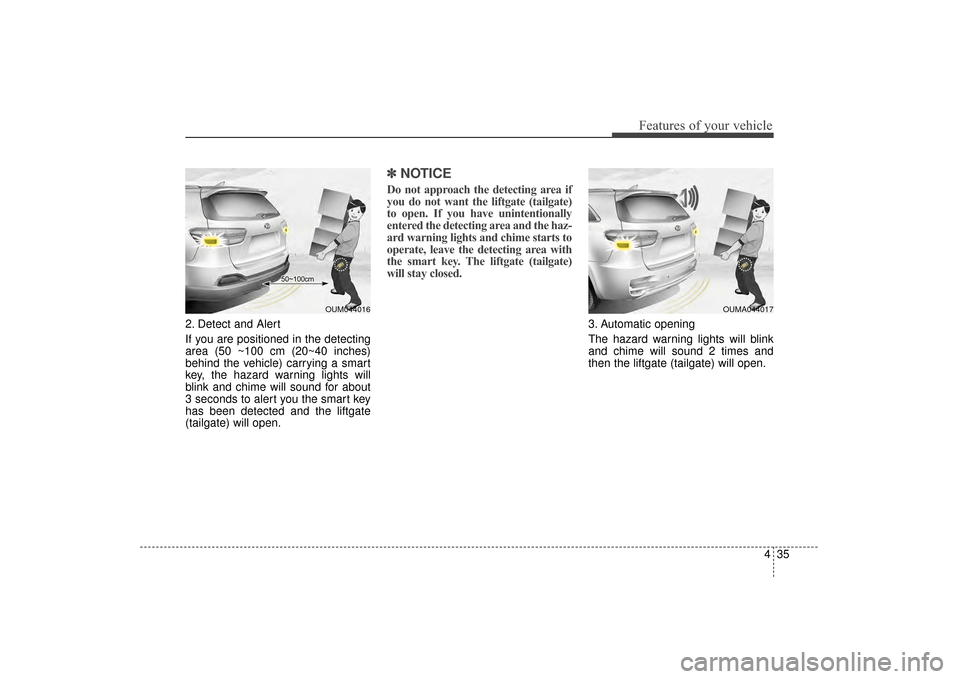
2. Detect and Alert
If you are positioned in the detecting
area (50 ~100 cm (20~40 inches)
behind the vehicle) carrying a smart
key, the hazard warning lights will
blink and chime will sound for about
3 seconds to alert you the smart key
has been detected and the liftgate
(tailgate) will open.
✽ ✽NOTICE
Do not approach the detecting area if
you do not want the liftgate (tailgate)
to open. If you have unintentionally
entered the detecting area and the haz-
ard warning lights and chime starts to
operate, leave the detecting area with
the smart key. The liftgate (tailgate)
will stay closed.
3. Automatic opening
The hazard warning lights will blink
and chime will sound 2 times and
then the liftgate (tailgate) will open.
OUM044016OUMA044017
UM CAN (ENG) 4.qxp 12/1/2014 12:51 PM Page 35
Page 120 of 565
Features of your vehicle
36
4
Make sure you close the liftgate (tail-
gate) before driving your vehicle.
Make sure there are no people or
objects around the liftgate (tailgate)
before opening or closing the liftgate
(tailgate). Make sure objects in the lift-
gate (tailgate) do not come out when
opening the liftgate (tailgate) on a
slope. It may cause serious injury.
Make sure to deactivate the Smart
Liftgate (Tailgate) when washing your
vehicle. Otherwise, the liftgate (tail-
gate) may open inadvertently. The key
should be kept out of reach of children.
Children may inadvertently open the
Smart Liftgate (Tailgate) while playing
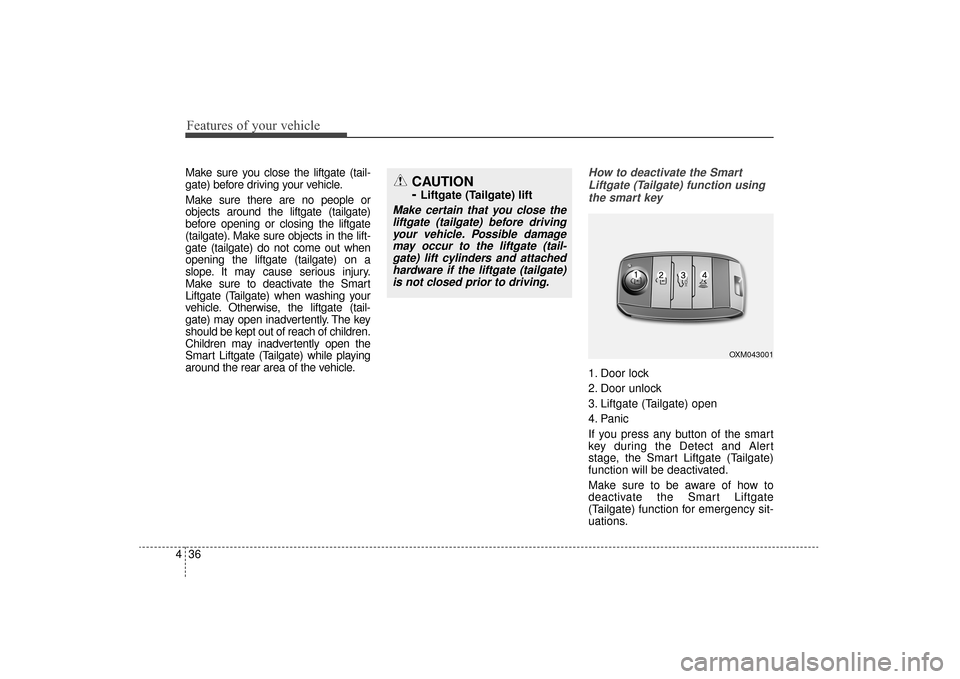
around the rear area of the vehicle.How to deactivate the Smart
Liftgate (Tailgate) function usingthe smart key
1. Door lock
2. Door unlock
3. Liftgate (Tailgate) open
4. Panic
If you press any button of the smart
key during the Detect and Alert
stage, the Smart Liftgate (Tailgate)
function will be deactivated.
Make sure to be aware of how to
deactivate the Smart Liftgate
(Tailgate) function for emergency sit-
uations.
CAUTION
-
Liftgate (Tailgate) lift
Make certain that you close theliftgate (tailgate) before drivingyour vehicle. Possible damagemay occur to the liftgate (tail-gate) lift cylinders and attachedhardware if the liftgate (tailgate)is not closed prior to driving.
OXM043001
UM CAN (ENG) 4.qxp 12/1/2014 12:51 PM Page 36
Page 121 of 565
437
Features of your vehicle
✽
✽NOTICE
• If you press the door unlock but-
ton (2), the Smart Liftgate
(Tailgate) function will be deacti-
vated temporarily. But, if you do
not open any door for 30 seconds,
the smart liftgate (tailgate) func-
tion will be activated again.
• If you press the liftgate (tailgate) open button (3) for more than 1
second, the liftgate (tailgate) opens.
• If you press the door lock button (1) or liftgate (tailgate) open but-
ton (3) when the Smart Liftgate
(Tailgate) function is not in the
Detect and Alert stage, the smart
liftgate (tailgate) function will not
be deactivated.
• In case you have deactivated the Smart Liftgate (Tailgate) function
by pressing the smart key button
and opened a door, the smart lift-
gate (tailgate) function can be acti-
vated again by closing and locking
all doors.
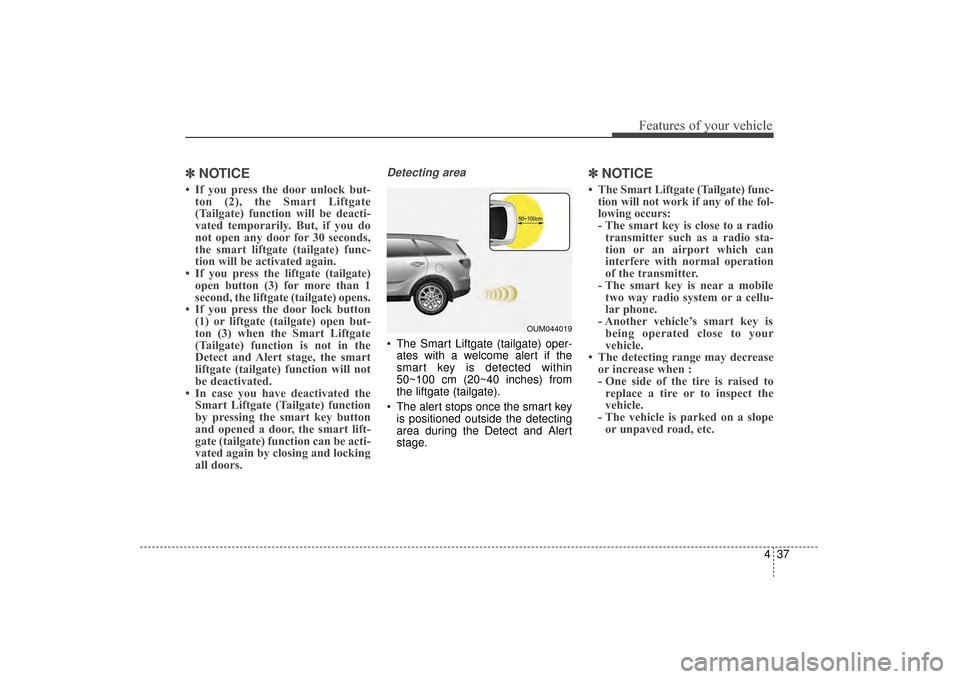
Detecting area
The Smart Liftgate (tailgate) oper-
ates with a welcome alert if the
smart key is detected within
50~100 cm (20~40 inches) from
the liftgate (tailgate).
The alert stops once the smart key is positioned outside the detecting
area during the Detect and Alert
stage.
✽ ✽ NOTICE
• The Smart Liftgate (Tailgate) func-
tion will not work if any of the fol-
lowing occurs:
- The smart key is close to a radiotransmitter such as a radio sta-
tion or an airport which can
interfere with normal operation
of the transmitter.
- The smart key is near a mobile two way radio system or a cellu-
lar phone.
- Another vehicle’s smart key is being operated close to your
vehicle.
• The detecting range may decrease or increase when :
- One side of the tire is raised toreplace a tire or to inspect the
vehicle.
- The vehicle is parked on a slope or unpaved road, etc.
OUM044019
UM CAN (ENG) 4.qxp 12/1/2014 12:51 PM Page 37
Page 122 of 565
Features of your vehicle
38
4
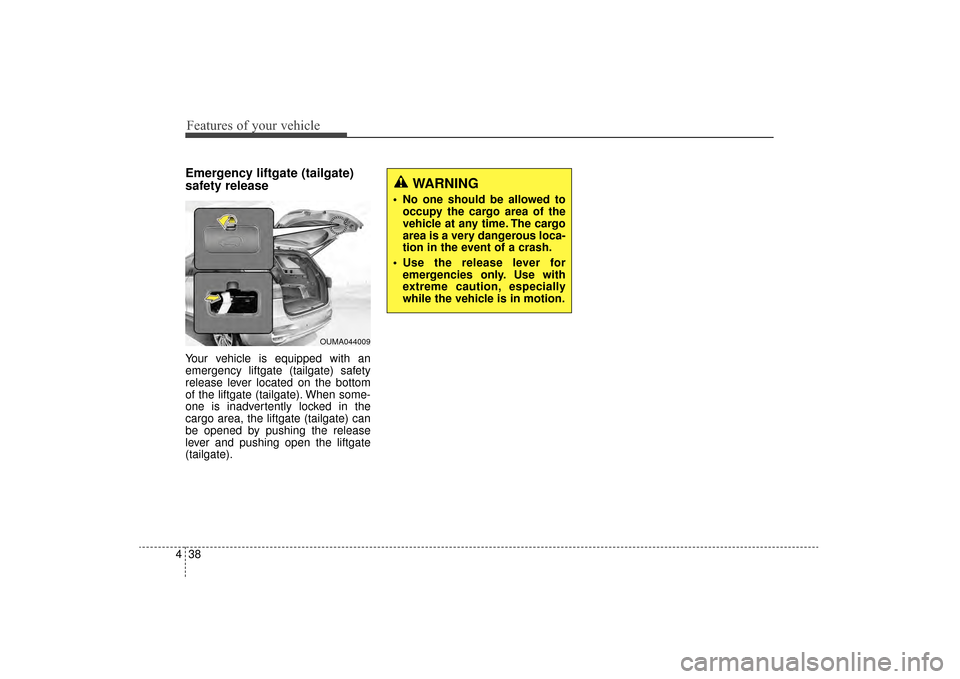
Emergency liftgate (tailgate)
safety release
Your vehicle is equipped with an
emergency liftgate (tailgate) safety
release lever located on the bottom
of the liftgate (tailgate). When some-
one is inadvertently locked in the
cargo area, the liftgate (tailgate) can
be opened by pushing the release
lever and pushing open the liftgate
(tailgate).
WARNING
No one should be allowed to
occupy the cargo area of the
vehicle at any time. The cargo
area is a very dangerous loca-
tion in the event of a crash.
Use the release lever for emergencies only. Use with
extreme caution, especially
while the vehicle is in motion.
OUMA044009
UM CAN (ENG) 4.qxp 12/1/2014 12:51 PM Page 38
Page 170 of 565
Features of your vehicle
86
4
Driving Assist
Smart Cruise Control Response
(if equipped)
Choose the sensitivity of the smart
cruise control.
Rear Cross Traffic Alert (if equipped)
If this item is checked, rear cross
traffic alert function will be activated.
Forward Collision Warning
(if equipped)
If this item is checked, forward collision
warning function will be activated.
Door / Liftgate (Tailgate)
Automatically lock
Disable:
The auto door lock operation will
be deactivated.
Enable on speed: All doors will be automatically
locked when the vehicle speed
exceeds 15km/h (9.3mph).
Enable on shift: All doors will be automatically
locked if the automatic transaxle
shift lever is shifted from the P
(Park) position to the R (Reverse),
N (Neutral), or D (Drive) position. Automatically unlock
Disable:
The auto door unlock operation will
be canceled.
On Key out: All doors will be automatically
unlocked when the ignition key is
removed from ignition switch or
Engine Start/Stop Button is set to
the OFF position.
On shift to P: All doors will be automatically
unlocked if the automatic transaxle
shift lever is shifted to the P (Park)
position.
UM CAN (ENG) 4.qxp 12/1/2014 12:54 PM Page 86
Page 171 of 565
487
Features of your vehicle
Two Press Unlock
Off:The two press unlock function will
be deactivated. Therefore, all doors
will unlock if the door is unlocked.
On: The driver’s door will unlock if the
door is unlocked. When the door is
unlocked again within 4 seconds,
all doors will unlock.
Horn Feedback
Off: The Horn feedback operation will
be deactivated.
On: After locking the door by pressing
the lock button on the transmitter, if
you press the lock button again
within 4 seconds, the warning
sound will operate once to indicate
that all doors are locked. Power liftgate (tailgate) (if equipped)
If this item is checked, the power lift-
gate (tailgate) function will be activat-
ed.
Smart liftgate (tailgate) (if equipped)
If this item is checked, the smart lift-
gate (tailgate) function will be activat-
ed.Lights
One touch turn signal
If this item is checked, the lane
change signals will blink 3, 5 or 7
times when the turn signal lever is
moved slightly.
Head Lamp Delay (if equipped)
If this item is checked, the headlamp
delay function will be activated.
Welcome Light (if equipped)
If this item is checked, the welcome
light function of the pocket lamp will
be activated.
UM CAN (ENG) 4.qxp 12/1/2014 12:54 PM Page 87
Page 177 of 565
493
Features of your vehicle
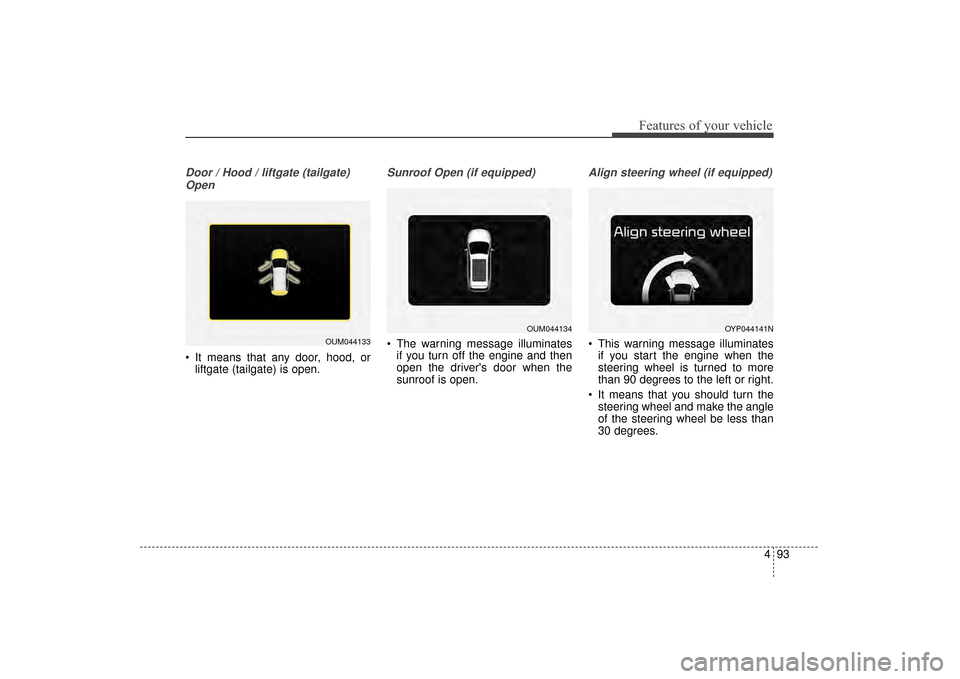
Door / Hood / liftgate (tailgate)Open
It means that any door, hood, or liftgate (tailgate) is open.
Sunroof Open (if equipped)
The warning message illuminates
if you turn off the engine and then
open the driver's door when the
sunroof is open.
Align steering wheel (if equipped)
This warning message illuminatesif you start the engine when the
steering wheel is turned to more
than 90 degrees to the left or right.
It means that you should turn the steering wheel and make the angle
of the steering wheel be less than
30 degrees.OUM044133
OUM044134OYP044141N
UM CAN (ENG) 4.qxp 12/1/2014 12:54 PM Page 93
Page 197 of 565
4113
Features of your vehicle
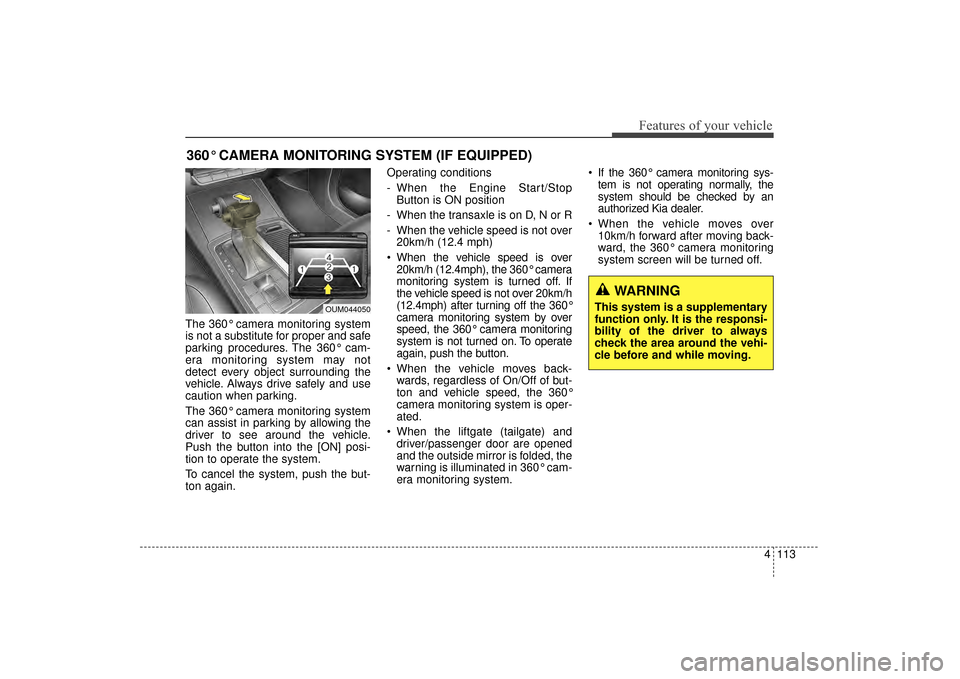
The 360° camera monitoring system
is not a substitute for proper and safe
parking procedures. The 360° cam-
era monitoring system may not
detect every object surrounding the
vehicle. Always drive safely and use
caution when parking.
The 360° camera monitoring system
can assist in parking by allowing the
driver to see around the vehicle.
Push the button into the [ON] posi-
tion to operate the system.
To cancel the system, push the but-
ton again.Operating conditions
- When the Engine Start/Stop
Button is ON position
- When the transaxle is on D, N or R
- When the vehicle speed is not over 20km/h (12.4 mph)
When the vehicle speed is over 20km/h (12.4mph), the 360° camera
monitoring system is turned off. If
the vehicle speed is not over 20km/h
(12.4mph) after turning off the 360°
camera monitoring system by over
speed, the 360° camera monitoring
system is not turned on. To operate
again, push the button.
When the vehicle moves back- wards, regardless of On/Off of but-
ton and vehicle speed, the 360°
camera monitoring system is oper-
ated.
When the liftgate (tailgate) and driver/passenger door are opened
and the outside mirror is folded, the
warning is illuminated in 360° cam-
era monitoring system. If the 360° camera monitoring sys-
tem is not operating normally, the
system should be checked by an
authorized Kia dealer.
When the vehicle moves over 10km/h forward after moving back-
ward, the 360° camera monitoring
system screen will be turned off.
360° CAMERA MONITORING SYSTEM (IF EQUIPPED)
OUM044050
WARNING
This system is a supplementary
function only. It is the responsi-
bility of the driver to always
check the area around the vehi-
cle before and while moving.
UM CAN (ENG) 4.qxp 12/1/2014 12:54 PM Page 113