warning KIA Sorento 2016 3.G Workshop Manual
[x] Cancel search | Manufacturer: KIA, Model Year: 2016, Model line: Sorento, Model: KIA Sorento 2016 3.GPages: 565, PDF Size: 10.63 MB
Page 97 of 565
413
Features of your vehicle
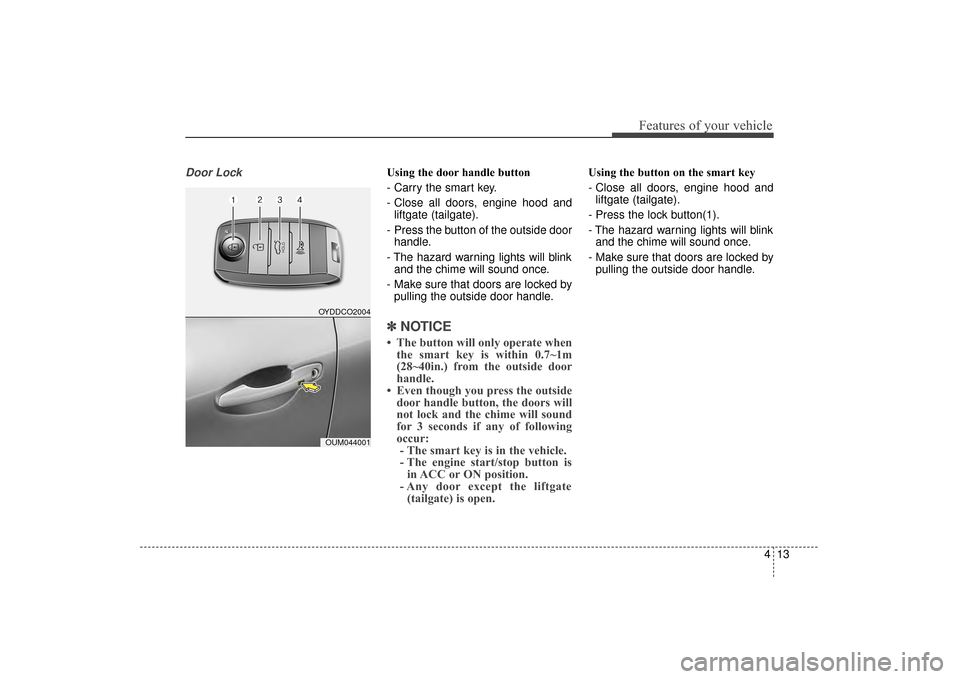
Door LockUsing the door handle button
- Carry the smart key.
- Close all doors, engine hood andliftgate (tailgate).
- Press the button of the outside door handle.
- The hazard warning lights will blink and the chime will sound once.
- Make sure that doors are locked by pulling the outside door handle.
✽ ✽ NOTICE
• The button will only operate when
the smart key is within 0.7~1m
(28~40in.) from the outside door
handle.
• Even though you press the outside door handle button, the doors will
not lock and the chime will sound
for 3 seconds if any of following
occur:- The smart key is in the vehicle.
- The engine start/stop button is in ACC or ON position.
- Any door except the liftgate (tailgate) is open.
Using the button on the smart key
- Close all doors, engine hood and
liftgate (tailgate).
- Press the lock button(1).
- The hazard warning lights will blink and the chime will sound once.
- Make sure that doors are locked by pulling the outside door handle.
OYDDCO2004
OUM044001
UM CAN (ENG) 4.qxp 12/1/2014 12:49 PM Page 13
Page 98 of 565
Features of your vehicle
14
4
Unlocking
Using the door handle button
1. Carry the smart key.
2. Press the button of the driver's
outside door handle.
3. The driver’s door will unlock. The hazard warning lights will blink and
the chime will sound two times.
4. Press the button twice within 4 seconds and all doors and the lift-
gate (tailgate) will unlock and the
hazard warning lights will blink and
the chime will sound two times.
✽ ✽NOTICE
• The button will only operate when
the smart key is within 0.7~1m
(28~40in.) from the outside door
handle.
• When the smart key is recognized in the area of 0.7~1m (28~40in.) from
the front outside door handle, other
people can also open the doors.
• After unlocking the driver’s door or all doors, the door(s) will lock
automatically unless the door is
opened.
Using the button on the smart key
1. Press the unlock button(2) of the
smart key.
2. The driver’s door will unlock. The hazard warning lights will blink and
the chime will sound two times.
3. Press the unlock button(2) twice within 4 seconds and all doors and
the liftgate (tailgate) will unlock.
The hazard warning lights will
blink and the chime will sound two
times.
✽ ✽NOTICE
After pressing the button, the doors
will lock automatically unless any
door is opened within 30 seconds.
✽ ✽NOTICE
You can activate or deactivate the
Two Turn Unlock function. Refer to
"User settings" in this chapter.
Liftgate (Tailgate) unlocking
Using the liftgate (tailgate) handle
button
1. Carry the smart key.
2. Press the liftgate (tailgate) handle
button.
3. When all doors are locked, the hazard warning lights will blink two
times.
Once the liftgate (tailgate) is
opened and then closed, the lift-
gate (tailgate) will lock automati-
cally.
✽ ✽NOTICE
The button will only operate when
the smart key is within 0.7~1m
(28~40in.) from the liftgate handle.
UM CAN (ENG) 4.qxp 12/1/2014 12:49 PM Page 14
Page 99 of 565
415
Features of your vehicle
Using the button on the smart key
1. Press the liftgate (tailgate) unlockbutton (3) for more than 1 second.
2. When all doors are locked, the hazard warning lights will blink two
times.
For Power Liftgate (tailgate) Only:
The Power Liftgate (tailgate) will
open if the button is pressed for more
than 1 second. Also, once the liftgate
(tailgate) is opened and then closed,
the liftgate (tailgate) will be locked
again automatically.
For detailed information refer to the
"Power liftgate (tailgate)" in this
chapter.Panic
1. Press the panic button (4) for more than 1 second.
2. The horn sounds and hazard warning light flash for about 27
seconds.
✽ ✽NOTICE
To stop the horn and lights, press
any button on the smart key.
Start-up
You can start the engine without
inserting the key. For detailed infor-
mation refer to the “Engine start/stop
button” in chapter 5.
UM CAN (ENG) 4.qxp 12/1/2014 12:49 PM Page 15
Page 101 of 565
417
Features of your vehicle
Battery replacement
A smart key battery should last for
several years, but if the smart key is
not working properly, try replacing
the battery with a new one. If you are
unsure how to use your smart key or
replace the battery, contact an
authorized Kia dealer.
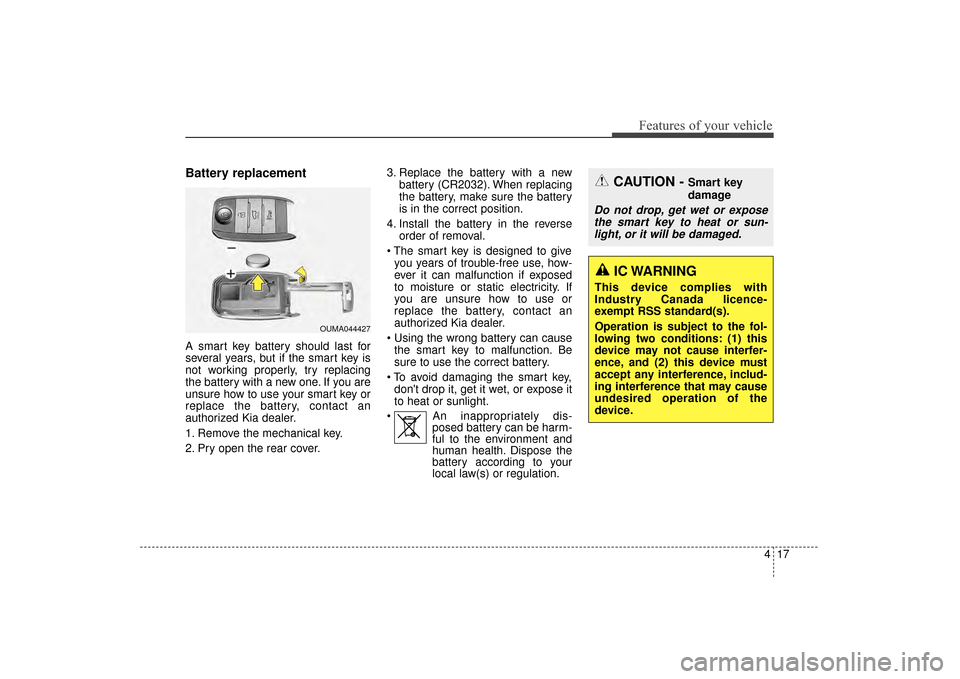
1. Remove the mechanical key.
2. Pry open the rear cover.3. Replace the battery with a new
battery (CR2032). When replacing
the battery, make sure the battery
is in the correct position.
4. Install the battery in the reverse order of removal.
you years of trouble-free use, how-
ever it can malfunction if exposed
to moisture or static electricity. If
you are unsure how to use or
replace the battery, contact an
authorized Kia dealer.
the smart key to malfunction. Be
sure to use the correct battery.
don't drop it, get it wet, or expose it
to heat or sunlight.
An inappropriately dis- posed battery can be harm-
ful to the environment and
human health. Dispose the
battery according to your
local law(s) or regulation.
CAUTION - Smart key
damage
Do not drop, get wet or expose
the smart key to heat or sun-light, or it will be damaged.
OUMA044427
IC WARNING
This device complies with
Industry Canada licence-
exempt RSS standard(s).
Operation is subject to the fol-
lowing two conditions: (1) this
device may not cause interfer-
ence, and (2) this device must
accept any interference, includ-
ing interference that may cause
undesired operation of the
device.
UM CAN (ENG) 4.qxp 12/1/2014 12:50 PM Page 17
Page 102 of 565
WARNING
Changes or modifications not
expressly approved by the party
responsible for compliance
could void the user’s authority
to operate the equipment. If the
keyless entry system is inoper-
ative due to changes or modifi-
cations not expressly approved
by the party responsible for
compliance, it will not be cov-
ered by your manufacturer’s
vehicle warranty.
Features of your vehicle
18
4
Smart key immobilizer system
Your vehicle is equipped with an
electronic engine immobilizer system
to reduce the risk of unauthorized
vehicle use.
Your immobilizer system is com-
prised of a small transponder in the
smart key and electronic devices
inside the vehicle.
With the immobilizer system, when-
ever you turn the engine start/stop
button to the ON position by pressing
the button while carrying the smart
key, it verifies if the smart key is valid
or not.
If the key is determined to be valid,
the engine will start.
If the key is determined to be invalid,
the engine will not start.
To deactivate the immobilizer
system:
Turn the engine start/stop button to
the ON position by pressing the but-
ton while carrying the smart key.
In order to prevent theft of your vehi-
cle, do not leave spare keys any-
where in your vehicle.
To activate the immobilizer system:
Turn the engine start/stop button to
the OFF position. The immobilizer
system activates automatically.
Without a valid smart key for your
vehicle, the engine will not start.
✽ ✽ NOTICE
When starting the engine, do not use
the key with other immobilizer keys
around. Otherwise the engine may
not start or may stop soon after it
starts. Keep each key separate in
order to avoid a starting malfunction.
✽ ✽NOTICE
If you need additional keys or lose
your keys, contact an authorized
Kia dealer.
This device complies with
Industry Canada licence-exempt
RSS standard(s).
Operation is subject to the following
two conditions:
(1) This device may not cause inter-
ference, and
(2) This device must accept any
interference, including interfer-
ence that may cause undesired
operation of the device.
UM CAN (ENG) 4.qxp 12/1/2014 12:50 PM Page 18
Page 103 of 565
419
Features of your vehicle
This system is designed to provide
protection from unauthorized entry
into the vehicle. This system is oper-
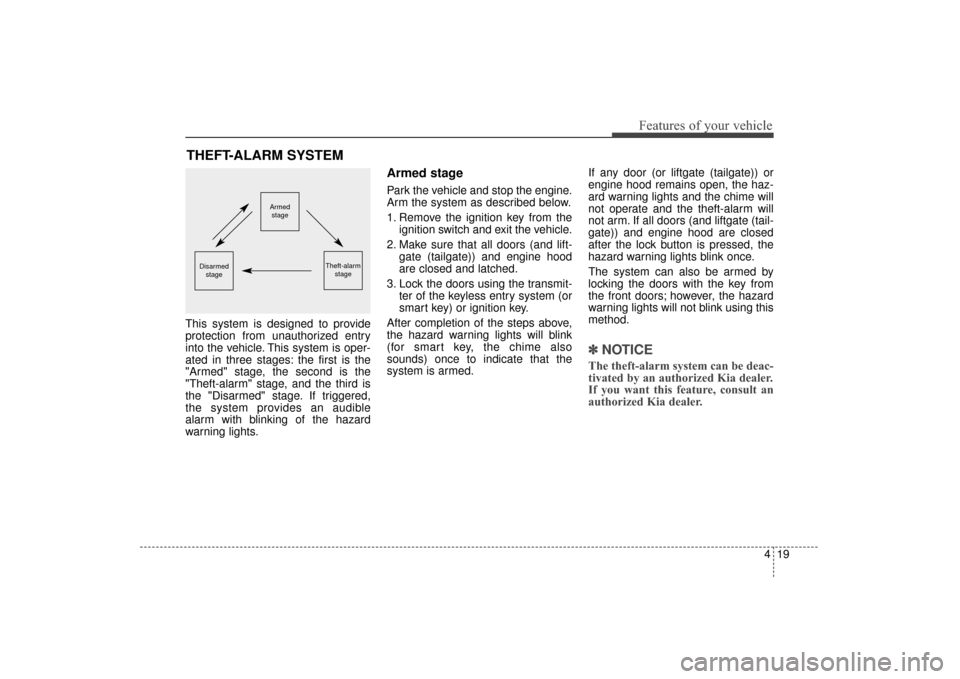
ated in three stages: the first is the
"Armed" stage, the second is the
"Theft-alarm" stage, and the third is
the "Disarmed" stage. If triggered,
the system provides an audible
alarm with blinking of the hazard
warning lights.
Armed stage
Park the vehicle and stop the engine.
Arm the system as described below.
1. Remove the ignition key from theignition switch and exit the vehicle.
2. Make sure that all doors (and lift- gate (tailgate)) and engine hood
are closed and latched.
3. Lock the doors using the transmit- ter of the keyless entry system (or
smart key) or ignition key.
After completion of the steps above,
the hazard warning lights will blink
(for smart key, the chime also
sounds) once to indicate that the
system is armed. If any door (or liftgate (tailgate)) or
engine hood remains open, the haz-
ard warning lights and the chime will
not operate and the theft-alarm will
not arm. If all doors (and liftgate (tail-
gate)) and engine hood are closed
after the lock button is pressed, the
hazard warning lights blink once.
The system can also be armed by
locking the doors with the key from
the front doors; however, the hazard
warning lights will not blink using this
method.
✽ ✽
NOTICE
The theft-alarm system can be deac-
tivated by an authorized Kia dealer.
If you want this feature, consult an
authorized Kia dealer.
THEFT-ALARM SYSTEM
Armed
stage
Theft-alarm stageDisarmedstage
UM CAN (ENG) 4.qxp 12/1/2014 12:50 PM Page 19
Page 104 of 565
Features of your vehicle
20
4
Do not arm the system until all
passengers have left the vehicle. If
the system is armed while a pas-
senger(s) remains in the vehicle,
the alarm may be activated when
the remaining passenger(s) leave
the vehicle. If any door (or liftgate
(tailgate)) or engine hood is
opened within 30 seconds after
the system enters the armed
stage, the system is disarmed to
prevent an unnecessary alarm.Theft-alarm stage
The alarm will be activated if any of
the following occurs while the system
is armed.
A front or rear door is opened with-
out using the ignition key or trans-
mitter (or smart key).
The liftgate (tailgate) is opened without using the transmitter (or
smart key).
The engine hood is opened.
The horn will sound and the hazard
warning lights will blink continuously
for approximately 27 seconds, and
repeat the horn 3 times unless the
system is disarmed. To turn off the
system, unlock the doors with the igni-
tion key or transmitter (or smart key).
Disarmed stage
The system will be disarmed when
The doors (and liftgate (tailgate)) are unlocked with the transmitter
(or smart key) or the ignition key.
After depressing the unlock button,
the hazard warning lights will blink
and the chime will sound twice (in
smart key) to indicate that the sys-
tem is disarmed.
After depressing the unlock button, if
any door (or liftgate (tailgate)) is not
opened within 30 seconds, the sys-
tem will be rearmed.
UM CAN (ENG) 4.qxp 12/1/2014 12:50 PM Page 20
Page 108 of 565
Features of your vehicle
24
4
With central door lock switch
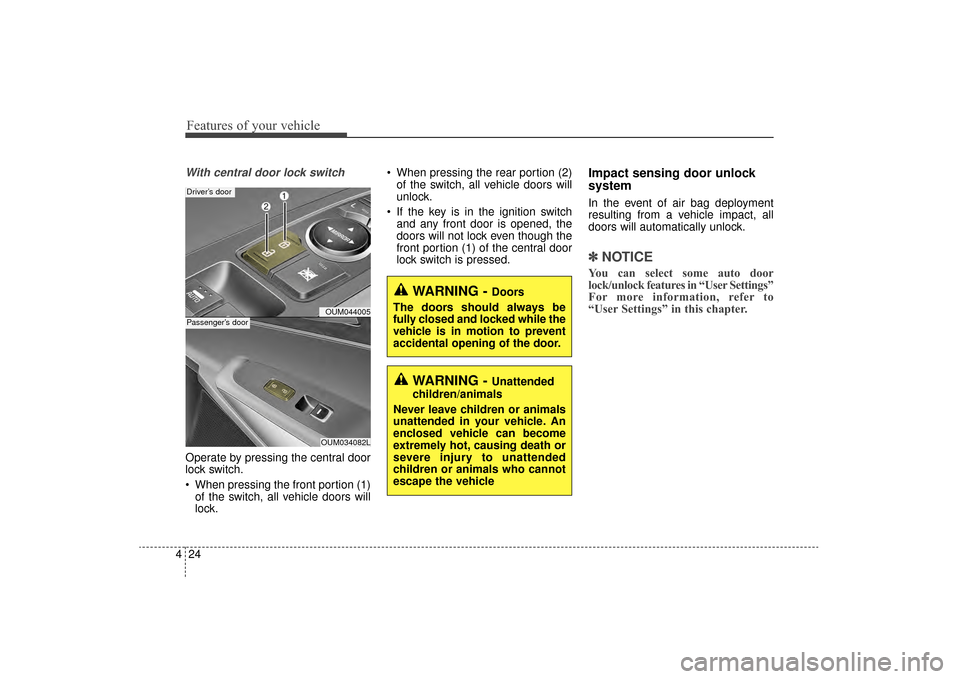
Operate by pressing the central door
lock switch.
When pressing the front portion (1)
of the switch, all vehicle doors will
lock. When pressing the rear portion (2)
of the switch, all vehicle doors will
unlock.
If the key is in the ignition switch and any front door is opened, the
doors will not lock even though the
front portion (1) of the central door
lock switch is pressed.
Impact sensing door unlock
system
In the event of air bag deployment
resulting from a vehicle impact, all
doors will automatically unlock.
✽ ✽ NOTICE
You can select some auto door
lock/unlock features in “User Settings”
For more information, refer to
“User Settings” in this chapter.
OUM044005
Driver’s door
OUM034082L
Passenger’s door
WARNING - Doors
The doors should always be
fully closed and locked while the
vehicle is in motion to prevent
accidental opening of the door.
WARNING - Unattended
children/animals
Never leave children or animals
unattended in your vehicle. An
enclosed vehicle can become
extremely hot, causing death or
severe injury to unattended
children or animals who cannot
escape the vehicle
UM CAN (ENG) 4.qxp 12/1/2014 12:50 PM Page 24
Page 109 of 565
425
Features of your vehicle
Child-protector rear door lock
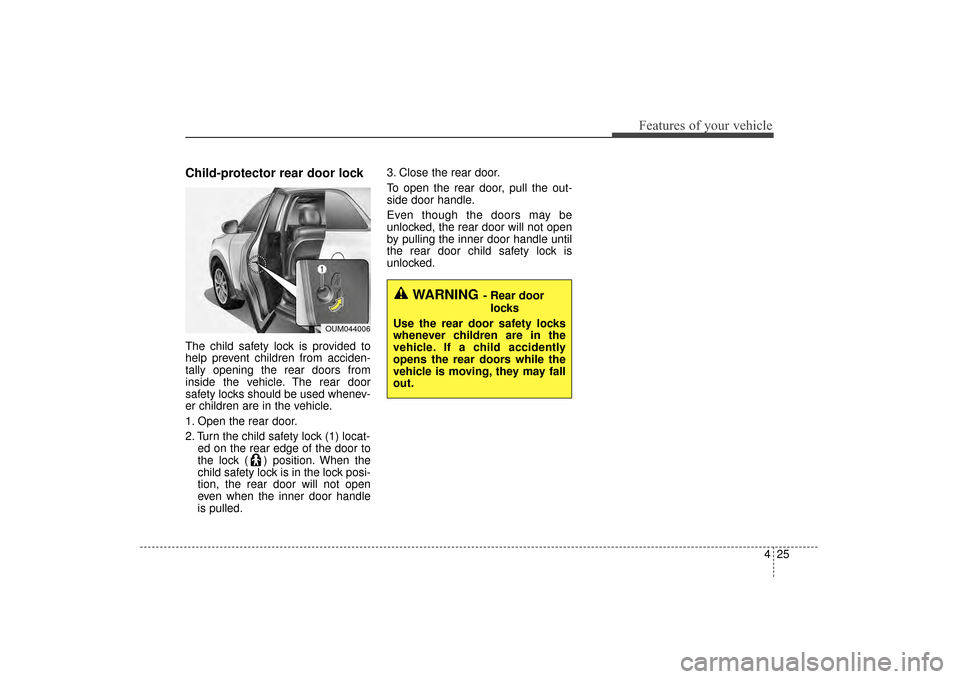
The child safety lock is provided to
help prevent children from acciden-
tally opening the rear doors from
inside the vehicle. The rear door
safety locks should be used whenev-
er children are in the vehicle.
1. Open the rear door.
2. Turn the child safety lock (1) locat-ed on the rear edge of the door to
the lock ( ) position. When the
child safety lock is in the lock posi-
tion, the rear door will not open
even when the inner door handle
is pulled. 3. Close the rear door.
To open the rear door, pull the out-
side door handle.
Even though the doors may be
unlocked, the rear door will not open
by pulling the inner door handle until
the rear door child safety lock is
unlocked.
OUM044006
WARNING- Rear door
locks
Use the rear door safety locks
whenever children are in the
vehicle. If a child accidently
opens the rear doors while the
vehicle is moving, they may fall
out.
UM CAN (ENG) 4.qxp 12/1/2014 12:50 PM Page 25
Page 111 of 565
427
Features of your vehicle
Emergency liftgate (tailgate)
safety release
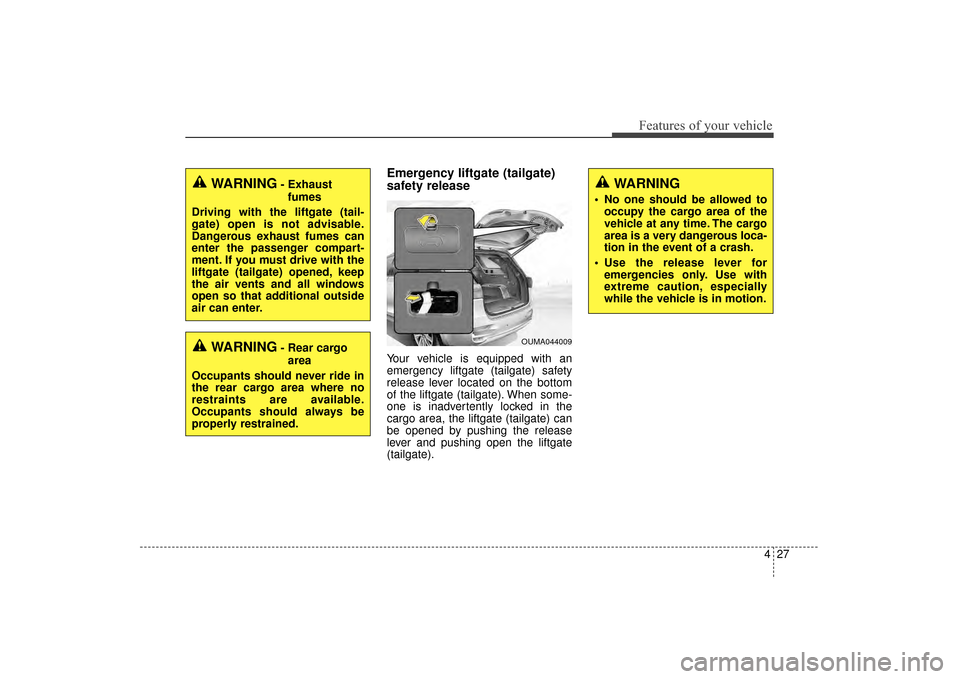
Your vehicle is equipped with an
emergency liftgate (tailgate) safety
release lever located on the bottom
of the liftgate (tailgate). When some-
one is inadvertently locked in the
cargo area, the liftgate (tailgate) can
be opened by pushing the release
lever and pushing open the liftgate
(tailgate).WARNING- Rear cargoarea
Occupants should never ride in
the rear cargo area where no
restraints are available.
Occupants should always be
properly restrained.
WARNING- Exhaust fumes
Driving with the liftgate (tail-
gate) open is not advisable.
Dangerous exhaust fumes can
enter the passenger compart-
ment. If you must drive with the
liftgate (tailgate) opened, keep
the air vents and all windows
open so that additional outside
air can enter.WARNING
No one should be allowed to occupy the cargo area of the
vehicle at any time. The cargo
area is a very dangerous loca-
tion in the event of a crash.
Use the release lever for emergencies only. Use with
extreme caution, especially
while the vehicle is in motion.
OUMA044009
UM CAN (ENG) 4.qxp 12/1/2014 12:50 PM Page 27