fog KIA Sorento 2016 3.G Owner's Manual
[x] Cancel search | Manufacturer: KIA, Model Year: 2016, Model line: Sorento, Model: KIA Sorento 2016 3.GPages: 565, PDF Size: 10.63 MB
Page 11 of 565
Your vehicle at a glance
22
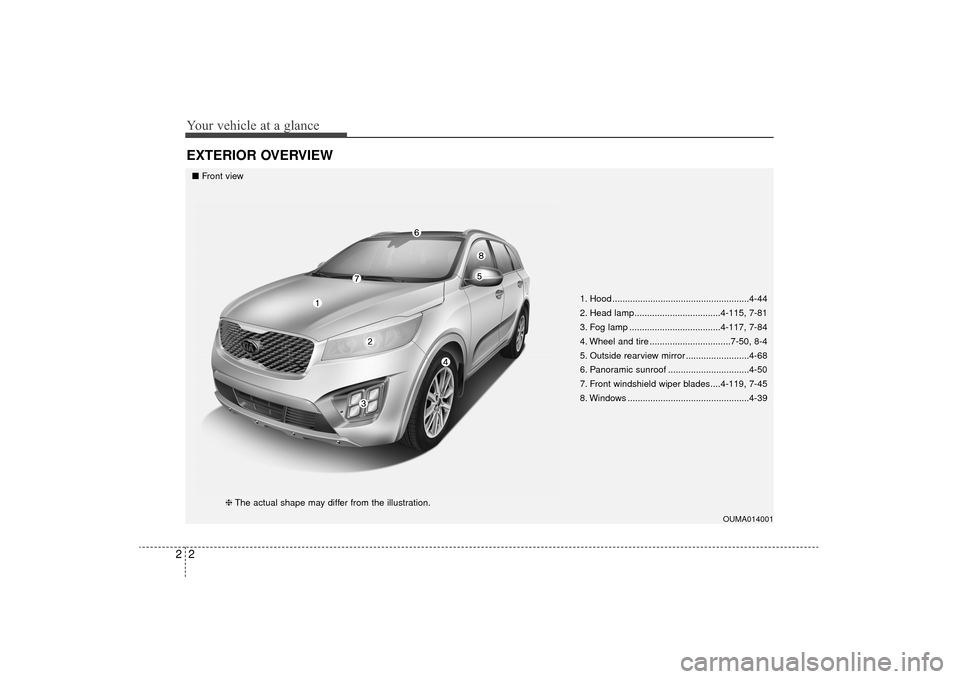
EXTERIOR OVERVIEW
1. Hood ......................................................4-44
2. Head lamp..................................4-115, 7-81
3. Fog lamp ....................................4-117, 7-84
4. Wheel and tire ................................7-50, 8-4
5. Outside rearview mirror .........................4-68
6. Panoramic sunroof ................................4-50
7. Front windshield wiper blades....4-119, 7-45
8. Windows ................................................4-39
OUMA014001
■Front view
❈The actual shape may differ from the illustration.
UM CAN (ENG) 2.qxp 12/1/2014 11:50 AM Page 2
Page 86 of 565
Steering wheel . . . . . . . . . . . . . . . . . . . . . . . . . . . . . 4-55
• Electric power steering (EPS) . . . . . . . . . . . . . . . . . . 4-55
• Tilt and telescopic steering . . . . . . . . . . . . . . . . . . . . 4-56
• Heated steering wheel . . . . . . . . . . . . . . . . . . . . . . . . . 4-57
• Horn . . . . . . . . . . . . . . . . . . . . . . . . . . . . . . . . . . . . \
. . . 4-57
Mirrors . . . . . . . . . . . . . . . . . . . . . . . . . . . . . . . . . . 4-58\
• Inside rearview mirror . . . . . . . . . . . . . . . . . . . . . . . . 4-58
• Outside rearview mirror. . . . . . . . . . . . . . . . . . . . . . . 4-68
Instrument cluster . . . . . . . . . . . . . . . . . . . . . . . . . 4-72
• Instrument cluster control . . . . . . . . . . . . . . . . . . . . . 4-73
• LCD display control . . . . . . . . . . . . . . . . . . . . . . . . . . 4-73
• Gauges . . . . . . . . . . . . . . . . . . . . . . . . . . . . . . . . . . . . \
. 4-74
• Transaxle shift indicator . . . . . . . . . . . . . . . . . . . . . . . 4-77
• Icy Road Warning Indicator . . . . . . . . . . . . . . . . . . . 4-77
LCD display . . . . . . . . . . . . . . . . . . . . . . . . . . . . . . 4-78
• LCD modes. . . . . . . . . . . . . . . . . . . . . . . . . . . . . . . . . .\
4-78
Trip modes (trip computer). . . . . . . . . . . . . . . . . . 4-79
• Trip Modes . . . . . . . . . . . . . . . . . . . . . . . . . . . . . . . . . . 4-79\
• Fuel Economy . . . . . . . . . . . . . . . . . . . . . . . . . . . . . . . 4-79
• Trip A/B . . . . . . . . . . . . . . . . . . . . . . . . . . . . . . . . . . . . \
4-81
• Digital speedometer . . . . . . . . . . . . . . . . . . . . . . . . . . . 4-82
• One time driving information mode . . . . . . . . . . . . . 4-82
• Turn by turn mode . . . . . . . . . . . . . . . . . . . . . . . . . . . 4-83
• ASCC/LDWS mode . . . . . . . . . . . . . . . . . . . . . . . . . . . 4-83
• A/V mode . . . . . . . . . . . . . . . . . . . . . . . . . . . . . . . . . . . 4-\
83• Service mode . . . . . . . . . . . . . . . . . . . . . . . . . . . . . . . . 4-84
• User settings mode. . . . . . . . . . . . . . . . . . . . . . . . . . . . 4-85
• Warning messages . . . . . . . . . . . . . . . . . . . . . . . . . . . . 4-89
Warning and indicator lights . . . . . . . . . . . . . . . . 4-96
• Warning lights . . . . . . . . . . . . . . . . . . . . . . . . . . . . . . . 4-96
• Indicator lights. . . . . . . . . . . . . . . . . . . . . . . . . . . . . . 4-104
Rear parking assist system . . . . . . . . . . . . . . . . . 4-108
• Operation of the rear parking assist system . . . . . . 4-108
• Non-operational conditions of
rear parking assist system . . . . . . . . . . . . . . . . . . . 4-109
• Rear parking assist system precautions . . . . . . . . . 4-110
• Self-diagnosis . . . . . . . . . . . . . . . . . . . . . . . . . . . . . . . 4-111
Rearview camera . . . . . . . . . . . . . . . . . . . . . . . . . 4-112
360° camera monitoring system . . . . . . . . . . . . . 4-113
Lighting . . . . . . . . . . . . . . . . . . . . . . . . . . . . . . . . . 4-114
• Battery saver function . . . . . . . . . . . . . . . . . . . . . . . . 4-114
• Daytime running light . . . . . . . . . . . . . . . . . . . . . . . . 4-114
• Lighting control . . . . . . . . . . . . . . . . . . . . . . . . . . . . . 4-114
• High beam operation . . . . . . . . . . . . . . . . . . . . . . . . . 4-116
• Turn signals and lane change signals. . . . . . . . . . . . 4-117
• Front fog light . . . . . . . . . . . . . . . . . . . . . . . . . . . . . . 4-117
• Check headlight . . . . . . . . . . . . . . . . . . . . . . . . . . . . 4-118
Wipers and washers . . . . . . . . . . . . . . . . . . . . . . . 4-119
• Windshield wipers . . . . . . . . . . . . . . . . . . . . . . . . . . 4-119
• Front windshield washers . . . . . . . . . . . . . . . . . . . . . 4-121
4
UM CAN (ENG) 4.qxp 12/1/2014 12:49 PM Page 2
Page 87 of 565
• Rear window wiper and washer switch. . . . . . . . . . 4-122
Interior lights . . . . . . . . . . . . . . . . . . . . . . . . . . . . 4-123
• Automatic turn off function . . . . . . . . . . . . . . . . . . . 4-123
• Room lamp . . . . . . . . . . . . . . . . . . . . . . . . . . . . . . . . . 4-123
• Map lamp . . . . . . . . . . . . . . . . . . . . . . . . . . . . . . . . . 4-124
• Luggage lamp . . . . . . . . . . . . . . . . . . . . . . . . . . . . . . 4-125
• Vanity mirror lamp . . . . . . . . . . . . . . . . . . . . . . . . . . 4-125
• Glove box lamp . . . . . . . . . . . . . . . . . . . . . . . . . . . . . 4-125
Welcome system . . . . . . . . . . . . . . . . . . . . . . . . . . 4-126
• Headlight (headlamp) escort function . . . . . . . . . . . 4-126
• Interior light . . . . . . . . . . . . . . . . . . . . . . . . . . . . . . . 4-126
• Pocket lamp . . . . . . . . . . . . . . . . . . . . . . . . . . . . . . . . 4-126
Defroster . . . . . . . . . . . . . . . . . . . . . . . . . . . . . . . . 4-127
• Rear window defroster . . . . . . . . . . . . . . . . . . . . . . . 4-127
Manual climate control system . . . . . . . . . . . . . . 4-128
• Heating and air conditioning . . . . . . . . . . . . . . . . . . 4-129
• 3rd row air conditioning . . . . . . . . . . . . . . . . . . . . . . 4-134
• System operation . . . . . . . . . . . . . . . . . . . . . . . . . . . . 4-135
• Climate control air filter. . . . . . . . . . . . . . . . . . . . . . 4-137
• Checking the amount of air conditionerrefrigerant and compressor lubricant . . . . . . . . . . 4-137
Automatic climate control system . . . . . . . . . . . 4-139
• Automatic heating and air conditioning . . . . . . . . . 4-141
• Manual heating and air conditioning . . . . . . . . . . . 4-142
• 3
rdrow air conditioning . . . . . . . . . . . . . . . . . . . . . . . 4-147 • System operation . . . . . . . . . . . . . . . . . . . . . . . . . . . . 4-148
• Climate control air filter. . . . . . . . . . . . . . . . . . . . . . 4-150
• Checking the amount of air conditioner
refrigerant and compressor lubricant . . . . . . . . . . 4-151
Windshield defrosting and defogging . . . . . . . . . 4-152
• Manual climate control system . . . . . . . . . . . . . . . . 4-152
• Automatic climate control system . . . . . . . . . . . . . . 4-153
• Defogging logic. . . . . . . . . . . . . . . . . . . . . . . . . . . . . . 4-154
Clean air . . . . . . . . . . . . . . . . . . . . . . . . . . . . . . . . 4-156
Storage compartments . . . . . . . . . . . . . . . . . . . . 4-157
• Center console storage . . . . . . . . . . . . . . . . . . . . . . . 4-157
• Glove box . . . . . . . . . . . . . . . . . . . . . . . . . . . . . . . . . . 4-15\
7
• Sunglass holder . . . . . . . . . . . . . . . . . . . . . . . . . . . . . 4-158
• Luggage box . . . . . . . . . . . . . . . . . . . . . . . . . . . . . . . . 4-159
Interior features . . . . . . . . . . . . . . . . . . . . . . . . . . 4-160
• Cup holder . . . . . . . . . . . . . . . . . . . . . . . . . . . . . . . . . 4-160
• Bottle holder. . . . . . . . . . . . . . . . . . . . . . . . . . . . . . . . 4-\
161
• Seat warmer . . . . . . . . . . . . . . . . . . . . . . . . . . . . . . . . 4-161
• Seat cooler (air ventilation seat) . . . . . . . . . . . . . . . 4-162
• Sunvisor . . . . . . . . . . . . . . . . . . . . . . . . . . . . . . . . . . . 4-\
163
• Power outlet . . . . . . . . . . . . . . . . . . . . . . . . . . . . . . . . 4-163
• AC inverter. . . . . . . . . . . . . . . . . . . . . . . . . . . . . . . . \
. 4-164
• USB charger . . . . . . . . . . . . . . . . . . . . . . . . . . . . . . . . 4-166
• Clothes hanger . . . . . . . . . . . . . . . . . . . . . . . . . . . . . 4-167
• Floor mat anchor (s) . . . . . . . . . . . . . . . . . . . . . . . . . 4-167
4
UM CAN (ENG) 4.qxp 12/1/2014 12:49 PM Page 3
Page 190 of 565
Features of your vehicle
106
4
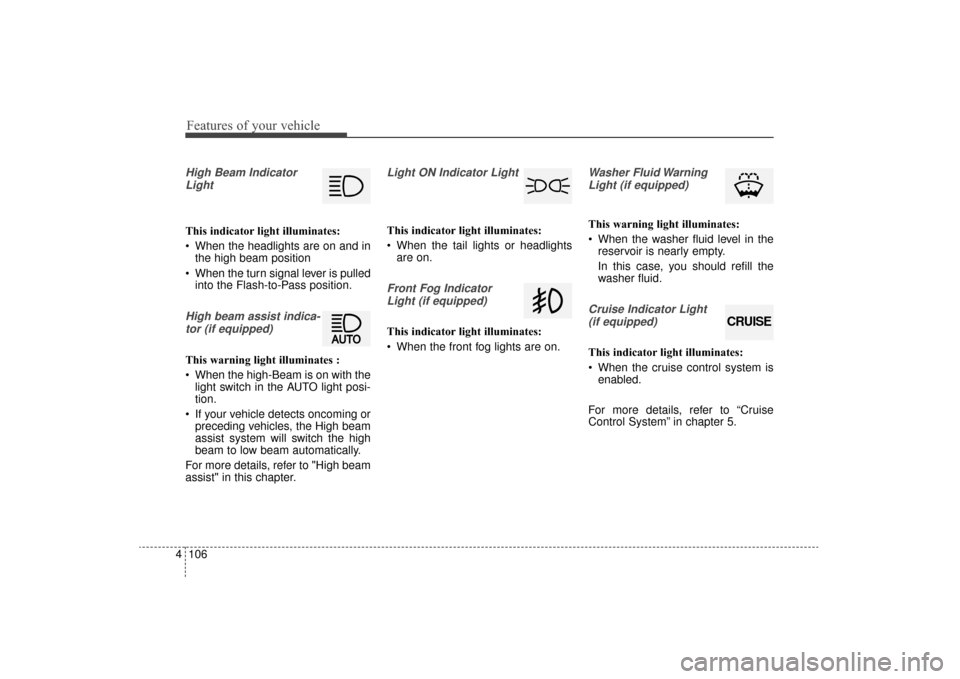
High Beam Indicator
Light
This indicator light illuminates:
When the headlights are on and in the high beam position
When the turn signal lever is pulled into the Flash-to-Pass position.
High beam assist indica-
tor (if equipped)
This warning light illuminates :
When the high-Beam is on with the light switch in the AUTO light posi-
tion.
If your vehicle detects oncoming or preceding vehicles, the High beam
assist system will switch the high
beam to low beam automatically.
For more details, refer to "High beam
assist" in this chapter.
Light ON Indicator Light
This indicator light illuminates:
When the tail lights or headlights are on.
Front Fog Indicator
Light (if equipped)
This indicator light illuminates:
When the front fog lights are on.
Washer Fluid WarningLight (if equipped)
This warning light illuminates:
When the washer fluid level in the reservoir is nearly empty.
In this case, you should refill the
washer fluid.
Cruise Indicator Light
(if equipped)
This indicator light illuminates:
When the cruise control system is enabled.
For more details, refer to “Cruise
Control System” in chapter 5.
CRUISE
UM CAN (ENG) 4.qxp 12/1/2014 12:54 PM Page 106
Page 198 of 565
Features of your vehicle
114
4
Battery saver function
The purpose of this feature is to
prevent the battery from being dis-
charged if the lights are left in the
ON position. The system automati-
cally shuts off the parking lights 30
seconds after the ignition key is
removed and the driver’s door is
opened and closed.
With this feature, the parking lights will turn off automatically if the driver
parks on the side of the road at night
and opens the driver’s side door.
If necessary, to keep the parking
lights on when the ignition key is
removed, perform the following:
1) Open the driver-side door.
2) Turn the parking lights OFF and ON again using the light switch
on the steering column.
Daytime running light
The Daytime Running Lights (DRL)
can make it easier for others to see the
front of your vehicle during the day.
DRL can be helpful in many different
driving conditions, and it is especially
helpful after dawn and before sunset.
The DRL system will turn the dedi-
cated lamp OFF when:
1. The headlight or fog lamp switch isON.
2. The engine is OFF.
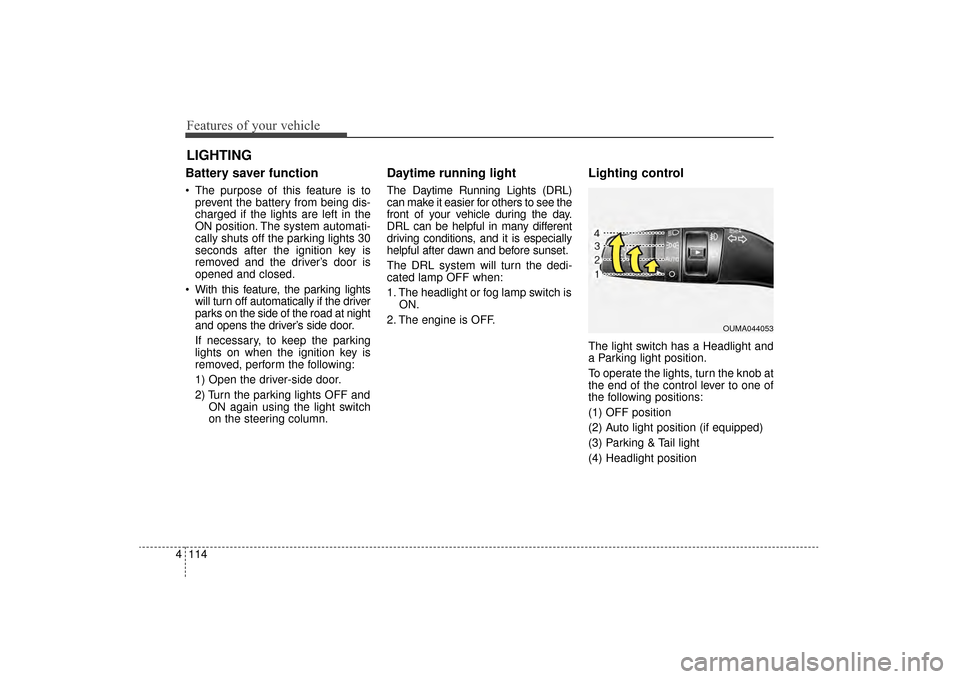
Lighting control
The light switch has a Headlight and
a Parking light position.
To operate the lights, turn the knob at
the end of the control lever to one of
the following positions:
(1) OFF position
(2) Auto light position (if equipped)
(3) Parking & Tail light
(4) Headlight position
LIGHTING
OUMA044053
UM CAN (ENG) 4.qxp 12/1/2014 12:55 PM Page 114
Page 201 of 565
4117
Features of your vehicle
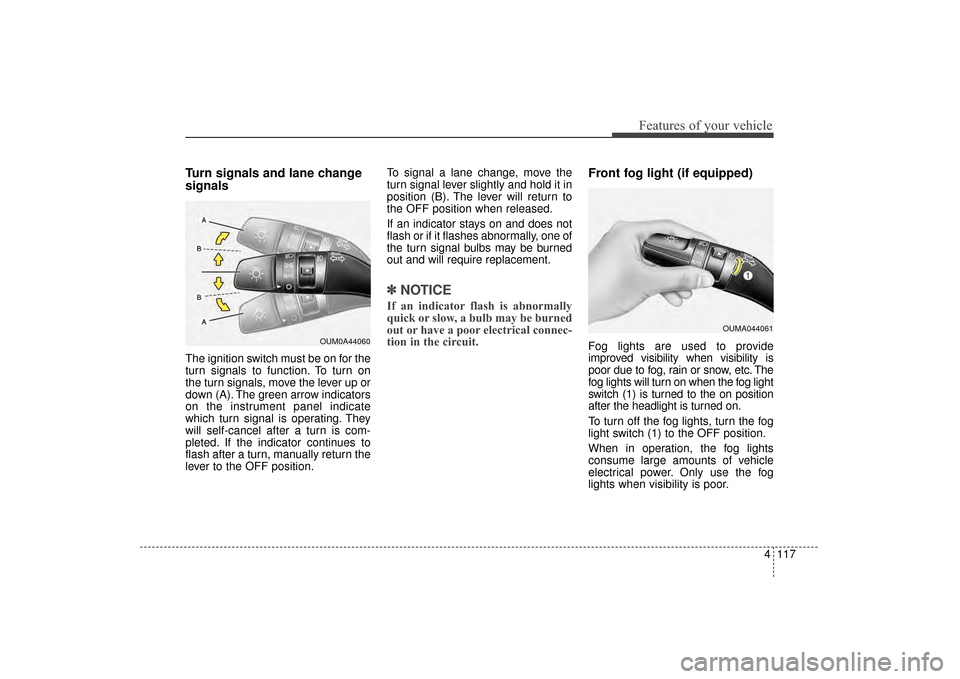
Turn signals and lane change
signals
The ignition switch must be on for the
turn signals to function. To turn on
the turn signals, move the lever up or
down (A). The green arrow indicators
on the instrument panel indicate
which turn signal is operating. They
will self-cancel after a turn is com-
pleted. If the indicator continues to
flash after a turn, manually return the
lever to the OFF position.To signal a lane change, move the
turn signal lever slightly and hold it in
position (B). The lever will return to
the OFF position when released.
If an indicator stays on and does not
flash or if it flashes abnormally, one of
the turn signal bulbs may be burned
out and will require replacement.
✽ ✽
NOTICE
If an indicator flash is abnormally
quick or slow, a bulb may be burned
out or have a poor electrical connec-
tion in the circuit.
Front fog light (if equipped)
Fog lights are used to provide
improved visibility when visibility is
poor due to fog, rain or snow, etc. The
fog lights will turn on when the fog light
switch (1) is turned to the on position
after the headlight is turned on.
To turn off the fog lights, turn the fog
light switch (1) to the OFF position.
When in operation, the fog lights
consume large amounts of vehicle
electrical power. Only use the fog
lights when visibility is poor.OUM0A44060
OUMA044061
UM CAN (ENG) 4.qxp 12/1/2014 12:55 PM Page 117
Page 211 of 565
4127
Features of your vehicle
If you want to defrost and defog the
front windshield, refer to “Windshield
defrosting and defogging” in this sec-
tion.
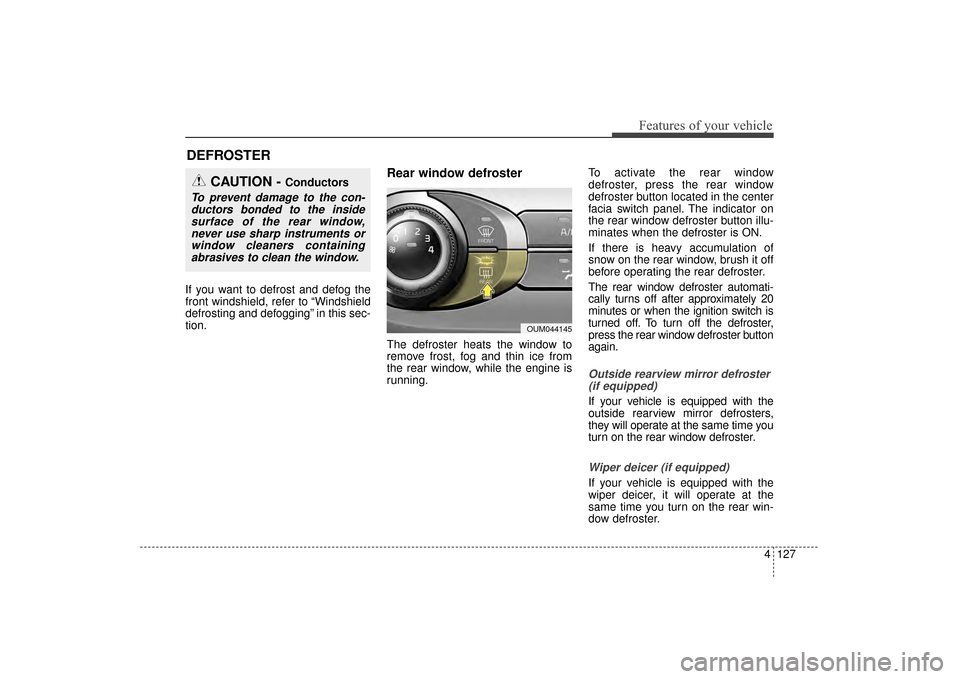
Rear window defroster
The defroster heats the window to
remove frost, fog and thin ice from
the rear window, while the engine is
running.To activate the rear window
defroster, press the rear window
defroster button located in the center
facia switch panel. The indicator on
the rear window defroster button illu-
minates when the defroster is ON.
If there is heavy accumulation of
snow on the rear window, brush it off
before operating the rear defroster.
The rear window defroster automati-
cally turns off after approximately 20
minutes or when the ignition switch is
turned off. To turn off the defroster,
press the rear window defroster button
again.
Outside rearview mirror defroster
(if equipped)
If your vehicle is equipped with the
outside rearview mirror defrosters,
they will operate at the same time you
turn on the rear window defroster.
Wiper deicer (if equipped)
If your vehicle is equipped with the
wiper deicer, it will operate at the
same time you turn on the rear win-
dow defroster.
DEFROSTER
CAUTION - Conductors
To prevent damage to the con-ductors bonded to the insidesurface of the rear window,never use sharp instruments orwindow cleaners containingabrasives to clean the window.
OUM044145
UM CAN (ENG) 4.qxp 12/1/2014 12:56 PM Page 127
Page 216 of 565
Features of your vehicle
132
4
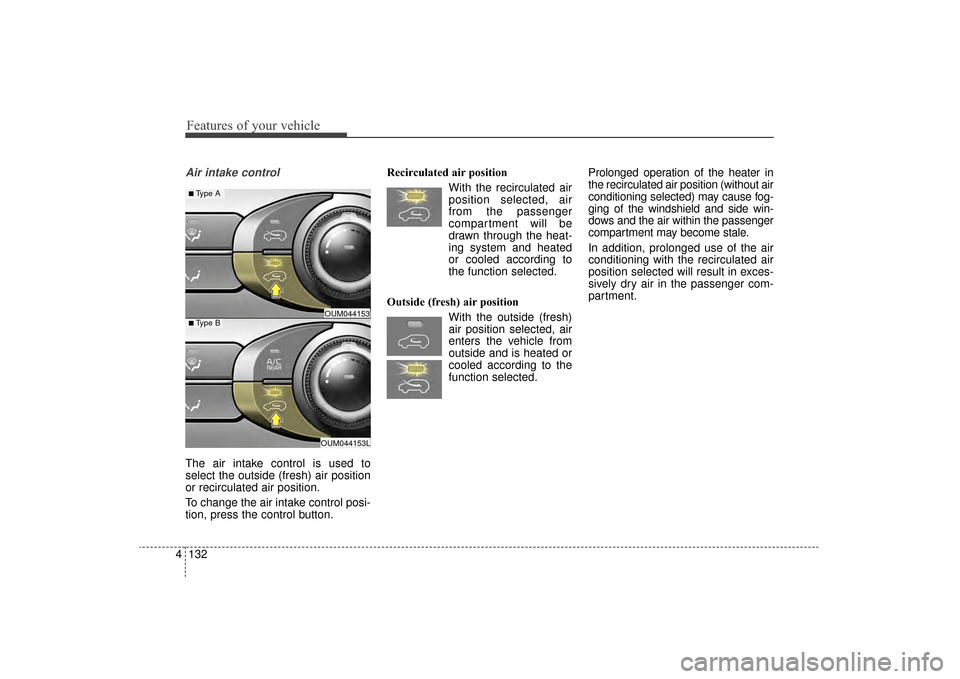
Air intake control
The air intake control is used to
select the outside (fresh) air position
or recirculated air position.
To change the air intake control posi-
tion, press the control button. Recirculated air position
With the recirculated airposition selected, air
from the passenger
compartment will be
drawn through the heat-
ing system and heated
or cooled according to
the function selected.
Outside (fresh) air position With the outside (fresh)air position selected, air
enters the vehicle from
outside and is heated or
cooled according to the
function selected. Prolonged operation of the heater in
the recirculated air position (without air
conditioning selected) may cause fog-
ging of the windshield and side win-
dows and the air within the passenger
compartment may become stale.
In addition, prolonged use of the air
conditioning with the recirculated air
position selected will result in exces-
sively dry air in the passenger com-
partment.
OUM044153L
OUM044153■Type B
■ Type A
UM CAN (ENG) 4.qxp 12/1/2014 12:57 PM Page 132
Page 217 of 565
4133
Features of your vehicle
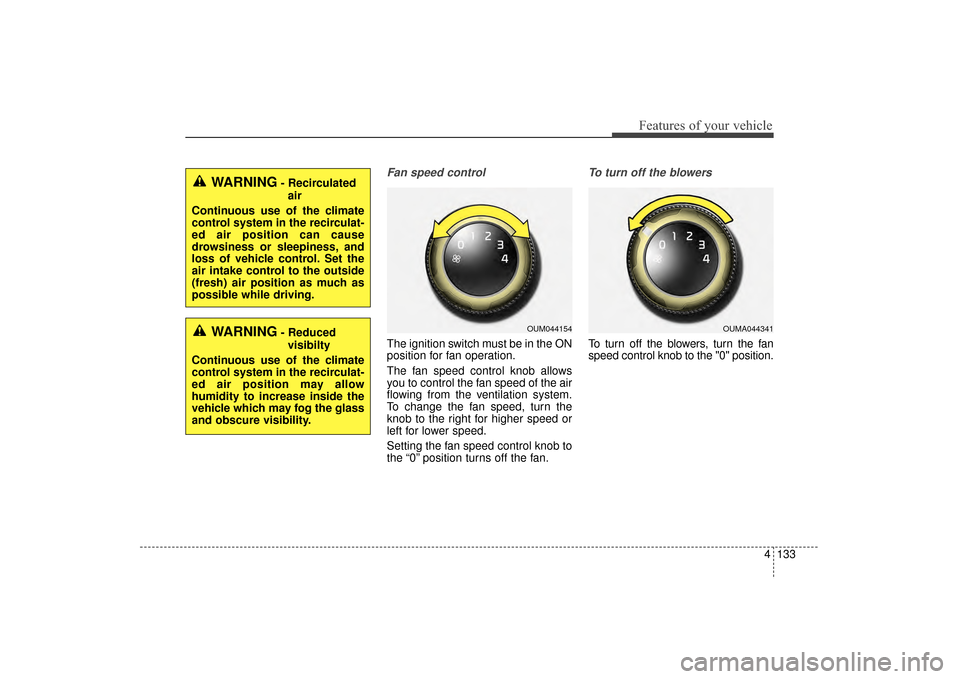
Fan speed control
The ignition switch must be in the ON
position for fan operation.
The fan speed control knob allows
you to control the fan speed of the air
flowing from the ventilation system.
To change the fan speed, turn the
knob to the right for higher speed or
left for lower speed.
Setting the fan speed control knob to
the “0” position turns off the fan.
To turn off the blowers
To turn off the blowers, turn the fan
speed control knob to the "0" position.
WARNING- Recirculatedair
Continuous use of the climate
control system in the recirculat-
ed air position can cause
drowsiness or sleepiness, and
loss of vehicle control. Set the
air intake control to the outside
(fresh) air position as much as
possible while driving.
WARNING- Reduced visibilty
Continuous use of the climate
control system in the recirculat-
ed air position may allow
humidity to increase inside the
vehicle which may fog the glass
and obscure visibility.OUM044154OUMA044341
UM CAN (ENG) 4.qxp 12/1/2014 12:57 PM Page 133
Page 219 of 565
4135
Features of your vehicle
System operation
Ventilation
1. Set the mode to the position.
2. Set the air intake control to theoutside (fresh) air position.
3. Set the temperature control to the desired position.
4. Set the fan speed control to the desired speed.
Heating
1. Set the mode to the position.
2. Set the air intake control to theoutside (fresh) air position.
3. Set the temperature control to the desired position.
4. Set the fan speed control to the desired speed.
5. If dehumidified heating is desired, turn the air conditioning system (if
equipped) on.
If the windshield fogs up, set the mode to the or position. Operation Tips
To keep dust or unpleasant fumes
from entering the vehicle through
the ventilation system, temporarily
set the air intake control to the
recirculated air position. Be sure to
return the control to the fresh air
position when the irritation has
passed to keep fresh air in the
vehicle. This will help keep the driv-
er alert and comfortable.
Air for the heating/cooling system is drawn in through the grilles just
ahead of the windshield. Care
should be taken that these are not
blocked by leaves, snow, ice or
other obstructions.
To prevent interior fog on the wind- shield, set the air intake control to
the fresh air position and fan speed
to the desired position, turn on the
air conditioning system, and adjust
the temperature control to desired
temperature.
Air conditioning
Kia Air Conditioning Systems are
filled with refrigerant*.
1. Start the engine. Push the air con- ditioning button.
2. Set the mode to the position.
3. Set the air intake control to the outside air or recirculated air posi-
tion.
4. Adjust the fan speed control and temperature control to maintain
maximum comfort.
The refrigerant system should only be serviced by trained and certified
technicians to insure proper and
safe operation.
The refrigerant system should be serviced in a well-ventilated place.
The air conditioning evaporator (cooling coil) shall never be repaired
or replaced with one removed from
a used or salvaged vehicle and new
replacement MAC evaporators shall
be certified (and labeled) as meet-
ing SAE Standard J2842.
UM CAN (ENG) 4.qxp 12/1/2014 12:57 PM Page 135