radio KIA Sorento 2016 3.G Owner's Manual
[x] Cancel search | Manufacturer: KIA, Model Year: 2016, Model line: Sorento, Model: KIA Sorento 2016 3.GPages: 565, PDF Size: 10.63 MB
Page 88 of 565
• Side curtain . . . . . . . . . . . . . . . . . . . . . . . . . . . . . . . . 4-168
• Luggage net holder . . . . . . . . . . . . . . . . . . . . . . . . . . 4-168
Exterior features . . . . . . . . . . . . . . . . . . . . . . . . . . 4-170
• Roof rack . . . . . . . . . . . . . . . . . . . . . . . . . . . . . . . . . . 4-17\
0
Audio system . . . . . . . . . . . . . . . . . . . . . . . . . . . . . 4-171
• Antenna . . . . . . . . . . . . . . . . . . . . . . . . . . . . . . . . . . . 4-\
171
• Steering wheel remote controller . . . . . . . . . . . . . . . 4-172
• Aux, USB and iPod
®port . . . . . . . . . . . . . . . . . . . . . 4-173
• How vehicle audio works . . . . . . . . . . . . . . . . . . . . . 4-174
• Using the USB device . . . . . . . . . . . . . . . . . . . . . . . . 4-178
• Using iPod
®device. . . . . . . . . . . . . . . . . . . . . . . . . . . 4-179
• Bluetooth®Wireless Technology . . . . . . . . . . . . . . . . 4-180
• Voice recognition . . . . . . . . . . . . . . . . . . . . . . . . . . . . 4-182
• Standard audio system . . . . . . . . . . . . . . . . . . . . . . . 4-183
• System controllers and functions . . . . . . . . . . . . . . . 4-184
• Set up . . . . . . . . . . . . . . . . . . . . . . . . . . . . . . . . . . . . \
. 4-186
• Sound settings . . . . . . . . . . . . . . . . . . . . . . . . . . . . . . 4-187
• Clock settings . . . . . . . . . . . . . . . . . . . . . . . . . . . . . . . 4-188
• System settings . . . . . . . . . . . . . . . . . . . . . . . . . . . . . . 4-189
• Radio . . . . . . . . . . . . . . . . . . . . . . . . . . . . . . . . . . . . \
. . 4-190
• SIRIUS™ Satellite Radio information . . . . . . . . . . 4-192
• SIRIUS™ radio . . . . . . . . . . . . . . . . . . . . . . . . . . . . . 4-193
• Basic method of use . . . . . . . . . . . . . . . . . . . . . . . . . . 4-195
• Bluetooth
®wireless technology audio . . . . . . . . . . . 4-202
• Phone . . . . . . . . . . . . . . . . . . . . . . . . . . . . . . . . . . . . \
. 4-204 • Voice recognition . . . . . . . . . . . . . . . . . . . . . . . . . . . . 4-218
• Voice command list . . . . . . . . . . . . . . . . . . . . . . . . . . 4-221
4
UM CAN (ENG) 4.qxp 12/1/2014 12:49 PM Page 4
Page 91 of 565
47
Features of your vehicle
Liftgate (Tailgate) unlock (3)
The liftgate (tailgate) is unlocked if
the button is pressed for more than 1
second.
Also, once the liftgate (tailgate) is
opened and then closed, the liftgate
(tailgate) will be locked automatically.
For Power Liftgate (tailgate) Only:
The Power Liftgate (tailgate) will
open if the button is pressed for more
than 1 second. Also, once the liftgate
(tailgate) is opened and then closed,
the liftgate (tailgate) will be locked
again automatically.
If the power liftgate (tailgate) is
switched ‘Off’ using the button in the
overhead console, the liftgate (tail-
gate) unlock button will operate to
unlock the liftgate (tailgate) as
described above.
For detailed information refer to the
"Power liftgate (liftgate)" in this chap-
ter.
Panic (4)
The horn sounds and hazard warn-
ing lights flash for about 27 seconds
if this button is pressed for more than
0.5 second. To stop the horn and
lights, press any button on the trans-
mitter.
Transmitter precautions
The transmitter will not work if anyof following occur:
- The ignition key is in the ignitionswitch.
- You exceed the operating dis- tance limit (about 10 m [30 feet]).
- The battery in the transmitter is weak.
- Other vehicles or objects may be blocking the signal.
- The weather is extremely cold.
- The transmitter is close to a radio transmitter such as a radio sub-
station or an airport which can
interfere with normal operation of
the transmitter.
UM CAN (ENG) 4.qxp 12/1/2014 12:49 PM Page 7
Page 100 of 565
Features of your vehicle
16
4
Loss of the smart key
A maximum of 2 smart keys can be
registered to a single vehicle.
If you happen to lose your smart key,
you will not be able to start the
engine. You should immediately take
the vehicle and remaining key to your
authorized Kia dealer(tow the vehi-
cle, if necessary) to protect it from
potential theft.
Smart key precautions
The smart key will not work if any
of the following occur:
- The smart key is close to a radio transmitter such as a radio sta-
tion or an airport which can inter-
fere with normal operation of the
smart key.
- The smart key is near a mobile two way radio system or a cellu-
lar phone.
- Another vehicle’s smart key is being operated close to your
vehicle.
When the smart key does not work correctly, open and close the door
with the mechanical key and contact
an authorized Kia dealer. If the smart key is in close proximity
to your cell phone or smart phone,
the signal from the smart key could
be blocked by normal operation of
your cell phone or smart phone.
This is especially important when
the phone is active such as making
a call, receiving calls, text messag-
ing, and/or sending/receiving
emails. Avoid placing the smart key
and your cell phone or smart phone
in the same pants or jacket pocket
and maintain adequate distance
between the two devices.
✽ ✽ NOTICE
If the keyless entry system is inoper-
ative due to exposure to water or liq-
uids, it will not be covered by your
manufacturer’s vehicle warranty.
CAUTION - Transmitter
Keep the transmitter away from
water or any liquid as it canbecome damaged and not func-tion properly.
UM CAN (ENG) 4.qxp 12/1/2014 12:49 PM Page 16
Page 121 of 565
437
Features of your vehicle
✽
✽NOTICE
• If you press the door unlock but-
ton (2), the Smart Liftgate
(Tailgate) function will be deacti-
vated temporarily. But, if you do
not open any door for 30 seconds,
the smart liftgate (tailgate) func-
tion will be activated again.
• If you press the liftgate (tailgate) open button (3) for more than 1
second, the liftgate (tailgate) opens.
• If you press the door lock button (1) or liftgate (tailgate) open but-
ton (3) when the Smart Liftgate
(Tailgate) function is not in the
Detect and Alert stage, the smart
liftgate (tailgate) function will not
be deactivated.
• In case you have deactivated the Smart Liftgate (Tailgate) function
by pressing the smart key button
and opened a door, the smart lift-
gate (tailgate) function can be acti-
vated again by closing and locking
all doors.
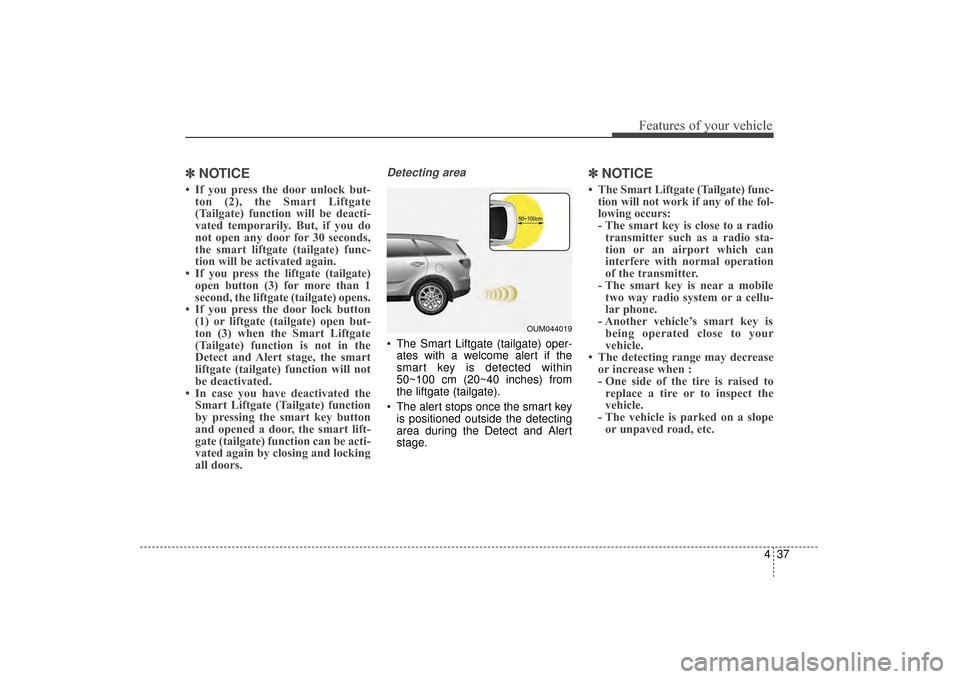
Detecting area
The Smart Liftgate (tailgate) oper-
ates with a welcome alert if the
smart key is detected within
50~100 cm (20~40 inches) from
the liftgate (tailgate).
The alert stops once the smart key is positioned outside the detecting
area during the Detect and Alert
stage.
✽ ✽ NOTICE
• The Smart Liftgate (Tailgate) func-
tion will not work if any of the fol-
lowing occurs:
- The smart key is close to a radiotransmitter such as a radio sta-
tion or an airport which can
interfere with normal operation
of the transmitter.
- The smart key is near a mobile two way radio system or a cellu-
lar phone.
- Another vehicle’s smart key is being operated close to your
vehicle.
• The detecting range may decrease or increase when :
- One side of the tire is raised toreplace a tire or to inspect the
vehicle.
- The vehicle is parked on a slope or unpaved road, etc.
OUM044019
UM CAN (ENG) 4.qxp 12/1/2014 12:51 PM Page 37
Page 148 of 565
Features of your vehicle
64
4
Retain the original transmitter for
future programming procedures (i.e.,
new vehicle purchase). It is also sug-
gested that upon the sale of the vehi-
cle, the programmed HomeLink but-
tons be erased for security purposes
(follow step 1 in the “Programming”
portion of this text). Programming
Your vehicle may require the ignition
switch to be turned to the ACC posi-
tion for programming and/or opera-
tion of HomeLink. It is also recom-
mended that a new battery be
replaced in the hand-held transmitter
of the device being programmed to
HomeLink for quicker training and
accurate transmission of the radio-
frequency.
Follow these steps to train your
HomeLink mirror:
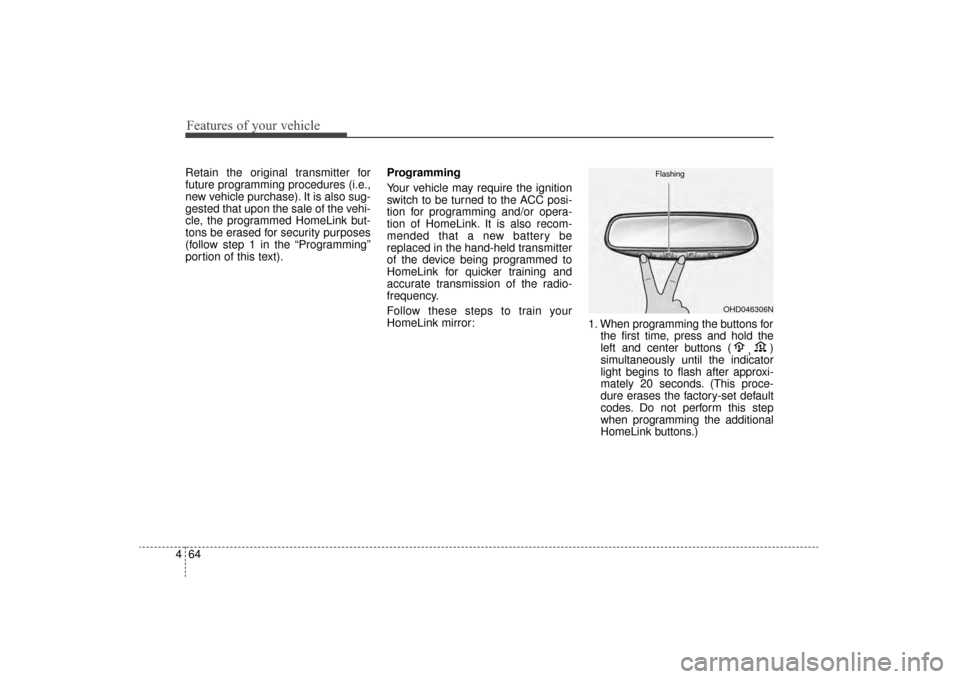
1. When programming the buttons for
the first time, press and hold the
left and center buttons ( ,)
simultaneously until the indicator
light begins to flash after approxi-
mately 20 seconds. (This proce-
dure erases the factory-set default
codes. Do not perform this step
when programming the additional
HomeLink buttons.)
OHD046306N
Flashing
UM CAN (ENG) 4.qxp 12/1/2014 12:53 PM Page 64
Page 258 of 565
Features of your vehicle
174
4
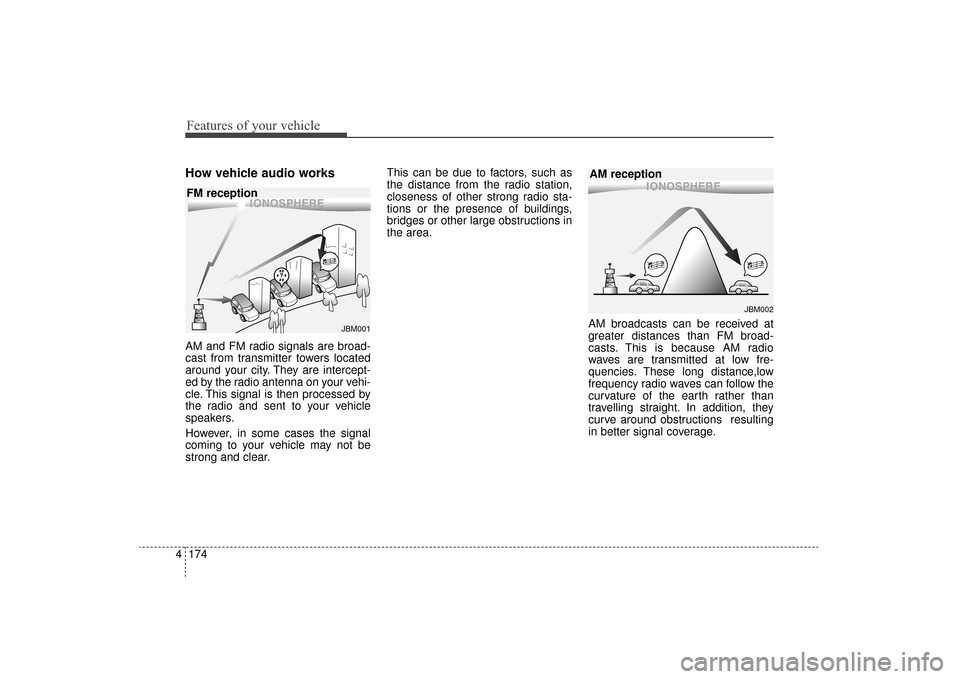
How vehicle audio works
AM and FM radio signals are broad-
cast from transmitter towers located
around your city. They are intercept-
ed by the radio antenna on your vehi-
cle. This signal is then processed by
the radio and sent to your vehicle
speakers.
However, in some cases the signal
coming to your vehicle may not be
strong and clear. This can be due to factors, such as
the distance from the radio station,
closeness of other strong radio sta-
tions or the presence of buildings,
bridges or other large obstructions in
the area.
AM broadcasts can be received at
greater distances than FM broad-
casts. This is because AM radio
waves are transmitted at low fre-
quencies. These long distance,low
frequency radio waves can follow the
curvature of the earth rather than
travelling straight. In addition, they
curve around obstructions resulting
in better signal coverage.
JBM002
AM reception
JBM001
FM reception
UM CAN (ENG) 4b (Audio).qxp 11/7/2014 3:01 PM Page 174
Page 259 of 565
4175
Features of your vehicle
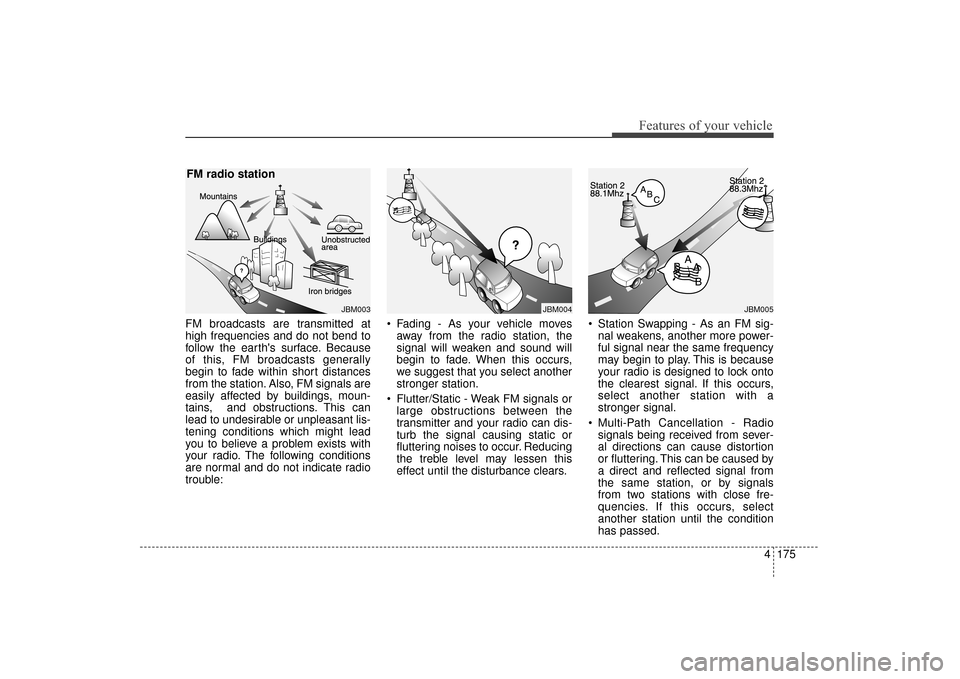
FM broadcasts are transmitted at
high frequencies and do not bend to
follow the earth's surface. Because
of this, FM broadcasts generally
begin to fade within short distances
from the station. Also, FM signals are
easily affected by buildings, moun-
tains, and obstructions. This can
lead to undesirable or unpleasant lis-
tening conditions which might lead
you to believe a problem exists with
your radio. The following conditions
are normal and do not indicate radio
trouble: Fading - As your vehicle moves
away from the radio station, the
signal will weaken and sound will
begin to fade. When this occurs,
we suggest that you select another
stronger station.
Flutter/Static - Weak FM signals or large obstructions between the
transmitter and your radio can dis-
turb the signal causing static or
fluttering noises to occur. Reducing
the treble level may lessen this
effect until the disturbance clears. Station Swapping - As an FM sig-
nal weakens, another more power-
ful signal near the same frequency
may begin to play. This is because
your radio is designed to lock onto
the clearest signal. If this occurs,
select another station with a
stronger signal.
Multi-Path Cancellation - Radio signals being received from sever-
al directions can cause distortion
or fluttering. This can be caused by
a direct and reflected signal from
the same station, or by signals
from two stations with close fre-
quencies. If this occurs, select
another station until the condition
has passed.
JBM003
FM radio station
JBM005JBM004
UM CAN (ENG) 4b (Audio).qxp 11/7/2014 3:01 PM Page 175
Page 260 of 565
Features of your vehicle
176
4
Using a cellular phone or a two-
way radio
When a cellular phone is used inside
the vehicle, noise may be produced
from the audio system. This does not
mean that something is wrong with
the audio equipment. In such a case,
try to operate mobile devices as far
from the audio equipment as possi-
ble.
When using a communication sys-
tem such as a cellular phone or a
radio set inside the vehicle, a sepa-
rate external antenna must be fitted.
When a cellular phone or a radio set
is used with an internal antenna
alone, it may interfere with the vehi-
cle's electrical system and adversely
affect safe operation of the vehicle.
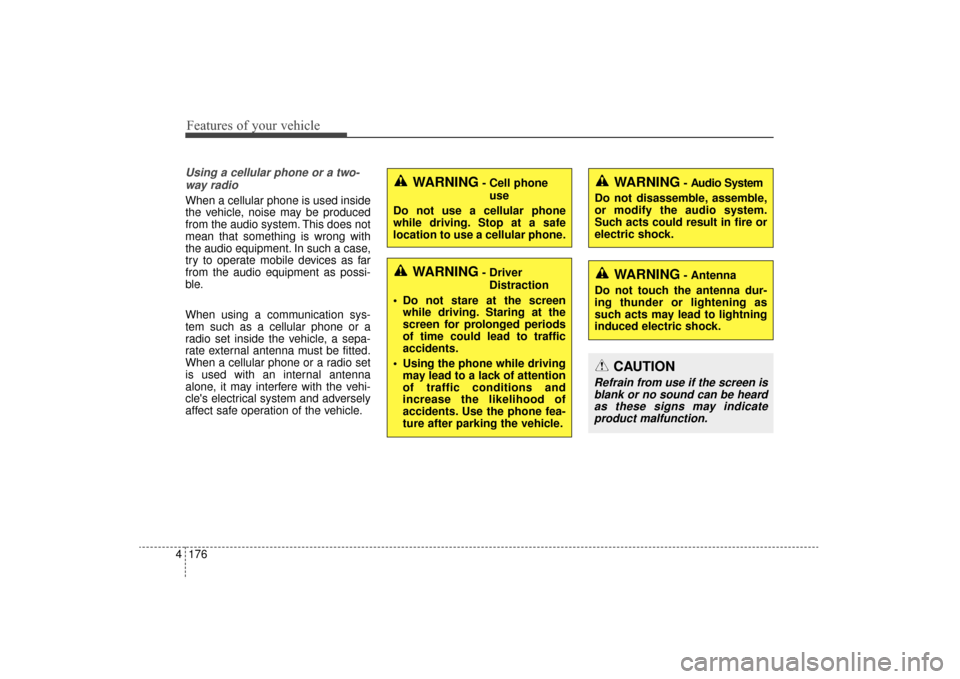
WARNING- Cell phone use
Do not use a cellular phone
while driving. Stop at a safe
location to use a cellular phone.
WARNING- Driver Distraction
Do not stare at the screen while driving. Staring at the
screen for prolonged periods
of time could lead to traffic
accidents.
Using the phone while driving may lead to a lack of attention
of traffic conditions and
increase the likelihood of
accidents. Use the phone fea-
ture after parking the vehicle.
WARNING- Audio System
Do not disassemble, assemble,
or modify the audio system.
Such acts could result in fire or
electric shock.
WARNING- Antenna
Do not touch the antenna dur-
ing thunder or lightening as
such acts may lead to lightning
induced electric shock.
CAUTION
Refrain from use if the screen is blank or no sound can be heardas these signs may indicateproduct malfunction.
UM CAN (ENG) 4b (Audio).qxp 11/7/2014 3:01 PM Page 176
Page 262 of 565
Features of your vehicle
178
4
USING THE USB DEVICE
To use an external USB device,
make sure the device is not con-
nected when starting up the vehi-
cle. Connect the device after start-
ing up.
If you start the engine when the USB device is connected, it may
damage the USB device. (USB
flashdrives are very sensitive to
electric shock.)
If the engine is started up or turned off while the external USB device is
connected, the external USB
device may not work.
The System may not play unau- thenticated MP3 or WMA files.
1) It can only play MP3 files with the compression rate between
8Kbps ~ 320Kbps.
2) It can only play WMA music files with the compression rate
between 8Kbps ~ 320Kbps.
Take precautions for static electrici- ty when connecting or disconnect-
ing the external USB device.
(Continued)(Continued)
An encrypted MP3 PLAYER is not
recognizable.
Depending on the condition of the external USB device, the connect-
ed external USB device can be
unrecognizable.
When the formatted byte/sector setting of External USB device is
not either 512BYTE or 2048BYTE,
then the device will not be recog-
nized.
Use only a USB device formatted to FAT 12/16/32.
USB devices without USB I/F authentication may not be recog-
nizable.
Make sure the USB connection ter- minal does not come in contact
with the human body or other
objects.
If you repeatedly connect or dis- connect the USB device in a short
period of time, it may break the
device.
(Continued)(Continued)
You may hear a strange noise when connecting or disconnecting
a USB device.
If you disconnect the external USB device during playback in USB
mode, the external USB device
can be damaged or may malfunc-
tion. Therefore, disconnect the
external USB device when the
audio is turned off or in another
mode. (e.g, Radio)
Depending on the type and capac- ity of the external USB device or
the type of the files stored in the
device, there is a difference in the
time for recognition the device.
Do not use the USB device for pur- poses other than playing music
files.
Playing videos through the USB is not supported.
Use of USB accessories such as rechargers or heaters using USB
I/F may lower performance or
cause trouble.
(Continued)
UM CAN (ENG) 4b (Audio).qxp 11/7/2014 3:01 PM Page 178
Page 268 of 565
Features of your vehicle
184
4
SYSTEM CONTROLLERS
AND FUNCTIONS
Audio Head Unit
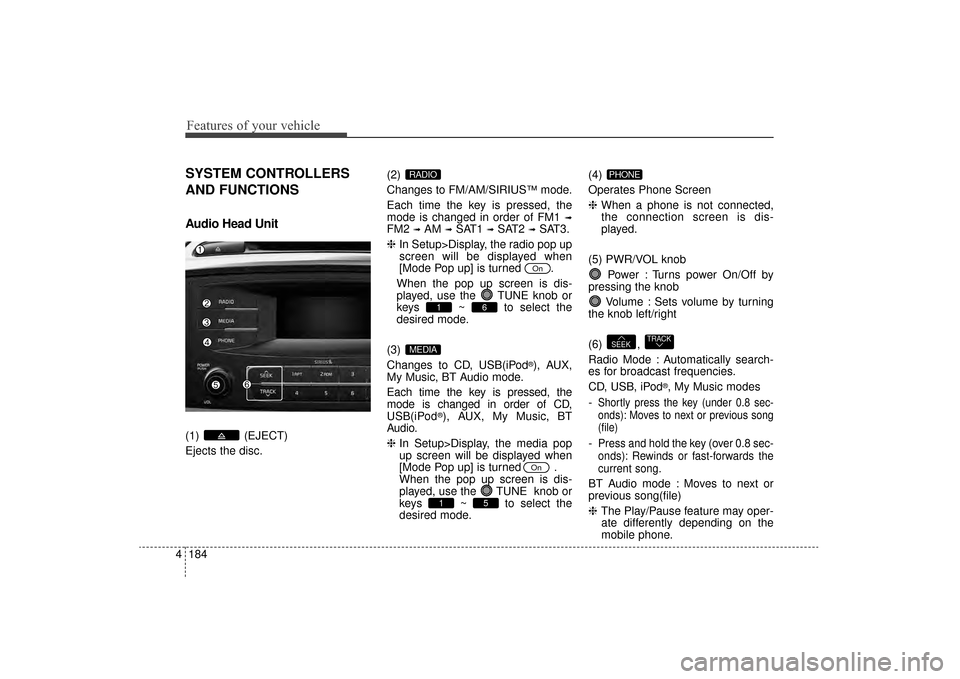
(1) (EJECT)
Ejects the disc. (2)
Changes to FM/AM/SIRIUS
™mode.
Each time the key is pressed, the
mode is changed in order of FM1
➟
FM2 ➟AM ➟SAT1 ➟SAT2 ➟SAT3.
❈ In Setup>Display, the radio pop up
screen will be displayed when
[Mode Pop up] is turned .
When the pop up screen is dis-
played, use the TUNE knob or
keys ~ to select the
desired mode.
(3)
Changes to CD, USB(iPod
®), AUX,
My Music, BT Audio mode.
Each time the key is pressed, the
mode is changed in order of CD,
USB(iPod
®), AUX, My Music, BT
Audio.
❈ In Setup>Display, the media pop
up screen will be displayed when
[Mode Pop up] is turned .
When the pop up screen is dis-
played, use the TUNE knob or
keys ~ to select the
desired mode. (4)
Operates Phone Screen
❈
When a phone is not connected,
the connection screen is dis-
played.
(5) PWR/VOL knob Power : Turns power On/Off by
pressing the knob
Volume : Sets volume by turning
the knob left/right
(6) ,
Radio Mode : Automatically search-
es for broadcast frequencies.
CD, USB, iPod
®, My Music modes
-
Shortly press the key (under 0.8 sec-
onds): Moves to next or previous song
(file)
-Press and hold the key (over 0.8 sec-
onds): Rewinds or fast-forwards the
current song.
BT Audio mode : Moves to next or
previous song(file)
❈ The Play/Pause feature may oper-
ate differently depending on the
mobile phone.
TRACKSEEK
PHONE
51
On
MEDIA
61
On
RADIO
UM CAN (ENG) 4b (Audio).qxp 11/7/2014 3:01 PM Page 184