Drive mode KIA Sorento 2017 3.G User Guide
[x] Cancel search | Manufacturer: KIA, Model Year: 2017, Model line: Sorento, Model: KIA Sorento 2017 3.GPages: 576, PDF Size: 7.82 MB
Page 211 of 576
Features of your vehicle
126
4
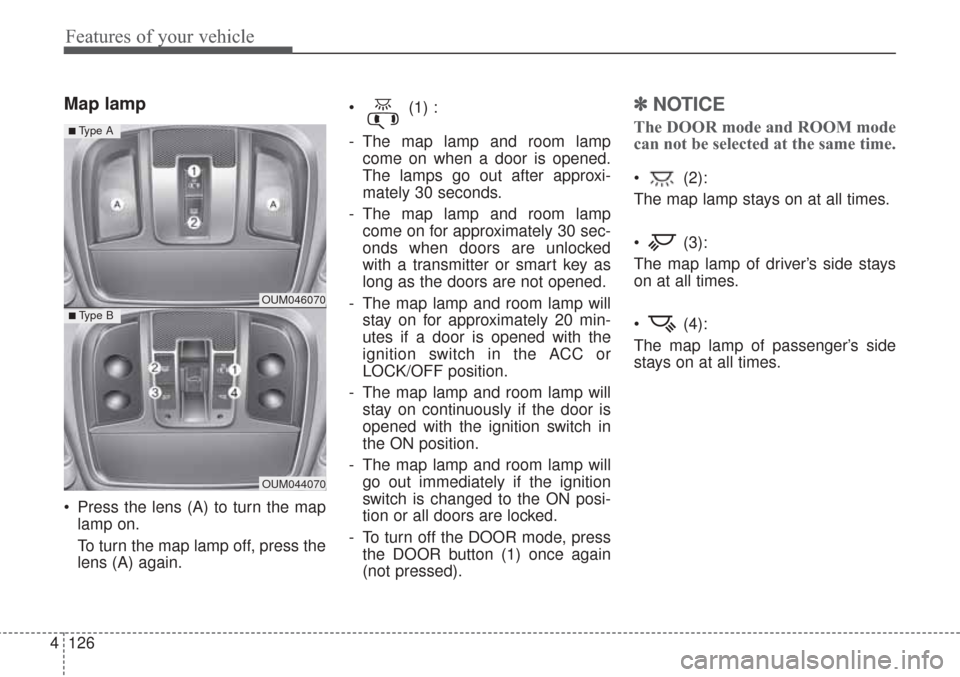
Map lamp
Press the lens (A) to turn the map
lamp on.
To turn the map lamp off, press the
lens (A) again. (1) :
- The map lamp and room lamp
come on when a door is opened.
The lamps go out after approxi-
mately 30 seconds.
- The map lamp and room lamp come on for approximately 30 sec-
onds when doors are unlocked
with a transmitter or smart key as
long as the doors are not opened.
- The map lamp and room lamp will stay on for approximately 20 min-
utes if a door is opened with the
ignition switch in the ACC or
LOCK/OFF position.
- The map lamp and room lamp will stay on continuously if the door is
opened with the ignition switch in
the ON position.
- The map lamp and room lamp will go out immediately if the ignition
switch is changed to the ON posi-
tion or all doors are locked.
- To turn off the DOOR mode, press the DOOR button (1) once again
(not pressed).
✽ ✽ NOTICE
The DOOR mode and ROOM mode
can not be selected at the same time.
(2):
The map lamp stays on at all times.
(3):
The map lamp of driver’s side stays
on at all times.
(4):
The map lamp of passenger’s side
stays on at all times.
OUM046070
OUM044070
■ Type B
■ Type A
Page 226 of 576
4141
Features of your vehicle
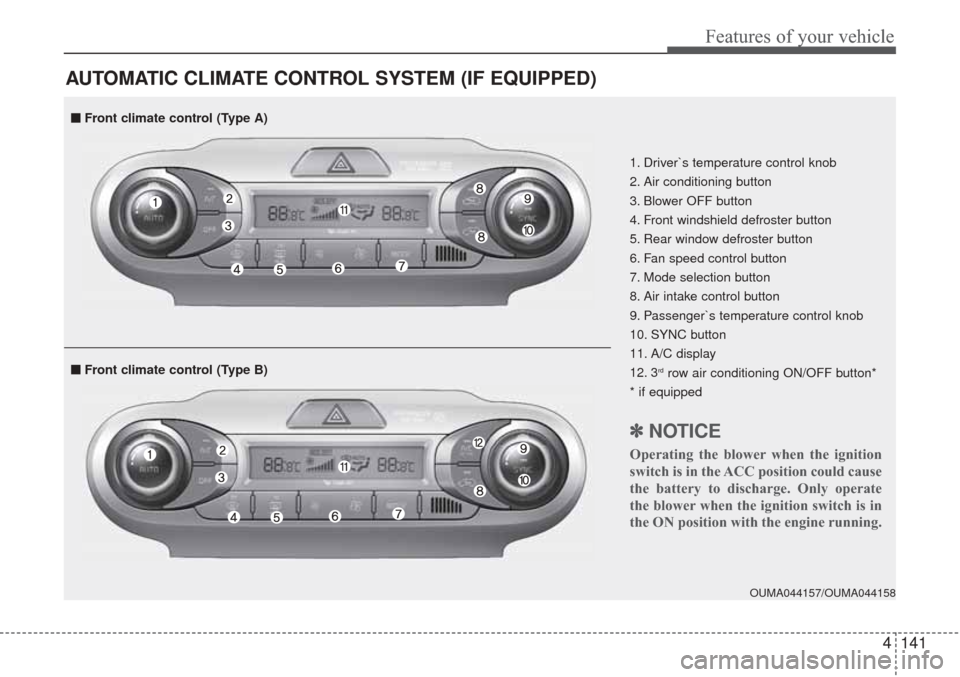
AUTOMATIC CLIMATE CONTROL SYSTEM (IF EQUIPPED)
OUMA044157/OUMA044158
1. Driver`s temperature control knob
2. Air conditioning button
3. Blower OFF button
4. Front windshield defroster button
5. Rear window defroster button
6. Fan speed control button
7. Mode selection button
8. Air intake control button
9. Passenger`s temperature control knob
10. SYNC button
11. A/C display
12. 3
rdrow air conditioning ON/OFF button*
* if equipped
✽ ✽ NOTICE
Operating the blower when the ignition
switch is in the ACC position could cause
the battery to discharge. Only operate
the blower when the ignition switch is in
the ON position with the engine running.
■ ■ Front climate control (Type B)
■ ■Front climate control (Type A)
Page 227 of 576
Features of your vehicle
142
4
OUMA046234/OUMA046235/OUM044177
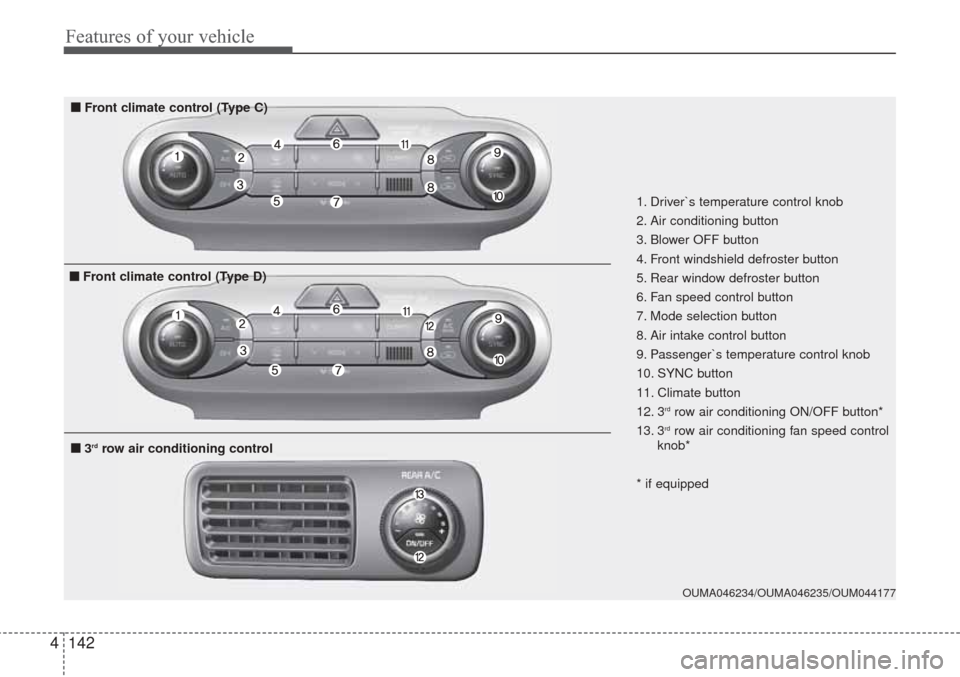
1. Driver`s temperature control knob
2. Air conditioning button
3. Blower OFF button
4. Front windshield defroster button
5. Rear window defroster button
6. Fan speed control button
7. Mode selection button
8. Air intake control button
9. Passenger`s temperature control knob
10. SYNC button
11. Climate button
12. 3
rdrow air conditioning ON/OFF button*
13. 3rdrow air conditioning fan speed control
knob*
* if equipped
■ ■ Front climate control (Type C)
■ ■Front climate control (Type D)
■ ■3rdrow air conditioning control
Page 228 of 576
4143
Features of your vehicle
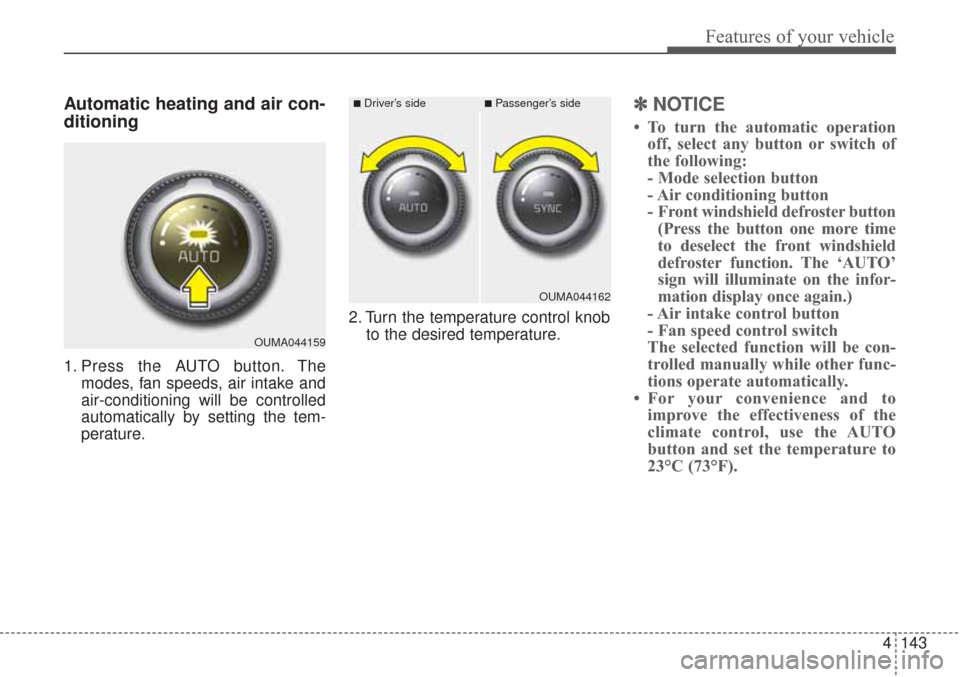
Automatic heating and air con-
ditioning
1. Press the AUTO button. Themodes, fan speeds, air intake and
air-conditioning will be controlled
automatically by setting the tem-
perature. 2. Turn the temperature control knob
to the desired temperature.
✽ ✽NOTICE
• To turn the automatic operation
off, select any button or switch of
the following:
- Mode selection button
- Air conditioning button
- Front windshield defroster button(Press the button one more time
to deselect the front windshield
defroster function. The ‘AUTO’
sign will illuminate on the infor-
mation display once again.)
- Air intake control button
- Fan speed control switch
The selected function will be con-
trolled manually while other func-
tions operate automatically.
• For your convenience and to improve the effectiveness of the
climate control, use the AUTO
button and set the temperature to
23°C (73°F).
OUMA044159
■Driver’s side■Passenger’s side
OUMA044162
Page 232 of 576
4147
Features of your vehicle
Adjusting the driver and passenger
side temperature individually
Press the “SYNC” button again toadjust the driver and passenger
side temperature individually. The
illumination of button turns off.
Operate the driver side tempera- ture control knob to adjust the driv-
er side temperature.
Operate the passenger side tem- perature control knob to adjust the
passenger side temperature.
Temperature conversion
You can switch the temperature
mode from Centigrade to Fahrenheit
as follows:
While pressing the OFF button,
press the AUTO button for 3 seconds
or more.
The display will change from
Centigrade to Fahrenheit, or from
Fahrenheit to Centigrade.
If the battery has been discharged or
disconnected, the temperature mode
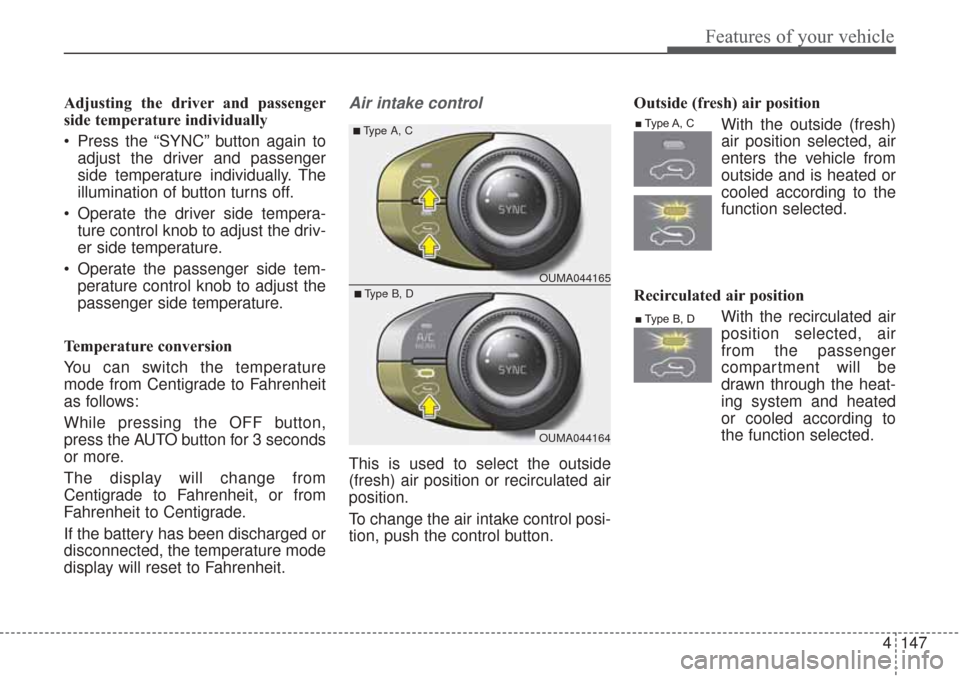
display will reset to Fahrenheit.Air intake control
This is used to select the outside
(fresh) air position or recirculated air
position.
To change the air intake control posi-
tion, push the control button. Outside (fresh) air position
With the outside (fresh)air position selected, air
enters the vehicle from
outside and is heated or
cooled according to the
function selected.
Recirculated air position With the recirculated airposition selected, air
from the passenger
compartment will be
drawn through the heat-
ing system and heated
or cooled according to
the function selected.
■Type B, D
■Type A, C
OUMA044164
OUMA044165
■Type A, C
■Type B, D
Page 237 of 576
Features of your vehicle
152
4
When using the air conditioning
system, you may notice clear water
dripping (or even puddling) on the
ground under the passenger side
of the vehicle. This is a normal sys-
tem operation characteristic.
Operating the air conditioning sys- tem in the recirculated air position
provides maximum cooling, how-
ever, continual operation in this
mode may cause the air inside the
vehicle to become stale.
During cooling operation, you may occasionally notice a misty air flow
because of rapid cooling and
humid air intake. This is a normal
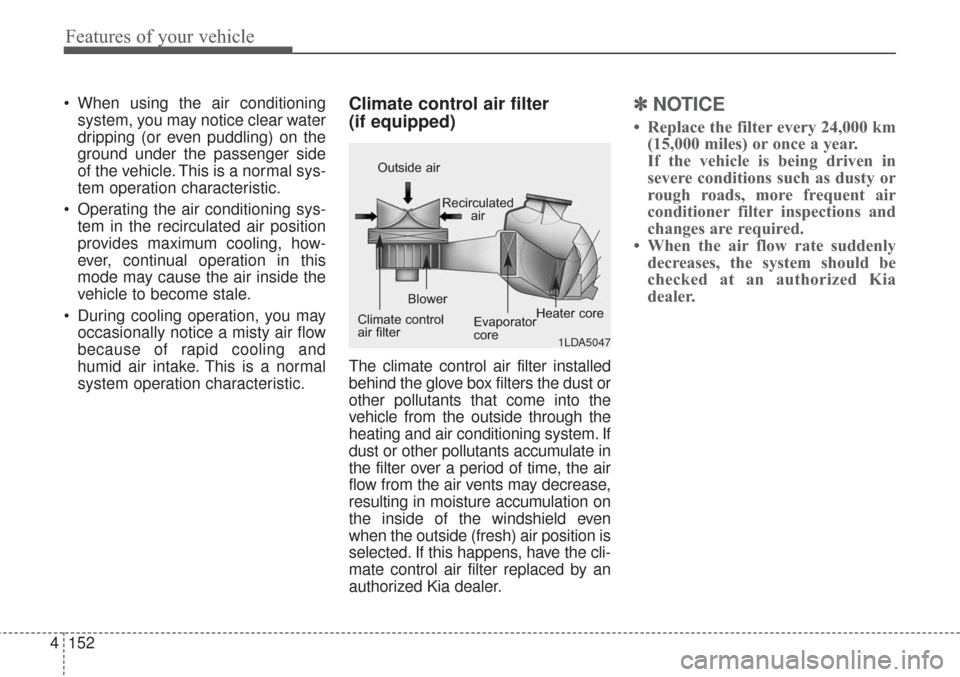
system operation characteristic.Climate control air filter
(if equipped)
The climate control air filter installed
behind the glove box filters the dust or
other pollutants that come into the
vehicle from the outside through the
heating and air conditioning system. If
dust or other pollutants accumulate in
the filter over a period of time, the air
flow from the air vents may decrease,
resulting in moisture accumulation on
the inside of the windshield even
when the outside (fresh) air position is
selected. If this happens, have the cli-
mate control air filter replaced by an
authorized Kia dealer.
✽ ✽ NOTICE
• Replace the filter every 24,000 km
(15,000 miles) or once a year.
If the vehicle is being driven in
severe conditions such as dusty or
rough roads, more frequent air
conditioner filter inspections and
changes are required.
• When the air flow rate suddenly decreases, the system should be
checked at an authorized Kia
dealer.
1LDA5047
Outside air
Recirculatedair
Climate control
air filter Blower
Evaporator
coreHeater core
Page 264 of 576
4179
Features of your vehicle
USING THE USB DEVICE
To use an external USB device,
make sure the device is not con-
nected when starting up the vehi-
cle. Connect the device after start-
ing up.
If you start the engine when the
USB device is connected, it may
damage the USB device. (USB
flashdrives are very sensitive to
electric shock.)
If the engine is started up or turned
off while the external USB device is
connected, the external USB
device may not work.
The System may not play unau-
thenticated MP3 or WMA files.
1) It can only play MP3 files with
the compression rate between
8Kbps ~ 320Kbps.
2) It can only play WMA music files
with the compression rate
between 8Kbps ~ 320Kbps.
Take precautions for static electrici-
ty when connecting or disconnect-
ing the external USB device.
(Continued)(Continued)
An encrypted MP3 PLAYER is not
recognizable.
Depending on the condition of the
external USB device, the connect-
ed external USB device can be
unrecognizable.
When the formatted byte/sector
setting of External USB device is
not either 512BYTE or 2048BYTE,
then the device will not be recog-
nized.
Use only a USB device formatted
to FAT 12/16/32.
USB devices without USB I/F
authentication may not be recog-
nizable.
Make sure the USB connection ter-
minal does not come in contact
with the human body or other
objects.
If you repeatedly connect or dis-
connect the USB device in a short
period of time, it may break the
device.
(Continued)(Continued)
You may hear a strange noise
when connecting or disconnecting
a USB device.
If you disconnect the external USB
device during playback in USB
mode, the external USB device
can be damaged or may malfunc-
tion. Therefore, disconnect the
external USB device when the
audio is turned off or in another
mode. (e.g, Radio)
Depending on the type and capac-
ity of the external USB device or
the type of the files stored in the
device, there is a difference in the
time for recognition the device.
Do not use the USB device for pur-
poses other than playing music
files.
Playing videos through the USB is
not supported.
Use of USB accessories such as
rechargers or heaters using USB
I/F may lower performance or
cause trouble.
(Continued)
Page 265 of 576
Features of your vehicle
180 4
(Continued)
If you use devices such as a USB
hub purchased separately, the
vehicle’s audio system may not
recognize the USB device. In that
case, connect the USB device
directly to the multimedia terminal
of the vehicle.
If the USB device is divided by log-
ical drives, only the music files on
the highest-priority drive are recog-
nized by car audio.
Devices such as MP3 Player/
Cellular phone/Digital camera can
be unrecognizable by standard
USB I/F can be unrecognizable.
Charging through the USB may not
be supported in some mobile
devices.
USB HDD or USB types liable to
connection failures due to vehicle
vibrations are not supported. (i-stick
type)
Some non-standard USB devices
(METAL COVER TYPE USB) can
be unrecognizable.
(Continued)(Continued)
Some USB flash memory readers
(such as CF, SD, micro SD, etc.) or
external-HDD type devices can be
unrecognizable.
Music files protected by DRM (DIGI-
TAL RIGHTS MANAGEMENT) are
not recognizable.
The data in the USB memory may
be lost while using this audio.
Always back up important data on
a personal storage device.
Please avoid using
USB memory products
which can be used as
key chains or cellular
phone accessories as they could
cause damage to the USB jack.
Please make certain only to use
plug type connector products.USING iPod®DEVICE
iPhone®is a registered trademark of
Apple inc.
Some iPod
®models may not sup-
port communication protocol and
files may not play properly.
Supported iPod
®models:
- iPhone
®3GS/4 or latest model
- iPod
®touch 1st~4th generation
- iPod
®nano 1st~6th generation
- iPod
®classic
The order of search or playback of
songs in the iPod
®can be different
from the order searched in the
audio system.
If the iPod
®is disabled due to its
own malfunction, reset the iPod®.
(Reset: Refer to iPod®manual)
An iPod
®may not operate normally
on low battery.
(Continued)
Page 266 of 576
4181
Features of your vehicle
(Continued)
Some iPod
®devices, such as the
iPhone®, can be connected
through the
Bluetooth®Wireless
Technology interface. The device
must have audio
Bluetooth®
Wireless Technology capability
(such as for stereo headphone
Bluetooth®Wireless Technology ).
The device can play, but it will not
be controlled by the audio system.
To use iPod
®features within the
audio mode, use the cable provid-
ed upon purchasing an iPod
®
device.
Skipping or improper operation
may occur depending on the char-
acteristics of your iPod
®/iPhone®
device.
If your iPhone
®is connected to
both the
Bluetooth®Wireless
Technology and USB, only iPod®
mode will be supported during
Bluetooth®Audio Streaming. To use
Bluetooth®Audio Streaming, dis-
connect iPod®cable with iPhone®.
(Continued)(Continued)
When connecting iPod
®with the
iPod®Power Cable, insert the con-
nector to the multimedia socket
completely. If not inserted complete-
ly, communications between iPod
®
and audio may be interrupted.
When adjusting the sound effects
of the iPod
®and the audio system,
the sound effects of both devices
will overlap and might reduce or
distort the quality of the sound.
Deactivate (turn off) the equalizer
function of an iPod
®when adjust-
ing the audio system’s volume, and
turn off the equalizer of the audio
system when using the equalizer of
an iPod
®.
When not using iPod
®with car
audio, detach the iPod®cable from
iPod®. Otherwise, iPod®may remain
in accessory mode, and may not
work properly.
Bluetooth®Wireless
Technology(if equipped)
Bluetooth®Wireless Technology
The Bluetooth®word mark and logos
are registered trademarks owned by
Bluetooth
®SIG, lnc. and any use of
such marks by Kia is under license.
A
Bluetooth®enabled cell phone is
required to use
Bluetooth®Wireless
Technology.
WARNING
Driving while distracted can
result in a loss of vehicle control
that may lead to an accident,
severe personal injury, and
death. The driver’s primary
responsibility is in the safe and
legal operation of a vehicle, and
use of any handheld devices,
other equipment, or vehicle sys-
tems which take the driver’s
eyes, attention and focus away
from the safe operation of a vehi-
cle or which are not permissible
by law should never be used
during operation of the vehicle.
Page 268 of 576
4183
Features of your vehicle
Park the vehicle when connecting
the head unit with the mobile
phone.
Bluetooth
®connection may become
intermittently disconnected in some
mobile phones. Follow these steps
to try again.
1. Within the mobile phone, turn
the Bluetooth
®function off/on
and try again.
2. Turn the mobile phone power
Off/On and try again.
3. Completely remove the mobile
phone battery (if possible),
reboot, and then try again.
4. Reboot the audio system and try
again.
5. Delete all paired devices, pair
and try again.
Voice Recognition
(if equipped)
When using the voice recognition
feature, only commands listed
within the user's manual are sup-
ported.
Be aware that during the operation
of the voice recognition system,
pressing any key other than the
key terminate voice recogni-
tion mode.
For optimal voice recognition per-
formance, position your head
below the microphone above the
driver’s seat and maintain proper
position when speaking voice com-
mands.
Within the following situations,
voice recognition may not function
properly due to external sound.
- When the windows and sunroof
are open
- When the blower AC/heater is set
to high
- When entering and passing through
tunnels
(Continued)(Continued)
- When driving on rugged and
uneven roads
- During severe rain (heavy rains,
windstorms)
Phone related voice commands can
be used only when a
Bluetooth®
Wireless Technology device is con-
nected.
When making calls by stating a
name, the corresponding contact
must be downloaded and stored
within the audio system.
After downloading the
Bluetooth®
Wireless Technology phone book,
it takes some time to convert the
phone book data into voice infor-
mation. During this time, voice
recognition may not properly oper-
ate.
Pronounce the voice commands
naturally and clearly as if in a nor-
mal conversation.