Drive mode KIA Sorento 2017 3.G Owner's Guide
[x] Cancel search | Manufacturer: KIA, Model Year: 2017, Model line: Sorento, Model: KIA Sorento 2017 3.GPages: 576, PDF Size: 7.82 MB
Page 314 of 576
Driving your vehicle
Before driving . . . . . . . . . . . . . . . . . . . . . . . . . . . . . . 5-4
• Before entering vehicle . . . . . . . . . . . . . . . . . . . . . . . . . 5-4
• Necessary inspections . . . . . . . . . . . . . . . . . . . . . . . . . . 5-4
• Before starting . . . . . . . . . . . . . . . . . . . . . . . . . . . . . . . 5-4
Key positions . . . . . . . . . . . . . . . . . . . . . . . . . . . . . . . 5-6
• Illuminated ignition switch . . . . . . . . . . . . . . . . . . . . . 5-6
• Ignition switch position . . . . . . . . . . . . . . . . . . . . . . . . . 5-6
• Starting the engine . . . . . . . . . . . . . . . . . . . . . . . . . . . . 5-7
ENGINE START/STOP button . . . . . . . . . . . . . . . 5-9
• Illuminated ENGINE START/STOP button . . . . . . . 5-9
• ENGINE START/STOP button position . . . . . . . . . . . 5-9
• Starting the engine with a smart key . . . . . . . . . . . . . 5-11
Automatic transaxle . . . . . . . . . . . . . . . . . . . . . . . . 5-13
• Automatic transaxle operation. . . . . . . . . . . . . . . . . . 5-13
• Good driving practices . . . . . . . . . . . . . . . . . . . . . . . . 5-19
All wheel drive (AWD) . . . . . . . . . . . . . . . . . . . . . . 5-20
• Tight corner brake effect . . . . . . . . . . . . . . . . . . . . . . 5-21
• All wheel drive (AWD) transfer mode selection . . . . 5-22
• For safe all wheel drive operation . . . . . . . . . . . . . . . 5-23
Brake system . . . . . . . . . . . . . . . . . . . . . . . . . . . . . . 5-27
• Power brakes . . . . . . . . . . . . . . . . . . . . . . . . . . . . . . . . 5-27
• Parking brake – Foot type . . . . . . . . . . . . . . . . . . . . . 5-29
• Electronic parking brake (EPB) . . . . . . . . . . . . . . . . 5-30
• AUTO HOLD. . . . . . . . . . . . . . . . . . . . . . . . . . . . . . . . 5-37
• Anti-lock brake system (ABS) . . . . . . . . . . . . . . . . . . 5-40
• Electronic stability control (ESC) . . . . . . . . . . . . . . . 5-42• Vehicle stability management (VSM) . . . . . . . . . . . . 5-46
• Hill-start assist control (HAC) . . . . . . . . . . . . . . . . . . 5-47
• Good braking practices. . . . . . . . . . . . . . . . . . . . . . . . 5-48
Autonomous Emergency Braking (AEB)/
Forward Collision Warning (FCW) . . . . . . . . . . 5-50
• System setting and activation . . . . . . . . . . . . . . . . . . . 5-50
• AEB warning message and system control . . . . . . . . 5-52
• Brake operation . . . . . . . . . . . . . . . . . . . . . . . . . . . . . . 5-54
• Sensor to detect the distance from the vehicle
in front (front radar) . . . . . . . . . . . . . . . . . . . . . . . . 5-54
• System malfunction . . . . . . . . . . . . . . . . . . . . . . . . . . . 5-55
• Limitation of the system . . . . . . . . . . . . . . . . . . . . . . . 5-56
• Recognizing pedestrians . . . . . . . . . . . . . . . . . . . . . . . 5-59
Cruise control system. . . . . . . . . . . . . . . . . . . . . . . 5-61
• To set cruise control speed . . . . . . . . . . . . . . . . . . . . . 5-62
• To increase cruise control set speed. . . . . . . . . . . . . . 5-62
• To decrease the cruising speed . . . . . . . . . . . . . . . . . . 5-63
• To temporarily accelerate with the cruise control on . . . . . . . . . . . . . . . . . . . . . . . . . . . . . . . . . . 5-63\
• To cancel cruise control . . . . . . . . . . . . . . . . . . . . . . . 5-63
• To resume cruising speed . . . . . . . . . . . . . . . . . . . . . . 5-64
• To turn cruise control off. . . . . . . . . . . . . . . . . . . . . . . 5-64
Advanced smart cruise control system (ASCC). . 5-65
• Speed setting (ASCC) . . . . . . . . . . . . . . . . . . . . . . . . . 5-66
• Vehicle to vehicle distance setting (ASCC) . . . . . . . . 5-70
• To adjust the sensitivity of advanced smart
cruise control . . . . . . . . . . . . . . . . . . . . . . . . . . . . . . 5-74
5
Page 315 of 576
• To convert to cruise control mode . . . . . . . . . . . . . . . 5-75
• Limitations of the system . . . . . . . . . . . . . . . . . . . . . . 5-75
Drive mode integrated control system . . . . . . . . . 5-81
• Drive mode . . . . . . . . . . . . . . . . . . . . . . . . . . . . . . . . . . 5-81\
Blind spot detection system (BSD) . . . . . . . . . . . . 5-84
• BSD (Blind Spot Detection) / LCA (Lane Change Assist) . . . . . . . . . . . . . . . . . . . 5-85
• RCTA (Rear Cross Traffic Alert). . . . . . . . . . . . . . . . 5-88
• Non-operating condition . . . . . . . . . . . . . . . . . . . . . . . 5-90
Lane departure warning system (LDWS) . . . . . . 5-92
• Warning indicator . . . . . . . . . . . . . . . . . . . . . . . . . . . . 5-94
• The LDWS does not operate when . . . . . . . . . . . . . . 5-94
Economical operation . . . . . . . . . . . . . . . . . . . . . . 5-96
Special driving conditions . . . . . . . . . . . . . . . . . . . 5-98
• Hazardous driving conditions . . . . . . . . . . . . . . . . . . 5-98
• Reducing the risk of a rollover . . . . . . . . . . . . . . . . . 5-98
• Rocking the vehicle . . . . . . . . . . . . . . . . . . . . . . . . . . . 5-99
• Smooth cornering . . . . . . . . . . . . . . . . . . . . . . . . . . . 5-100
• Driving at night . . . . . . . . . . . . . . . . . . . . . . . . . . . . . 5-100
• Driving in the rain . . . . . . . . . . . . . . . . . . . . . . . . . . . 5-101
• Driving in flooded areas . . . . . . . . . . . . . . . . . . . . . . 5-101
• Driving off-road . . . . . . . . . . . . . . . . . . . . . . . . . . . . . 5-102
• Highway driving . . . . . . . . . . . . . . . . . . . . . . . . . . . . 5-102
Winter driving . . . . . . . . . . . . . . . . . . . . . . . . . . . 5-103
• Snowy or icy conditions . . . . . . . . . . . . . . . . . . . . . . 5-103
• Use high quality ethylene glycol coolant . . . . . . . . . 5-104
• Check battery and cables . . . . . . . . . . . . . . . . . . . . . 5-104 • Change to "winter weight" oil if necessary . . . . . . 5-104
• Check spark plugs and ignition system. . . . . . . . . . 5-104
• To keep locks from freezing . . . . . . . . . . . . . . . . . . . 5-104
• Use approved window washer anti-freeze in
system . . . . . . . . . . . . . . . . . . . . . . . . . . . . . . . . . . . . \
5-104
• Don't let your parking brake freeze . . . . . . . . . . . . 5-105
• Don't let ice and snow accumulate underneath . . . 5-105
• Carry emergency equipment . . . . . . . . . . . . . . . . . . 5-105
Trailer towing . . . . . . . . . . . . . . . . . . . . . . . . . . . . 5-106
• Hitches . . . . . . . . . . . . . . . . . . . . . . . . . . . . . . . . . . . . \
5-106
• Safety chains . . . . . . . . . . . . . . . . . . . . . . . . . . . . . . . 5-106
• Trailer brakes . . . . . . . . . . . . . . . . . . . . . . . . . . . . . . 5-106
• Driving with a trailer . . . . . . . . . . . . . . . . . . . . . . . . 5-108
• Maintenance when trailer towing . . . . . . . . . . . . . . 5-111
• If you do decide to pull a trailer . . . . . . . . . . . . . . . 5-112
Vehicle load limit . . . . . . . . . . . . . . . . . . . . . . . . . 5-114
• Tire and loading information label . . . . . . . . . . . . . 5-114
• Certification label . . . . . . . . . . . . . . . . . . . . . . . . . . . 5-118
Vehicle weight glossary . . . . . . . . . . . . . . . . . . . . 5-120
• Base curb weight . . . . . . . . . . . . . . . . . . . . . . . . . . . 5-120
• Vehicle curb weight . . . . . . . . . . . . . . . . . . . . . . . . . . 5-120
• Cargo weight . . . . . . . . . . . . . . . . . . . . . . . . . . . . . . . 5-120
• GAW (Gross axle weight) . . . . . . . . . . . . . . . . . . . . . 5-120
• GAWR (Gross axle weight rating) . . . . . . . . . . . . . . 5-120
• GVW (Gross vehicle weight) . . . . . . . . . . . . . . . . . . 5-120
• GVWR (Gross vehicle weight rating) . . . . . . . . . . . 5-120
5
Page 329 of 576
Driving your vehicle
16
5
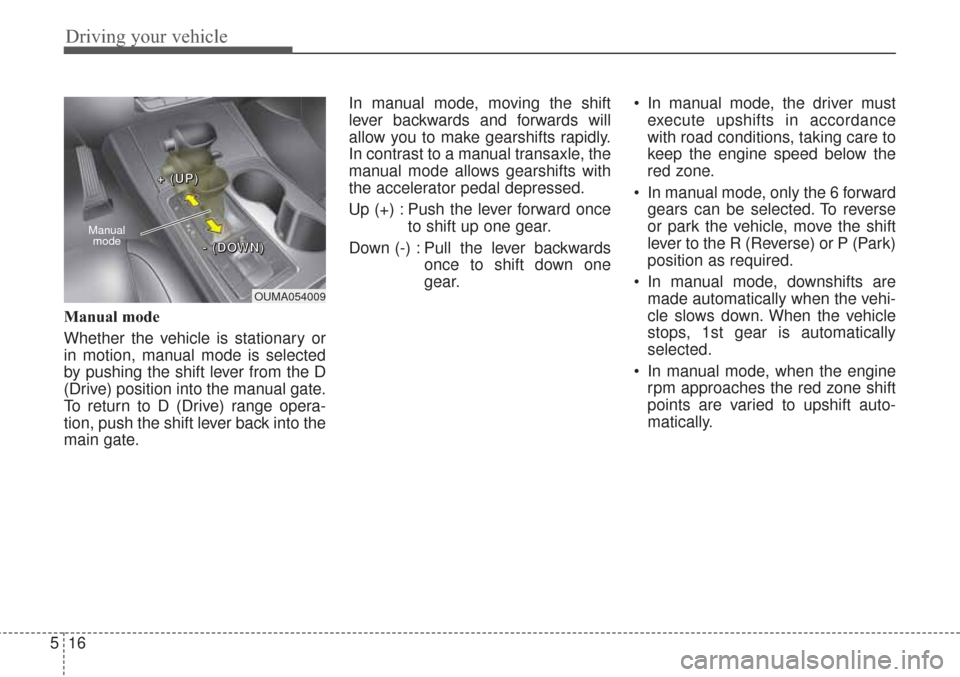
Manual mode
Whether the vehicle is stationary or
in motion, manual mode is selected
by pushing the shift lever from the D
(Drive) position into the manual gate.
To return to D (Drive) range opera-
tion, push the shift lever back into the
main gate. In manual mode, moving the shift
lever backwards and forwards will
allow you to make gearshifts rapidly.
In contrast to a manual transaxle, the
manual mode allows gearshifts with
the accelerator pedal depressed.
Up (+) : Push the lever forward once
to shift up one gear.
Down (-) : Pull the lever backwards once to shift down one
gear. In manual mode, the driver must
execute upshifts in accordance
with road conditions, taking care to
keep the engine speed below the
red zone.
In manual mode, only the 6 forward gears can be selected. To reverse
or park the vehicle, move the shift
lever to the R (Reverse) or P (Park)
position as required.
In manual mode, downshifts are made automatically when the vehi-
cle slows down. When the vehicle
stops, 1st gear is automatically
selected.
In manual mode, when the engine rpm approaches the red zone shift
points are varied to upshift auto-
matically.
OUMA054009
Manual
mode
+ +
+ +
( (
( (
U U
U U
P P
P P
) )
) )
- -
- -
( (
( (
D D
D D
O O
O O
W W
W W
N N
N N
) )
) )
Page 330 of 576
517
Driving your vehicle
To maintain the required levels ofvehicle performance and safety,
the system may not execute cer-
tain gearshifts when the shift lever
is operated.
When driving on a slippery road, push the shift lever forward into the
+(up) position. This causes the
transaxle to shift into the 2nd gear
which is better for smooth driving
on a slippery road. Push the shift
lever to the -(down) side to shift
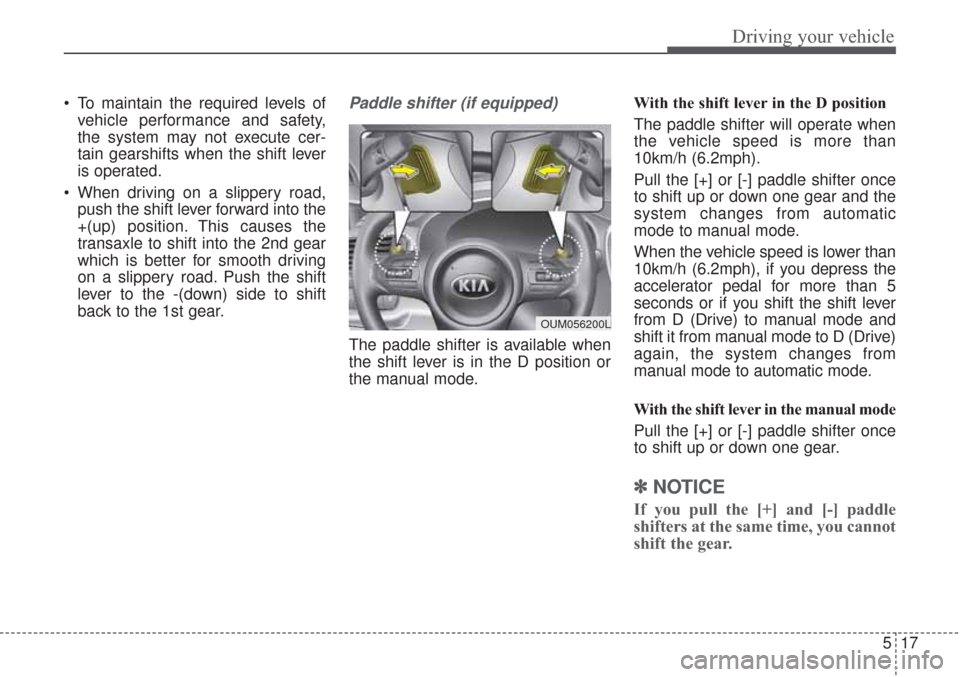
back to the 1st gear.Paddle shifter (if equipped)
The paddle shifter is available when
the shift lever is in the D position or
the manual mode. With the shift lever in the D position
The paddle shifter will operate when
the vehicle speed is more than
10km/h (6.2mph).
Pull the [+] or [-] paddle shifter once
to shift up or down one gear and the
system changes from automatic
mode to manual mode.
When the vehicle speed is lower than
10km/h (6.2mph), if you depress the
accelerator pedal for more than 5
seconds or if you shift the shift lever
from D (Drive) to manual mode and
shift it from manual mode to D (Drive)
again, the system changes from
manual mode to automatic mode.
With the shift lever in the manual mode
Pull the [+] or [-] paddle shifter once
to shift up or down one gear.
✽ ✽
NOTICE
If you pull the [+] and [-] paddle
shifters at the same time, you cannot
shift the gear.
OUM056200L
Page 335 of 576
Driving your vehicle
22
5
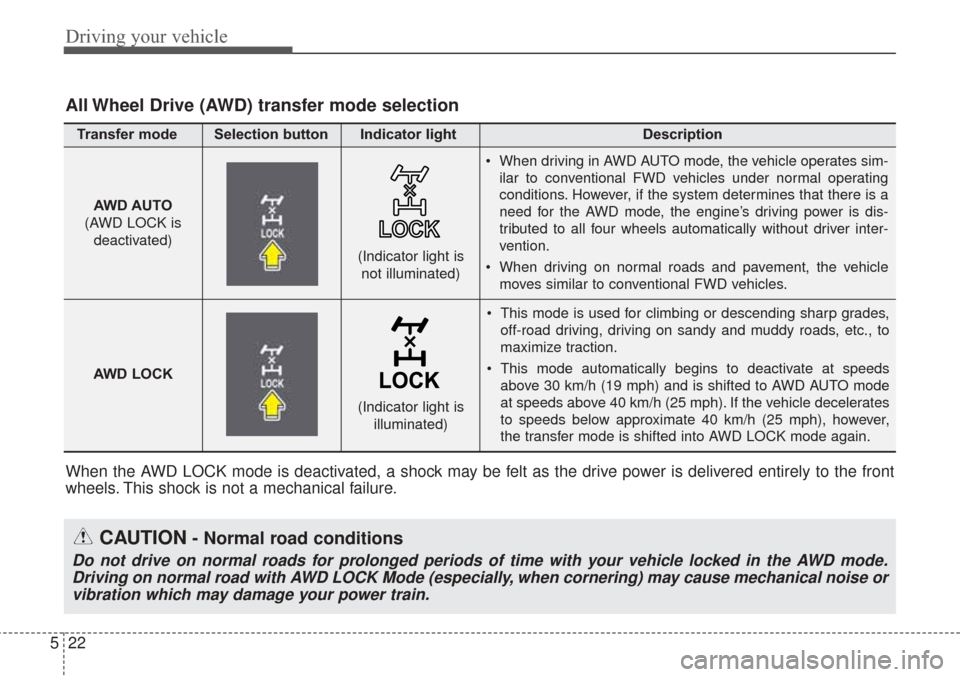
This mode is used for climbing or descending sharp grades,
off-road driving, driving on sandy and muddy roads, etc., to
maximize traction.
This mode automatically begins to deactivate at speeds above 30 km/h (19 mph) and is shifted to AWD AUTO mode
at speeds above 40 km/h (25 mph). If the vehicle decelerates
to speeds below approximate 40 km/h (25 mph), however,
the transfer mode is shifted into AWD LOCK mode again.
AWD AUTO
(AWD LOCK is
deactivated) (Indicator light is
not illuminated)
All Wheel Drive (AWD) transfer mode selection
Transfer mode Selection button Indicator light Description
When driving in AWD AUTO mode, the vehicle operates sim-
ilar to conventional FWD vehicles under normal operating
conditions. However, if the system determines that there is a
need for the AWD mode, the engine’s driving power is dis-
tributed to all four wheels automatically without driver inter-
vention.
When driving on normal roads and pavement, the vehicle moves similar to conventional FWD vehicles.
AWD LOCK (Indicator light isilluminated)
When the AWD LOCK mode is deactivated, a shock may be felt as the drive power is delivered entirely to the front
wheels. This shock is not a mechanical failure.
CAUTION- Normal road conditions
Do not drive on normal roads for prolonged periods of time with your vehicle locked in the AWD mode.Driving on normal road with AWD LOCK Mode (especially, when cornering) may cause mechanical noise orvibration which may damage your power train.
Page 337 of 576
Driving your vehicle
24
5
You must consciously take the
effort to learn how to corner in a
AWD vehicle. Do not rely on your
experience in conventional FWD
vehicles in choosing a safe corner-
ing speed in AWD mode. For
starters, you must drive more slow-
ly in AWD.
Drive carefully off-road because your vehicle may be damaged by
rocks or roots of trees. Become
familiar with the off-road conditions
where you are going to drive
before you begin driving. Always hold the steering wheel
firmly when you are driving off-
road.
Make sure all passengers are wearing seat belts.
If you need to drive in the water, stop your vehicle, set your transfer
to the AWD LOCK mode and drive
at less than 8 km/h (5 mph).
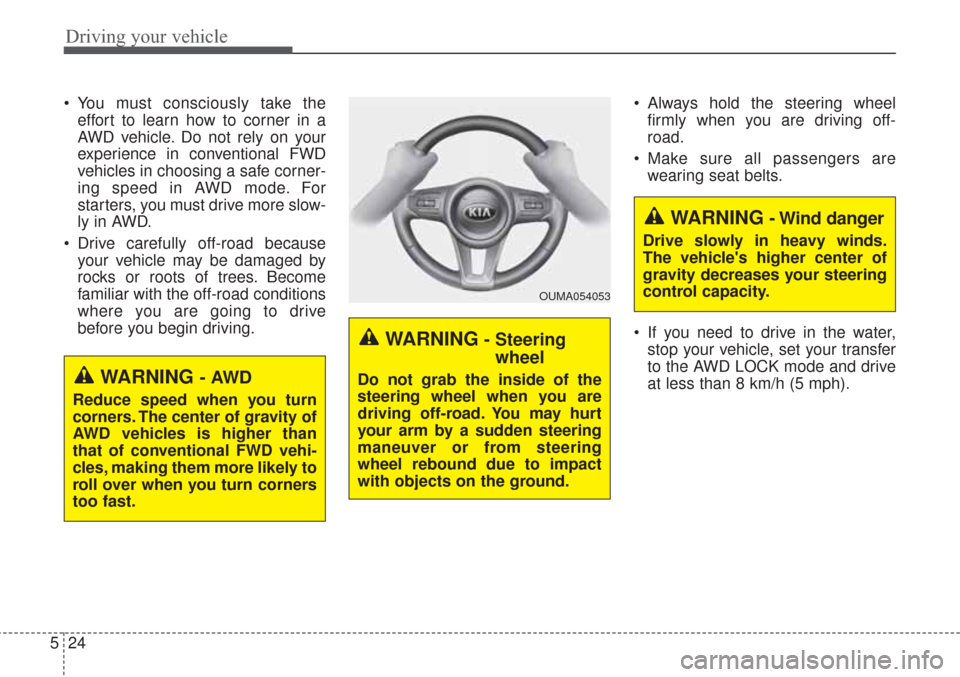
WARNING- Steeringwheel
Do not grab the inside of the
steering wheel when you are
driving off-road. You may hurt
your arm by a sudden steering
maneuver or from steering
wheel rebound due to impact
with objects on the ground.
WARNING- Wind danger
Drive slowly in heavy winds.
The vehicle's higher center of
gravity decreases your steering
control capacity.
OUMA054053
WARNING - AWD
Reduce speed when you turn
corners. The center of gravity of
AWD vehicles is higher than
that of conventional FWD vehi-
cles, making them more likely to
roll over when you turn corners
too fast.
Page 338 of 576
525
Driving your vehicle
✽ ✽NOTICE
• Shorten your scheduled mainte-
nance interval if you drive in off-
road conditions such as sand, mud
or water (see “Maintenance under
severe usage conditions” in section
7). Always wash your vehicle thor-
oughly after off-road use, especial-
ly cleaning the bottom of the vehi-
cle.
• A full time all wheel drive vehicle cannot be towed by an ordinary
tow truck. Make sure that the
vehicle is placed on a flat bed
truck for moving.
CAUTION - Mud or snow
Do not run the engine continu-
ously at high RPMs to free thevehicle from snow or mud. Doingso could damage the AWD sys-tem in your vehicle.
WARNING- AWD driving
Do not attempt quick steering
maneuvers or sharp turns in
AWD mode. Such maneuvers
increase the risk of rollover
accidents. Rollover accidents
are extremely violent and
unpredictable.
WARNING - Driving through
water
Drive slowly. If you are driving
too fast in water, the water can
get into the engine compartment
and wet the ignition system,
causing your vehicle to sudden-
ly stop. If this happens and your
vehicle is in a tilted position,
your vehicle may roll over.
Page 345 of 576
Driving your vehicle
32
5
To release EPB (electronic parking
brake) automatically:
Shift lever in P (Park)
With the engine running depress
the brake pedal and shift out of P
(Park) to R (Reverse) or D (Drive).
Shift lever in N (Neutral) With the engine running depress
the brake pedal and shift out of N
(Neutral) to R (Reverse) or D
(Drive).
Automatic transaxle vehicle 1. Start the engine.
2. Fasten the driver's seat belt.
3. Close the driver's door, engine hood and trunk.
4. Depress the accelerator pedal while the shift lever is in R
(Rear), D (Drive) or Sports
mode.
Make sure the brake warning light
goes off.✽ ✽ NOTICE
• For your safety, you can engage
the EPB even though the ignition
switch or engine stop/start button
is in the OFF position, but you
cannot release it.
• For your safety, depress the brake pedal and release the parking
brake manually with the EPB
switch when you drive downhill or
when backing up the vehicle.
Do not follow the above procedure
when driving on a flat level ground.
The vehicle may suddenly move for-
ward.CAUTION
If the parking brake warning light is still on even thoughthe EPB has been released,have the system checked byan authorized Kia dealer.
Do not drive your vehicle with the EPB applied. It may causeexcessive brake pad andbrake rotor wear.
Page 351 of 576
Driving your vehicle
38
5
4.If you press the accelerator pedal
with the shift lever in R (Reverse),
D (Drive) or sports mode, the Auto
Hold will be released automatically
and the vehicle will start to move.
The indicator changes from green
to white indicating the Auto Hold is
in standby and the EPB is
released.
When driving off from Auto Hold by
depressing the accelerator pedal,
always check the surrounding area
near your vehicle.
Slowly depress the accelerator pedal
for a smooth launch.Cancel
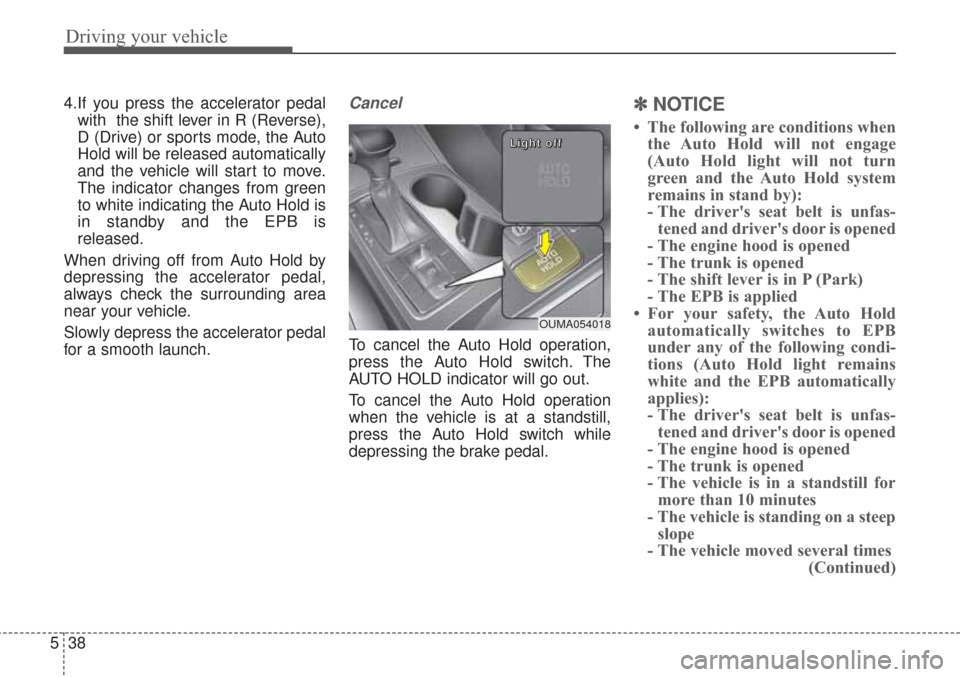
To cancel the Auto Hold operation,
press the Auto Hold switch. The
AUTO HOLD indicator will go out.
To cancel the Auto Hold operation
when the vehicle is at a standstill,
press the Auto Hold switch while
depressing the brake pedal.
✽ ✽ NOTICE
• The following are conditions when
the Auto Hold will not engage
(Auto Hold light will not turn
green and the Auto Hold system
remains in stand by):
- The driver's seat belt is unfas-tened and driver's door is opened
- The engine hood is opened
- The trunk is opened
- The shift lever is in P (Park)
- The EPB is applied
• For your safety, the Auto Hold automatically switches to EPB
under any of the following condi-
tions (Auto Hold light remains
white and the EPB automatically
applies):
- The driver's seat belt is unfas-tened and driver's door is opened
- The engine hood is opened
- The trunk is opened
- The vehicle is in a standstill for more than 10 minutes
- The vehicle is standing on a steep slope
- The vehicle moved several times (Continued)
OUMA054018
L L
L L
i i
i i
g g
g g
h h
h h
t t
t t
o o
o o
f f
f f
f f
f f
Page 388 of 576
575
Driving your vehicle
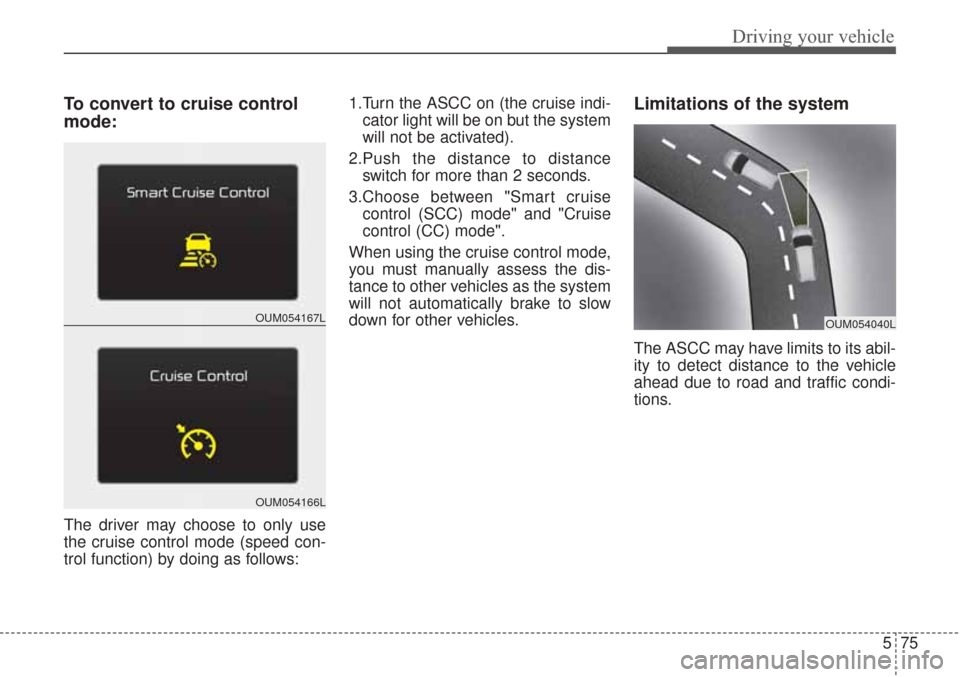
To convert to cruise control
mode:
The driver may choose to only use
the cruise control mode (speed con-
trol function) by doing as follows:1.Turn the ASCC on (the cruise indi-
cator light will be on but the system
will not be activated).
2.Push the distance to distance switch for more than 2 seconds.
3.Choose between "Smart cruise control (SCC) mode" and "Cruise
control (CC) mode".
When using the cruise control mode,
you must manually assess the dis-
tance to other vehicles as the system
will not automatically brake to slow
down for other vehicles.
Limitations of the system
The ASCC may have limits to its abil-
ity to detect distance to the vehicle
ahead due to road and traffic condi-
tions.
OUM054167L
OUM054166L
OUM054040L