Screen KIA Sorento 2017 3.G User Guide
[x] Cancel search | Manufacturer: KIA, Model Year: 2017, Model line: Sorento, Model: KIA Sorento 2017 3.GPages: 576, PDF Size: 7.82 MB
Page 272 of 576
![KIA Sorento 2017 3.G User Guide 4187
Features of your vehicle
SETUP
Display Settings
Press the key Select
[Display] through TUNE knob or
key Select menu through
TUNE knob
Mode Pop up
[Mode Pop up] Changes /
selection mode
or k](/img/2/2983/w960_2983-271.png "KIA Sorento 2017 3.G User Guide 4187
Features of your vehicle
SETUP
Display Settings
Press the key Select
[Display] through TUNE knob or
key Select menu through
TUNE knob
Mode Pop up
[Mode Pop up] Changes /
selection mode
or k")
4187
Features of your vehicle
SETUP
Display Settings
Press the key Select
[Display] through TUNE knob or
key Select menu through
TUNE knob
Mode Pop up
[Mode Pop up] Changes /
selection mode
or key to display the mode
change pop up screen.
Media Display
When playing an MP3 file, select the
desired display info from ‘Folder/File’
or ‘Album/Artist/Song’.
MEDIA
RADIO
OffOn
1 RPT
SETUPCLOCK
Page 274 of 576
![KIA Sorento 2017 3.G User Guide 4189
Features of your vehicle
CLOCK SETTINGS
Press the key Select [Clock]
through TUNE knob or key
Select menu through TUNE knob
Clock Settings
This menu is used to set the time.
Select [Clock Set](/img/2/2983/w960_2983-273.png "KIA Sorento 2017 3.G User Guide 4189
Features of your vehicle
CLOCK SETTINGS
Press the key Select [Clock]
through TUNE knob or key
Select menu through TUNE knob
Clock Settings
This menu is used to set the time.
Select [Clock Set")
4189
Features of your vehicle
CLOCK SETTINGS
Press the key Select [Clock]
through TUNE knob or key
Select menu through TUNE knob
Clock Settings
This menu is used to set the time.
Select [Clock Settings] Set through
TUNE knob Press TUNE knob
❈Adjust the number currently in
focus to set the [hour] and press
the tune knob to set the [minute]
and [AM/PM].
Calendar Settings
This menu is used to set the date.
Select [Calendar Settings] Set through
TUNE knob Press TUNE knob
❈Adjust the number currently in
focus to make the settings and
press the tune knob to move to
the next setting.
Time Format
This function is used to set the 12/24
hour time format of the audio sys-
tem.
Select [Time Format] Set 12Hr /
24Hr through TUNE knob.
Clock Display when Power is OFF
Select [Clock Disp.(Pwr Off)] Set
/through TUNEknob
: Displays time/date on screen
: Turn off.
Off
On
OffOn
3
SETUPCLOCK
WARNING- Clock Setting
Distraction
Do not adjust the clock while
driving. You may lose your
steering control and cause
severe personal injury or acci-
dents.
Page 279 of 576
Features of your vehicle
194 4
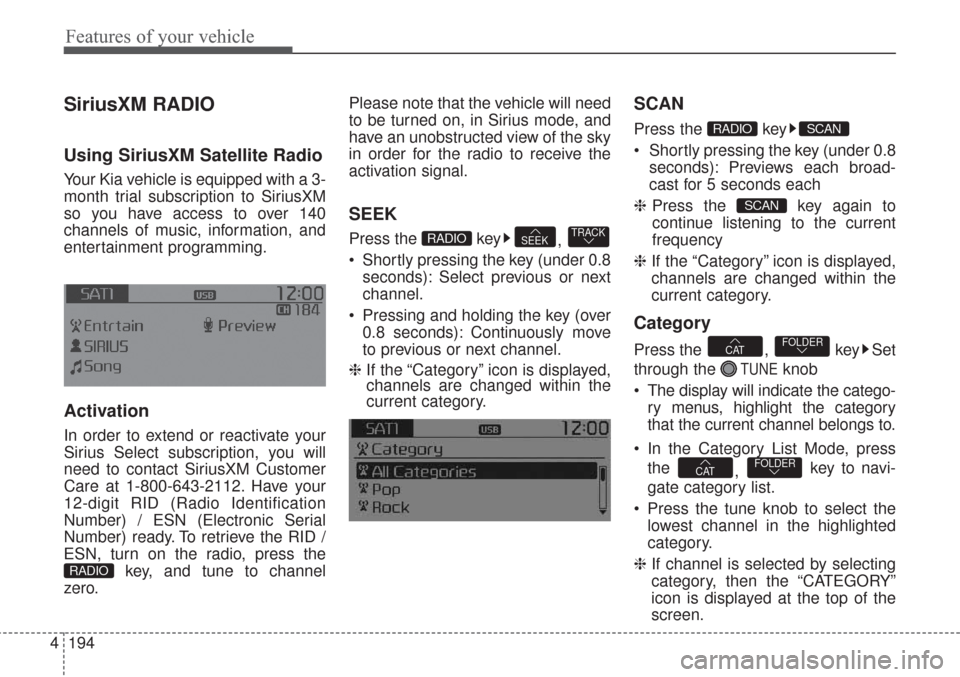
SiriusXM RADIO
Using SiriusXM Satellite Radio
Your Kia vehicle is equipped with a 3-
month trial subscription to SiriusXM
so you have access to over 140
channels of music, information, and
entertainment programming.
Activation
In order to extend or reactivate your
Sirius Select subscription, you will
need to contact SiriusXM Customer
Care at 1-800-643-2112. Have your
12-digit RID (Radio Identification
Number) / ESN (Electronic Serial
Number) ready. To retrieve the RID /
ESN, turn on the radio, press the
key, and tune to channel
zero.Please note that the vehicle will need
to be turned on, in Sirius mode, and
have an unobstructed view of the sky
in order for the radio to receive the
activation signal.
SEEK
Press the key
,
Shortly pressing the key (under 0.8
seconds): Select previous or next
channel.
Pressing and holding the key (over
0.8 seconds): Continuously move
to previous or next channel.
❈ If the “Category” icon is displayed,
channels are changed within the
current category.
SCAN
Press the key
Shortly pressing the key (under 0.8
seconds): Previews each broad-
cast for 5 seconds each
❈Press the key again to
continue listening to the current
frequency
❈If the “Category” icon is displayed,
channels are changed within the
current category.
Category
Press the , key Set
through the
TUNEknob
The display will indicate the catego-
ry menus, highlight the category
that the current channel belongs to.
In the Category List Mode, press
the
, key to navi-
gate category list.
Press the tune knob to select the
lowest channel in the highlighted
category.
❈If channel is selected by selecting
category, then the “CATEGORY”
icon is displayed at the top of the
screen.
FOLDERCAT
FOLDERCAT
SCAN
SCANRADIO
TRACKSEEKRADIO
RADIO
Page 281 of 576
Features of your vehicle
196 4
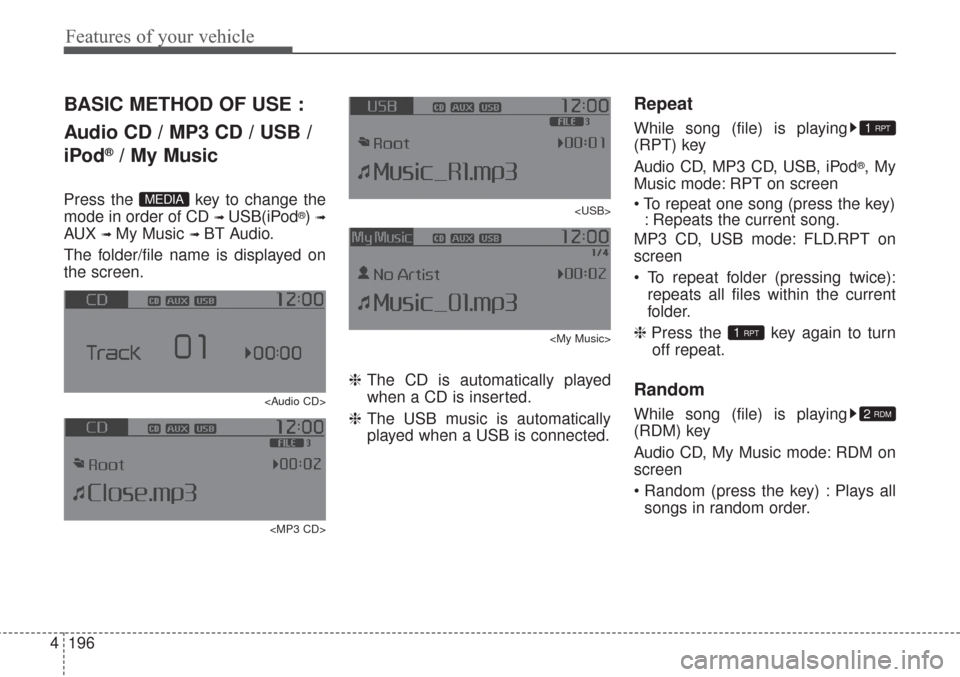
BASIC METHOD OF USE :
Audio CD / MP3 CD / USB /
iPod
®/ My Music
Press the key to change the
mode in order of CD
➟ USB(iPod®) ➟
AUX ➟ My Music ➟ BT Audio.
The folder/file name is displayed on
the screen.
Page 282 of 576
4197
Features of your vehicle
MP3 CD, USB mode: FLD.RDM on
screen
Folder Random (press the key) :
Plays all files within the current fold-
er in random order.
iPod
®mode: ALL RDM on screen
All Random (press the key) : Plays
all files in random order.
MP3 CD, USB : ALL RDM on screen
All Random (pressing twice): Plays
all files in random order.
❈ Press the key again to turn
off repeat.
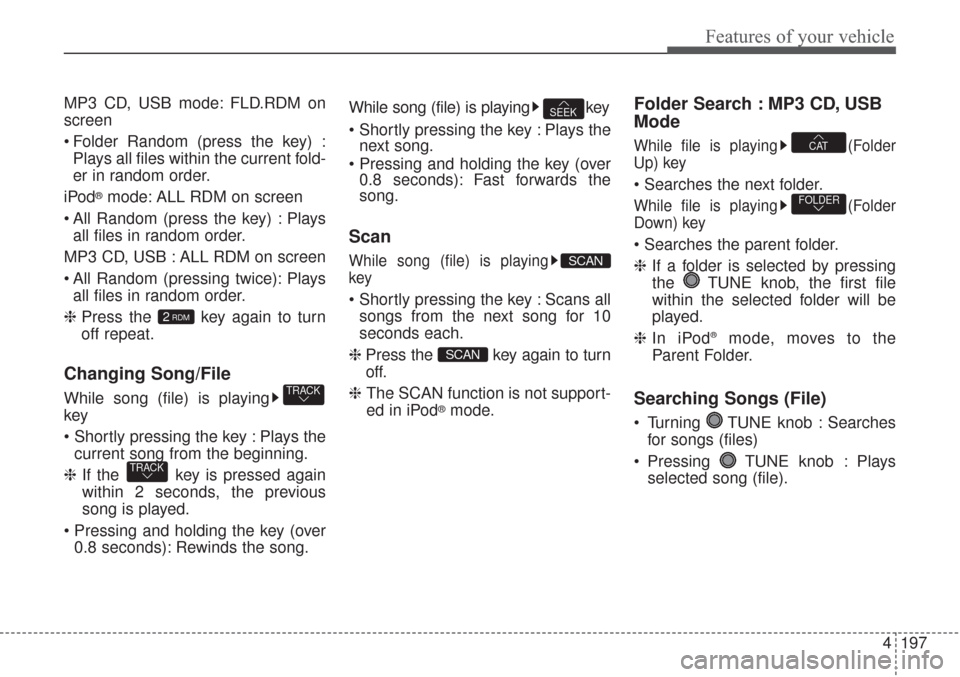
Changing Song/File
While song (file) is playing
key
Plays the
current song from the beginning.
❈If the key is pressed again
within 2 seconds, the previous
song is played.
0.8 seconds): Rewinds the song.While song (file) is playing key
Plays the
next song.
0.8 seconds): Fast forwards the
song.
Scan
While song (file) is playing
key
Scans all
songs from the next song for 10
seconds each.
❈ Press the key again to turn
off.
❈ The SCAN function is not support-
ed in iPod
®mode.
Folder Search : MP3 CD, USB
Mode
While file is playing (Folder
Up) key
While file is playing (Folder
Down) key
❈If a folder is selected by pressing
the TUNE knob, the first file
within the selected folder will be
played.
❈In iPod
®mode, moves to the
Parent Folder.
Searching Songs (File)
Turning TUNE knob : Searches
for songs (files)
Pressing TUNE knob : Plays
selected song (file).
FOLDER
CAT
SCAN
SCAN
SEEK
TRACK
TRACK
2RDM
Page 286 of 576
4201
Features of your vehicle
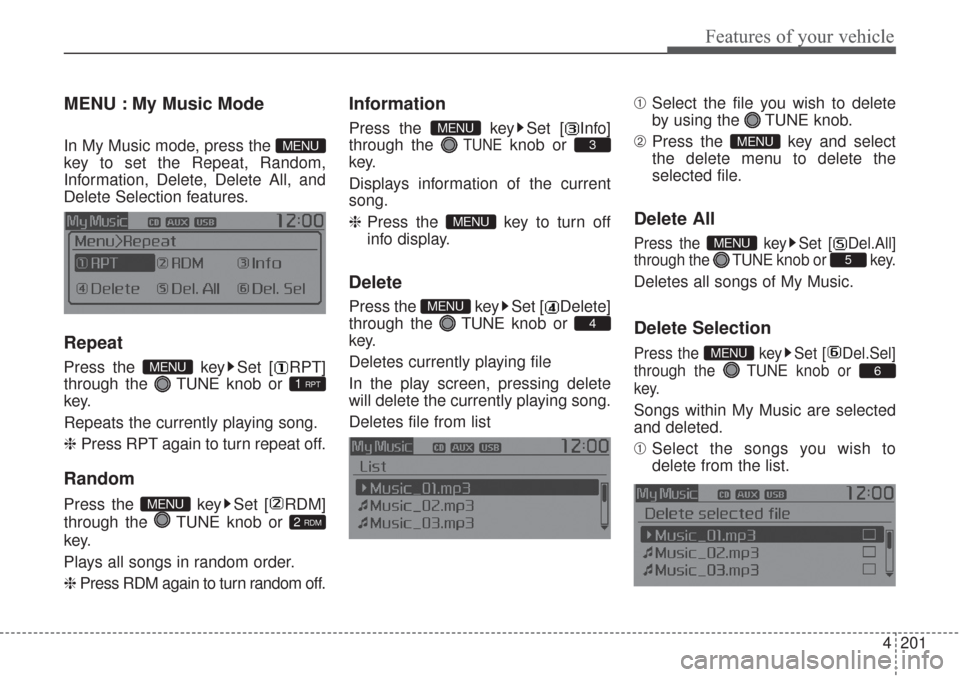
MENU : My Music Mode
In My Music mode, press the
key to set the Repeat, Random,
Information, Delete, Delete All, and
Delete Selection features.
Repeat
Press the key Set [ RPT]
through the TUNEknob or
key.
Repeats the currently playing song.
❈ Press RPT again to turn repeat off.
Random
Press the key Set [ RDM]
through the TUNE knob or
key.
Plays all songs in random order.
❈ Press RDM again to turn random off.
Information
Press the key Set [ Info]
through the
TUNEknob or
key.
Displays information of the current
song.
❈Press the key to turn off
info display.
Delete
Press the key Set [ Delete]
through the TUNEknob or
key.
Deletes currently playing file
In the play screen, pressing delete
will delete the currently playing song.
Deletes file from list➀Select the file you wish to delete
by using the TUNE knob.
➁Press the key and select
the delete menu to delete the
selected file.
Delete All
Press the key Set [ Del.All]
through the TUNEknob or key.
Deletes all songs of My Music.
Delete Selection
Press the key Set [ Del.Sel]
through the TUNEknob or
key.
Songs within My Music are selected
and deleted.
➀Select the songs you wish to
delete from the list.
6
MENU
5
MENU
MENU
4
MENU
MENU
3
MENU
2 RDM
MENU
1 RPTMENU
MENU
Page 290 of 576
4205
Features of your vehicle
PHONE
Before using the Bluetooth®Wireless
Technology phone features
Bluetooth®Wireless
Technologyphone, you must first
pair and connect the
Bluetooth®
Wireless Technologymobile phone.
connected, it is not possible to
enter Phone mode. Once a phone
is paired or connected, the guid-
ance screen will be displayed.
tion (IGN/ACC ON), the
Bluetooth®
Wireless Technologyphone will be
automatically connected. Even if
you are outside, the
Bluetooth®
Wireless Technologyphone will be
automatically connected once you
are in the vicinity of the vehicle. If
you do not want automatic
Bluetooth®Wireless Technology
phone connection, set the
Bluetooth®Wireless Technology
power to OFF
Making a call using the
Steering-wheel mount controls
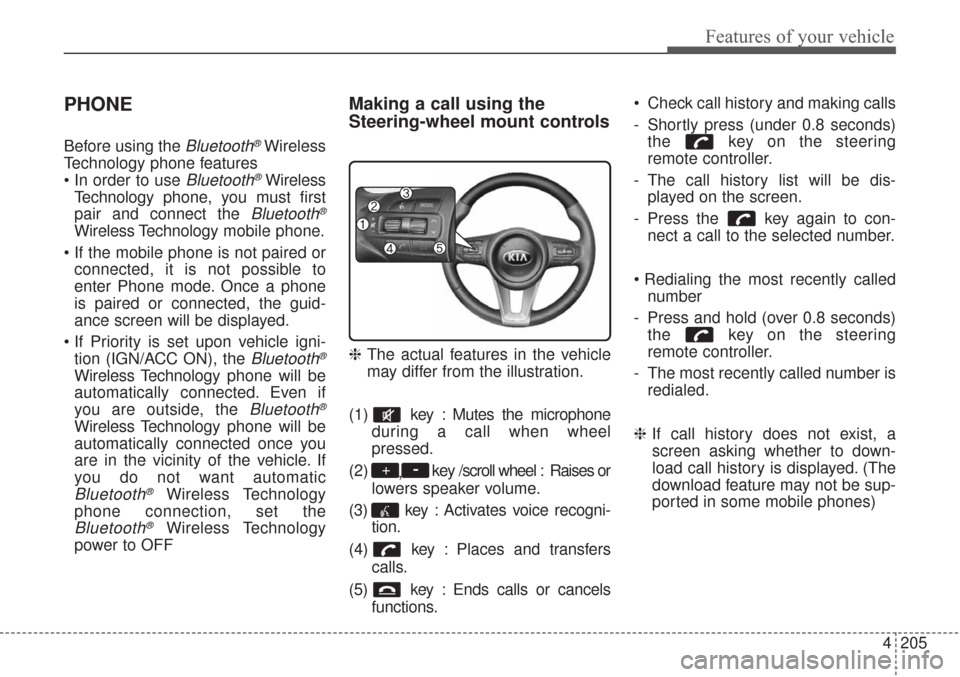
❈The actual features in the vehicle
may differ from the illustration.
(1) key : Mutes the microphone
during a call when wheel
pressed.
(2)
,key /scroll wheel : Raises or
lowers speaker volume.
(3) key : Activates voice recogni-
tion.
(4) key : Places and transfers
calls.
(5) key : Ends calls or cancels
functions. Check call history and making calls
- Shortly press (under 0.8 seconds)
the key on the steering
remote controller.
- The call history list will be dis-
played on the screen.
- Press the key again to con-
nect a call to the selected number.
number
- Press and hold (over 0.8 seconds)
the key on the steering
remote controller.
- The most recently called number is
redialed.
❈If call history does not exist, a
screen asking whether to down-
load call history is displayed. (The
download feature may not be sup-
ported in some mobile phones)
-+
Page 292 of 576
4207
Features of your vehicle
Pairing key / key on
the Steering Remote Controller
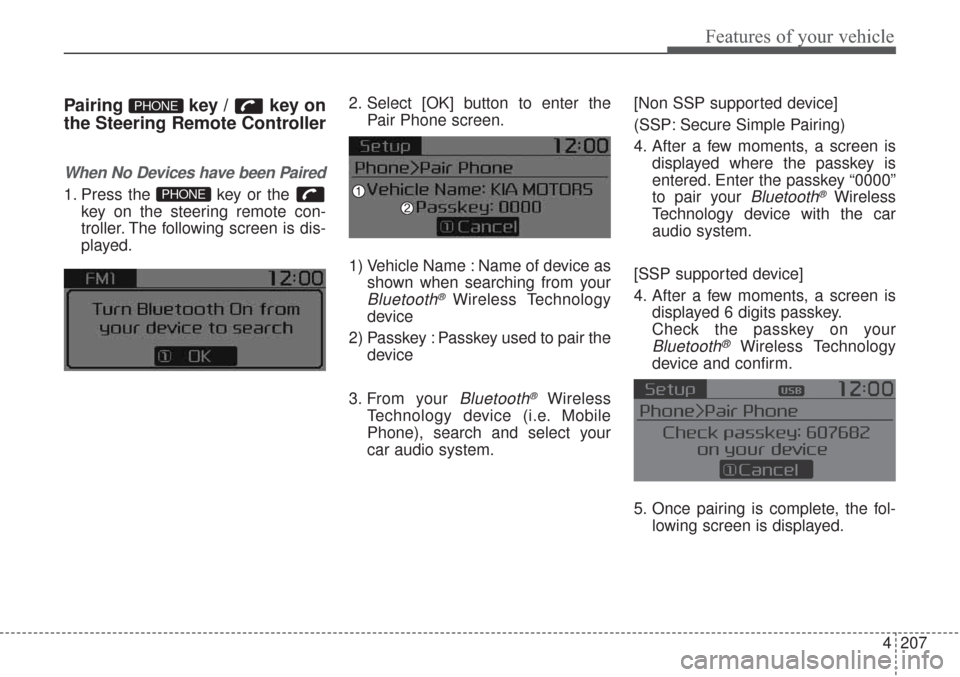
When No Devices have been Paired
1. Press the key or the
key on the steering remote con-
troller. The following screen is dis-
played.2. Select [OK] button to enter the
Pair Phone screen.
1) Vehicle Name : Name of device as
shown when searching from your
Bluetooth®Wireless Technology
device
2) Passkey : Passkey used to pair the
device
3. From your
Bluetooth®Wireless
Technology device (i.e. Mobile
Phone), search and select your
car audio system.[Non SSP supported device]
(SSP: Secure Simple Pairing)
4. After a few moments, a screen is
displayed where the passkey is
entered. Enter the passkey “0000”
to pair your
Bluetooth®Wireless
Technology device with the car
audio system.
[SSP supported device]
4. After a few moments, a screen is
displayed 6 digits passkey.
Check the passkey on your
Bluetooth®Wireless Technology
device and confirm.
5. Once pairing is complete, the fol-
lowing screen is displayed.
PHONE
PHONE
Page 293 of 576
Features of your vehicle
208 4
Some phones (i.e., iPhone®, Android TM
and Blackberry®phones) may offer
an option to allow acceptance of all
future Bluetooth
®connection
requests by default." and "Visit
http://www
.kia.com/us/en/content/
owners/bluetoothfor additional infor-
mation on pairing your Bluetooth®-
enabled mobile phone, and to view a
phone compatibility list.
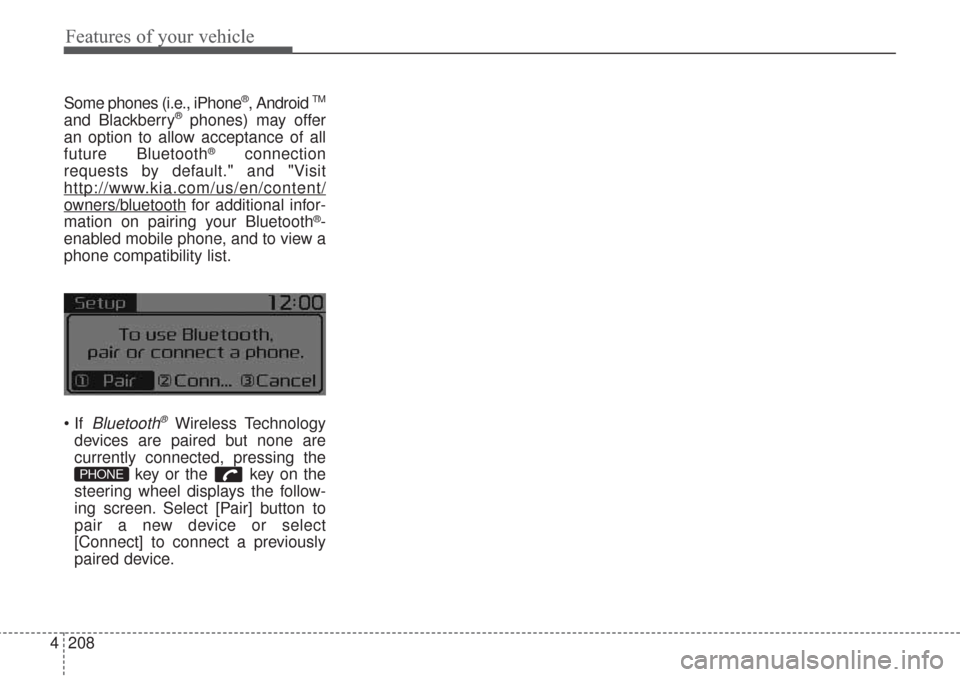
Bluetooth®Wireless Technology
devices are paired but none are
currently connected, pressing the
key or the key on the
steering wheel displays the follow-
ing screen. Select [Pair] button to
pair a new device or select
[Connect] to connect a previously
paired device.
PHONE
Page 298 of 576
4213
Features of your vehicle
USING Bluetooth®Wireless
Technology
Phone Menu Screen
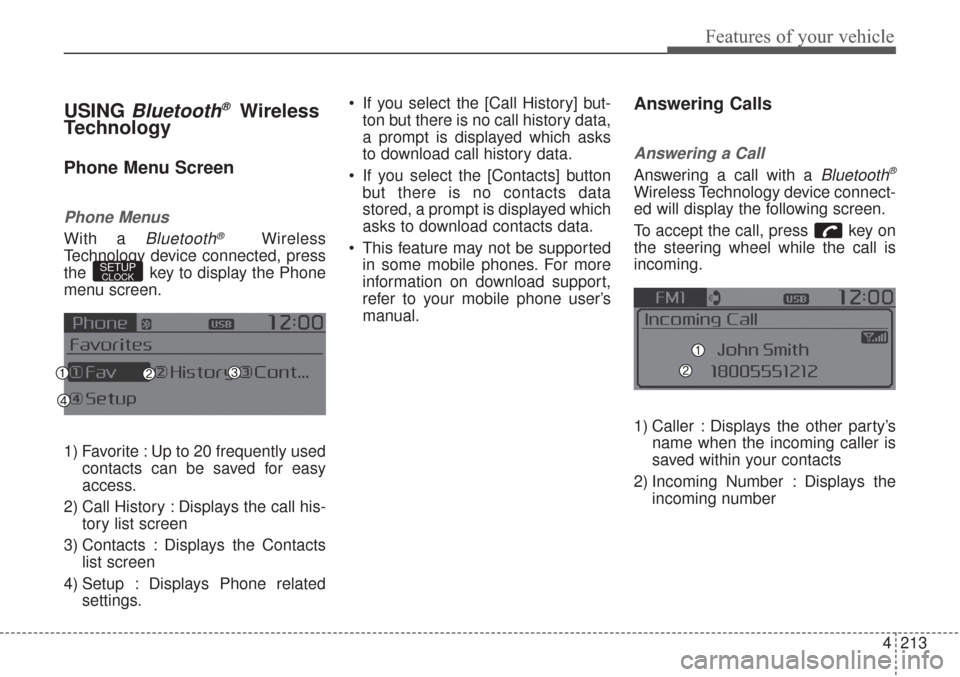
Phone Menus
With a Bluetooth®Wireless
Technology device connected, press
the key to display the Phone
menu screen.
1) Favorite : Up to 20 frequently used
contacts can be saved for easy
access.
2) Call History : Displays the call his-
tory list screen
3) Contacts : Displays the Contacts
list screen
4) Setup : Displays Phone related
settings. If you select the [Call History] but-
ton but there is no call history data,
a prompt is displayed which asks
to download call history data.
If you select the [Contacts] button
but there is no contacts data
stored, a prompt is displayed which
asks to download contacts data.
This feature may not be supported
in some mobile phones. For more
information on download support,
refer to your mobile phone user’s
manual.
Answering Calls
Answering a Call
Answering a call with a Bluetooth®
Wireless Technology device connect-
ed will display the following screen.
To accept the call, press key on
the steering wheel while the call is
incoming.
1) Caller : Displays the other party’s
name when the incoming caller is
saved within your contacts
2) Incoming Number : Displays the
incoming number
SETUPCLOCK