air condition KIA SORENTO 2018 User Guide
[x] Cancel search | Manufacturer: KIA, Model Year: 2018, Model line: SORENTO, Model: KIA SORENTO 2018Pages: 536, PDF Size: 13.42 MB
Page 88 of 536
Wipers and washers . . . . . . . . . . . . . . . . . . . . . . . 4-121
• Windshield wipers . . . . . . . . . . . . . . . . . . . . . . . . . . . 4-121
• Front windshield washers . . . . . . . . . . . . . . . . . . . . . 4-123
• Rear window wiper and washer switch. . . . . . . . . . 4-124
Interior lights . . . . . . . . . . . . . . . . . . . . . . . . . . . . 4-125
• Automatic turn off function . . . . . . . . . . . . . . . . . . . 4-125
• Room lamp . . . . . . . . . . . . . . . . . . . . . . . . . . . . . . . . . 4-125
• Map lamp . . . . . . . . . . . . . . . . . . . . . . . . . . . . . . . . . . 4-12\
6
• Luggage lamp . . . . . . . . . . . . . . . . . . . . . . . . . . . . . . 4-127
• Vanity mirror lamp . . . . . . . . . . . . . . . . . . . . . . . . . . 4-127
• Glove box lamp . . . . . . . . . . . . . . . . . . . . . . . . . . . . . 4-127
Welcome system . . . . . . . . . . . . . . . . . . . . . . . . . . 4-128
• Headlight (headlamp) escort function . . . . . . . . . . . 4-128
• Interior light. . . . . . . . . . . . . . . . . . . . . . . . . . . . . . . . 4-128
• Pocket lamp . . . . . . . . . . . . . . . . . . . . . . . . . . . . . . . . 4-128
Defroster . . . . . . . . . . . . . . . . . . . . . . . . . . . . . . . . 4-129
• Rear window defroster . . . . . . . . . . . . . . . . . . . . . . . 4-129
Manual climate control system . . . . . . . . . . . . . . 4-130
• Heating and air conditioning . . . . . . . . . . . . . . . . . . 4-131
• 3rd row air conditioning . . . . . . . . . . . . . . . . . . . . . . 4-136
• System operation . . . . . . . . . . . . . . . . . . . . . . . . . . . . 4-137
• Climate control air filter. . . . . . . . . . . . . . . . . . . . . . 4-139
• Checking the amount of air conditionerrefrigerant and compressor lubricant . . . . . . . . . . 4-139
Automatic climate control system . . . . . . . . . . . 4-141
• Automatic heating and air conditioning . . . . . . . . . 4-143
• Manual heating and air conditioning . . . . . . . . . . . 4-144
• To cancel or reset the automatic ventilation . . . . . . 4-150
• 3
rdrow air conditioning . . . . . . . . . . . . . . . . . . . . . . . 4-150
• System operation . . . . . . . . . . . . . . . . . . . . . . . . . . . . 4-151
• Climate control air filter. . . . . . . . . . . . . . . . . . . . . . 4-153
• Checking the amount of air conditioner refrigerant and compressor lubricant . . . . . . . . . . 4-154
Windshield defrosting and defogging . . . . . . . . . 4-155
• Manual climate control system . . . . . . . . . . . . . . . . 4-155
• Automatic climate control system . . . . . . . . . . . . . . 4-156
• Defogging logic. . . . . . . . . . . . . . . . . . . . . . . . . . . . . . 4-157
Clean air . . . . . . . . . . . . . . . . . . . . . . . . . . . . . . . . 4-160
Storage compartments . . . . . . . . . . . . . . . . . . . . . 4-161
• Center console storage . . . . . . . . . . . . . . . . . . . . . . . 4-161
• Glove box . . . . . . . . . . . . . . . . . . . . . . . . . . . . . . . . . . 4-16\
1
• Sunglass holder . . . . . . . . . . . . . . . . . . . . . . . . . . . . . 4-162
• Luggage box . . . . . . . . . . . . . . . . . . . . . . . . . . . . . . . . 4-162
Interior features . . . . . . . . . . . . . . . . . . . . . . . . . . 4-163
• Cup holder . . . . . . . . . . . . . . . . . . . . . . . . . . . . . . . . . 4-163
• Bottle holder. . . . . . . . . . . . . . . . . . . . . . . . . . . . . . . . 4-\
164
• Seat warmer . . . . . . . . . . . . . . . . . . . . . . . . . . . . . . . . 4-164
• Seat cooler (air ventilation seat) . . . . . . . . . . . . . . . 4-165
• Sunvisor . . . . . . . . . . . . . . . . . . . . . . . . . . . . . . . . . . . 4-\
166
4
Page 96 of 536
411
Features of your vehicle
This device complies with
Industry Canada licence-exempt
RSS standard(s).
Operation is subject to the following
two conditions:
(1) This device may not cause inter-ference, and
(2) This device must accept any
interference, including interfer-
ence that may cause undesired
operation of the device.
✽ ✽ NOTICE
Changes or modifications not
expressly approved by the party
responsible for compliance could
void the user’s authority to operate
the equipment. If the keyless entry
system is inoperative due to changes
or modifications not approved by
the party responsible for compli-
ance, it will not be covered by your
manufacturer’s vehicle warranty.
Limp home (override) procedure
When you turn the ignition switch to
the ON position, if the immobilizer
indicator ( ) goes off after blink-
ing 5 times, your transponder
equipped in the ignition key is out of
order. You cannot start the engine
without the limp home procedure. To
start the engine, you have to input
your password by using the ignition
switch. Your password is only avail-
able from an authorized Kia dealer-
ship. Contact an authorized dealer
for more information.
The following procedure is how to
input your password of “2345” as an
example.
1. Turn the ignition s witch to the ON
position. The immobilizer indicator
( ) will blink 5 times and go off
indicating the beginning of the limp
home procedure.
2. Turn the ignition switch to the ACC position. 3. To enter the first digit (in this
example “2”), turn the ignition
switch to the ON and ACC position
twice. Perform the same proce-
dure for the next digits between 3
seconds and 10 seconds (for
example, for “3”, turn the ignition
ON and ACC 3 times).
4. If all of the digits have been input successfully, you have to start the
engine within 30 seconds. If you
attempt to start the engine after 30
seconds, the engine will not start
and you will have to input your
password again.
After performing the limp home pro-
cedure, you have to see an author-
ized Kia dealer immediately to
inspect and repair your ignition key
or immobilizer system.
Page 148 of 536
463
Features of your vehicle
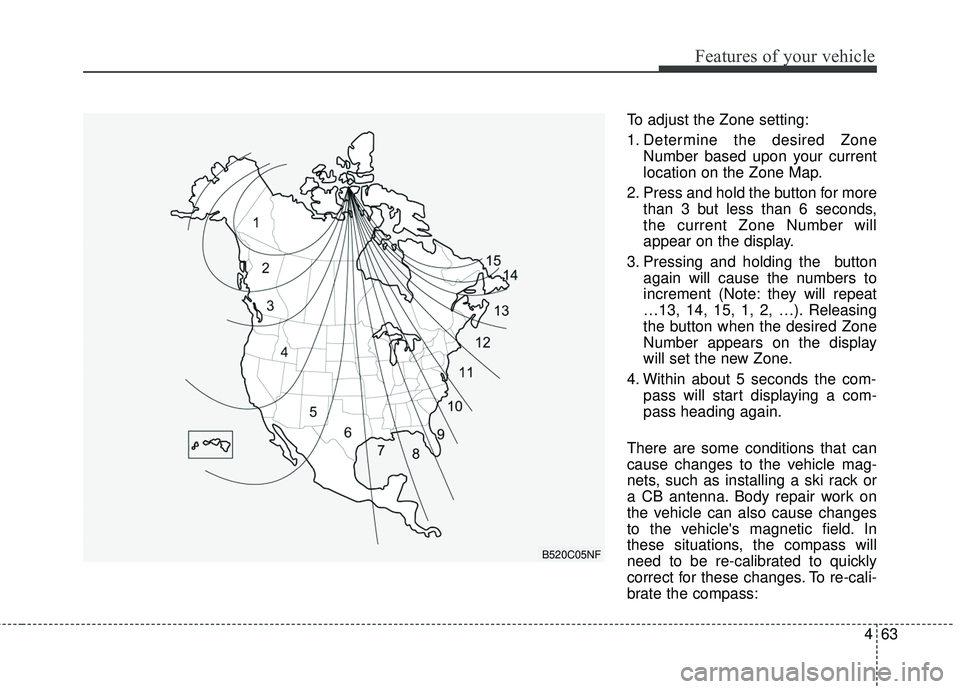
To adjust the Zone setting:
1. Determine the desired ZoneNumber based upon your current
location on the Zone Map.
2. Press and hold the button for more than 3 but less than 6 seconds,
the current Zone Number will
appear on the display.
3. Pressing and holding the button again will cause the numbers to
increment (Note: they will repeat
…13, 14, 15, 1, 2, …). Releasing
the button when the desired Zone
Number appears on the display
will set the new Zone.
4. Within about 5 seconds the com- pass will start displaying a com-
pass heading again.
There are some conditions that can
cause changes to the vehicle mag-
nets, such as installing a ski rack or
a CB antenna. Body repair work on
the vehicle can also cause changes
to the vehicle's magnetic field. In
these situations, the compass will
need to be re-calibrated to quickly
correct for these changes. To re-cali-
brate the compass:
B520C05NF
Page 195 of 536
Features of your vehicle
110
4
This system will activate when
backing up with the ignition switch
ON.
If the vehicle is moving at a speed
over 5 km/h (3 mph), the system
may not be activated correctly.
The sensing distance while the back-up warning system is in oper-
ation is approximately 120 cm (47
in.) at the rear bumper center area,
60 cm (23.5 in.) at the rear bumper
both side area.
When more than two objects are sensed at the same time, the clos-
est one will be recognized first.Types of warning sound
When an object is 120 cm to 61 cm(47 in. to 24 in.) from the rear
bumper: Buzzer beeps intermit-
tently.
When an object is 60 cm to 31 cm (24 in. to 12 in.) from the rear
bumper: Buzzer beeps more fre-
quently.
When an object is within 30 cm (12 in.) of the rear bumper:
Buzzer sounds continuously.
Non-operational conditions of
rear parking assist system
The rear parking assist system
may not operate properly when:
1. Moisture is frozen to the sensor. (It will operate normally when the
moisture has been cleared.)
2. The sensor is covered with foreign matter, such as snow or water, or
the sensor cover is blocked. (It will
operate normally when the materi-
al is removed or the sensor is no
longer blocked.)
3. Driving on uneven road surfaces (unpaved roads, gravel, bumps,
gradient).
4. Objects generating excessive noise (vehicle horns, loud motor-
cycle engines, or truck air brakes)
are within range of the sensor.
5. Heavy rain or water spray exists.
6. Wireless transmitters or mobile phones are within range of the
sensor.
7. The sensor is covered with snow.
8. Trailer towing
Page 215 of 536
Features of your vehicle
130
4
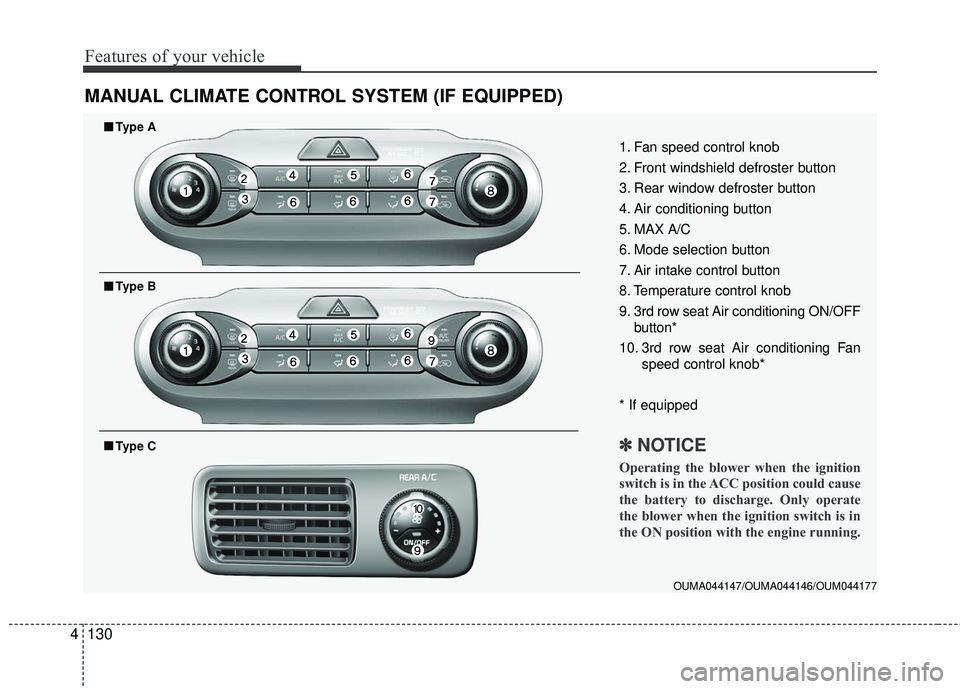
MANUAL CLIMATE CONTROL SYSTEM (IF EQUIPPED)
OUMA044147/OUMA044146/OUM044177
1. Fan speed control knob
2. Front windshield defroster button
3. Rear window defroster button
4. Air conditioning button
5. MAX A/C
6. Mode selection button
7. Air intake control button
8. Temperature control knob
9. 3rd row seat Air conditioning ON/OFF
button*
10. 3rd row seat Air conditioning Fan speed control knob*
* If equipped
✽ ✽ NOTICE
Operating the blower when the ignition
switch is in the ACC position could cause
the battery to discharge. Only operate
the blower when the ignition switch is in
the ON position with the engine running.
■ ■Type A
■ ■Type B
■ ■Type C
Page 216 of 536
4131
Features of your vehicle
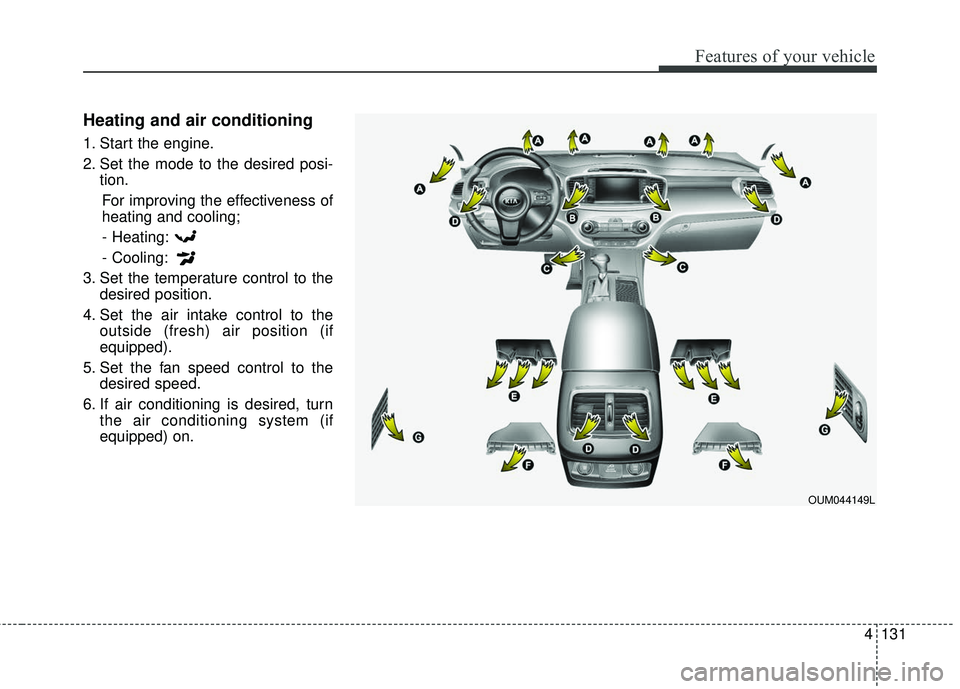
Heating and air conditioning
1. Start the engine.
2. Set the mode to the desired posi-tion.
For improving the effectiveness of
heating and cooling;- Heating:
- Cooling:
3. Set the temperature control to the desired position.
4. Set the air intake control to the outside (fresh) air position (if
equipped).
5. Set the fan speed control to the desired speed.
6. If air conditioning is desired, turn the air conditioning system (if
equipped) on.
OUM044149L
Page 218 of 536
4133
Features of your vehicle
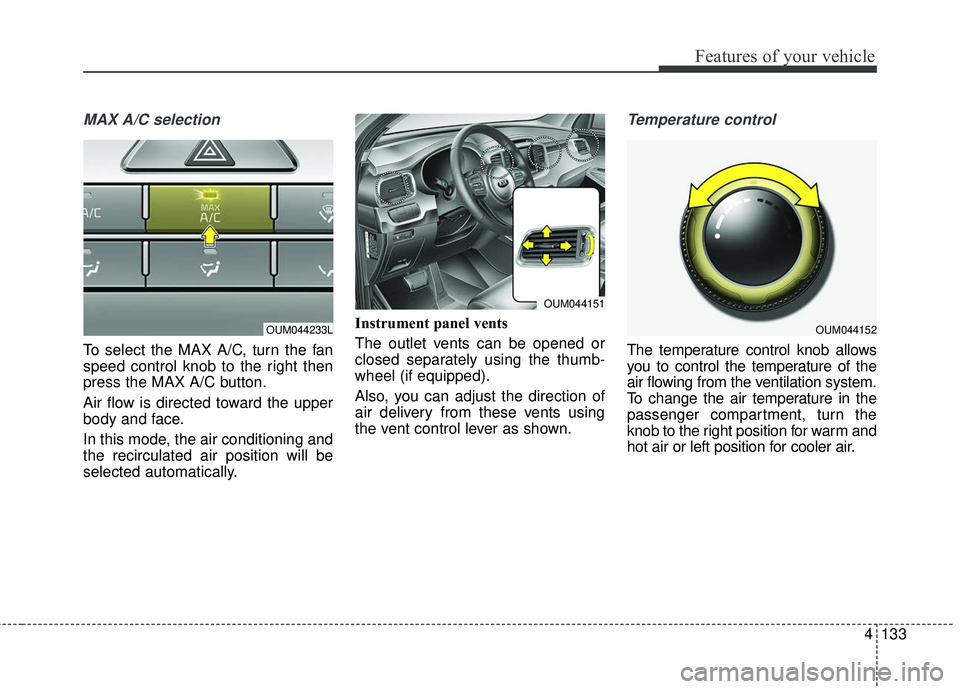
MAX A/C selection
To select the MAX A/C, turn the fan
speed control knob to the right then
press the MAX A/C button.
Air flow is directed toward the upper
body and face.
In this mode, the air conditioning and
the recirculated air position will be
selected automatically.Instrument panel vents
The outlet vents can be opened or
closed separately using the thumb-
wheel (if equipped).
Also, you can adjust the direction of
air delivery from these vents using
the vent control lever as shown.
Temperature control
The temperature control knob allows
you to control the temperature of the
air flowing from the ventilation system.
To change the air temperature in the
passenger compartment, turn the
knob to the right position for warm and
hot air or left position for cooler air.
OUM044233LOUM044152
OUM044151
Page 219 of 536
Features of your vehicle
134
4
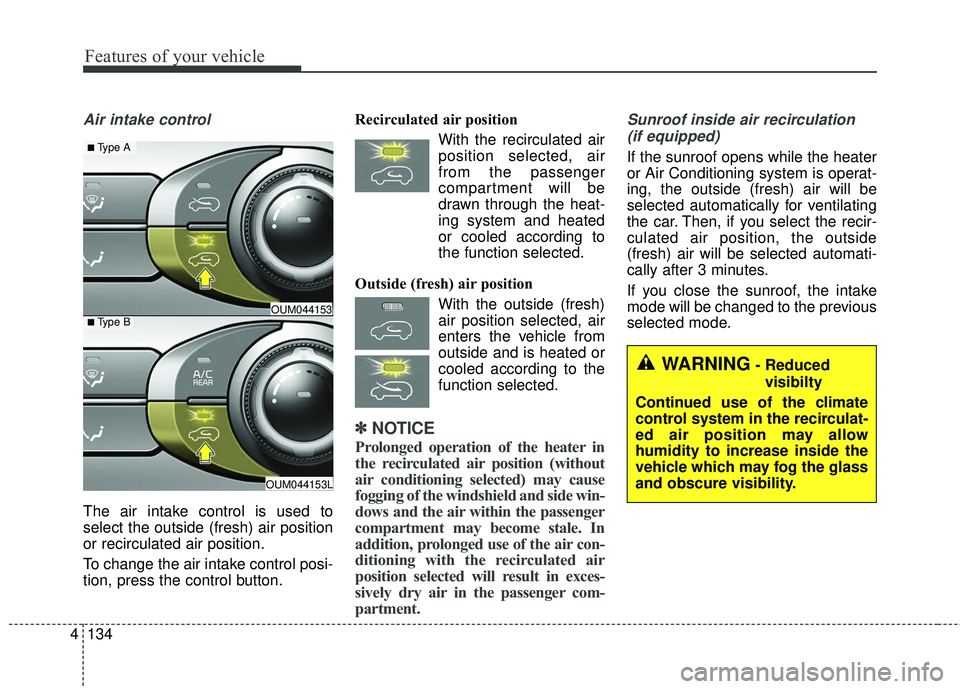
Air intake control
The air intake control is used to
select the outside (fresh) air position
or recirculated air position.
To change the air intake control posi-
tion, press the control button. Recirculated air position
With the recirculated airposition selected, air
from the passenger
compartment will be
drawn through the heat-
ing system and heated
or cooled according to
the function selected.
Outside (fresh) air position With the outside (fresh)air position selected, air
enters the vehicle from
outside and is heated or
cooled according to the
function selected.
✽ ✽ NOTICE
Prolonged operation of the heater in
the recirculated air position (without
air conditioning selected) may cause
fogging of the windshield and side win-
dows and the air within the passenger
compartment may become stale. In
addition, prolonged use of the air con-
ditioning with the recirculated air
position selected will result in exces-
sively dry air in the passenger com-
partment.
Sunroof inside air recirculation
(if equipped)
If the sunroof opens while the heater
or Air Conditioning system is operat-
ing, the outside (fresh) air will be
selected automatically for ventilating
the car. Then, if you select the recir-
culated air position, the outside
(fresh) air will be selected automati-
cally after 3 minutes.
If you close the sunroof, the intake
mode will be changed to the previous
selected mode.
OUM044153L
OUM044153■Type B
■ Type A
WARNING- Reduced visibilty
Continued use of the climate
control system in the recirculat-
ed air position may allow
humidity to increase inside the
vehicle which may fog the glass
and obscure visibility.
Page 220 of 536
4135
Features of your vehicle
Fan speed control
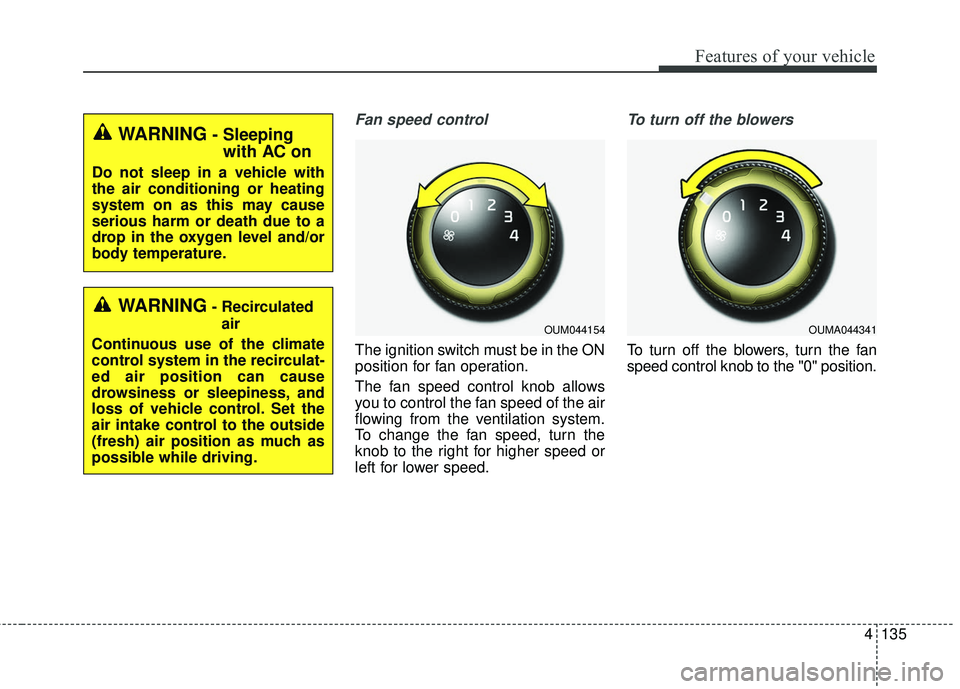
The ignition switch must be in the ON
position for fan operation.
The fan speed control knob allows
you to control the fan speed of the air
flowing from the ventilation system.
To change the fan speed, turn the
knob to the right for higher speed or
left for lower speed.
To turn off the blowers
To turn off the blowers, turn the fan
speed control knob to the "0" position.
WARNING- Recirculatedair
Continuous use of the climate
control system in the recirculat-
ed air position can cause
drowsiness or sleepiness, and
loss of vehicle control. Set the
air intake control to the outside
(fresh) air position as much as
possible while driving.
OUM044154OUMA044341
WARNING- Sleeping with AC on
Do not sleep in a vehicle with
the air conditioning or heating
system on as this may cause
serious harm or death due to a
drop in the oxygen level and/or
body temperature.
Page 221 of 536
Features of your vehicle
136
4
Air conditioning
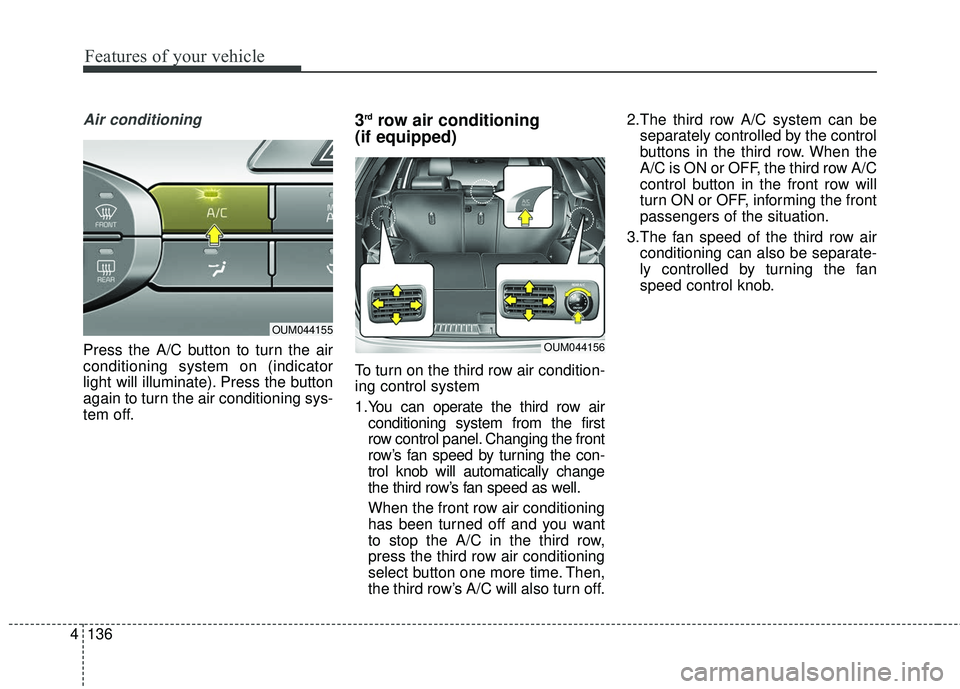
Press the A/C button to turn the air
conditioning system on (indicator
light will illuminate). Press the button
again to turn the air conditioning sys-
tem off.
3rdrow air conditioning
(if equipped)
To turn on the third row air condition-
ing control system
1.You can operate the third row air
conditioning system from the first
row control panel. Changing the front
row’s fan speed by turning the con-
trol knob will automatically change
the third row’s fan speed as well.
When the front row air conditioning
has been turned off and you want
to stop the A/C in the third row,
press the third row air conditioning
select button one more time. Then,
the third row’s A/C will also turn off. 2.The third row A/C system can be
separately controlled by the control
buttons in the third row. When the
A/C is ON or OFF, the third row A/C
control button in the front row will
turn ON or OFF, informing the front
passengers of the situation.
3.The fan speed of the third row air conditioning can also be separate-
ly controlled by turning the fan
speed control knob.
OUM044155
OUM044156