battery KIA SORENTO 2018 User Guide
[x] Cancel search | Manufacturer: KIA, Model Year: 2018, Model line: SORENTO, Model: KIA SORENTO 2018Pages: 536, PDF Size: 13.42 MB
Page 94 of 536
49
Features of your vehicle
For replacement transmitters, see an
authorized Kia dealer for transmitter
reprogramming.
The transmitter is designed to giveyou years of trouble-free use, how-
ever it can malfunction if exposed to
moisture or static electricity. If you
are unsure how to use your trans-
mitter or replace the battery, contact
an authorized Kia dealer.
Using the wrong battery can cause the transmitter to malfunction. Be
sure to use the correct battery.
To avoid damaging the transmitter, don't drop it, get it wet, or expose it
to heat or sunlight.
An inappropriately dis- posed battery can be
harmful to the environment
and may cause harm of to
human health. Dispose of
the battery according to
your local law(s) or regula-
tion.Immobilizer system
Your vehicle is equipped with an
electronic engine immobilizer system
to reduce the risk of unauthorized
vehicle use.
Your immobilizer system is com-
prised of a small transponder in the
ignition key and electronic devices
inside the vehicle.
With the immobilizer system, when-
ever you insert your ignition key into
the ignition switch and turn it to ON,
the system verifies if the ignition key
is valid.
If the key is determined to be valid,
the engine will start.
If the key is determined to be invalid,
the engine will not start.CAUTION - Transmitter
damage
Do not drop, wet or expose the keyless entry system transmit-ter to heat or sunlight.
IC WARNING
This device complies with
Industry Canada licence-
exempt RSS standard(s).
Operation is subject to the fol-
lowing two conditions: (1) this
device may not cause interfer-
ence, and (2) this device must
accept any interference, includ-
ing interference that may cause
undesired operation of the
device.
Page 102 of 536
417
Features of your vehicle
Battery replacement
A smart key battery should last for
several years, but if the smart key is
not working properly, try replacing
the battery with a new one. If you are
unsure how to use your smart key or
replace the battery, contact an
authorized Kia dealer.
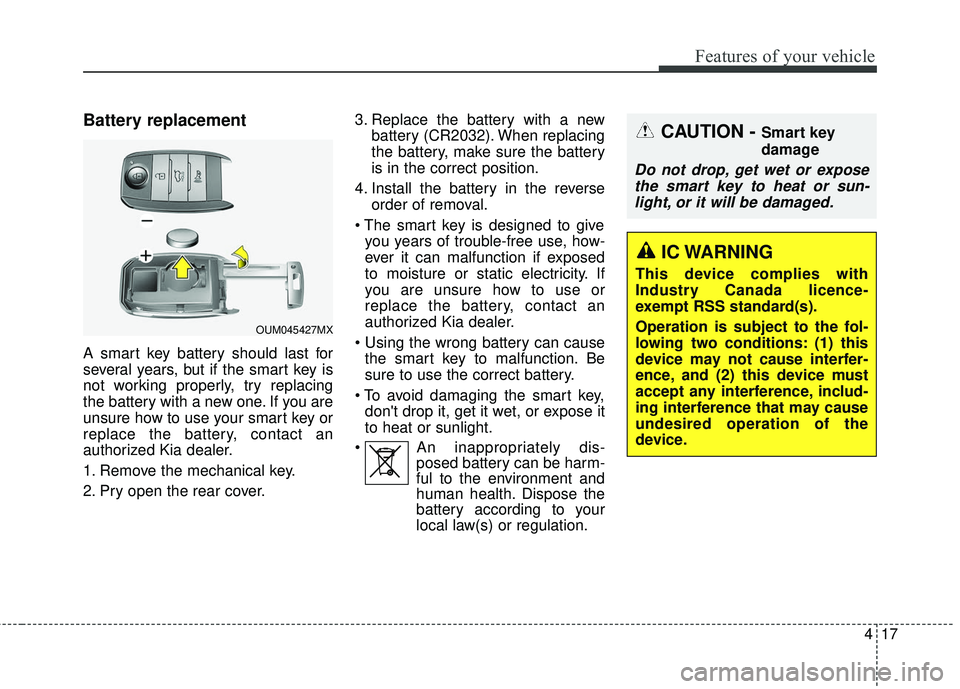
1. Remove the mechanical key.
2. Pry open the rear cover.3. Replace the battery with a new
battery (CR2032). When replacing
the battery, make sure the battery
is in the correct position.
4. Install the battery in the reverse order of removal.
you years of trouble-free use, how-
ever it can malfunction if exposed
to moisture or static electricity. If
you are unsure how to use or
replace the battery, contact an
authorized Kia dealer.
the smart key to malfunction. Be
sure to use the correct battery.
don't drop it, get it wet, or expose it
to heat or sunlight.
An inappropriately dis- posed battery can be harm-
ful to the environment and
human health. Dispose the
battery according to your
local law(s) or regulation.
CAUTION - Smart key
damage
Do not drop, get wet or expose
the smart key to heat or sun-light, or it will be damaged.
OUM045427MX
IC WARNING
This device complies with
Industry Canada licence-
exempt RSS standard(s).
Operation is subject to the fol-
lowing two conditions: (1) this
device may not cause interfer-
ence, and (2) this device must
accept any interference, includ-
ing interference that may cause
undesired operation of the
device.
Page 114 of 536
429
Features of your vehicle
Opening the liftgate
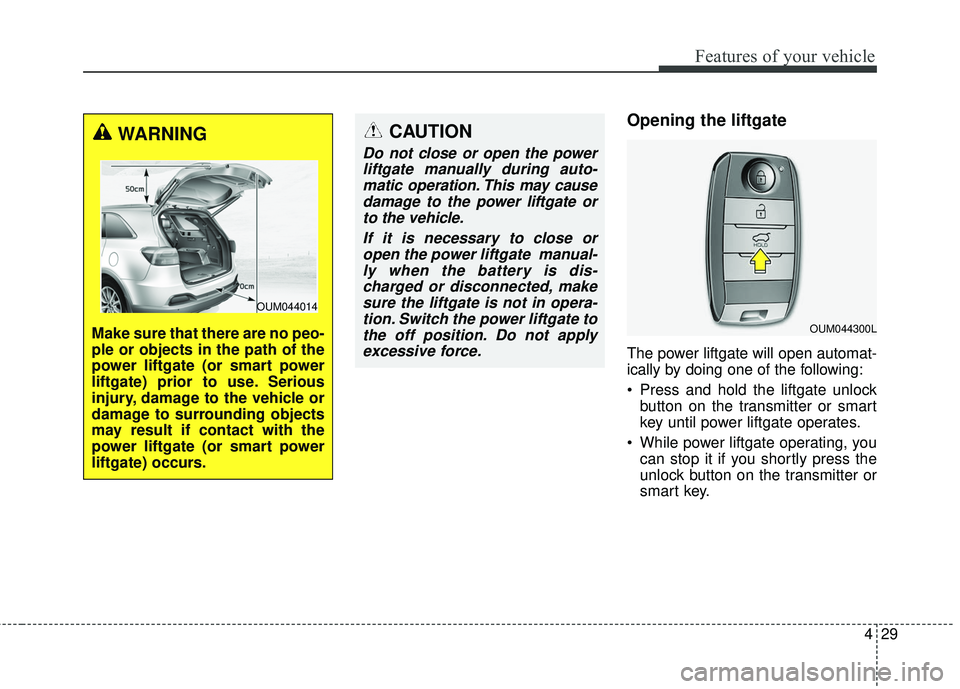
The power liftgate will open automat-
ically by doing one of the following:
Press and hold the liftgate unlockbutton on the transmitter or smart
key until power liftgate operates.
While power liftgate operating, you can stop it if you shortly press the
unlock button on the transmitter or
smart key.
CAUTION
Do not close or open the powerliftgate manually during auto-matic operation. This may causedamage to the power liftgate orto the vehicle.
If it is necessary to close oropen the power liftgate manual-ly when the battery is dis-charged or disconnected, makesure the liftgate is not in opera-tion. Switch the power liftgate tothe off position. Do not applyexcessive force.
OUM044300L
WARNING
Make sure that there are no peo-
ple or objects in the path of the
power liftgate (or smart power
liftgate) prior to use. Serious
injury, damage to the vehicle or
damage to surrounding objects
may result if contact with the
power liftgate (or smart power
liftgate) occurs.
OUM044014
Page 116 of 536
431
Features of your vehicle
For emergency stop while powerliftgate operating, press the power
liftgate open/close button shortly.
Power liftgate non-opening condi-
tions
The power liftgate will not open auto-
matically, when the vehicle is moving
more than 3km/h (2mph) or the auto-
matic shift lever is not in P(Park)
position. The pow er liftgate will not
open automatically, when the auto-
matic shift lever is not in P(Park) posi-
tion or the manual shift lever is not in
N(Neutral) position.
✽ ✽ NOTICE
The chime will sound continuously if
you drive over 3km/h (2mph) with the
liftgate opened. Stop your vehicle at a
safe place as soon as possible to check
if your liftgate is opened.
✽ ✽NOTICE
• The power liftgate can be operated
when the engine is not running.
However the power liftgate opera-
tion consumes large amounts of
vehicle electric power. To prevent
the battery from being discharged,
do not operate it excessively.
• To prevent the battery from being discharged, do not leave the power
liftgate in the open position for a
long time.
• Do not modify or repair any part of the power liftgate by yourself.
This must be done by an author-
ized Kia dealer.
• When jacking up the vehicle to change a tire or repair the vehicle,
do not operate the power liftgate.
This could cause the power liftgate
to operate improperly. (Continued)
CAUTION
Do not operate the power lift-
gate more than 5 times continu-ously.
It may damage the power lift-gate system. If you operate thepower liftgate more than 5 timescontinuously, the chime willsound 3 times and the powerliftgate will not operate. At thistime, stop operating the liftgateand leave it for more than 1minute.
WARNING
Make sure there are no people
or objects around the liftgate
before opening or closing the
power liftgate. Wait until the lift-
gate is open fully and stopped
before loading or unloading
cargo from the vehicle.
Page 118 of 536
433
Features of your vehicle
How to reset the power liftgate
If the battery has been discharged or
disconnected, or if the related fuse has
been replaced or disconnected, for the
power liftgate to operate normally,
reset the power liftgate as follows:
1. Put the automatic shift lever in P(Park) or the manual shift lever in
N (Neutral).
2. While pressing the liftgate close button, press the liftgate handle
switch for more than 3 seconds.
(the chime will sound)
3. Close the liftgate manually.
If the power liftgate does not work
properly after the above procedure,
have the system checked by an
authorized Kia dealer.
✽ ✽ NOTICE
If the power liftgate does not operate
normally, first check the following
condition before using the power
liftgate.
Make sure the automatic shift lever
is in P (Park) or the manual shift
lever is in N (Neutral).
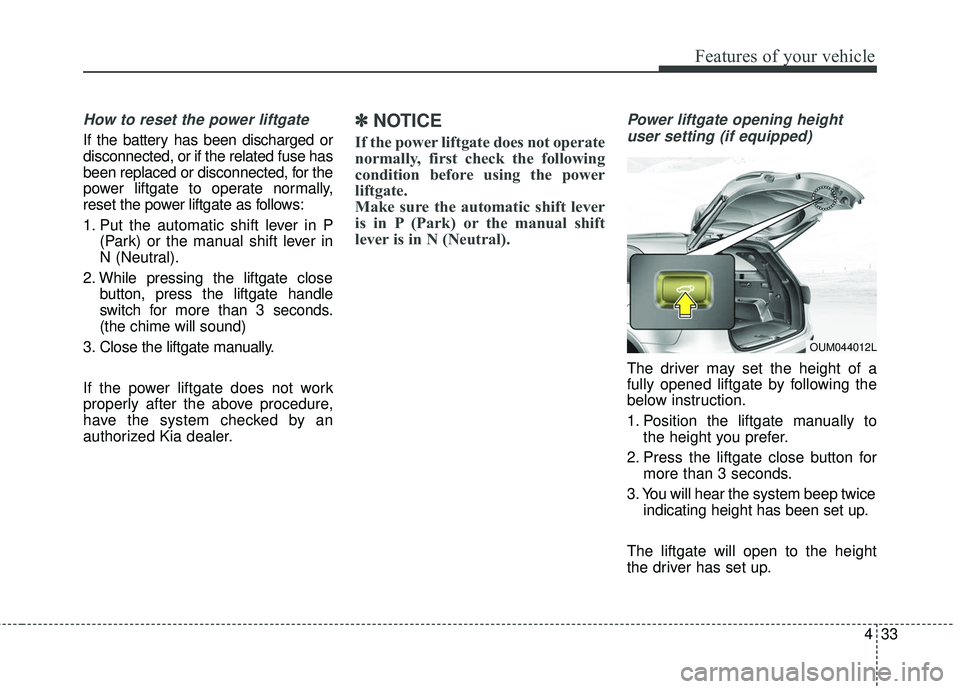
Power liftgate opening height
user setting (if equipped)
The driver may set the height of a
fully opened liftgate by following the
below instruction.
1. Position the liftgate manually to the height you prefer.
2. Press the liftgate close button for more than 3 seconds.
3. You will hear the system beep twice indicating height has been set up.
The liftgate will open to the height
the driver has set up.
OUM044012L
Page 139 of 536
Features of your vehicle
54
4
Resetting the sunroof
Whenever the vehicle battery is dis-
connected or discharged, you must
reset your sunroof system as follows:
1. Turn the ignition switch to the ON
position.
2. Close the sunshade and sunroof completely if opened.
3. Release the sunroof control lever.
4. Push the sunroof control lever for- ward in the direction of close for
about (5 ~10 seconds) until the sun-
roof operates as follows: SUN-
SHADE OPENS → GLASS TILTS
UP → SOUND OF MOTOR’S
‘CLICK’ and then release the button.
[Do not release the button on move-
ment. (initialization of reset will fail)] 5. Push the sunroof control lever for-
ward in the direction of close for
about (1 ~2 seconds), until the sun-
roof operates as follows: GLASS
CLOSE →GLASS OPEN →
GLASS/SUNSHADE CLOSE and
then release the button. [Do not
release the button on movement.
(initialization failed)]
When this is complete, the sunroof
system has been reset and one
touch open and close should be
restored.
✽ ✽ NOTICE
If you do not reset the sunroof, it
may not work properly.
Page 150 of 536
465
Features of your vehicle
Retain the original transmitter for
future programming procedures (i.e.,
new vehicle purchase). It is also sug-
gested that upon the sale of the vehi-
cle, the programmed HomeLink but-
tons be erased for security purposes
(follow step 1 in the “Programming”
portion of this text).Programming
Your vehicle may require the ignition
switch to be turned to the ACC posi-
tion for programming and/or opera-
tion of HomeLink. It is also recom-
mended that a new battery be
replaced in the hand-held transmitter
of the device being programmed to
HomeLink for quicker training and
accurate transmission of the radio-
frequency.
Follow these steps to train your
HomeLink mirror:
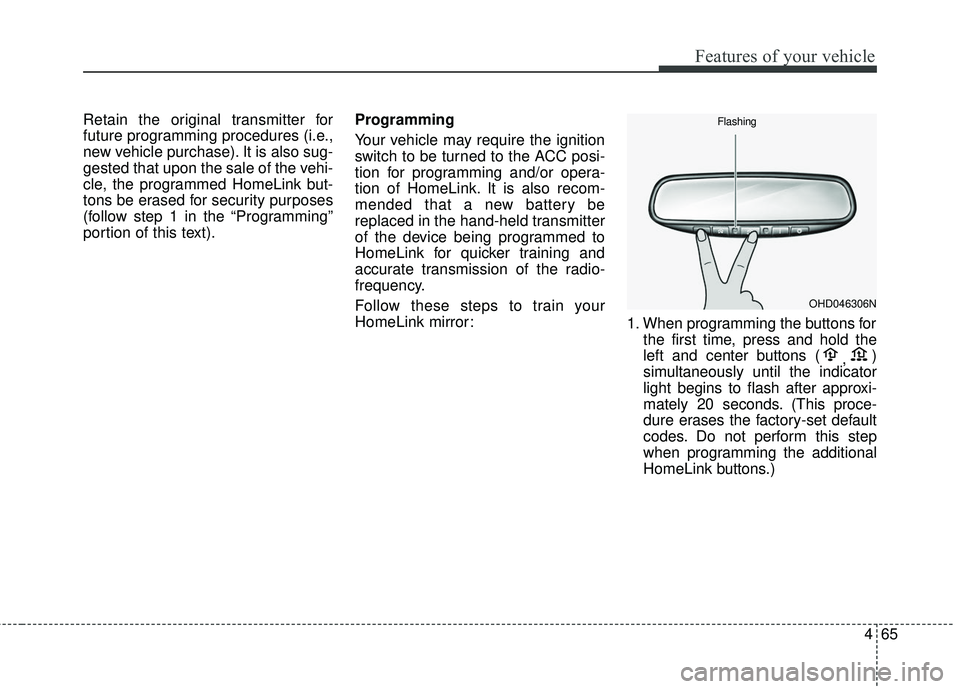
1. When programming the buttons for
the first time, press and hold the
left and center buttons ( ,)
simultaneously until the indicator
light begins to flash after approxi-
mately 20 seconds. (This proce-
dure erases the factory-set default
codes. Do not perform this step
when programming the additional
HomeLink buttons.)
OHD046306N
Flashing
Page 157 of 536
Features of your vehicle
72
4
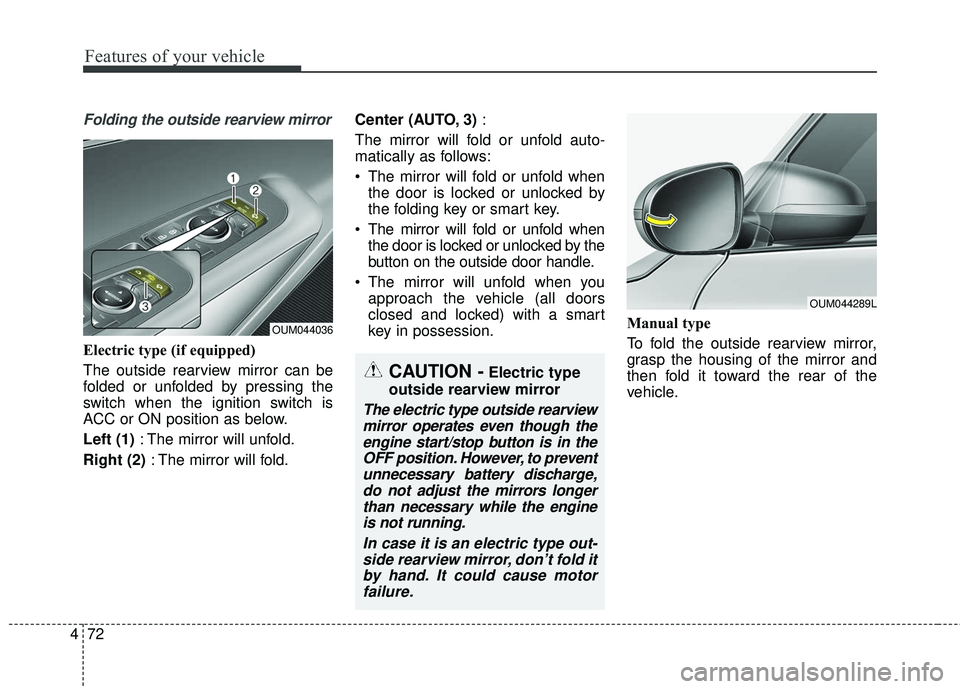
Folding the outside rearview mirror
Electric type (if equipped)
The outside rearview mirror can be
folded or unfolded by pressing the
switch when the ignition switch is
ACC or ON position as below.
Left (1) : The mirror will unfold.
Right (2) : The mirror will fold. Center (AUTO, 3)
:
The mirror will fold or unfold auto-
matically as follows:
The mirror will fold or unfold when the door is locked or unlocked by
the folding key or smart key.
The mirror will fold or unfold when the door is locked or unlocked by the
button on the outside door handle.
The mirror will unfold when you approach the vehicle (all doors
closed and locked) with a smart
key in possession. Manual type
To fold the outside rearview mirror,
grasp the housing of the mirror and
then fold it toward the rear of the
vehicle.
OUM044036
CAUTION -Electric type
outside rearview mirror
The electric type outside rearview mirror operates even though theengine start/stop button is in theOFF position. However, to preventunnecessary battery discharge,do not adjust the mirrors longerthan necessary while the engineis not running.
In case it is an electric type out-side rearview mirror, don’t fold itby hand. It could cause motorfailure.
OUM044289L
Page 165 of 536
Features of your vehicle
80
4
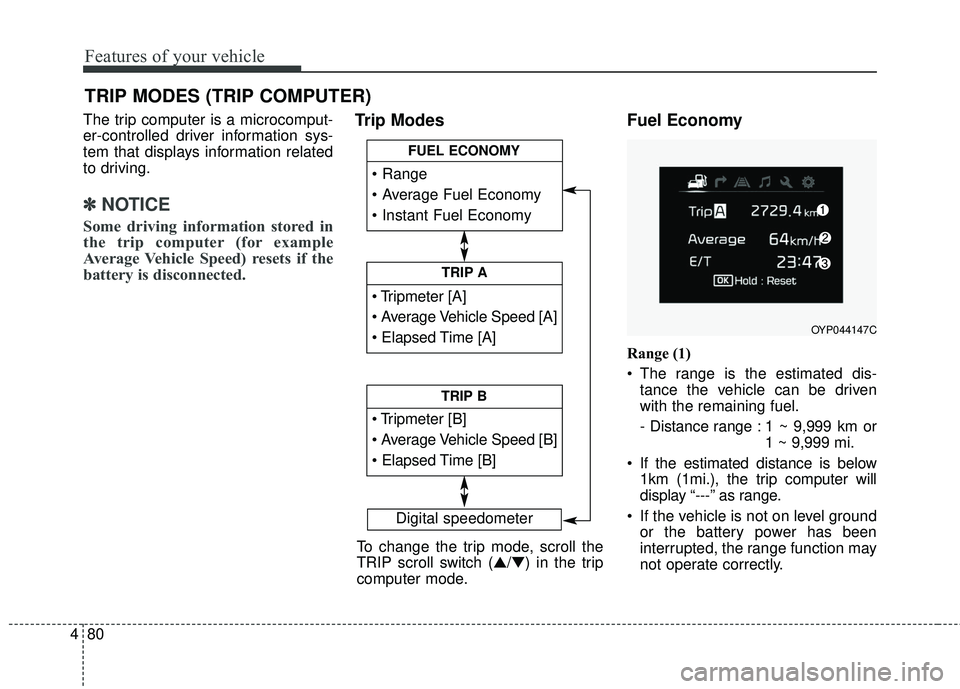
The trip computer is a microcomput-
er-controlled driver information sys-
tem that displays information related
to driving.
✽ ✽
NOTICE
Some driving information stored in
the trip computer (for example
Average Vehicle Speed) resets if the
battery is disconnected.
Trip Modes Fuel Economy
Range (1)
The range is the estimated dis-
tance the vehicle can be driven
with the remaining fuel.
- Distance range : 1 ~ 9,999 km or 1 ~ 9,999 mi.
If the estimated distance is below 1km (1mi.), the trip computer will
display “---” as range.
If the vehicle is not on level ground or the battery power has been
interrupted, the range function may
not operate correctly.
TRIP MODES (TRIP COMPUTER)
Digital speedometer
To change the trip mode, scroll the
TRIP scroll switch (▲/▼) in the trip
computer mode.
TRIP A
TRIP B
FUEL ECONOMY
OYP044147C
Page 171 of 536
Features of your vehicle
86
4
✽ ✽
NOTICE
If any of the following conditions
occur, the km and days may be
incorrect.
- The battery cable is disconnected.
- The fuse switch is turned off.
- The battery is discharged.
Master Warning Mode
This warning light informs the driv-
er of the following situations
- Low washer fluid
- Blind Spot Detection (BSD) mal-function (if equipped)
- Lane Departure warning system (LDWS) malfunction (if equipped)
- Autonomous Emergency Braking (AEB) malfunction (if equipped)
- Advanced smart cruise control system (ASCC) malfunction (if
equipped)
- Service reminder (if equipped)
- Lamp malfunction and so on.
The Master Warning Light illumi-
nates when more than one of the
above warning situations occur. At
this time, the LCD Modes Icon will
change from ( ) to ( ).
If the warning situation is solved, the
master warning light will be turned off
and the LCD Modes Icon will be
changed back to its previous icon ( ).
(ex : refill the washer fluid)
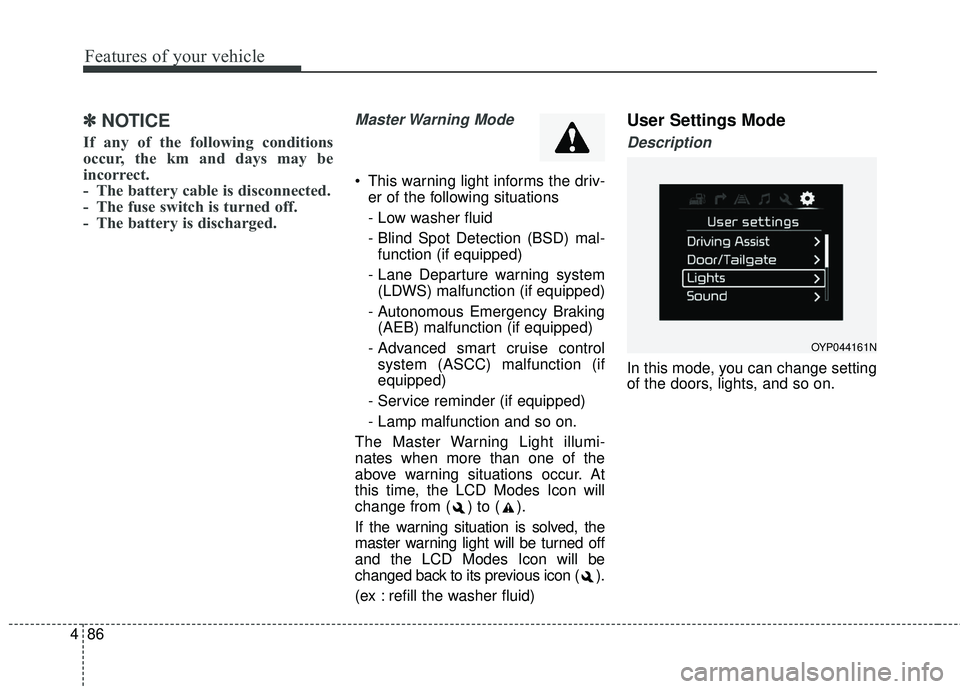
User Settings Mode
Description
In this mode, you can change setting
of the doors, lights, and so on.
OYP044161N