ECO mode KIA SORENTO 2018 Owner's Manual
[x] Cancel search | Manufacturer: KIA, Model Year: 2018, Model line: SORENTO, Model: KIA SORENTO 2018Pages: 536, PDF Size: 13.42 MB
Page 235 of 536
Features of your vehicle
150
4
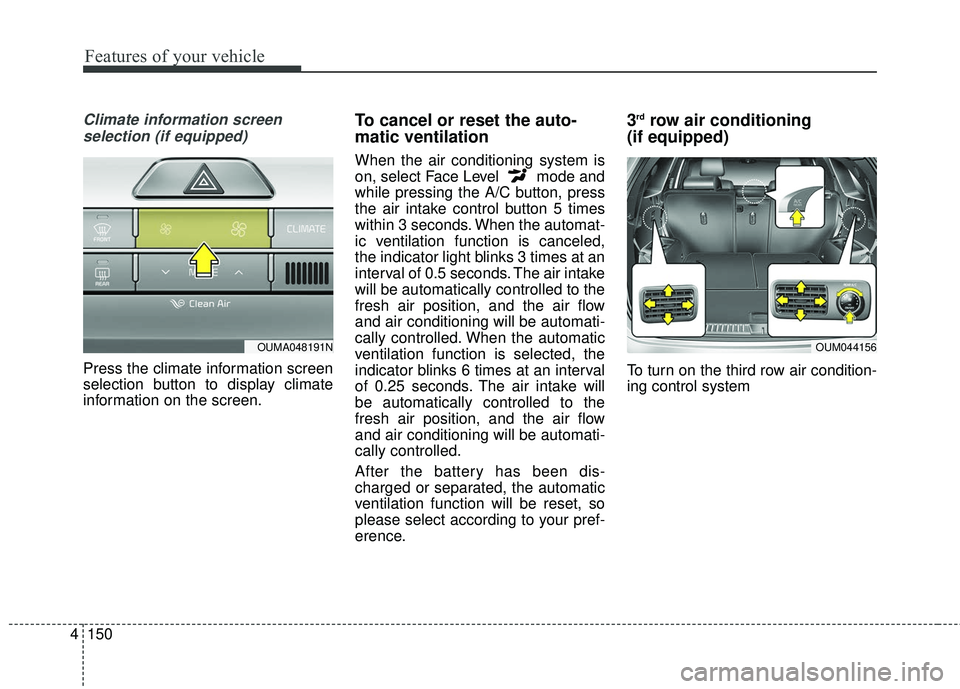
Climate information screen
selection (if equipped)
Press the climate information screen
selection button to display climate
information on the screen.
To cancel or reset the auto-
matic ventilation
When the air conditioning system is
on, select Face Level mode and
while pressing the A/C button, press
the air intake control button 5 times
within 3 seconds. When the automat-
ic ventilation function is canceled,
the indicator light blinks 3 times at an
interval of 0.5 seconds. The air intake
will be automatically controlled to the
fresh air position, and the air flow
and air conditioning will be automati-
cally controlled. When the automatic
ventilation function is selected, the
indicator blinks 6 times at an interval
of 0.25 seconds. The air intake will
be automatically controlled to the
fresh air position, and the air flow
and air conditioning will be automati-
cally controlled.
After the battery has been dis-
charged or separated, the automatic
ventilation function will be reset, so
please select according to your pref-
erence.
3rdrow air conditioning
(if equipped)
To turn on the third row air condition-
ing control system
OUM044156OUMA048191N
Page 238 of 536
4153
Features of your vehicle
When using the air conditioningsystem, you may notice clear water
dripping (or even puddling) on the
ground under the passenger side
of the vehicle. This is a normal sys-
tem operation characteristic.
Operating the air conditioning sys- tem in the recirculated air position
provides maximum cooling, how-
ever, continual operation in this
mode may cause the air inside the
vehicle to become stale.
During cooling operation, you may occasionally notice a misty air flow
because of rapid cooling and
humid air intake. This is a normal
system operation characteristic.Climate control air filter
(if equipped)
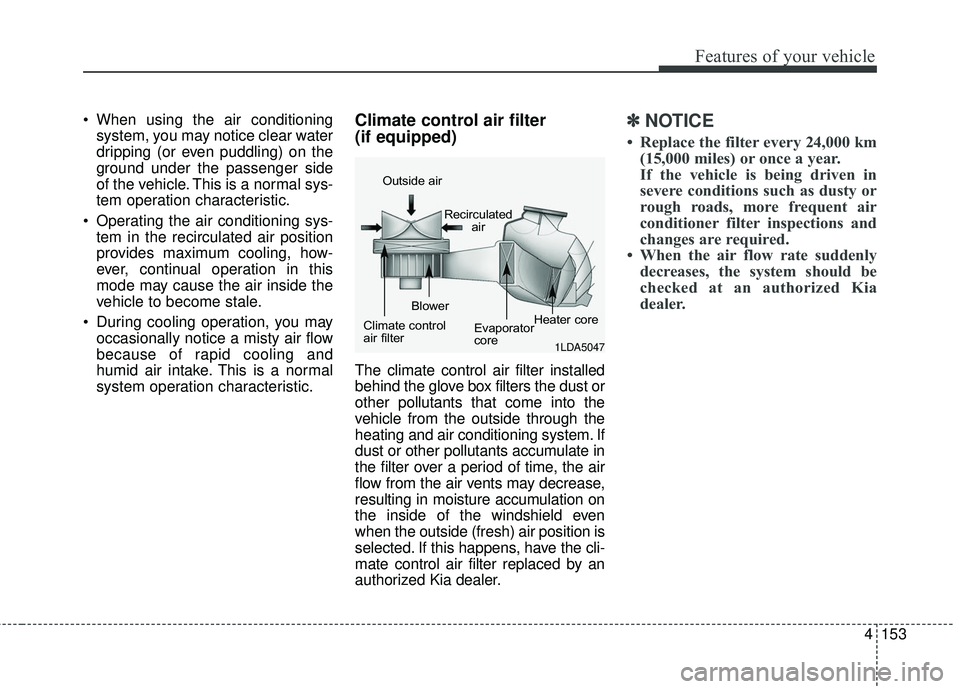
The climate control air filter installed
behind the glove box filters the dust or
other pollutants that come into the
vehicle from the outside through the
heating and air conditioning system. If
dust or other pollutants accumulate in
the filter over a period of time, the air
flow from the air vents may decrease,
resulting in moisture accumulation on
the inside of the windshield even
when the outside (fresh) air position is
selected. If this happens, have the cli-
mate control air filter replaced by an
authorized Kia dealer.
✽ ✽ NOTICE
• Replace the filter every 24,000 km
(15,000 miles) or once a year.
If the vehicle is being driven in
severe conditions such as dusty or
rough roads, more frequent air
conditioner filter inspections and
changes are required.
• When the air flow rate suddenly decreases, the system should be
checked at an authorized Kia
dealer.
1LDA5047
Outside air
Recirculatedair
Climate control
air filter Blower
Evaporator
coreHeater core
Page 242 of 536
4157
Features of your vehicle
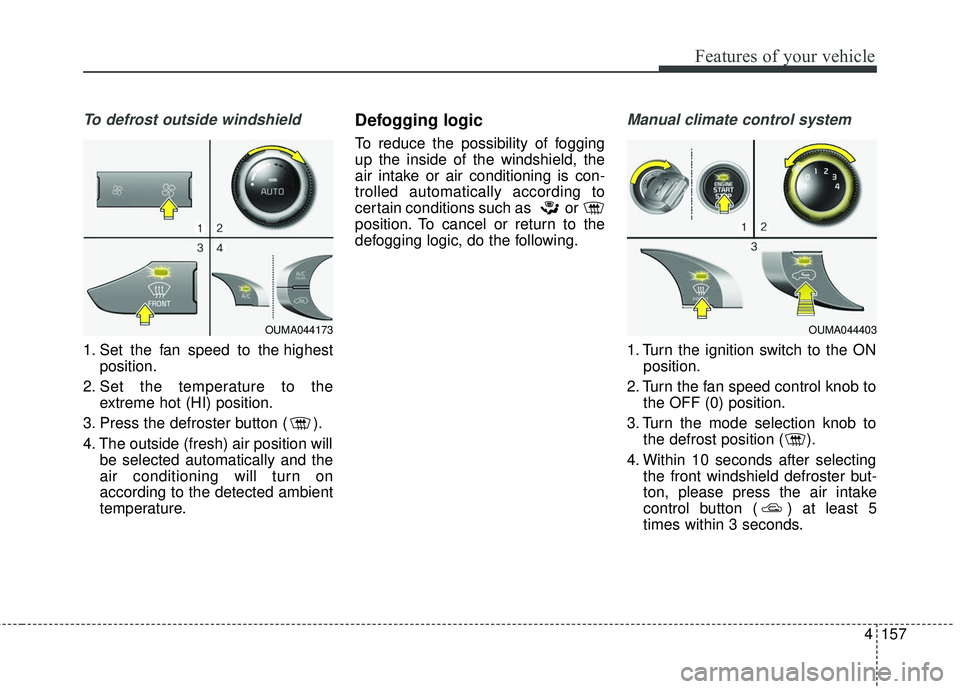
To defrost outside windshield
1. Set the fan speed to the highestposition.
2. Set the temperature to the extreme hot (HI) position.
3. Press the defroster button ( ).
4. The outside (fresh) air position will be selected automatically and the
air conditioning will turn on
according to the detected ambient
temperature.
Defogging logic
To reduce the possibility of fogging
up the inside of the windshield, the
air intake or air conditioning is con-
trolled automatically according to
certain conditions such as or
position. To cancel or return to the
defogging logic, do the following.
Manual climate control system
1. Turn the ignition switch to the ONposition.
2. Turn the fan speed control knob to the OFF (0) position.
3. Turn the mode selection knob to the defrost position ( ).
4. Within 10 seconds after selecting the front windshield defroster but-
ton, please press the air intake
control button ( ) at least 5
times within 3 seconds.
OUMA044173OUMA044403
Page 260 of 536
4175
Features of your vehicle
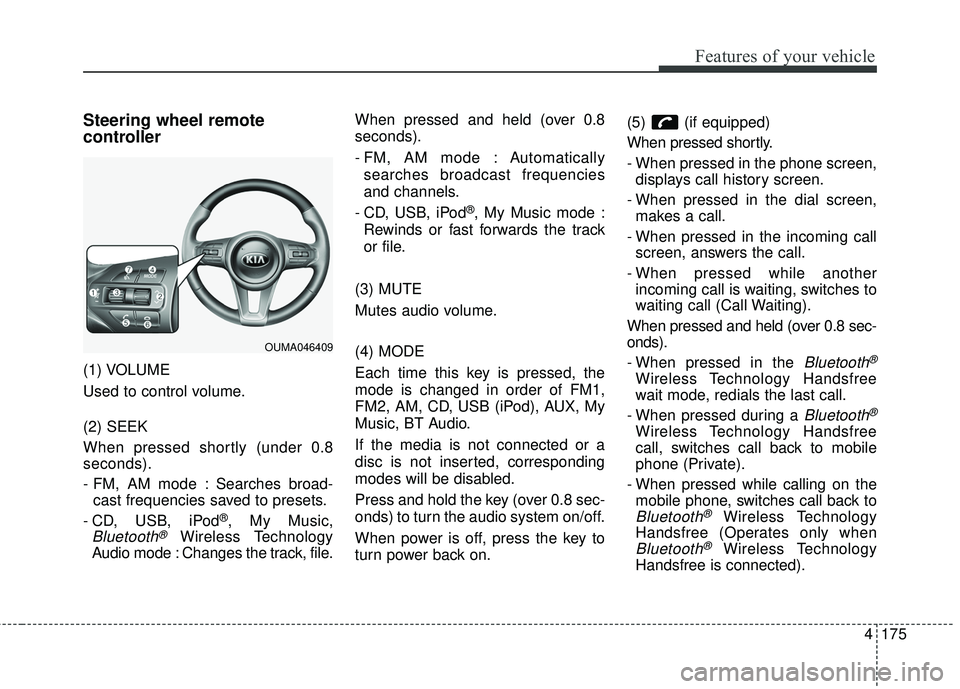
Steering wheel remote
controller
(1) VOLUME
Used to control volume.
(2) SEEK
When pressed shortly (under 0.8
seconds).
- FM, AM mode : Searches broad-cast frequencies saved to presets.
- CD, USB, iPod
®, My Music,
Bluetooth®Wireless Technology
Audio mode : Changes the track, file. When pressed and held (over 0.8
seconds).
- FM, AM mode : Automatically
searches broadcast frequencies
and channels.
- CD, USB, iPod
®, My Music mode :
Rewinds or fast forwards the track
or file.
(3) MUTE
Mutes audio volume.
(4) MODE
Each time this key is pressed, the
mode is changed in order of FM1,
FM2, AM, CD, USB (iPod), AUX, My
Music, BT Audio.
If the media is not connected or a
disc is not inserted, corresponding
modes will be disabled.
Press and hold the key (over 0.8 sec-
onds) to turn the audio system on/off.
When power is off, press the key to
turn power back on. (5) (if equipped)
When pressed shortly.
- When pressed in the phone screen,
displays call history screen.
- When pressed in the dial screen, makes a call.
- When pressed in the incoming call screen, answers the call.
- When pressed while another incoming call is waiting, switches to
waiting call (Call Waiting).
When pressed and held (over 0.8 sec-
onds).
- When pressed in the
Bluetooth®
Wireless Technology Handsfree
wait mode, redials the last call.
- When pressed during a
Bluetooth®
Wireless Technology Handsfree
call, switches call back to mobile
phone (Private).
- When pressed while calling on the mobile phone, switches call back to
Bluetooth®Wireless Technology
Handsfree (Operates only when
Bluetooth®Wireless Technology
Handsfree is connected).
OUMA046409
Page 266 of 536
4181
Features of your vehicle
USING THE USB DEVICE
To use an external USB device,make sure the device is not con-
nected when starting up the vehi-
cle. Connect the device after start-
ing up.
If you start the engine when the USB device is connected, it may
damage the USB device. (USB
flashdrives are very sensitive to
electric shock.)
If the engine is started up or turned off while the external USB device is
connected, the external USB
device may not work.
The System may not play unau- thenticated MP3 or WMA files.
1) It can only play MP3 files with the compression rate between
8Kbps ~ 320Kbps.
2) It can only play WMA music files with the compression rate
between 8Kbps ~ 320Kbps.
Take precautions for static electrici- ty when connecting or disconnect-
ing the external USB device.
(Continued)(Continued)
An encrypted MP3 PLAYER is not
recognizable.
Depending on the condition of the external USB device, the connect-
ed external USB device can be
unrecognizable.
When the formatted byte/sector setting of External USB device is
not either 512BYTE or 2048BYTE,
then the device will not be recog-
nized.
Use only a USB device formatted to FAT 12/16/32.
USB devices without USB I/F authentication may not be recog-
nizable.
Make sure the USB connection ter- minal does not come in contact
with the human body or other
objects.
If you repeatedly connect or dis- connect the USB device in a short
period of time, it may break the
device.
(Continued)(Continued)
You may hear a strange noise when connecting or disconnecting
a USB device.
If you disconnect the external USB device during playback in USB
mode, the external USB device
can be damaged or may malfunc-
tion. Therefore, disconnect the
external USB device when the
audio is turned off or in another
mode. (e.g, Radio)
Depending on the type and capac- ity of the external USB device or
the type of the files stored in the
device, there is a difference in the
time for recognition the device.
Do not use the USB device for pur- poses other than playing music
files.
Playing videos through the USB is not supported.
Use of USB accessories such as rechargers or heaters using USB
I/F may lower performance or
cause trouble.
(Continued)
Page 267 of 536
Features of your vehicle
182
4
(Continued)
If you use devices such as a USB
hub purchased separately, the
vehicle’s audio system may not
recognize the USB device. In that
case, connect the USB device
directly to the multimedia terminal
of the vehicle.
If the USB device is divided by log- ical drives, only the music files on
the highest-priority drive are recog-
nized by car audio.
Devices such as MP3 Player/ Cellular phone/Digital camera can
be unrecognizable by standard
USB I/F can be unrecognizable.
Charging through the USB may not be supported in some mobile
devices.
USB HDD or USB types liable to connection failures due to vehicle
vibrations are not supported. (i-stick
type)
Some non-standard USB devices (METAL COVER TYPE USB) can
be unrecognizable.
(Continued)(Continued)
Some USB flash memory readers
(such as CF, SD, micro SD, etc.) or
external-HDD type devices can be
unrecognizable.
Music files protected by DRM (DIGI- TAL RIGHTS MANAGEMENT) are
not recognizable.
The data in the USB memory may be lost while using this audio.
Always back up important data on
a personal storage device.
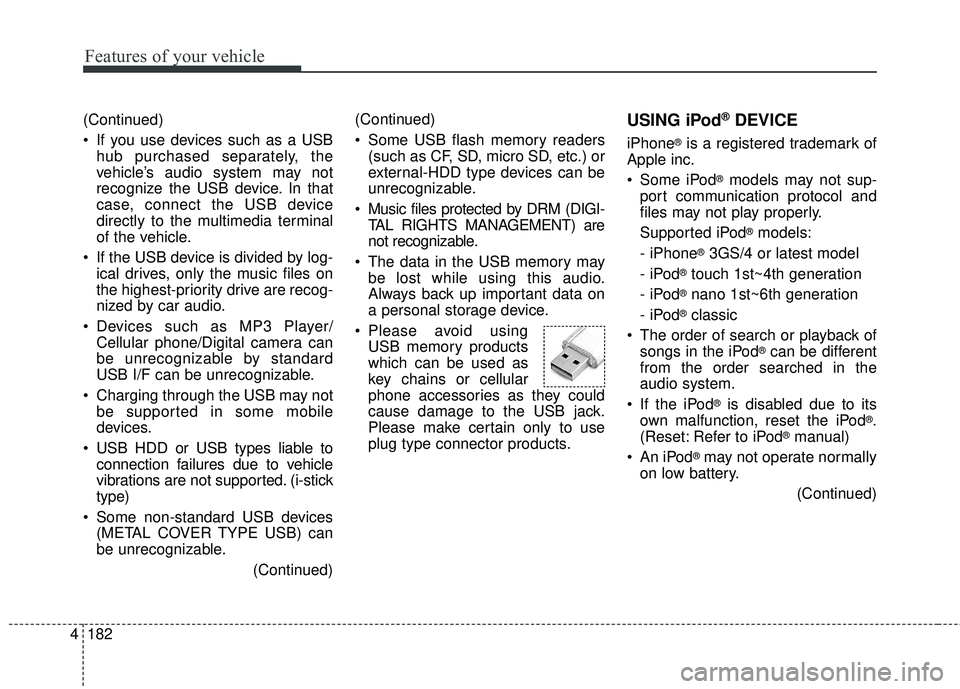
Please avoid using USB memory products
which can be used as
key chains or cellular
phone accessories as they could
cause damage to the USB jack.
Please make certain only to use
plug type connector products.USING iPod®DEVICE
iPhone®is a registered trademark of
Apple inc.
Some iPod
®models may not sup-
port communication protocol and
files may not play properly.
Supported iPod
®models:
- iPhone
®3GS/4 or latest model
- iPod
®touch 1st~4th generation
- iPod
®nano 1st~6th generation
- iPod
®classic
The order of search or playback of songs in the iPod
®can be different
from the order searched in the
audio system.
If the iPod
®is disabled due to its
own malfunction, reset the iPod®.
(Reset: Refer to iPod®manual)
An iPod
®may not operate normally
on low battery.
(Continued)
Page 270 of 536
4185
Features of your vehicle
Park the vehicle when connectingthe head unit with the mobile
phone.
Bluetooth
®connection may become
intermittently disconnected in some
mobile phones. Follow these steps
to try again.
1. Within the mobile phone, turn the Bl uetooth
®function off/on
and try again.
2. Turn the mobile phone power Off/On and try again.
3. Completely remove the mobile phone battery (if possible),
reboot, and then try again.
4. Reboot the audio system and try again.
5. Delete all paired devices, pair and try again.
Voice Recognition
(if equipped)
When using the voice recognitionfeature, only commands listed
within the user's manual are sup-
ported.
Be aware that during the operation of the voice recognition system,
pressing any key other than the key terminate voice recogni-
tion mode.
For optimal voice recognition per- formance, position your head
below the microphone above the
driver’s seat and maintain proper
position when speaking voice com-
mands.
Within the following situations, voice recognition may not function
properly due to external sound.
- When the windows and sunroof are open
- When the blower AC/heater is set to high
- When entering and passing through tunnels
(Continued)(Continued)
- When driving on rugged and uneven roads
- During severe rain (heavy rains, windstorms)
Phone related voice commands can be used only when a
Bluetooth®
Wireless Technology device is con-
nected.
When making calls by stating a name, the corresponding contact
must be downloaded and stored
within the audio system.
After downloading the
Bluetooth®
Wireless Technology phone book,
it takes some time to convert the
phone book data into voice infor-
mation. During this time, voice
recognition may not properly oper-
ate.
Pronounce the voice commands naturally and clearly as if in a nor-
mal conversation.
Page 271 of 536
Driving your vehicle
Before driving . . . . . . . . . . . . . . . . . . . . . . . . . . . . . . 5-4• Before entering vehicle . . . . . . . . . . . . . . . . . . . . . . . . . 5-4
• Necessary inspections . . . . . . . . . . . . . . . . . . . . . . . . . . 5-4
• Before starting . . . . . . . . . . . . . . . . . . . . . . . . . . . . . . . . 5-4
Key positions . . . . . . . . . . . . . . . . . . . . . . . . . . . . . . . 5-6• Illuminated ignition switch . . . . . . . . . . . . . . . . . . . . . . 5-6
• Ignition switch position . . . . . . . . . . . . . . . . . . . . . . . . . 5-6
• Starting the engine . . . . . . . . . . . . . . . . . . . . . . . . . . . . 5-7
Engine start/stop button . . . . . . . . . . . . . . . . . . . . . 5-9• Illuminated engine start/stop button . . . . . . . . . . . . . . 5-9
• Engine start/stop button position. . . . . . . . . . . . . . . . . 5-9
• Starting the engine with a smart key . . . . . . . . . . . . . 5-11
Automatic transaxle . . . . . . . . . . . . . . . . . . . . . . . . 5-13• Automatic transaxle operation. . . . . . . . . . . . . . . . . . 5-13
• Good driving practices . . . . . . . . . . . . . . . . . . . . . . . . 5-19
All wheel drive (AWD) . . . . . . . . . . . . . . . . . . . . . . 5-20• Tight corner brake effect . . . . . . . . . . . . . . . . . . . . . . 5-21
• All wheel drive (AWD) transfer mode selection . . . . 5-22
• For safe all wheel drive operation . . . . . . . . . . . . . . . 5-23
Brake system . . . . . . . . . . . . . . . . . . . . . . . . . . . . . . 5-27• Power brakes . . . . . . . . . . . . . . . . . . . . . . . . . . . . . . . . 5-27
• Parking brake - Foot type . . . . . . . . . . . . . . . . . . . . . 5-29
• Electronic parking brake (EPB) . . . . . . . . . . . . . . . . 5-30
• Auto hold . . . . . . . . . . . . . . . . . . . . . . . . . . . . . . . . . . . 5-\
37
• Anti-lock brake system (ABS) . . . . . . . . . . . . . . . . . . 5-40
• Electronic stability control (ESC) . . . . . . . . . . . . . . . 5-42
• Vehicle stability management (VSM) . . . . . . . . . . . . 5-46• Hill-start assist control (HAC) . . . . . . . . . . . . . . . . . . 5-47
• Good braking practices. . . . . . . . . . . . . . . . . . . . . . . . 5-48
Autonomous emergency braking (AEB)/
Forward collision warning (FCW) . . . . . . . . . . . 5-50
• System setting and activation . . . . . . . . . . . . . . . . . . . 5-50
• AEB warning message and system control . . . . . . . . 5-52
• Brake operation . . . . . . . . . . . . . . . . . . . . . . . . . . . . . . 5-54
• Sensor to detect the distance from the vehicle
in front (front radar) . . . . . . . . . . . . . . . . . . . . . . . . 5-54
• System malfunction . . . . . . . . . . . . . . . . . . . . . . . . . . . 5-55
• Limitation of the system . . . . . . . . . . . . . . . . . . . . . . . 5-56
• Recognizing pedestrians . . . . . . . . . . . . . . . . . . . . . . . 5-59
Cruise control system. . . . . . . . . . . . . . . . . . . . . . . 5-61• To set cruise control speed . . . . . . . . . . . . . . . . . . . . . 5-62
• To increase cruise control set speed. . . . . . . . . . . . . . 5-62
• To decrease the cruising speed . . . . . . . . . . . . . . . . . . 5-63
• To temporarily accelerate with the cruise control on . . . . . . . . . . . . . . . . . . . . . . . . . . . . . . . . . . 5-63\
• To cancel cruise control . . . . . . . . . . . . . . . . . . . . . . . 5-63
• To resume cruising speed . . . . . . . . . . . . . . . . . . . . . . 5-64
• To turn cruise control off. . . . . . . . . . . . . . . . . . . . . . . 5-64
Advanced smart cruise control system (ASCC). . 5-65• Speed setting (ASCC) . . . . . . . . . . . . . . . . . . . . . . . . . 5-66
• Vehicle to vehicle distance setting (ASCC) . . . . . . . . 5-70
• To adjust the sensitivity of advanced smart
cruise control . . . . . . . . . . . . . . . . . . . . . . . . . . . . . . . 5-74
• To convert to cruise control mode . . . . . . . . . . . . . . . 5-75
• Limitations of the system . . . . . . . . . . . . . . . . . . . . . . 5-75
5
Page 272 of 536
 . . . . . . . . .")
Drive mode integrated control system . . . . . . . . . 5-81• Drive mode . . . . . . . . . . . . . . . . . . . . . . . . . . . . . . . . . . 5-81\
Blind spot detection system (BSD) . . . . . . . . . . . . 5-84• BSD (Blind spot detection) / LCA (Lane change assist) . . . . . . . . . . . . . . . . . . . . 5-85
• RCTA (Rear cross traffic alert) . . . . . . . . . . . . . . . . . 5-88
• Non-operating condition . . . . . . . . . . . . . . . . . . . . . . . 5-90
Lane departure warning system (LDWS) . . . . . . 5-92• LDWS operation . . . . . . . . . . . . . . . . . . . . . . . . . . . . . 5-93
• Warning light and message . . . . . . . . . . . . . . . . . . . . 5-95
• The LDWS does not operate when . . . . . . . . . . . . . . 5-95
• Driver's attention. . . . . . . . . . . . . . . . . . . . . . . . . . . . . 5-95
Economical operation . . . . . . . . . . . . . . . . . . . . . . 5-97
Special driving conditions . . . . . . . . . . . . . . . . . . . 5-99
• Hazardous driving conditions . . . . . . . . . . . . . . . . . . 5-99
• Reducing the risk of a rollover . . . . . . . . . . . . . . . . . 5-99
• Rocking the vehicle . . . . . . . . . . . . . . . . . . . . . . . . . . 5-101
• Smooth cornering . . . . . . . . . . . . . . . . . . . . . . . . . . . 5-101
• Driving at night . . . . . . . . . . . . . . . . . . . . . . . . . . . . . 5-102
• Driving in the rain . . . . . . . . . . . . . . . . . . . . . . . . . . . 5-102
• Driving in flooded areas . . . . . . . . . . . . . . . . . . . . . . 5-103
• Driving off-road . . . . . . . . . . . . . . . . . . . . . . . . . . . . . 5-103
• Highway driving . . . . . . . . . . . . . . . . . . . . . . . . . . . . 5-103
Winter driving . . . . . . . . . . . . . . . . . . . . . . . . . . . 5-105• Snowy or icy conditions . . . . . . . . . . . . . . . . . . . . . . 5-105
• Use high quality ethylene glycol coolant . . . . . . . . . 5-106
• Check battery and cables . . . . . . . . . . . . . . . . . . . . . 5-106
• Change to "winter weight" oil if necessary . . . . . . 5-106 • Check spark plugs and ignition system. . . . . . . . . . 5-106
• To keep locks from freezing . . . . . . . . . . . . . . . . . . . 5-106
• Use approved window washer anti-freeze in
system . . . . . . . . . . . . . . . . . . . . . . . . . . . . . . . . . . . . \
5-106
• Don't let your parking brake freeze . . . . . . . . . . . . 5-107
• Don't let ice and snow accumulate underneath . . . 5-107
• Carry emergency equipment . . . . . . . . . . . . . . . . . . 5-107
Trailer towing . . . . . . . . . . . . . . . . . . . . . . . . . . . . 5-108• Hitches . . . . . . . . . . . . . . . . . . . . . . . . . . . . . . . . . . . . \
5-109
• Safety chains . . . . . . . . . . . . . . . . . . . . . . . . . . . . . . . 5-109
• Trailer brakes . . . . . . . . . . . . . . . . . . . . . . . . . . . . . . 5-109
• Driving with a trailer . . . . . . . . . . . . . . . . . . . . . . . . 5-110
• Maintenance when trailer towing . . . . . . . . . . . . . . 5-113
• If you do decide to pull a trailer . . . . . . . . . . . . . . . 5-114
Vehicle load limit . . . . . . . . . . . . . . . . . . . . . . . . . 5-116• Tire and loading information label . . . . . . . . . . . . . 5-116
• Certification label . . . . . . . . . . . . . . . . . . . . . . . . . . . 5-120
Vehicle weight glossary . . . . . . . . . . . . . . . . . . . . 5-122• Base curb weight . . . . . . . . . . . . . . . . . . . . . . . . . . . 5-122
• Vehicle curb weight . . . . . . . . . . . . . . . . . . . . . . . . . . 5-122
• Cargo weight . . . . . . . . . . . . . . . . . . . . . . . . . . . . . . . 5-122
• GAW (Gross axle weight) . . . . . . . . . . . . . . . . . . . . . 5-122
• GAWR (Gross axle weight rating) . . . . . . . . . . . . . . 5-122
• GVW (Gross vehicle weight) . . . . . . . . . . . . . . . . . . 5-122
• GVWR (Gross vehicle weight rating) . . . . . . . . . . . 5-122
5
Page 278 of 536
Driving your vehicle
85
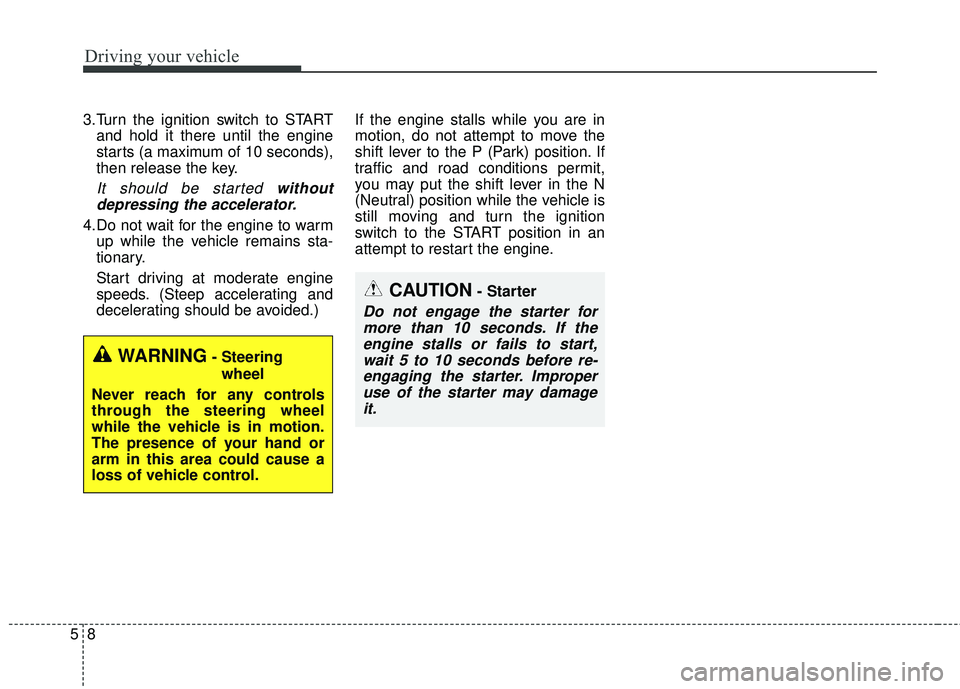
3.Turn the ignition switch to STARTand hold it there until the engine
starts (a maximum of 10 seconds),
then release the key.
It should be started withoutdepressing the accelerator.
4.Do not wait for the engine to warm up while the vehicle remains sta-
tionary.
Start driving at moderate engine
speeds. (Steep accelerating and
decelerating should be avoided.) If the engine stalls while you are in
motion, do not attempt to move the
shift lever to the P (Park) position. If
traffic and road conditions permit,
you may put the shift lever in the N
(Neutral) position while the vehicle is
still moving and turn the ignition
switch to the START position in an
attempt to restart the engine.
CAUTION- Starter
Do not engage the starter for
more than 10 seconds. If theengine stalls or fails to start,wait 5 to 10 seconds before re-engaging the starter. Improperuse of the starter may damageit.
WARNING- Steering
wheel
Never reach for any controls
through the steering wheel
while the vehicle is in motion.
The presence of your hand or
arm in this area could cause a
loss of vehicle control.