power steering KIA SORENTO 2018 Owners Manual
[x] Cancel search | Manufacturer: KIA, Model Year: 2018, Model line: SORENTO, Model: KIA SORENTO 2018Pages: 536, PDF Size: 13.42 MB
Page 13 of 536
Your vehicle at a glance
42
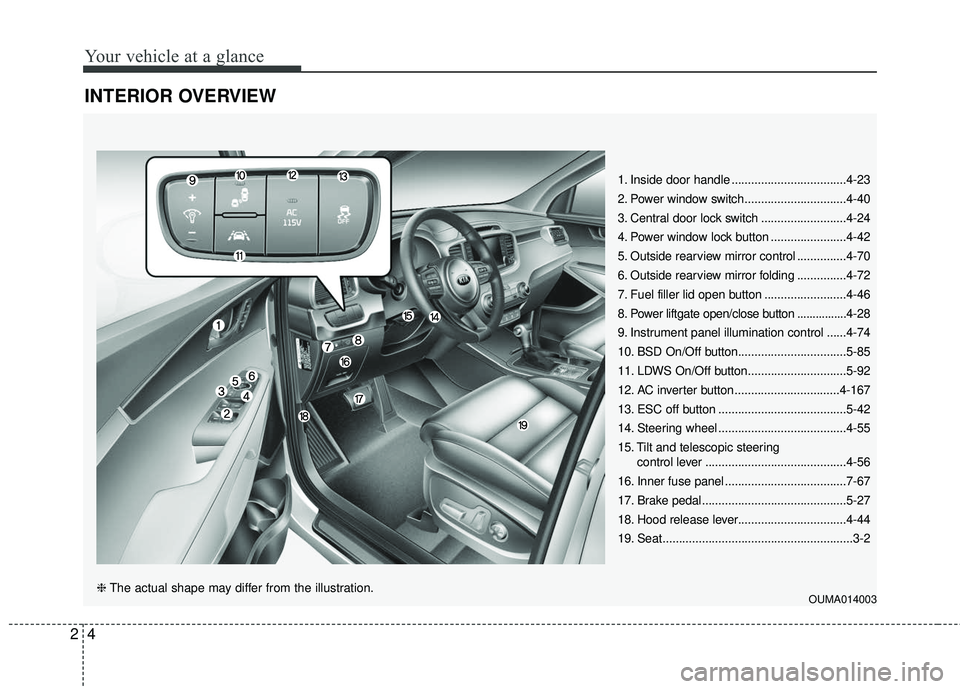
INTERIOR OVERVIEW
1. Inside door handle ...................................4-23
2. Power window switch...............................4-40
3. Central door lock switch ..........................4-24
4. Power window lock button .......................4-42
5. Outside rearview mirror control ...............4-70
6. Outside rearview mirror folding ...............4-72
7. Fuel filler lid open button .........................4-46
8. Power liftgate open/close button ................4-28
9. Instrument panel illumination control ......4-74
10. BSD On/Off button.................................5-85
11. LDWS On/Off button..............................5-92
12. AC inverter button ................................4-167
13. ESC off button .......................................5-42
14. Steering wheel .......................................4-55
15. Tilt and telescopic steering control lever ...........................................4-56
16. Inner fuse panel .....................................7-67
17. Brake pedal............................................5-27
18. Hood release lever.................................4-44
19. Seat..........................................................3-2
OUMA014003❈ The actual shape may differ from the illustration.
Page 14 of 536
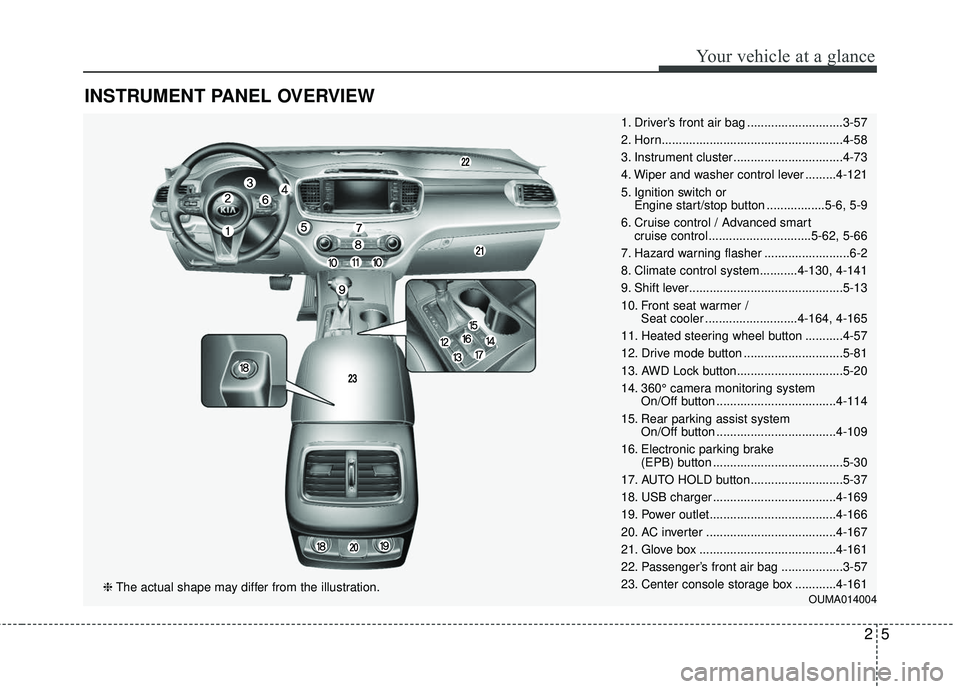
INSTRUMENT PANEL OVERVIEW
1. Driver’s front air bag ............................3-57
2. Horn.....................................................4-58
3. Instrument cluster ................................4-73
4. Wiper and washer control lever .........4-121
5. Ignition switch or Engine start/stop button .................5-6, 5-9
6. Cruise control / Advanced smart cruise control ..............................5-62, 5-66
7. Hazard warning flasher .........................6-2
8. Climate control system...........4-130, 4-141
9. Shift lever.............................................5-13
10. Front seat warmer / Seat cooler ...........................4-164, 4-165
11. Heated steering wheel button ...........4-57
12. Drive mode button .............................5-81
13. AWD Lock button...............................5-20
14. 360° camera monitoring system On/Off button ...................................4-114
15. Rear parking assist system On/Off button ...................................4-109
16. Electronic parking brake (EPB) button ......................................5-30
17. AUTO HOLD button...........................5-37
18. USB charger ....................................4-169
19. Power outlet.....................................4-166
20. AC inverter ......................................4-167
21. Glove box ........................................4-161
22. Passenger’s front air bag ..................3-57
23. Center console storage box ............4-161
OUMA014004❈ The actual shape may differ from the illustration.
25
Your vehicle at a glance
Page 23 of 536
Safety features of your vehicle
63
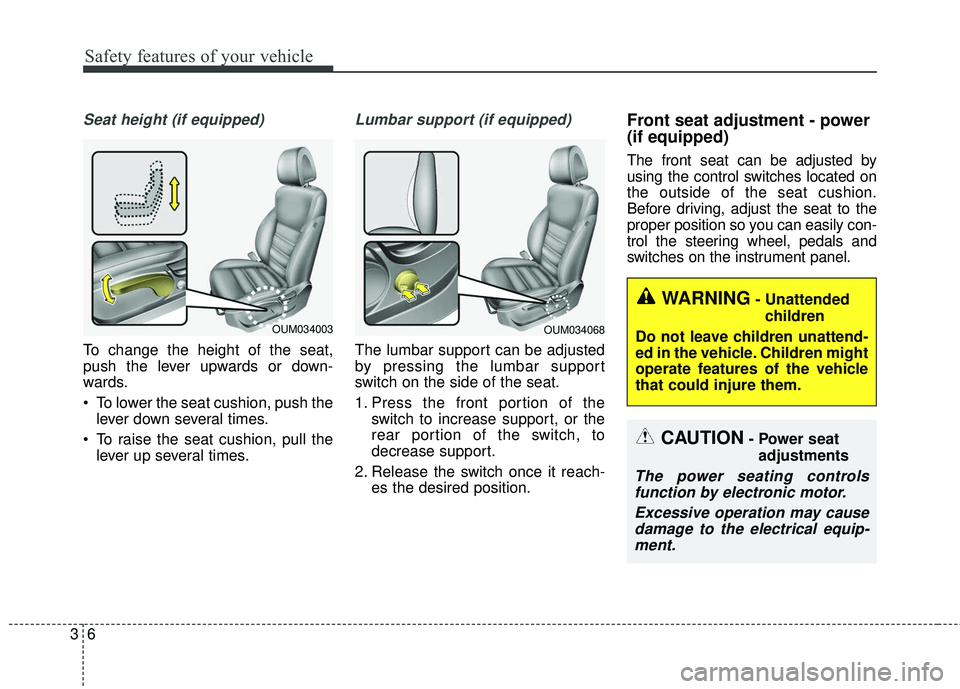
Seat height (if equipped)
To change the height of the seat,
push the lever upwards or down-
wards.
To lower the seat cushion, push thelever down several times.
To raise the seat cushion, pull the lever up several times.
Lumbar support (if equipped)
The lumbar support can be adjusted
by pressing the lumbar support
switch on the side of the seat.
1. Press the front portion of the switch to increase support, or the
rear portion of the switch, to
decrease support.
2. Release the switch once it reach- es the desired position.
Front seat adjustment - power
(if equipped)
The front seat can be adjusted by
using the control switches located on
the outside of the seat cushion.
Before driving, adjust the seat to the
proper position so you can easily con-
trol the steering wheel, pedals and
switches on the instrument panel.
CAUTION- Power seat
adjustments
The power seating controlsfunction by electronic motor.
Excessive operation may causedamage to the electrical equip-ment.
WARNING- Unattended
children
Do not leave children unattend-
ed in the vehicle. Children might
operate features of the vehicle
that could injure them.
OUM034068OUM034003
Page 87 of 536
Steering wheel . . . . . . . . . . . . . . . . . . . . . . . . . . . . . 4-55
• Electric power steering (EPS) . . . . . . . . . . . . . . . . . . 4-55
• Tilt and telescopic steering . . . . . . . . . . . . . . . . . . . . . 4-56
• Heated steering wheel . . . . . . . . . . . . . . . . . . . . . . . . . 4-57
• Horn . . . . . . . . . . . . . . . . . . . . . . . . . . . . . . . . . . . . \
. . . 4-57
Mirrors . . . . . . . . . . . . . . . . . . . . . . . . . . . . . . . . . . 4-59\
• Inside rearview mirror . . . . . . . . . . . . . . . . . . . . . . . . 4-59
• Outside rearview mirror. . . . . . . . . . . . . . . . . . . . . . . 4-69
Instrument cluster . . . . . . . . . . . . . . . . . . . . . . . . . 4-73
• Instrument cluster control . . . . . . . . . . . . . . . . . . . . . 4-74
• LCD display control . . . . . . . . . . . . . . . . . . . . . . . . . . 4-74
• Gauges . . . . . . . . . . . . . . . . . . . . . . . . . . . . . . . . . . . . \
. 4-75
• Transaxle shift indicator . . . . . . . . . . . . . . . . . . . . . . . 4-78
• Icy Road Warning Indicator . . . . . . . . . . . . . . . . . . . 4-78
LCD display . . . . . . . . . . . . . . . . . . . . . . . . . . . . . . 4-79
• LCD modes. . . . . . . . . . . . . . . . . . . . . . . . . . . . . . . . . .\
4-79
Trip modes (trip computer). . . . . . . . . . . . . . . . . . 4-80
• Trip Modes . . . . . . . . . . . . . . . . . . . . . . . . . . . . . . . . . . 4-80\
• Fuel Economy . . . . . . . . . . . . . . . . . . . . . . . . . . . . . . . 4-80
• Trip A/B . . . . . . . . . . . . . . . . . . . . . . . . . . . . . . . . . . . . \
4-82
• Digital speedometer . . . . . . . . . . . . . . . . . . . . . . . . . . . 4-83
• One time driving information mode . . . . . . . . . . . . . 4-83
• Turn by turn mode . . . . . . . . . . . . . . . . . . . . . . . . . . . 4-84
• ASCC/LDWS mode . . . . . . . . . . . . . . . . . . . . . . . . . . . 4-84
• A/V mode . . . . . . . . . . . . . . . . . . . . . . . . . . . . . . . . . . . 4-\
84• Service mode . . . . . . . . . . . . . . . . . . . . . . . . . . . . . . . . 4-85
• User settings mode. . . . . . . . . . . . . . . . . . . . . . . . . . . . 4-86
• Warning messages . . . . . . . . . . . . . . . . . . . . . . . . . . . . 4-90
Warning and indicator lights . . . . . . . . . . . . . . . . 4-97
• Warning lights . . . . . . . . . . . . . . . . . . . . . . . . . . . . . . . 4-97
• Indicator lights. . . . . . . . . . . . . . . . . . . . . . . . . . . . . . 4-105
Rear parking assist system . . . . . . . . . . . . . . . . . 4-109
• Operation of the rear parking assist system . . . . . . 4-109
• Non-operational conditions of
rear parking assist system . . . . . . . . . . . . . . . . . . . 4-110
• Rear parking assist system precautions . . . . . . . . . 4-111
• Self-diagnosis . . . . . . . . . . . . . . . . . . . . . . . . . . . . . . . 4-112
Rearview camera . . . . . . . . . . . . . . . . . . . . . . . . . 4-113
360° camera monitoring system . . . . . . . . . . . . . 4-114
Lighting . . . . . . . . . . . . . . . . . . . . . . . . . . . . . . . . . 4-115
• Battery saver function . . . . . . . . . . . . . . . . . . . . . . . . 4-115
• Daytime running light . . . . . . . . . . . . . . . . . . . . . . . . 4-115
• Lighting control . . . . . . . . . . . . . . . . . . . . . . . . . . . . . 4-115
• High beam operation . . . . . . . . . . . . . . . . . . . . . . . . . 4-117
• Turn signals and lane change signals. . . . . . . . . . . . 4-118
• Front fog light . . . . . . . . . . . . . . . . . . . . . . . . . . . . . . 4-119
• Check headlight . . . . . . . . . . . . . . . . . . . . . . . . . . . . . 4-119
• Headlight leveling device . . . . . . . . . . . . . . . . . . . . . 4-120
• AFLS (Adaptive Front Lighting System) . . . . . . . . 4-120
4
Page 89 of 536

• Power outlet . . . . . . . . . . . . . . . . . . . . . . . . . . . . . . . . 4-166
• AC inverter. . . . . . . . . . . . . . . . . . . . . . . . . . . . . . . . \
. 4-167
• USB charger . . . . . . . . . . . . . . . . . . . . . . . . . . . . . . . . 4-169
• Coat hook . . . . . . . . . . . . . . . . . . . . . . . . . . . . . . . . . . 4-17\
0
• Floor mat anchor (s) . . . . . . . . . . . . . . . . . . . . . . . . . 4-170
• Side curtain . . . . . . . . . . . . . . . . . . . . . . . . . . . . . . . . 4-171
• Luggage net holder . . . . . . . . . . . . . . . . . . . . . . . . . . 4-171
Exterior features . . . . . . . . . . . . . . . . . . . . . . . . . . 4-173
• Roof rack . . . . . . . . . . . . . . . . . . . . . . . . . . . . . . . . . . 4-17\
3
Audio system . . . . . . . . . . . . . . . . . . . . . . . . . . . . . 4-174
• Antenna . . . . . . . . . . . . . . . . . . . . . . . . . . . . . . . . . . . 4-\
174
• Steering wheel remote controller . . . . . . . . . . . . . . . 4-175
• AUX, USB port . . . . . . . . . . . . . . . . . . . . . . . . . . . . . 4-176
• How vehicle audio works . . . . . . . . . . . . . . . . . . . . . 4-177
• Using the USB device . . . . . . . . . . . . . . . . . . . . . . . . 4-181
• Using iPod
®device. . . . . . . . . . . . . . . . . . . . . . . . . . . 4-182
4
Page 140 of 536
455
Features of your vehicle
Electric power steering (EPS)
The power steering uses a motor to
assist you in steering the vehicle. If
the engine is off or if the power steer-
ing system becomes inoperative, the
vehicle may still be steered, but it will
require increased steering effort.
The motor driven power steering is
controlled by a power steering con-
trol unit which senses the steering
wheel torque and vehicle speed to
command the motor.
The steering becomes heavier as
the vehicle’s speed increases and
becomes lighter as the vehicle’s
speed decreases for optimum steer-
ing control.
Should you notice any change in the
effort required to steer during normal
vehicle operation, have the power
steering checked by an authorized
Kia dealer. If the Electric Power Steering
System does not operate normally,
the warning light will illuminate on
the instrument cluster. The steering
wheel may require increased
steering effort. Take your vehicle to
an authorized Kia dealer and have
the vehicle checked as soon as
possible.
When you operate the steering wheel in low temperature, noise
may occur. If temperature rises, the
noise will likely disappear. This is a
normal condition.
When the vehicle is stationary, and the steering wheel is turned all the
way to the left or right continuous-
ly, the steering wheel becomes
harder to turn. The power assist is
limited to protect the motor from
overheating.
As time passes, the steering wheel
will return to its normal condition.
✽ ✽ NOTICE
The following symptoms may occur
during normal vehicle operation:
• The EPS warning light does not
illuminate.
• The steering gets heavy immedi- ately after turning the ignition
switch on. This happens as the sys-
tem performs the EPS system
diagnostics. When the diagnostics
are completed, the steering wheel
will return to its normal condition.
• A click noise may be heard from the EPS relay after the ignition
switch is turned to the ON or
LOCK (OFF) position.
• A motor noise may be heard when the vehicle is at a stop or at a low
driving speed.
• If the Electric Power Steering System does not operate normally,
the warning light will illuminate on
the instrument cluster. The steer-
ing wheel may become difficult to
control or operate abnormally.
Take your vehicle to an authorized
Kia dealer and have the vehicle
checked as soon as possible. (Continued)
STEERING WHEEL
Page 185 of 536
Features of your vehicle
100
4
✽ ✽
NOTICE- Electronic Brake
force Distribution
(EBD) System
Warning Light
When the ABS Warning Light is on
or both ABS and Parking Brake &
Brake Fluid Warning Lights are on,
the speedometer, odometer, or trip-
meter may not work. Also, the EPS
Warning Light may illuminate and
the steering effort may increase or
decrease.
In this case, have your vehicle inspect-
ed by an authorized Kia dealer as
soon as possible.
Electronic Power
Steering (EPS) WarningLight
This warning light illuminates:
Once you set the ignition switch or Engine Start/Stop Button to the ON
position.
- It remains on until the engine isstarted.
When there is a malfunction with the EPS.
In this case, have your vehicle
inspected by an authorized Kia
dealer.
WARNING - Electronic
Brake force Distribution
(EBD) System Warning Light
When both ABS and Parking
Brake & Brake Fluid Warning
Lights are on, the brake system
will not work normally and you
may experience an unexpected
and dangerous situation during
sudden braking thereby
increasing the risk of a crash.
In this case, avoid high speed
driving and abrupt braking.
Have your vehicle inspected by
an authorized Kia dealer as
soon as possible thereby
increasing the risk of a crash
and injury.
Page 260 of 536
4175
Features of your vehicle
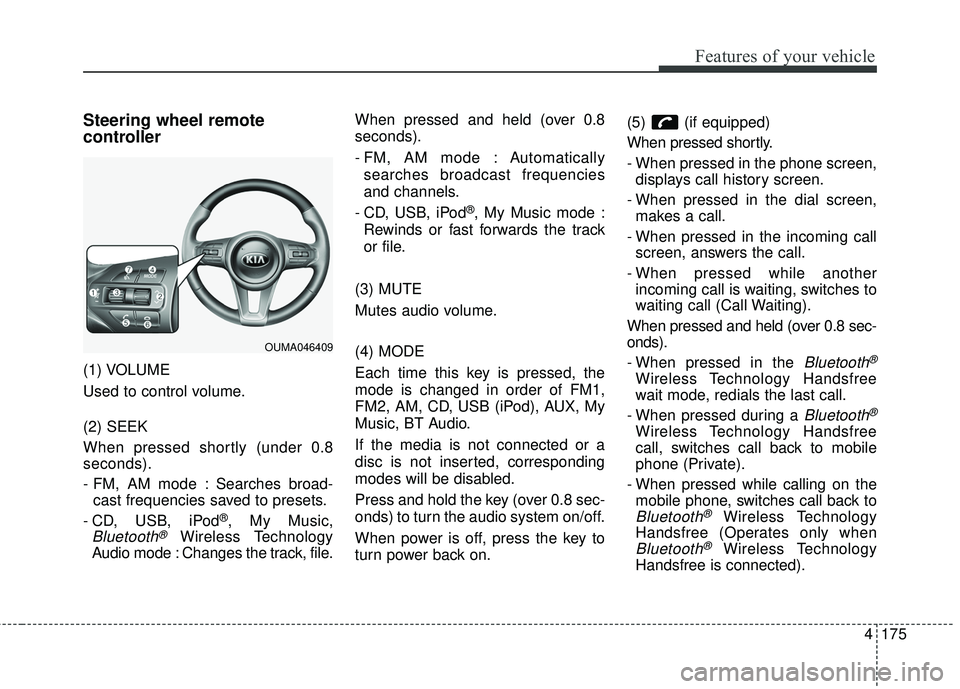
Steering wheel remote
controller
(1) VOLUME
Used to control volume.
(2) SEEK
When pressed shortly (under 0.8
seconds).
- FM, AM mode : Searches broad-cast frequencies saved to presets.
- CD, USB, iPod
®, My Music,
Bluetooth®Wireless Technology
Audio mode : Changes the track, file. When pressed and held (over 0.8
seconds).
- FM, AM mode : Automatically
searches broadcast frequencies
and channels.
- CD, USB, iPod
®, My Music mode :
Rewinds or fast forwards the track
or file.
(3) MUTE
Mutes audio volume.
(4) MODE
Each time this key is pressed, the
mode is changed in order of FM1,
FM2, AM, CD, USB (iPod), AUX, My
Music, BT Audio.
If the media is not connected or a
disc is not inserted, corresponding
modes will be disabled.
Press and hold the key (over 0.8 sec-
onds) to turn the audio system on/off.
When power is off, press the key to
turn power back on. (5) (if equipped)
When pressed shortly.
- When pressed in the phone screen,
displays call history screen.
- When pressed in the dial screen, makes a call.
- When pressed in the incoming call screen, answers the call.
- When pressed while another incoming call is waiting, switches to
waiting call (Call Waiting).
When pressed and held (over 0.8 sec-
onds).
- When pressed in the
Bluetooth®
Wireless Technology Handsfree
wait mode, redials the last call.
- When pressed during a
Bluetooth®
Wireless Technology Handsfree
call, switches call back to mobile
phone (Private).
- When pressed while calling on the mobile phone, switches call back to
Bluetooth®Wireless Technology
Handsfree (Operates only when
Bluetooth®Wireless Technology
Handsfree is connected).
OUMA046409
Page 297 of 536
527
Driving your vehicle
Power brakes
Your vehicle has power-assisted
brakes that adjust automatically
through normal usage.
In the event that the power-assisted
brakes lose power because of a
stalled engine or some other reason,
you can still stop your vehicle by
applying greater force to the brake
pedal than you normally would. The
stopping distance, however, will be
longer.
When the engine is not running, the
reserve brake power is partially
depleted each time the brake pedal
is applied. Do not pump the brake
pedal when the power assist has
been interrupted.
Pump the brake pedal only when
necessary to maintain steering con-
trol on slippery surfaces.Wet brakes may impair the vehicle’s
ability to safely slow down; the vehi-
cle may also pull to one side when
the brakes are applied. Applying the
brakes lightly will indicate whether
they have been affected in this way.
Always test your brakes in this fash-
ion after driving through deep water.
To dry the brakes, apply them lightly
while maintaining a safe forward
speed until brake performance
returns to normal.
BRAKE SYSTEM
WARNING- Steep hill
braking
Avoid continuous application of
the brakes when descending a
long or steep hill by shifting to a
lower gear. Continuous brake
application will cause the brakes
to overheat and could result in a
temporary loss of braking per-
formance.
CAUTION- Brake Pedal
Do not drive with your foot rest- ing on the brake pedal. This willcreate abnormally high braketemperatures which can causeexcessive brake lining and padwear.
Page 317 of 536
547
Driving your vehicle
Malfunction indicator
The VSM can be deactivated even if
you don’t cancel the VSM operation
by pressing the ESC OFF button. It
indicates that a malfunction has
been detected somewhere in the
Electric Power Steering system or
VSM system. If the ESC indicator
light ( ) or EPS warning light
remains on, take your vehicle to an
authorized Kia dealer and have the
system checked.
✽ ✽NOTICE
• The VSM is designed to function
above approximately 22 km/h (13
mph) on curves.
• The VSM is designed to function above approximately 10 km/h (6
mph) when a vehicle is braking on
a split-mu road. The split-mu road
is made of surfaces which have dif-
ferent friction forces.
The Vehicle Stability Management
system is not a substitute for safe
driving practices but a supplemen-
tary function only. It is the respon-
sibility of the driver to always check
the speed and the distance to the
vehicle ahead. Always hold the
steering wheel firmly while driving.
Your vehicle is designed to activate according to the driver’s intention,
even with installed VSM. Always
follow all the normal precautions
for driving at safe speeds for the
conditions – including driving in
clement weather and on a slippery
road.Hill-start assist control (HAC)
A vehicle has the tendency to roll
back on a steep hill when it starts to
go after stopping. The Hill-start
Assist Control (HAC) prevents the
vehicle from rolling back by applying
the brakes automatically for about 2
seconds. The brakes are released
when the accelerator pedal is
depressed or after about 2 seconds.
The HAC is activated only for about 2
seconds, so when the vehicle is
starting off always depress the accel-
erator pedal.
WARNING- Maintaining
Brake Pressure on Incline
HAC does not replace the need
to apply brakes while stopped
on an incline. While stopped,
make sure you maintain brake
pressure sufficient to prevent
your vehicle from rolling back-
ward and causing an accident.
Don’t release the brake pedal
until you are ready to accelerate
forward.