epb KIA SORENTO 2019 User Guide
[x] Cancel search | Manufacturer: KIA, Model Year: 2019, Model line: SORENTO, Model: KIA SORENTO 2019Pages: 573, PDF Size: 10.61 MB
Page 313 of 573
Driving your vehicle
36
5
Emergency braking
If there is a problem with the brake
pedal while driving, emergency brak-
ing is possible by pulling up and
holding the EPB switch. Braking is
possible only while you are holding
the EPB switch.
✽ ✽
NOTICE
During emergency braking by the
EPB, the parking brake warning
light will illuminate to indicate that
the system is operating.
If you notice a continuous noise or
burning smell when the EPB is used
for emergency braking, have your
vehicle checked by an authorized Kia
dealer.
When the EPB (electronic parking
brake) is not released
If the EPB does not release normal-
ly, take your vehicle to an authorized
Kia dealer by loading the vehicle on
a flatbed tow truck and have the sys-
tem checked.
AUTO HOLD (if equipped)
The Auto Hold maintains the vehicle
in a standstill even though the brake
pedal is not depressed after the driv-
er brings the vehicle to a complete
stop by depressing the brake pedal.
WARNING
Do not operate the electronic
parking brake while the vehicle
is moving except in an emer-
gency situation. Applying the
electronic parking brake while
the vehicle is moving at normal
speeds can cause a sudden
loss of control of the vehicle. If
you must use the electronic
parking brake to stop the vehi-
cle, use great caution in apply-
ing the brake.
Page 314 of 573
537
Driving your vehicle
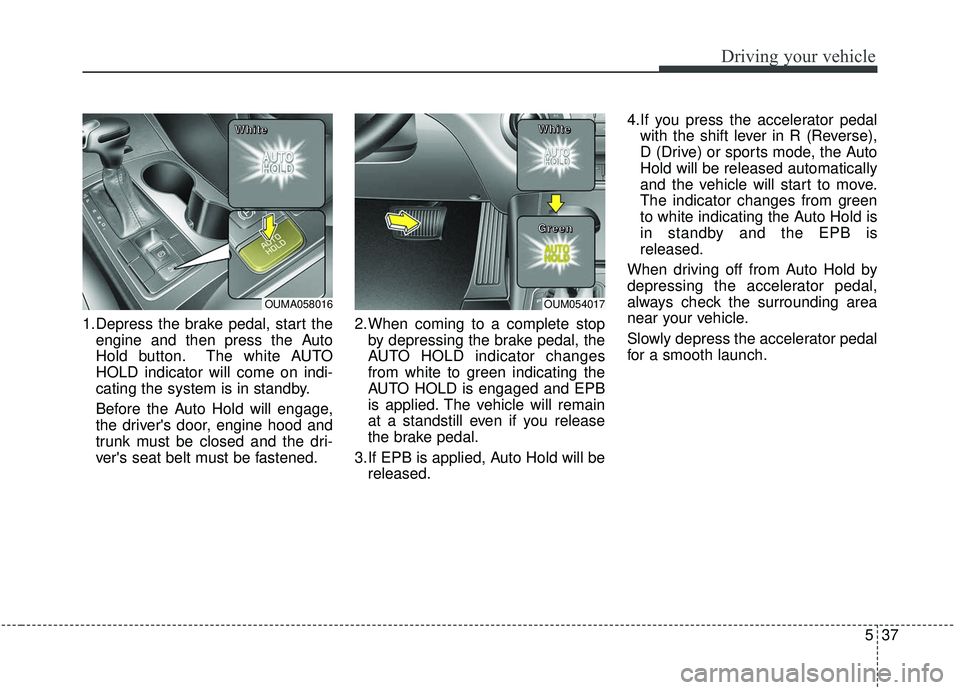
1.Depress the brake pedal, start theengine and then press the Auto
Hold button. The white AUTO
HOLD indicator will come on indi-
cating the system is in standby.
Before the Auto Hold will engage,
the driver's door, engine hood and
trunk must be closed and the dri-
ver's seat belt must be fastened. 2.When coming to a complete stop
by depressing the brake pedal, the
AUTO HOLD indicator changes
from white to green indicating the
AUTO HOLD is engaged and EPB
is applied. The vehicle will remain
at a standstill even if you release
the brake pedal.
3.If EPB is applied, Auto Hold will be released. 4.If you press the accelerator pedal
with the shift lever in R (Reverse),
D (Drive) or sports mode, the Auto
Hold will be released automatically
and the vehicle will start to move.
The indicator changes from green
to white indicating the Auto Hold is
in standby and the EPB is
released.
When driving off from Auto Hold by
depressing the accelerator pedal,
always check the surrounding area
near your vehicle.
Slowly depress the accelerator pedal
for a smooth launch.
OUMA058016
W W
W W
h h
h h
i i
i i
t t
t t
e e
e eOUM054017
W W
W W
h h
h h
i i
i i
t t
t t
e e
e e
G G
G G
r r
r r
e e
e e
e e
e e
n n
n n
Page 315 of 573
Driving your vehicle
38
5
Cancel
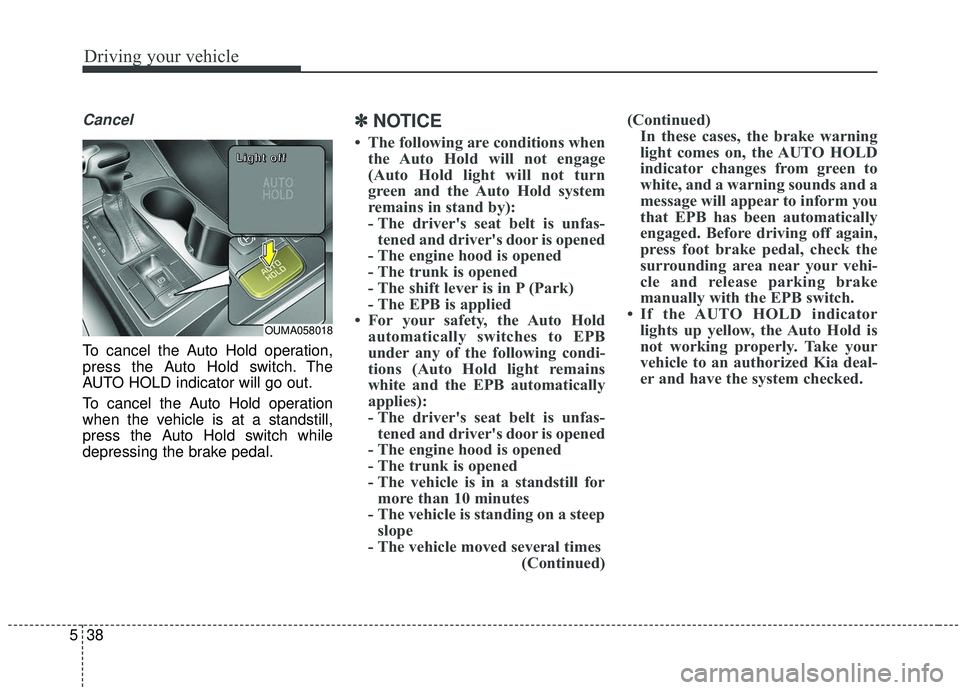
To cancel the Auto Hold operation,
press the Auto Hold switch. The
AUTO HOLD indicator will go out.
To cancel the Auto Hold operation
when the vehicle is at a standstill,
press the Auto Hold switch while
depressing the brake pedal.
✽ ✽
NOTICE
• The following are conditions when
the Auto Hold will not engage
(Auto Hold light will not turn
green and the Auto Hold system
remains in stand by):
- The driver's seat belt is unfas-tened and driver's door is opened
- The engine hood is opened
- The trunk is opened
- The shift lever is in P (Park)
- The EPB is applied
• For your safety, the Auto Hold automatically switches to EPB
under any of the following condi-
tions (Auto Hold light remains
white and the EPB automatically
applies):
- The driver's seat belt is unfas-tened and driver's door is opened
- The engine hood is opened
- The trunk is opened
- The vehicle is in a standstill for more than 10 minutes
- The vehicle is standing on a steep slope
- The vehicle moved several times (Continued)(Continued)
In these cases, the brake warning
light comes on, the AUTO HOLD
indicator changes from green to
white, and a warning sounds and a
message will appear to inform you
that EPB has been automatically
engaged. Before driving off again,
press foot brake pedal, check the
surrounding area near your vehi-
cle and release parking brake
manually with the EPB switch.
• If the AUTO HOLD indicator lights up yellow, the Auto Hold is
not working properly. Take your
vehicle to an authorized Kia deal-
er and have the system checked.
OUMA058018
L L
L L
i i
i i
g g
g g
h h
h h
t t
t t
o o
o o
f f
f f
f f
f f
Page 316 of 573
539
Driving your vehicle
If there is a malfunction with the dri-
ver’s door, engine hood or trunk open
detection system, the Auto Hold may
not work properly.
Take your vehicle to an authorized Kia
dealer and have the system checked.
✽ ✽NOTICE
A click or electric brake motor
whine sound may be heard while
operating or releasing the EPB, but
these conditions are normal and
indicate that the EPB is functioning
properly.
Anti-lock brake system (ABS)
ABS (or ESC) will not prevent acci-
dents due to improper or dangerous
driving maneuvers. Even though
vehicle control is improved during
emergency braking, always maintain
a safe distance between you and
objects ahead. Vehicle speeds
should always be reduced during
extreme road conditions. The vehicle
should be driven at reduced speeds
in the following circumstances:
When driving on rough, gravel or
snow-covered roads
When driving on roads where the road surface is pitted or has differ-
ent surface heights.
Driving in these conditions increase
the stopping distance for your vehi-
cle. The ABS continuously senses the
speed of the wheels. If the wheels
are going to lock, the ABS system
repeatedly modulates the hydraulic
brake pressure to the wheels.
When you apply your brakes under
conditions which may lock the
wheels, you may hear a “tik-tik’’
sound from the brakes, or feel a cor-
responding sensation in the brake
pedal. This is normal and it means
your ABS is active.
In order to obtain the maximum ben-
efit from your ABS in an emergency
situation, do not attempt to modulate
your brake pressure and do not try to
pump your brakes. Press your brake
pedal as hard as possible or as hard
as the situation allows the ABS to
control the force being delivered to
the brakes.WARNING
To reduce the risk of an acci-
dent, do not activate Auto Hold
while driving downhill, backing
up or parking your vehicle.
Page 348 of 573
571
Driving your vehicle
To temporarily accelerate with thecruise control on:
If you want to speed up temporarily
when the cruise control is on,
depress the accelerator pedal.
Increased speed will not interfere
with cruise control operation or
change the set speed.
To return to the set speed, take your
foot off the accelerator.
If you move the lever down (to SET-)
at increased speed, the cruising
speed will be set again.
✽ ✽ NOTICE
Be careful when accelerating tem-
porarily, because the speed is not
regulated automatically at this time
even if there is a vehicle in front of
you.
Smart cruise control system will
be temporarily canceled when:
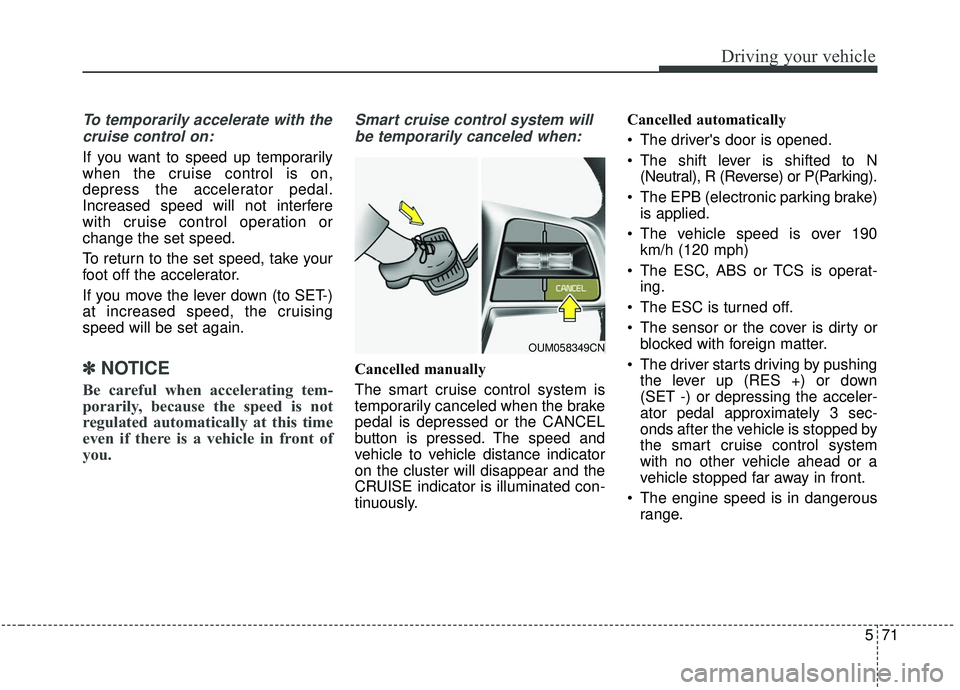
Cancelled manually
The smart cruise control system is
temporarily canceled when the brake
pedal is depressed or the CANCEL
button is pressed. The speed and
vehicle to vehicle distance indicator
on the cluster will disappear and the
CRUISE indicator is illuminated con-
tinuously. Cancelled automatically
The driver's door is opened.
The shift lever is shifted to N
(Neutral), R (Reverse) or P(Parking).
The EPB (electronic parking brake) is applied.
The vehicle speed is over 190 km/h (120 mph)
The ESC, ABS or TCS is operat- ing.
The ESC is turned off.
The sensor or the cover is dirty or blocked with foreign matter.
The driver starts driving by pushing the lever up (RES +) or down
(SET -) or depressing the acceler-
ator pedal approximately 3 sec-
onds after the vehicle is stopped by
the smart cruise control system
with no other vehicle ahead or a
vehicle stopped far away in front.
The engine speed is in dangerous range.
OUM058349CN
Page 354 of 573
577
Driving your vehicle
If you push the smart cruise controltoggle switch (RES+ or SET-) while
Auto Hold and smart cruise control
is operating the Auto Hold will be
released regardless of accelerator
pedal operation and the vehicle will
start to move. The AUTO HOLD
indicator changes from green to
white. (if equipped with EPB
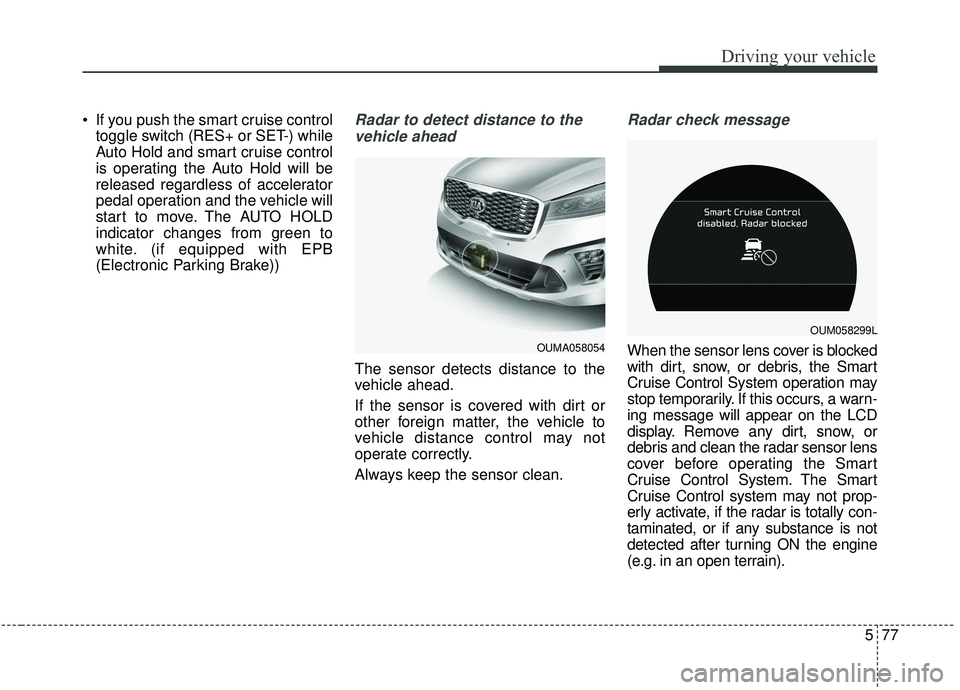
(Electronic Parking Brake))Radar to detect distance to the
vehicle ahead
The sensor detects distance to the
vehicle ahead.
If the sensor is covered with dirt or
other foreign matter, the vehicle to
vehicle distance control may not
operate correctly.
Always keep the sensor clean.
Radar check message
When the sensor lens cover is blocked
with dirt, snow, or debris, the Smart
Cruise Control System operation may
stop temporarily. If this occurs, a warn-
ing message will appear on the LCD
display. Remove any dirt, snow, or
debris and clean the radar sensor lens
cover before operating the Smart
Cruise Control System. The Smart
Cruise Control system may not prop-
erly activate, if the radar is totally con-
taminated, or if any substance is not
detected after turning ON the engine
(e.g. in an open terrain).OUMA058054
OUM058299L
Page 508 of 573
765
Maintenance
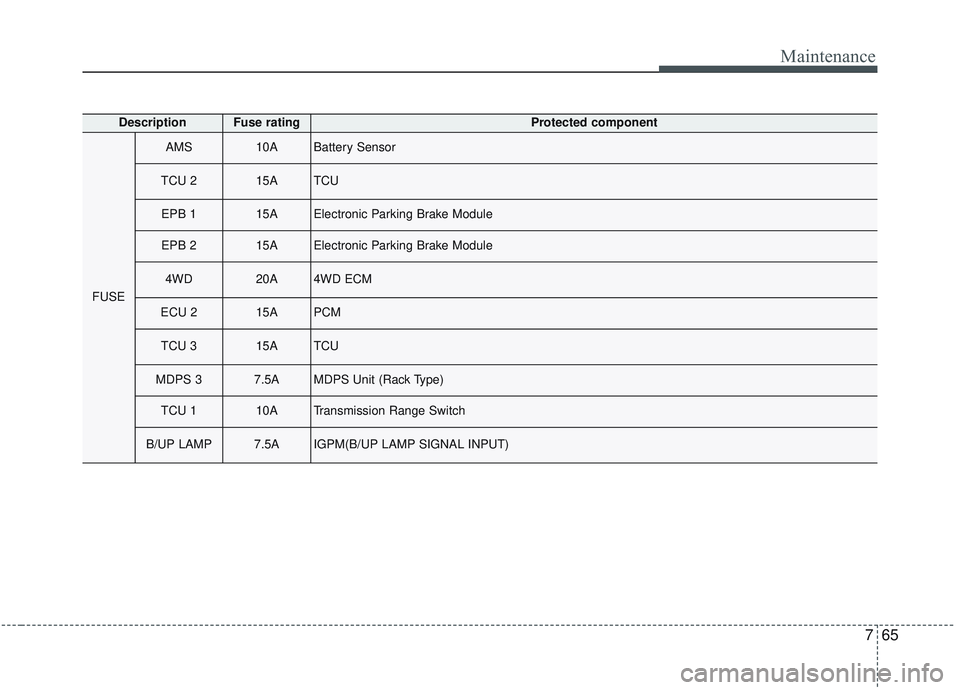
DescriptionFuse ratingProtected component
FUSE
AMS10ABattery Sensor
TCU 215ATCU
EPB 115AElectronic Parking Brake Module
EPB 215AElectronic Parking Brake Module
4WD20A4WD ECM
ECU 215APCM
TCU 315ATCU
MDPS 37.5AMDPS Unit (Rack Type)
TCU 110ATransmission Range Switch
B/UP LAMP7.5AIGPM(B/UP LAMP SIGNAL INPUT)
Page 560 of 573
I3
Index
Automatic transmission . . . . . . . . . . . . . . . . . . . . . . . . 5-14Automatic transmission operation . . . . . . . . . . . . . . 5-14
Good driving practices . . . . . . . . . . . . . . . . . . . . . . . 5-20
Automatic turn off function . . . . . . . . . . . . . . . . . . . . 4-136
AUX, USB port . . . . . . . . . . . . . . . . . . . . . . . . . . . . . 4-188
Back up lamp (Bulb type) bulb replacement . . . . . . . . 7-84
Battery. . . . . . . . . . . . . . . . . . . . . . . . . . . . . . . . . . . . \
. . 7-34 For best battery service . . . . . . . . . . . . . . . . . . . . . . 7-34
Battery recharging . . . . . . . . . . . . . . . . . . . . . . . . . . 7-35
Recharging the battery . . . . . . . . . . . . . . . . . . . . . . . 7-35
Reset items . . . . . . . . . . . . . . . . . . . . . . . . . . . . . . . . 7-36
Battery replacement (Folding key) . . . . . . . . . . . . . . . . . 4-8
Battery replacement (Smart key) . . . . . . . . . . . . . . . . . 4-17
Battery saver function. . . . . . . . . . . . . . . . . . . . . . . . . 4-123
Before driving . . . . . . . . . . . . . . . . . . . . . . . . . . . . . . . . . 5-5
Blind-Spot Collision Warning (BCW) system . . . . . . 5-101 BCW (Blind-Spot Collision Warning) . . . . . . . . . . 5-102
RCCW (Rear Cross-Traffic Collision Warning) . . 5-104
Driver's attention . . . . . . . . . . . . . . . . . . . . . . . . . . 5-108
Bonnet see the hood . . . . . . . . . . . . . . . . . . . . . . . . . . . 4-45
Bottle holder . . . . . . . . . . . . . . . . . . . . . . . . . . . . . . . . 4-173
Brake fluid . . . . . . . . . . . . . . . . . . . . . . . . . . . . . . . . . . 7-24\
Checking the brake fluid level . . . . . . . . . . . . . . . . . 7-24 Brake system. . . . . . . . . . . . . . . . . . . . . . . . . . . . . . . . . 5-27
Power brakes . . . . . . . . . . . . . . . . . . . . . . . . . . . . . . 5-27
Parking brake . . . . . . . . . . . . . . . . . . . . . . . . . . . . . . 5-29
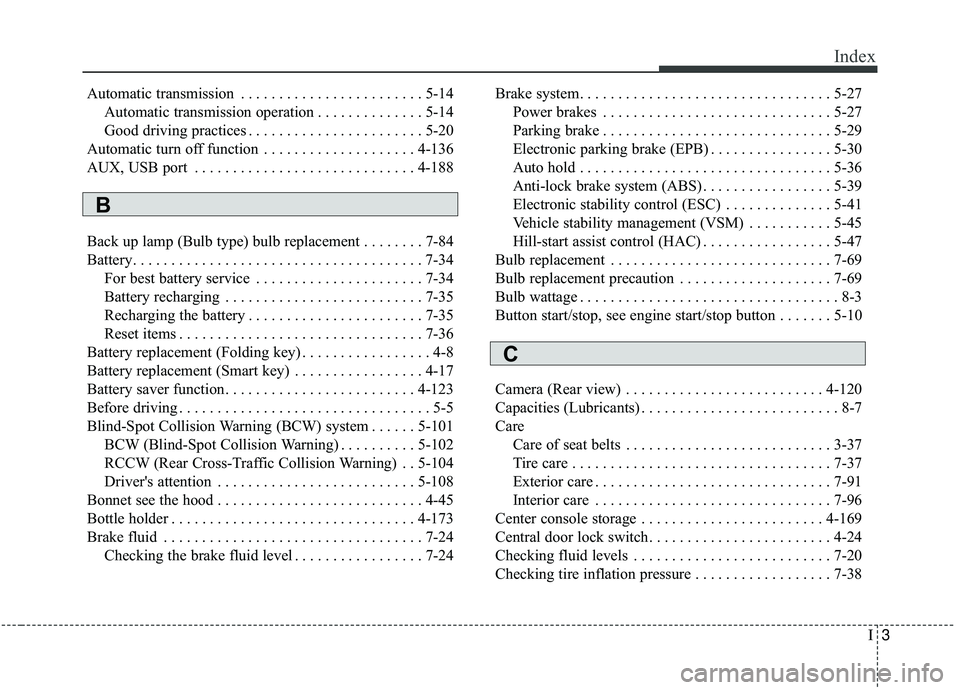
Electronic parking brake (EPB) . . . . . . . . . . . . . . . . 5-30
Auto hold . . . . . . . . . . . . . . . . . . . . . . . . . . . . . . . . . 5-36
Anti-lock brake system (ABS) . . . . . . . . . . . . . . . . . 5-39
Electronic stability control (ESC) . . . . . . . . . . . . . . 5-41
Vehicle stability management (VSM) . . . . . . . . . . . 5-45
Hill-start assist control (HAC) . . . . . . . . . . . . . . . . . 5-47
Bulb replacement . . . . . . . . . . . . . . . . . . . . . . . . . . . . . 7-69
Bulb replacement precaution . . . . . . . . . . . . . . . . . . . . 7-69
Bulb wattage . . . . . . . . . . . . . . . . . . . . . . . . . . . . . . . . . . 8-3
Button start/stop, see engine start/stop button . . . . . . . 5-10
Camera (Rear view) . . . . . . . . . . . . . . . . . . . . . . . . . . 4-120
Capacities (Lubricants) . . . . . . . . . . . . . . . . . . . . . . . . . . 8-7
Care Care of seat belts . . . . . . . . . . . . . . . . . . . . . . . . . . . 3-37
Tire care . . . . . . . . . . . . . . . . . . . . . . . . . . . . . . . . . . 7-37\
Exterior care . . . . . . . . . . . . . . . . . . . . . . . . . . . . . . . 7-91
Interior care . . . . . . . . . . . . . . . . . . . . . . . . . . . . . . . 7-96
Center console storage . . . . . . . . . . . . . . . . . . . . . . . . 4-169
Central door lock switch. . . . . . . . . . . . . . . . . . . . . . . . 4-24
Checking fluid levels . . . . . . . . . . . . . . . . . . . . . . . . . . 7-20
Checking tire inflation pressure . . . . . . . . . . . . . . . . . . 7-38
B
C
Page 562 of 573
I5
Index
Drive mode integrated control system . . . . . . . . . . . . . 5-86SMART mode . . . . . . . . . . . . . . . . . . . . . . . . . . . . . 5-86
SPORT mode . . . . . . . . . . . . . . . . . . . . . . . . . . . . . . 5-89
ECO mode . . . . . . . . . . . . . . . . . . . . . . . . . . . . . . . . 5-89
Driver Attention Warning (DAW) system . . . . . . . . . 5-110 System setting and activation . . . . . . . . . . . . . . . . . 5-110
Resetting the system . . . . . . . . . . . . . . . . . . . . . . . . 5-112
System disabled . . . . . . . . . . . . . . . . . . . . . . . . . . . 5-113
System malfunction . . . . . . . . . . . . . . . . . . . . . . . . 5-113
Driver position memory system . . . . . . . . . . . . . . . . . . 3-10
Driver's and passenger's front air bag. . . . . . . . . . . . . . 3-59
Driving at night. . . . . . . . . . . . . . . . . . . . . . . . . . . . . . 5-120
Driving in flooded areas . . . . . . . . . . . . . . . . . . . . . . . 5-121
Driving in the rain . . . . . . . . . . . . . . . . . . . . . . . . . . . 5-120
Driving off-road . . . . . . . . . . . . . . . . . . . . . . . . . . . . . 5-121
Driving with a trailer . . . . . . . . . . . . . . . . . . . . . . . . . 5-127
Dynamic Bending Light (DBL) . . . . . . . . . . . . . . . . . 4-130
ECO mode (Drive mode integrated control system) . . 5-89
Economical operation . . . . . . . . . . . . . . . . . . . . . . . . . 5-115
Electric chromatic mirror (ECM) with compass . . . . . 4-63
Electric power steering . . . . . . . . . . . . . . . . . . . . . . . . . 4-57
Electrical equipment . . . . . . . . . . . . . . . . . . . . . . . . . . . 8-15
Electrochromic mirror (ECM) . . . . . . . . . . . . . . . . . . . 4-62
Electrochromic mirror with HomeLink system . . . . . . 4-66
Electronic parking brake (EPB) . . . . . . . . . . . . . . . . . . 5-30 Electronic Stability Control (ESC) . . . . . . . . . . . . . . . . 5-41
Emergency liftgate safety release . . . . . . . . . . . . . . . . . 4-38
Emergency starting . . . . . . . . . . . . . . . . . . . . . . . . . . . . . 6-5
Jump starting . . . . . . . . . . . . . . . . . . . . . . . . . . . . . . . 6-5
Emergency while driving . . . . . . . . . . . . . . . . . . . . . . . . 6-3
Emission control system . . . . . . . . . . . . . . . . . . . . . . . 7-100 Crankcase emission control system . . . . . . . . . . . . 7-100
Evaporative emission control (including ORVR: Onboard Refueling Vapor Recovery) system . . . 7-100
Exhaust emission control system . . . . . . . . . . . . . . 7-101
Engine . . . . . . . . . . . . . . . . . . . . . . . . . . . . . . . . . . . . \
. . . 8-2
Engine compartment . . . . . . . . . . . . . . . . . . . . . . . . . . . . 2-6
Engine compartment . . . . . . . . . . . . . . . . . . . . . . . . . . . . 7-3
Engine coolant . . . . . . . . . . . . . . . . . . . . . . . . . . . . . . . 7-21 Checking the coolant level . . . . . . . . . . . . . . . . . . . . 7-21
Changing the coolant . . . . . . . . . . . . . . . . . . . . . . . . 7-23
Engine coolant temperature gauge . . . . . . . . . . . . . . . . 4-78
Engine number . . . . . . . . . . . . . . . . . . . . . . . . . . . . . . . 8-11
Engine oil . . . . . . . . . . . . . . . . . . . . . . . . . . . . . . . . . . . 7-\
19 Checking the engine oil level. . . . . . . . . . . . . . . . . . 7-19
Changing the engine oil and filter . . . . . . . . . . . . . . 7-20
Engine overheats. . . . . . . . . . . . . . . . . . . . . . . . . . . . . . . 6-8
Engine start/stop button . . . . . . . . . . . . . . . . . . . . . . . . 5-10 Illuminated engine start/stop button. . . . . . . . . . . . . 5-10
Engine start/stop button position . . . . . . . . . . . . . . . 5-10
Starting the engine . . . . . . . . . . . . . . . . . . . . . . . . . . 5-12
Engine start/stop button illumination . . . . . . . . . . . . . . 5-10
Engine start/stop button position . . . . . . . . . . . . . . . . . 5-10
E