ECO mode KIA SORENTO 2019 Owner's Manual
[x] Cancel search | Manufacturer: KIA, Model Year: 2019, Model line: SORENTO, Model: KIA SORENTO 2019Pages: 573, PDF Size: 10.61 MB
Page 254 of 573
Features of your vehicle
166
4
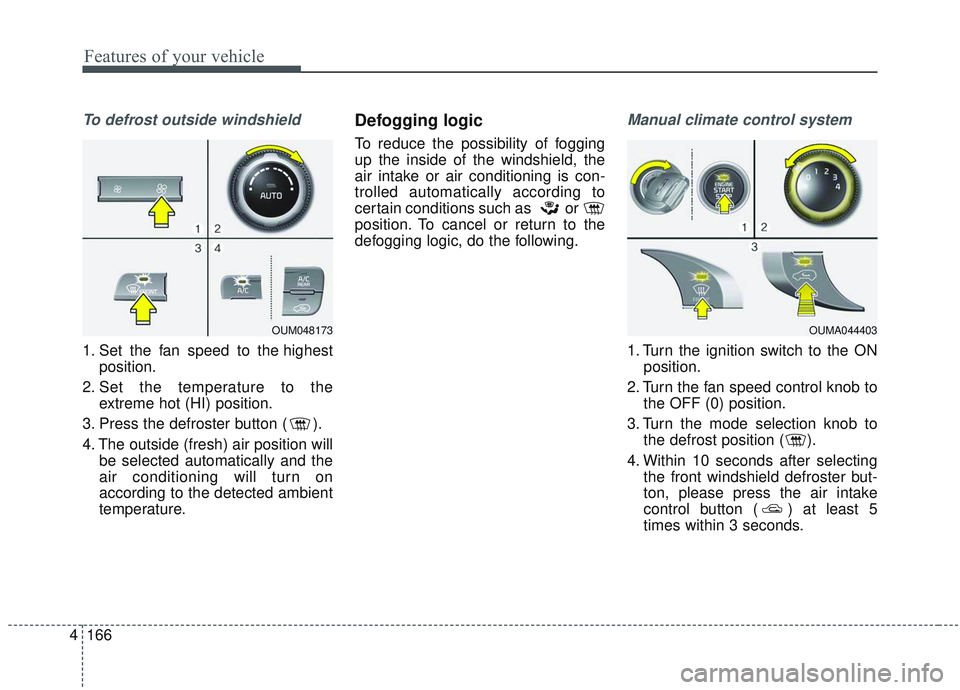
To defrost outside windshield
1. Set the fan speed to the highest
position.
2. Set the temperature to the extreme hot (HI) position.
3. Press the defroster button ( ).
4. The outside (fresh) air position will be selected automatically and the
air conditioning will turn on
according to the detected ambient
temperature.
Defogging logic
To reduce the possibility of fogging
up the inside of the windshield, the
air intake or air conditioning is con-
trolled automatically according to
certain conditions such as or
position. To cancel or return to the
defogging logic, do the following.
Manual climate control system
1. Turn the ignition switch to the ONposition.
2. Turn the fan speed control knob to the OFF (0) position.
3. Turn the mode selection knob to the defrost position ( ).
4. Within 10 seconds after selecting the front windshield defroster but-
ton, please press the air intake
control button ( ) at least 5
times within 3 seconds.
OUM048173OUMA044403
Page 275 of 573
4187
Features of your vehicle
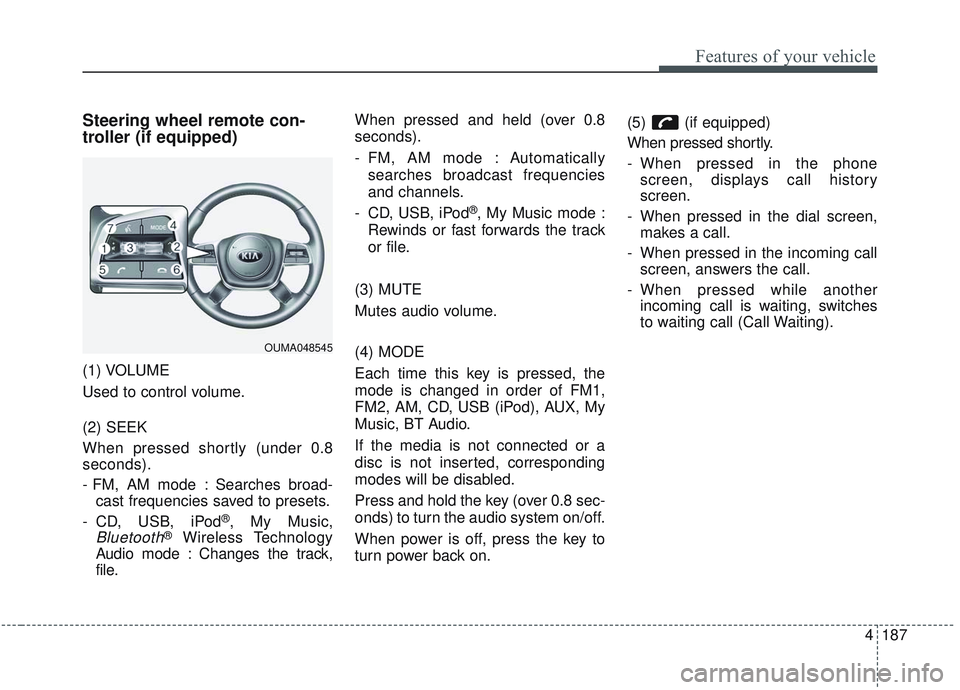
Steering wheel remote con-
troller (if equipped)
(1) VOLUME
Used to control volume.
(2) SEEK
When pressed shortly (under 0.8
seconds).
- FM, AM mode : Searches broad-cast frequencies saved to presets.
- CD, USB, iPod
®, My Music,
Bluetooth®Wireless Technology
Audio mode : Changes the track,
file. When pressed and held (over 0.8
seconds).
- FM, AM mode : Automatically
searches broadcast frequencies
and channels.
- CD, USB, iPod
®, My Music mode :
Rewinds or fast forwards the track
or file.
(3) MUTE
Mutes audio volume.
(4) MODE
Each time this key is pressed, the
mode is changed in order of FM1,
FM2, AM, CD, USB (iPod), AUX, My
Music, BT Audio.
If the media is not connected or a
disc is not inserted, corresponding
modes will be disabled.
Press and hold the key (over 0.8 sec-
onds) to turn the audio system on/off.
When power is off, press the key to
turn power back on. (5) (if equipped)
When pressed shortly.
- When pressed in the phone
screen, displays call history
screen.
- When pressed in the dial screen, makes a call.
- When pressed in the incoming call screen, answers the call.
- When pressed while another incoming call is waiting, switches
to waiting call (Call Waiting).
OUMA048545
Page 276 of 573
Features of your vehicle
188
4
When pressed and held (over 0.8 sec-
onds).
- When pressed in the
Bluetooth®
Wireless Technology Handsfree
wait mode, redials the last call.
- When pressed during a
Bluetooth®
Wireless Technology Handsfree
call, switches call back to mobile
phone (Private).
- When pressed while calling on the mobile phone, switches call back to
Bluetooth®Wireless Technology
Handsfree (Operates only when
Bluetooth®Wireless Technology
Handsfree is connected). (6) (if equipped)
Ends phone call.
(7) (if equipped)
When pressed shortly.
- Starts voice recognition.
- When selected during a voice
prompt, stops the prompt and con-
verts to voice command waiting
state.
When pressed and held (over 0.8 sec-
onds).
- Ends voice recognition.
❈ The Bluetooth®word mark and
logos are registered trademarks
owned by Bluetooth
®SIG, Inc. and
any use of such marks by Kia is
under license. Other trademarks
and trade names are those of their
respective owners. A compatible
Bluetooth
®enabled cell phone is
required to use
Bluetooth®
Wireless Technology.
Refer to a separately supplied A
VN manual for detailed informa-
tion.
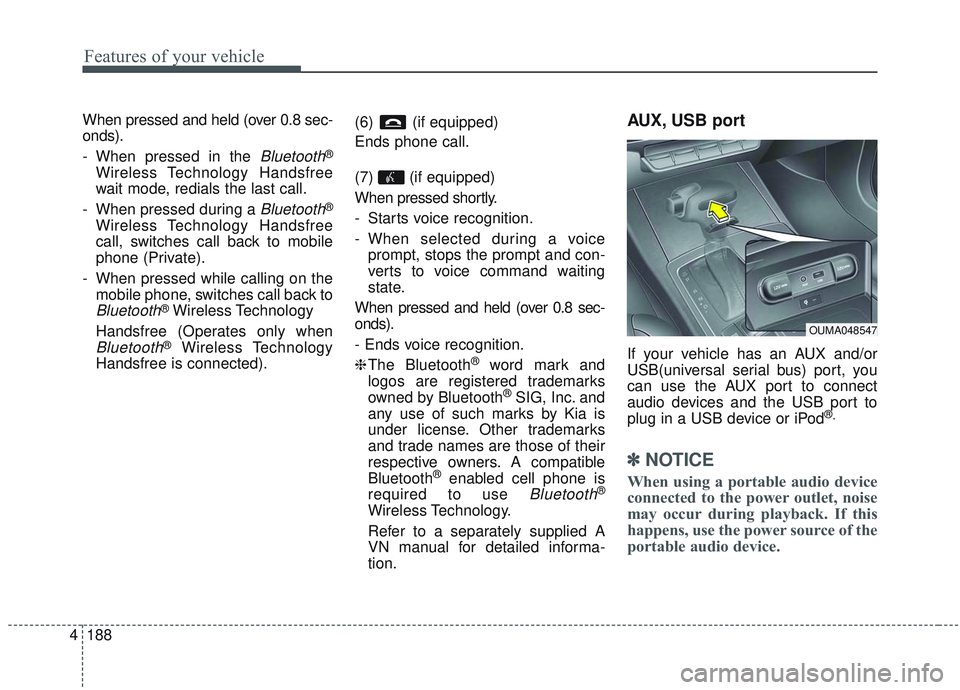
AUX, USB port
If your vehicle has an AUX and/or
USB(universal serial bus) port, you
can use the AUX port to connect
audio devices and the USB port to
plug in a USB device or iPod
®.
✽ ✽ NOTICE
When using a portable audio device
connected to the power outlet, noise
may occur during playback. If this
happens, use the power source of the
portable audio device.
OUMA048547
Page 279 of 573
(Smart cruise control system) . . . . . . . . . . . . . . . . . 5-74
. . . . . . . . . . . . . . . . . . . 5-75
. . . 5-75
smart cruise control system . . . . . . . . . . . . . . . . . . . 5-79
. . . . . . . . . . . . . . . 5-79
. . . . . . . . . . . . . . . . . . . . . . 5-80
Drive mode integrated control system . . . . . . . . . 5-86
Lane Keeping Assist (LKA) system . . . . . . . . . . . 5-91
. . . . . . . . . . . . . . . . . . . . . . . . 5-93
. . . . . . . . . . . . . . . . . . . . . . 5-98
. . . . . . . . . . . . . . . . . . . 5-99
Blind-spot Collision Warning (BCW). . . . . . . . . 5-101
. . . . . . . . . . . 5-102
. . . 5-104
Driver Attention Warning (DAW). . . . . . . . . . . . 5-110
. . . . . . . . . . . . . . . . . . 5-110
. . . . . . . . . . . . . . . . . . . . . . . . . 5-112
. . . . . . . . . . . . . . . . . . . . . . . . . . . . . 5-113
. . . . . . . . . . . . . . . . . . . . . . . . . . 5-113
Economical operation . . . . . . . . . . . . . . . . . . . . . 5-115 Special driving conditions . . . . . . . . . . . . . . . . . . 5-117
. . . . . . . . . . . . . . . . . 5-117
. . . . . . . . . . . . . . . . 5-117
. . . . . . . . . . . . . . . . . . . . . . . . . . 5-119
. . . . . . . . . . . . . . . . . . . . . . . . . . . 5-119
. . . . . . . . . . . . . . . . . . . . . . . . . . . . . 5-120
. . . . . . . . . . . . . . . . . . . . . . . . . . . 5-120
. . . . . . . . . . . . . . . . . . . . . . 5-121
. . . . . . . . . . . . . . . . . . . . . . . . . . . . . 5-121
. . . . . . . . . . . . . . . . . . . . . . . . . . . . 5-121
Winter driving . . . . . . . . . . . . . . . . . . . . . . . . . . . 5-123
. . . . . . . . . . . . . . . . . . . . . . 5-123
. . . . . . . . . 5-124
. . . . . . . . . . . . . . . . . . . . . 5-124
. . . . . . 5-124
. . . . . . . . . . . . . . . . . . . 5-124
anti-freeze in system . . . . . . . . . . . . . . . . . . . . . . . . 5-124
. . . . . . . . . . . . 5-125
. . . 5-125
. . . . . . . . . . . . . . . . . . 5-125
Trailer towing . . . . . . . . . . . . . . . . . . . . . . . . . . . . 5-126
. . . . . . . . . . . . . . . . . . . . . . . . . . . . . . . . . . . . \
5-127
. . . . . . . . . . . . . . . . . . . . . . . . . . . . . . . 5-127
5
Page 286 of 573
59
Driving your vehicle
3.Turn the ignition switch to STARTand hold it there until the engine
starts (a maximum of 10 seconds),
then release the key.
It should be started without depress-
ing the accelerator.
4.Do not wait for the engine to warm up while the vehicle remains sta-
tionary.
Start driving at moderate engine
speeds. (Steep accelerating and
decelerating should be avoided.) If the engine stalls while you are in
motion, do not attempt to move the
shift lever to the P (Park) position. If
traffic and road conditions permit,
you may put the shift lever in the N
(Neutral) position while the vehicle is
still moving and turn the ignition
switch to the START position in an
attempt to restart the engine.
CAUTION- Starter
Do not engage the starter for
more than 10 seconds. If theengine stalls or fails to start,wait 5 to 10 seconds before re-engaging the starter. Improperuse of the starter may damage it.
WARNING- Steering
wheel
Never reach for any controls
through the steering wheel
while the vehicle is in motion.
The presence of your hand or
arm in this area could cause a
loss of vehicle control.
Page 289 of 573
Driving your vehicle
12
5
✽ ✽
NOTICE
If you leave the engine start/stop
button in the ACC or ON position
for a long time, the battery will dis-
charge.
Starting the engine with a
smart key
1.Carry the smart key or leave it
inside the vehicle.
2.Make sure the parking brake is firmly applied
3.Place the transmission shift lever in P (Park). Depress the brake pedal
fully.
You can also start the engine whenthe shift lever is in the N (Neutral)position.
4.Press the engine start/stop button while depressing the brake pedal.
It should be started withoutdepressing the accelerator.
5.Do not wait for the engine to warm up while the vehicle remains sta-
tionary.
Start driving at moderate engine
speeds. (Rapid accelerating and
decelerating should be avoided.) Even if the smart key is in the vehi-
cle, if it is far away from you, the
engine may not start.
When the engine start/stop button is in the ACC position or above, if
any door is opened, the system
checks for the smart key. If the
smart key is not in the vehicle, a
message “key is not in the vehicle”
will appear on the LCD display. And
if all doors are closed, the chime
will sound for 5 seconds. The indi-
cator or warning will turn off while
the vehicle is moving. Always have
the smart key with you.
WARNING- Starting
vehicle
Never press the engine
start/stop button while the vehi-
cle is in motion except in an
emergency. This would result in
loss of directional control and
braking function, which could
cause an accident.
Page 294 of 573
![KIA SORENTO 2019 Owners Manual 517
Driving your vehicle
After the ignition switch has beenturned off, the electronic parking
brake cannot be disengaged.
For EPB (Electronic Parking Brake) equipped vehicles with
[AUTO HOLD] functi](/img/2/40476/w960_40476-293.png "KIA SORENTO 2019 Owners Manual 517
Driving your vehicle
After the ignition switch has beenturned off, the electronic parking
brake cannot be disengaged.
For EPB (Electronic Parking Brake) equipped vehicles with
[AUTO HOLD] functi")
517
Driving your vehicle
After the ignition switch has beenturned off, the electronic parking
brake cannot be disengaged.
For EPB (Electronic Parking Brake) equipped vehicles with
[AUTO HOLD] function used while
driving, if the ignition button has
been turned [OFF], the electronic
parking brake will be engaged
automatically. Therefore, [AUTO
HOLD] function should be turned
off before the ignition button is
turned off.
D (Drive)
This is the normal forward driving
position. The transmission will auto-
matically shift through a 6 or 8-gear
sequence, providing the best fuel
economy and power.
For extra power when passing anoth-
er vehicle or climbing grades, depress
the accelerator fully, at which time the
transmission will automatically down-
shift to the next lower gear. Manual mode
Whether the vehicle is stationary or
in motion, manual mode is selected
by pushing the shift lever from the D
(Drive) position into the manual gate.
To return to D (Drive) range opera-
tion, push the shift lever back into the
main gate.In manual mode, moving the shift
lever backwards and forwards will
allow you to make gearshifts rapidly.
In contrast to a manual transmission,
the manual mode allows gearshifts
with the accelerator pedal
depressed.
Up (+) : Push the lever forward once
to shift up one gear.
Down (-) : Pull the lever backwards once to shift down one
gear.
OUMA058009
Manual
mode
+ +
+ +
( (
( (
U U
U U
P P
P P
) )
) )
- -
- -
( (
( (
D D
D D
O O
O O
W W
W W
N N
N N
) )
) )
Page 301 of 573
Driving your vehicle
24
5
You must consciously take the
effort to learn how to corner in a
AWD vehicle. Do not rely on your
experience in conventional FWD
vehicles in choosing a safe corner-
ing speed in AWD mode. For
starters, you must drive more slow-
ly in AWD.
Drive carefully off-road because your vehicle may be damaged by
rocks or roots of trees. Become
familiar with the off-road conditions
where you are going to drive
before you begin driving. Always hold the steering wheel
firmly when you are driving off-
road.
Make sure all passengers are wearing seat belts.
If you need to drive in the water, stop your vehicle, set your transfer
to the AWD LOCK mode and drive
at less than 5 mph (8 km/h).
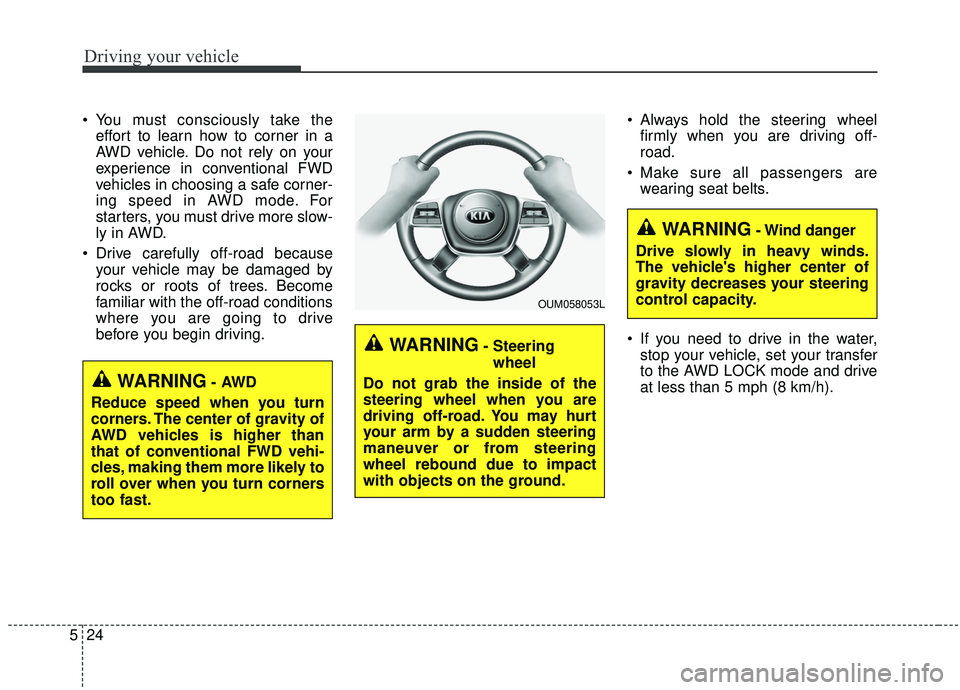
WARNING- Steering
wheel
Do not grab the inside of the
steering wheel when you are
driving off-road. You may hurt
your arm by a sudden steering
maneuver or from steering
wheel rebound due to impact
with objects on the ground.
WARNING- Wind danger
Drive slowly in heavy winds.
The vehicle's higher center of
gravity decreases your steering
control capacity.
OUM058053L
WARNING- AWD
Reduce speed when you turn
corners. The center of gravity of
AWD vehicles is higher than
that of conventional FWD vehi-
cles, making them more likely to
roll over when you turn corners
too fast.
Page 302 of 573
525
Driving your vehicle
✽ ✽NOTICE
• Shorten your scheduled mainte-
nance interval if you drive in off-
road conditions such as sand, mud
or water (see “Maintenance under
severe usage conditions” in section
7). Always wash your vehicle thor-
oughly after off-road use, especial-
ly cleaning the bottom of the vehi-
cle.
• A full time all wheel drive vehicle cannot be towed by an ordinary
tow truck. Make sure that the
vehicle is placed on a flat bed
truck for moving.
Do not use a tire and wheel package
with a different size and type from
the one originally installed on your
vehicle. It can affect the safety and
performance of your vehicle, which
could lead to steering failure or
rollover causing serious injury.
When replacing the tires, be sure to
equip all four tires with the tire and
wheel of the same size, type, tread,
brand and load-carrying capacity. If
you equip your vehicle with any
tire/wheel combination not recom-
mended by Kia for off-road driving,
ou should not use thesetires for high
way driving.
CAUTION- Mud or snow
Do not run the engine continu-
ously at high RPMs to free thevehicle from snow or mud. Doingso could damage the AWD sys-tem in your vehicle.
WARNING- AWD driving
Do not attempt quick steering
maneuvers or sharp turns in
AWD mode. Such maneuvers
increase the risk of rollover
accidents. Rollover accidents
are extremely violent and
unpredictable.WARNING- Driving through water
Drive slowly. If you are driving
too fast in water, the water can
get into the engine compartment
and wet the ignition system,
causing your vehicle to sudden-
ly stop. If this happens and your
vehicle is in a tilted position,
your vehicle may roll over.
Page 356 of 573
579
Driving your vehicle
To adjust the sensitivity of
smart cruise control system
The sensitivity of vehicle speed
when following the front vehicle to
maintain the set distance can be
adjusted. Go to the User Settings
Mode (Driver Assistance) and select
SCC Reaction (Smart Cruise
Control). You may select one of the
three stages you prefer.
Slow:Vehicle speed following the front
vehicle to maintain the set distance
is slower than normal speed.
Normal: Vehicle speed following the front
vehicle to maintain the set distance
is normal
Fast: Vehicle speed following the front
vehicle to maintain the set distance
is faster than normal speed.
✽ ✽ NOTICE
The system remembers the last
selected mode.
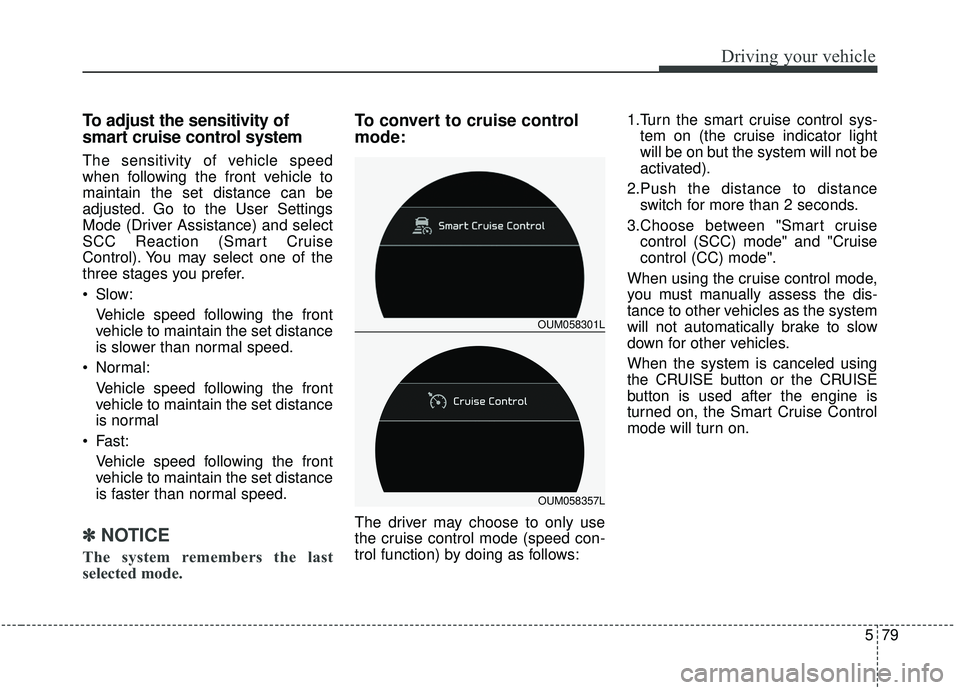
To convert to cruise control
mode:
The driver may choose to only use
the cruise control mode (speed con-
trol function) by doing as follows: 1.Turn the smart cruise control sys-
tem on (the cruise indicator light
will be on but the system will not be
activated).
2.Push the distance to distance switch for more than 2 seconds.
3.Choose between "Smart cruise control (SCC) mode" and "Cruise
control (CC) mode".
When using the cruise control mode,
you must manually assess the dis-
tance to other vehicles as the system
will not automatically brake to slow
down for other vehicles.
When the system is canceled using
the CRUISE button or the CRUISE
button is used after the engine is
turned on, the Smart Cruise Control
mode will turn on.
OUM058301L
OUM058357L