lights KIA SOUL 2009 User Guide
[x] Cancel search | Manufacturer: KIA, Model Year: 2009, Model line: SOUL, Model: KIA SOUL 2009Pages: 328, PDF Size: 29.57 MB
Page 116 of 328
Features of your vehicle
44
4
D150328AUN-U1
Glow indicator
(Diesel engine)
The indicator illuminates when the igni-
tion switch is in the ON position. The
engine can be started after the preheat
indicator light goes off. The illuminating
time varies with the water temperature,
air temperature and battery condition.
✽✽ NOTICE
If the engine does not start within 10
seconds after the preheating is complet-
ed, turn the ignition key once more to
the LOCK position for 10 seconds, and
then to the ON position, in order to pre-heat again.
D150329AUN-U1
Fuel filter warning light (Diesel engine)
This warning light illuminates for 3 sec-
onds after the ignition switch is set to the
ON position and then it will go off. If it
lights up while the engine is running, it
indicates that water has accumulated
inside the fuel filter. If this happens,
remove the water from the fuel filter. For
more information, refer to “Fuel filter” insection 7. D150330BUN-U1
Overspeed warning
(if equipped)
Type A Overspeed warning light
If you drive with the speed of 120 km/h or
more, the overspeed warning light will
blink. This is to prevent you from over-speeding. Overspeed warning chime
If you drive with the speed of 120 km/h or
more, the overspeed warning chime will
sound for about 5 seconds. This is to pre-
vent you from overspeedingd.
Type B Overspeed warning chime
If you drive with the speed of 120 km/h or
more, the overspeed warning chime will
sound. This is to prevent you from over-speeding.
120km/h
CAUTION
When the fuel filter warning light is
illuminated, engine power (vehiclespeed & idle speed) may decrease. If you keep driving with the warninglight on, you can damage your vehi-
cle's engine parts and injection sys-tem of the Common Rail.
If this occurs, have your vehiclechecked by an authorized KIA deal-
er as soon as possible.
CAUTION
If the preheat indicator continues to illuminate or blink on and off afterthe engine has warmed up or while driving, have the system checked
by an authorized KIA dealer assoon as possible.
Page 120 of 328
Features of your vehicle
48
4
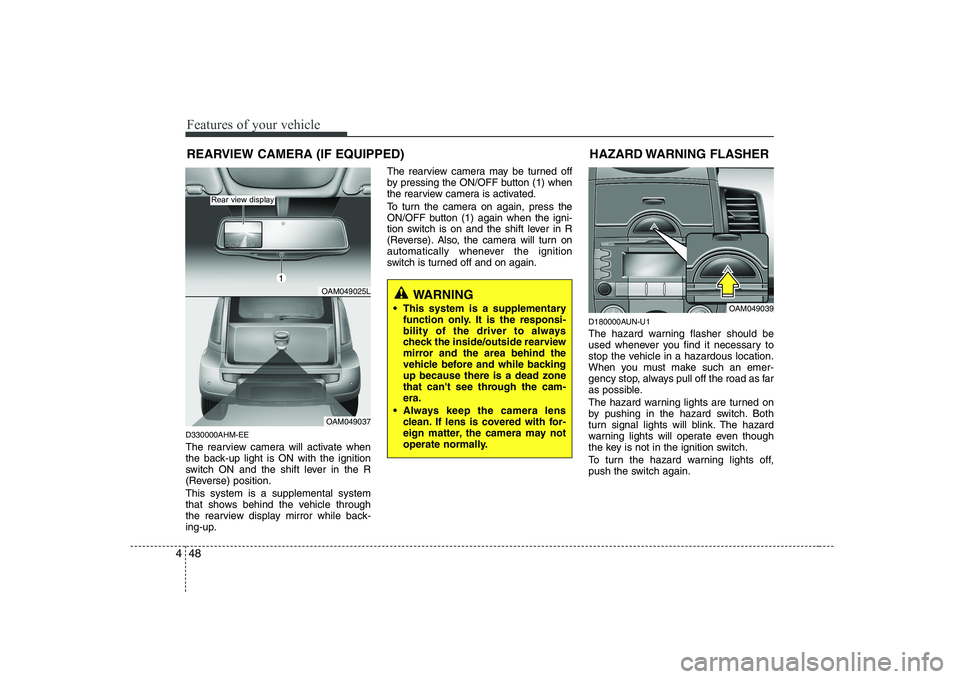
D330000AHM-EE
The rearview camera will activate when
the back-up light is ON with the ignition
switch ON and the shift lever in the R
(Reverse) position. This system is a supplemental system
that shows behind the vehicle through
the rearview display mirror while back-
ing-up. The rearview camera may be turned off
by pressing the ON/OFF button (1) when
the rearview camera is activated.
To turn the camera on again, press the
ON/OFF button (1) again when the igni-
tion switch is on and the shift lever in R
(Reverse). Also, the camera will turn on
automatically whenever the ignition
switch is turned off and on again.
D180000AUN-U1
The hazard warning flasher should be
used whenever you find it necessary to
stop the vehicle in a hazardous location.
When you must make such an emer-
gency stop, always pull off the road as far
as possible.
The hazard warning lights are turned on
by pushing in the hazard switch. Both
turn signal lights will blink. The hazard
warning lights will operate even though
the key is not in the ignition switch.
To turn the hazard warning lights off,
push the switch again.HAZARD WARNING FLASHER
OAM049039
WARNING
This system is a supplementary function only. It is the responsi-
bility of the driver to always
check the inside/outside rearview
mirror and the area behind the
vehicle before and while backingup because there is a dead zone
that can't see through the cam-era.
Always keep the camera lens clean. If lens is covered with for-
eign matter, the camera may not
operate normally.
REARVIEW CAMERA (IF EQUIPPED)
OAM049025L
OAM049037
Rear view display
1
Page 121 of 328
449
Features of your vehicle
D190100AUN-U1
Battery saver function
The purpose of this feature is to pre-vent the battery from being dis-
charged. The system automatically
turns off the exterior lights when the
driver removes the ignition key and
opens the driver-side door.
With this feature, the parking lights will turn off automatically if the driver parkson the side of road at night.
If necessary, to keep the lights on
when the ignition key is removed, per-
form the following:
1) Open the driver-side door.
2) Turn the parking lights OFF and ON again using the light switch on the
steering column.
D190400AUN-C1
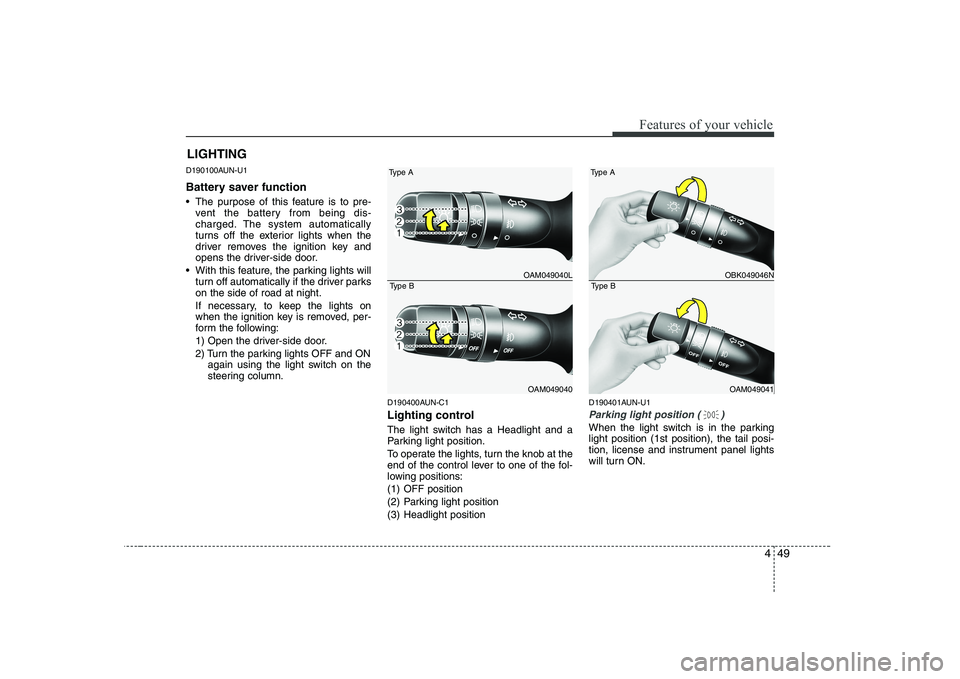
Lighting control
The light switch has a Headlight and a
Parking light position.
To operate the lights, turn the knob at the
end of the control lever to one of the fol-
lowing positions:
(1) OFF position
(2) Parking light position
(3) Headlight position D190401AUN-U1
Parking light position ( )
When the light switch is in the parking light position (1st position), the tail posi-
tion, license and instrument panel lights
will turn ON.
LIGHTING
OAM049040L
OAM049040
Type A
Type BOBK049046N
OAM049041
Type A
Type B
Page 122 of 328
Features of your vehicle
50
4
D190402AUN-C1
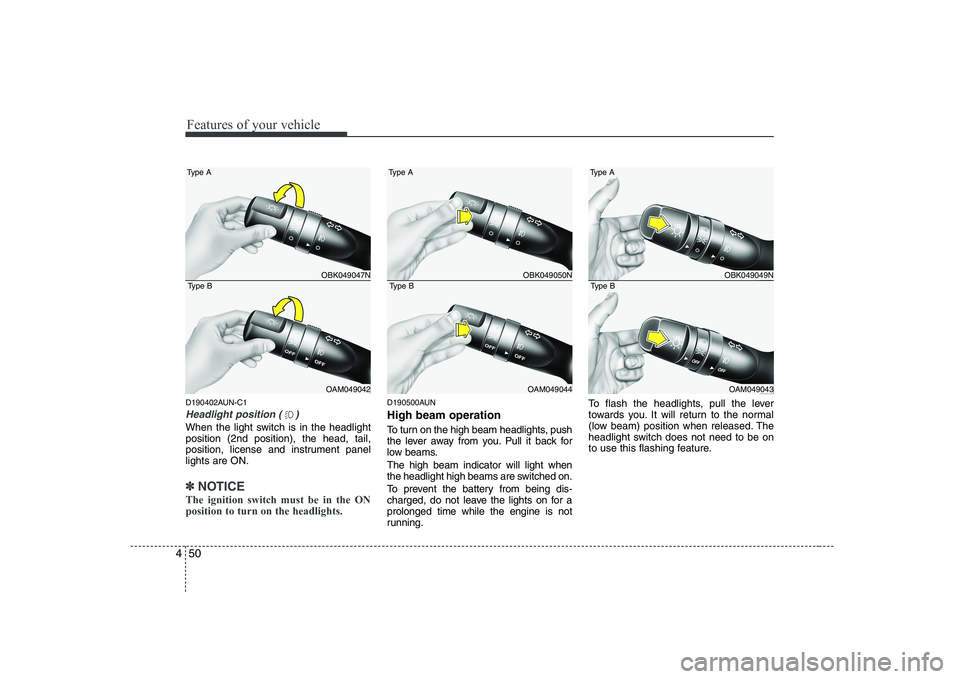
Headlight position ( )
When the light switch is in the headlight position (2nd position), the head, tail,
position, license and instrument panellights are ON.
✽✽
NOTICE
The ignition switch must be in the ON position to turn on the headlights.
D190500AUN High beam operation
To turn on the high beam headlights, push
the lever away from you. Pull it back for
low beams. The high beam indicator will light when
the headlight high beams are switched on.
To prevent the battery from being dis-
charged, do not leave the lights on for aprolonged time while the engine is not
running. To flash the headlights, pull the lever
towards you. It will return to the normal
(low beam) position when released. The
headlight switch does not need to be on
to use this flashing feature.
OBK049047N
OAM049042
Type A
Type BOBK049050N
OAM049044
Type A
Type BOBK049049N
OAM049043
Type A
Type B
Page 123 of 328
451
Features of your vehicle
D190600AUN-C1
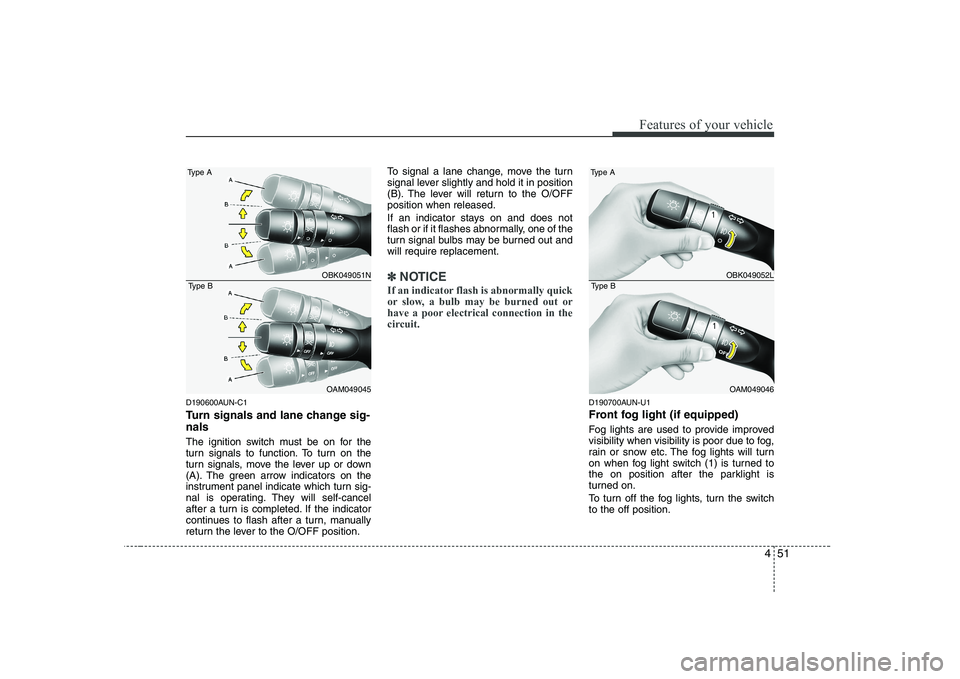
Turn signals and lane change sig- nals
The ignition switch must be on for the
turn signals to function. To turn on the
turn signals, move the lever up or down
(A). The green arrow indicators on the
instrument panel indicate which turn sig-
nal is operating. They will self-cancel
after a turn is completed. If the indicator
continues to flash after a turn, manually
return the lever to the O/OFF position.To signal a lane change, move the turn
signal lever slightly and hold it in position
(B). The lever will return to the O/OFFposition when released.
If an indicator stays on and does not
flash or if it flashes abnormally, one of the
turn signal bulbs may be burned out andwill require replacement.
✽✽
NOTICE
If an indicator flash is abnormally quick
or slow, a bulb may be burned out or
have a poor electrical connection in the
circuit.
D190700AUN-U1
Front fog light (if equipped)
Fog lights are used to provide improved
visibility when visibility is poor due to fog,
rain or snow etc. The fog lights will turn
on when fog light switch (1) is turned to
the on position after the parklight is
turned on.
To turn off the fog lights, turn the switch to the off position.
OBK049051N
OAM049045
Type A
Type BOBK049052L
OAM049046
Type A
Type B
Page 124 of 328
Features of your vehicle
52
4
D190800APB
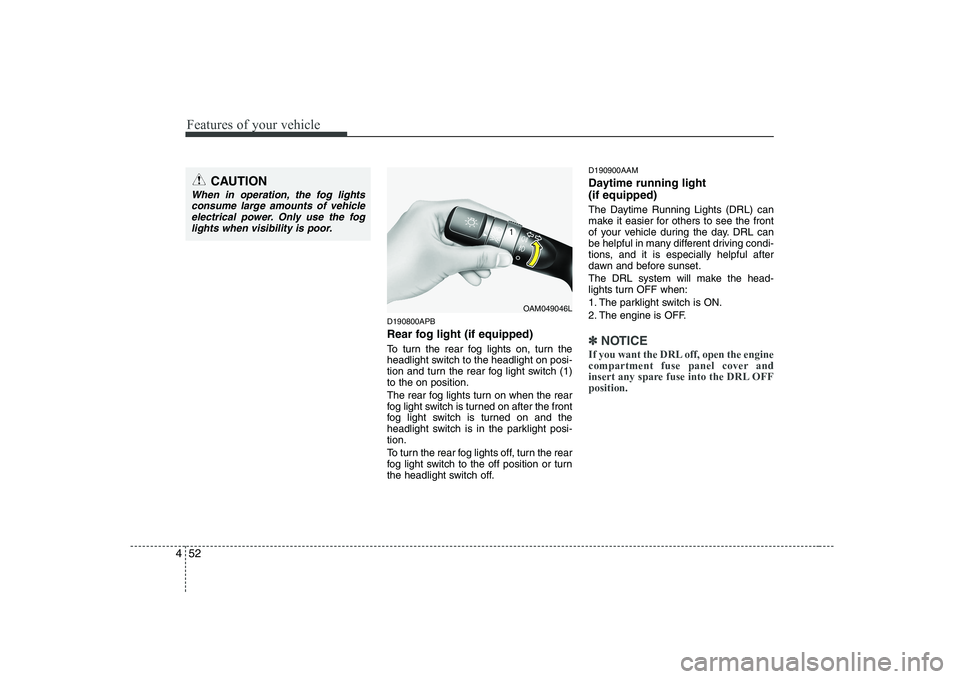
Rear fog light (if equipped)
To turn the rear fog lights on, turn the
headlight switch to the headlight on posi-
tion and turn the rear fog light switch (1)to the on position.
The rear fog lights turn on when the rear
fog light switch is turned on after the front
fog light switch is turned on and the
headlight switch is in the parklight posi-tion.
To turn the rear fog lights off, turn the rear
fog light switch to the off position or turn
the headlight switch off. D190900AAM
Daytime running light (if equipped)
The Daytime Running Lights (DRL) can
make it easier for others to see the front
of your vehicle during the day. DRL can
be helpful in many different driving condi-
tions, and it is especially helpful after
dawn and before sunset.
The DRL system will make the head-
lights turn OFF when:
1. The parklight switch is ON.
2. The engine is OFF.
✽✽
NOTICE
If you want the DRL off, open the engine
compartment fuse panel cover and
insert any spare fuse into the DRL OFFposition.
CAUTION
When in operation, the fog lights consume large amounts of vehicleelectrical power. Only use the fog lights when visibility is poor.
OAM049046L
Page 125 of 328
453
Features of your vehicle
D191000AUN-C1
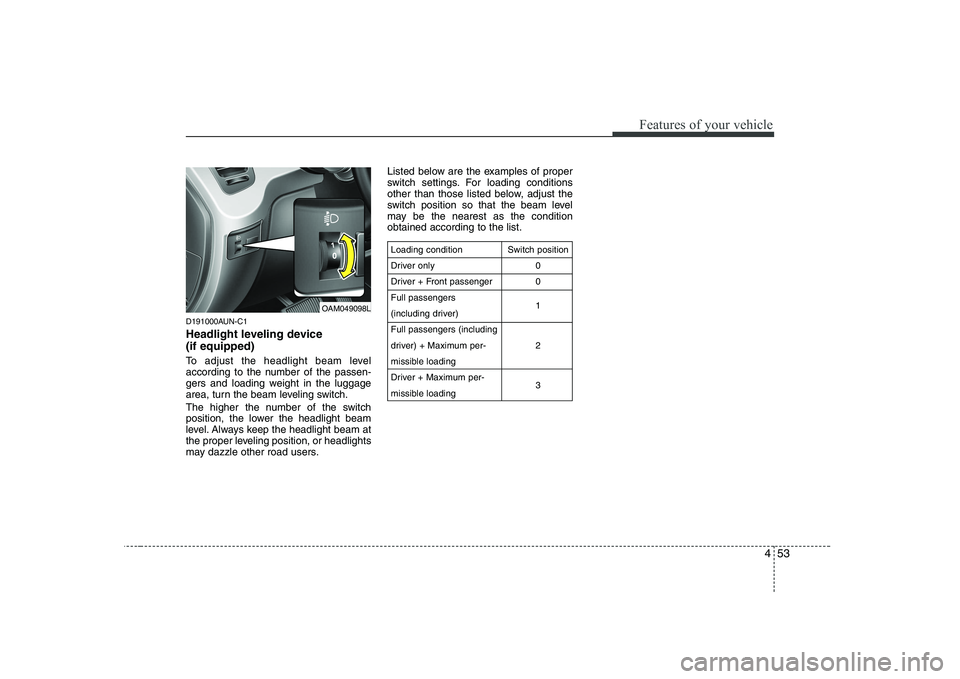
Headlight leveling device (if equipped)
To adjust the headlight beam level
according to the number of the passen-
gers and loading weight in the luggage
area, turn the beam leveling switch.
The higher the number of the switch
position, the lower the headlight beam
level. Always keep the headlight beam at
the proper leveling position, or headlights
may dazzle other road users.Listed below are the examples of proper
switch settings. For loading conditions
other than those listed below, adjust the
switch position so that the beam level
may be the nearest as the conditionobtained according to the list.
Loading condition
Driver only
Driver + Front passengerFull passengers
(including driver)Full passengers (including
driver) + Maximum per-
missible loading
Driver + Maximum per-
missible loading
Switch position
00 1 2 3
OAM049098L
Page 129 of 328
457
Features of your vehicle
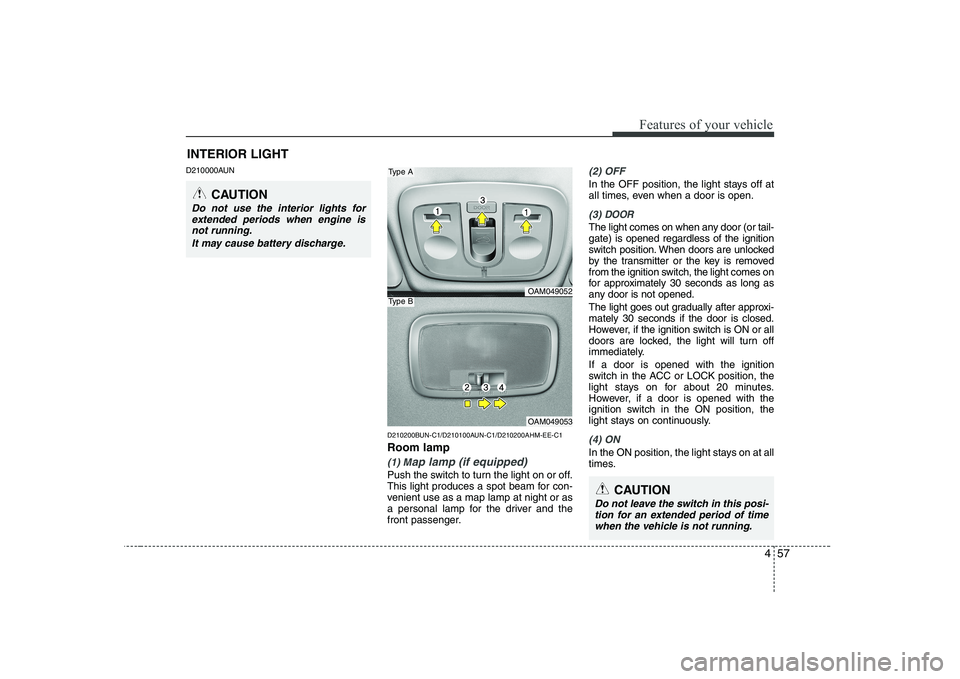
D210000AUND210200BUN-C1/D210100AUN-C1/D210200AHM-EE-C1 Room lamp
(1) Map lamp (if equipped)
Push the switch to turn the light on or off.
This light produces a spot beam for con-
venient use as a map lamp at night or as
a personal lamp for the driver and the
front passenger.
(2) OFF
In the OFF position, the light stays off at
all times, even when a door is open.
(3) DOOR
The light comes on when any door (or tail- gate) is opened regardless of the ignition
switch position. When doors are unlocked
by the transmitter or the key is removed
from the ignition switch, the light comes on
for approximately 30 seconds as long as
any door is not opened.
The light goes out gradually after approxi- mately 30 seconds if the door is closed.
However, if the ignition switch is ON or all
doors are locked, the light will turn off
immediately. If a door is opened with the ignition
switch in the ACC or LOCK position, the
light stays on for about 20 minutes.
However, if a door is opened with the
ignition switch in the ON position, the
light stays on continuously.
(4) ON
In the ON position, the light stays on at all
times.
INTERIOR LIGHT
CAUTION
Do not use the interior lights for
extended periods when engine is not running.
It may cause battery discharge.
OAM049052
OAM049053
Type A
Type B
CAUTION
Do not leave the switch in this posi-tion for an extended period of time
when the vehicle is not running.
Page 151 of 328
479
Features of your vehicle
VOLUME ( / ) (1)
• Push up the lever to increase volume.
Push down the lever to decrease vol-ume.
SEEK/PRESET ( / ) (2)
If the SEEK/PRESET button is pressed
for 0.8 second or more, it will work as fol-
lows in each mode. RADIO mode
It will function as the AUTO SEEK select
button.
CDP mode
It will function as the FF/REW button. CDC mode
It will function as the DISC UP/DOWN
button.
If the SEEK/PRESET button is pressed
for less than 0.8 second, it will work as
follows in each mode. RADIO mode
It will function as the PRESET STATION
select buttons. CDP mode
It will function as the TRACK UP/DOWN
button. CDC mode
It will function as the TRACK UP/DOWN
button.
MODE (3)
Press the button to select Radio or CD (compact disc).
MUTE (4)
Press the MUTE button to cancel the
sound.
Press the MUTE button again to acti- vate the sound.
Detailed information for audio control
buttons is described in the followingpages in this section. D210300AAM
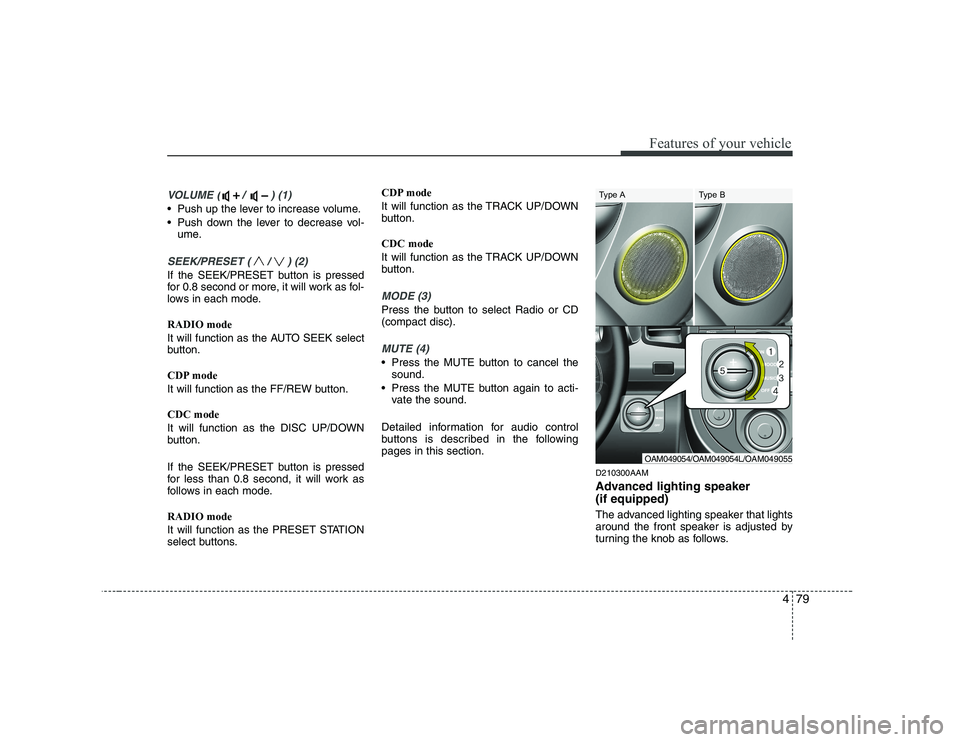
Advanced lighting speaker (if equipped)
The advanced lighting speaker that lights
around the front speaker is adjusted by
turning the knob as follows.
OAM049054/OAM049054L/OAM049055
Type A Type B
Page 152 of 328
Features of your vehicle
80
4
1. ON : The light turns on.
2. MOOD : The light shade changes
automatically at regular inter-
val.
3. MUSIC : The light blinks or changes shade according to the
sound of the audio.
If the audio is not turned on,
the light does not turn on.
4. OFF : The light turns off.
5. +/- : When the lights are on, push the illumination button to adjust the
light intensity.
✽✽NOTICE
The lighting around the front speaker may not illuminate when the sound of
the audio is low.
D300800AAM
How car audio works
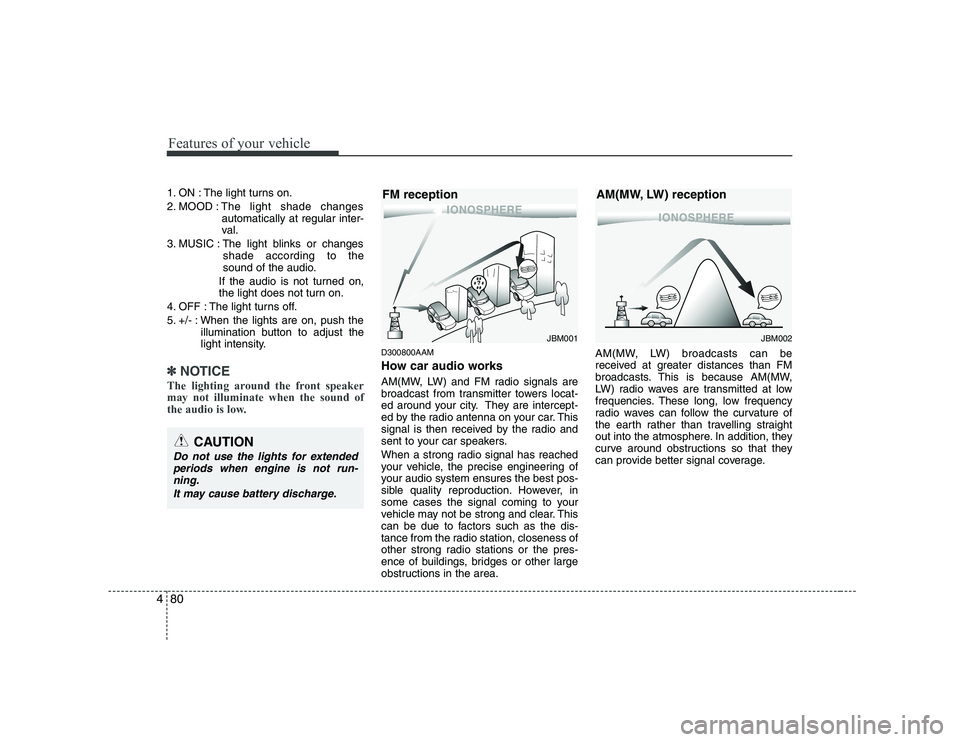
AM(MW, LW) and FM radio signals are
broadcast from transmitter towers locat-
ed around your city. They are intercept-
ed by the radio antenna on your car. This
signal is then received by the radio and
sent to your car speakers.
When a strong radio signal has reached
your vehicle, the precise engineering of
your audio system ensures the best pos-
sible quality reproduction. However, in
some cases the signal coming to your
vehicle may not be strong and clear. This
can be due to factors such as the dis-
tance from the radio station, closeness of
other strong radio stations or the pres-
ence of buildings, bridges or other large
obstructions in the area. AM(MW, LW) broadcasts can be
received at greater distances than FM
broadcasts. This is because AM(MW,
LW) radio waves are transmitted at low
frequencies. These long, low frequency
radio waves can follow the curvature of
the earth rather than travelling straight
out into the atmosphere. In addition, they
curve around obstructions so that they
can provide better signal coverage.
¢¢¢
JBM001
FM reception
CAUTION
Do not use the lights for extended
periods when engine is not run-ning.
It may cause battery discharge.
¢¢¢¢¢¢
JBM002
AM(MW, LW) reception